Location :
Orlando, FL, USA
Location :
Orlando, FL, USA +1 (407) 714-1616
 info@biz4group.com


















Imagine a digital system that doesn’t wait for instructions but instead, understands your business goals, learns from real-time feedback, and takes independent actions to get the job done.
Read More

 AI Summary Powered by Biz4AI
A buyer texts at 8 p.m.: "Is Lot 12 still available? What's the price with the upgraded kitchen? I want to tour this weekend."
To answer accurately, an AI assistant needs current inventory and approved pricing, access to relevant home details, a way to capture buyer information, and a connection to the builder's CRM and scheduling process. If the lot has just gone under contract or the upgrade price needs confirmation, the assistant also needs clear rules for handling that situation and bringing in a sales representative.
That's the practical work behind AI homebuilder sales platform development: connecting buyer conversations with the builder's actual data and sales processes. Before development begins, the team needs to settle some important questions. Where will pricing and availability come from? What rules govern the information shared with buyers? Which inquiries need a sales representative, and how will buyer details carry over during that handoff?
When evaluating the best AI sales platform for homebuilders, look at how it handles these real sales workflows: retrieving approved property details, answering pricing and availability questions, updating lead records, booking appointments, and routing inquiries that need human attention.
Biz4Group LLC is a U.S.-based AI development company with experience in real estate AI, including property discovery and visit scheduling. That experience is relevant to the work of connecting property information, buyer conversations, scheduling, CRM workflows, and human handoffs into a practical sales process.
Build an AI homebuilder sales platform that keeps buyers informed and your sales team in the loop.
Plan Your AI Sales PlatformBefore development begins, define the buyer journeys, community-specific business rules, AI approval boundaries, first-release scope, and measurable acceptance criteria. These decisions establish what the platform needs to do, which systems and teams it must connect with, and how you'll know it's ready for real buyers. A clear plan also gives AI homebuilder sales platform development a practical starting point.
Start by mapping the conversations buyers have with your sales team, from their first question to an appointment or a handoff to a sales representative. Use actual buyer inquiries and existing sales procedures to identify what the platform needs to handle.
For each interaction, document:
These decisions shape the conversational AI for real estate experience. For example, a buyer asking about a specific home needs a different workflow from someone comparing communities and home options. Mapping these paths early helps keep development focused on real sales activity.
Document the differences between communities before building shared workflows. Communities may have different floor plans, pricing structures, incentives, sales hours, appointment procedures, and rules for sharing information.
Create a requirements record for each community that identifies:
|
Requirement |
What to document |
|---|---|
|
Property information |
Floor plans, elevations, specifications, included features, and available upgrades |
|
Pricing |
Base prices, approved incentives, upgrade costs, and quote restrictions |
|
Inventory |
Homes and lots, status definitions, and the source of current availability |
|
Sales process |
Appointment types, sales representatives, routing rules, and follow-up procedures |
|
Community policies |
Buyer eligibility requirements, disclosures, and rules for communicating with prospects |
These requirements also help define how a new home inventory management platform or existing inventory system will supply information to buyer-facing workflows. Decide which rules apply across the entire builder and which are specific to an individual community. This gives the development team a clear basis for configuration without mixing information between locations.
Define which tasks the platform is authorized to complete independently and which require review or action from a sales representative. These boundaries help prevent unapproved pricing statements, unsupported property claims, and inappropriate commitments to buyers.
Set rules for situations such as:
Specify what happens during an escalation. The workflow needs to identify the receiving team, transfer the conversation and relevant buyer details, and record the reason for the handoff. It also needs a clear response for the buyer while the request awaits attention.
Choose a manageable set of workflows for the first release based on business value, data readiness, integration effort, and operational risk. Trying to automate every sales activity at once makes it harder to validate accuracy and identify problems before a wider rollout.
A practical first-release scope might include:
Treat more complex capabilities, such as advanced lead scoring, extensive personalization, or automated handling of unusual pricing requests, as separate decisions. Include them in the initial release when the required data, rules, and testing plans are ready.
Define how the team will test each workflow before development starts. Acceptance criteria turn broad goals such as "answer buyers accurately" or "improve lead handling" into results that can be checked during testing and after launch.
|
Area |
Example acceptance criterion |
|---|---|
|
Property information |
Responses match the approved source for the tested community and home |
|
Pricing |
The platform provides only permitted pricing information and routes unverified requests for review |
|
Availability |
Inventory responses reflect the defined source and status rules |
|
Lead capture |
Required buyer details are recorded in the correct CRM fields |
|
Handoffs |
Escalated conversations reach the designated team with the available context attached |
|
Scheduling |
Appointment requests follow the builder's configured booking rules |
|
Reliability |
Integration failures trigger the defined fallback instead of an unsupported response |
Set numeric targets where the builder has reliable baseline data, such as response time, successful CRM updates, or appointment-booking completion. For speed-to-lead automation for builders, for instance, define when the response-time clock starts, what counts as a successful response, and how exceptions are measured.
Record the test scenarios, expected outcomes, responsible reviewers, and conditions that must be met before the platform moves into production.
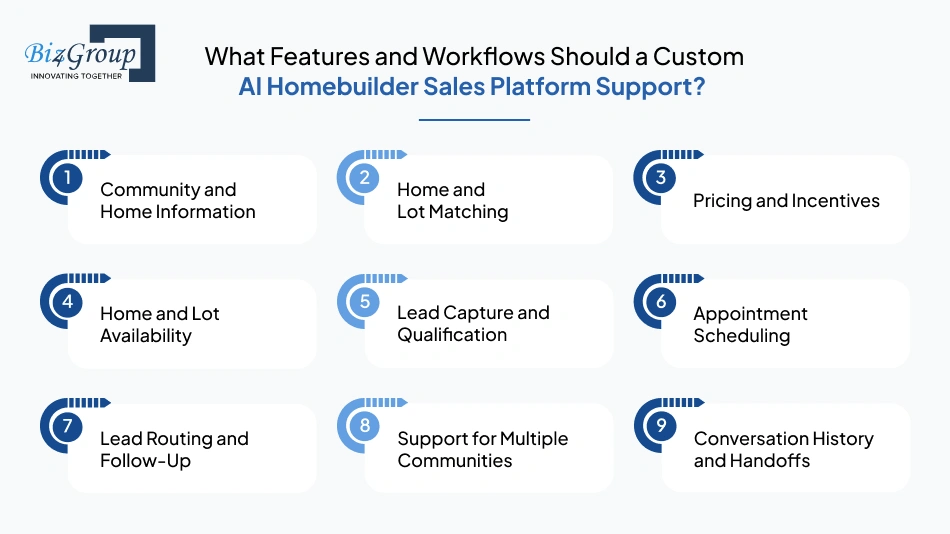
A custom AI homebuilder sales platform needs to help buyers get answers, find homes that fit their needs, check prices and availability, and take the next step toward a purchase. To make that work, it needs to use the builder's actual property and pricing information, follow each community's rules, and keep the sales team in the loop.
A common concern among real estate businesses is losing potential buyers because sales teams cannot respond to pricing and availability inquiries quickly enough.
"I am running a real estate business and my sales team keeps losing leads because we cannot respond to buyer questions about pricing and availability fast enough, so I need to know how an AI sales platform can fix this."
An AI sales platform retrieves approved pricing and inventory information, answers common buyer questions, captures lead details, and routes inquiries to sales representatives. Automated responses and follow-ups help reduce delays and keep potential buyers engaged.
Here are the key features to plan for and what each one needs to handle.
|
Feature |
How It Works in a Real Buyer Conversation |
What to Plan For |
|---|---|---|
|
Community and Home Information |
A buyer asks, "Does the Willow floor plan include a study?" The platform looks up the approved details for that plan and community before answering. If the same plan has different options in another community, it uses the right information. |
Where floor plans, specifications, included features, upgrades, amenities, and community details are stored. Decide what happens when information is missing or unclear. |
|
Home and Lot Matching |
A buyer wants a single-story home with three bedrooms, a certain budget, and a move-in date within four months. The platform checks the builder's listings and shows homes that fit those needs. |
Which preferences matter most, what counts as available, and how to handle cases where no home matches every preference. |
|
Pricing and Incentives |
A buyer asks about the price of a home with an upgraded kitchen and whether a current promotion applies. The platform checks the approved price and promotion details. If the offer has conditions or needs approval, it explains what is known and sends the question to the sales team when needed. |
Where prices and incentives come from, when they apply, which calculations are allowed, and which quotes need a sales representative's approval. |
|
Home and Lot Availability |
A buyer asks whether Lot 12 is still available. The platform checks its latest status before replying. If the lot has been reserved or gone under contract, it follows the builder's rules for explaining that status. |
What each inventory status means, how often records are updated, and what to say when the latest status cannot be confirmed. |
|
Lead Capture and Qualification |
As the buyer asks questions, the platform gathers useful details such as budget, preferred community, home features, and purchase timeline. It records what the buyer shares and asks for more information when it's needed. |
Which details the sales team needs, which questions are optional, and how to keep buyer-provided information separate from system assessments. |
|
Appointment Scheduling |
A buyer asks to tour a home on Saturday. The platform checks the booking options for that community and follows the builder's process to confirm the visit or send the request to a team member. |
Tour hours, appointment types, available time slots, calendar connections, confirmation rules, and what happens when the requested time is unavailable. |
|
Lead Routing and Follow-Up |
A buyer asks for a special price or needs help with a home whose status is unclear. The platform sends the inquiry to the right person and records what needs attention. |
How inquiries are assigned, who handles each community, what needs a quick response, and how follow-up tasks are created and tracked. |
|
Support for Multiple Communities |
A buyer compares two communities with different prices, incentives, and tour procedures. The platform uses the right details and rules for each location. |
How each community's information, inventory, pricing, and sales process are kept separate while shared features work across the builder. |
|
Conversation History and Handoffs |
A buyer has already shared a budget, discussed a floor plan, and asked for a tour. When a sales representative takes over, they can see those details and the questions that still need answers. |
Which conversation details are saved, where the sales team sees them, who can access them, and how open requests are handed over. |
When comparing AI platforms for homebuilders, ask providers to walk through these same scenarios. You'll get a clearer picture of how each platform handles real buyer questions, changing information, and handoffs to your team. These conversational workflows are a practical use case for an AI conversation app.
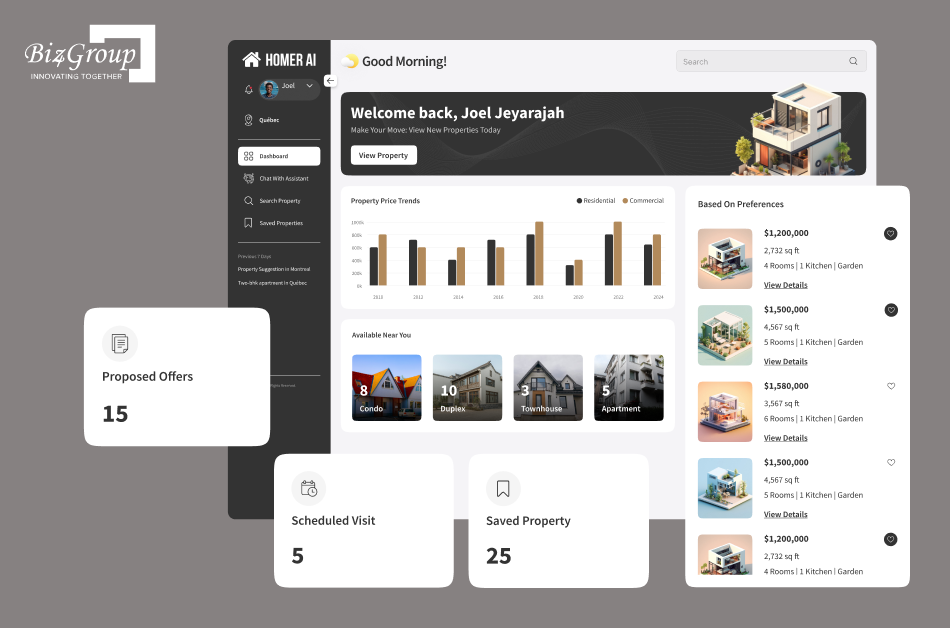
Biz4Group's Homer AI project demonstrates experience with conversational property search, preference-based recommendations, and property visit scheduling, capabilities that are relevant to buyer-facing homebuilder workflows.
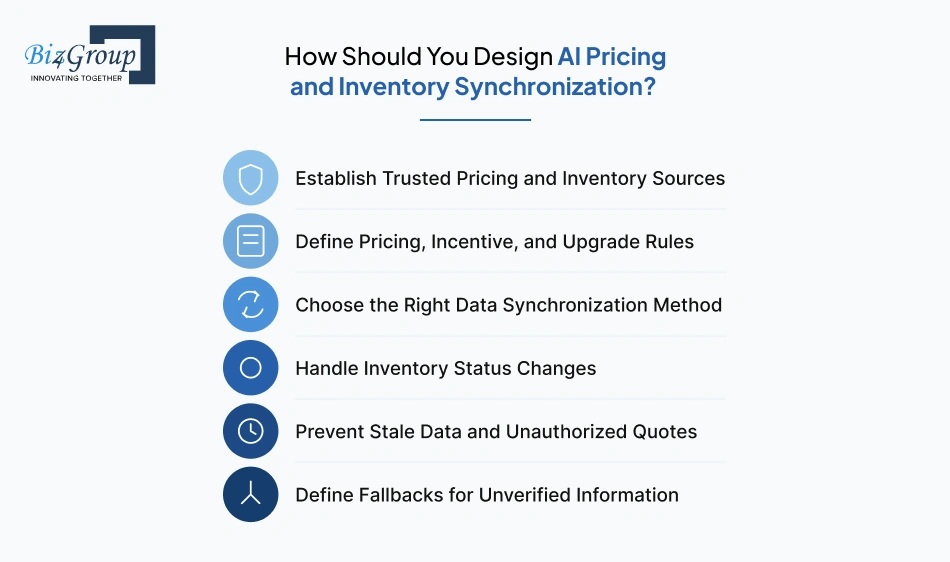
For AI homebuilder sales platform development, pricing and inventory synchronization starts with trusted data, clear pricing rules, and a reliable update process. The platform needs to provide current information, avoid unapproved quotes, and flag details that require confirmation.
For example, if a buyer asks about Lot 12 while its status is changing, the platform needs a reliable way to check the latest record before describing it as available. Pricing needs the same care, especially when incentives, upgrades, or special offers have conditions.
Start by identifying the system the builder trusts for each type of information. Pricing might live in a sales or ERP system, while home and lot status comes from an inventory tool. Community details and upgrade options may be managed somewhere else.
Write down the source for each data type:
If two systems show different values, decide in advance which one takes precedence and who resolves the mismatch. Without that decision, the platform has no reliable basis for choosing which information to share.
Set clear rules for how the platform presents prices. A base price, an advertised promotion, and a personalized quote are different things, and the platform needs to treat them accordingly.
For example, a buyer asks, "What would this home cost with the upgraded kitchen?" The platform needs the approved base price, the correct upgrade amount, and any conditions that affect the total. If the builder requires a sales representative to approve a custom quote, the workflow needs to pass the request along rather than present an unapproved figure.
Document:
The right update method depends on how often the builder's information changes and what the connected systems support. Some data needs frequent updates; other details change only when a community or plan is revised.
Common approaches include:
|
Method |
When It Fits |
What to Watch |
|---|---|---|
|
API requests |
The platform checks a connected system when it needs a current value. |
Response time, API limits, and what happens when the source is unavailable. |
|
Event-based updates |
A connected system sends a notice when a price or status changes. |
Missed events, duplicate messages, and whether updates arrive in the right order. |
|
Scheduled synchronization |
Records are copied at set intervals, such as every few minutes or hours. |
The delay between a change in the source and the platform receiving it. |
|
Manual updates with review |
A builder manages a limited set of data through an approved process. |
Who makes the change, how it is checked, and how quickly it reaches the platform. |
A platform with pricing and availability sync might use frequent inventory updates while refreshing community descriptions less often.
Define what available, reserved, under contract, and sold mean in the builder's systems. A best AI availability tracker for new homes needs to reflect status changes and stop presenting a property as available when its status no longer allows it. If the latest status is unclear, the platform should request confirmation.
Set freshness rules for the information used in buyer responses. The right time limit depends on the data: inventory status may need a check at the moment of inquiry, while community descriptions usually change less often.
For AI homebuilder sales platform with pricing and availability sync, define what happens when data falls outside its freshness limit. The platform might need to refresh the record, temporarily withhold the answer, or ask a sales representative to confirm it. It should never quietly treat an old price or status as current.
Decide what the platform says when it cannot verify a price, incentive, or property status. A useful fallback gives the buyer an honest update and a clear next step.
For example:
"I'm unable to confirm the latest status for that lot right now. I'll pass your question to the sales team so they can check it for you."
The platform should also record the unresolved request, identify the team responsible for follow-up, and preserve the buyer's question. This keeps the conversation moving without making up an answer or leaving the sales team unaware of the inquiry.
Connecting pricing, inventory, and CRM data is an important consideration when planning AI integration services.
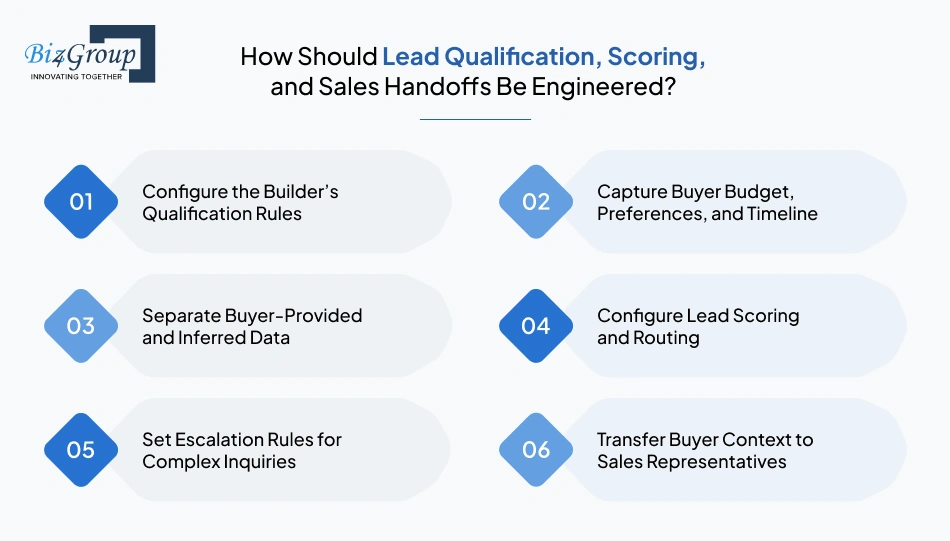
Engineer lead qualification around the builder's sales criteria, capture buyer details consistently, and define how scores guide routing and follow-up. The platform needs to distinguish information buyers provide from assumptions, explain why a lead is routed, and pass useful conversation context to the sales team.
Start with the criteria the sales team uses to understand buyer readiness. These include budget, preferred community, home type, purchase timeline, financing status, and interest in a specific property. Set which details are required, which are optional, and which answers trigger a representative's review.
Keep questions relevant to the buyer's inquiry. Someone asking about a particular lot may need a different qualification flow from someone still comparing communities.
Use conversational AI for real estate to gather details naturally during the conversation. Ask one question at a time when possible, and allow buyers to skip questions they do not want to answer.
Capture information such as:
Store these details in structured CRM fields so sales representatives can review them without searching through the full conversation.
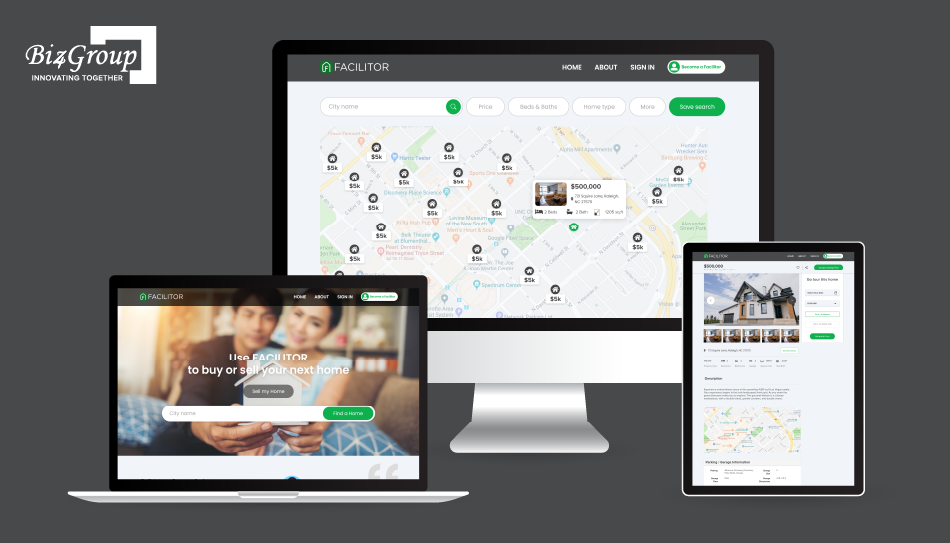
A related example is Biz4Group's Facilitor, which uses budget and location preferences, property recommendations, and buyer financial verification within a home-search experience.
Mark whether each qualification detail came directly from the buyer, from an approved system record, or from an AI-generated inference. For example, "plans to buy within three months" belongs in buyer-provided data only when the buyer actually states that timeline.
Do not treat browsing activity or unanswered questions as proof of purchase intent. Keep inferred signals clearly labeled and subject to the builder's rules.
Define a scoring model that reflects the builder's sales process. Assign points or categories to approved signals, such as a stated purchase timeline, a request for a tour, or interest in a home that matches the buyer's budget. Set thresholds for routing, while allowing urgent or complex inquiries to bypass the score and go directly to a representative. These repeatable workflows are relevant to AI automation services.
A lead qualification tool for builders needs to make the score understandable to the sales team. Record the signals behind it, the time of assessment, and any rule that triggered the handoff. Review outcomes regularly and adjust the model when scoring does not align with actual sales workflows.
Route inquiries to a human when they involve exceptions, conflicting records, requests for unapproved pricing, complaints, or questions outside the assistant's approved knowledge. Also define what happens when the buyer explicitly asks to speak with a representative.
The assistant should explain the next step clearly, record the reason for escalation, and avoid promising a response time unless the builder has established one.
A handoff should give the representative enough context to continue the conversation without making the buyer repeat everything. Send the relevant details to the CRM or sales queue, including:
For AI homebuilder sales platform development, test the full handoff from conversation to CRM record. Confirm that the right representative receives the lead, key fields map correctly, and the conversation history remains available to authorized team members.
A scalable AI homebuilder sales platform needs connected architecture layers for buyer channels, property data, AI assistance, sales workflows, and system integrations. Each layer has a clear responsibility, helping developers maintain accurate buyer information, enforce builder-specific rules, and expand the platform across communities and sales teams.
|
Architecture Layer |
Architecture Pattern / Technology Approach |
What It Does |
Why It Matters for Homebuilders |
|---|---|---|---|
|
Buyer Channels |
Omnichannel communication architecture |
Collects inquiries from the builder's website, chat, email, SMS, WhatsApp, phone, and other supported channels. |
Keeps buyer conversations connected as prospects move between channels. |
|
API and Event Gateway |
API gateway and event-driven integration |
Provides controlled entry points for incoming inquiries, system requests, and updates from connected applications. |
Makes it easier to add channels and integrations without redesigning the core platform. |
|
Unified Buyer Data Layer |
Centralized buyer profile and data model |
Organizes contact details, stated budget, preferences, timeline, lead source, and conversation activity. |
Gives sales representatives a consistent view of each buyer across interactions. |
|
Identity Resolution |
Contact matching and duplicate detection |
Identifies potential duplicate buyer records using approved matching rules, such as email or phone number. |
Reduces duplicate records while helping preserve a buyer's interaction history. |
|
Inventory Data Layer |
Structured property and inventory model |
Organizes communities, homes, lots, floor plans, specifications, prices, incentives, and availability statuses. |
Provides a consistent foundation for property searches, recommendations, and availability responses. |
|
Knowledge Base and Retrieval |
Retrieval-augmented generation (RAG) |
Retrieves relevant approved content, such as community details, brochures, policies, and home specifications, for AI responses. |
Helps keep answers grounded in builder-approved information and the correct community context. |
|
AI Orchestration Layer |
LLM orchestration and tool calling |
Directs buyer requests to the appropriate AI capability or approved backend service. |
Separates language understanding from actions that require verified data or business-rule checks. |
|
Qualification and Home-Matching Services |
Rules-based qualification and matching logic |
Captures buyer requirements, applies qualification criteria, and finds homes or communities that meet defined preferences. |
Makes lead assessment and property recommendations consistent with the builder's sales process. |
|
Conversation and Follow-Up Services |
Conversation state management and workflow automation |
Maintains context, handles common questions, and triggers approved follow-ups based on configured rules. |
Supports continuity across conversations and reduces repetitive manual follow-up work. |
|
Appointment and Routing Services |
Scheduling integration and queue-based routing |
Checks supported scheduling systems, submits appointment requests, and routes inquiries to the appropriate sales team. |
Helps buyers move from questions to visits or representative conversations with clear next steps. |
|
Workflow Engine and Event Queue |
Workflow orchestration and asynchronous messaging |
Processes events such as new leads, inventory changes, appointment requests, and CRM updates. |
Supports reliable processing and helps services handle work independently when event volumes increase. |
|
CRM Integration Layer |
API-based connectors and data mapping |
Reads and updates buyer records, activities, qualification details, and handoff information in the builder's CRM. |
Keeps the platform aligned with the builder's existing sales operations and record ownership rules. |
|
Human Sales Workspace |
Representative dashboard and conversation timeline |
Presents buyer summaries, conversation history, relevant properties, qualification details, and pending actions. |
Helps representatives continue a conversation without asking buyers to repeat information already provided. |
|
Analytics and Monitoring Layer |
Observability, funnel analytics, and audit logging |
Tracks response performance, lead outcomes, data freshness, integration errors, appointments, and sales activity. |
Helps teams identify workflow problems and evaluate how the platform supports sales operations. |
|
Security and Governance |
Role-based access control, data isolation, and audit controls |
Governs access to buyer information, pricing, community records, and AI tools. |
Protects sensitive information and limits actions to authorized users and services. |
|
Infrastructure and Scaling |
Cloud infrastructure with capacity management |
Hosts platform services and supports deployment, monitoring, backups, and scaling based on demand. |
Helps the platform accommodate additional communities, users, integrations, and buyer activity. |
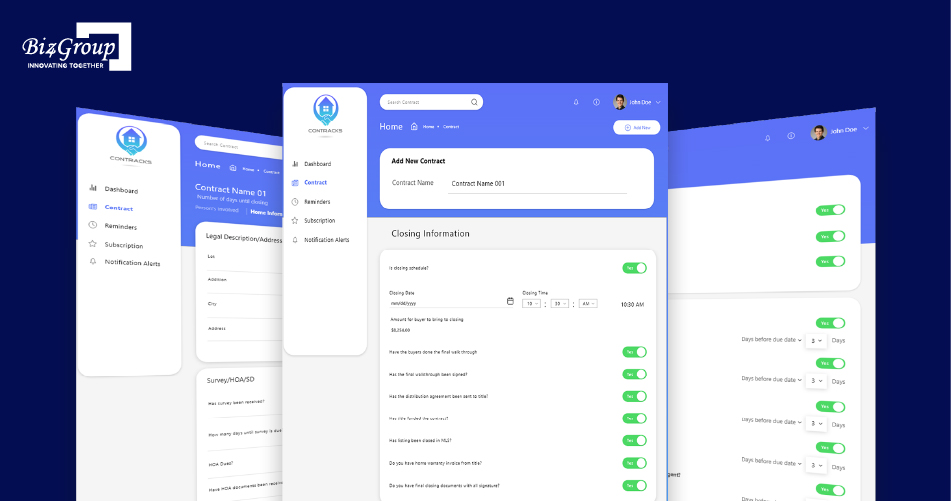
Builders planning for these requirements can explore approaches used in enterprise AI solutions. A well-structured AI homebuilder sales platform architecture keeps buyer assistance, pricing and inventory data, and sales workflows connected while giving homebuilders room to expand as their needs grow. Biz4Group's Contracks project provides an example of real estate contract management, with contract information, milestone tracking, and notifications for important dates and events.
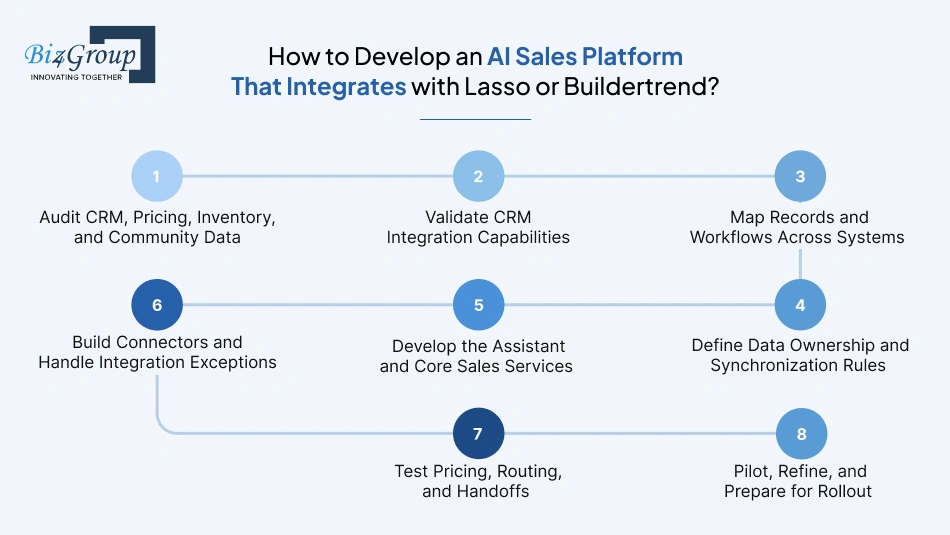
Developing an AI homebuilder sales platform with CRM integration starts with understanding how your team manages leads, pricing, inventory, and follow-ups today. From there, the development team can connect the AI platform to your existing systems and make sure buyer information moves through the right workflows.
Start by reviewing where your team stores buyer details, home prices, lot availability, community information, and appointment records. Check how these systems share information and identify gaps that need to be addressed before development begins.
Pay attention to:
Before choosing an integration approach, confirm how your Lasso CRM or Buildertrend setup supports connections with other software. Check which records and actions are accessible, what permissions are required, and whether any restrictions affect the planned workflows.
Homebuilders often ask:
"We keep losing potential buyers because our team cannot keep up with follow ups, and our current CRM does not talk to our inventory system, so we want to develop an AI platform that connects buyer assistance, pricing, and availability in one place."
Develop a platform that integrates the CRM, inventory, and approved pricing sources through defined data mappings and synchronization rules. Automate lead capture and follow-ups, and route inquiries to sales representatives with the buyer's conversation history and relevant property details.
Confirm:
Decide how information in the AI platform matches records in the CRM and other connected systems. For example, when a buyer asks about a home, the assistant needs to find the correct property record and associate the conversation with the right buyer profile. This mapping also helps the sales team continue the conversation without losing important context.
Include:
These are also important considerations when teams integrate AI into an app.
Set clear rules for which system controls each type of information and which systems are allowed to update it. For example, the inventory system might control lot status while the CRM manages buyer records and sales activities. Decide how often information is synchronized and how the platform handles conflicting or failed updates.
Plan for situations such as:
Build the assistant around the tasks your team wants it to handle, such as answering community questions, checking prices and availability, collecting buyer details, and requesting appointments. Keep builder-specific rules configurable so the platform follows the right process for each community.
As part of AI sales platform development services for real estate, define:
Build the connections between the assistant, CRM, inventory, pricing, and scheduling systems using the access methods confirmed during discovery. Each connector needs to validate the information it sends and receives, while making errors visible to the team.
Account for issues such as:
Before launch, walk through realistic buyer conversations from the first inquiry to the final action. Check that the assistant retrieves the correct information, updates the right records, and routes inquiries according to the builder's rules. Include failure scenarios so the team knows what happens when information is missing or a connected system is unavailable.
Test that:
For AI homebuilder sales platform implementation for builders, begin with a small group of communities and sales representatives. Review conversations, integration logs, data accuracy, and team feedback. Use those findings to fix problems and confirm the platform is ready before expanding.
Before rollout, establish:
Buy an existing AI platform when its features and integrations fit your sales process. Consider AI homebuilder sales platform development when you need builder-specific workflows, pricing controls, or system connections that existing platforms don't support. A hybrid approach combines an existing platform with custom additions.
|
Approach |
What It Offers |
What to Consider |
|---|---|---|
|
Existing platform |
Ready-made buyer assistance and sales automation |
Feature and integration limits |
|
Custom solution |
Workflows tailored to your business |
Development and maintenance costs |
|
Hybrid solution |
Existing platform with custom additions |
Compatibility and vendor dependencies |
Check whether the platform supports community rules, pricing approvals, inventory updates, lead routing, and appointment scheduling. For an AI homebuilder sales platform with CRM integration, confirm which records it can access or update in systems such as Lasso CRM or Buildertrend.
Custom development is worth evaluating when critical requirements remain unsupported, such as complex incentive rules, multi-community inventory synchronization, or specialized lead qualification. Before choosing, clarify data access, code ownership, maintenance responsibilities, and ongoing expenses.
When comparing the best AI sales platform for homebuilders, weigh how well each option fits your sales process, integration needs, and budget. Choose the approach that meets your core requirements with manageable long-term costs.
The AI homebuilder sales platform development cost typically ranges from $15,000 to $200,000, depending on the platform's features, integrations, and complexity. A focused buyer assistant costs less than a custom platform connecting multiple communities, live pricing and inventory, CRM workflows, and sales automation.
|
Development Scope |
Estimated Cost |
|---|---|
|
Basic buyer assistant with approved information and lead capture |
$15,000-$40,000 |
|
Mid-level platform with CRM integration, qualification, and appointment workflows |
$40,000-$100,000 |
|
Advanced custom platform with pricing and inventory synchronization, multiple communities, and complex workflows |
$100,000-$200,000 |
These are indicative planning ranges, not vendor quotes. Actual costs depend on requirements, existing systems, data quality, and integration effort.
Get a development roadmap shaped around your communities, integrations, and sales workflows.
Estimate My Platform Cost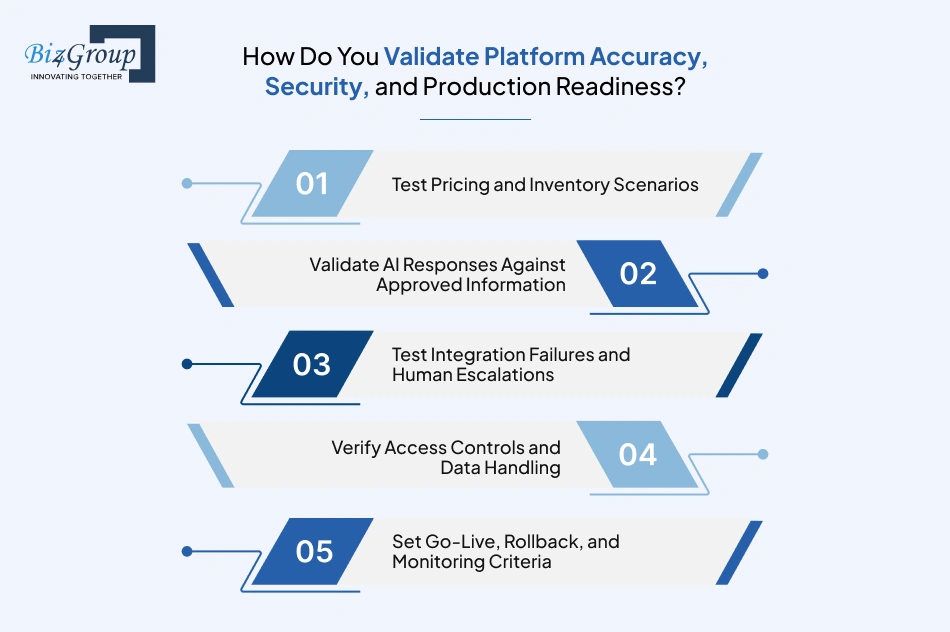
Before launch, test the platform's answers, data updates, security, and sales workflows. For AI homebuilder sales platform development, validation helps ensure buyers receive accurate property information and sales teams can rely on the system. These checks also matter when planning AI model development.
A frequent concern among homebuilders is:
"I want to automate repetitive buyer questions and lead qualification, but I am concerned about AI giving incorrect pricing information or making decisions without proper sales team involvement."
Validate AI responses against approved pricing and inventory sources, and block unverified quotes or availability claims. Set clear escalation rules so sales representatives handle exceptions, sensitive decisions, and inquiries that require human approval.
Test price changes, incentives, lot availability, and homes that move from available to sold. Verify that AI homebuilder sales platform with pricing and availability sync reflects approved records and doesn't show outdated information as current.
Check answers about floor plans, home features, communities, and construction timelines against approved builder information. Test unclear questions to confirm the assistant acknowledges details it cannot verify.
Simulate CRM connection issues, failed updates, and inquiries that need a sales representative. Confirm buyer context is preserved and the right person receives the handoff, with human oversight available when needed.
Make sure only authorized users can access buyer records and internal business information. Review how conversations and personal details are stored, shared, and retained.
Start the AI homebuilder sales platform implementation for builders with a pilot in selected communities. Track incorrect answers, pricing mismatches, integration failures, and missed handoffs. Resolve critical issues before expanding, and prepare a plan to restore the previous setup if serious problems occur.
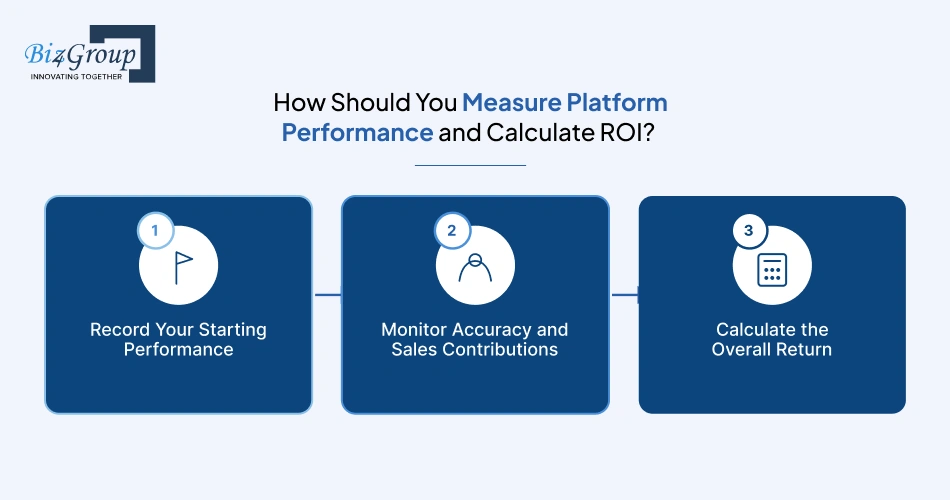
Measure the platform against your sales performance before and after launch. Track response speed, lead quality, appointment outcomes, data accuracy, and operating costs to assess the value of your AI sales automation platform for new home construction.
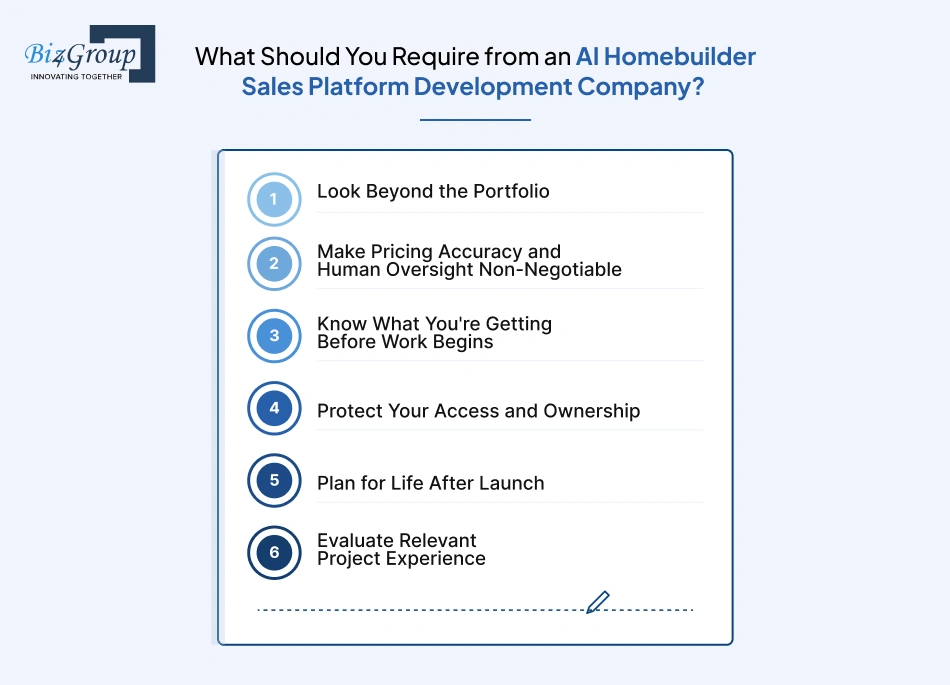
Choose a development partner that understands homebuilder sales and can explain how it will meet your business requirements. Before hiring, look at its experience, technical approach, project terms, and support commitments.
A common question among homebuilders evaluating AI platform vendors is:
"I am evaluating AI homebuilder sales platform vendors, but I need clarity on their development capabilities, CRM and inventory integrations, lead qualification logic, and total implementation cost."
Ask vendors to demonstrate relevant development experience, explain how they connect CRM and inventory systems, and show how qualification rules are configured. Request an itemized estimate covering development, integrations, deployment, and ongoing operating costs.
Ask the company to walk you through a relevant project or demonstrate how its solution handles buyer inquiries, pricing questions, lead qualification, and CRM updates. Focus on what was actually delivered and how it fits your needs.
Your agreement should explain how the platform uses approved pricing and inventory data, handles uncertain answers, and escalates inquiries to sales representatives. Ask who approves pricing changes and who resolves errors.
Get the project scope, architecture, milestones, testing requirements, and deliverables documented. For an AI homebuilder sales platform development project, this also means understanding the integrations, third-party dependencies, and responsibilities on both sides.
Don't leave code, data, or integration rights open to interpretation. Confirm the ownership or licensing terms for custom work, how you'll access and export buyer records, and what happens if you move to another provider.
A platform still needs attention after deployment. Agree on who handles maintenance, security updates, integration problems, and AI performance issues, along with support hours, response times, and ongoing fees.
Examine what the project involved, how the solution was implemented, and what the documented results show. This gives readers a concrete basis for judging whether that experience is relevant to their own platform requirements. Builders expanding their project team can review what to consider when they hire AI developers.
Like if you are evaluating Biz4Group's work, focus on examples that relate to the challenges homebuilders face, such as property discovery, visit scheduling, buyer assistance, and connecting customer-facing features with business workflows.
Developing an AI homebuilder sales platform takes more than adding a chatbot to your website. It requires a clear understanding of buyer journeys, reliable pricing and inventory data, effective lead qualification, and integration with your existing CRM and sales tools. Each component needs to work together to give buyers accurate answers and help sales representatives follow up with the right context. A platform using generative AI still needs reliable data, clear business rules, and appropriate human oversight.
A structured development process helps builders define the right features, choose a scalable architecture, validate accuracy and security, and measure performance against business goals. Whether you're launching a focused pilot or supporting multiple communities, prioritize dependable information, smooth sales handoffs, and room to grow.
Biz4Group's AI consulting services and property-focused projects offer relevant examples to explore when considering your development approach. Ready to bring your AI homebuilder sales platform to life? Contact Biz4Group to discuss your requirements and book an appointment.
Yes. An AI homebuilder sales platform with pricing and availability sync can connect to approved pricing and inventory sources to keep buyer-facing information current. Validation rules help prevent outdated or unverified details from being shared.
The platform can use buyer details such as budget, preferred community, home type, and purchase timeline, along with interaction signals. A best AI lead qualification tool for builders should follow the builder's qualification criteria and routing rules, helping sales representatives prioritize follow-up.
Yes. Custom development can align the platform with your communities, sales policies, inventory structure, and internal workflows. An AI homebuilder sales platform with CRM integration can also connect buyer interactions with existing lead records and sales processes.
An AI sales automation platform for new home construction can answer routine questions after hours, capture lead details, and route inquiries to the appropriate representative. Connecting it to approved property information helps keep responses relevant and follow-up organized.
The AI homebuilder sales platform development cost typically ranges from $15,000 to $200,000. The estimate depends on features, community count, CRM and inventory integrations, data complexity, and the level of customization required. A focused initial release generally requires less investment than a platform with extensive integrations and multi-community workflows.
Look for a company with experience in AI development, real estate workflows, CRM integration, and pricing and inventory synchronization. Ask for relevant project examples, a clear development plan, data ownership terms, and details about testing, human oversight, and post-launch support.
Compare community and floor plan information retrieval, home and lot matching, pricing and availability updates, lead qualification, appointment scheduling, CRM integration, sales-team handoffs, reporting, and security. Check how each platform handles outdated information, integration failures, and questions that require a sales representative.

Our website require some cookies to function properly. Read our privacy policy to know more.