Location :
Orlando, FL, USA
Location :
Orlando, FL, USA +1 (407) 714-1616
 info@biz4group.com


















Imagine a digital system that doesn’t wait for instructions but instead, understands your business goals, learns from real-time feedback, and takes independent actions to get the job done.
Read More

 AI Summary Powered by Biz4AI
AI can now pick up an inbound call, figure out whether someone is looking to buy or sell, ask about budget and timing, answer routine questions, log the conversation in the CRM, and book an appointment. That is what makes AI lead response software for real estate worth looking at for real estate businesses in the USA.
In NAR's February 2026 survey of 225 U.S. real estate professionals, 92% said they were using AI or planning to use it.
But there is a catch: 2026 HousingWire report on Fyxer's research found that while 90% of surveyed real estate professionals use AI, only 35% said it was genuinely helpful.
That gap is important. In its work as a U.S.-based AI product development company, Biz4Group LLC has found that getting the conversation right is only part of the job. The AI also needs the right property and lead data, CRM connection, scheduling logic, routing rules, and a clear point where it hands the conversation back to a person.
So, what does a practical AI lead-response setup actually look like? How does it compare with an ISA, what should it connect to, what can it realistically automate, and how quickly can a team get one running? That is what we'll break down.
AI lead response software for real estate handles the first interaction with a lead, from answering a missed call or text to asking basic qualification questions, updating the CRM, and booking or routing the next step. Instead of leaving agents to manage every initial interaction manually, the system handles the repeatable parts and brings an agent in when human judgment is needed.
When an agent misses a call, AI can answer or follow up immediately through voice or SMS. It can identify why the lead reached out, answer approved questions, and keep the conversation moving instead of sending the person to voicemail.
For example: someone calling about a listing could get an immediate response about the property and then be asked whether they want to schedule a showing. The same workflow can work for text inquiries, including after-hours leads.
That makes an AI missed call answering service for real estate more than a voicemail replacement. The goal is to start the conversation while the lead is still engaged.
AI can also handle the initial qualification conversation instead of sending every lead through another form.
For buyers, that might mean asking about property type, location, budget, financing status, and buying timeline. For sellers, it could cover the property, expected selling timeline, and reason for selling.
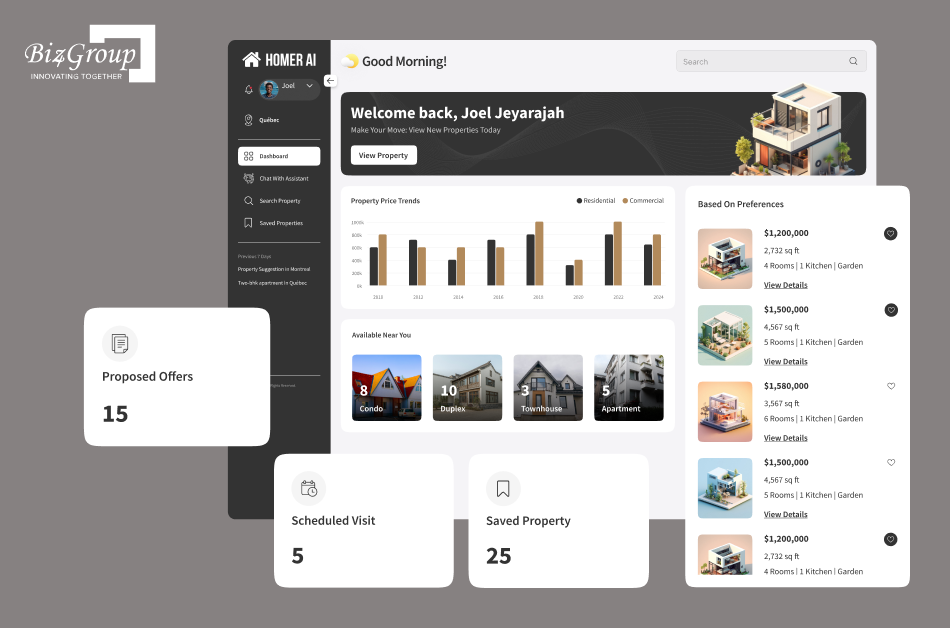
What this looks like in a real estate AI product: Biz4Group's project Homer AI used conversational interaction to understand buyer preferences such as budget and location, filter property options, and support property-visit scheduling. The useful lesson for lead-response workflows is that qualification works better when the conversation is connected to actual property information and the next action, rather than ending with a list of collected answers.
If a lead asks something outside the AI's approved scope or needs a human decision, the workflow should hand the conversation to an agent rather than guess.
The conversation is only useful if the information reaches the systems the team already uses. With the right real estate CRM integration, AI can record contact details, qualification answers, conversation history, notes, and the lead's next step.
It can also connect with a calendar to offer appointment times and book a meeting when the lead is ready. Leads that are not ready can be routed into the appropriate follow-up workflow.
So the basic flow is simple:
Lead comes in → AI responds → AI qualifies → CRM is updated → lead is booked or handed to an agent.
The important part is that AI is handling the repetitive first stage while the agent stays involved where judgment, negotiation, or a more personal conversation matters.
If you're deciding between AI lead response and an ISA, start with the work you need covered. AI can respond to leads around the clock, handle several conversations at once, ask basic qualification questions, and keep the CRM updated. An ISA brings a person into those conversations and can deal with situations that need judgment, context, or a more personal touch.
For a solo agent, AI can cover the first response without adding another person to the team. A growing brokerage may use AI for initial conversations and have an ISA or agent step in when the lead needs more attention.
A few practical differences matter:
|
Factor |
AI Lead Response |
ISA |
|---|---|---|
|
Availability |
24/7 |
Set working hours |
|
Multiple leads |
Handles several at once |
Limited by staff capacity |
|
Qualification |
Follows the workflow you set |
Uses human judgment |
|
Follow-up |
Can run automatically |
Requires staff time |
|
CRM updates |
Can happen automatically |
Often requires manual work |
|
Human conversation |
Agent/ISA takes over when needed |
Available from the start |
|
Adding capacity |
Platform-based |
Requires additional staff |
Then there is the cost. With AI, look at the platform fee, call and text usage, integrations, setup, and ongoing management. With an ISA, factor in salary, recruiting, training, management, and the time needed to keep the person productive.
Ask yourself how your team actually handles leads today.
Those answers will tell you where AI can take work off the team's plate and where a human still needs to be involved.
For many real estate teams, that creates a simple workflow: AI handles the initial response and qualification, then passes the lead to an ISA or agent when the conversation calls for a person.
If you're asking how to use AI for real estate? The answer depends on the workflow you want to improve. For lead response, that means connecting your lead sources, CRM, phone and SMS channels, qualification rules, calendar, and AI workflow so the system can respond, qualify, update records, and route the right conversations to an agent. Once those pieces are connected, AI can respond to new leads, qualify them, update the CRM, and route the right conversations to an agent.
The AI needs access to the information your team already uses when responding to leads. A typical setup includes:
Connecting all of these systems can require AI integration services, especially when the brokerage has an existing CRM, custom lead sources, or internal applications that need to exchange information with the AI workflow.
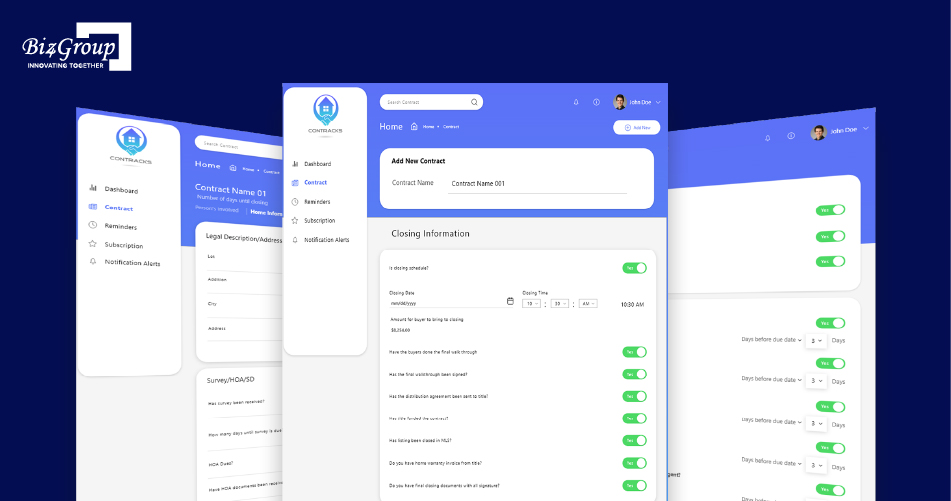
This need for structured real estate data shows up across the products teams build around the transaction. Biz4Group's ConTracKs, for example, was designed to organize property contract information and track important dates, events, and outstanding formalities through alerts and notifications. That kind of workflow thinking matters in AI lead response too: the conversation is one part of the system, while the underlying records, triggers, and next actions determine what happens afterward.
What happens if the AI has to answer a question about a listing that changed yesterday? It needs access to current information. This is why real estate CRM integration and reliable property data matter from the beginning.
You also need clear rules around what the AI can answer, what information it can use, and when a human should take over. The goal is to give it enough context to handle routine conversations without giving it freedom to make assumptions.
A practical AI lead response setup can be built in six steps:
1. Map your lead sources and workflow.
List where leads come from, how quickly they currently receive a response, who handles them, and where leads tend to get stuck.
2. Define the qualification flow.
Decide which questions matter for buyers, sellers, renters, or investors. Set the information an agent needs before taking over.
3. Connect your systems.
Connect the AI to your CRM, phone, SMS, calendar, lead sources, and approved property information.
4. Build the conversation and handoff rules.
Set instructions for common questions, qualification, missed-call response, follow-up, appointment booking, and escalation.
5. Test real lead scenarios.
Test after-hours calls, listing inquiries, appointment requests, incomplete answers, and conversations that need a human. Would your team be comfortable if a real lead had this exact conversation tomorrow? That is the kind of test worth running before launch.
6. Launch a controlled pilot.
Start with one lead source, team, or workflow. Review conversations, CRM activity, and lead outcomes before expanding.
This setup can cover many of the tasks teams expect from real estate lead qualification software, while keeping agents involved when a conversation needs personal attention.
A focused implementation can often reach an initial pilot within 1–2 weeks, with a broader rollout taking around 2–4 weeks when the required systems, data, and integrations are ready.
The timeline depends on what you are connecting. A simple missed-call and SMS workflow can move quickly. Multiple lead sources, custom CRM work, complex qualification rules, property-data connections, and compliance requirements can add more time.
A practical rollout might look like this:
Do you really need to perfect every possible conversation before going live? Usually, the better approach is to get the core speed-to-lead workflow working, review real conversations, and improve the areas where the AI needs better instructions, data, or escalation rules.
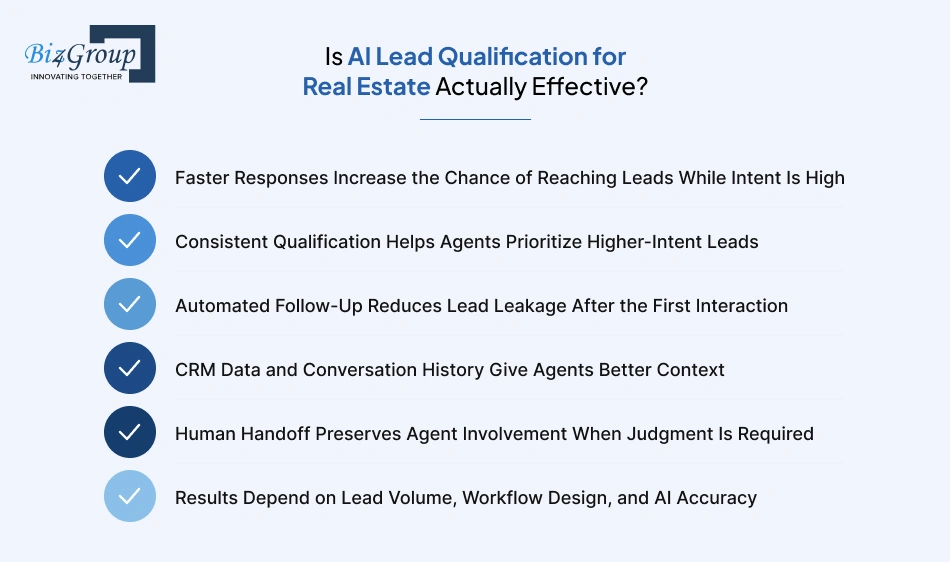
Yes, AI lead qualification can be effective when it responds quickly, asks useful questions, records the conversation correctly, and knows when to involve an agent. The technology can improve the early stages of lead handling, but results depend on how well the workflow fits the team's lead sources, qualification process, CRM, and follow-up strategy.
A lead who has just called, submitted an inquiry, or asked about a property is giving the team a reason to respond now. AI can respond within seconds, including outside normal working hours, so the first conversation does not have to wait for an available agent.
For a team, this can make a real estate speed to lead software useful for a very practical reason: more leads can receive an initial response while they are actively looking for information.
AI can ask the same core qualification questions across incoming leads. A buyer might be asked about location, budget, property type, financing, and timeline. A seller might be asked about the property and expected selling timeline.
That gives agents a consistent set of information to work with. They can see which leads have a defined budget, an active timeline, or a specific property in mind and decide where to spend their time.
The benefit depends on the questions being useful. Asking ten questions that tell an agent very little will not improve lead qualification.
What happens after the first conversation? A lead may need more time, ask for property details, or say they want to talk later. Without a follow-up process, those leads can easily disappear from the team's attention.
AI can send scheduled messages based on the workflow and conversation history. It can also create tasks or update the lead status in the CRM when an agent needs to take over.
This is where AI virtual assistant for real estate lead follow-up can have a practical role. The system keeps routine follow-up moving while agents focus on conversations that need them.
An agent should not have to start from zero after AI has spoken with a lead.
With the right CRM integration, the team can see the lead's contact details, source, qualification answers, conversation history, appointment status, and other relevant information. An agent picking up the conversation can then understand what has already been discussed.
That context also makes handoffs smoother. If the lead has already explained their budget and buying timeline, the agent can move the conversation forward rather than asking the same questions again.
Some conversations need a person. A lead may have a complicated question, want to negotiate, raise a financing issue, or simply ask to speak with an agent.
A good AI lead qualification platform for real estate should have clear handoff rules for these situations. The AI can recognize the trigger, pass along the relevant conversation details, and bring the agent in.
The handoff can also be triggered by the lead. If someone says, "I'd rather speak with Sarah," the workflow should make that request easy to act on.
AI will not produce the same results for every real estate business. A solo agent handling a few dozen leads has different needs from a brokerage managing thousands of inquiries across multiple teams.
Lead volume affects how much automation is useful. Workflow design determines what the AI actually does. Data quality and AI accuracy affect whether leads receive appropriate answers and get routed correctly.
So when evaluating top rated real estate lead qualification platforms, look beyond the feature list. Test the system with your actual lead sources, qualification questions, CRM, and common conversations.
The useful metrics are straightforward: response time, contact rate, qualification rate, appointment rate, handoff rate, and what happens to those leads after the appointment. Those numbers will tell you whether the AI is actually improving your lead-response process.
The right AI lead response setup depends on your lead volume, daily workflow, and the amount of work you want AI to handle. A solo agent may need help with missed calls and basic qualification. A brokerage may need lead routing, CRM connections, follow-up, and reporting across several teams.
Keep the setup focused on the work you struggle to get to. If you're showing a property when a new lead calls, can the system respond, ask a few useful questions, and book a time to talk?
This is where AI for real estate agents can be useful: handling the first response, collecting basic information, and keeping the lead moving while the agent is busy with clients or properties.
For most small teams, the basics are enough: voice and SMS response, lead qualification, appointment booking, follow-up, and a connection to the CRM.
Things get more complicated when several agents are handling leads. The AI needs to know who should receive a lead, which questions to ask, and what information belongs in the CRM.
At this stage, real estate lead qualification platforms can help standardize the first conversation across the team. Managers can also track response times, qualified leads, appointments, and handoffs.
Large brokerages usually need more control. Different offices may have different teams and workflows, while the organization still needs consistent rules for lead response and qualification.
At this scale, the lead-response system may become part of a broader set of enterprise AI solutions covering customer communication, lead management, reporting, and other operational workflows.
CRM and lead-source integrations, centralized workflow management, permissions, reporting, and human handoff become more important here.
One useful question to ask is: What happens when we add another office, another lead source, or another few thousand leads? The answer tells you whether the setup can grow with the business.
Brokerages need clear rules around consent, disclosure, data access, call recording, qualification, and human handoff before putting AI on live calls and texts. The exact requirements depend on the communication method and the jurisdictions involved, so the workflow should be reviewed before launch.
Think about the entire path from lead capture to AI conversation.
A brokerage should know:
For covered calls and texts using artificial or prerecorded voices, the FCC's TCPA rules are an important part of the compliance review. State requirements can add further obligations, particularly around call recording.
The AI should have one clear playbook for the situations the brokerage wants it to handle. That playbook can cover qualification questions, approved property information, appointment rules, lead routing, and human handoffs.
Different teams can have different workflows where necessary. The core rules should still be documented so managers can review how the AI is handling conversations across the brokerage.
If the AI does not have enough information to answer confidently, the workflow should tell it what to do next. That might mean asking for clarification, offering to connect the lead with an agent, or creating a task for follow-up.
This is also where accuracy becomes measurable. Managers can review actual conversations, identify recurring errors, and update the workflow instead of leaving each agent to handle problems individually.
Wondering how AI could handle missed calls, qualify leads, and connect with your existing CRM? Biz4Group can help you map the right AI workflow for your real estate business.
Talk to Our Team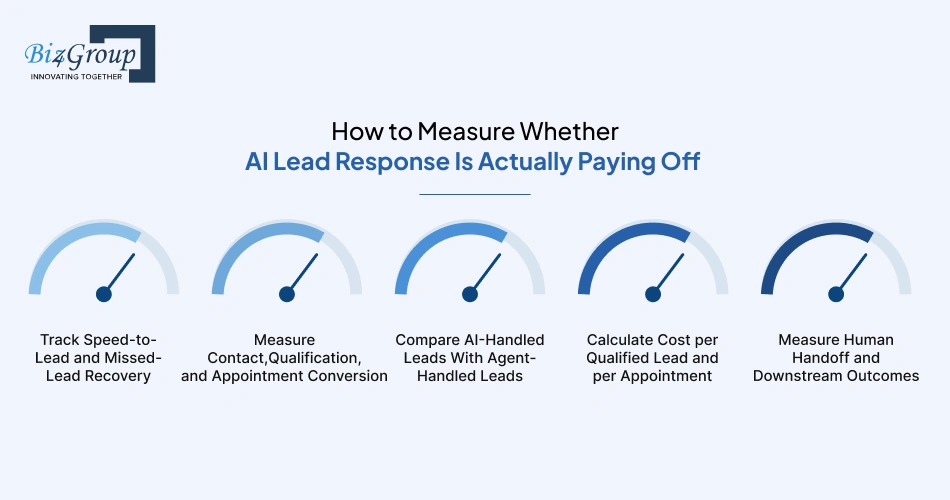
Track what happens after a lead comes in, not just how quickly the AI responds. The useful numbers are response time, contact rate, qualification rate, appointments, cost per qualified lead, and what happens after a human takes over.
Start with speed-to-lead. Record how long it takes the AI to respond to a new inquiry and how many missed calls receive an automated response.
Then look at recovery. How many of those previously missed leads replied, continued the conversation, became qualified, or booked an appointment?
This gives you a clearer picture of whether the system is recovering opportunities that would otherwise sit unanswered.
Response alone does not tell you much. A better measurement chain is:
Lead → Contacted → Engaged → Qualified → Appointment → Agent Follow-up
Track the conversion rate between each stage. If the AI is contacting nearly every lead but very few become qualified, the qualification workflow may need attention.
For a brokerage, these numbers can also be broken down by lead source. Website leads, paid ads, listing inquiries, and other sources may behave very differently.
Run the same metrics for leads handled by AI and leads handled directly by agents. Keep the comparison fair by looking at similar lead sources, lead types, and time periods.
You might find that AI produces more initial conversations while agents perform better further down the funnel. Or the difference may be small. The data should show where each approach is contributing.
The monthly AI bill does not tell you what a qualified lead actually costs.
Add platform fees, call and text usage, integrations, setup, and ongoing management. Then divide the relevant cost by the number of qualified leads or appointments generated.
For example:
These numbers give you something useful to compare with the cost of ISA-led lead response.
A handoff is only useful if something happens after it.
Track how many conversations reach an agent, how quickly the agent responds, whether the lead attends the appointment, and what happens afterward. Over time, you can see whether AI-qualified leads actually progress through the pipeline.
What matters most is the full lead-to-appointment conversion rate, followed by the outcomes further down the sales process. That tells you whether the AI is creating useful opportunities for the team or simply generating more conversations.
If leads are slipping through after hours or between agent follow-ups, Biz4Group can help you design an AI lead response workflow that keeps them engaged and routes them to the right person.
Explore Your AI Options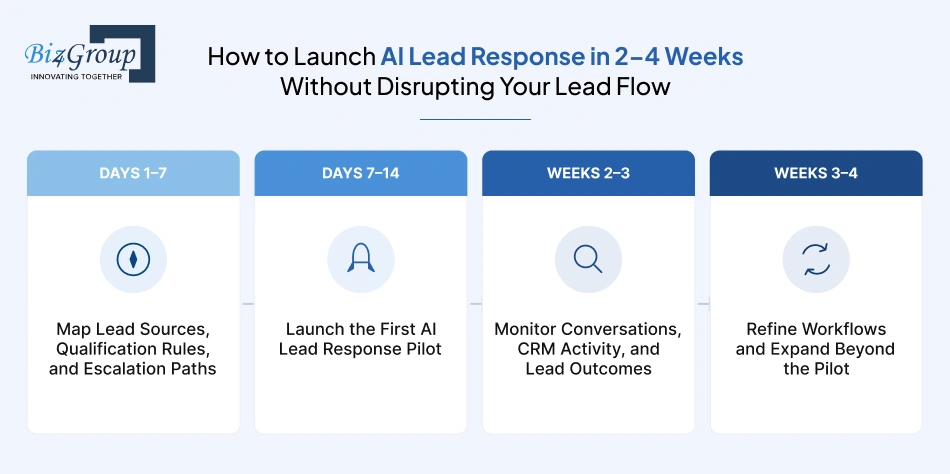
You don't need to change your entire lead process on day one. Start with one workflow, get it working with real leads, see what needs fixing, and then expand.
|
Timeline |
What You Do |
What to Sort Out |
|---|---|---|
|
Days 1–7 |
Map your current lead flow |
Lead sources, qualification questions, CRM, routing, and handoffs |
|
Days 7–14 |
Start the first AI pilot |
Connect the systems and test it with a small group of leads |
|
Weeks 2–3 |
Watch what happens |
Conversations, CRM updates, appointments, handoffs, and lead outcomes |
|
Weeks 3–4 |
Make improvements and expand |
Fix gaps, then add more agents, lead sources, or lead types |
First, figure out what the AI actually needs to handle. Where do your leads come from? What questions do agents ask? Which situations need an agent right away?
Write those rules down before building the workflow. It gives the AI a clear job and clear limits.
Connect the lead source, CRM, phone or SMS, and calendar. Then put a small number of real leads through the workflow.
Don't start with every agent and every lead source. If something goes wrong, you want to know exactly where it happened.
This is where you find out whether the setup works in real life.
Are leads getting useful answers? Is the AI capturing the right information? Are agents getting the context they need? Are appointments being booked correctly?
Review the actual conversations and fix the problems you see.
Once the basics are working, improve the questions, responses, routing, follow-up, and handoff rules.
Then start adding more lead sources or agents. Why risk changing the whole lead flow when you can prove the workflow with one part of it first?
Before choosing a platform, focus on how it will fit into your existing lead flow. The right questions cover the conversations it can handle, the systems it needs to connect with, what happens when a human is needed, and what the solution will actually cost.
If your leads come through both calls and texts, the AI should handle both channels within the same workflow. Ask whether it can answer inbound calls, respond to missed calls, continue SMS conversations, and keep the conversation history together.
A solution that handles only one channel may leave part of your lead flow untouched.
Buyer, seller, rental, investor, and property-management leads can require different questions.
Check whether you can create separate qualification flows without rebuilding the entire system. You should also be able to change questions as your team's process changes.
Your AI should fit into the systems your team already uses. Ask about integrations with your CRM, calendar, website forms, listing portals, advertising platforms, phone system, and SMS provider.
If you're planning to integrate AI into an app your agents already use, ask what data the AI can access, what actions it can trigger, and whether conversation history stays available inside the existing workflow.
This is worth testing before you buy.
Ask the vendor to show you what happens when a lead asks something outside the AI's knowledge, requests a specific agent, or needs help with a complex situation. Can the conversation be handed off with the previous context intact?
Look beyond the advertised monthly price. Depending on the solution, you may have costs for voice minutes, SMS, setup, integrations, CRM work, usage, and ongoing customization.
Calculate what the system would cost based on your actual lead volume, not the vendor's sample usage.
Ask how the platform handles consent records, AI disclosures, call recording, data storage, access controls, and deletion requests.
Your brokerage may operate across multiple states, so check whether the workflow can accommodate the requirements that apply to each market.
You should be able to see whether the system is doing useful work. At minimum, look for reporting around response time, contact rate, qualification, appointments, human handoffs, and downstream outcomes.
Can you connect those numbers back to the original lead source? That makes it much easier to see which workflows are actually producing results.
If you decide to build AI software, the work goes beyond the AI itself. You also have to account for the CRM, communication channels, property data, scheduling, routing, testing, monitoring, and ongoing maintenance.
Teams considering whether to build real estate AI software should therefore start by mapping the workflow they need to own. If the requirement is simply missed-call response and basic qualification, an existing platform may cover most of it. More unusual routing, property-data, CRM, or brokerage requirements can justify a custom approach.
Are your agents spending their day chasing missed calls, answering the same qualification questions, and updating the CRM? Then there is a clear part of the lead-response process that can be automated.
AI lead response software for real estate can handle that first layer across calls and texts, including nights and weekends, while sending conversations that need human judgment to the right agent. Start with one lead source, measure what happens, and expand when the numbers make sense.
The bigger decision is how much of the workflow you want to automate. An existing platform may work for a straightforward setup, while unusual qualification rules, complex routing, or custom integrations may call for AI consulting services. Look at what happens after the lead responds: Was it qualified? Did the agent get useful context? Was an appointment booked? Those numbers tell you whether the system is actually helping.
If you're planning an AI lead response solution, Biz4Group LLC can help you decide what to build, customize, or integrate. Reach out to discuss your lead workflow, CRM setup, and AI requirements.
It responds to inbound calls and texts, qualifies leads, answers routine questions, records conversation details, follows up, and can book appointments or hand leads to an agent.
It asks predefined questions based on the lead type, such as budget, location, property type, financing, and timeline, then records the answers for the agent.
Yes. AI can handle calls and texts 24/7, including evenings, weekends, and holidays, depending on the platform and setup.
AI can handle many repetitive ISA tasks, including initial response, qualification, follow-up, and appointment booking. An ISA or agent may still be needed for complex conversations and situations requiring human judgment.
AI can respond almost immediately when the lead enters a connected workflow. Actual response time depends on the lead source and system integrations.
Many platforms offer CRM integrations, but capabilities vary. Check whether the system can create or update contacts, record conversations, add qualification data, assign leads, and trigger follow-up actions.
Yes, provided the workflow has separate qualification rules for each lead type. Buyer, seller, rental, investor, and other lead types can have different questions and routing rules.
The AI can hand the conversation to the assigned agent or ISA based on the brokerage's rules. The agent should receive the conversation history and qualification information collected so far.
It can be accurate for clearly defined, routine conversations. Accuracy depends on the quality of the data, instructions, integrations, testing, and human escalation rules.
AI pricing varies by platform and usage. Compare the full AI cost, including setup, usage, integrations, and maintenance, with the total employment cost of an ISA.
A focused workflow can often reach a pilot within 1–2 weeks. Broader implementation can take around 2–4 weeks when integrations, data, and workflows are ready.
It can be configured for applicable requirements, but compliance depends on the calls, texts, data, and jurisdictions involved. Brokerages should review consent, disclosure, recording, privacy, and communication requirements before launch.
Buying is usually simpler when an existing platform covers the required workflow. Building or heavily customizing makes more sense when the brokerage has unique processes, integrations, or technology requirements.

Our website require some cookies to function properly. Read our privacy policy to know more.