Location :
Orlando, FL, USA
Location :
Orlando, FL, USA +1 (407) 714-1616
 info@biz4group.com


















Imagine a digital system that doesn’t wait for instructions but instead, understands your business goals, learns from real-time feedback, and takes independent actions to get the job done.
Read More

 AI Summary Powered by Biz4AI
What if your AI could tell which leads need an agent right now, which ones need another follow-up, and which ones should stay in nurture?
An AI real estate lead nurturing platform can take a new lead from first contact to agent handoff with very little manual work. It can read messages, emails, forms, and call transcripts, identify buying or selling intent, update lead priority as behavior changes, and trigger the next follow-up across SMS and email.
This also connects naturally with AI real estate lead generation, where lead acquisition and follow-up work together to move prospects through the sales journey.
But how do you know whether an AI-generated lead score is reliable enough to influence agent priorities? What should happen when the system is unsure whether a lead is ready to transact? And how do you keep those decisions tied to the CRM, property activity, and agent workflow?
For teams exploring AI-powered lead follow-up automation for real estate, these are the practical questions that shape the platform.
Biz4Group LLC, a U.S.-based AI product development company, has experience building AI products that connect conversations with business data and operational workflows. For real estate, that means accounting for property data, scheduling, routing, CRM activity, and human handoff alongside the AI layer.
Create an AI-powered workflow that moves the right prospects toward a conversation or appointment.
Start Your AI Development Journey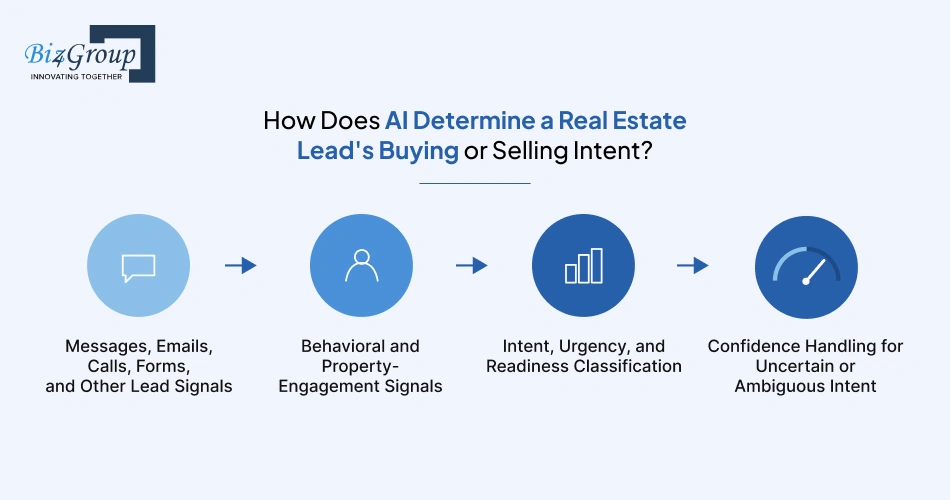
AI can determine real estate intent by combining what a lead says with their recent activity. It can identify whether someone is likely buying or selling, estimate urgency, and update that assessment as new signals appear.
AI can analyze conversations and lead submissions for signals such as:
For example, "I need to sell within two months" gives the system a much clearer seller-intent signal than "Can you tell me about this property?"
Biz4Group's experience with Homer AI provides a practical example of applying conversational AI to real estate workflows. The platform used interactive buyer questions to understand preferences such as location and budget, then connected those inputs with property filtering and recommendations.
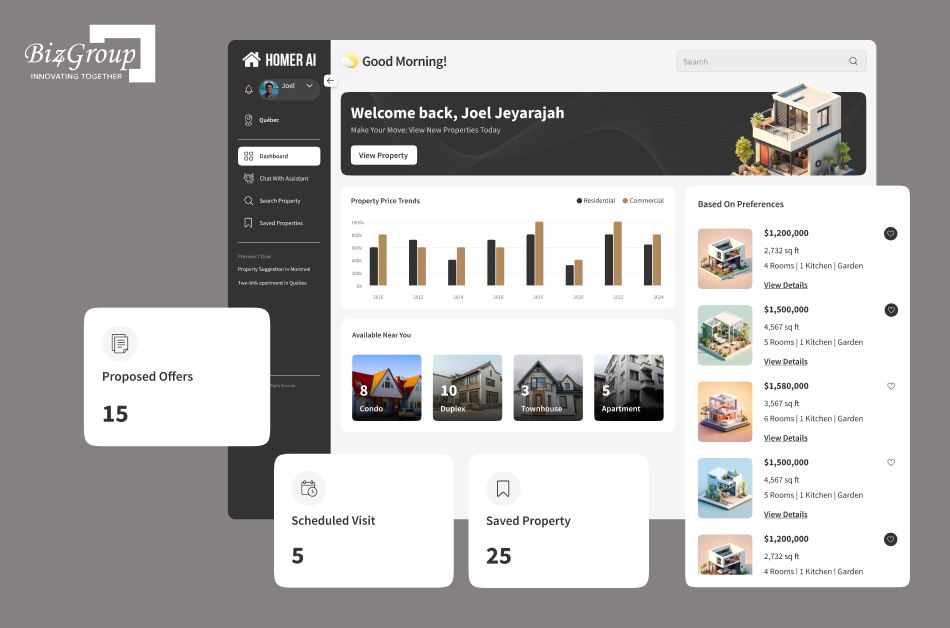
What a lead does can add context to what they say. Repeated listing views, saved properties, property searches, inquiries, and returning to the website can indicate increasing engagement.
CRM event data can make these signals available to the AI workflow.
Through AI model development, the platform assesses three related signals:
This gives the sales team more useful context than a single generic lead score. Someone planning to buy next year can remain in nurture, while someone requesting a showing this weekend can move toward immediate agent follow-up.
Not every lead gives AI enough information to make a confident call. A message such as "Just browsing for now" may need more context.
The system can assign a confidence level and use rules for uncertain cases, such as continuing light nurture, asking a qualifying question, or sending the lead to an agent for review. This keeps uncertain AI decisions from automatically driving high-impact sales actions.
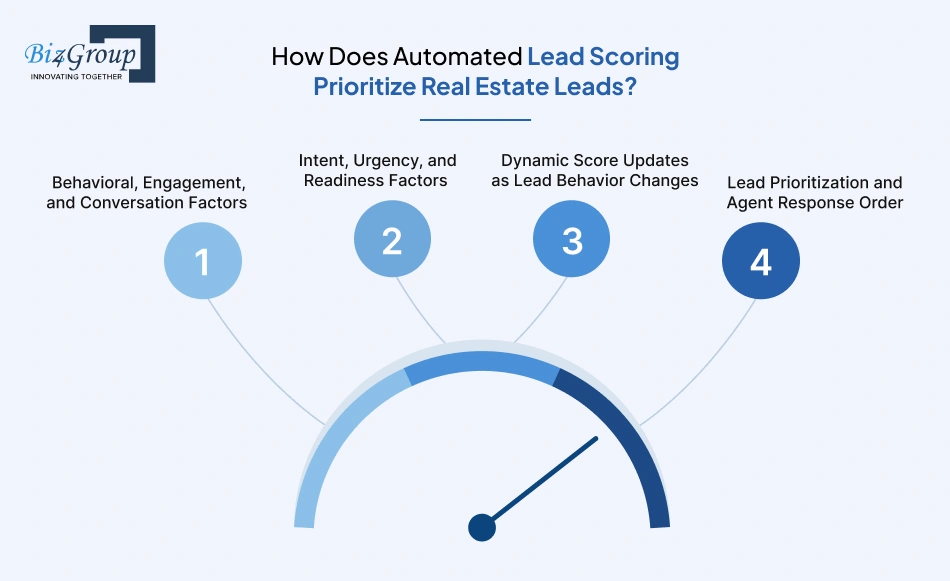
A useful real estate lead score is not a number attached to a contact record. It is a decision layer that converts multiple signals into an operational priority. The scoring engine evaluates recency, intent, engagement, readiness, and business rules, then passes the resulting priority to routing and follow-up workflows.
For example, a lead who viewed three properties, replied to an SMS, confirmed a preferred area, and asked for a showing today presents a very different sales opportunity from someone who opened an email once. The scoring model needs to reflect that difference.
The scoring engine pulls evidence from the lead's activity history and conversation context. Typical inputs include:
These signals require weighting rather than simple counting. Five passive listing views do not necessarily represent more intent than one explicit request to schedule a showing.
The intent classification from the previous stage becomes another input to the score.
A practical model separates what the lead wants, how soon they want it, and how ready they are to take the next step.
For instance:
|
Signal |
Example |
Scoring Implication |
|---|---|---|
|
Intent |
"I'm looking to sell my home" |
Transaction intent identified |
|
Urgency |
"I need to sell within 60 days" |
Higher time sensitivity |
|
Readiness |
"I'm available for a valuation Thursday" |
Immediate action signal |
|
Engagement |
Repeated listing interaction |
Reinforces active interest |
|
Inactivity |
No response after multiple touches |
Reduces current priority |
The exact weights and thresholds belong to the brokerage's qualification model. A luxury brokerage, investor-focused team, and residential brokerage may require very different definitions of a high-priority lead.
A static score quickly becomes misleading in a high-volume funnel. The scoring engine therefore recalculates priority when meaningful events occur.
A lead previously classified as low priority might move sharply upward after:
The reverse applies when a lead stops engaging, postpones their transaction, or explicitly changes their requirements.
For auditability, the platform records the events behind each material score change. Agents then see not only the current priority but also the evidence that caused the change.
The score becomes actionable when it determines what happens next.
A high-priority lead might enter an immediate agent-alert workflow, while a lower-priority lead remains in automated nurture. The routing layer then applies operational constraints such as territory, specialty, availability, workload, and existing ownership.
This creates a sequence such as:
Lead activity → signal extraction → score update → priority classification → routing → agent action
That distinction matters when evaluating an AI lead scoring and nurturing system for realtors.
A multi-channel follow-up workflow uses lead events to decide the next outreach step. A new inquiry might trigger an immediate SMS, while a reply, property view, missed appointment, or change in intent moves the lead into a different sequence.
The platform uses lead data, conversation history, and generative AI to create relevant follow-up around the lead's property interest, questions, and next step.
The communication layer pulls lead attributes, conversation history, and relevant property data before generating a message. For example, a buyer asking about a 3-bedroom home in Austin receives follow-up tied to that requirement rather than a generic listing message.
The workflow engine applies rules such as:
Timing also changes when the lead responds or enters a new stage.
The AI assistant uses structured conversation details such as budget, location, financing status, preferred property type, and purchase timeline. If a lead changes from "looking next year" to "ready to buy this month," the workflow updates the messaging and priority accordingly. The same approach used in an AI conversation app applies here, with each response informed by the lead's previous messages, preferences, and current stage.
When a lead reaches an agent handoff condition, the agent workspace provides a short context summary: current intent, qualification details, recent property activity, previous messages, and unresolved questions. After the call, the CRM integration feeds the outcome back into the nurture workflow.
Buyer and seller workflows use different event logic. A buyer sequence may move forward after a showing request or financing discussion. A seller sequence may advance after a valuation request, pricing discussion, or listing consultation.
The workflow engine also stops conflicting sequences. For example, once a buyer books an appointment, generic nurture messages pause and appointment-related follow-up takes over.
Behavior-based triggers let the platform react to what a lead does next. These workflows reflect how AI automation services connect lead activity with follow-up, re-engagement, and agent handoff.
Instead of keeping every contact on the same drip campaign, the system can change the follow-up when a lead views properties, replies to a message, requests a showing, goes quiet, or shows renewed interest.
A trigger is useful when it leads to a clear change in the workflow. For example:
|
Lead Activity |
Possible Workflow Response |
|---|---|
|
Replies to an automated message |
Pause the sequence and assess the response |
|
Requests a showing |
Escalate to agent follow-up |
|
Repeatedly views listings |
Increase relevant property follow-up |
|
Stops engaging |
Move to a slower nurture sequence |
|
Returns after a period of inactivity |
Restart re-engagement |
|
Changes their stated timeline |
Reassess intent and lead priority |
The important part is the action attached to the trigger. Collecting activity data without changing the follow-up does little for the sales team.
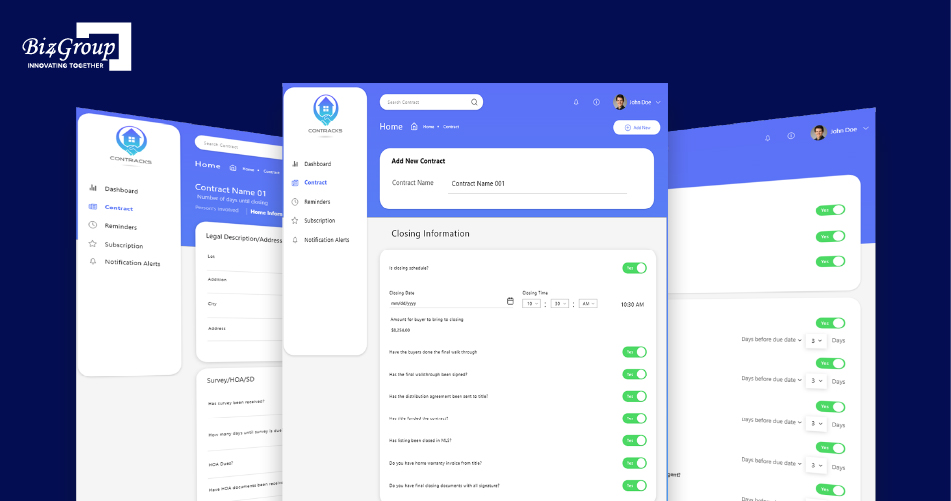
Biz4Group's Contracks project provides a real estate example of event-driven workflows, using contract information, important dates, and notifications to trigger timely actions. The same workflow principle applies to AI lead nurturing, where lead replies, property activity, and status changes trigger the next follow-up step.
A lead who says, "We're planning to buy next year," should not receive the same cadence as someone looking for a showing this week.
Re-nurture sequences give longer-term leads a lighter touch until their behavior changes. New listing activity, a reply, or a change in their timeline can bring them back into a more active workflow.
Nurture sequences also need rules for when they should stop.
A lead reply might pause automated messages while an agent takes over. If the conversation ends without a next step, the platform can later resume an appropriate sequence. A major change in behavior can instead move the lead into a completely different workflow.
This prevents outdated campaigns from continuing after the lead's situation has changed.
Each stage should have clear entry and exit conditions. A simple workflow might look like:
New Lead → Initial Nurture → Engaged Lead → Agent Follow-Up
If engagement drops, the lead can move back to Long-Term Nurture. If the lead requests a showing or gives a clear transaction timeline, the system can move them toward Agent Follow-Up.
This keeps the nurture journey dynamic, with the lead's latest behavior determining what happens next.
AI can route a lead using details such as location, property type, intent, agent availability, and current workload. When the lead reaches a defined handoff point, the system can pause automated nurturing, send the relevant context to the assigned agent, and update the CRM.
A routing engine can combine several rules when deciding who should receive a lead.
Example: A lead submits a form asking about a $1.2 million home in Miami and mentions that they want to move within 45 days. The platform can identify the lead as a high-intent buyer, check which agents cover Miami and work with that property segment, then consider who is currently available.
Human oversight works best when it is tied to specific actions rather than applied to every automated message.
Example: AI drafts a follow-up after a lead says, "We're interested, but we're still waiting to hear back about our relocation package." The system can flag the conversation for review instead of sending a message that assumes the buyer's timeline.
The platform should know when a lead has crossed a threshold that calls for an agent.
Consider a seller who initially asks for general information about selling. Two weeks later, they reply, "Can someone come by Thursday to give me an estimate?" That new request can trigger an escalation. AI pauses the nurture sequence, assigns the lead to an appropriate agent, and passes along the conversation history.
Other escalation signals can include:
A high-volume team can have several workflows touching the same contact. Without a shared activity state, an agent's personal reply could be followed by an automated campaign message.
Example: An agent replies to a buyer at 10:04 AM. Before the scheduled 10:05 AM nurture message goes out, the system checks the CRM for recent activity and pauses that automated touch. The lead receives one relevant response instead of two unrelated messages.
The CRM should show what happened during the handoff so the agent does not have to reconstruct the conversation.
For example, the record might show:
Lead status: Agent Follow-Up Intent: Buyer Priority: High Trigger: Requested showing Assigned agent: Miami Buyer Team Automation: Paused Context: Lead wants to view two properties this weekend
The agent can then continue from the existing conversation instead of starting with a generic "How can I help you?" message.
CRM and MLS/IDX integrations connect AI lead nurturing with the data already used by real estate teams. The CRM remains the main lead record, while AI uses contact activity, property engagement, and conversation data to qualify and nurture leads.
A CRM integration connects lead records, activity, scoring, workflow updates, and agent assignments.
For example, a lead's property searches and recent conversations enter the AI workflow. The resulting lead score or qualification status returns to the CRM, where the assigned agent sees the latest context.
The exact capabilities depend on the CRM's API and available events.
Also Read: Building a Real Estate CRM
The AI platform works alongside existing lead sources and CRM workflows:
Lead Source → CRM → AI Workflow → CRM → Agent
This keeps contact history, assignments, and existing CRM processes in one place instead of creating another system for agents to manage.
MLS/IDX data gives AI property-level context. A buyer repeatedly viewing three-bedroom homes in one neighborhood, saving listings, and then requesting a showing provides a stronger signal than a contact record alone. That activity feeds into lead scoring, personalized follow-up, and agent handoff.
A previous Biz4Group real estate project, Facilitor, also demonstrates how property data and AI features can work together. The platform combined budget and location-based property search, AI-powered recommendations, integrated MLS and GPS data, real-time chat, and property-visit workflows.
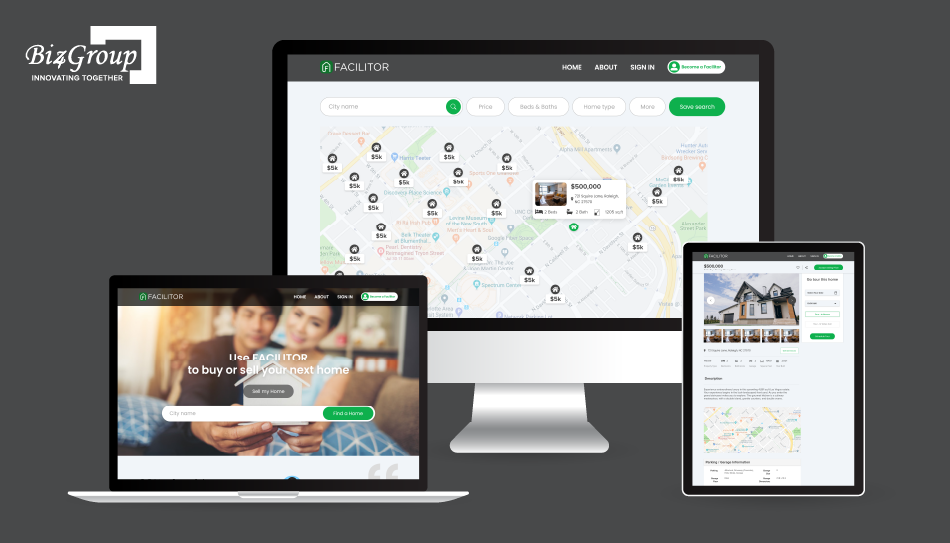
This type of integration shows why the AI layer needs access to relevant property and user activity data when personalization and lead qualification are part of the workflow.
APIs move lead and property data between connected systems, while webhooks pass along supported events as they happen. AI integration services help connect these data flows across the CRM, MLS/IDX, communication providers, and other systems.
A new inquiry, property view, lead reply, or showing request then becomes an event the AI workflow uses to determine the next action.
The integration needs clear rules for common data issues:
|
Issue |
Required Handling |
|---|---|
|
Duplicate leads |
Match records before starting separate workflows |
|
Missing data |
Use available CRM and conversation context |
|
Delayed updates |
Check timestamps before changing lead priority |
|
Failed API requests |
Log and retry failed updates |
|
Conflicting records |
Define the source of truth |
|
MLS restrictions |
Follow the applicable data-access rules |
The key is knowing exactly which data each system provides, which system owns it, and what happens when the data is missing or delayed.
A strong architecture separates the platform into connected layers, with each layer responsible for a specific part of lead nurturing, AI decision-making, communication, or system reliability.
|
Architecture Layer |
What It Handles |
Key Components |
|---|---|---|
|
Lead Ingestion and Unified Customer Data Layer |
Brings lead information into one consistent profile |
Website forms, portals, CRM records, calls, SMS, emails, property activity, lead preferences |
|
Intent Classification and Lead-Scoring Layer |
Turns conversations and behavior into actionable lead signals |
Intent detection, urgency, readiness, engagement signals, scoring rules, AI models |
|
Workflow Orchestration and Nurture Engine |
Controls what happens after each lead event |
Nurture sequences, timing rules, triggers, pauses, re-engagement, escalation, agent handoff |
|
AI Personalization and Communication Layer |
Generates context-aware communication across approved channels |
LLMs, message generation, conversation context, SMS, email, voice, communication rules |
|
CRM, MLS/IDX, and External Integration Layer |
Connects the AI platform with the existing real estate technology stack |
CRM APIs, MLS/IDX data, lead portals, websites, calendars, communication providers, webhooks |
|
Monitoring, Audit Logs, and Failure Handling |
Tracks system activity and handles operational failures |
Event logs, AI decision logs, API monitoring, retries, error handling, alerts, audit trails |
Teams looking to integrate AI into an app need to account for APIs, authentication, data mapping, webhooks, and synchronization across connected systems.
The layers work together as a continuous flow:
Lead Data → AI Analysis → Lead Score → Workflow Decision → Personalized Follow-Up → CRM Update → Agent Handoff
For a high-volume sales team, this separation also makes the platform easier to scale and maintain. This architecture also supports enterprise AI solutions where multiple teams, workflows, integrations, and lead volumes need to operate within the same platform.
A change to the scoring model, communication provider, or CRM integration stays within its respective layer instead of affecting the entire system.
The same principles apply to business app development using AI, where AI capabilities need to work alongside existing data, workflows, integrations, and business rules.
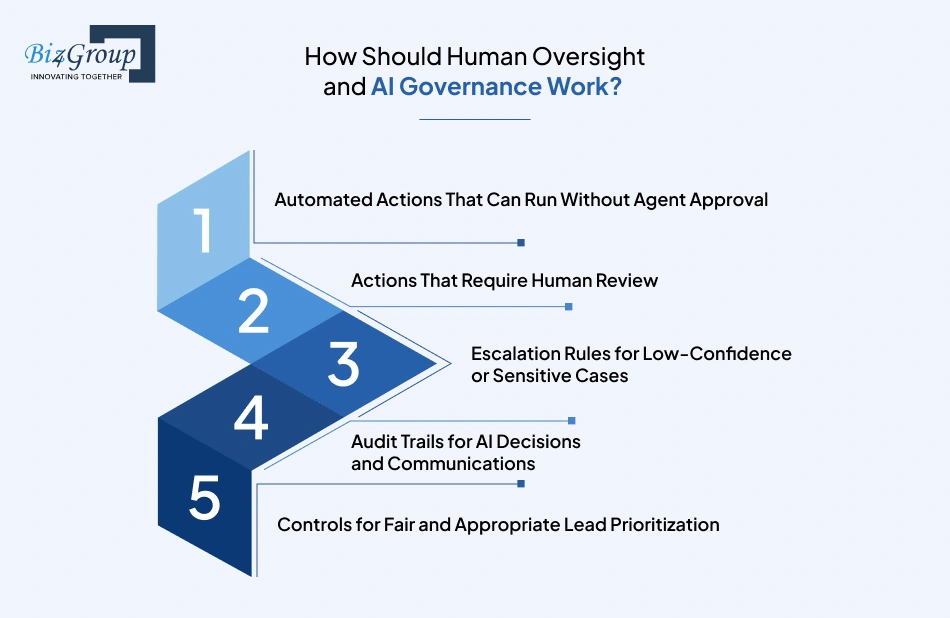
Human oversight in an AI real estate lead nurturing platform comes down to clear boundaries around automated lead nurturing, AI lead qualification, agent review, and escalation.
Routine automated lead nurturing activities fit into predefined workflows. These include approved SMS and email follow-ups, lead activity updates, AI lead scoring, and nurture-stage changes based on defined triggers.
Agent review belongs where the conversation requires judgment or falls outside the approved workflow.
Examples include unclear lead intent, unusual requests, complex transaction questions, and responses that need more context than the AI has available. The agent reviews the conversation and takes over when necessary.
The platform needs clear escalation rules for uncertain AI lead qualification results.
A low-confidence classification keeps the lead in nurture while the system gathers more engagement signals. A direct request for an agent, a showing request, or a complex question moves the lead toward agent handoff.
AI governance also requires a record of important automated activity, including:
This gives sales managers a clear history when reviewing lead prioritization or checking why an automated action occurred.
Lead prioritization needs to rely on relevant sales signals such as intent, engagement, timing, property interest, and response behavior.
The team also needs regular review of scoring and routing rules to catch inappropriate patterns. This keeps AI oversight connected to the actual lead qualification and agent-routing process.
Measure the platform at each stage of the lead journey, from the first automated response through appointment and pipeline progression. A useful measurement framework connects AI activity, agent activity, and sales outcomes rather than focusing on message volume alone.
Track:
First-response time · Follow-up response time · Agent handoff time · Time from lead activity to next action
What it tells you:
Whether the AI lead nurturing workflow responds quickly when a new lead enters or shows renewed interest.
Track:
Lead-to-conversation rate · Qualified-lead rate · Conversation-to-appointment rate · Appointment completion rate
What it tells you:
Whether AI lead qualification and follow-up are moving contacts toward meaningful sales conversations.
Track:
Automated follow-ups completed · Agent interventions · Leads handled per agent · Agent time spent on qualified leads
What it tells you:
How much routine follow-up the platform handles and how agent time shifts toward higher-priority conversations.
Track:
Inactive leads re-engaged · Re-nurture response rate · Leads returning to active nurture · Appointments from re-engaged leads
What it tells you:
Whether long-term lead nurturing produces measurable movement instead of simply increasing outreach volume.
Track the complete journey:
Lead Source → AI Qualification → Follow-Up → Conversation → Appointment → Opportunity → Closed Deal
What it tells you:
Which lead sources and AI lead nurturing workflows contribute to pipeline progression.
Keep attribution rules consistent across the CRM and AI platform. That makes performance comparisons more meaningful and gives sales leaders a clear view of where the automation is producing results.
Building an AI real estate lead nurturing platform typically costs $25,000 to $200,000, depending on the platform's scope, integrations, AI capabilities, and scale.
|
Platform Scope |
Estimated Cost |
|---|---|
|
Basic MVP |
$25,000-$50,000 |
|
Mid-Level Platform |
$50,000-$100,000 |
|
Advanced / Enterprise Platform |
$100,000-$200,000 |
The main cost drivers are AI lead scoring, automated follow-up, CRM and MLS/IDX integrations, communication channels, customization, and infrastructure requirements.
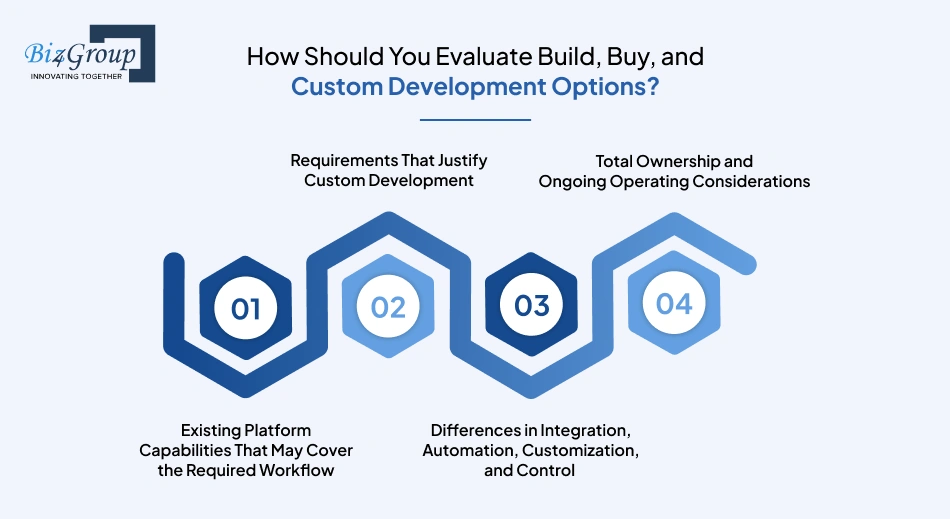
Evaluate the options based on workflow fit, integrations, customization, cost, and control. Start with existing platforms, identify the gaps, and then decide whether custom development addresses a real business need.
Review real estate lead nurturing software for AI lead qualification, AI lead scoring, automated lead follow-up, CRM integrations, agent routing, and reporting.
If the platform covers the required workflow with limited configuration, buying offers a faster implementation path.
Custom development fits requirements that standard platforms do not cover, such as proprietary AI lead scoring, custom qualification rules, complex lead routing, multiple CRM or MLS/IDX integrations, or specialized automated lead nurturing workflows.
Existing platforms provide predefined integrations and automation features. Custom AI development provides greater control over AI logic, data flows, integrations, workflows, and future changes.
The deciding factor is how closely the available platform matches the team's actual sales process.
Buying typically involves recurring subscription and integration costs. Custom development includes the initial build plus ongoing AI, hosting, maintenance, and support costs.
For an AI real estate lead nurturing platform, compare these long-term costs with the level of customization and control the business requires.
Evaluate a development partner based on its ability to handle the full product lifecycle, from AI lead scoring and automation to integrations, security, scalability, and post-launch support. Look for relevant technical experience and clear evidence of how the team has handled similar systems.
Look for experience with AI product development, intent classification, lead scoring, workflow automation, and context-aware personalization. Ask how AI decisions connect with business rules and agent handoffs.
Biz4Group LLC's experience in AI products and workflow automation provides relevant technical background for this type of platform.
Integration experience matters because the platform needs to work with existing CRMs, lead sources, communication services, and property data.
Review previous API integration work and ask how the team handles authentication, data mapping, synchronization, duplicates, and integration failures. Biz4Group's custom technology and API integration experience is relevant to this multi-system setup.
The development partner needs clear processes for protecting lead data and controlling AI-generated actions. Review access controls, data handling, audit logs, human approval workflows, and escalation rules during the technical evaluation.
A platform handling high lead volumes needs reliable infrastructure, monitoring, error handling, and a plan for maintaining AI models and integrations after launch.
Ask how production issues are monitored, how model updates are tested, and how performance is maintained as lead volume and agent count increase.
Define responsibilities before development begins. The scope needs to cover AI development, integrations, workflow configuration, testing, deployment, documentation, maintenance, and support.
Teams planning to hire AI developers should define responsibilities for integrations, testing, deployment, documentation, maintenance, and post-launch support.
A development partner with experience across the full product lifecycle gives the team a clearer path from initial architecture to production and ongoing improvements.
An AI real estate lead nurturing platform connects AI lead qualification, lead scoring, automated follow-up, CRM data, property activity, and agent handoff in one workflow. The goal is simple: move the right leads toward a conversation, showing, or book an appointment action at the right time.
For teams exploring AI-powered lead follow-up automation for real estate, define the required workflows, integrations, routing rules, and human controls before choosing the technology.
Biz4Group LLC, a U.S.-based AI product development company, brings experience in building AI products, custom integrations, and workflow automation, relevant to building this type of connected platform.
A well-planned foundation also supports growing lead volumes, larger agent teams, and additional CRM, MLS/IDX, and communication integrations.
Connect lead scoring, AI nurturing, CRM data, and agent handoffs into one system built around your sales process.
Build Your AI Lead Nurturing PlatformAn AI real estate lead nurturing platform with a focused MVP typically takes around 2 to 4 weeks. A larger platform with advanced AI lead qualification, multiple CRM integrations, and complex automation often take 6 to 8 weeks.
Building an AI real estate lead nurturing platform typically costs $25,000 to $200,000. The final cost depends on AI lead scoring, automated lead follow-up, CRM and MLS/IDX integration, communication channels, customization, and platform scale.
Yes. A phased rollout lets teams test automated lead nurturing, AI lead scoring, lead routing, and agent handoff with one team before expanding across the organization.
Existing CRM data stays within the CRM while the CRM integration connects the required records and activity to the AI platform. Data mapping, duplicate handling, and synchronization need to be addressed before automated lead follow-up goes live.
AI lead scoring needs regular review as lead behavior, sales processes, and business priorities change. Conversation outcomes, appointment rates, and pipeline progression provide useful signals for refining scoring rules and lead prioritization.
Ownership needs to be defined in the development agreement. The scope should cover AI workflows, integrations, lead data, documentation, access, maintenance, and ongoing support so the team has clear control after launch.
The platform needs failure handling that records the issue, preserves workflow state, and retries supported operations. MLS/IDX integration and CRM failures also need safeguards, so outdated data does not trigger incorrect automated lead follow-up.

Our website require some cookies to function properly. Read our privacy policy to know more.