 Location :
Orlando, FL, USA
Location :
Orlando, FL, USA +1 (407) 714-1616
 info@biz4group.com
 AI Summary Powered by Biz4AI
- AI construction loan and draw management platform development can automate document extraction, budget reconciliation, payment matching, progress verification, and exception detection.
- Key features include document intelligence, budget-to-actual reconciliation, duplicate charge detection, progress verification, lien waiver tracking, approval workflows, and audit trails.
- A focused pilot can validate one draw workflow before expanding across a portfolio.
- A production platform typically costs around $120,000-$500,000, depending on scope, integrations, data complexity, and AI capabilities.
- ROI can be measured through review hours, draw cycle time, exception rates, error/rework rates, and operating costs.
- Build, buy, integrate, or use a hybrid approach based on how specialized the draw workflow is and how well existing systems can support it.
If you're building or evaluating an AI platform for construction draws, the interesting part isn't whether AI can read an invoice. It can. The real question is what happens after that.
Can it match the invoice to the right budget line? Can it spot that the same cost was already paid? Can it tell when the reported progress doesn't line up with the inspection evidence? And when something looks wrong, can it get the issue to the right reviewer without letting the system make a funding decision it shouldn't make?
That's the thinking behind using AI in real estate development for construction loan and draw management. The goal isn't to throw AI at the entire draw process. It's to automate the repetitive checks while keeping people in control of the decisions that carry financial or compliance risk.
There's a useful reality check here: the 2026 State of Construction Finance Report found that 71% of respondents trust AI to read and summarize documents, but only 21% trust it for calculations and quantitative analysis.
That gap matters when you're deciding what to build. A good platform might handle document extraction, budget reconciliation, duplicate-charge checks, progress verification, and exception routing, while leaving final approval to authorized reviewers. For a U.S.-based AI product development company like Biz4Group LLC, that also means paying close attention to the existing accounting, lending, and approval systems the AI has to work with. The model is only one part of the build.
Why Is Construction Draw Review Still Slow and Manual?
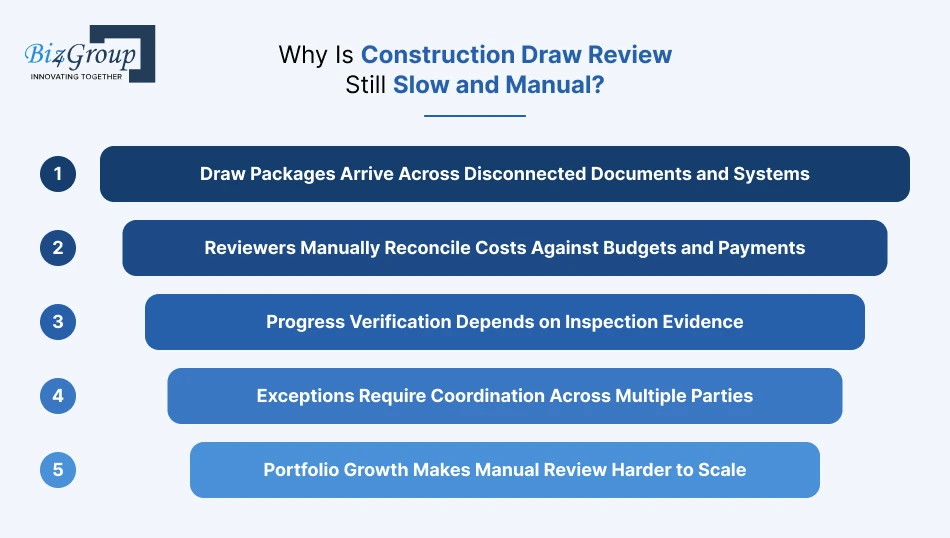
Construction draw review stays slow because the reviewer has to pull information from different places, check the numbers against the budget and previous payments, confirm the work has actually been completed, and sort out anything that doesn't match before money goes out.
Draw Packages Arrive Across Disconnected Documents and Systems
A single draw can include invoices, lien waivers, budget updates, inspection reports, and site photos. They may all be sitting in different emails, folders, or systems. Someone has to bring the pieces together before the review can really begin.
Reviewers Manually Reconcile Costs Against Budgets and Payments
The basic questions are simple: Does this cost belong in the budget? Was it already paid? Is there enough budget left? The problem is answering those questions across every line item and previous draw when the underlying records aren't connected.
Progress Verification Depends on Inspection Evidence
The draw tells you what the borrower wants funded. The inspection tells you what is actually happening on site. When those two don't agree, someone has to stop, dig into the details, and work out what's going on.
Exceptions Require Coordination Across Multiple Parties
A missing waiver, unusual charge, or progress mismatch usually needs someone else to weigh in. That might mean going back to the developer, contractor, inspector, or another person on the lending team before the draw can move forward.
Portfolio Growth Makes Manual Review Harder to Scale
One project is manageable. Now imagine doing the same checks across dozens of active projects and multiple draws per project. How much of that review work is still being done by hand simply because there isn't a better workflow?
Which Parts of the Draw Process Can and Cannot Be Fully Automated by AI?
Generative AI can help automate parts of draw review, especially document handling and review preparation, but it should not make every funding decision on its own. The practical split is simple: let AI handle structured checks, while people handle judgment, exceptions, and final approval.
|
Draw Activity |
What AI Can Handle |
What Still Needs Human Review |
|---|---|---|
|
Document review |
Extract data from invoices, draw requests, lien waivers, and reports |
Resolve unclear or conflicting information |
|
Budget reconciliation |
Match costs to budget lines and previous payments |
Decide whether unusual costs are justified |
|
Exception screening |
Flag duplicates, missing documents, and unusual variances |
Investigate and resolve exceptions |
|
Progress verification |
Compare schedules, reports, and visual evidence |
Assess ambiguous or conflicting site evidence |
|
Disbursement approval |
Prepare the review package and route it for approval |
Authorize the release of funds |
AI can take a lot of the checking off the reviewer's plate. But when the question becomes "Should we actually release the money?", that's still a human call.
What Features Should an AI Construction Loan Draw Management Platform Include?
A useful platform should do more than read draw documents. It should connect the financial, construction, and approval sides of the process so a reviewer can quickly answer: What was requested? Does it match the budget? Has it already been paid? Does the project support the claim? And what needs my attention?
Document Intelligence for Draw Packages and Invoices
The platform should pull key information from draw requests, invoices, lien waivers, inspection reports, and other documents automatically. Instead of opening each file and copying details into another system, the reviewer gets the important data in one place.
Budget-to-Actual Reconciliation and Payment Matching
The system should match requested costs against the approved budget and previous payments. Was this cost already funded? Is there enough budget left? Does the amount make sense for this stage of the project? Those checks should happen before the reviewer has to dig through spreadsheets.
Construction Progress Verification
The platform should bring together inspection findings, project schedules, site photos, and other progress evidence. This helps answer a simple question: Does the work on site support what the draw is asking to fund?
Exception and Duplicate Charge Detection
Instead of making reviewers hunt for problems, the platform should surface them. That can include duplicate invoices, previously paid costs, unusual budget variances, missing documents, or information that conflicts across the draw package.
Lien Waiver and Disbursement Tracking
The system should show which required waivers and conditions are complete and where each draw sits in the approval process. Is this draw actually ready to fund, or is one missing item holding it up? The reviewer shouldn't have to piece that together from emails.
Human Approval Workflows and Audit Trails
AI can prepare the review, but people still need control over the decision. The platform should capture who reviewed the draw, what evidence they saw, what was approved or rejected, and any exceptions or overrides along the way.
Portfolio Dashboards for Multi-Project Oversight
Once you're managing multiple projects, the question changes from "What's happening with this draw?" to "Which projects need my attention right now?" A portfolio dashboard should surface pending draws, unresolved exceptions, budget issues, and delayed approvals without making the team open every project individually.
How Does AI Reconcile Construction Draws Against Project Budgets?
AI reconciles a draw by extracting cost data, matching it against the approved budget and payment history, checking variances, and routing exceptions for review.
A common question among developers is:
"I am developing multiple projects at once and my team spends hours every week manually reviewing draw requests against our budgets, so I want to know how AI can automate this process."
AI can extract draw data, match costs to approved budget lines, compare previous payments, flag variances, and route exceptions for review.
|
Stage |
AI Action |
Review Output |
|---|---|---|
|
Document AI Turns Files Into Structured Data |
Extracts invoice amounts, vendors, dates, line items, and other draw data |
Structured information ready for comparison |
|
Line-Item Matching Connects Costs to Budgets |
Maps requested costs to approved budget lines |
Matched and unmatched costs |
|
Payment Matching Identifies Previously Paid Costs |
Checks current requests against prior draws and payment records |
Previously paid or duplicate costs |
|
Variance Analysis Highlights Unusual Spending |
Compares requested spending with budgeted amounts |
Significant variances for review |
|
Cost-to-Complete Analysis Identifies Funding Gaps |
Compares remaining budget with projected costs |
Potential funding shortfalls |
|
Exceptions Are Routed With Supporting Evidence |
Groups flagged items with related documents and records |
A review-ready exception list |
The reviewer gets the flagged cost, the relevant budget line, the payment history, and the supporting document in the same workflow.
Keeping payment history aligned with new draw requests gets difficult when project costs are spread across multiple draws and systems. A common question from developers is:
"I keep losing track of which invoices have already been paid on a project when a new draw request comes in, so I need an AI platform that can reconcile budgets and flag duplicate charges automatically."
AI can match invoices against previous draws, payment records, vendors, amounts, and budget lines, then flag potential duplicate or previously funded costs for review.
How Does AI Verify Construction Progress for Draw Requests?
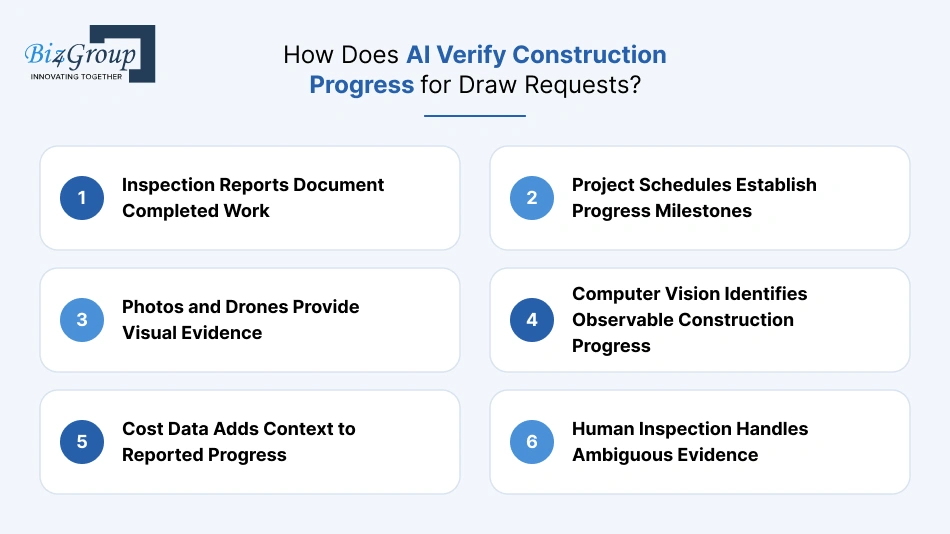
AI verifies construction progress by bringing together inspection reports, project schedules, site photos, drone imagery, and cost data. It gives reviewers a clearer answer to a basic question: Does the work reported in the draw match what the project evidence shows?
Inspection Reports Document Completed Work
Inspection reports give AI a structured record of what was actually observed on site. The system can pull out completion percentages, work categories, inspection dates, and notes.
- Example: An inspection report says concrete work is 80% complete. The platform connects that figure to the relevant draw line so the reviewer doesn't have to search through the report manually.
Project Schedules Establish Progress Milestones
The project schedule shows when major activities should happen. AI can compare those milestones with the progress reported in the draw and flag anything that looks out of place.
- Example: Framing is scheduled to finish in Week 12, but a Week 10 draw reports it as complete. Should that be accepted as-is? The platform flags the timing for the reviewer to check.
Photos and Drones Provide Visual Evidence
Photos and drone images give reviewers another way to check what is happening on site. AI can organize them by date, location, and construction stage for easier comparison.
- Example: Earlier images show foundation work, while recent images show framing. The platform connects those images to the relevant progress claim.
Computer Vision Identifies Observable Construction Progress
Computer vision can identify visible construction elements in site imagery, such as foundations, framing, roofing, or installed equipment. That gives the reviewer additional evidence when assessing a draw.
- Example: The draw reports roofing work as substantially complete, and recent images show the roof structure in place. The system can surface that visual evidence alongside the claim.
Cost Data Adds Context to Reported Progress
Spending patterns can help put reported construction progress into context. When physical progress and project spending look significantly different, the platform can flag the variance.
- Example: A contractor reports 90% completion for a trade while only 45% of its approved budget has been spent. Is there a valid reason for the gap? The reviewer can investigate before approving the amount.
Human Inspection Handles Ambiguous Evidence
AI can organize and compare evidence, but some site conditions still require human judgment. What if an image is unclear, a report conflicts with the schedule, or the visible work doesn't confirm the claimed completion level?
- Example: A photo shows equipment installed, but it doesn't confirm that the installation is complete and operational. The reviewer can request inspection confirmation before approving the related draw amount.
What Data and Integrations Does an AI Draw Platform Need?
An AI draw platform needs connected data from the financial, lending, accounting, project, and inspection systems already involved in the draw process. Each source answers a different review question, so the platform needs to bring them together rather than treat them as separate data silos.
The Financial Foundation
|
Data Source |
What It Tells the Platform |
|---|---|
|
Approved Budgets |
What was approved, how much has been allocated, and what remains |
|
Draws and Invoices |
What the borrower is requesting and which costs support the request |
|
Payment History |
What has already been funded or paid |
These three sources handle the basic money trail. If a $60,000 electrical invoice appears in a new draw, the platform can check the approved electrical budget, compare the invoice with previous draws, and confirm whether the cost has already been paid.
Loan Rules Sit Alongside the Numbers
Loan documents define the rules that the financial data has to follow. The platform may need information about eligible costs, retainage, reserves, advance rates, approval conditions, and other disbursement requirements.
Review question: Does this request meet the funding conditions of the loan?
The answer may require both structured loan data and information pulled from the underlying documents.
Project and Accounting Systems Add Context
Accounting systems provide actual cost and payment records, while loan and project systems provide workflow information.
- Accounting: vendor payments, accounts payable, project costs, commitments
- Loan systems: loan status, draw history, approval stage
- Project systems: milestones, project status, schedules, task progress
A reviewer shouldn't have to reconcile these systems manually every time a draw arrives.
Inspection Data Connects Money to Physical Progress
Inspection systems provide the construction evidence behind the financial request. That can include inspection reports, completion percentages, inspection dates, site photos, and other progress records.
For example, a draw requests funding for framing. The platform can connect:
Approved framing budget → current invoice → previous payments → project milestone → latest inspection evidence
That gives the reviewer the financial and physical context needed to assess the request.
What the Integration Layer Should Ultimately Provide
AI integration services can bring these sources into a common draw record:
Budget + Loan Rules + Invoices + Payment History + Accounting Data + Project Status + Inspection Evidence → Draw Review
The reviewer can then see where the request fits, what has already happened, what evidence supports it, and which items still need attention.
Why Does Human-in-the-Loop Review Still Matter in AI-Driven Draw Approvals?
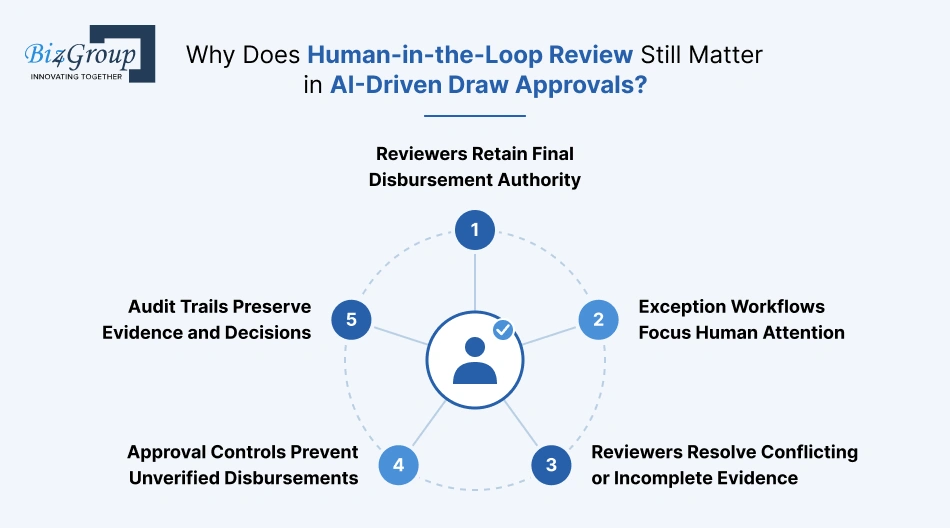
AI can handle the repetitive checking, matching, and flagging involved in draw review. People still need to make the calls that depend on context, conflicting evidence, approval authority, and risk.
Here's what lenders commonly ask:
"We are a construction lender and our draw review process relies on email threads and manual document checks, so I want to understand how AI can speed up disbursement without increasing our risk exposure."
AI can automate document extraction, reconciliation, duplicate checks, and exception screening while keeping final disbursement approval with authorized reviewers.
Reviewers Retain Final Disbursement Authority
The platform can prepare the draw and show the evidence behind it. An authorized reviewer decides whether the request is ready for funding.
Who makes the final call when the system flags an issue? The reviewer does.
Exception Workflows Focus Human Attention
AI can screen every draw for duplicate invoices, unusual variances, missing documents, and other issues. Reviewers can then spend their time on the items that actually need investigation.
For example:
- Flag: $18,500 invoice matches a previous draw
- Evidence: Same vendor and invoice number
- Reviewer: Confirms whether it's a duplicate or a legitimate resubmission
Reviewers Resolve Conflicting or Incomplete Evidence
Draw information doesn't always line up neatly. An inspection report might show 70% completion while the draw claims 90%. A site photo might also leave too much open to interpretation.
What should happen when the evidence doesn't agree? The reviewer can request clarification, check another source, or hold the item until the discrepancy is resolved.
Approval Controls Prevent Unverified Disbursements
AI recommendations need to sit inside clear approval controls. Required documents, unresolved exceptions, approval limits, and funding conditions can determine whether a draw can move forward.
|
Control |
Practical Check |
|---|---|
|
Required documents |
Is the required lien waiver present? |
|
Exception status |
Are all flagged issues resolved? |
|
Approval threshold |
Does this draw require additional authorization? |
|
Funding conditions |
Have the required loan conditions been met? |
Audit Trails Preserve Evidence and Decisions
The platform should record what was flagged, which evidence supported the finding, who reviewed it, and what decision followed.
Later, someone may ask, "Why was this draw approved?" The audit trail should make that answer easy to find.
Still Chasing Draw Documents Across Six Systems?
If your team is piecing together invoices, budgets, payment records, and inspection reports by hand, an AI draw workflow can bring the review into one place and surface the issues that actually need attention.
See What AI Can AutomateHow to Build an AI Construction Loan Draw Management Platform
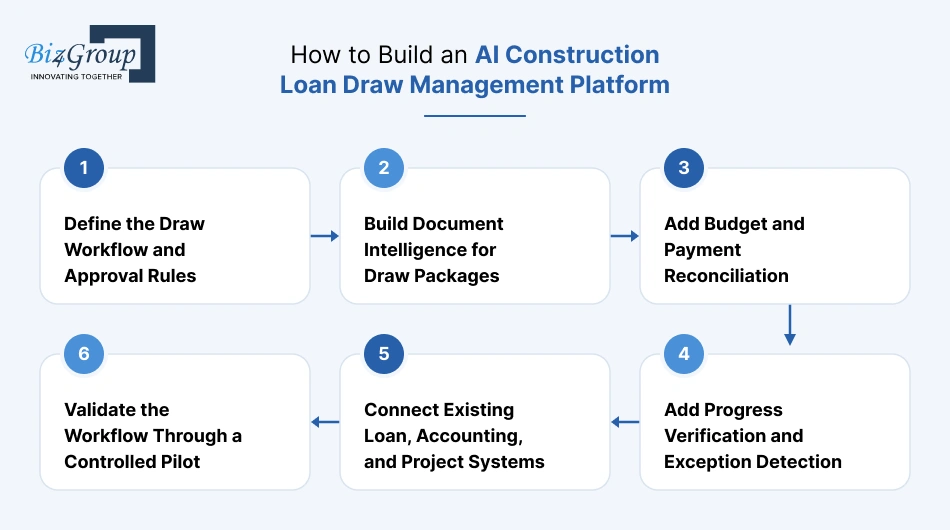
If you're looking to build AI software for construction draw management, start with the draw process people already follow, then automate the parts that slow them down. That means defining the review rules first, then adding document handling, reconciliation, progress checks, integrations, and a real-world pilot.
1. Define the Draw Workflow and Approval Rules
If you're planning to hire AI developers, map what actually happens when a draw comes in before building anything. Who checks it? What documents do they need? What can hold up funding? Who gets the final say?
A simple workflow map should cover:
- Draw submission
- Document and eligibility checks
- Budget and payment review
- Progress verification
- Exception handling
- Final approval
- Disbursement
2. Build Document Intelligence for Draw Packages
Draw packages can contain invoices, draw requests, lien waivers, inspection reports, and plenty of supporting paperwork. AI should pull the useful information out of those files and make it available to the rest of the workflow.
For an invoice, that might mean extracting the vendor, invoice number, amount, date, line items, and project reference while keeping the original document available for verification.
3. Add Budget and Payment Reconciliation
Once the documents are structured, connect the costs to the approved budget and payment history.
The platform should make questions like these easy to answer:
Does this cost belong to the approved budget? Was this invoice already funded? How much is left in this budget line?
If reviewers still need to open spreadsheets and search through old draws for those answers, the automation hasn't gone far enough.
4. Add Progress Verification and Exception Detection
Now bring in the construction side of the review. Connect inspection reports, project schedules, site photos, and other progress evidence to the financial information.
AI can flag things that deserve a closer look:
- A draw reports 90% completion while inspection evidence shows less progress.
- An invoice appears to have been submitted in an earlier draw.
- A requested amount is well outside the expected budget range.
- A required document is missing.
The reviewer gets the issue and the supporting evidence in the same place.
5. Connect Existing Loan, Accounting, and Project Systems
This part deserves careful planning because the same transaction can look different across systems. An invoice might have one identifier in accounting, another reference in the loan platform, and a project-specific cost code elsewhere.
The platform needs to know how those records relate to each other and which system should be trusted when the information doesn't match.
For example:
|
Situation |
What the Platform Should Do |
|---|---|
|
Accounting shows an invoice as paid |
Match it to the relevant draw and payment record |
|
Loan system shows a different status |
Surface the conflict |
|
Project system uses a different cost code |
Map it to the corresponding budget line |
|
A record can't be matched |
Route it for review |
This kind of cross-system record mapping is a practical detail in AI product development work at Biz4Group LLC. In a construction lending workflow, getting the AI extraction right is only part of the job. The system also needs to preserve where each piece of data came from and how it connects to the rest of the draw.
6. Validate the Workflow Through a Controlled Pilot
Don't roll the platform across every project on day one. Pick a defined workflow or a small group of projects and run the system alongside the existing review process.
Track things such as:
- Draw review time: How long does each review take?
- Manual work: Which checks are no longer being done by hand?
- Exception accuracy: Are the right issues being flagged?
- Rework: How often do reviewers have to correct the system?
- Integration issues: Which records fail to match?
The pilot should answer one practical question: Is the platform actually making draw review easier without taking approval control away from the people responsible for the funding decision?
What Does It Take to Implement the Platform?
Building enterprise AI solutions for draw management doesn't have to mean connecting every system and automating every part of draw review at once. Start with one working draw workflow, test it with real data, then expand as the integrations and controls are ready.
A First Pilot Can Focus on One Workflow
Pick one draw path and take it from submission to approval:
Draw package → document extraction → budget check → payment matching → exception review → approval
The pilot should use real documents and involve the people who actually review draws. That quickly shows where AI works well, where it needs correction, and which parts of the process still depend on human judgment.
Production Requires Tested Integrations and Controls
Production brings in the messy stuff. Permissions, data synchronization, approval rules, audit trails, failed integrations, and exceptions all need to work consistently.
There's another detail that's easy to miss: rules change over time. A lender may have used different cost codes, budget structures, or approval requirements for older projects.
So what happens when someone reviews a 2024 draw using a platform configured for 2026?
The system needs to know which version of the budget and business rules applied when that draw was processed. Preserving that historical context is an important part of building AI workflows around existing enterprise systems, and it's the kind of implementation detail that comes up in the work of Biz4Group LLC.
Portfolio Rollout Requires Workflow Standardization
Once the platform moves beyond the pilot, inconsistent project practices can become a headache. One project may require a particular waiver, another may use different cost codes, and another may have a different approval path.
Standardize the common pieces:
- Required draw documents
- Budget and cost-code definitions
- Exception categories
- Approval stages
- Disbursement conditions
- Shared data fields
Keep genuine project-level differences configurable rather than creating separate workflows for every project.
Timelines Depend on Scope, Data, and Integrations
There isn't a useful single timeline for every implementation. A focused pilot with a few data sources is a very different project from a portfolio platform connected to loan, accounting, project, and inspection systems.
|
Factor |
What Affects the Work |
|---|---|
|
Scope |
Number of AI capabilities and workflow stages |
|
Data |
Quality, consistency, and historical records |
|
Integrations |
Number and complexity of connected systems |
|
Controls |
Approval rules, permissions, and exception handling |
|
Rollout |
Number of projects, users, and workflow variations |
The practical approach is to estimate the pilot first, learn from the real workflow, and then size the broader rollout.
What Determines the Cost of Developing an AI Construction Loan Draw Management Platform?
A realistic development range is $120,000-$500,000 for a production-ready platform. A focused pilot may cost less, while a larger multi-project system with several integrations and advanced progress verification can move toward the upper end.
Platform Scope Sets the Baseline Effort
The amount of the draw workflow you want to automate sets the starting point.
|
Scope |
Approx. Cost |
|---|---|
|
Focused pilot |
$40K-$80K |
|
Production platform |
$120K-$300K |
|
Multi-project platform |
$300K-$500K |
Integrations Increase Development Complexity
Each loan, accounting, project, inspection, or document system adds mapping, authentication, testing, and maintenance work. A useful planning range is $10K-$25K per substantial integration.
The tricky part is often data conflicts: Which system should the platform trust when two systems show different information?
Document AI Adds Extraction and Validation Work
Invoices, draw forms, lien waivers, and inspection reports can come in different formats. Extraction, document classification, validation, and human review for uncertain results can add roughly $20K-$60K.
Reconciliation and Exception Detection Add Model Requirements
The platform needs to connect invoices with budget lines, previous draws, payments, vendors, and remaining balances, which makes AI model development more involved than simple document extraction. Budget reconciliation and exception detection can add around $25K-$75K, depending on the number and complexity of checks.
Progress Verification Adds Imagery and Inspection Requirements
Inspection reports, schedules, site photos, drone imagery, and computer vision introduce additional data and model requirements. Budget roughly $30K-$100K for this layer, depending on how advanced the verification needs to be.
Pilot and Production Deployments Require Different Investments
A pilot mainly proves the workflow. Production adds security, permissions, monitoring, audit trails, integration reliability, and broader testing.
|
Area |
Approx. Range |
|---|---|
|
Core draw workflow |
$30K-$100K |
|
Document intelligence |
$20K-$60K |
|
Reconciliation |
$25K-$75K |
|
Progress verification |
$30K-$100K |
|
Integrations |
$10K-$25K each |
|
Production controls |
$20K-$60K |
These figures overlap, so they shouldn't be added mechanically. The final AI construction loan draw management platform cost to develop depends mainly on workflow scope, integration count, data quality, and the depth of AI-driven review required.
How Can Developers and Lenders Measure ROI From AI Draw Automation?
The easiest way to measure ROI is to compare the draw process before and after automation. Track how much time the team spends, how quickly draws move, how often issues are found, how much rework happens, and what the platform costs to run.
|
Metric |
What to Track |
Practical Question |
|---|---|---|
|
Review Hours |
Average hours spent reviewing each draw |
How much reviewer time is being saved? |
|
Draw Cycle Time |
Time from submission to approval or funding |
Are draws moving through the process faster? |
|
Exception Rates |
Percentage of draws or line items flagged |
Is AI finding useful issues without flooding reviewers with alerts? |
|
Error and Rework Rates |
Corrections, reopened draws, repeated checks, and rejected submissions |
Are fewer mistakes making it through the workflow? |
|
Implementation and Operating Costs |
Development, integrations, AI usage, maintenance, and support |
What does the automation actually cost? |
A simple example: if a draw takes 12 review hours before automation and 5 hours afterward, the platform saves 7 hours per draw. Multiply that across the number of draws processed each month, then compare the value of those saved hours with the platform's ongoing costs.
Capture the baseline before implementation. Otherwise, how will you know whether the automation actually improved the process?
How Should Developers and Lenders Evaluate Build, Buy, and Integration Options?
The choice gets easier when you start with the workflow instead of the technology. Ask what your current systems already handle, where the gaps are, and how much customization the draw process actually needs.
|
Option |
Makes Sense When |
Main Benefit |
Main Trade-Off |
|---|---|---|---|
|
Buy |
Your draw workflow is fairly standard |
Faster to get running |
You work within the product's capabilities |
|
Build |
You have specialized rules, workflows, or AI requirements |
Full control over the experience and data model |
Higher development and maintenance effort |
|
Integrate |
Existing systems already handle important parts of the process |
Adds automation without replacing everything |
Data mapping and API issues can get complicated |
|
Hybrid |
Some needs are standard and others are highly specific |
Combines existing tools with custom capabilities |
Requires more planning across systems |
A few questions are worth asking before choosing:
- Can an existing platform handle your approval rules without workarounds?
- Can it connect cleanly to your loan, accounting, and project systems?
- Can you control how AI exceptions are reviewed?
- Will the setup still work when the number of projects and draws increases?
If most answers are yes, buying or integrating may be enough. If the workflow has specialized funding rules, complex reconciliation, or custom AI requirements, a dedicated build may make more sense.
How Many Hours Are Hiding Inside Your Next Draw?
If reviewers are still checking invoices against spreadsheets, hunting for previous payments, and chasing inspection evidence, there's plenty of room to automate the busywork.
Build a Smarter Draw Review WorkflowFrom Draw Package to Disbursement, With Less Manual Work
Construction draw automation gets useful when it can follow the money and the work. Can it match an invoice to the right budget line, spot that it was already paid, connect the cost to inspection evidence, and put the odd cases in front of the right reviewer? That's the real test of an AI construction loan and draw management platform development project.
The tricky part is rarely one clever AI model. It's getting loan, accounting, project, inspection, and document data to agree with each other. That kind of cross-system detail is where Biz4Group LLC brings relevant AI product development experience, including the integration and workflow logic that sits around the model. For teams considering AI consulting services, the better question is: Will this actually remove review work, or just give the team another dashboard to babysit?
FAQs
1. Can AI Review a Construction Draw Without Replacing the Lender?
Yes. AI can extract documents, reconcile costs, check prior payments, flag exceptions, and organize supporting evidence. The lender can retain final approval authority.
2. What Documents Should an AI Construction Draw Platform Process?
A typical draw package can include draw requests, invoices, lien waivers, inspection reports, budgets, change orders, and site photos. Exact requirements depend on the lender's policies and loan structure.
3. How Does AI Detect Duplicate Charges in Construction Draw Requests?
It can compare invoice numbers, vendors, amounts, dates, descriptions, and previous draw records. Similar transactions can be flagged for human review instead of being automatically treated as duplicates.
4. Can AI Reconcile Draw Requests Against the Approved Construction Budget?
Yes. AI can match requested costs to budget line items, compare them with previous draws and remaining balances, and flag overages or unusual variances.
5. How Does AI Verify Construction Progress for Lender Draw Requests?
It can compare inspection reports, schedules, site photos, and reported completion levels. Computer vision can add evidence from images where the construction work is visibly identifiable. Human review remains important when evidence conflicts or is unclear.
6. Can an AI Draw Platform Integrate With Existing Loan and Accounting Systems?
Yes. APIs and integration layers can connect loan, accounting, project, inspection, and document systems. The important part is defining how records are matched and which system is authoritative when data conflicts.
7. What Is the Cost to Develop an AI Construction Loan Draw Management Platform?
A practical planning range is $120,000-$500,000, depending on workflow scope, integrations, document complexity, reconciliation requirements, progress verification, and production controls.
8. How Long Does It Take to Build an AI Construction Draw Platform?
A focused pilot can be built faster than a portfolio-wide platform. The timeline mainly depends on the number of workflows, integrations, document types, historical data requirements, and AI capabilities involved.
9. What Should Lenders Look for in AI Draw Review Software?
Look for budget reconciliation, document extraction, payment matching, exception handling, inspection evidence, approval controls, integrations, and a complete audit trail. The system should also make it clear why an item was flagged and what evidence supports the finding.
10. Is It Better to Build or Buy Construction Draw Automation Software?
Buy or integrate when an existing platform covers most of the workflow. Custom development becomes more relevant when you need specialized approval rules, proprietary workflows, deeper integrations, or custom AI capabilities.
