Location :
Orlando, FL, USA
 +1 (407) 714-1616
 info@biz4group.com


 AI Summary Powered by Biz4AI
- AI automation in healthcare uses software to handle high-volume work like scheduling, eligibility checks, claim checks and note drafting, and 81% of physicians now use AI as administrative workload and staff turnover keep growing.
- Strong starting points include patient access center automation for health systems, prior authorization and revenue cycle, while clinical workflow automation in a healthcare system needs more human oversight, so start with one workflow and a pilot.
- AI healthcare workflow automation can be HIPAA compliant, but no software is HIPAA certified, so you need signed BAAs, a risk analysis, audit logs and a plan for state AI laws, recording consent and FDA rules.
- The cost of AI automation for healthcare runs about $35,000 to $300,000+ depending on workflows, EHR connections and compliance work, and buying ready-made tools usually makes sense for scribes and standard front-desk work.
- Measure ROI with touches per claim, no-show rate and handle time, avoid poor data and missing human review, and expect Biz4Group, an Orlando-based AI development company with 20+ years of experience and 100+ healthcare AI projects, to deliver AI automation for clinics and health systems with an MVP in 2 to 4 weeks and enterprise builds in 6 to 8 weeks.
It’s 8:05 a.m. Three patients are waiting at the front desk, two voicemails ask to reschedule, and one insurance card won’t match the record. Down the hall, your billing lead is rechecking a claim the payer will probably deny again.
Nothing here means your people are doing something wrong. The workflows were built for a smaller patient load, and the extra work lands on the same few people.
AI automation in healthcare is the use of machine learning, language models and workflow software to handle repeatable administrative and clinical-support tasks, such as scheduling, intake, documentation and claims. Your staff review anything that needs clinical or financial judgment.
You may also see it called AI and automation in healthcare or AI in healthcare automation.
How does it reduce administrative burden? Instead of a person verifying insurance, sending reminders, drafting notes and checking claims one at a time, the software runs those steps and flags only what looks wrong. Your team works the flagged cases.
Adoption is already well underway. The AMA’s 2026 survey found that 81% of physicians use AI in their practice, up from 38% in 2023. The 2025 CAQH Index shows the same shift on the administrative side: one in four providers now use AI, mostly for work like eligibility checks, note-taking and patient communications.
Plenty of manual work remains. The same report puts the savings still available through further automation at $21 billion, and only 40% of prior authorizations were fully electronic.
The index tracks automation broadly, not AI alone, so read that figure as a measure of how much manual work is left for AI administrative automation in healthcare to take on.
Most of that work sits in the back office: insurance verification, prior authorizations, coding, billing follow-ups and records management. These tasks make up the core of AI in healthcare administration automation, because they follow clear rules, repeat all day and leave a record you can audit.
Knowing AI automation in healthcare pays off is the easy part. The hard parts are choosing the first workflow, budgeting for integrations and staying HIPAA compliant.
Is AI automation for healthcare HIPAA compliant? It can be, but no software carries a HIPAA certification. Compliance depends on how the tool handles protected health information and how your team uses it. We cover the details in the compliance section.
We’ve spent 20+ years building software, with 1,000+ projects delivered and more than 100 in healthcare AI. One example is RevIntegrity, a platform we built for hospital billing teams. It reads payer contracts, flags claims paid below the contracted rate and drafts the appeal. Staff review and finalize every appeal, and every financial action goes into an audit trail that can’t be edited afterward.
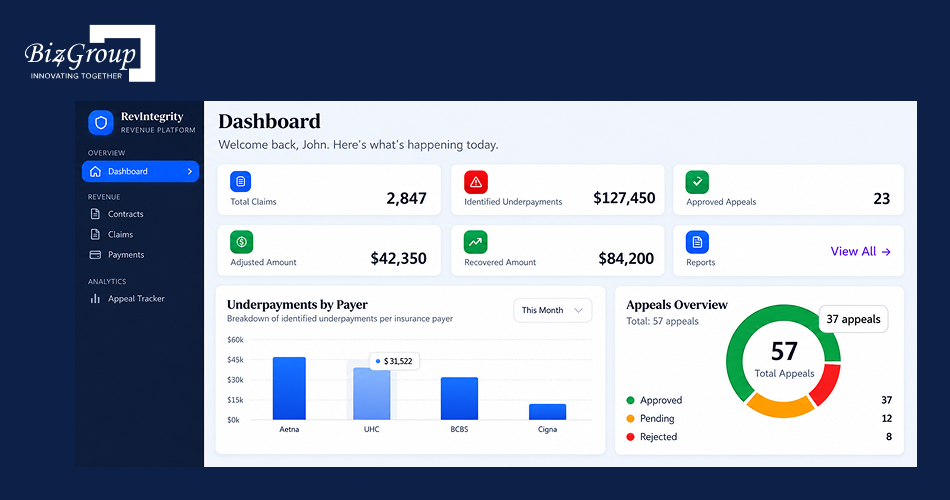
That’s the rule we apply across our healthcare work: AI does the repeat work, and a person owns the decision. In this guide, we break down AI automation in healthcare step by step and show you where to start. Here’s what you’ll get:
- Which workflows can AI in healthcare workflow automation handle today, and which still need a person?
- What do clinical workflow automation in a healthcare system and patient access center automation for health systems look like in practice?
- What does AI automation for clinics cost, and how do you roll it out in seven steps?
Which workflow costs your team the most hours each week? Keep that answer in mind as you read.
What Is AI Automation in Healthcare, and How Do AI and Automation Work Together?
AI automation in healthcare combines two things. Automation runs a fixed sequence of steps, such as sending a reminder or copying a field into the EHR. AI adds judgment to those steps: reading a message, predicting a no-show or drafting a note. Together, AI and automation in healthcare take repeat work off your staff and send them only the exceptions.
Most healthcare centers run on people, paperwork and software that don’t share data. Every handoff between them is a chance for an error.
Here’s how AI automation for healthcare changes those handoffs, and where a person still needs to step in.
How Does AI Automation Compare with Manual Healthcare Center Workflows?
The clearest way to see the difference is workflow by workflow. The table shows what changes and, just as important, what your staff still do.
|
Workflow |
Manual approach |
With AI automation |
What your staff still do |
|---|---|---|---|
|
Scheduling |
Phone calls, spreadsheets and reminders sent by hand |
AI suggests open slots, predicts likely no-shows and sends reminders |
Approve overrides and handle complex bookings |
|
Patient intake |
Paper or PDF forms retyped into the EHR |
Digital forms with data checks that flag missing or mismatched fields |
Review flagged records |
|
Insurance verification |
Staff check payer portals one patient at a time |
The system checks eligibility before the visit and flags problems |
Resolve flagged cases |
|
Documentation |
Clinicians type notes after the visit |
AI drafts the note from the visit or dictation |
Review, edit and sign every note |
|
Claims |
Billers catch errors after a denial |
AI checks claims for errors before submission |
Make the final coding and billing calls |
|
Patient messages |
Staff answer the same questions by phone or portal |
AI answers routine questions and routes the rest |
Handle clinical and sensitive questions |
Look at the last column. In every row, a person reviews, approves or resolves the exceptions.
We build with human review wherever AI touches a clinical or financial decision. We also start projects with one workflow and agree on how we’ll measure it before anything gets built.
What Technologies Power AI for Automation in Healthcare?
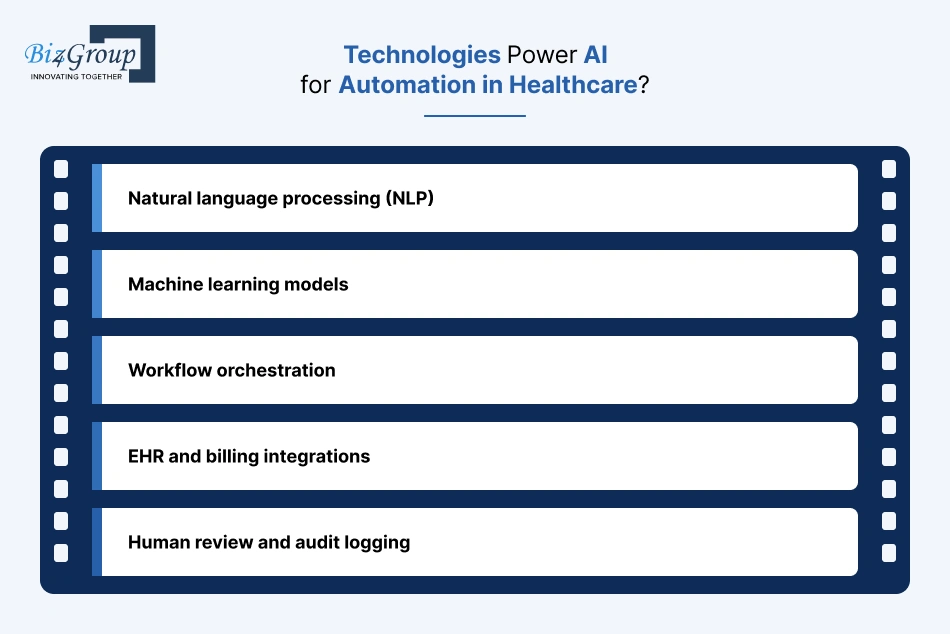
Five pieces work together behind the scenes. You don’t need to build each one, but you should know what to ask a vendor about.
- Natural language processing (NLP): Reads and writes human language, so the system can understand a patient’s text message or a clinician’s dictation. Large language models are the newest form of this.
- Machine learning models: Find patterns in past data to predict outcomes, such as which patients are likely to miss an appointment or which claims are likely to be denied.
- Workflow orchestration: Runs multi-step processes in order and moves work between people and systems. Think of it as the traffic controller.
- EHR and billing integrations: Connect the AI to the records and claims systems your team already uses, so data stays consistent. This is where timelines tend to stretch, because every system exposes data differently.
- Human review and audit logging: Routes anything uncertain to a person and records who approved what. Without this layer, software makes unchecked decisions.
We give each model one defined job, such as summarizing a note or predicting a no-show, and validate it before launch. A model with one clear job is easier to test, easier to explain to your compliance team and easier to fix.
How Do AI and Automation in Healthcare Differ from Rule-Based Automation?
Rule-based automation follows instructions you write in advance: if X happens, do Y. It works well for stable, predictable steps. It breaks when the input changes, such as a patient who texts “can I move my Tuesday thing” instead of picking a slot from a menu.
AI handles that variation because it works from patterns in data and context instead of a fixed script.
One correction to a common claim: most healthcare AI tools do not keep learning by themselves after launch. They get better when the vendor retrains or updates them, which is why monitoring matters.
Automation also isn’t one thing. It runs on a ladder, and each rung adds capability and risk.
|
Level |
What it does |
Healthcare example |
Where a person stays involved |
|---|---|---|---|
|
Rules and RPA |
Follows fixed if-then steps |
Sends a reminder 48 hours before every appointment |
Writes the rules and fixes exceptions |
|
Predictive machine learning |
Estimates what is likely to happen from past data |
Flags patients likely to miss a visit, or claims likely to be denied |
Decides what to do with each flag |
|
Generative AI |
Drafts, summarizes and answers in plain language |
Drafts a visit note or a reply to a patient message |
Reviews and approves before anything is sent or signed |
|
Agentic AI |
Plans and carries out multi-step tasks across systems within set limits |
Checks eligibility, books the slot, sends the confirmation and escalates if the payer rejects it |
Sets the limits, approves high-risk actions and handles escalations |
McKinsey’s healthcare survey describes this same shift, from using generative AI for content and single tasks to using agentic AI to coordinate processes end to end. Respondents most often named administrative efficiency as the area with the greatest potential.
Which rung do you need? We usually recommend starting with the first three. Agentic AI makes sense once your data, integrations and review steps are solid.
With the basics clear, the next question is timing: why are so many healthcare centers moving now?
Still Managing Healthcare Like It’s 2015?
Healthcare organizations report up to 30%-40% reduction in manual workload after adopting AI automation.
Automate Smart with Biz4GroupWhy Is AI in Healthcare Automation Critical for Healthcare Centers Today?
AI in healthcare automation matters now because three pressures are landing at once: administrative work that keeps growing, front-desk teams that are hard to keep staffed, and patients who give up when they can’t get through. AI and automation in healthcare give your existing team room to cover all three by taking over the repeat work.
Which one hits your center hardest? Here’s what the data says about each, and what’s changing over the next year.
1. Administrative Workload and AI Administrative Automation in Healthcare
Prior authorization alone takes about 13 hours of physician and staff time per physician each week, according to the AMA’s 2025 prior authorization survey of 1,000 physicians. Those physicians completed an average of 40 prior authorizations a week, and 32% said requests are often or always denied.
Prior authorization is the heaviest example, but the same pattern runs through the rest of the front and back office:
- Patient registration and data entry
- Insurance verification
- Billing and claims follow-ups
- Scheduling changes
Each one looks small. Added up across a week, they take hours away from patient care.
This is the work AI automation in healthcare takes on first: checking eligibility, assembling authorization requests, drafting claim corrections and flagging only the exceptions for a person.
We usually start a project by timing one workflow. Count the weekly hours, multiply by your loaded hourly cost, and you have a baseline to measure any automation against.
2. Front-Desk Staffing and Patient Access Center Automation for Health Systems
Staffing is the first problem. MGMA’s May 2026 poll found that 29% of medical groups had higher staff turnover than the year before, with strain concentrated in medical assistants, nursing staff and front-desk teams. MGMA also notes what that does to patients: call abandonment rises, scheduling accuracy falls, check-in slows and complaints climb.
You can see the result on the phones. BCG’s July 2026 analysis of patient access centers found that up to 40% of scheduling-related interactions go unresolved on first contact. Calls go unanswered or get dropped after long waits, failed transfers and no after-hours coverage.
Each unresolved call is a patient who may not come back.
AI helps in a specific way here. It answers routine calls and texts at any hour, confirms and reschedules appointments, and hands complex or sensitive requests to a person with the context already attached. Your staff stop being the only line of defense for every call.
The same approach scales down to AI automation for clinics, where a single front desk covers phones, check-in and billing questions.
3. CMS Deadlines and AI in Healthcare Workflow Automation
Deadlines are making electronic prior authorization less optional.
CMS’s Interoperability and Prior Authorization final rule (CMS-0057-F) requires affected payers to decide standard requests within seven days and expedited requests within 72 hours, and to give a reason for every denial. Payers must also offer prior authorization APIs, with those requirements starting in 2027.
The 2025 CAQH Index shows how unevenly the industry is prepared. In a CAQH pilot survey, 63% of medical plans were still building their electronic prior authorization APIs, and only 20% of providers had started implementation.
What does that mean for you? Payers are building electronic connections. To use them, your own systems have to send and receive that data. That integration work is part of any AI automation for healthcare project, so scope it early.
4. Manual Process Costs and AI Automation in Healthcare
Start with simple arithmetic. If prior authorization takes 13 hours a week, that’s 676 hours a year per physician. In a ten-physician group, that’s 6,760 hours, before you count billing follow-ups, intake or scheduling. The AMA survey also found that two in five physicians have staff who work only on prior authorization.
The hidden costs sit next to those hours: errors and rework, claims that age while a denial waits, and overtime when a front-desk employee quits.
The 2024 Change Healthcare cyberattack showed another cost of manual work. When clearinghouse systems went down, staff submitted claims and prior authorization documents by hand. The 2025 CAQH Index says that added strain to workflows that were already largely manual.
Automation brings its own dependency, so any plan needs a manual fallback for outages. We cover that in the challenges section.
The strongest case for AI for automation in healthcare sits where your hours are highest and your rules are clearest. Which workflow is that at your center? The next section shows which workflows AI can take on today and which still need a person.
Which Healthcare Workflows Can AI Workflow Automation Handle Today, Administrative or Clinical?
AI workflow automation handles high-volume, rule-bound work well today: reminders, eligibility checks, claim checks, call routing and note drafting. It handles clinical judgment poorly, so people keep every decision that carries clinical or financial risk.
The three tables below show, workflow by workflow, what AI does, what your staff keep and how mature the tools are. Maturity ratings are our assessment of the evidence cited. Proven means widely used with consistent results. Maturing means growing use with results that vary by setting. Early means mostly pilots.
1. AI in Healthcare Workflow Automation Across Your Center
This table maps the seven workflows we see most often, from front desk to care team.
|
Workflow |
Team that owns it |
What AI does |
What your staff keep |
Maturity |
|---|---|---|---|---|
|
Reminders and rescheduling |
Front desk |
Predicts likely no-shows, sends reminders, offers open slots |
Cost, transport and complex rebooking conversations |
Proven |
|
Call and message handling |
Patient access |
Answers routine calls and texts, routes the rest with context |
Clinical, sensitive and escalated requests |
Maturing |
|
Intake and registration |
Front desk |
Collects forms digitally, flags missing or mismatched fields |
Review of flagged records |
Maturing |
|
Eligibility and prior authorization |
Billing |
Checks coverage, assembles requests, tracks status |
Peer-to-peer reviews, appeals, payer disputes |
Maturing |
|
Coding, claims and denials |
Revenue cycle |
Flags coding gaps, checks claims before submission, sorts denials |
Final coding and billing decisions |
Maturing |
|
Clinical documentation |
Clinicians |
Drafts visit notes from the conversation |
Review, edit and signature |
Maturing |
|
Patient message sorting |
Care team |
Sorts messages by topic and urgency, drafts replies |
Clinical action and sign-off |
Early |
Row 2 is the core of patient access center automation for health systems. BCG’s July 2026 research found that up to 40% of scheduling interactions go unresolved on first contact, and it expects 40% to 50% of calls to still need a human.
Rows 4 to 7 connect to payer systems or the chart, so they take more integration work than rows 1 to 3. Which row costs your team the most hours?
2. AI Administrative Automation in Healthcare: Back-Office Tasks
Start with where manual work remains. The 2025 CAQH Index tracks how many medical plan transactions are fully electronic. Eligibility checks and claim submission are nearly there. Prior authorization and attachments are not.
|
Task |
What AI does |
What your staff keep |
KPI to track |
Fully electronic today (CAQH 2025) |
|---|---|---|---|---|
|
Eligibility verification |
Checks coverage before the visit, flags mismatches |
Fix flagged records |
Eligibility-related denial rate |
96% |
|
Prior authorization |
Checks if authorization is required, assembles documents, tracks status |
Peer-to-peer reviews and appeals |
Turnaround time, touches per request |
40% |
|
Claim submission |
Flags coding gaps and missing data before submission |
Final code selection |
First-pass acceptance rate |
98% |
|
Attachments |
Pulls and attaches supporting records to claims and appeals |
Confirm the right documents |
Days to submit |
24% (down from 32%) |
|
Claim status |
Checks status automatically, queues stalled claims |
Work the stalled claims |
Days in A/R, status checks per claim |
81% |
|
Denials and appeals |
Sorts denials by cause, drafts appeal letters |
Review and sign off every appeal |
Overturn rate, days to appeal |
Not tracked |
CAQH measures electronic transactions in general, not AI alone. Use the right-hand column to see where manual work is thickest.
Leaders are moving this way. An Oct. 2026 MGMA poll found that 63% of medical group leaders say their revenue cycle operations are leaning toward more automation. Coding came up most, followed by prior authorization, denials and appeals, and payment posting.
Three cautions from the same sources:
- AI cannot shorten a payer’s review: In MGMA’s Sept. 2026 poll, 44% of leaders said prior authorization turnaround got slower in 2026, and 7% said faster. AI helps with assembly and status checks, not the payer’s decision time.
- Evidence on AI coding accuracy is thin: A July 2026 GAO review found few independent studies.
- Fix the process first: A revenue cycle leader at Harvard Medical Faculty Physicians warned that automating a broken process repeats its mistakes across thousands of claims. MGMA suggests tracking touches per claim to confirm a tool actually removed work.
3. Clinical Workflow Automation in a Healthcare System: Care-Team Tasks
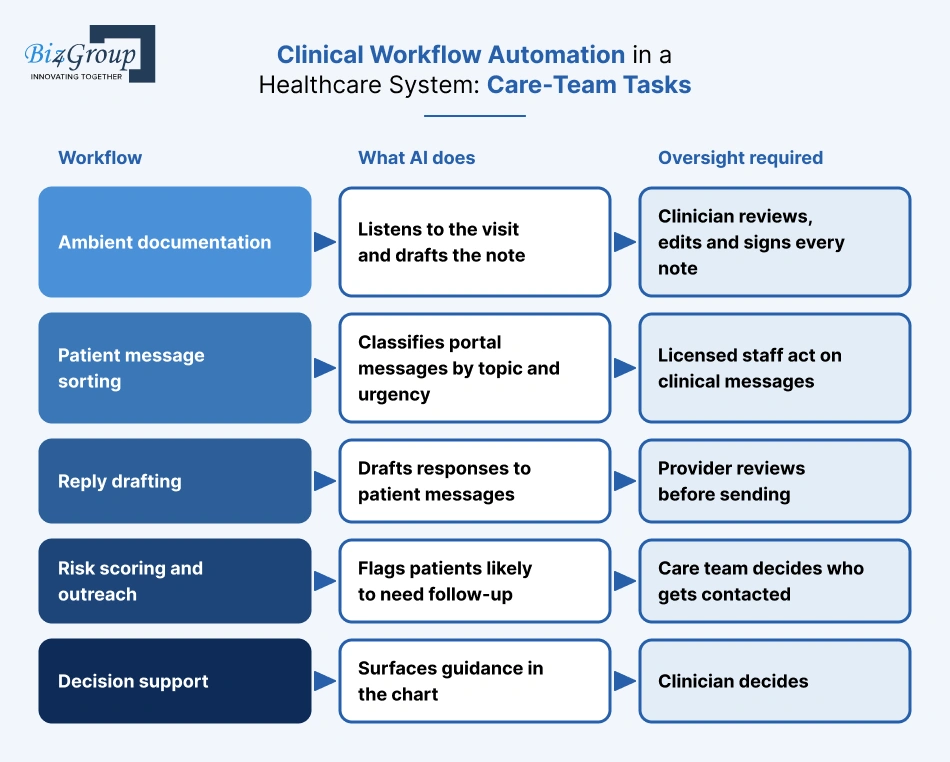
The evidence here is stronger for clinician well-being than for productivity. MGMA’s May 2026 poll asked practice leaders whether new AI tools made their providers more productive. 46% said yes, 27% saw no gains, 14% were unsure and 13% don’t use AI.
|
Workflow |
What AI does |
Oversight required |
Main risk |
Evidence today |
|---|---|---|---|---|
|
Ambient documentation |
Listens to the visit and drafts the note |
Clinician reviews, edits and signs every note |
Errors, missed context, patient consent rules |
Burnout fell from 51.9% to 38.8% in 30 days in a six-system study. Time saved: roughly 7 to 22 minutes per day |
|
Patient message sorting |
Classifies portal messages by topic and urgency |
Licensed staff act on clinical messages |
Misrouted urgent message |
Early, mostly single-system studies |
|
Reply drafting |
Drafts responses to patient messages |
Provider reviews before sending |
California AB 3030 requires a disclaimer on generative-AI messages with clinical information unless a licensed provider reviews them |
Maturing |
|
Risk scoring and outreach |
Flags patients likely to need follow-up |
Care team decides who gets contacted |
Bias from unequal historical data: a 2019 Science study found a widely used algorithm underestimated Black patients’ needs because it used cost as a proxy |
Maturing |
|
Decision support |
Surfaces guidance in the chart |
Clinician decides |
Performance can drop in live encounters compared with benchmarks |
Early |
On documentation, MGMA’s review found that the strongest findings are about burnout. A Midwestern study of 220 clinicians and 314,000 encounters found time savings growing from about 7% to 15% over 150 days, with billed wRVUs up about 2%. The authors of a NEJM AI editorial concluded that AI scribes are not productivity tools yet.
Plan your business case around well-being first. Treat extra patient visits as an upside you measure, not a promise.
We write the human sign-off rule for every AI output from the first sprint. For clinical work, ask a vendor one question first: who reviews this before it reaches the chart or the patient?
Pick the row that matches your answer from the intro. The next section shows what these workflows look like in real use.
What Would Your Team Do With 10 Extra Hours a Week?
Administrative automation can reclaim 8-12 hours per staff member weekly. That time could be redirected to patient care and growth.
Unlock Operational Gains with Biz4GroupWhat Are the Top AI Automation Use Cases for Healthcare Centers and Clinics?
AI automation for healthcare center operations shows the strongest results when applied to high-volume, repeatable workflows. Below are the most impactful use cases healthcare leaders are prioritizing today.
1. Patient Engagement and Front-Desk Automation
Patient engagement is often the first area where healthcare centers apply AI automation. Manual call handling, appointment reminders, and intake forms create friction for both patients and staff. AI automates these touchpoints by managing conversations, capturing intent, and routing requests in real time.
Project Spotlight: AI Chatbot for Personalized Support to Homeless and At-Risk Veterans
Using exceptional AI chatbot development services, Biz4group developed an AI chatbot focused on providing immediate, personalized support to homeless and at-risk veterans across the U.S. The solution automated access to healthcare and crisis services through natural conversations.
Key Features
- Voice and text-based conversational support
- Real-time crisis detection with staff alerts
- Location-based healthcare and service matching
- Secure, HIPAA-compliant data handling
The platform demonstrates how AI automation for healthcare center engagement can reduce response time while improving continuity of care for vulnerable populations.
Also read: AI virtual healthcare assistant development guide
2. Appointment Scheduling and Resource Optimization
Scheduling remains a major operational bottleneck for many healthcare centers. Manual processes lead to overbooking, cancellations, and inefficient staff utilization. AI automation predicts demand, adjusts schedules dynamically, and sends timely reminders.
By applying AI solutions for healthcare center automation, organizations reduce no-shows and improve patient flow. When combined with thoughtful interface design from a healthcare-focused UI/UX design company, these systems are easier for patients and staff to adopt.
Also read: Top 15 UI/UX design companies in USA
3. Automated Clinical Documentation and Records Management
Documentation consumes significant clinician time. AI automates record creation by capturing structured data from interactions and syncing it across systems. This improves accuracy while reducing duplication.
Healthcare centers often integrate these tools directly with existing platforms. The ability to integrate AI with EHR and EMR systems ensures records stay consistent and compliant across departments.
4. Personalized Health Insights and Decision Support
AI analyzes lab results, patient history, and ongoing metrics to surface actionable insights. This supports clinicians and empowers patients with clearer guidance. Unlike static reports, AI systems adapt recommendations as new data arrives.
Healthcare centers often build custom AI healthcare software solutions to match specific clinical goals and data requirements.
Project Spotlight: AI-Powered Athletic Health Solution
This AI athletic health solution was built to deliver personalized health insights through automated analysis of blood test data. The platform supports performance optimization and long-term health tracking.
Key Features
- Automated blood test analysis
- Personalized diet and performance recommendations
- Appointment scheduling and private consultations
- Secure storage of sensitive health data
This solution shows how AI automation for healthcare center analytics improves outcomes without increasing clinician workload.
5. Revenue Cycle and Administrative Workflow Automation
Administrative inefficiencies directly impact revenue. AI automates tasks such as insurance verification, billing workflows, and claims routing. This reduces delays and minimizes errors caused by manual handling.
Pro tip: When exploring this path, evaluate the cost of implementing AI in healthcare alongside potential revenue recovery and operational savings (we’ve covered these below, don’t worry).
6. Advanced Conversational AI and Virtual Care Experiences
Some healthcare centers go beyond chatbots and introduce immersive conversational experiences. AI avatars and intelligent agents engage patients in ongoing wellness programs, education, and follow-ups.
This category increasingly overlaps with agentic AI in healthcare, where systems take autonomous actions across workflows rather than responding to single prompts.
Project Spotlight: Dr. Truman AI Avatar
As a seasoned AI avatar development company, Biz4Group built delivered an AI-powered health companion that blends personalized consultations with wellness recommendations and digital commerce.
Key Features
- AI avatar with natural conversation
- Personalized health and supplement recommendations
- Secure health history and document uploads
- Integrated membership and eCommerce workflows
The results highlight how agentic process AI automation for healthcare center engagement can drive higher retention and operational efficiency.
7. Scalable Automation for Growing Healthcare Organizations
As healthcare centers expand, manual processes fail to scale. AI automation supports growth by standardizing workflows across locations while allowing local flexibility.
Organizations often partner with an experienced AI app development company to ensure scalability, security, and long-term support.
In the next section, we will break down a clear, step-by-step process on how to implement AI automation in healthcare center workflows without disrupting daily operations or compliance requirements.
How to Implement AI Automation in Healthcare Center in 7 Steps?
Implementing AI automation for healthcare center operations requires structure and clarity. Successful projects follow a phased approach that balances speed with safety. Below is a practical roadmap healthcare leaders can follow.
Step 1. Identify High-Impact Automation Opportunities
Start with workflows that are repetitive, time-consuming, and prone to error. These areas deliver faster value and easier adoption.
Common starting points include:
- Appointment scheduling
- Patient intake and registration
- Billing and administrative coordination
- Record management and follow-ups
This step ensures AI automation aligns with real operational needs, not assumptions.
Step 2. Assess Data Readiness and Infrastructure
AI relies on clean, accessible data. Before implementation, review how patient data, scheduling records, and administrative information are stored.
Focus on:
- Data accuracy and consistency
- Access permissions and security
- Integration points with existing systems
Pro tip: Only rely on professional AI integration services to ensure automation layers work smoothly with current platforms.
Step 3. Define the Right AI Model and Scope
Not every problem needs the same type of AI. Some workflows benefit from predictive models, while others require conversational or autonomous systems.
At this stage, decision makers evaluate:
- Task complexity
- Volume of interactions
- Need for adaptability
Solutions may include predictive analytics, conversational systems, or even generative AI models for content and documentation workflows.
Step 4. Build a Pilot or MVP Before Full Rollout
Launching everything at once increases risk. A controlled pilot validates assumptions and reveals gaps early.
A focused MVP helps:
- Test usability and performance
- Gather staff feedback
- Measure early ROI
Healthcare leaders often partner with teams offering MVP development services to move quickly without long-term commitment.
Also read: Top 12+ MVP development companies in USA
Step 5. Integrate AI Into Existing Workflows
Automation works best when it blends into daily operations. AI systems should support staff rather than forcing new processes overnight.
This step includes:
- Connecting AI to EHR and administrative systems
- Aligning automation with existing SOPs
- Training teams on usage and escalation
Step 6. Scale With the Right Development Partner
As automation expands, technical expertise becomes critical. Healthcare centers often choose to outsource AI healthcare software development to accelerate delivery and reduce internal strain.
Whether building a platform, integrating automation, or launching an AI product, working with an experienced development team ensures security, compliance, and scalability.
Step 7. Monitor, Optimize, and Evolve
AI automation improves over time when monitored correctly. Continuous optimization keeps workflows aligned with changing patient needs and operational goals.
Key activities include:
- Reviewing performance metrics
- Updating models and rules
- Expanding automation into new areas
In advanced scenarios, healthcare centers collaborate with an agentic AI development company to deploy systems capable of managing multi-step workflows autonomously.
This structured approach reduces risk and maximizes ROI. In the next section, we will address compliance and ethical considerations that healthcare leaders must account for when deploying AI automation.
70% of AI Projects Fail Due to Poor Execution
A structured rollout increases success rates dramatically.
Contact Biz4Group TodayIs AI Healthcare Workflow Automation HIPAA Compliant, and Which Other Regulations Apply?
AI healthcare workflow automation can be HIPAA compliant, but no tool is certified. HIPAA applies the same rules to AI and automation in healthcare as to any system that handles protected health information: signed BAAs, risk analysis, access controls and audit logs. State AI laws, FDA rules and recording-consent laws add requirements on top.
Here is what applies as of October 2026, in the order most healthcare centers run into it.
1. HIPAA Privacy and Security Rules for AI Automation in Healthcare
HIPAA has no AI clause. The Privacy and Security Rules apply to any tool that touches protected health information, so map where PHI enters and leaves each workflow: prompts, logs and outputs.
A documented risk analysis is required today under 45 CFR 164.308(a)(1)(ii)(A), and it remains the gap OCR cites most often.
No software carries a HIPAA certification. Compliance depends on the tool and on how your team uses it.
2. Business Associate Agreements for AI Automation for Healthcare Vendors
Any vendor that creates, receives, maintains or transmits PHI for you is a business associate, and the BAA must be signed before PHI flows.
Vendors selling AI for automation in healthcare often license models from other providers. Ask whether your vendor also holds BAAs with the AI and cloud providers behind its product, and whether the contract bars training models on your data without your authorization.
A HIPAA-compliant AI healthcare platform development company should put those terms in place before any PHI is shared and extend them to every provider in the chain.
We hold our own builds to that standard: BAAs first, only the minimum necessary data sent to a model, and a log of every request.
3. The Pending HIPAA Security Rule Update for AI in Healthcare Automation
HHS proposed a major Security Rule rewrite on January 6, 2025. It would end the split between required and addressable safeguards and make controls such as encryption and multi-factor authentication mandatory.
It is not final. OCR is still working through more than 4,700 comments, and the federal regulatory agenda now lists July 2027 for final action.
The current rule stays in force, and every system in your AI in healthcare automation program that handles electronic PHI falls under whatever the final rule requires. Build the controls now.
4. CMS Prior Authorization Rule (CMS-0057-F) and AI Administrative Automation in Healthcare
Under the CMS Interoperability and Prior Authorization rule, affected payers must decide expedited requests in 72 hours and standard requests in seven days, and give a specific reason for every denial. They must also report prior authorization metrics publicly each year.
Prior authorization APIs are due January 1, 2027. Prior authorization is the largest target for AI administrative automation in healthcare, so this rule shapes what you can connect.
MGMA reports that few practices have heard from their EHR vendors about it. Ask yours which payers’ APIs will connect, when and at what cost.
5. State AI Disclosure Laws for AI Automation for Clinics
California’s AB 3030 (January 1, 2025) requires a disclaimer, and instructions for reaching a human, on generative-AI messages that contain clinical information. It does not apply if a licensed provider reviews the message first.
Clinics using AI for texts, reminders or intake chat should check each message type. Scheduling and billing messages sit outside AB 3030, while anything with clinical information sits inside.
Texas’s TRAIGA (January 1, 2026) requires providers to disclose AI use in diagnosis or treatment clearly and conspicuously, with an emergency exception. Texas SB 1188 requires practitioners to review AI-generated records. California’s AB 489 bars AI from implying it holds a healthcare license, and Illinois bars independent AI therapy.
Until courts settle the federal preemption fight, these laws remain enforceable. Build disclosure rules by state, or follow the strictest one.
6. Recording Consent for AI Scribes and Patient Access Center Automation for Health Systems
HIPAA treats scribe documentation as treatment, so it needs no separate patient authorization. State recording laws are where the exposure sits, and California and roughly a dozen other states require every party’s consent.
Voice agents that answer calls record audio too, which makes consent a design question for any patient access center automation for health systems.
Plaintiffs allege that Sharp HealthCare recorded visits without consent and that the system wrote consent statements into charts. A federal suit filed April 8, 2026 against Sutter Health and MemorialCare makes similar claims, adding that audio went to a third-party vendor.
Get consent before recording starts, show a clear recording indicator, and never let software auto-write consent into the chart.
7. FDA Rules for Clinical Workflow Automation in a Healthcare System
FDA revised its clinical decision support guidance on January 6, 2026 and reissued it January 29. Clinician-facing software that meets four statutory criteria is not a medical device.
The guidance covers clinician-facing tools only. It does not address patient-facing chatbots or symptom checkers.
Tools that schedule, route or draft documents usually sit outside FDA oversight. Anything that scores, ranks or recommends needs a classification check early.
8. Nondiscrimination Duties for AI in Healthcare Workflow Automation (Section 1557)
Under 45 CFR 92.210, covered entities must make reasonable efforts to identify decision tools that use race, color, national origin, sex, age or disability as inputs, and to mitigate the risk of discrimination.
It covers AI and non-AI tools alike, including tools used for prior authorization and medical necessity decisions. The compliance date was May 1, 2025.
Parts of the 2024 rule face litigation, so confirm current status with counsel. Keep an inventory of your tools, ask vendors which inputs they use, and compare outputs across patient groups.
9. AI Governance and Audit Readiness for Healthcare AI Workflow Automation
A Black Book Research survey of 182 hospital leaders found that only 22% were highly confident they could produce a complete AI audit trail within 30 days. Only 29% enforced policies on model inventory, lineage and sign-offs.
Teams running healthcare AI workflow automation need a record of every tool. Strong AI governance in healthcare starts with one committee, an inventory of every tool, an approval step before launch and a named owner for each tool.
AI compliance software can map rules to controls, monitor data access and write time-stamped audit logs, which removes much of the manual evidence work.
Test yourself: pick one workflow and try to produce its full record in 30 days.
This section is general information, not legal advice. Have your compliance counsel confirm what applies in your states.
How Much Does AI Automation for Healthcare Cost, and What Drives the Price?
The cost of AI automation for healthcare typically ranges from $35,000 to $300,000+. That range is an estimate. Your own AI automation in healthcare cost will differ with your EHR, your data quality, the number of sites and how much compliance work the project needs.
A single-workflow pilot sits at the low end, and a multi-site build with several EHR connections sits at the top. Below, you’ll see what each feature costs, how the features add up, what moves the price, what teams miss and when to buy instead of build.
1. AI Automation in Healthcare Cost Breakdown by Feature
We scope cost feature by feature, starting with one workflow measured against agreed targets. These ranges are estimates for a custom build, not quotes.
|
Feature |
What it covers |
Estimated cost (USD) |
|---|---|---|
|
Discovery, workflow mapping and design |
Time study of the target workflow, data mapping, staff and patient screens, success metrics |
$8,000 to $12,000 |
|
Patient communication and reminders |
AI chat, text and voice for routine questions, confirmations and rescheduling, with handoff to staff, the core of patient access center automation for health systems |
$12,000 to $22,000 |
|
Intake and registration |
Digital forms, data checks, insurance card capture, flagged mismatches |
$6,000 to $12,000 |
|
Scheduling and no-show prediction |
Risk scoring, waitlist backfill, rules by visit type |
$10,000 to $25,000 |
|
Eligibility and prior authorization |
Coverage checks, request assembly, status tracking, exception queue, core AI administrative automation in healthcare |
$15,000 to $35,000 |
|
Clinical documentation assistance |
Drafted notes from dictation or visit audio, clinician review step, chart write-back, a common clinical workflow automation in a healthcare system |
$15,000 to $40,000 |
|
Claims checks and denial workflows |
Pre-submission checks, denial sorting by cause, appeal drafting with staff sign-off |
$15,000 to $45,000 |
|
Simple API connection |
Link to a scheduling or billing tool |
$5,000 to $10,000 |
|
EHR integration, read-only (per system) |
FHIR or HL7 connection that reads patient and schedule data |
$15,000 to $30,000 |
|
EHR integration, write-back (per system) |
FHIR or HL7 connection that writes notes, orders or status back to the chart |
$30,000 to $60,000+ |
|
Dashboards and reporting |
Role-based views and KPIs such as no-show rate, touches per claim and handle time |
$6,000 to $20,000 |
|
Security, HIPAA controls and audit logging |
Encryption, role-based access, append-only audit trail, risk analysis support |
$5,000 to $20,000 |
|
Testing, validation and rollout |
Scenario testing, accuracy checks, staff training, phased go-live |
$5,000 to $15,000 |
|
Support and model tuning |
Monitoring, updates, retraining, integration upkeep |
$1,500 to $5,000 per month |
How the features add up. Pick the rows you need and add them. These three examples show the arithmetic.
|
Project size |
Rows included |
Low total |
High total |
|---|---|---|---|
|
Focused pilot |
Discovery, patient communication, simple API connection, security, testing |
$35,000 |
$79,000 |
|
Multi-workflow rollout |
Discovery, patient communication, scheduling, eligibility and prior authorization, one read-only EHR connection, security, testing |
$70,000 |
$159,000 |
|
Multi-site build |
Discovery, all seven feature rows, one read-only and one write-back EHR connection, dashboards, security, testing |
$142,000 |
$336,000+ |
For example, the pilot’s low total is $8,000 + $12,000 + $5,000 + $5,000 + $5,000 = $35,000. Its high total is $12,000 + $22,000 + $10,000 + $20,000 + $15,000 = $79,000.
The totals overlap because each row has its own range, and your scope and complexity decide where you land. Large programs with more EHRs or sites can pass $300,000.
Support is not in these totals. At $1,500 to $5,000 per month, plan on $18,000 to $60,000 for the first year after launch.
2. Factors Affecting the Cost of AI Healthcare Workflow Automation
- Number of workflows: Each added workflow adds design, testing and training. AI in healthcare workflow automation projects that start with one workflow cost far less than ones that try to automate everything at once.
- Integrations: A simple API connection costs $5,000 to $10,000, a read-only EHR connection $15,000 to $30,000 and a write-back connection $30,000 to $60,000 or more. Published 2026 guides put Epic integrations at roughly $18,000 to $80,000.
- Level of AI: Rule-based steps sit at the low end of each range, and predictive, generative and agent-style features sit near the high end or above.
- Data quality and volume: Messy records add cleanup work, covered under hidden costs below.
- Compliance depth: HIPAA controls, state disclosure rules, recording consent and audit logging all add engineering and review time, and heavier needs push the security row toward $20,000.
- Human review design: Review queues, sign-off screens and escalation paths take real build time, and they are what keep AI and automation in healthcare safe.
- Interface depth: Simple staff screens stay near the low end of the ranges, while role-based, multi-user interfaces push toward the high end.
- Sites and users: More locations mean more configuration, training and support.
- Usage fees: Model calls, voice minutes and messages bill per use and rise as adoption grows.
3. Hidden Costs in Healthcare AI Workflow Automation
- EHR and API fees: Vendors charge annual interface or API fees that are separate from build costs. Published estimates run from about $5,000 to $15,000 a year for Epic maintenance to $15,000 to $30,000 for some Oracle API access.
- Change management and training: Budget $5,000 to $15,000, depending on team size.
- Data cleanup: Fixing historical records can add $3,000 to $12,000.
- Workflow redesign: Automating a broken process repeats its mistakes, so fixing it first can add $5,000 to $20,000.
- First-year support: At $1,500 to $5,000 per month, that’s $18,000 to $60,000 on top of the build.
- Compliance upkeep: Annual risk analysis, legal review of state laws and BAA management continue after launch.
- Downtime planning: Every automated workflow needs a manual fallback for outages.
- Scaling phases: Extending to a new department or location adds roughly $10,000 to $30,000 per phase.
- Slower weeks after go-live: Staff need time to adjust, so plan for lower output at first.
4. Cost Optimization for AI Automation for Clinics and Larger Centers
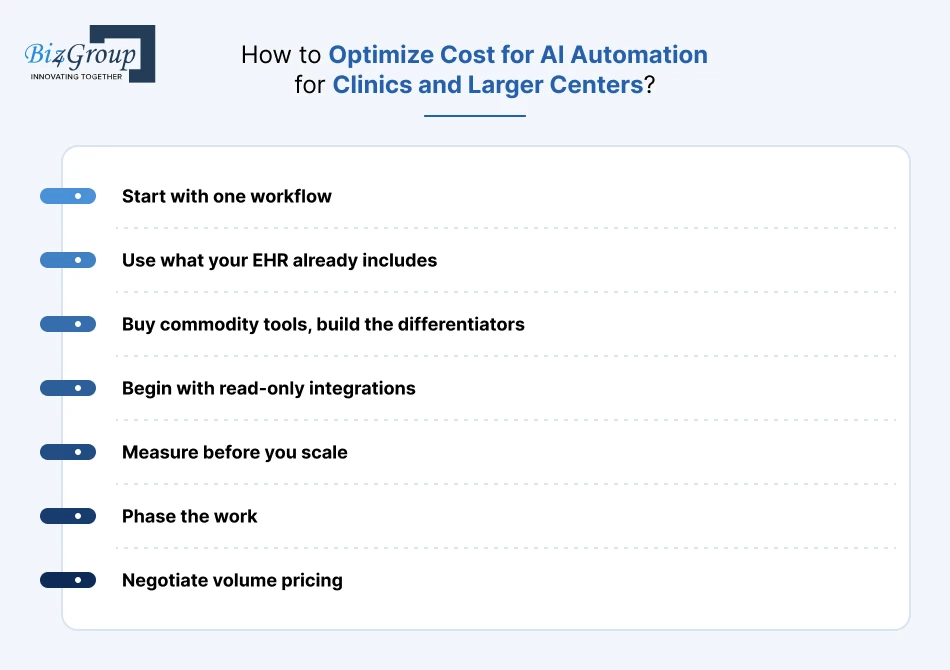
- Start with one workflow: Pick the one with the most hours and the clearest rules, and run a pilot before you commit to a full build.
- Use what your EHR already includes: MGMA’s IT lead advises small groups to begin with AI features already in the EHR or an enterprise AI tool approved for PHI, and to start in revenue cycle, where denial root-cause analysis often pays back fast.
- Buy commodity tools, build the differentiators: Scribes and standard receptionist tools are cheap to subscribe to. Custom rules, multi-site logic and contract logic justify a build.
- Begin with read-only integrations: At $15,000 to $30,000 per system, they cost half of write-back or less. Add write-back once the pilot proves its value.
- Measure before you scale: Track touches per claim, no-show rate and handle time, and expand only when they improve.
- Phase the work: Phasing with an experienced provider of AI automation services lets you fund one workflow, measure it and then expand.
- Negotiate volume pricing: Per-provider and per-minute prices drop with scale, so ask early.
5. Buy vs Build for AI in Healthcare Automation
Most centers end up with a mix. Buy the standard pieces and build only where your rules or systems are unusual.
|
Workflow |
Buy (subscription) |
Build (custom) |
Better fit |
|---|---|---|---|
|
Documentation |
Self-serve scribes from about $39 to $120 per provider per month. Mid-market $120 to $300. EHR-integrated enterprise tools reportedly $400 to $700+ |
$15,000 to $40,000 for an assistance layer, plus model costs |
Buy for most specialties |
|
Front-desk voice and chat |
About $100 to $1,500 per month, and some plans add per-minute fees |
$12,000 to $22,000, plus usage costs |
Buy when booking rules are standard. Build for multi-site logic |
|
Eligibility and prior authorization |
Add-ons from about $250 per month, scaled by volume |
$15,000 to $35,000, plus payer API work |
Buy for common payers. Build when workflows span many payers |
|
Claims and denials |
Outsourced RCM at roughly 4% to 8% of collections, or software subscriptions |
$15,000 to $45,000 |
Buy a managed service. Build for custom rules and contract logic |
|
Multi-site orchestration |
Limited by vendor APIs |
$30,000 to $60,000+ per write-back connection, plus the feature rows above |
Build |
Run the break-even math before you decide. At 10 providers and $300 per provider per month, subscriptions cost $36,000 a year, or $108,000 over three years. A $35,000 to $79,000 custom pilot equals roughly one to two years of those subscriptions, so it pays off only if it replaces several tools or does something they can’t.
Cost is only half the decision. The next section covers how to measure the return.
Manual Processes Cost More Than You Think
Healthcare centers lose $200,000+ annually to inefficiencies tied to scheduling, billing, and admin delays. Automation shifts that curve.
Let's Talk NumbersHow Do You Measure the ROI of AI Workflow Automation in Healthcare?
Return on investment is the lens through which healthcare leaders evaluate AI initiatives. AI automation for healthcare center operations delivers value across cost reduction, productivity, patient experience, and scalability.
The table below outlines the most important KPIs used to measure success. These indicators help leaders connect AI investments with tangible business outcomes.
|
KPI Category |
Metric |
What It Measures |
Typical Impact Range |
|---|---|---|---|
|
Administrative efficiency |
Time spent on manual tasks |
Reduction in non-clinical workload |
25%-45% decrease |
|
Revenue cycle performance |
Claim processing time |
Speed of reimbursement |
20%-40% faster |
|
Staff productivity |
Tasks completed per staff member |
Operational output |
15%-30% increase |
|
Patient experience |
Appointment wait time |
Access and responsiveness |
20%-35% reduction |
|
Error reduction |
Documentation and billing errors |
Accuracy and compliance |
30%-50% fewer errors |
|
Cost optimization |
Operational overhead |
Expense control |
10%-25% savings |
|
Scalability |
Cost per patient served |
Efficiency at scale |
15%-30% improvement |
Healthcare center administrative automation with AI allows organizations to see gains quickly because repetitive tasks are the first to be optimized. As automation expands into more complex workflows, ROI continues to improve.
Short-Term vs Long-Term ROI
AI automation generates value in phases.
- Short-term gains appear within the first 3-6 months through reduced administrative effort and faster turnaround times.
- Mid-term gains emerge as workflows stabilize and staff productivity improves.
- Long-term gains come from scalability, consistency, and data-driven decision making.
Without defined KPIs, automation success becomes subjective. Clear metrics ensure AI automation for healthcare center initiatives stay aligned with organizational goals.
When tracked consistently, these KPIs provide leadership with confidence that automation investments support sustainable growth rather than short-term efficiency alone.
In the next section, we will examine common challenges, risks, and mistakes healthcare centers face during AI automation projects and how to mitigate them effectively.
Why Do Healthcare AI Workflow Automation Projects Fail, and How Do You Avoid It?
AI automation for healthcare center initiatives delivers strong results when implemented correctly. However, many projects struggle due to planning gaps, technical missteps, or unrealistic expectations. Understanding these challenges early helps leaders avoid costly setbacks.
Below are the most common issues healthcare organizations face, along with proven mitigation strategies.
Challenge 1. Poor Data Quality and Fragmented Systems
AI systems rely on consistent, accurate data. In many healthcare centers, data lives across disconnected platforms.
Solutions
- Audit data sources before implementation
- Clean and standardize historical records
- Use enterprise AI solutions to unify automation across departments
Challenge 2. Resistance from Staff and Adoption Challenges
Staff may view automation as disruptive or fear loss of control. This slows adoption and limits impact.
Solutions
- Involve staff early in planning
- Provide role-based training
- Position AI as a support tool, not a replacement
Challenge 3. Underestimating Compliance and Security Risks
Automating sensitive workflows without proper safeguards creates compliance exposure.
Solutions
- Embed security controls into AI workflows
- Maintain audit logs for automated actions
- Assign clear ownership for compliance oversight
Challenge 4. Choosing the Wrong Technology Partner
Limited healthcare experience or under-skilled teams often lead to rework and instability.
Solutions
- Partner with teams experienced in healthcare automation
- Hire AI developers with domain expertise and compliance awareness
Challenge 5. Scaling Too Quickly Without Validation
Expanding automation before validating results increases operational risk.
Solutions
- Pilot solutions in controlled environments
- Track KPIs before scaling
- Refine workflows based on real-world usage
Most challenges tied to AI automation for healthcare center projects are avoidable. Clear planning, strong data foundations, staff engagement, and the right technical expertise turn risk into opportunity.
Avoid Costly Mistakes Before They Happen
Healthcare automation fails when expertise is missing. The right partner turns risk into confidence.
Talk to Biz4Group’s Automation ExpertsWhy Choose Biz4Group for AI Automation in Healthcare Across the USA?
Biz4Group is an Orlando-based AI development company with 20+ years of experience. We build AI and automation in healthcare for providers, payers and digital health companies across the U.S., from front-desk tools to revenue cycle platforms.
Here is what that experience means for your project.
1. Proven Record in AI Automation for Healthcare
We’ve delivered 1,000+ projects for 750+ clients, including 100+ healthcare AI projects. Our team of 300+ consultants, architects and AI specialists has built billing and claims platforms, ambient documentation, patient engagement agents and remote monitoring systems.
Clients across industries have included Adobe and Google.
2. HIPAA-Conscious Engineering for AI Healthcare Workflow Automation
Healthcare teams comparing a HIPAA-compliant AI healthcare platform development company with a generic software vendor should ask for the BAA, the audit trail design and the list of AI providers that touch PHI.
We sign a BAA before any PHI is shared, and we require BAAs with the cloud and AI providers that touch it. Encryption, role-based access and audit trails go into the architecture from the first sprint.
No software carries a HIPAA certification. We build the technical safeguards, and we work with your compliance team on your risk analysis, policies and training.
3. Human Oversight in Healthcare AI Workflow Automation
Good AI in healthcare automation gives each model one defined job, such as summarizing, searching, predicting or running a single task, and validates it before launch. We write the human sign-off rule for every AI output and retest after each model update.
We test how a model behaves when inputs are incomplete or wrong, not only when they’re clean.
4. EHR Integration for AI in Healthcare Workflow Automation
AI for automation in healthcare only pays off when it connects to the systems your staff already use. We connect platforms to EHRs, EMRs, labs, telehealth tools and billing systems through FHIR, HL7 and SMART on FHIR, including payer APIs for the CMS prior authorization rules due in January 2027.
Access depends on each vendor’s approval process, so we confirm integration paths during discovery.
5. Pilot-First Delivery for AI Automation for Clinics and Health Systems
We start with one workflow, such as intake, documentation or prior authorization, and measure it against targets you agree on first. Then we release by department or site, so clinical work keeps running.
Support continues after launch: monitoring, security updates and model improvements. You can hire us for a full build, a defined stage such as discovery or an MVP, or team augmentation.
6. Third-Party Proof for AI Administrative Automation in Healthcare
You don’t have to take our word for it. Our 4.9 out of 5 Clutch rating is public, with 28 reviews, and our Upwork rating is 4.8 out of 5 across 120+ reviews. Our client retention rate is 85%.
Sanjeev Verma, our founder and CEO, has been a featured author on Entrepreneur, IBM and TechTarget. Dave Caplis, our Technical Director, leads the architecture and delivery of our HIPAA-compliant AI platforms for hospitals, clinics and health-tech companies.
Whether you want patient access center automation for health systems, revenue cycle tools or clinical workflow automation in a healthcare system, we can scope it with you. Book a strategy session to talk through your first workflow.
Wrapping Up!
Start where the hours are highest and the rules are clearest. That’s the one idea running through this guide.
AI automation in healthcare works best on high-volume, scripted work: reminders, eligibility checks, claim checks, call routing and note drafting. People still own every decision with clinical or financial risk, and BCG expects 40% to 50% of patient access calls to need a human for now. That is why AI and automation in healthcare works best as a partnership between software and staff.
You also know the other half. The cost of AI automation for healthcare runs from $35,000 to $300,000+ depending on scope. HIPAA and state rules apply from day one, and the HIPAA Security Rule overhaul is still only a proposal, so build the controls now.
Your next three moves:
- Time one workflow for a week. Count the hours, the handoffs and the errors. This is the baseline for any AI workflow automation in healthcare.
- Check every vendor and tool. Ask for a BAA from every AI vendor and confirm consent and disclosure rules for every recording or messaging tool. This is what makes AI healthcare workflow automation safe to run.
- Decide buy or build for each workflow. Then run a pilot against targets you set first. A pilot is the safest way into healthcare AI workflow automation.
We’ve spent 20+ years building software, with 100+ healthcare AI projects behind us. We start with AI consulting that maps your workflow and business case, then use AI integration to connect it to your EHR, payer and billing systems. We build the human review steps and run a pilot through MVP development before anything scales.
When a process spans several systems, we build AI agents that act within set limits and escalate to your staff. That is where AI for automation in healthcare moves beyond single tasks.
The same approach covers:
- AI administrative automation in healthcare, such as prior authorization and claims.
- Front-desk and patient access center automation for health systems.
- Clinical workflow automation in a healthcare system, such as documentation and message sorting.
- AI in healthcare automation across several sites and partner labs.
Smaller practices can start with AI automation for clinics: one pilot and one EHR connection.
Which workflow costs your team the most hours each week? Start there and talk to us when you’re ready to scope it.
FAQ
1. What is AI automation in healthcare, and how does it work?
AI automation in healthcare uses software that reads, decides and acts on routine work such as scheduling, eligibility checks, claim checks and note drafting. It connects to your EHR and payer systems, handles clear cases on its own and sends unclear ones to staff. People keep every clinical and financial decision.
2. What are examples of AI and automation in healthcare for clinics and hospitals?
Common examples include appointment reminders, patient access center automation for health systems, eligibility and prior authorization checks, denial sorting and clinical workflow automation in a healthcare system, such as note drafting. In a February 2026 MGMA poll of practice leaders, scheduling ranked first (31%), then calls (27%), registration and eligibility (23%) and prior authorization (16%).
3. How much does AI automation for healthcare cost?
Custom builds typically cost $35,000 to $300,000+, depending on workflows, EHR connections, compliance work and sites. A focused pilot sits near the low end. Ready-made tools cost less upfront, with AI scribes running roughly $39 to $700 per provider per month. Support for a custom build adds $1,500 to $5,000 a month.
4. Is AI healthcare workflow automation HIPAA compliant?
It can be, but no software is HIPAA certified. You need a signed BAA with every vendor that handles PHI, a documented risk analysis, access controls and audit logs. State laws add disclosure and recording-consent rules. The HIPAA Security Rule overhaul is still only a proposal, so the current rule applies.
5. Will AI workflow automation in healthcare replace administrative staff?
Not so far. AI administrative automation in healthcare is changing tasks more than headcount. In a June 2026 MGMA poll, 68% of practice leaders had not redesigned a role or adjusted staffing with AI in the past year. Changes centered on revenue cycle and assistant roles, while schedulers, billers and coders more often moved to reviewing AI output.
6. How long does it take to implement healthcare AI workflow automation?
Most AI in healthcare workflow automation projects start with an MVP, which can go live in 2 to 4 weeks. An enterprise build with several EHR connections, compliance review and multi-site rollout typically takes 6 to 8 weeks. Vendors of ready-made scheduling tools report three to five weeks. Confirm EHR access during discovery.
7. Can AI automation for clinics work with Epic, athenahealth or my existing EHR?
Yes, usually without replacing your EHR. AI tools connect through FHIR or HL7 interfaces, and Epic and Oracle Health run marketplaces for third-party tools. Read-only connections cost about $15,000 to $30,000 per system and write-back connections $30,000 to $60,000 or more. Approval timelines vary by vendor, so confirm access early.