 Location :
Orlando, FL, USA
Location :
Orlando, FL, USA +1 (407) 714-1616
 info@biz4group.com
 AI Summary Powered by Biz4AI
- AI can extract rent, dates, escalation clauses, and other key terms from lease documents.
- Automated alerts help teams track renewal deadlines, expirations, and upcoming rent increases.
- Portfolio-wide search makes it easier to find leases, clauses, and obligations without manually reviewing documents.
- The choice between buying and building depends on budget, workflow needs, compliance requirements, and integrations.
- Custom development may cost between $25,000 and $350,000, depending on features, AI capabilities, integrations, and complexity.
- Biz4Group can develop features such as AI-powered document extraction, amendment comparison, clause search, and automated alerts.
A tenant's renewal option window closes on a Friday, nobody notices, and the lease quietly rolls over on terms you'd never agree to today. It happens more than people admit, usually because the dates are sitting in a PDF or someone's personal spreadsheet.
That's the problem commercial lease management platform development is meant to fix. You get a system that reads your leases, pulls out the rent, escalations, CAM terms, and notice periods, and then keeps track so nothing slips.
In this guide, we'll walk through what's worth tracking, how AI handles messy amendments, and how rent increases and CAM reconciliation get automated. We'll also look at whether to build your own or go with something like Visual Lease or Prophia, plus what it costs and how to tell if it's paying off.
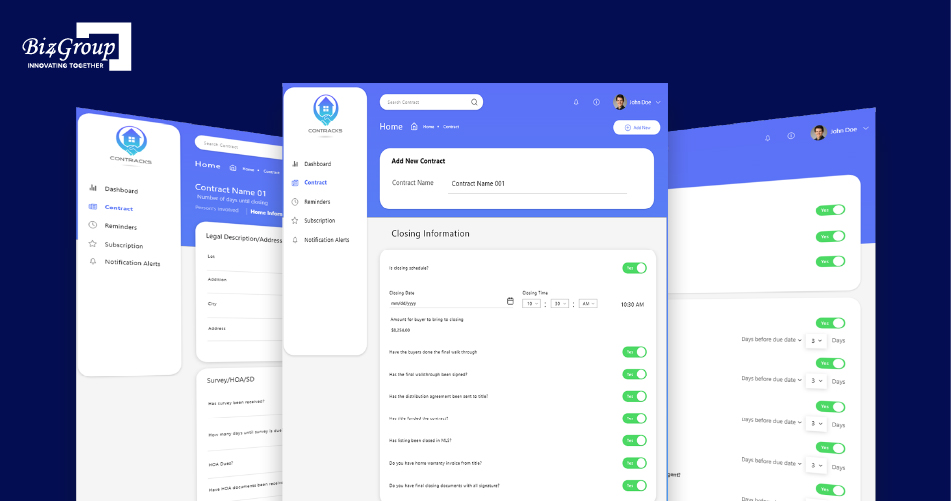
A bit of context on where we're coming from. At Biz4Group, a U.S.-based AI product development company, we built Contracks, a real estate contract app where reminders are set by contract type and AI summarizes long documents. It's sale contracts, not leases, but it taught us that an alert is only useful if it's tied to the right document and the right obligation. tied to the right document and the right obligation.
So if you're figuring out how to build a commercial lease management platform with automated alerts, let's start with what the manual way is really costing you.
What Does Manual Lease Tracking Actually Cost Commercial Property Portfolios?
Manual lease tracking creates costs through administrative hours, missed deadlines, incorrect rent calculations, and lost revenue. For a growing portfolio, these costs can add up even when the team has a spreadsheet-based process in place.
Consider a portfolio with 100 commercial leases. If employees spend an average of 30 minutes per lease each month checking dates, updating records, reviewing amendments, and verifying rent terms, that adds up to:
- 50 hours per month spent on manual tracking.
- 600 hours per year spent on repetitive lease administration.
- $21,000 in annual labor costs, assuming a loaded employee cost of $35 per hour.
Illustrative calculation, not an industry benchmark. Actual costs depend on lease complexity, portfolio size, and staffing costs.
That estimate does not include the financial impact of missed renewal notice windows, unwanted auto-renewals, incorrect rent escalations, or missed CAM recoveries. It also excludes the time spent searching PDFs and amendments during audits, due diligence, or tenant disputes. When critical lease knowledge sits with one or two employees, staff turnover creates another operational risk.
Signs you've outgrown spreadsheets:
- Renewal dates and notice windows depend on manual reminders.
- Lease terms and amendments are scattered across files.
- Rent escalations and CAM calculations require repeated checks.
- Teams maintain separate or conflicting lease records.
- Due diligence and audit preparation take too long.
- Critical lease information depends on individual employees.
A commercial lease management platform can reduce repetitive administration by centralizing lease records, automating date tracking, and helping teams manage rent obligations before they become costly problems.
Which Lease Dates and Terms Should a Platform Track Automatically?
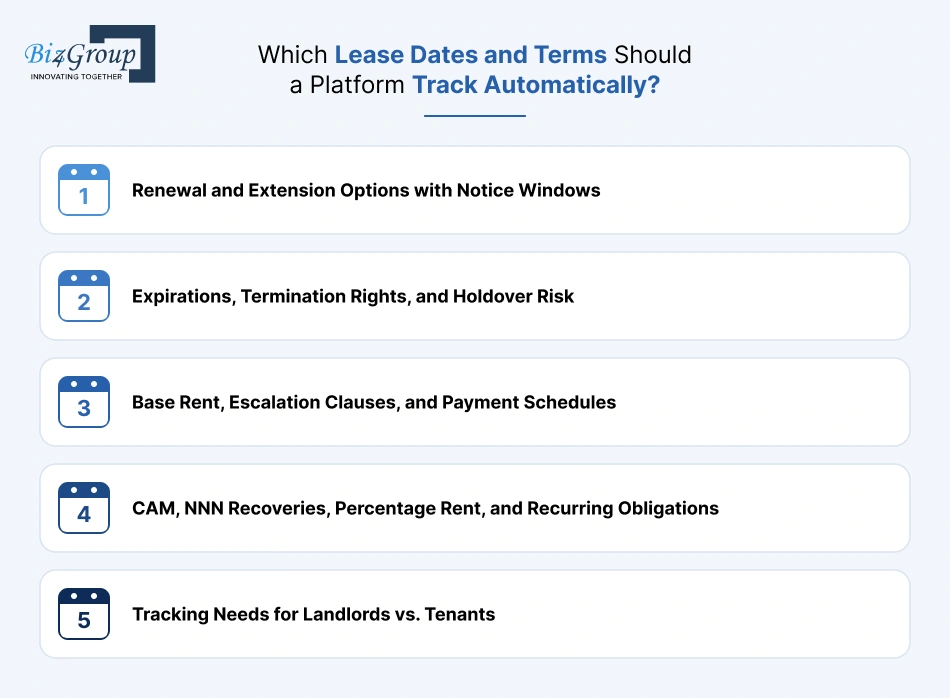
A commercial lease management platform should track contractual dates, financial terms, and recurring obligations that affect rent, occupancy, and compliance. This includes renewal deadlines, lease expirations, rent increases, CAM recoveries, and termination rights.
Renewal and Extension Options with Notice Windows
Record renewal options, extension rights, exercise deadlines, and required notice periods. Automated reminders help landlords and tenants act before contractual windows close.
Expirations, Termination Rights, and Holdover Risk
Track commencement and expiration dates, early termination rights, break clauses, and holdover provisions. This helps teams prepare for renewals, vacancies, or lease transitions.
Base Rent, Escalation Clauses, and Payment Schedules
Store base rent, payment dates, frequency, and increase schedules. Track fixed increases and CPI-based adjustments, including applicable caps and floors, to support accurate rent calculations.
CAM, NNN Recoveries, Percentage Rent, and Recurring Obligations
Track common area maintenance (CAM), taxes, insurance, operating expense recoveries, and percentage rent. Record calculation rules, exclusions, caps, and reconciliation dates alongside recurring obligations such as insurance renewals and inspections.
Tracking Needs for Landlords vs. Tenants
Landlords need to monitor rent collection, escalations, renewals, CAM recoveries, and vacancies. Tenants need visibility into payment obligations, notice windows, expense reconciliations, and lease compliance. For multi-location businesses and corporate occupiers, portfolio-wide filters by property, location, entity, and responsible team make these obligations easier to manage.
|
Lease information |
What the platform should track |
Why it matters |
|---|---|---|
|
Renewal and extensions |
Option dates, notice windows, extension terms |
Prevents missed renewal opportunities |
|
Expirations and terminations |
Expiration dates, break clauses, termination rights |
Helps plan renewals and vacancies |
|
Base rent and escalations |
Payment schedules, fixed increases, CPI adjustments |
Supports accurate rent calculations |
|
CAM and NNN recoveries |
Recoverable expenses, caps, exclusions, reconciliation dates |
Reduces billing errors and missed recoveries |
|
Percentage rent |
Sales thresholds, reporting periods, payment terms |
Helps verify tenant payments |
|
Recurring obligations |
Insurance renewals, inspections, maintenance deadlines |
Keeps contractual responsibilities on track |
|
Portfolio details |
Property, tenant, landlord, entity, and location |
Supports multi-property lease management |
How Does AI Turn Lease Documents into Structured, Searchable Data?
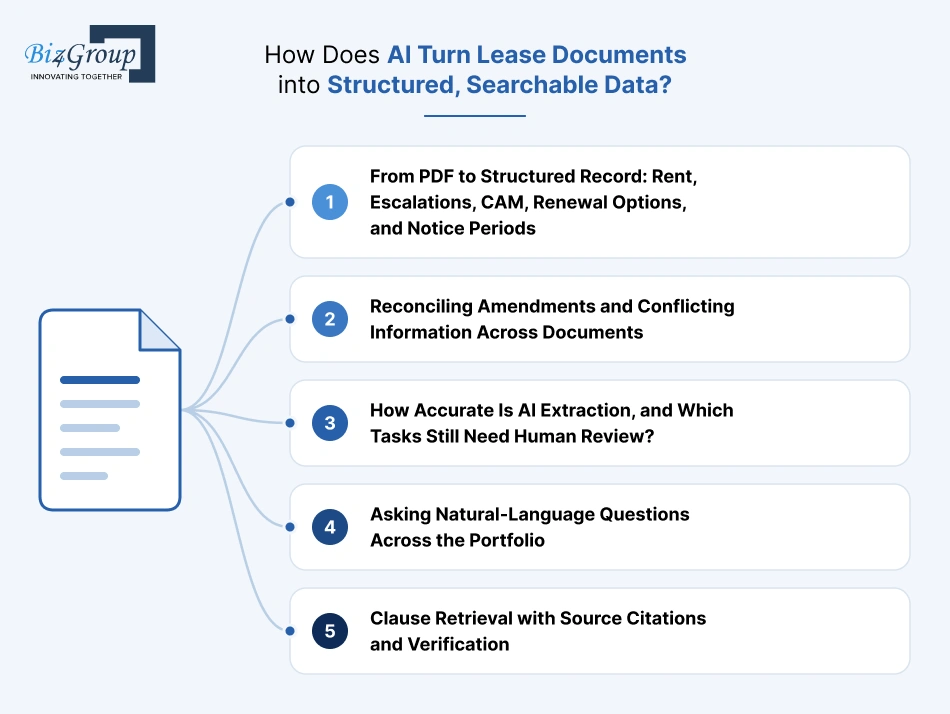
AI reads lease PDFs, scanned agreements, and amendments to pull out important information such as rent, renewal dates, escalation clauses, and tenant obligations. Instead of searching through hundreds of pages, property teams can find these details in one searchable record.
Here's a question that comes up when that process becomes too time-consuming:
“Our team spends days extracting rent, escalation clauses, and CAM terms from lease PDFs every time we onboard a new property, so I want to understand how AI lease abstraction can do this automatically.”
AI-powered lease abstraction uses OCR and language models to extract rent, escalation clauses, CAM terms, key dates, and other lease details from PDFs. The platform organizes these details into structured records and links them to the original pages for verification.
Platforms such as Prophia and Leasecake already use AI for tasks like lease abstraction and document search. Biz4Group works on the custom AI product development side of this space, where businesses can build similar capabilities around the way they manage their own lease portfolios.
From PDF to Structured Record: Rent, Escalations, CAM, Renewal Options, and Notice Periods
First, the platform reads the uploaded lease using OCR and AI. It then pulls out details such as:
- Tenant, landlord, and property names
- Base rent and payment schedules
- Fixed and CPI-based rent increases
- CAM charges and expense recovery terms
- Renewal options, expiration dates, and notice periods
For example, if a lease says rent increases by 3% every year, the platform can capture the percentage, effective date, and calculation rule. The team can then see when the next increase is due without searching the agreement again.
Reconciling Amendments and Conflicting Information Across Documents
Here's where things can get tricky. A lease amendment might change the expiration date or rent amount, while the original agreement still shows the old terms. If the platform reads only the original lease, it could store incorrect information.
Consider this example:
|
Document |
Expiration date |
|---|---|
|
Original lease |
December 31, 2027 |
|
First amendment |
December 31, 2028 |
|
Second amendment |
June 30, 2029 |
AI can compare these documents and flag the differences. Someone should still verify the latest applicable term before the platform updates the main lease record.
How Accurate Is AI Extraction, and Which Tasks Still Need Human Review?
AI can extract a lot of lease information, but it won't get every clause right. Scanned pages, handwritten changes, unusual wording, and conflicting amendments can all cause problems.
Prophia has published figures about material errors in lease abstracts and rent rolls, along with an accuracy claim for its AI-assisted abstraction offering. These are company-reported figures, not industry-wide benchmarks.
Some information should always get a closer look:
- Conflicting terms across amendments
- Complex CPI formulas, caps, and floors
- Unusual CAM exclusions and recovery provisions
- Ambiguous renewal and termination clauses
- Financial terms that could lead to significant billing errors
A useful platform should flag uncertain results instead of quietly treating them as correct.
Asking Natural-Language Questions Across the Portfolio
Once lease information is organized, users can ask questions in plain English rather than searching through folders or applying spreadsheet filters.
For example:
- Which leases expire next year without renewal options?
- Which properties have rent increases coming up this quarter?
- Which tenants have outstanding CAM reconciliation obligations?
- How do renewal terms differ across our properties?
Leasecake's AI-powered lease queries show how this kind of search can work. A custom platform developed with a company such as Biz4Group could also be built to answer questions using a business's own lease records and workflows.
Clause Retrieval with Source Citations and Verification
Getting an answer is one thing. Knowing where it came from is just as important.
If someone asks when a tenant must exercise a renewal option, the platform should return the date along with the relevant clause and original document page. If an amendment changes that deadline, users should be able to see the updated provision too.
This is especially important when teams use AI-generated information to make rent, renewal, or termination decisions. The original lease should remain the final reference, not the AI-generated answer.
How Do You Automate Renewals, Rent Escalations, and CAM Reconciliation?
Lease automation connects important dates, financial calculations, and follow-up tasks. Instead of relying on separate spreadsheets and manual checks, property teams can see what's due, who is responsible, and which items need review.
Critical-Date Alerts, Ownership, and Escalation Workflows
A reminder needs an owner and a next step. Set alerts for renewal notice deadlines, expirations, rent increases, and CAM reconciliations. Assign each task to the responsible person and escalate it if it remains unresolved.
Fixed and CPI-Based Rent Increases at Scale
Fixed increases can be calculated automatically, but CPI-based increases need to follow the exact lease wording. The platform must account for the index and comparison period, effective date, caps, floors, and any amendments.
A common question from multi-location property teams is:
“We have hundreds of retail leases across multiple locations and applying an annual rent increase means updating each one by hand, so I want to know how AI can automate this across our entire portfolio at once."
A lease management platform can extract each lease's escalation terms, calculate fixed or CPI-based increases, and update the relevant rent schedules across the portfolio. It can also flag exceptions, such as caps, floors, and amended terms, for review before the new rent is applied.
For example, if a lease sets a 2% floor and a 4% cap, the platform should keep the increase within that range. It should show the calculation and source clause so the finance team can verify the new rent before billing.
CAM Reconciliation, Expense Recovery, and Routing Discrepancies for Review
CAM reconciliation involves more than dividing expenses among tenants. Leases may exclude certain costs, set recovery caps, or specify different allocation methods.
A platform can compare actual expenses with each tenant's recovery terms, calculate the amount due, and flag exceptions. An excluded capital expense, missing invoice, or unusual variance should go to the accounting team for review rather than being included automatically.
Predicting Tenant Renewal Risk: What Data Is Needed and How to Validate the Model
AI can flag tenants who may need early attention using lease dates, payment history, rent changes, maintenance issues, market rents, and previous renewal outcomes.
But a risk score is not a renewal decision. Teams should test predictions against actual outcomes, check false alarms and missed risks, and make sure managers can review why a tenant was flagged.
Data quality matters too. Deloitte's 2026 commercial real estate survey found that 72% of surveyed executives had completed preliminary data mapping and source verification for their AI systems. The survey covers CRE AI adoption generally, not renewal prediction specifically.
What Features and Security Safeguards Should a Lease Management Platform Include?
A lease management platform needs to do two things well: keep lease information easy to manage and protect the documents and financial data stored in it. The right feature set depends on portfolio size, but a few capabilities are useful from the start.
Feature Checklist: Must-Have vs. Nice-to-Have
Not every team needs advanced analytics or AI search on day one. Start with features that support daily lease administration, then add capabilities as the portfolio grows.
|
Feature |
Priority |
What it should do |
|---|---|---|
|
Central document storage |
Must-have |
Store leases, amendments, notices, and supporting files in one place. |
|
Lease abstraction and search |
Must-have |
Find key dates, rent terms, clauses, and obligations without reading every PDF. |
|
Critical-date alerts |
Must-have |
Track renewals, expirations, rent increases, and notice deadlines. |
|
Multi-entity management |
Must-have for complex portfolios |
Organize leases by property, tenant, landlord, legal entity, and location. |
|
Role-based access |
Must-have |
Control who can view, edit, approve, or download lease records. |
|
Dashboards and reporting |
Must-have |
Show upcoming deadlines, rent changes, open tasks, and portfolio-level summaries. |
|
Accounting and property-system integrations |
Depends on existing systems |
Sync relevant lease and financial data without repeated manual entry. |
|
AI document search |
Nice-to-have |
Answer questions across leases and locate relevant clauses. |
|
Renewal-risk analytics |
Nice-to-have |
Highlight tenants who may need earlier renewal discussions. |
|
Custom reports and forecasting |
Nice-to-have |
Support portfolio comparisons, scenario planning, and management reporting. |
Security and AI Data Handling
Lease documents can contain rent terms, financial details, tenant information, and confidential business agreements. Before choosing a platform, get clear answers to these questions:
- Where is data stored? Ask which country or region hosts the documents and whether storage locations can be specified.
- Are documents used to train AI models? Confirm whether the provider or its third-party AI vendors use uploaded leases for model training.
- How is data protected? Check for encryption in transit and at rest, along with secure backup practices.
- Who can access each lease? Look for role-based permissions and controls at the property, entity, and document level.
- Can activity be audited? The platform should log document views, edits, downloads, approvals, and changes to extracted lease terms.
- What happens when the contract ends? Confirm how data can be exported, returned, or permanently deleted.
Also ask vendors for their security documentation, incident response process, backup and recovery arrangements, and details of their AI subprocessors. Certifications such as SOC 2 Type II or ISO 27001 can help with due diligence, but they do not replace checking the actual controls and contract terms.
For AI features, test the platform with sample leases and ask it to show the original clause behind each extracted answer. That way, your team can check both the security of the documents and the reliability of the information being pulled from them.
Build vs. Buy vs. Hybrid: Custom Platform vs. Visual Lease, Leasecake, Prophia, and Re-Leased
Should you buy an existing lease management platform or build your own? It depends on how your team handles leases. An existing platform comes with predefined features, a custom platform is built around your processes, and a hybrid approach combines the two.
A common question for property owners and technology teams is:
“We are evaluating whether to buy an existing platform like Visual Lease or Leasecake or build a custom lease management system that fits our own workflow, so I need to understand the cost, compliance requirements, and integration work involved.”
Buying an existing platform usually costs less upfront, while a custom build offers more control over workflows and integrations. Compare both options based on total cost, ASC 842 and IFRS 16 support, data migration, and connections to your existing systems.
|
What to compare |
Buy |
Build |
Hybrid |
|---|---|---|---|
|
What you get |
An existing lease management platform |
A platform built around your business |
An existing platform with custom features |
|
Customization |
Limited to the vendor's features |
Based on your workflows |
Custom features added where needed |
|
Integrations |
Available vendor integrations |
Connections built for your systems |
Existing integrations plus custom connections |
|
Time to launch |
Usually shorter |
Usually longer |
Depends on the custom work |
|
Upfront cost |
Setup, subscription, and migration |
Design and development |
Platform setup plus development |
|
Ongoing cost |
Subscription and add-on fees |
Hosting, maintenance, and support |
Subscription and custom maintenance |
|
Data ownership |
Depends on the contract and export terms |
Depends on data and IP agreements |
Depends on both agreements |
|
Vendor lock-in |
Depends on the vendor's data formats and export options |
Depends on code ownership and documentation |
Depends on how closely custom features rely on the platform |
When Buying Makes More Sense
If your team mainly needs lease storage, renewal reminders, rent tracking, and reports, buying an existing platform may be enough. You get a ready-to-use system without taking on the time and expense of developing every feature yourself.
Visual Lease, Leasecake, Prophia, and Re-Leased are examples of platforms in the commercial lease and property management market. They represent the buy approach, where a business uses a third-party platform with predefined features and workflows.
When Custom Development or a Hybrid Approach Makes Sense
Standard platforms don't always match the way a business works. Your team might manage several legal entities, use unusual rent calculations, follow specific approval steps, or need connections to internal systems.
Custom development lets you build a platform around those requirements. A hybrid approach means keeping an existing platform for routine lease administration and developing only the features it doesn't cover, such as internal dashboards, approval workflows, or specialized integrations.
Biz4Group fits into the custom development side of this comparison as a company that builds AI platforms around specific business requirements.
Subscription Fees vs. Custom Build: A 3 to 5 Year Cost Comparison
Buying and building have different cost patterns. Buying usually involves recurring subscription fees, while custom development requires a larger initial investment and ongoing technical maintenance.
Here is an illustrative comparison for a mid-sized commercial portfolio that needs document management, lease abstraction, critical-date alerts, reporting, and accounting integrations.
|
Cost |
Buy |
Custom build |
Hybrid |
|---|---|---|---|
|
Initial setup or development |
$10,000–$30,000 |
$100,000–$250,000 |
$50,000–$140,000 |
|
Annual subscription, hosting, and maintenance |
$15,000–$40,000 |
$20,000–$50,000 |
$20,000–$50,000 |
|
Estimated 3-year total |
$55,000–$150,000 |
$160,000–$400,000 |
$110,000–$290,000 |
|
Estimated 5-year total |
$85,000–$230,000 |
$200,000–$500,000 |
$150,000–$390,000 |
For a fair comparison, add up the costs over three to five years: subscriptions or development, migration, integrations, hosting, maintenance, and internal admin time.
Also consider what happens if you change platforms. Lease documents, extracted terms, and historical records should remain accessible in usable formats. Data portability and source-code ownership can make a real difference to the long-term cost of each approach.
How Much Does It Cost, and How Long Does It Take to Build a Lease Management Platform?
Building a commercial lease management platform can cost anywhere from $25,000 to $350,000, depending on what it needs to handle. A basic platform for storing leases and tracking renewal dates is a smaller project than one that uses AI to read complex clauses, processes amendments, calculates rent increases, and connects with accounting systems.
AI-assisted development has also shortened build times. Some features can be developed in days rather than weeks, although testing lease data, checking financial calculations, and preparing the platform for daily use still take time.
|
Platform type |
Estimated cost (USD) |
Estimated timeline |
|---|---|---|
|
Basic MVP |
$25,000–$60,000 |
2–4 weeks |
|
Mid-level platform |
$60,000–$150,000 |
4–8 weeks |
|
Advanced platform |
$150,000–$250,000 |
8–12 weeks |
|
Enterprise platform |
$250,000–$350,000 |
12–20 weeks |
These are illustrative planning estimates, not fixed quotes. Actual costs and timelines depend on feature scope, lease volume, integrations, data quality, and testing requirements. Some development tasks can run in parallel.
What Drives Cost and Timeline?
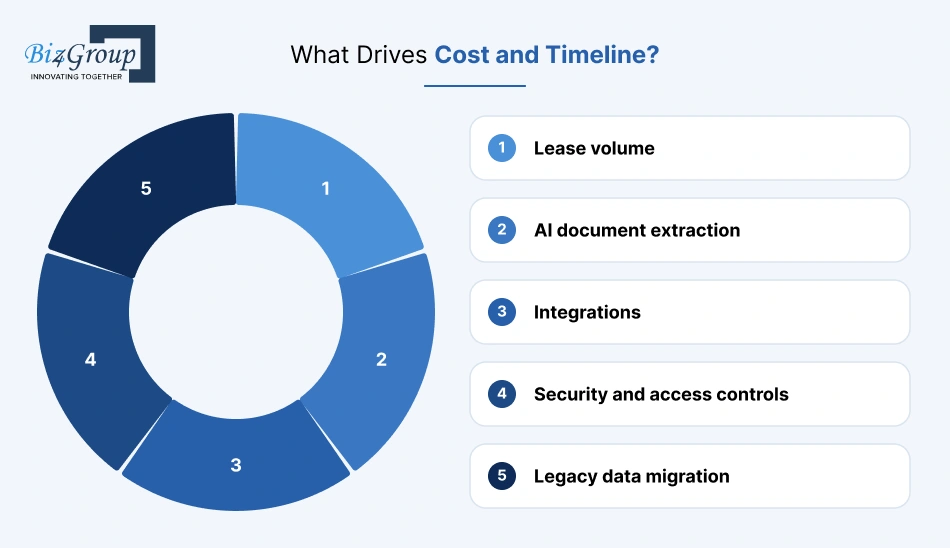
A few parts of the project have a bigger effect on the budget and schedule:
- Lease volume: Processing 500 leases is different from handling 20,000. Larger portfolios need more document processing, data cleanup, and validation.
- AI document extraction: Pulling basic details such as rent and expiration dates is less involved than interpreting amendments, unusual clauses, CAM exclusions, and CPI-based increases.
- Integrations: Connecting accounting, ERP, and property management systems adds work. A standard API connection may take a few days, while older or heavily customized systems can take longer.
- Security and access controls: Encryption, user permissions, audit logs, and data retention rules need to be built and tested.
- Legacy data migration: Existing PDFs, spreadsheets, and amendments may contain missing or conflicting information. Cleaning and checking these records can take longer than the initial platform build.
What Will You Spend After Launch?
Plan for annual maintenance and support costs of roughly 15–25% of the initial development budget. For a platform that costs $100,000 to build, that would mean around $15,000–$25,000 per year.
Other recurring expenses may include:
|
Expense |
Illustrative monthly estimate |
|---|---|
|
Cloud hosting and database |
$200–$1,500 |
|
Document storage and backups |
$50–$500 |
|
OCR and AI processing |
$100–$2,000 |
|
Monitoring and security tools |
$100–$500 |
These are budget estimates, not provider quotes. AI processing costs will depend on how many pages the platform reads, how often documents are processed, and which models are used. Adding new features or integrations later will also require a separate budget.
How Do You Roll It Out Without Disrupting the Team?
You don't need to move the entire portfolio at once. Start with a small group of users and a limited set of leases, then expand after the main workflows have been checked.
For example, a rollout could look like this:
- Days 1–3: Train 5–10 users and walk through the main tasks.
- Days 4–7: Test lease searches, reminders, rent calculations, and approval steps using real records.
- Days 8–10: Fix issues and collect feedback.
- Days 11–15: Add more leases and users once the first group is comfortable with the platform.
The exact schedule depends on the number of users and how much data needs to move. The important part is to test everyday work before giving the whole team access.
Where Should You Start? A Pilot of 20 to 50 Leases
A pilot of 20–50 leases is a practical starting point. Include different document types and lease terms, such as scanned PDFs, amendments, fixed rent increases, CPI clauses, CAM provisions, and renewal options.
Before expanding, check whether the platform can meet targets like these:
|
What to test |
Suggested pilot target |
|---|---|
|
Critical-field extraction accuracy |
At least 95% |
|
Renewal and expiration date accuracy |
At least 98% |
|
Rent escalation calculations |
100% on validated test cases |
|
Extracted terms linked to source clauses |
100% |
|
User task completion without assistance |
At least 90% |
These are suggested project acceptance targets, not industry benchmarks. If results fall short, identify whether the problem comes from document quality, AI extraction, or the rules used for calculations. Fix those issues before migrating the rest of the portfolio.
How Do You Measure the ROI of a Lease Management Platform?
The return on a lease management platform comes down to whether it saves time, prevents costly mistakes, and helps recover money that might otherwise go uncollected. To measure that, compare what lease administration costs today with what it costs after implementation.
|
Metric |
Baseline to record |
How to measure after implementation |
Expected impact |
|---|---|---|---|
|
Missed deadlines |
Number of missed renewal notices, expirations, and other critical dates |
Compare missed deadlines before and after launch |
Fewer missed notice windows and unwanted auto-renewals |
|
Administrative time |
Hours spent reviewing leases, updating spreadsheets, and checking dates |
Track staff hours spent on the same tasks |
Less time on manual tracking |
|
Rent escalation accuracy |
Number and value of incorrect or delayed rent increases |
Compare calculated increases with lease terms and actual billing |
Fewer calculation errors and missed increases |
|
CAM reconciliation |
Time spent reconciling expenses and value of identified discrepancies |
Track reconciliation time, corrections, and unresolved amounts |
More accurate recoveries and fewer billing disputes |
|
Recovered revenue |
Rent increases, CAM charges, and other amounts previously missed or underbilled |
Record additional amounts identified and actually collected |
Better recovery of contractual income |
Establishing Baselines Before Implementation
Start by collecting data for at least 3–6 months before the platform goes live. If your portfolio has seasonal rent changes or annual CAM reconciliations, include those cycles where possible.
Record how many hours the team spends on lease administration, how often deadlines are missed, and how many rent or CAM errors need correction. Also note any recoveries that were delayed or overlooked.
For example, if a team spends 40 hours each month checking lease dates and updating records, that is 480 hours a year. If automation cuts that work by 50%, the team saves 240 hours annually. At a loaded labor cost of $35 per hour, that represents $8,400 in annual time savings.
Keep the calculation tied to actual work. Time saved only counts as a financial benefit when it reduces overtime, avoids additional hiring, or gives employees time for other valuable tasks.
Payback Period, Adoption, and Portfolio Visibility
The payback period shows how long it takes for the platform's financial benefits to cover its implementation and operating costs.
For example, if the initial build costs $100,000 and the platform produces $40,000 in measurable annual benefits, the simple payback period is 2.5 years. This calculation assumes the annual benefit stays consistent and does not include ongoing platform costs. Include maintenance, hosting, AI processing, and support for a more complete estimate.
Adoption matters too. If only 30% of the team uses the platform regularly, the expected time savings may not materialize. Track monthly active users, the percentage of leases entered, and how often staff complete tasks within the platform rather than returning to spreadsheets.
Finally, look at portfolio visibility. Can the team see upcoming expirations, rent increases, outstanding CAM reconciliations, and leases missing key information in one place? These measures may not translate directly into dollars, but they show whether the platform is giving the business a clearer picture of its lease obligations.
How Is a Lease Management Platform Built and Integrated Under the Hood?
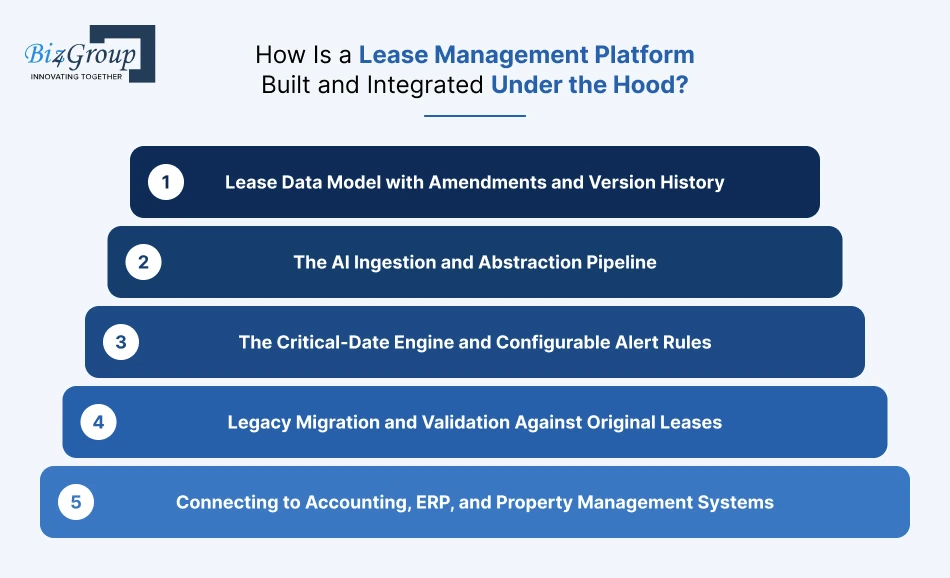
A lease management platform needs to read lease documents, keep track of changes, calculate important dates, and share data with other business systems. Here's how the main parts fit together.
Lease Data Model with Amendments and Version History
Each lease gets a structured record for rent, dates, parties, and obligations. Amendments stay linked to the original document, so teams can see what changed without losing the earlier terms.
The AI Ingestion and Abstraction Pipeline
OCR reads scanned leases, and AI extracts details such as rent, renewal options, and escalation clauses. Each result should link to its source page for review. Businesses can train AI models on reviewed documents when their lease formats need more specialized extraction.
The Critical-Date Engine and Configurable Alert Rules
The platform calculates renewal deadlines, expirations, and rent increases, then sends reminders to assigned team members. If an amendment changes a date, the alerts should update too.
Legacy Migration and Validation Against Original Leases
Before moving old records, check for missing fields, duplicate leases, and unlinked amendments. Test the migration on 20–50 leases and compare the results with the original documents.
Connecting to Accounting, ERP, and Property Management Systems
Decide which platform owns each record. For example, lease terms may live in the lease platform, while invoices and payments stay in accounting. APIs and webhooks pass updates between them, while unique record IDs help prevent duplicates.
|
Platform component |
What it handles |
|---|---|
|
Lease data model |
Stores lease terms, amendments, and version history |
|
AI extraction pipeline |
Reads documents and pulls out key lease details |
|
Critical-date engine |
Calculates deadlines and sends alerts |
|
Data migration |
Transfers and validates existing lease records |
|
System integrations |
Connects lease data with accounting, ERP, and property management platforms |
The interface should make these tasks straightforward. A UI/UX design company may help shape the screens, while MVP development services can keep the first release focused on the core workflows.
Ready to Stop Chasing Lease Dates and Start Managing Smarter?
A commercial lease management platform should do more than keep lease documents in one place. It should catch upcoming renewal deadlines, read changes buried in amendments, track rent increases, and flag CAM discrepancies before they turn into bigger problems. Can your team see all of that without jumping between spreadsheets, PDFs, and accounting records? That's the real measure of a useful platform.
For businesses building one, Biz4Group LLC can help develop AI-powered features such as lease data extraction, amendment comparison, clause search with source references, and automated alerts tied to actual lease terms. These capabilities can be shaped around the portfolio, existing systems, and review process, with AI consulting services helping define where AI fits and where fixed rules are more reliable. The goal is a platform that fits how your team manages leases, not another tool that creates more work.
Frequently Asked Questions
1. What information should be included in a commercial lease abstract?
A lease abstract should capture tenant and landlord details, property information, lease dates, base rent, escalation terms, renewal options, notice periods, CAM provisions, and termination rights. It should also link key details to the relevant clauses in the original lease.
2. Can AI extract rent escalation clauses and renewal dates from scanned lease PDFs?
Yes. OCR can read scanned pages, and AI can extract rent terms, escalation schedules, renewal options, and notice deadlines. The results should be checked against the original lease, especially when clauses are unclear or amendments change earlier terms.
3. How should a lease management platform handle conflicting terms in amendments?
It should link amendments to the original lease, identify changed terms, and show which version is currently effective. Conflicts or unclear changes should be flagged for human review rather than resolved automatically.
4. Can rent escalations be calculated automatically using CPI?
Yes. The platform can apply the lease's CPI formula, comparison period, effective date, caps, and floors. It should retain the calculation details and source clause so the finance team can verify the revised rent.
5. How can landlords automate CAM reconciliation across multiple properties?
A platform can compare actual operating expenses with each tenant's recovery terms, including pro-rata shares, exclusions, and caps. It can calculate adjustments and flag unusual amounts for review.
6. Does a lease management platform replace lease accounting systems for ASC 842 and IFRS 16?
Not necessarily. A lease administration platform tracks contractual terms and obligations. A specialist accounting engine handles calculations such as lease liabilities, right-of-use assets, and remeasurement. The two can be connected.
7. How long does it take to build a custom lease management platform?
A basic MVP may take around 2–4 weeks, while a more advanced platform may take 8–12 weeks or longer. AI-assisted development can speed up feature development, but integrations, migration, and validation affect the full timeline.
8. What should a pilot test before migrating an entire lease portfolio?
Start with 20–50 leases covering different document formats, amendments, rent structures, and renewal clauses. Test extraction accuracy, date alerts, rent calculations, source references, and integration with existing systems before expanding.
