Location :
Orlando, FL, USA
Location :
Orlando, FL, USA +1 (407) 714-1616
 info@biz4group.com


















Imagine a digital system that doesn’t wait for instructions but instead, understands your business goals, learns from real-time feedback, and takes independent actions to get the job done.
Read More

What if one tiny file error could wipe out an entire print run and eat into your margins overnight? According to a recent report by Smithers, print waste and rework can account for up to 20% of total production costs in commercial printing. Many of these losses begin in prepress. That is exactly why AI prepress automation software development for printing has become a serious priority for founders aiming to stay profitable in a competitive market.
Studies from NAPCO Research and Smithers indicate that print businesses adopting automated preflight and file validation systems report error reduction rates ranging from 40% to over 88%, depending on implementation depth. The 45% benchmark referenced throughout this blog reflects a conservative mid-range outcome for small and mid-sized commercial print operations making the transition from manual to AI-driven prepress workflows.
You might relate to this. A customer sends artwork. It looks fine at first glance. Hours later, the job hits the press and suddenly there is a missing bleed or a color mismatch. Now you are dealing with delays, unhappy clients, and wasted materials. This ongoing struggle is pushing many print businesses toward prepress automation software development to eliminate repetitive manual checks and reduce costly mistakes.
Here is the bigger issue. Traditional tools rely on fixed rules, but modern print environments are far more dynamic. Complex packaging designs, variable data printing, and multi-format outputs require smarter systems. That is where AI printing prepress automation software steps in. It can analyze files, detect hidden issues, and flag errors before production even begins.
If this sounds familiar, you are not alone. Many business owners are actively enquiring, “we are a printing company facing frequent file errors and reprints and want to develop AI prepress automation software to improve accuracy.” The solution lies in adopting printing workflow automation software for prepress that catches problems early, protects your margins, and keeps production running smoothly.
Let’s begin by understanding the basics.
Let’s get straight to it.
Prepress has always been the silent risk zone in printing. Files move fast, checks happen manually, and errors slip through more often than expected. A 2025 industry update by PRINTING United Alliance highlights that a large portion of print defects originate before the press even starts, largely due to file preparation issues.
So, what exactly changes with AI?
At its core, AI prepress automation software analyzes print files before production. It detects errors, suggests corrections, and in many cases, fixes them automatically.
Think of it as a system that reviews every file with the consistency of a machine and the decision-making ability of an experienced operator.
Here is what it typically handles:
Unlike static tools, this software learns from past jobs and improves over time. That is where AI-based printing prepress system development becomes a game changer for modern print businesses.
Let’s break this down in a way that actually matters for your operations.
|
Factor |
Traditional Prepress |
AI Prepress Automation |
|---|---|---|
|
Error Detection |
Manual or rule-based |
Intelligent and adaptive |
|
Speed |
Slower, depends on staff |
Instant file analysis |
|
Accuracy |
Prone to human error |
High precision detection |
|
Scalability |
Limited by manpower |
Easily scalable |
|
Learning Capability |
None |
Improves with data |
|
Cost Impact |
High due to reprints |
Lower due to early detection |
Traditional systems follow fixed rules. They only catch what they are told to catch.
AI systems go further. They identify patterns, flag unusual elements, and even predict potential issues based on past data. This is a core advantage when investing in printing workflow automation software for prepress.
Now the real question. How does AI actually change your day-to-day operations?
Here is a simplified workflow comparison.
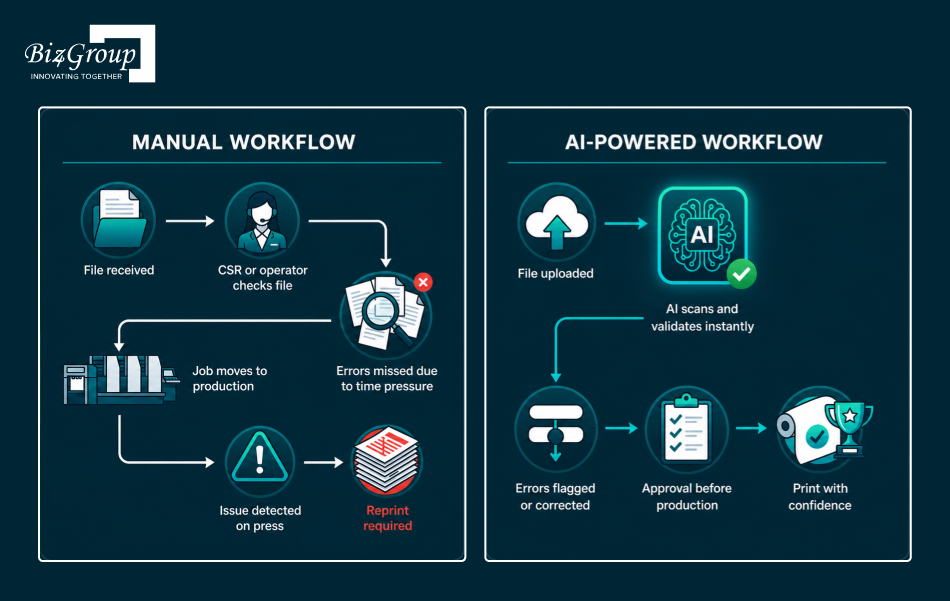
Manual Workflow
AI-Powered Workflow
This shift is the reason firms exploring how to create automated prepress system for packaging and commercial printing are prioritizing AI-led solutions.
Manual prepress has one major flaw. It depends on human consistency in high-pressure environments. That rarely holds up.
Here are the most common reasons it breaks down:
Now consider this. As print volumes increase, manual checks do not scale. Errors increase, turnaround slows down, and costs rise.
This is where directors start evaluating building AI system for print file error detection and correction before production as a long-term solution.
AI prepress automation does not operate in isolation. It integrates into your broader workflow.
It works alongside:
This is where strong AI integration capabilities come into play, ensuring smooth data flow across systems. Combined with scalable enterprise AI solutions, print businesses can create a connected ecosystem that reduces friction at every stage.
AI prepress automation software works with precision.
It reduces dependency on manual checks.
It catches errors before they become expensive problems.
And most importantly, it gives print businesses control over a stage that has traditionally been unpredictable.
Up next, we will break down the exact file errors that are quietly draining profits in your print shop.
Also read: AI-powered printing MIS automation software development guide
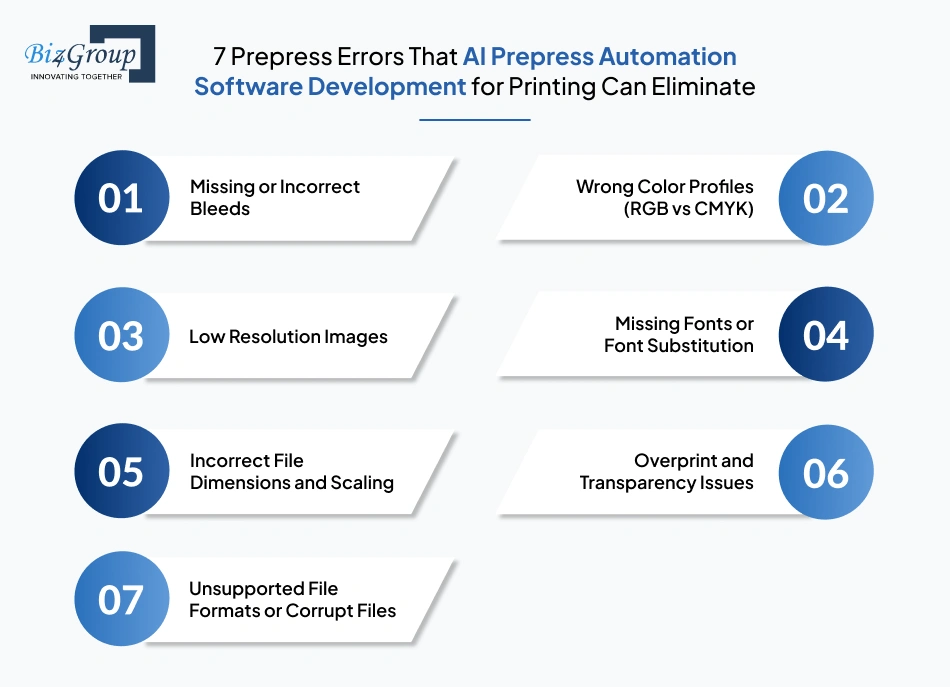
Every print shop has faced this moment.
A job looks perfect on screen. It moves to production. Then something breaks. The result is wasted material, lost time, and frustrated clients.
If you are thinking, “we are losing money due to print reprints caused by prepress file errors and need an AI solution to fix this,” you are looking at the right place.
Let’s break down the most common issues quietly draining your profits.
Bleeds are small but critical. When they are missing or incorrectly set, trimming exposes white edges.
Impact
This one shows up too often. Designers submit RGB files. Printing requires CMYK.
What happens
Images might look fine on screen. That does not mean they are print-ready.
Typical issue
Result
Fonts that are not embedded can break layouts.
Common outcomes
A small size mismatch can ruin an entire run.
Examples
These errors are hard to catch manually.
Problems include
Not every file that opens is production-ready.
Frequent scenarios
If even one of these errors hits your press weekly, you could be losing thousands every month. Why keep paying for preventable mistakes?
Build Smart with Biz4Group|
Error Type |
Frequency |
Cost Impact |
Detectability (Manual) |
|---|---|---|---|
|
Bleed Issues |
High |
High |
Medium |
|
Color Mismatch |
Very High |
High |
Low |
|
Resolution Problems |
High |
Medium |
Medium |
|
Font Errors |
Medium |
Medium |
Low |
|
Dimension Errors |
Medium |
High |
Medium |
|
Overprint Issues |
Low |
High |
Very Low |
|
File Format Issues |
Medium |
Medium |
Medium |
Here is the pattern across most print businesses:
Even experienced teams miss things.
This is exactly why companies exploring how to reduce print reprints using AI prepress automation software are shifting toward intelligent validation systems.
Modern systems built with AI automation capabilities can:
This becomes even more powerful when combined with advanced models like generative AI that can intelligently interpret design elements and predict potential print issues.
Every error listed above has one thing in common... It is preventable.
If caught early, it costs nothing. If caught late, it costs everything.
CEOs actively searching “I want to build a system that can detect print file errors before production in my print shop” are already moving in this direction. They are investing in systems that remove uncertainty from prepress.
Now that you know where the losses originate, the next logical question is simple... What do you actually gain by fixing them?
In the next section, we break down the measurable business benefits of adopting AI-driven prepress automation and how it directly impacts your bottom line.
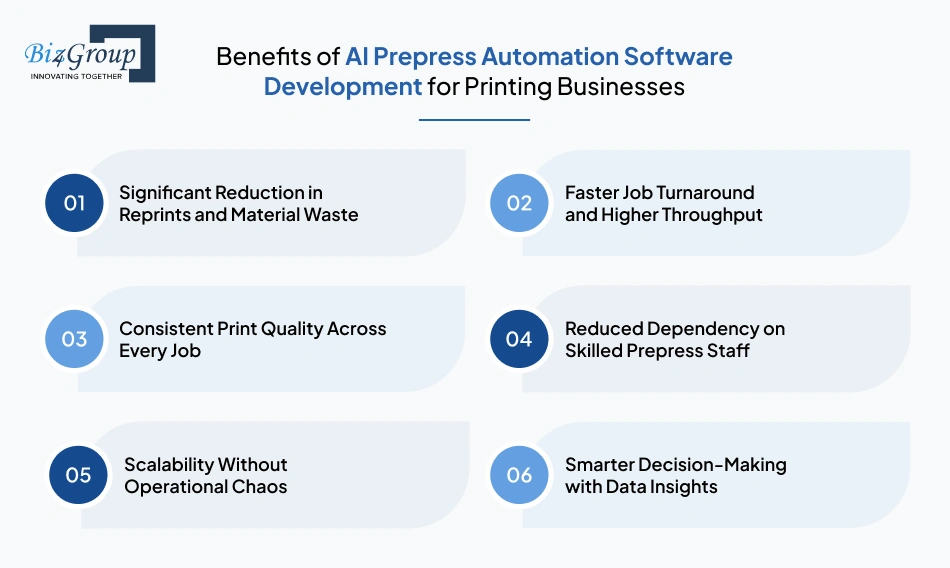
Fixing file errors is one part of the story. The real value shows up in how your business performs after those errors are eliminated.
Let’s look at what actually changes when you invest in AI-driven systems.
Reprints eat into margins faster than most owners realize. Paper, ink, machine time, and labor all add up.
With AI prepress automation software development for printing, errors are caught before production begins. That means fewer rejected jobs and far less wasted inventory.
This is the core reason many decision-makers search “I am looking to reduce costly reprints in my printing business using prepress automation software”.
The result is simple. Less waste. More profit per job.
Manual checks slow everything down. Each file requires attention. Each correction takes time.
AI removes that bottleneck.
Files are validated instantly, which allows your team to process more jobs without increasing headcount. Firms investing in printing workflow automation software for prepress often see faster delivery timelines and improved production efficiency.
If you are thinking, “I am struggling with manual prepress checks and want to automate file validation before printing using AI software”, this is where the biggest operational shift happens.
Consistency builds trust. Clients expect the same output every time, especially in packaging and branded materials.
AI systems standardize file validation. Every file goes through the same level of scrutiny.
This leads to:
This is how AI improves prepress accuracy and reduces printing production waste in real-world scenarios.
Hiring experienced prepress operators is expensive and often difficult.
AI reduces reliance on individual expertise by automating repetitive checks and validations. Your existing team can focus on higher-value tasks instead of reviewing files line by line.
This is a major advantage for small and mid-sized print shops that cannot afford large prepress teams.
Growth sounds great until operations start breaking under pressure.
More orders mean more files. More files increase the risk of errors.
AI in printing industry helps teams scale effortlessly. It handles increasing workloads without compromising accuracy.
That is why companies planning scalable prepress automation software development for printing businesses see it as a long-term investment rather than a short-term fix.
AI systems do more than detect errors. They collect data.
You start seeing patterns:
These insights help you optimize workflows and pricing strategies.
Many companies looking to integrate AI into your printing workflow are leveraging this data layer to improve overall business performance.
Every benefit discussed here ties back to one thing. Control.
Control over quality. Control over costs. Control over timelines.
Now the next question becomes practical... Where exactly can you apply AI prepress automation across different printing segments?
Let’s explore real-world use cases next.
Automation removes bottlenecks. Same team. More output. Better margins. That is how modern print shops scale.
Book a Strategy Call Today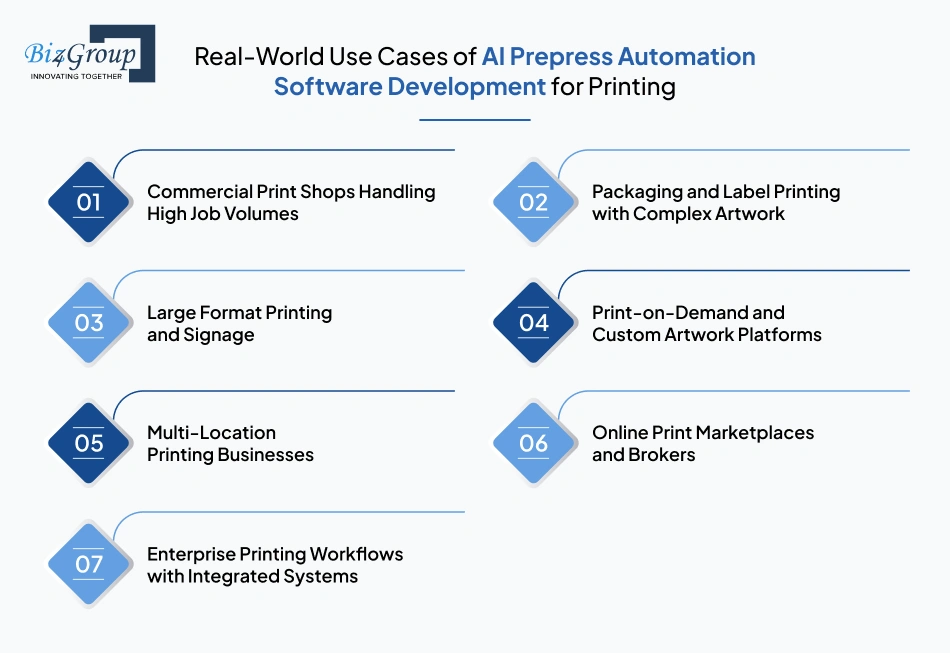
Understanding the concept is one thing. Seeing where it works in real business environments is what drives decisions.
Across the printing ecosystem, AI is being applied in very specific, high-impact scenarios. These use cases show how businesses are adopting AI prepress automation software development for printing to solve operational challenges and unlock efficiency.
Commercial printers deal with hundreds of files daily. Each file brings a new risk.
AI systems validate incoming artwork in real time. They detect layout inconsistencies, resolution issues, and color mismatches before jobs enter production. This allows teams to maintain speed without compromising quality.
CEOs often explore this when they think, “I run a printing business and want to develop AI prepress automation software to reduce file errors and reprints.” The outcome is higher throughput and fewer production interruptions.
Packaging files are layered, detailed, and highly sensitive to small errors. A minor issue can affect entire batches.
AI helps by analyzing dielines, verifying dimensions, and ensuring color consistency across multiple SKUs. This is especially valuable for professionals researching how to create automated prepress system for packaging and commercial printing.
|
Packaging Challenge |
AI-Driven Solution |
Business Impact |
|---|---|---|
|
Complex dielines |
Automated dimension validation |
Reduced packaging errors |
|
Multi-layer files |
Layer integrity checks |
Accurate output |
|
Brand color consistency |
Color profile standardization |
Consistent branding |
Large format printing amplifies every error. A small issue becomes highly visible at scale.
AI-based systems analyze file scaling, resolution, and proportion before printing begins. This prevents costly reprints of banners, billboards, and signage materials.
Companies adopting AI-based printing prepress system development in this segment benefit from improved accuracy and reduced material waste.
Print-on-demand businesses operate at speed. Customers upload files, expect quick turnaround, and demand accuracy.
Manual validation slows down operations and increases error rates. AI automates this process by instantly checking uploaded files and flagging issues before approval.
This is where companies exploring building AI system for print file error detection and correction before production see immediate value.
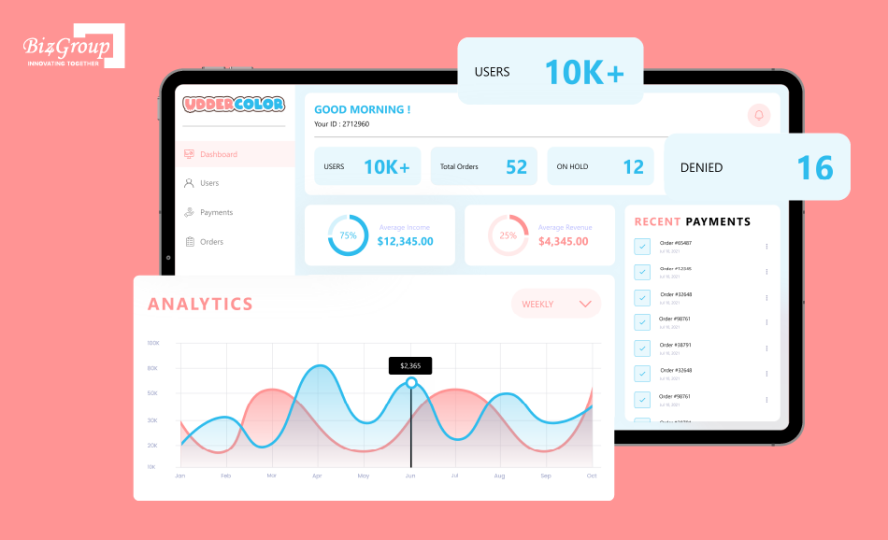
Biz4Group has already delivered an advanced platform for custom artwork printing aligned with this use case. A leading US-based printing house approached us to rebuild their platform into a scalable and efficient system. The goal was to handle large volumes of custom artwork submissions while ensuring file accuracy before production.
Key capabilities delivered:
The platform enabled customers to upload artwork for printable heat transfers and receive fast, reliable output. The built-in validation system ensured only production-ready files moved forward, reducing errors and improving turnaround time.
Businesses operating across multiple locations face consistency challenges.
Different teams follow different processes. File validation varies. Errors increase.
AI standardizes prepress workflows across all locations. Every file goes through the same validation process, regardless of where it originates.
This is particularly useful for companies evaluating scalable prepress automation software development for printing businesses to maintain uniform quality across operations.
Platforms that connect buyers and print vendors deal with a wide variety of file formats and quality levels.
AI ensures that submitted files meet production standards before being routed to vendors. This reduces disputes and improves fulfillment accuracy.
This model is gaining traction alongside systems like AI print broker software, where automation plays a central role in managing large volumes of print orders.
Large enterprises require seamless coordination between systems such as MIS, ERP, and design tools.
AI prepress automation integrates into these workflows to provide real-time validation and decision-making support.
Now that you have seen where AI prepress automation works in real-world scenarios, the next logical question comes... What exactly does this software include, and how does it function at a feature level?
Also read: Real-world AI use cases in the printing industry
If you are thinking, “I want to create an AI solution for print file validation and prepress error detection,” this section will give you clarity on what such a system actually includes.
A well-built solution under AI prepress automation software development for printing combines intelligence, automation, and adaptability to handle real production challenges.
Here are the core features that define a high-performing system.
|
Feature |
What It Is |
What It Does |
|---|---|---|
|
Automated File Validation |
AI-driven analysis of incoming print files |
Scans files instantly for bleed, resolution, color, and layout issues before production |
|
Intelligent Error Detection |
Machine learning models trained on past print errors |
Identifies hidden and complex issues that rule-based systems often miss |
|
Auto-Correction Engine |
Built-in correction logic powered by AI |
Fixes common errors like missing bleeds, incorrect color profiles, and scaling issues |
|
Color Profile Standardization |
Automated color space conversion system |
Ensures all files meet CMYK or required print standards consistently |
|
Resolution Optimization |
Image quality analysis module |
Detects low-resolution images and suggests or applies improvements |
|
Font and Asset Management |
Embedded font and linked asset verification |
Prevents layout shifts and missing font issues during printing |
|
Preflight Rule Customization |
Configurable validation rules |
Allows businesses to define checks based on their specific printing requirements |
|
AI-Based Predictive Alerts |
Pattern recognition system |
Flags potential risks based on historical data before they occur |
|
Workflow Integration Capability |
API and system integration layer |
Connects with MIS, ERP, and design tools for seamless operations |
|
Real-Time Approval System |
Automated approval and feedback loop |
Enables faster file approval with minimal manual intervention |
|
Multi-Format File Support |
Compatibility across file types |
Handles PDFs, AI files, PSDs, and other formats without disruption |
|
Cloud-Based Scalability |
Distributed processing infrastructure |
Supports high volumes of file processing without performance issues |
Each of these features plays a role in solving a specific operational problem.
Together, they create a system that removes uncertainty from prepress. Businesses investing in building AI system for print file error detection and correction before production rely on this combination to ensure accuracy, speed, and consistency.
Features define what the system can do. The next step is understanding how these capabilities come together during development and implementation.
Most issues surface after production starts. AI flips that by catching them before they cost you time and money.
Call Biz4Group Now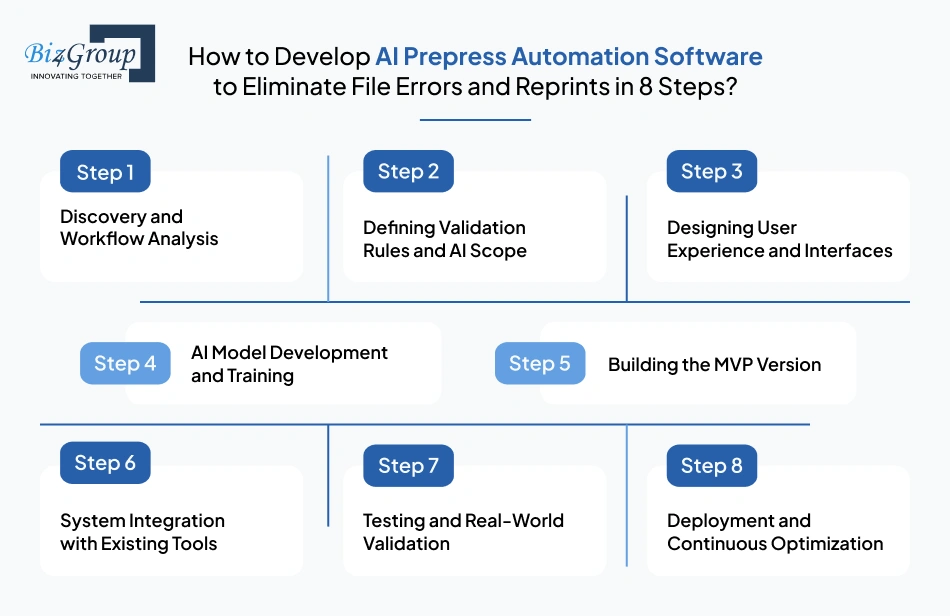
Building a reliable system requires more than plugging in AI. It needs a structured approach that aligns with your print workflows, file types, and production scale.
If you are thinking, “we are planning to build a prepress automation system to detect bleed, color, and layout issues before print production”, this section outlines how that journey typically unfolds.
Every printing business operates differently. The first step focuses on understanding your current workflow.
Key areas analyzed include:
This stage defines the foundation for AI prepress automation software development for printing.
Before building AI models, you need clarity on what the system should detect and correct.
This involves:
Firms exploring how to create automated prepress system for packaging and commercial printing often spend significant time here to ensure accuracy.
A powerful system still needs to be easy to use.
The platform should allow operators, designers, and customers to interact with file validation results without confusion.
This is where strong UI/UX design plays a role in improving usability and reducing operational friction.
Also read: Top 15 UI/UX design companies in USA
This is the core of the system.
AI models are trained using real print file data to:
This stage defines the intelligence behind AI printing prepress automation software.
Instead of developing everything at once, a focused MVP helps validate the concept quickly.
An MVP typically includes:
Many businesses begin with MVP development to test performance before scaling.
Also read: Top 12+ MVP development companies in USA
The AI system must connect with your existing infrastructure.
This includes:
Smooth integration ensures that printing workflow automation software for prepress operates without disrupting current operations.
Before full deployment, the system is tested with live data.
This phase focuses on:
Businesses often refine their systems here to ensure they meet real production demands.
Once deployed, the system continues to evolve.
AI models improve with new data. Workflows get optimized. Performance increases over time.
This ongoing refinement is essential for companies investing in development of AI prepress automation software as a long-term capability.
Building such a system requires a balance of technical expertise and industry understanding. If you are thinking, “we are comparing companies that develop AI prepress automation software for printing businesses”, the development approach should be one of your key evaluation criteria.
Working with teams experienced in AI product development ensures your solution is not only functional but also scalable and aligned with your business goals.
Now that you understand how the system is built, let’s talk about how much does it actually cost to develop AI prepress automation software for your printing business?
At this stage, CEOs often ask, “I run a mid-sized commercial print shop and we're losing money every month on reprints caused by file errors. How much would it cost to build a custom AI prepress automation software that automatically catches and fixes these issues before the job goes to press?”
The short answer. The investment for AI prepress automation software development for printing typically ranges between $25,000-$150,000+ depending on complexity, features, and scale.
Here is a quick breakdown based on development stages.
|
Level |
Scope |
Estimated Cost |
|---|---|---|
|
MVP Version |
Basic file validation, limited AI detection, simple workflow |
$25,000-$50,000 |
|
Advanced System |
AI error detection, auto-correction, integrations, dashboards |
$50,000-$100,000 |
|
Enterprise Solution |
Full automation, predictive AI, multi-location scalability, deep integrations |
$100,000-$150,000+ |
This range gives a starting point.
Now, the long answer. The actual cost depends on several key factors, which we will break down next.
Every project has moving parts. Understanding these drivers helps you plan your investment more effectively.
|
Cost Driver |
What It Includes |
Estimated Impact |
|---|---|---|
|
Feature Complexity |
Number of validations, AI capabilities, automation depth |
$10,000-$40,000 |
|
AI Model Development |
Training AI models for error detection and prediction |
$15,000-$50,000 |
|
UI/UX Design |
User dashboards, file upload interfaces, approval systems |
$5,000-$20,000 |
|
Integration Requirements |
MIS, ERP, design tools, workflow systems |
$10,000-$30,000 |
|
Data Preparation |
Collecting and structuring training data |
$5,000-$15,000 |
|
Cloud Infrastructure |
Hosting, storage, processing power |
$5,000-$20,000 annually |
|
Testing and QA |
Performance testing, validation accuracy checks |
$5,000-$15,000 |
Each of these components contributes to the overall cost of development of AI prepress automation software. The more advanced your requirements, the higher the investment.
Beyond development, there are additional costs that often go unnoticed during initial planning.
One major factor is data readiness. AI systems rely on structured and high-quality data. If your existing files are inconsistent, you may need extra investment in cleaning and organizing datasets, which can add around $5,000-$15,000.
Another consideration is ongoing model training. AI systems improve over time, but that requires periodic updates. Businesses often allocate $5,000-$20,000 annually for continuous optimization and retraining.
There is also the cost of change management. Teams need time to adapt to new workflows. Training sessions, onboarding, and internal adjustments can cost another $3,000-$10,000 depending on team size.
If you are planning long-term scalability, infrastructure upgrades may also be required. Expanding processing capabilities or handling higher workloads can increase annual costs by $10,000 or more.
While the investment can seem significant, there are practical ways to control costs without compromising quality.
Directors exploring how to develop AI prepress automation software to eliminate file errors and reprints often find that a phased approach delivers better ROI and lower risk.
The cost of building an AI prepress automation system depends on how ambitious your goals are.
A smaller print shop may start with a lean MVP. A growing business may invest in an advanced system. Enterprises often build fully integrated solutions that scale across locations.
If you are evaluating options with questions like, “we are evaluating vendors for print file validation and prepress automation systems”, understanding these cost layers will help you make a more informed decision.
Now that you have a clear picture of the investment required, the next step is choosing the right approach. Should you buy an existing tool or build a custom AI solution tailored to your workflow?
Also read: How much does it cost to integrate AI in printing business?
If you prevent even 10-15 reprints monthly, your ROI starts compounding faster than you expect.
Let’s Talk NumbersIf you are thinking, “Should I build prepress automation software for my printing company or use an existing tool”, this comparison will help you make a clearer decision.
|
Factor |
Off-the-Shelf Software |
Custom AI Prepress Automation Software |
|---|---|---|
|
Setup Time |
Quick deployment |
Longer development timeline |
|
Initial Cost |
Lower upfront cost |
Higher initial investment |
|
Customization |
Limited to predefined features |
Fully tailored to your workflow |
|
Scalability |
Restricted by vendor capabilities |
Built to scale with your business |
|
AI Capabilities |
Mostly rule-based or limited AI |
Advanced AI with learning capabilities |
|
Integration |
May require workarounds |
Seamless integration with existing systems |
|
Ownership |
Vendor-controlled |
Full ownership and control |
|
Flexibility |
Fixed workflows |
Adaptable workflows |
|
Long-Term Cost |
Subscription-based, ongoing fees |
One-time investment with optimization costs |
Both approaches have their place. The right choice depends on your business goals, scale, and complexity.
Buy when
Build when
Off-the-shelf tools can solve immediate problems.
Custom development, on the other hand, transforms how your entire prepress workflow operates. It gives you control, flexibility, and a long-term edge.
This is why businesses investing in AI prepress automation software development for printing often move toward custom solutions as they scale.
Also read: Guide to reduce quote time by 80% with AI print estimating software development
Choosing the right development partner can define the success or failure of your entire project.
Many decision-makers reach this stage with a question like, “how do I choose the right company to develop AI prepress automation software for my printing business?”
The answer lies in asking the right questions before signing any contract.
AI expertise alone is not enough. Your partner must understand printing.
Look for experience in:
A company that understands both AI and printing will build a system that works in real conditions, not just in theory.
Not all developers specialize in AI.
Ask them directly:
This is critical when investing in AI printing prepress automation software that goes beyond rule-based validation.
Your prepress system cannot operate in isolation.
Ensure the company can integrate with:
This is essential for building printing workflow automation software for prepress that fits into your current operations without disruption.
Your business will grow. Your software should grow with it.
Ask about:
This becomes important when planning scalable prepress automation software development for printing businesses.
From idea to deployment and beyond, you need a partner who stays involved.
This includes:
Companies that offer full-cycle services make it easier to build and maintain complex systems. Ensure you hire AI developers or work with teams with relevant domain expertise.
|
Question |
Why It Matters |
What to Look For |
|---|---|---|
|
Industry Experience |
Ensures practical solutions |
Proven work in printing or similar domains |
|
AI Capabilities |
Determines system intelligence |
Experience with ML models and automation |
|
Integration Skills |
Avoids workflow disruption |
API and system integration expertise |
|
Scalability |
Supports long-term growth |
Cloud-ready and modular architecture |
|
End-to-End Support |
Reduces risk |
Full development lifecycle services |
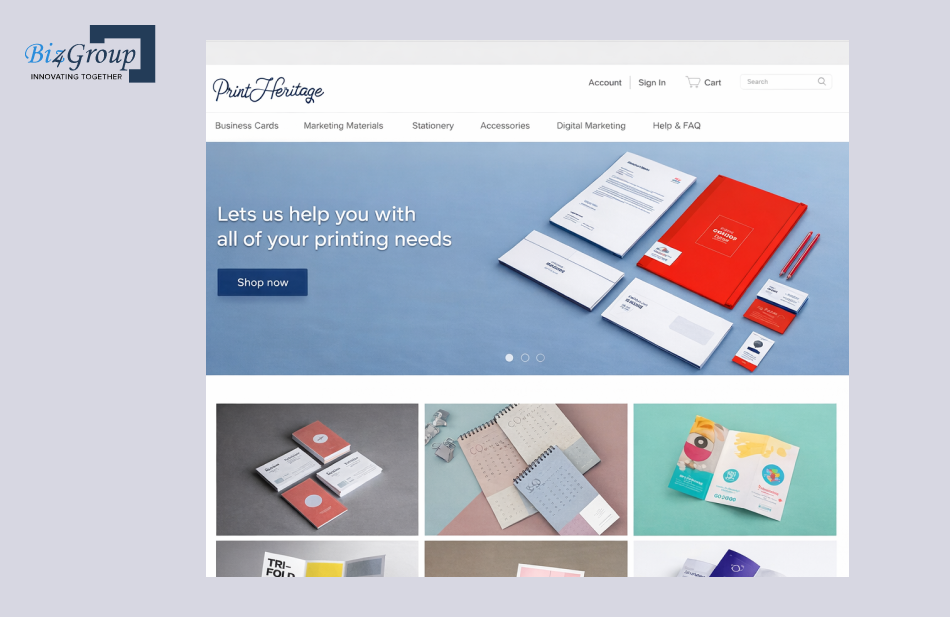
Experience reflects in how real development challenges are actually solved. Biz4Group has delivered solutions that directly align with prepress workflows and print accuracy requirements.
One such work of ours is a custom eCommerce store for print-ready accessories.
What made this project relevant to prepress automation was the focus on preparing accurate, production-ready files at the source. Users could configure designs within defined parameters, reducing the chances of common issues like incorrect dimensions, layout misalignment, or missing elements.
This approach mirrors the core goal of AI prepress automation software development for printing, where errors are minimized before files reach production, ensuring smoother workflows and fewer reprints.
Choosing a development partner is not about comparing quotes. It is about evaluating long-term capability. If the foundation is strong, your system will scale, adapt, and deliver consistent value.
Now that you know how to evaluate the right partner, a question often comes, “I need to automate our prepress file validation process and reduce reprints. Which company is the best fit for this kind of development?” Here’s the answer...
Also read: Top 12 AI printing software development companies in USA
Choosing the wrong development partner leads to delays, rework, and wasted budget. Get it right the first time.
Talk to a SpecialistWhen printing businesses decide to invest in AI, they are looking for results, leading to them asking, “Which company in the USA can actually build AI prepress automation software that works in real production environments?”
Biz4Group LLC has built its reputation by answering that question with execution.
We are a US-based AI development company, with deep experience in building custom solutions for businesses that demand precision, scalability, and performance. Our work spans across industries, but what sets us apart in printing is our ability to understand operational bottlenecks and convert them into intelligent, automated systems.
We develop AI printing software solutions that focus on solving real problems. File errors. Production delays. Reprints. Workflow inefficiencies. We design systems that directly address these challenges using advanced AI models, automation frameworks, and seamless integrations.
Firms that partner with us are not buying generic tools. They are building custom solutions engineered around their workflows. From AI printing prepress automation software to fully integrated platforms, our solutions are designed to scale as your operations grow.
Choosing the right partner often comes down to trust, capability, and results. Here is what makes businesses consistently choose Biz4Group.
Many businesses approach us with questions like, “we are comparing companies that develop prepress automation software for printing industry in USA, who can actually deliver a scalable AI solution?”
The answer often lies in experience combined with execution.
At Biz4Group, our development philosophy is simple. Build systems that solve problems before they occur.
That means catching file errors before production.
That means reducing reprints before they impact margins.
That means creating workflows that run with precision and consistency.
If you are planning to eliminate file errors, reduce reprints, and scale your printing operations with confidence, partner with Biz4Group LLC and build a solution that works for your business, not around it.
Prepress errors have always been a silent profit killer in the printing industry. From incorrect bleeds to color mismatches, small file issues often lead to large financial losses. As print workflows become more complex, relying on manual checks or traditional tools creates more risk than control. This is where AI prepress automation software development for printing changes the game by bringing accuracy, speed, and consistency into one of the most error-prone stages of production.
By adopting AI printing prepress automation software, businesses gain the ability to detect and correct errors before they reach the press. The result is fewer reprints, lower waste, faster turnaround times, and a more reliable production pipeline. For printing companies aiming to scale without increasing operational chaos, automation powered by AI offers a clear and practical path forward.
This is exactly where Biz4Group LLC steps in. As a trusted, US-based software development company, we specialize in building intelligent, scalable solutions tailored to your printing workflows. From concept to deployment, our focus remains on delivering systems that solve real business challenges and drive measurable results.
If you are ready to reduce costly errors, streamline your prepress operations, and future-proof your printing business, now is the time to take action. Build your AI-powered prepress system with Biz4Group and move your operations toward precision, efficiency, and growth.
AI prepress automation is highly valuable for packaging, label printing, commercial printing, and print-on-demand businesses. These segments deal with complex artwork and high file volumes, where even minor errors can lead to significant losses.
Yes, modern systems are designed to process files from multiple sources including designers, agencies, and direct clients. They normalize file formats, validate quality, and ensure consistency before production begins.
Accuracy depends on the quality of training data and system design. Well-developed AI systems can achieve high detection accuracy and continue improving over time as they learn from new file patterns and corrections.
No. Even small and mid-sized print shops benefit from automation. A few avoided reprints each month can offset the investment, especially when margins are tight and errors are frequent.
Most platforms take several months depending on complexity and feature requirements. Biz4Group, however, can deliver a functional MVP in 2-4 weeks by using reusable components that reduce both development time and cost.
Yes, these systems can be customized to follow specific print standards, file requirements, and validation rules. This makes them suitable for businesses handling diverse job types and client specifications.
No. It enhances their efficiency. AI handles repetitive validation tasks, while human experts focus on complex decision-making, quality control, and client communication.

with Biz4Group today!
Our website require some cookies to function properly. Read our privacy policy to know more.