Location :
Orlando, FL, USA
Location :
Orlando, FL, USA +1 (407) 714-1616
 info@biz4group.com

 AI Summary Powered by Biz4AI
- An AI medical billing platform reads clinical and payer data, checks claims, predicts denials, and drafts fixes while a person approves.
- Rising denials and the CMS-0057-F and FY2027 ICD-10 changes make now the time to build an AI medical billing platform.
- Launch AI medical billing automation software with the claim spine: eligibility, claim scrubbing, clearinghouse submission, payment posting, a review queue, an audit trail, and one EHR link. Add denial scoring, appeals drafting, and suggest-only coding in phase 2.
- AI medical billing platform architecture uses six layers and a hybrid of rules, machine learning, and language models, with uncertain items routed to human review. BAAs, encryption, MFA, audit logs, and False Claims Act controls belong in the design from day one.
- The AI medical billing platform development process moves from discovery and data readiness to an MVP, a shadow-mode pilot, and a staged rollout. Plan $35,000 to $250,000 to develop an AI medical billing platform, integrating the standard parts and building the decision layer.
- Measure outcomes, model quality, and control health against your own baselines, and price the platform by subscription, usage, or outcomes. Expect data quality, integration, and adoption challenges, and pick an AI medical billing platform development company that can show verifiable billing AI, such as Biz4Group's Bill Matters.
How much revenue has your organization already earned but can't collect?
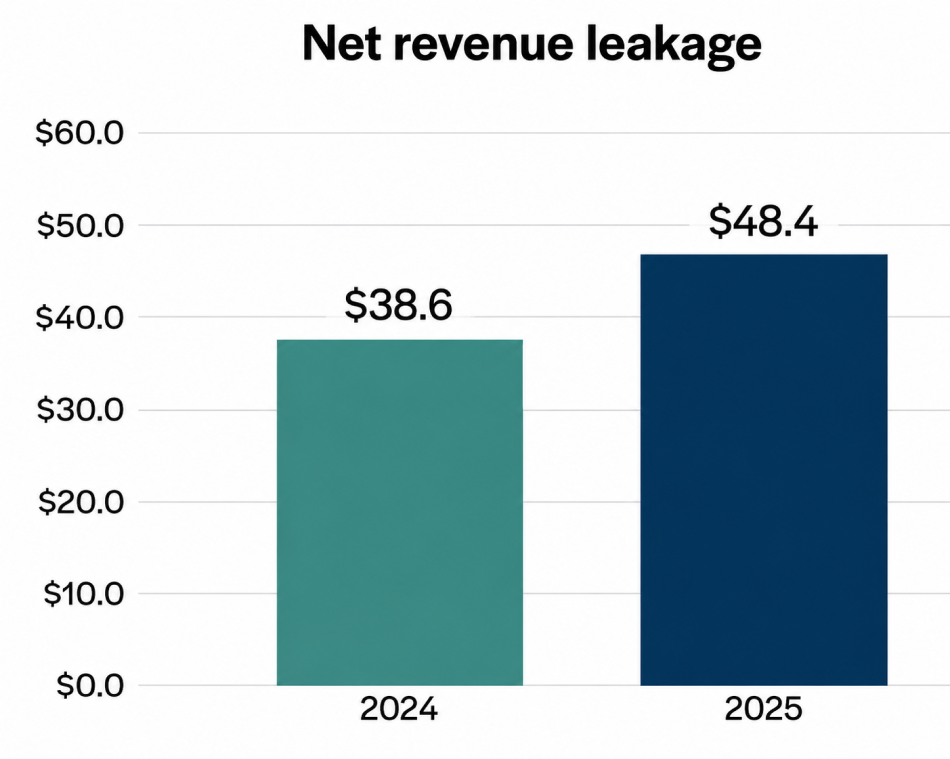
Kodiak Solutions found that the hospitals on its platform lost more than $48 billion in net revenue in 2025 to final denials and uncollected patient balances, up from $38.6 billion in 2024.
That's why more leaders are asking whether to build an AI medical billing platform of their own.
The tools aren't widely in place yet. An HFMA survey analyzed found that about 60% of executives haven't implemented any AI or automation in their revenue cycle operations.
The rules keep moving, too. The FY2027 ICD-10-CM code set took effect on October 1, 2026, adding 190 codes, deleting 30, and revising 4. A billing system that can't absorb changes like that keeps falling behind.
So, what is an AI medical billing platform?
It's platform that reads clinical and payer data, builds and checks claims, predicts which ones will be denied, and drafts the correction. A trained person approves what goes out. That human step matters, because AI medical billing automation that nobody can audit won't survive a payer review.
The goal when you build an intelligent medical billing platform to automate claims is fewer denials, less rework, and a clean audit trail.
Plenty of guides cover how to create medical billing platform. Few come from a team that has shipped AI in this part of the revenue cycle.
Biz4group has. In September 2026, we launched Bill Matters, an AI denial management and appeals generation platform for US billing teams. It reads a denied claim, checks it against the payer contract, finds the missing evidence, and drafts the appeal.
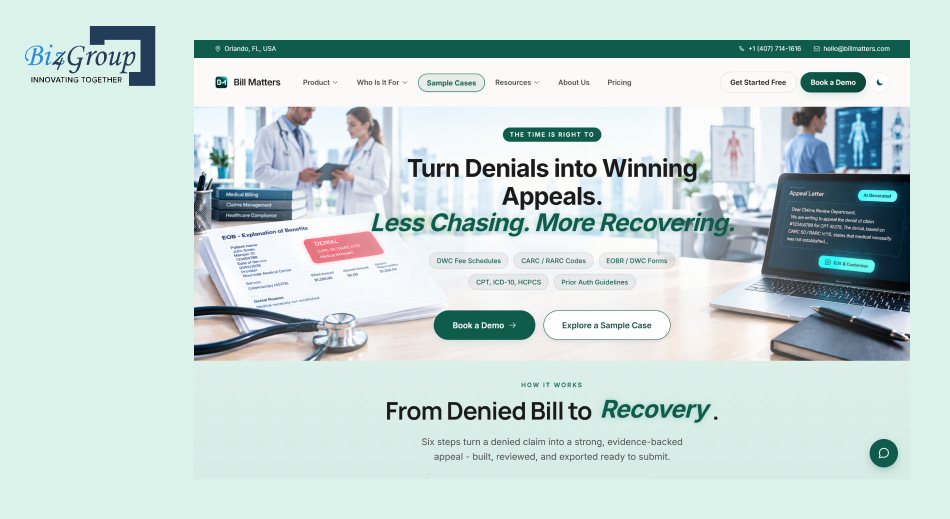
Three decisions from that build shape this guide:
- A person signs off on every appeal before it reaches a payer.
- Each task sees only the patient information it needs, and one customer's case data never touches another's.
- Payer rules and code sets stay current, because yesterday's rules produce tomorrow's denials.
Dave Caplis, our Technical Director, describes the gap between what a provider is owed and what it collects as the problem Bill Matters was built to close.
Here's how to build an AI medical billing platform that holds up, from AI medical billing platform architecture and HIPAA controls to the AI medical billing platform development process and cost. We'll also tell you where buying or integrating beats building.
If you want to develop custom AI medical billing solutions for hospitals and clinics, or you're comparing an AI medical billing platform development company with an in-house team, start here.
Why Should You Build an AI Medical Billing Platform Now?
Payer rules, denials, and code sets now change faster than a manual billing team can follow.
The case to build an AI medical billing platform is strongest when your payer mix, specialties, or integrations don't fit a packaged tool, or when billing is the product you sell. We cover build versus buy in the cost section.
Pain Points and Business Benefits of AI Medical Billing Automation
Where does your revenue leak? AI medical billing automation pays off most when it catches the problem before submission.
|
Pain point |
What it costs you |
What the platform changes |
|---|---|---|
|
Denials and underpayments |
In Adonis's 2026 survey of 120+ RCM leaders, 47% said denials, underpayments, and timely filing limits cost them 3% to 4% of net patient revenue. |
Scores each claim for denial risk before submission and flags the likely cause. |
|
Rework |
Most teams in that survey spend 51 to 75 hours a week on denial-related work. |
Drafts the correction and supporting evidence, so staff review instead of starting from scratch. |
|
Prior authorization |
74% of providers in the 2026 HFMA and Guidehouse survey report more prior authorization delays. |
Checks whether authorization is required, assembles the packet, and tracks status. |
|
Unfought denials |
Billing teams often have to choose which denials to fight and which to write off. |
Compares the denial with the contract and payer rules, then drafts an evidence-backed appeal. |
|
Rule changes |
48% of the Adonis respondents said frequent changes to payer adjudication rules hurt collections in 2025. |
Keeps rules and code sets versioned in one place, so updates are configuration, not rewrites. |
We built Bill Matters around one idea. Dave Caplis, our Technical Director, puts it plainly: "A denial isn't usually a dead end, it's a documentation gap." The answer usually sits in the claim, the contract, and the payer's own rules.
So, the platform reads the denial code, the payer's response, and the claim context. Then it checks them against the provider's contract or fee schedule before it drafts anything. It also re-checks claims when a rule changes mid-process.
Specialty matters too. A workers' compensation claim and a behavioral health denial rarely fail for the same reason, so Bill Matters treats each specialty on its own terms instead of running one template.
The 2026-27 Regulatory Clock
Four items matter for your build.
|
Date |
What changes |
What it means for your platform |
|---|---|---|
|
Jan 1, 2026 (in effect) |
Under CMS-0057-F, impacted payers must decide standard prior authorization requests within 7 calendar days and urgent ones within 72 hours, and give specific denial reasons. |
Treat payer response times and denial reasons as data. They improve your appeals and denial predictions. |
|
Oct 1, 2026 (in effect) |
The FY2027 ICD-10 code sets apply by date of service or discharge date. |
Version code sets and scrubber edits by date. |
|
Jan 1, 2027 |
Impacted payers must have four FHIR APIs live: Patient Access, Provider Access, Payer-to-Payer, and Prior Authorization. The duty sits with payers, and drug prior authorization is excluded. |
Build an integration layer that can connect to payer prior authorization APIs instead of faxes and portals. |
|
Pending |
The HIPAA Security Rule overhaul is still a proposal. Reports put final action at around July 2027, and the current rule stays enforced (HIPAA Journal). |
Design encryption and access logging in now. |
Don't hard-code any of these dates. Treat code sets, payer rules, and API contracts as versioned configuration, so a change is an update, not a rebuild.
What Does an AI Medical Billing Platform Actually Do?
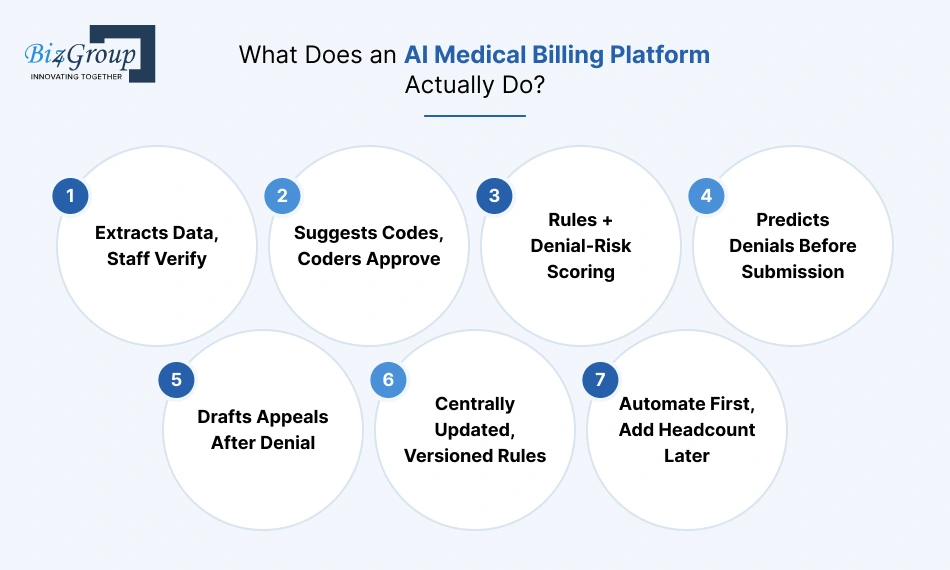
An AI medical billing platform takes a claim from intake to final payment. It uses machine learning, language models, and payer rules to catch errors, predict denials, and draft fixes. Your staff approve what matters.
If you're researching how to create medical billing platform with AI at the center, start with what the AI is actually responsible for.
The Role of AI in Medical Billing
AI does five jobs inside a billing platform:
- Reads: Pulls diagnoses, procedures, and dates from clinical notes, EOBs, and denial letters.
- Predicts: Scores each claim for denial risk using past payer outcomes.
- Routes: Sends clean claims straight through and holds risky ones for review.
- Drafts: Writes corrections and appeals with the evidence attached.
- Learns: Feeds every outcome back into the models.
Prediction is only as good as the payer's data behind it. In that same Adonis survey, 38% of RCM leaders said they lack real-time access to data on payer performance. Closing that gap is one of the best reasons to build an AI medical billing platform around your own claims history.
Plan for one limit. The billing entity stays responsible for every claim, whether a person or a model prepared it. So, the AI suggests, and a qualified person decides. We cover the controls in the compliance section.
Bill Matters also flags gaps and inconsistencies before a case reaches final review, because a reviewer working at volume will miss some.
AI Medical Billing Platform vs. Traditional Billing Systems
|
Area |
Traditional billing system |
AI medical billing platform |
|---|---|---|
|
Data entry |
Staff key or copy data between systems |
Extracts data from notes, EOBs, and denial letters, and staff verify it |
|
Coding |
Coder picks codes from memory and lookups |
Suggests codes with the supporting note text, and the coder approves |
|
Claim checks |
Static rule edits |
Rules plus a denial-risk score based on past payer outcomes |
|
Denials |
Found after the payer responds |
Predicted before submission, and appeals drafted after |
|
Rule updates |
Manual changes and staff retraining |
Versioned rules updated centrally |
|
Scaling |
Add headcount |
Add automation first, then headcount |
|
Reporting |
Static reports after the fact |
Live views by payer, code, and denial reason |
|
Audit trail |
Who edited what |
The AI suggestion, the reviewer's decision, and the final result |
AI Medical Billing Automation Across the Claim Lifecycle
AI medical billing automation works differently at each stage of a claim. This table shows where AI does the work and where a person stays in charge.
|
Stage |
What AI does |
What a person still does |
|---|---|---|
|
Eligibility and intake |
Verifies coverage and flags missing or mismatched registration data |
Resolves exceptions with the patient or payer |
|
Coding |
Suggests ICD-10, CPT, and HCPCS codes with the supporting note text |
Approves codes, especially high-severity ones |
|
Claim checks |
Applies payer rules and scores denial risk before submission |
Fixes held claims |
|
Submission and status |
Sends claims, tracks acknowledgments, and flags stalled claims |
Handles payer escalations |
|
Payment posting |
Matches remittances to claims and flags underpayments |
Reviews disputed variances |
|
Denials and appeals |
Finds the cause, gathers evidence, and drafts the appeal |
Reviews and signs off |
|
Patient billing |
Builds statements and payment reminders |
Handles hardship cases and disputes |
Bill Matters covers one stage of this lifecycle, denials and appeals, in six steps. It understands the claim, analyzes the case, finds the recovery opportunity, identifies missing evidence, generates the appeal, and hands it to a person for review before export.
Where should you start? Pull your last 90 days of denials and group them by reason. Automate the biggest group first. That becomes your MVP scope.
Which Features Should Your AI Medical Billing Automation Platform Include from the Start?
A billing platform needs a working claim lifecycle before it needs clever AI. If eligibility checks, submission, and payment posting don't work, no model can rescue the output.
So which features belong in version one? Launch with the claim spine plus the controls that make AI safe to use. Add the heavier AI modules in phase two.
Here's how we'd split the features of AI medical billing automation platform. If you plan to build an AI medical billing platform for a hospital, clinic, or billing company, treat this as your starting scope.
|
Feature |
What it does |
Where AI helps |
Build in |
|---|---|---|---|
|
Eligibility and insurance verification |
Checks coverage and policy status at registration using X12 270/271, the standard electronic eligibility request and response. |
Flags missing or mismatched registration data before the visit is billed. |
Launch |
|
Claim creation and scrubbing |
Builds the claim and checks it against payer rules and code edits before it leaves. |
Adds a denial-risk score and the likely reason for each flagged claim. |
Launch |
|
Claim submission and clearinghouse connectivity |
Sends claims (X12 837) through a clearinghouse, the intermediary that routes claims to payers, and tracks acknowledgments. |
Flags rejected or stalled claims early. |
Launch |
|
Payment posting and reconciliation |
Records payments and adjustments from remittance files (X12 835). |
Spots underpayments by comparing payments with contracted rates. |
Launch |
|
Human review queue |
Holds AI suggestions for approval, with a confidence score and an override option. |
Routes only low-confidence or high-risk items to people. |
Launch |
|
Role-based access |
Limits who can see and edit patient data by role: billers, admins, auditors. |
Keeps model inputs scoped to the minimum data each task needs. |
Launch |
|
Audit trail and compliance logging |
Records every user action, edit, and claim event. |
Also logs the AI suggestion, confidence score, reviewer decision, and model version. |
Launch |
|
EHR and practice management integration |
Pulls encounters, demographics, coverage, and charges over HL7 or FHIR. |
Maps incoming data to one standard format before any model sees it. |
Launch (one system first) |
|
Reporting and analytics dashboard |
Shows claim status, payments, and core KPIs: clean-claim rate, denial rate by payer, days in A/R. |
Highlights which payers and codes drive denials. |
Launch (core KPIs) |
|
Medical coding support |
Suggests ICD-10 (diagnosis), CPT, and HCPCS (procedure and supply) codes from clinical notes. |
Shows the note text behind each suggested code. |
Phase 2 (suggest-only first) |
|
Denial management and appeals |
Lists denials by reason, owner, and status. |
Groups denials by root cause and drafts the first appeal. |
Basic queue at launch, AI drafting in phase 2 |
Two choices in that table are deliberate.
First, coding support starts in suggest-only mode. Coding is where over-coding risk is highest, so let your team validate scrubbing and review workflows before you let AI touch code selection.
Second, the human review queue is a launch feature, not a nice-to-have. It's the control that makes every AI feature usable in a regulated setting.
Also read: AI hospital management platform development guide
Manual billing slows you down. Automate it and reclaim up to 65% more efficiency.
Contact Biz4Group NowWhich Advanced Capabilities Help You Build an Intelligent Medical Billing Platform to Automate Claims?
Once the claim spine works, these capabilities help you build an intelligent medical billing platform to automate claims. Like any AI medical platform development, each one needs clean data, human review, and monitoring to be safe.
Add them in phases, starting with the ones that need the least new data.
1. Predictive Denial Management
Predictive denial management scores each claim for denial risk before submission and names the likely cause, so your team fixes the problem while it's still cheap.
Scoring claims before they go out is the most common first step in AI medical billing automation. Here's how it works:
- Train on your history. Use past claims, remittances (X12 835), and claim status responses (277CA) by payer, plan, code, modifier, and place of service.
- Score every claim before submission and show the top reasons behind the score.
- Route high-risk claims to a pre-bill work queue with a suggested fix.
- Feed outcomes back. Each denial and its resolution becomes training data.
A new platform has no history to learn from. Start with payer rules, then add the model as data builds up. Validate it on your own claims before you promise anyone a denial reduction.
2. Appeals Drafting
AI appeals drafting turns a denied claim into a first-draft appeal letter with the supporting evidence attached. A person reviews it before anything reaches the payer.
- Read the denial. The system reads the payer's letter and the CARC and RARC codes, the standard reason and remark codes payers send back on a remittance.
- Match the reason to the evidence. It pulls the chart, authorization history, and the contract or policy language that applies.
- List what's missing, such as a prior authorization form or a progress note.
- Draft the letter with citations to the supporting documents.
- Hand it to a reviewer, who edits, approves, and submits it through your normal process.
To build it, you need a document store tied to each claim, a map from denial reason to required evidence, and an edit-and-approve screen. Track the win rate by denial reason, so you know where drafts help.
Never send appeals automatically. A wrong citation or an outdated fee schedule can lose the case. Our denial management and appeals platform, Bill Matters, follows this pattern: a person reviews and signs off on every appeal.
3. NLP-Assisted Coding
NLP-assisted coding reads clinical notes and suggests ICD-10, CPT, and HCPCS codes, each with the note text that supports it. A coder approves every suggestion.
ICD-10 codes describe diagnoses, while CPT and HCPCS codes describe procedures and supplies. The model's job is to help your coders flag both under-coding and over-coding, not to replace their judgment.
Build these controls in from the start:
- Suggest-only mode until you've measured accuracy by specialty.
- Highlighted source text for every suggested code.
- Mandatory coder sign-off on higher-severity codes.
- Distribution monitoring. Compare your code mix before and after launch to catch drift toward higher-paying codes.
Language models can misread negations, such as "no evidence of pneumonia." That's why the source text and the sign-off matter. Your organization stays responsible for every claim it submits.
4. Intelligent Payment Reconciliation
Intelligent payment reconciliation matches payer remittances to claims and flags underpayments against your contracted rates.
- Parse remittance files (X12 835) and match each payment to its claim.
- Compare the amount paid with the contract or fee schedule.
- Flag variances, such as underpayments, unexplained adjustments, and short pays.
- Route the flagged items to staff, who decide whether to dispute.
Keep a human in the loop for disputed variances. The platform finds the gap, and your team decides what's worth chasing.
5. Payer-Policy Search with LLMs
Payer-policy search lets staff ask plain-language questions about payer rules and get an answer with the source passage attached. It uses a large language model (LLM) with retrieval-augmented generation (RAG), a method where the model answers only from documents your system retrieves first.
It handles questions like these:
- Does this payer require prior authorization for this CPT code?
- What is the timely filing limit for this plan?
- What evidence does this denial code require?
To build it safely:
- Index only trusted documents: payer manuals, contracts, fee schedules, and code lists.
- Return the passage, document name, and effective date with every answer.
- Instruct the model to answer only from retrieved text and to say "not found" otherwise.
- Re-index whenever a payer publishes a change, and flag answers based on older versions.
Keep patient data out of this layer. Policy search needs documents and codes, not patient records.
The main risk is that models can invent details or miss a negation, such as "no authorization required." So, show the source passage, and don't let an answer trigger a claim action on its own.
6. Automated Compliance Monitoring
Compliance monitoring watches for changes to code sets, payer policies, and regulations, and alerts your team when something affects your rules.
Annual code-set updates are the clearest example. The system can flag which scrubber edits, templates, and pick lists reference retired codes.
A person confirms and approves each rule update before it goes live. Keep every rule version dated, so you can show which rules applied to which claim.
7. Dynamic Analytics and Reporting
Analytics and reporting turns claim data into live views by payer, code, and denial reason. These are the numbers to track:
- Clean-claim rate: the share of claims that pass checks on the first try.
- First-pass acceptance: the share payers accept without a rejection.
- Denial rate by payer and by reason.
- Days in A/R: how long claims wait for payment.
- Cost to collect: what it costs to turn a claim into cash.
AI adds two things on top. It groups denials by root cause, and it alerts you when a payer denial pattern shifts. The dashboards and portals themselves are front-end work that AI medical web development teams handle routinely.
8. Scheduled Model Retraining
Scheduled retraining updates your models from reviewed outcomes on a set cadence, not from live, unsupervised learning. That keeps changes explainable and auditable.
- Collect reviewed outcomes, the cases where a person confirmed or corrected the AI.
- Retrain on a schedule you set, and after major payer or code-set changes.
- Test the new model against the current one on held-out claims.
- Release only approved versions and log the model version on every claim.
This is how a platform gets sharper with use while staying defensible in an audit.
9. Patient Billing Assistant
A patient billing assistant is a chat tool that answers balance, payment plan, and claim status questions so your front desk doesn't have to.
Build it after your core claim flow is stable. Limit it to account data the patient is entitled to see. Route disputes and hardship cases to a person.
Capabilities at a Glance
|
Capability |
What it needs |
Human control |
Add in |
|---|---|---|---|
|
Predictive denial management |
Past claims and denial outcomes by payer |
Staff review flagged claims |
Phase 2 |
|
Appeals drafting |
Denial reason, chart, contract or policy text |
Reviewer approves every appeal |
Phase 2 |
|
NLP-assisted coding |
Clinical notes and current code sets |
Coder approves each suggestion |
Phase 2 (suggest-only) |
|
Payment reconciliation |
Remittances and contracted rates |
Staff review disputed variances |
Phase 2 |
|
Payer-policy search |
Indexed payer documents |
Source passage shown with each answer |
Phase 2 or 3 |
|
Compliance monitoring |
Code-set and policy change feeds |
A person approves each rule update |
Phase 2 |
|
Analytics and reporting |
Clean claim data |
Read-only |
Launch (core KPIs) |
|
Scheduled retraining |
Reviewed outcomes |
Approved releases only |
Phase 3 |
|
Patient billing assistant |
Patient account data |
Disputes routed to a person |
Phase 3 |
The next section shows where each of these sits in the AI medical billing platform architecture.
What Does AI Medical Billing Platform Architecture Look Like?
AI medical billing platform architecture is the set of layers that moves a claim from clinical data to payment. It runs through ingestion, integration, core billing services, a decision layer that combines rules, machine learning, and language models, human review, and platform services for access, audit, and monitoring.
Core Components
A claim passes through six layers, in this order:
|
Layer |
Job |
Typical components |
|---|---|---|
|
1. Ingestion |
Receives data from EHRs, documents, clearinghouses, and payers |
HL7 and FHIR feeds, SFTP drops, document upload, OCR (optical character recognition) for scanned EOBs and letters |
|
2. Integration |
Translates every source into one internal claim model |
Interface engine, adapters per partner, message queues, dead-letter queue |
|
3. Core billing services |
Run the claim lifecycle as separate services |
Eligibility, charge capture, claim builder, submission, posting, denials, patient billing |
|
4. Decision layer |
Scores, drafts, and routes |
Rules engine, ML models, LLM services, confidence router |
|
5. Human review |
Where people approve, edit, and override |
Work queues, case view, approval screens |
|
6. Platform services |
Support every layer above |
Identity, audit store, reference data (code sets and payer rules with effective dates), model registry, monitoring |
The services talk through events. Each step publishes one: eligibility checked, claim scrubbed, submitted, acknowledged, paid, denied. Other services react on their own, and the event log lets you replay exactly what happened to any claim.
The Hybrid Decision Layer: Rules, ML, and LLMs
A hybrid decision layer gives each task to the simplest tool that can do it well: rules for fixed logic, machine learning for patterns in outcomes, and language models for reading and writing text.
|
Tool |
Best for |
Keep it away from |
|---|---|---|
|
Rules engine |
Fixed logic: payer edits, code validity, timely filing, required fields |
Patterns nobody has written down |
|
ML models |
Patterns in outcomes: risk scores, anomalies, queue priority |
Tasks with little history |
|
LLMs |
Reading and writing text: notes, letters, policy documents |
Final decisions, or anything that changes a claim on its own |
A confidence router decides what happens next:
- High confidence, low risk: the item continues down the pipeline.
- Medium confidence or high dollar value: the item goes to the review queue with the reasons attached.
- Low confidence, or rules and model disagree: the item goes to a senior reviewer.
Set the thresholds from measured accuracy, not guesses. Adjust them by payer and specialty.
Validate every model output before it touches a claim. A suggested code must exist in the current code set, fit the date of service, and pass modifier and pairing rules. The LLM proposes, a rule checks, and a person approves.
Payer, Clearinghouse, and EHR Integration
A custom AI medical insurance billing platform connects to three outside groups: clearinghouses and payers for claims traffic, EHR and practice management systems for clinical and charge data, and the payer APIs now emerging for prior authorization.
Here is how to build custom medical insurance billing platform connections, one transaction at a time:
|
Transaction |
Direction |
Service that owns it |
|---|---|---|
|
Eligibility inquiry and response (270/271) |
Out and in |
Eligibility service |
|
Claim, professional or institutional (837P, 837I) |
Out |
Claim builder and submission service |
|
Acknowledgments (999, 277CA) |
In |
Submission service |
|
Claim status inquiry (276/277) |
Out and in |
Submission service |
|
Prior authorization (278, or FHIR) |
Out and in |
Authorization service |
|
Remittance (835) |
In |
Posting service |
Four design principles keep these connections reliable:
- Give every outbound message an idempotency key, so a retry never creates a duplicate claim.
- Retry with backoff, then park failures in a dead-letter queue with a named owner.
- Run a nightly reconciliation that compares claims sent, acknowledged, and paid, and flags gaps.
- Keep payer-specific logic in the rules service, not in code. Each payer reads the 837 slightly differently.
The cost section weighs building these connections against buying them.
Data Layer and the PHI Boundary
The data layer holds every store the platform uses. The PHI boundary is the line that decides which services may touch protected health information.
|
Store |
Holds |
Inside the PHI zone? |
|---|---|---|
|
Operational database |
Claims, accounts, encounters |
Yes |
|
Document store |
Notes, EOBs, denial letters, appeals |
Yes |
|
Event log |
Claim events |
Yes |
|
Reference data |
Code sets, payer rules, effective dates |
No |
|
Warehouse |
De-identified or tokenized claim data |
No |
|
Policy index |
Payer documents only |
No |
Four rules hold the boundary:
- Map every PHI flow and keep PHI-bearing services in their own network segment.
- Send each model call only the fields the task needs.
- Train on de-identified or tokenized data wherever you can.
- Keep the warehouse and policy index outside the PHI zone.
The controls that protect this boundary are covered in the compliance section.
Multi-Tenant or Single-Tenant?
Tenancy decides how one deployment serves one organization or many.
|
Model |
Fits |
Trade-off |
|---|---|---|
|
Single-tenant |
A hospital or health system building for itself |
Simpler isolation, higher hosting cost per customer |
|
Multi-tenant |
Billing companies and SaaS products serving many practices |
Cheaper to run and update, but needs per-tenant keys, row-level security, and separate data stores for large clients |
Decide this before you design the data model. Retrofitting tenancy touches every table.
Resilience and Downtime
Resilience planning assumes a partner will go down and keeps claims moving anyway. The 2024 Change Healthcare cyberattack showed how a single clearinghouse dependency can stall cash flow.
- Queue outbound claims during an outage and release them in order when service returns.
- Add a second clearinghouse path for high-volume payers.
- Set recovery targets per tier: a recovery point objective (how much data you can lose) and a recovery time objective (how long you can be down). Test restores on a schedule.
- Run a downtime mode that lets staff keep working, then reconcile afterward.
The next section covers how to keep this design HIPAA-compliant and audit-ready.
How Do You Keep an AI Medical Billing Platform HIPAA-Compliant and Audit-Ready?
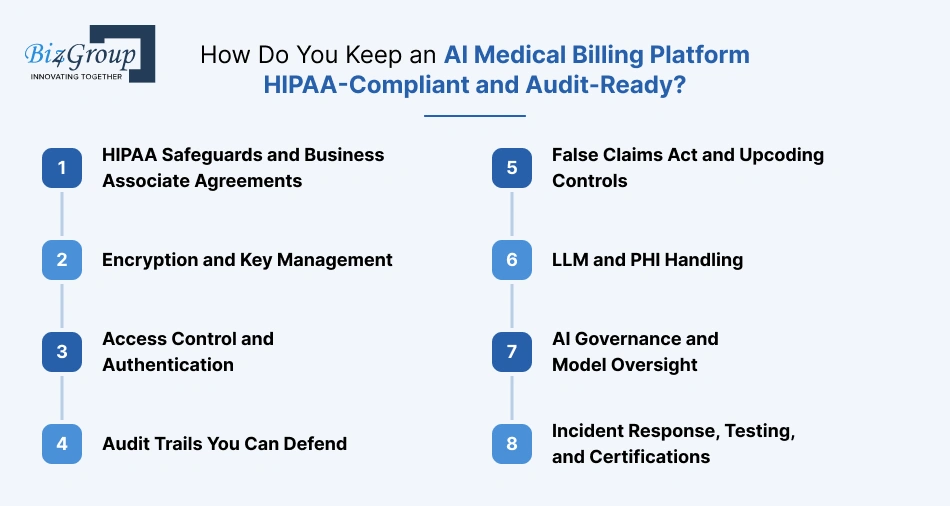
When you build an AI medical billing platform, compliance is a design requirement, not a phase after launch. AI medical billing platform development that treats HIPAA safeguards, billing-law controls, and AI governance this way lets you answer an auditor with evidence instead of memory. Here are the eight controls to build in.
1. HIPAA Safeguards and Business Associate Agreements
Start with a written risk analysis, then map administrative, physical, and technical safeguards to every system that touches PHI. Sign a business associate agreement (BAA) with every vendor in the chain, including your cloud host, clearinghouse, OCR service, and language model provider. A vendor that won't sign a BAA stays outside the PHI zone.
2. Encryption and Key Management
Encrypt data in transit with TLS 1.2 or higher and at rest with AES-256. Keep keys in a managed key service, rotate them on a schedule, and keep secrets out of code and logs. Encrypt backups and exports the same way, since they're the copies teams forget.
3. Access Control and Authentication
Require single sign-on and multi-factor authentication for everyone, with extra checks on admin and export functions. Review who holds which role every quarter and remove access the same day someone changes jobs. Give service accounts and AI components the narrowest permissions that still let them work.
4. Audit Trails You Can Defend
Make logs tamper-evident and store them outside the systems they describe. HIPAA requires you to keep security documentation for six years, so use that as your minimum for audit logs, and extend it to cover your longest payer audit window. Test that you can replay what happened to any claim on demand.
5. False Claims Act and Upcoding Controls
The billing entity stays liable for every claim, whether a person or a model prepared it, and upcoding can trigger False Claims Act exposure. OIG's guidance for Medicare Advantage organizations flagged AI-generated prompts that push physicians to add diagnoses. So, schedule independent audits of AI-assisted claims, require reviewers to explain why they accepted a suggestion, and set a process to report and return any overpayments you find.
6. LLM and PHI Handling
Use a language model provider that signs a BAA and doesn't retain your data or train on it. Redact PHI from prompt and output logs wherever you can. Treat uploaded letters and notes as untrusted input, because text inside a document can carry instructions meant to steer the model.
7. AI Governance and Model Oversight
GAO's July 2026 review of AI coding tools found few independent studies verifying their accuracy, so test every model on your own claims by payer and specialty. Version each model, require sign-off before a new one goes live, and keep a rollback path. Run AI governance in healthcare as a standing process, not a launch checklist.
8. Incident Response, Testing, and Certifications
Write the incident response plan before launch, name an owner, and rehearse it. Under HIPAA's Breach Notification Rule, individuals must be notified without unreasonable delay and no later than 60 days after discovery. Add annual penetration tests and a SOC 2 or HITRUST report, which enterprise buyers often request, and keep AI compliance checks running after launch.
With these eight controls in place, you can show an auditor how your platform protects PHI, supervises its AI, and proves every claim decision. Now let's turn them into a build plan, starting with the AI medical billing platform development process, step by step.
How to Develop AI Billing System for Healthcare in 7 Steps?
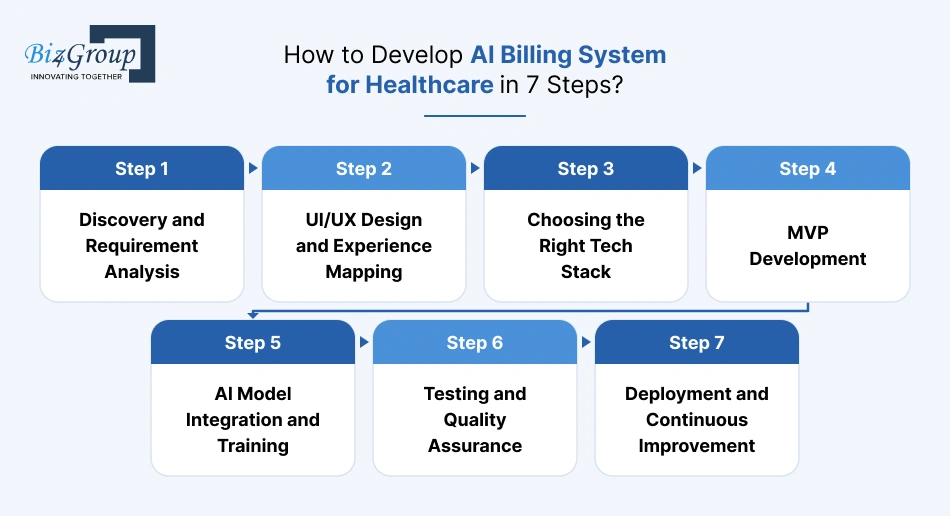
You can't just throw a bunch of developers, data, and algorithms together and expect a fully functional billing marvel to pop out. Building a healthcare-grade, intelligent billing system requires strategy, precision, and the right sequence of steps.
Let's walk through how you can create an AI-powered medical billing application that's reliable, scalable, and loved by both accountants and doctors alike.
Step 1: Discovery and Requirement Analysis
Before writing a single line of code, you need clarity. This phase is about understanding who you're building for, what challenges they face, and how your platform will fix them.
- Define the user base: hospitals, clinics, billing companies, or telemedicine providers.
- Map out the existing workflow and identify automation opportunities.
- Outline your must-have and nice-to-have features.
- Evaluate compliance needs (HIPAA, GDPR, HITECH).
Remember, the better your discovery, the smoother every step that follows.
Step 2: UI/UX Design and Experience Mapping
No matter how smart your system is, if users find it confusing, they'll abandon it faster than a bad webinar. A reliable UI/UX design company helps keep everything intuitive, clean, and efficient.
- Focus on minimal clicks and clutter-free dashboards.
- Design role-specific interfaces for admins, billers, and auditors.
- Use color coding for claim statuses and alerts.
- Ensure accessibility and responsive design for mobile users.
Good design improves adoption rates and reduces training costs.
Also read: Top 15 UI/UX design companies in USA
Step 3: Choosing the Right Tech Stack
What is required to develop AI medical billing platform that is secure, scalable, and future-ready? The right tech stack. It forms the backbone of your system, directly influencing performance, compliance, and integration capabilities.
Suggested Stack Overview:
|
Layer |
Common choices |
Note |
|---|---|---|
|
Front end |
React or Next.js |
Role-based screens for billers, coders, and auditors |
|
Core services |
One primary language per service group |
|
|
Integration |
Mirth Connect, Redox, or a cloud health-data integration service, plus X12 EDI libraries |
Translates HL7, FHIR, and X12 |
|
Data |
PostgreSQL, object storage, Redis, Kafka, a cloud warehouse such as Snowflake |
Keep PHI and de-identified stores apart |
|
Decision layer |
A rules engine, scikit-learn or gradient-boosted models, an LLM from a provider that signs a BAA |
Rules first, ML where rules run out |
|
Documents |
OCR or a document-AI service |
Handles scanned EOBs and letters |
|
ML operations |
A model registry (MLflow is common) and scheduled pipelines |
Runs the retraining cadence |
|
Infrastructure |
HIPAA-eligible cloud services (AWS, Azure, Google Cloud), Docker, Kubernetes, Terraform |
Infrastructure as code keeps environments identical |
|
Security |
OAuth 2.0 or OpenID Connect, MFA, KMS or Key Vault |
Central secrets management |
|
Observability |
Central logs, metrics, tracing, alerts on queue depth and rejection rates |
Watch business signals, not only server health |
Typically, organizations that successfully build such systems collaborate with experienced specialists, because knowing who can develop AI medical billing platform is just as important as choosing the technologies themselves.
Step 4: MVP Development
Building an MVP (Minimum Viable Product) is how you validate your vision in the real world without overspending.
- Scope the MVP to the claim spine: eligibility, claim scrubbing, submission through a clearinghouse, payment posting, the review queue, and the audit trail, plus one EHR integration.
- Test with real workflows and collect feedback early.
- Start with payer rules and add a denial-risk model once you have outcome data.
An MVP helps you avoid the classic "feature overload" trap. Start lean, validate fast, and improve continuously.
Also read: Top 12+ MVP development companies in USA
Step 5: AI Model Integration and Training
This is where your platform starts flexing its intelligence.
- Feed the AI with your historical claims, denial patterns, and payer data. If you have little history, add de-identified or partner data.
- Audit your data first: claims, remittances (835), denial reasons, and notes. Check volume, completeness, and consistency by payer.
- Use supervised learning to train NLP models for code extraction and classification.
- Integrate AI models for denial risk and payment forecasting.
- Have billing specialists label outcomes, and de-identify training data before it leaves the PHI zone.
Remember, AI is a living system that grows smarter with time and data.
Step 6: Testing and Quality Assurance
Testing AI billing platform is like tuning a race car, every component must run perfectly in sync.
- Perform unit, integration, and regression testing.
- Conduct security audits for HIPAA compliance.
- Test AI models for accuracy, bias, and performance.
- Simulate real-world billing workflows to ensure reliability.
- Run the platform in shadow mode: the AI scores and drafts while people work as usual, and you compare the results.
- Move to assisted mode when the results hold up.
Your users should trust your system enough to let it handle millions in revenue without blinking.
Step 7: Deployment and Continuous Improvement
Deploy your custom AI medical billing solutions on your preferred cloud platform and monitor performance in real-time.
- Roll out one payer or clearinghouse connection at a time and expect production to behave differently from sandboxes.
- Start EHR integration read-only. Add write-backs after patient matching and consent rules are settled.
- Monitor claim success rates and AI prediction accuracy, plus model drift, queue depth, and rejection rates, not only uptime.
- Use analytics to refine user experience and workflows.
- Roll out incremental updates and keep compliance modules current.
Next, we'll pull back the curtain on a question every healthcare organization asks early in their AI journey. What does it actually cost to build one?
How Much Does It Cost to Develop an AI Medical Billing Platform?
It costs $35,000 to $250,000 to develop an AI medical billing platform. An MVP sits at the low end, a mid-level platform in the middle, and an enterprise build at the high end.
Your final cost will differ with scope, integrations, data readiness, and compliance needs. Here is how the range breaks down.
Build, Buy, or Hybrid? How to Create an AI Medical Billing Platform
Before you price features, decide how much of the platform you need to create an AI medical billing platform around. You can buy a packaged product, build everything, or buy the standard parts and build the layer that sets you apart.
|
Approach |
Best when |
Cost pattern |
Trade-off |
|---|---|---|---|
|
Buy a packaged platform |
Billing isn't your product, your workflows are standard, and you need to go live fast |
Subscription or per-claim fees, low upfront, rising with volume |
Little control over AI logic, payer rules, and your data, and the roadmap is the vendor's |
|
Hybrid: integrate the standard parts, build the decision layer |
You have specific denial patterns or specialties, and you want control of AI and review workflows |
MVP to Mid-level tier in the tables below, plus per-transaction fees |
You own integration upkeep and model governance |
|
Build custom end to end |
Billing is your product (a SaaS or billing company), or you serve many payers and tenants |
Enterprise tier, with lower cost per claim at scale |
Longest time to value, and full compliance responsibility |
Most teams land on the hybrid. Two rules help you split the work:
- Build what differentiates you: the decision layer, the review workflows, and your payer-specific rules.
- Integrate what's standard: clearinghouse connectivity, eligibility checks, payments, and OCR.
A good AI medical billing platform development company will price these choices separately, so you can compare quotes like for like.
What Each Tier Includes
|
Tier |
What it includes |
Total cost |
|---|---|---|
|
MVP |
The nine MVP features below: one payer group, one clearinghouse, one EHR (read-only), and rules-first risk flags |
$35,000 to $75,000 |
|
Mid-level |
The MVP plus eight additions: ML denial scoring, appeals drafting, suggest-only coding, payer-policy search, a second connection, and more payers and specialties |
$75,000 to $150,000 |
|
Enterprise |
The Mid-level build plus seven additions: multi-tenant design, write-back integrations, model governance, SOC 2 readiness, and scale and resilience |
$150,000 to $250,000 |
AI Medical Billing Platform Development Cost by Feature
Each feature has one price range. Higher-tier builds don't change a feature's price. They add more features.
MVP features
|
Feature |
Estimated cost |
Why it costs this |
|---|---|---|
|
Eligibility and insurance verification |
$3,000 to $6,000 |
Cost rises with the number of payers and with real-time checks over batch checks. |
|
Claim creation, scrubbing, and rules-based risk flags |
$5,000 to $10,000 |
Payer-specific edits and the number of specialties set the effort. |
|
Claim submission and clearinghouse connectivity |
$4,000 to $8,000 |
Each clearinghouse and claim format needs its own mapping and acknowledgment handling. |
|
Payment posting and reconciliation |
$3,000 to $7,000 |
Remittance parsing and adjustment rules vary by payer. |
|
Human review queue and workflows |
$3,000 to $6,000 |
Roles, case views, and confidence-based routing drive the screen count. |
|
Role-based access and audit trail |
$3,000 to $6,000 |
Single sign-on, multi-factor authentication, and tamper-evident logging all take build time. |
|
EHR and practice management integration (one system, read-only) |
$4,000 to $10,000 |
It depends on how mature the system's HL7 or FHIR support is. |
|
Reporting and analytics dashboard (core KPIs) |
$3,000 to $6,000 |
The number of KPIs and drill-downs sets the effort. |
|
Compliance setup, testing, and project management |
$7,000 to $16,000 |
HIPAA risk analysis, security testing, QA, and delivery management scale with scope. |
Added at Mid-level
|
Feature |
Estimated cost |
Why it costs this |
|---|---|---|
|
ML denial-risk scoring |
$7,000 to $14,000 |
It needs claims history, model validation, and explanations reviewers can read. |
|
Appeals drafting |
$5,000 to $10,000 |
It needs a document store, evidence mapping, and letter templates. |
|
NLP-assisted coding (suggest-only, one specialty) |
$6,000 to $12,000 |
Code validation and accuracy testing are required per specialty. |
|
Payer-policy search (LLM with RAG) |
$3,000 to $6,000 |
Document volume and how often payers change policies drive the cost. |
|
Second EHR or clearinghouse connection (read-only) |
$7,000 to $13,000 |
A new partner means new formats and new testing. |
|
Payer rule library and added specialties |
$4,000 to $8,000 |
More payers and specialties mean more rules to write and test. |
|
Advanced analytics and denial root-cause reporting |
$3,000 to $5,000 |
It groups denials by cause and by payer. |
|
Added testing, security review, and project management |
$5,000 to $7,000 |
A bigger scope needs more QA and delivery oversight. |
Added at Enterprise
|
Feature |
Estimated cost |
Why it costs this |
|---|---|---|
|
Multi-tenant architecture and scaling |
$14,000 to $18,000 |
Per-tenant isolation, keys, and row-level security touch every data store. |
|
Additional EHR connections with write-backs |
$15,000 to $20,000 |
Write-backs need patient matching, consent rules, and reconciliation. |
|
Model operations and governance tooling |
$10,000 to $14,000 |
It covers a model registry, drift monitoring, and a scheduled retraining pipeline. |
|
SOC 2 readiness and advanced security controls |
$12,000 to $15,000 |
It needs policies, evidence collection, and control testing. |
|
Payer onboarding and coverage at scale |
$10,000 to $13,000 |
Rule libraries and testing must cover many payers and specialties. |
|
Data warehouse and advanced payer analytics |
$8,000 to $10,000 |
It covers warehouse setup and payer-level reporting. |
|
Disaster recovery and high-availability setup |
$6,000 to $10,000 |
It needs a second region, restore testing, and a downtime mode. |
These estimates assume one cloud region. The patient billing assistant, a later-phase item, isn't priced here.
Factors That Affect the Cost to Build an AI Medical Billing Platform
Eight factors move the price most when you build an AI medical billing platform:
- Scope and number of modules: Each added feature is its own build and test effort.
- Integrations: Every EHR, clearinghouse, or payer connection has its own formats and testing, and write-backs cost more than read-only access.
- AI approach: Rules cost the least, ML needs data and validation, and LLM features add retrieval, guardrails, and review tooling.
- Data readiness: Cleaning, labeling, and de-identifying claims history is often one of the longest phases.
- Compliance depth: HIPAA safeguards are the baseline, and SOC 2 or HITRUST readiness adds work.
- Tenancy: Multi-tenant builds need per-tenant isolation and keys, so they cost more upfront than single-tenant.
- Specialties and payer mix: More of either means more rules to write and test.
- Team mix and scale: Seniority and region change the rate, and claim volume and recovery targets drive infrastructure and testing.
Hidden Costs of AI Medical Billing Automation Software
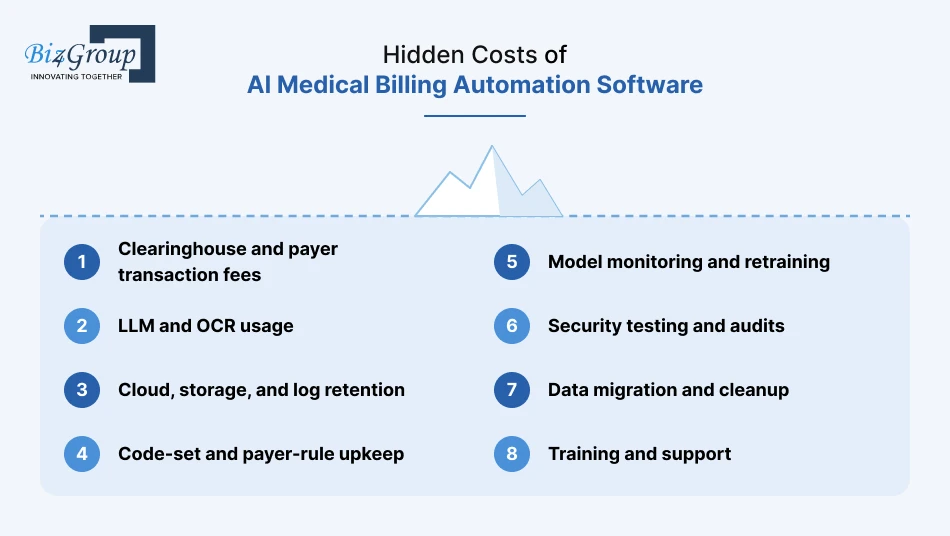
The build price isn't the whole bill. These costs show up after launch, so ask for them in every proposal for AI medical billing automation software:
- Clearinghouse and payer transaction fees: They're often charged per claim, so they grow with volume.
- LLM and OCR usage: Per-document and per-token charges add up as volume grows, and some tools carry license fees.
- Cloud, storage, and log retention: HIPAA-eligible services, backups, and long-term audit records.
- Code-set and payer-rule upkeep: Someone has to review and approve each annual code-set update and payer policy change.
- Model monitoring and retraining: Drift checks, labeling, and scheduled releases.
- Security testing and audits: Annual penetration tests and SOC 2 or HITRUST reports.
- Data migration and cleanup: Moving legacy claims and mapping old codes takes real time.
- Training and support: Reviewers need time to learn the queue, and partner API changes need fixes.
How to Optimize the Cost of AI Medical Billing Automation
These moves lower the price of AI medical billing automation without cutting the controls that keep it safe:
- Scope release one around a single workflow with a measurable return, then expand.
- Reuse your existing clearinghouse and EHR connections instead of rebuilding them.
- Use managed model APIs under a BAA instead of training your own language model.
- Route routine cases to rules and templates, and cache repeated policy lookups, so LLM calls happen only where they add value.
- Move up a tier only when the last one proves its value, for example MVP first, then Mid-level.
- Automate testing and deployment so regressions don't turn into rework.
- Track cost per claim from day one, including inference and clearinghouse fees.
- Follow the AI medical billing platform development process in stages and release value after each one.
- Run a fixed-scope discovery first, so a range becomes a firm estimate before the build starts.
ROI and Payback for an AI Medical Billing Platform
Use the three numbers you baselined at the start: denial rate, hours per denial, and days in A/R.
- Annual benefit = recovered revenue (denials avoided or overturned × average payment) + labor saved (hours saved × loaded hourly cost) + cash-flow gain from fewer days in A/R.
- Net annual benefit = annual benefit − annual run costs.
- Payback in months = build cost ÷ (net annual benefit ÷ 12).
If payback runs longer than you can accept, cut scope or move down a tier.
Want to turn this range into a firm number for your scope? Start with a fixed-scope discovery, which prices your payers, integrations, and AI modules before any build begins. Then we'll look at how to measure the return and monetize an AI medical billing platform once it's live.
You've seen the numbers, now picture turning a $45K investment into 2X ROI within a year.
Get a Custom QuoteHow Do You Measure Success and Monetize an AI Medical Billing Platform?
Measure first, then price. A platform that can't prove its results can't justify a budget, a subscription, or a contract. Before you build an AI medical billing platform, decide what success looks like and who captures the value.
KPIs to Measure Your AI Medical Billing Platform's Success
Track three layers in this order: outcomes, model quality, and control health. Outcome KPIs tell you whether money moved. Model metrics tell you why. Control metrics tell you whether it's safe.
Every KPI needs a baseline, an owner, and a review date. Set targets as improvement against your own baseline, by payer, not against industry averages. Your payer mix, specialties, and claim volume make averages a poor benchmark.
|
Layer |
What to track |
Red flag to watch |
|---|---|---|
|
1. Outcomes |
The five KPIs from the analytics capability (clean-claim rate, first-pass acceptance, denial rate by payer and reason, days in A/R, cost to collect), plus hours per denial and revenue recovered |
Denial rate falls while overpayment findings rise |
|
2. Model quality |
Precision (of the claims the model flagged, how many were actually denied), recall (of the claims actually denied, how many it flagged), and reviewer correction rate on extracted data, all by payer and specialty |
Score distribution shifts after a payer or code-set change |
|
3. Control health |
Reviewer override rate, share of AI-assisted claims audited, audit findings, and access exceptions |
Near-100% acceptance of AI suggestions, which can mean reviewers stopped checking |
The third red flag matters most. A suggestion acceptance rate near 100% looks like success, but it can mean the review step has become a click.
Match your KPIs to your build tier, so each one supports a real decision:
|
Build tier |
Primary KPIs |
Decision it supports |
|---|---|---|
|
MVP |
Clean-claim rate, first-pass acceptance, hours per denial |
Is the claim flow reliable enough to add more AI? |
|
Mid-level |
Denial rate by payer, precision and recall, acceptance and correction rates |
Which payers and modules earn further investment? |
|
Enterprise |
Cost to collect, per-tenant performance, audit coverage at scale |
Does it scale profitably and stay defensible? |
Review the numbers on a fixed rhythm:
- Weekly: operations review of queue time, rejections, and stalled claims.
- Monthly: model review of precision, recall, drift, and corrections.
- Quarterly: executive review that re-runs the payback formula from the cost section against actual results.
Monetization Models for an AI Medical Billing Platform
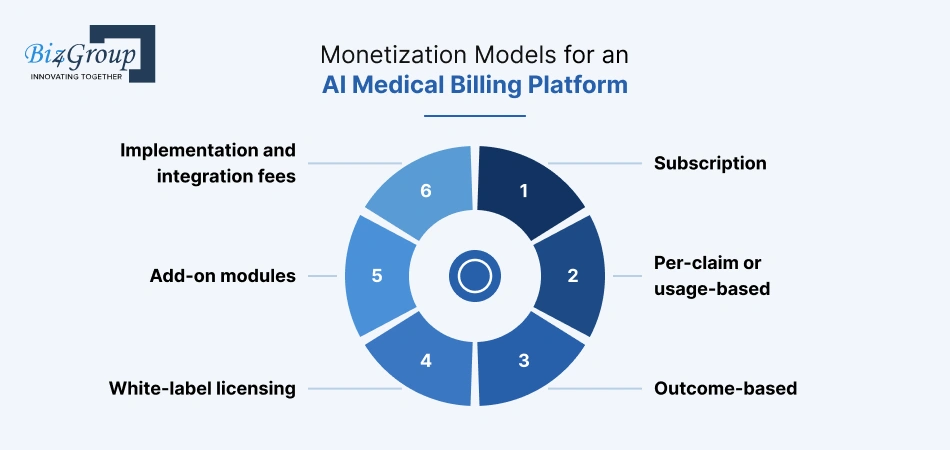
How you monetize an AI medical billing platform depends on who you are:
- Hospitals and clinics usually have no revenue line. The return is recovered revenue and a lower cost to collect.
- Billing companies earn through margin per claim, since the same staff can serve more clients.
- SaaS builders sell the platform itself and need a pricing model.
If you're selling it, choose from these six:
|
Model |
How it works |
Best for |
Watch out |
|---|---|---|---|
|
Subscription |
A recurring fee per provider, location, or tier, with modules bundled by level |
Practices and clinics that want a predictable bill |
Revenue stays flat while clearinghouse and model costs rise with volume |
|
Per-claim or usage-based |
A fee per claim processed or per appeal drafted |
Billing companies and high-volume clients |
Define what counts as a billable claim, and expect revenue to swing with volume |
|
Outcome-based |
A fee tied to revenue actually recovered |
Denial and appeals tools, and buyers wary of upfront cost |
You carry the risk until results appear, and "recovered" needs a clear definition |
|
White-label licensing |
A license to billing companies or RCM vendors under their own brand |
Partners who own the client relationship |
You support several brands and must keep compliance responsibilities clear |
|
Add-on modules |
Extra fees for analytics, appeals drafting, or policy search |
Land with the core product, expand later |
Price each module against the cost to build and run it |
|
Implementation and integration fees |
One-time fees for setup, EHR connections, and data migration |
Enterprise and multi-site customers |
Don't let services work swallow product margin |
Three rules keep the pricing healthy:
- Price on a unit the customer already counts, such as claims, providers, or recovered dollars.
- Track gross margin per claim. Subtract your run costs from the hidden-costs list in the cost section from what each claim earns.
- Start with the simplest model your buyer understands. Add usage or outcome pricing once you can measure value reliably.
Even a well-measured build runs into obstacles. Next, the problems teams hit most often, and how to solve them.
Also read: Top 15 AI healthcare platform development companies in USA
What Challenges Slow AI Medical Billing Platform Development, and How Do You Solve Them?
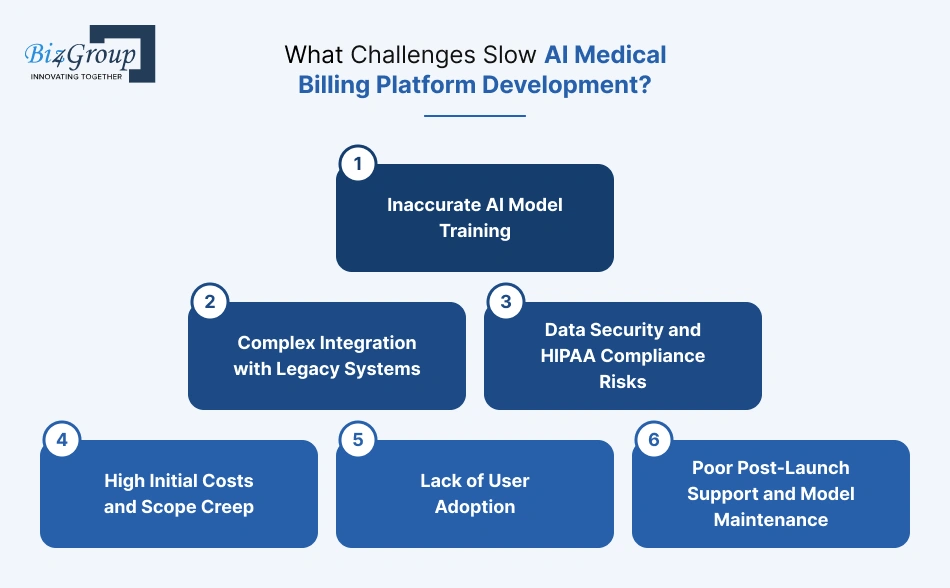
Building a smart, compliant, and scalable AI medical billing platform is about precision. One missed compliance clause, one untrained AI model, or one poor integration can send months of work spiraling.
Let's explore the common roadblocks teams face when they develop custom AI medical billing solutions for hospitals and clinics and how to overcome them before they become costly mistakes.
1. Inaccurate AI Model Training
When your AI models are trained on inconsistent or insufficient data, they deliver flawed billing predictions, poor code mapping, and false claim rejections.
Solutions:
- Use clean, anonymized data from multiple healthcare sources to reduce bias.
- Continuously retrain models with live data from claim outcomes.
- Incorporate both supervised and unsupervised learning for improved accuracy.
- Establish periodic model validation checkpoints with billing specialists.
2. Complex Integration with Legacy Systems
Most hospitals and billing companies rely on legacy EHR or practice management systems. Connecting modern AI platform to outdated infrastructures can feel like teaching a flip phone to stream Netflix.
Solutions:
- Use middleware and HL7/FHIR-compatible APIs for seamless data transfer.
- Prioritize modular architecture so integrations can evolve over time.
- Run sandbox simulations before live deployment.
- Involve IT teams early to align system dependencies and data standards.
3. Data Security and HIPAA Compliance Risks
AI billing platform handles vast amounts of sensitive patient data. One breach, and the financial (and reputational) damage could be enormous.
Solutions:
- Encrypt data both in storage and transit using AES-256 and SSL protocols.
- Use role-based access controls (RBAC) and log every user action.
- Regularly perform vulnerability scans and HIPAA compliance audits.
- Implement anonymization for all AI model training data.
4. High Initial Costs and Scope Creep
AI projects can snowball fast if requirements aren't crystal clear from day one. Too many "nice-to-have" features early on can inflate costs and delay delivery.
Solutions:
- Start with an MVP (core billing automation + claims) and iterate gradually.
- Define success metrics and lock feature priorities early.
- Use Agile development cycles with sprint-based cost tracking.
- Maintain transparent client-developer communication to avoid scope drift.
5. Lack of User Adoption
Even the smartest AI system fails if users don't trust or understand it. Billing teams often hesitate to rely on automation for compliance-heavy tasks.
Solutions:
- Conduct onboarding sessions and hands-on training for staff.
- Design intuitive dashboards with transparent AI reasoning.
- Allow manual overrides for AI-generated decisions to build confidence.
- Collect early feedback and refine the UX continuously.
6. Poor Post-Launch Support and Model Maintenance
AI systems evolve. Many companies launch, celebrate, and then forget the continuous learning part, leaving systems outdated and underperforming within months.
Solutions:
- Schedule quarterly retraining sessions for your AI models.
- Maintain dedicated DevOps and MLOps support teams.
- Track KPI performance and flag declining model accuracy early.
- Offer clients post-deployment service-level agreements (SLAs).
Facing these challenges early can mean the difference between a platform that functions and one that dominates. When you develop intelligent medical billing platform with these pitfalls in mind, you build a lasting competitive advantage.
Next, let's talk about AI experts who can help you dominate.
Why Choose Biz4Group as Your AI Medical Billing Platform Development Company?
The right AI medical billing platform development company has shipped AI in the revenue cycle, builds to HIPAA and billing-law controls, and tells you when not to build. Here is what we can show for each, and where you can check it yourself. Ask any vendor for the same proof.
|
Proof point |
What we can show |
|---|---|
|
Billing AI in production |
Bill Matters, our AI denial management and appeals platform, launched in September 2026. A person signs off on every appeal, every action is logged, and a BAA is available. |
|
Healthcare integration stack |
Our healthcare teams work with X12/EDI, HL7, FHIR, Mirth Connect, and Redox. |
|
Claims-adjacent delivery |
An AI voice support platform for healthcare TPAs that automates routine insurance and patient inquiries and routes complex cases to people. |
|
Scale and retention |
300+ people, 1,000+ projects, and an 85% client retention rate. |
|
Independent ratings |
Rated 4.9 from 28 reviews on Clutch, where we're recognized among top AI healthcare development companies. |
Dave Caplis says our first question to any healthcare client is what specific problem the software solves, and what the outcome should look like six months later. That question shapes how we work:
- We start with a fixed-scope discovery that baselines your denial rate, hours per denial, and days in A/R.
- We build on the systems you already have, and we'll tell you when a packaged tool is the better buy.
- We keep a person in control of every AI decision that touches a claim.
- We hand over architecture diagrams, regular status reports, and post-launch support, so you can run what we build.
You now know what a dependable partner looks like and what to ask for. Let's put that into a plan that fits your hospital or clinic and develop custom AI medical billing solutions for hospitals and clinics that your team trusts from day one.
Mistakes in healthcare billing can cost thousands.
Partner with a team that's already fixed them for industry leaders and would do the same (and more) for you.
Talk to Our ExpertsWrapping Up
To build an AI medical billing platform that lasts, make four decisions well: where AI helps first, how the architecture keeps people in control, how compliance is designed in, and how you'll measure the return. Get those right, and the features, budget, and timeline follow.
Biz4Group can help at whichever stage you're in. We offer full-cycle development, team augmentation, or consulting that assesses your current systems, picks the right first use case, and builds a compliance-first roadmap.
Ready to turn this plan into a working platform? Book an appointment for a free AI consultation with our healthcare AI team.
Still weighing it up? The questions below are the ones buyers ask us most before they build.
FAQ
1. How much does it cost to develop an AI medical billing platform?
It costs $35,000 to $250,000 to develop an AI medical billing platform. An MVP runs about $35,000 to $75,000, a mid-level platform $75,000 to $150,000, and an enterprise build $150,000 to $250,000. Integrations, AI modules, and compliance depth move the price most. Budget for run costs too, such as clearinghouse fees, model usage, and code-set upkeep.
2. How long does the AI medical billing platform development process take?
An MVP usually takes 2 to 4 weeks. A mid-level platform takes about 4 to 6 weeks, and an enterprise build 6 to 8 weeks. Data readiness, the number of integrations, and a shadow-mode pilot set the pace. Releasing in stages gets you value before the full build is done.
3. Should I build a custom medical insurance billing platform or buy one?
Buy when billing isn't your product and your workflows are standard. Build when your payers, specialties, or integrations don't fit a packaged tool, or when billing is the product you sell. Most teams choose a hybrid: integrate the standard parts, such as clearinghouse connectivity, and build the decision layer that gives you an edge.
4. Is AI medical billing automation software HIPAA compliant?
It can be, but compliance comes from the vendor's controls and yours, not from the AI itself. You need a signed business associate agreement with every vendor that touches PHI, including the language model provider. Add encryption in transit and at rest, role-based access, audit logs, and a breach response plan. Confirm your data doesn't train shared models and keep consumer AI tools away from PHI.
5. Can an AI medical billing platform replace my billing team?
No. The platform takes over repetitive work such as eligibility checks, claim scrubbing, and first-draft appeals. People still approve codes, review appeals, and handle exceptions. Your organization stays responsible for every claim, so a person must stay in control. Roles shift toward review, audit, and payer follow-up.
6. How accurate is AI medical billing and coding, and how do I test it?
Accuracy varies by specialty, payer, and documentation quality, so a vendor's headline number won't transfer to your claims. Test on your own data. Run the model in shadow mode while coders work as usual, then compare results by payer and specialty. Track precision, recall, and correction rates, and move to assisted mode only when the results hold.
7. Can I build an AI medical billing platform on top of my current EHR and clearinghouse?
Yes. Connect to your EHR over HL7 or FHIR, and to payers through your clearinghouse using X12 transactions such as eligibility (270/271), claims (837), and remittances (835). Start with read-only access to one EHR and keep your existing clearinghouse. Add write-backs once patient matching and consent rules are settled.