Location :
Orlando, FL, USA
Location :
Orlando, FL, USA +1 (407) 714-1616
 info@biz4group.com


















Imagine a digital system that doesn’t wait for instructions but instead, understands your business goals, learns from real-time feedback, and takes independent actions to get the job done.
Read More

 AI Summary Powered by Biz4AI
Can your team really afford to spend thousands of hours navigating websites every year? Probably not.
Every business depends on web-based workflows, yet a surprising amount of productive time disappears into searching for information, monitoring websites, updating records, and completing repetitive online tasks.
The impact goes far beyond lost efficiency. Studies estimate that workplaces worldwide lose nearly 55 billion hours annually to manual work processes and repetitive tasks creating a massive productivity gap and costing businesses $1.8 trillion annually when factoring in national hourly wages.
The challenge becomes even bigger when information gathering itself turns into a daily responsibility. In the U.S., 70% of employees spend at least 20 hours every week searching for the information they need to do their jobs.
This growing pressure is pushing organizations toward smarter forms of automation, including the adoption of an AI browser agent that can interact with websites and complete tasks with minimal human intervention.
Some of the most common web-based activities businesses are looking to automate include:
As demand for intelligent automation grows, AI browser agent development is becoming a strategic focus for organizations looking to streamline web operations. Now, with all of that on the table, you might be wondering how to develop an AI browser agent for automating web tasks and workflows.
That's exactly what we'll unpack throughout this guide, from what happens behind the scenes to the decisions and technologies that turn these agents into practical business tools.
An AI browser agent is an AI system designed to perform browser-based tasks on behalf of users. Instead of requiring someone to manually move between websites, search for information, gather data, or complete repetitive online activities, it handles those responsibilities while working toward a defined objective.
Think about a sales operations manager who starts every morning checking competitor websites, collecting pricing updates, reviewing industry news, and updating internal records. Individually, these tasks seem manageable. Together, they consume hours that could be spent on strategy and customer engagement.
An AI browser agent takes ownership of those routine browser activities, allowing teams to focus on higher-value work improving productivity by 30% and boosting employee efficiency by 61%.
Common responsibilities assigned to AI browser agents include:
At its core, an AI browser agent helps organizations shift repetitive browser work away from employees and toward intelligent task execution. So, what sets these systems apart? Let's take a look.
At first glance, web scraping tools, RPA workflows, custom scripts, and AI browser agents may appear to solve similar problems. The difference becomes clearer when you look at what organizations are actually trying to accomplish. Most businesses are not trying to collect data, run scripts, or build workflows. They are trying to achieve an outcome.
Here is the key difference in how each on reacts to different day-to-day situations inside an organization.
A SaaS company wants a single report every Monday covering competitor pricing changes, feature launches, partnership announcements, product updates, and positioning shifts across 25 competitors.
Many organizations start with web scraping tools to collect pricing information. As reporting requirements expand, additional monitoring systems are introduced to track product launches, partnership announcements, blog updates, and company news. RPA workflows may then be used to move information into reporting systems, while custom scripts help fill monitoring gaps that existing tools cannot handle.
The business eventually gets the report it needs, but maintaining the reporting process becomes a project of its own. Multiple automations are supporting a single business objective.
An AI browser agent approaches the same problem differently. Instead of managing separate monitoring activities, the objective becomes the starting point: produce a competitive intelligence report. Information gathering across websites is organized around that outcome, reducing the need to build separate workflows for each category of information being monitored.
If you were also someone asking, "We currently use web scraping and automation tools for competitor monitoring, but maintaining separate workflows is becoming difficult. Is there a more unified approach?" Then hope you now have an answer to your question.
An insurance provider monitors government portals, regulatory websites, compliance publications, and industry associations. Missing an important policy update can create operational and compliance risks.
Traditional automation approaches often focus on collecting information from specific sources. One workflow retrieves regulatory publications. Another monitors government announcements. Additional scripts may be introduced as monitoring requirements expand. The organization successfully gathers information, but teams still need to sort through updates arriving from multiple monitoring systems.
The business objective, however, is not collecting regulatory content. The objective is understanding which updates require attention.
An AI browser agent focuses on that objective from the beginning. Rather than treating each source as a separate monitoring workflow, it gathers updates from multiple sources and organizes them around the compliance priorities being tracked.
A logistics company works across supplier portals, shipping carrier dashboards, warehouse systems, and customer service platforms. The organization needs visibility into delays, service disruptions, delivery exceptions, and operational issues throughout the day.
With traditional automation, separate workflows are often created for separate systems. One automation retrieves shipment statuses. Another downloads reports. Additional scripts monitor operational alerts from specific platforms. Each automation solves part of the problem, but operational visibility remains distributed across multiple tools and processes.
The actual business objective is much simpler: understand what requires attention across all operational systems.
An AI browser agent approaches the workflow from that perspective. Instead of treating each portal as a separate automation project, it gathers operational updates across systems and organizes information around issues, exceptions, and events that affect business operations.
Area |
Traditional Automation Tools |
AI Browser Agents |
|---|---|---|
Starting Point |
Automate a specific task |
Achieve a business objective |
Workflow Design |
Multiple automations often handle different parts of a process |
Activities are organized around a single outcome |
Information Sources |
Typically configured source by source |
Can work across multiple browser-based sources within the same objective |
Change Management |
New requirements often require new workflows or automation updates |
Objectives can evolve without redesigning every activity individually |
Operational View |
Focuses on completing predefined actions |
Focuses on delivering the result the business is trying to achieve |
Business Perspective |
Manage automations |
Manage outcomes |
These examples reveal the fundamental differences. Traditional automation tools are typically designed to automate individual tasks within a process. AI browser agents are designed around the business objective itself, helping organizations coordinate research, monitoring, and browser-based activities through a single outcome-driven workflow.
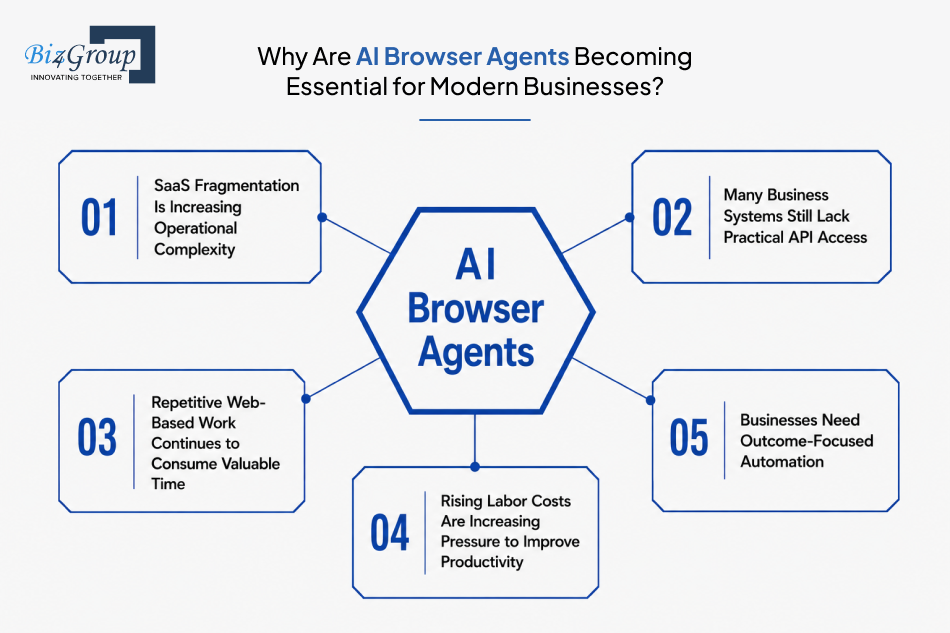
The growing adoption of AI browser agents is being driven by changes in how businesses operate online rather than by advancements in automation alone. Several operational pressures are pushing organizations to rethink how browser-based work gets completed speeding up the adoption rate by 79%.
Modern businesses rely on dozens of SaaS platforms across sales, marketing, operations, finance, customer support, procurement, and compliance. Critical information is often distributed across multiple dashboards, portals, and web applications, making it difficult to maintain visibility without constant manual effort.
Although APIs are widely available, many business workflows still involve websites, customer portals, supplier platforms, government systems, and third-party applications where direct integrations are unavailable, restricted, incomplete, or costly to implement. As a result, browser-based interaction remains a necessary part of daily operations.
Research, monitoring, data collection, status tracking, information verification, and portal management are repeated across departments every day. While each task may seem small individually, the cumulative operational burden becomes significant as organizations scale.
Organizations are under growing pressure to accomplish more without proportionally increasing headcounts, especially when adoption of AI agents can help reduce operational cost by 20-30%. Browser-based activities that require consistent attention often consume time that could be directed toward strategic, customer-facing, or revenue-generating work.
Many organizations have already automated individual tasks. The next challenge is coordinating entire browser-based workflows that span multiple systems, websites, and information sources while keeping business objectives at the center of the process.
These forces are not temporary trends. They represent structural changes in how digital work is performed, which is why interest in AI browser agent development continues to grow across industries.
Identify browser workflows consuming valuable operational time before inefficiencies become expensive.
Audit My Browser Workflows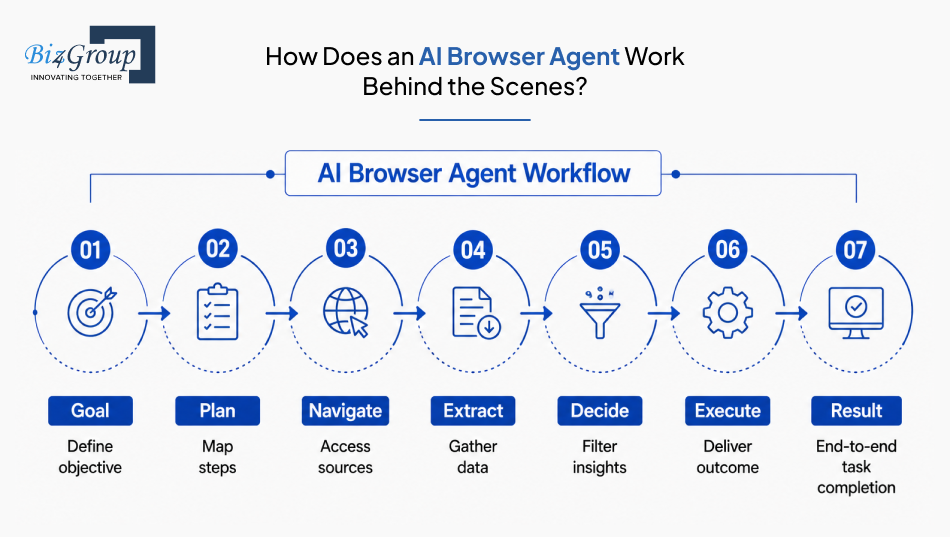
The value of an AI browser agent becomes much easier to understand when you look at what happens after a task is assigned. Rather than focusing on the technology behind it, let's follow the operational journey from the moment an objective is provided to the point where the work is completed.
This operational flow is what makes AI agent development for browsers different from traditional automation approaches. The process stays focused on completing an objective rather than executing isolated browser actions.
Also Read: Top AI Agent Development Companies in USA
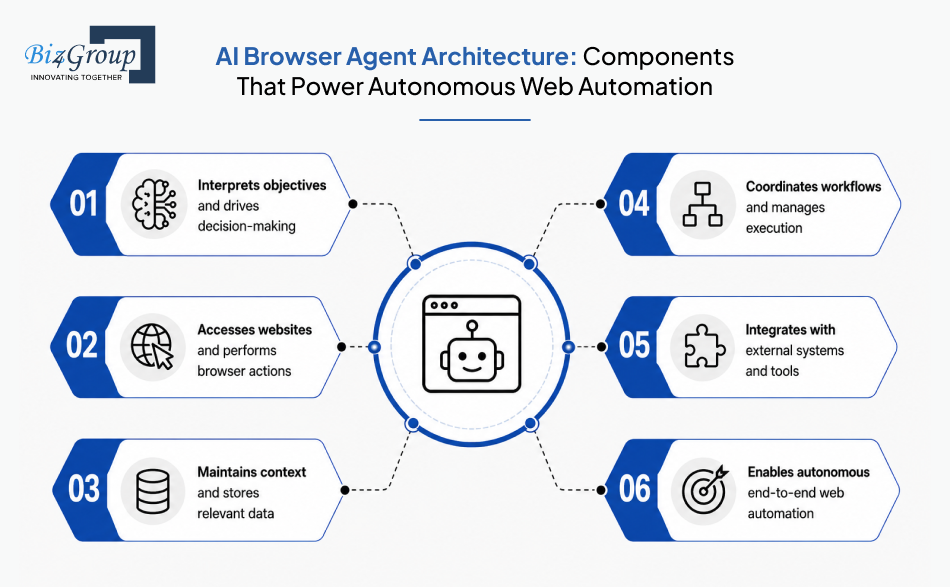
You have seen how an AI browser agent operates from objective to execution, and this naturally leads you to wonder what makes that process possible behind the scenes. Well, every browser AI agent development project relies on several core architectural layers working together to support decision-making, browser interaction, coordination, and data flow.
The reasoning layer interprets objectives and determines how tasks should be approached.
The browser layer serves as the agent's connection to websites and web applications.
The memory layer maintains context throughout task execution.
The orchestration layer coordinates activities across the entire system.
The integration layer connects the agent with external business systems.
Together, these layers form the foundation of an AI browser agent architecture. Understanding how these components interact makes it easier to evaluate technical requirements, implementation choices, and the systems needed to support production-scale deployments.
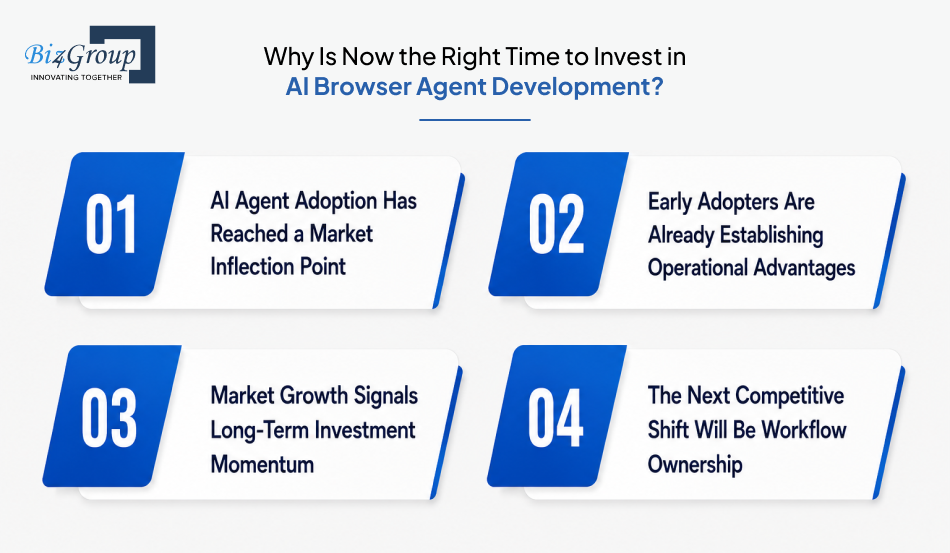
Interest in AI browser agents is moving beyond experimentation and into active adoption. Organizations evaluating AI browser agent development for automating repetitive tasks in web environments are increasingly treating it as a long-term operational investment rather than an emerging technology initiative.
Several market signals point to why timing matters today.
AI agents are rapidly moving from pilot programs to production environments. According to McKinsey's State of AI research, 88% of companies are already exploring or piloting AI agents. This indicates that organizations are actively assessing where autonomous systems can create operational value.
The shift becomes even more significant when looking at future deployment plans:
The value discussion has shifted from potential to measurable outcomes. Organizations that adopted AI-driven automation early are already reporting operational improvements that help justify continued investment.
Reported outcomes include:
For many decision-makers, the question is becoming less about whether browser agents can create value and more about how quickly they can be deployed effectively.
Investment activity is being supported by strong market expansion across both AI agents and AI-native browser technologies.
Current projections indicate:
Markets rarely sustain this level of projected growth unless organizations see meaningful business value and continue allocating budget toward adoption.
Over the next few years, competitive advantage is likely to move beyond access to AI models and toward ownership of automated workflows. Organizations that establish browser-agent capabilities early will have more time to refine processes, identify high-value use cases, and build operational experience before adoption becomes widespread.
Predictions worth watching include:
The strongest investment opportunities often emerge before a market reaches full maturity. For organizations evaluating how to create intelligent AI browser agent with workflow integration, current adoption trends, measurable business outcomes, and long-term market growth signals suggest that the investment window is already open.
Early movers are already refining browser-agent capabilities while others are still evaluating possibilities.
Assess My AI Agent OpportunityWe just saw how market momentum around AI browser agents is accelerating. Now let's look at the capabilities that separate a production-ready platform from a basic automation tool and will help you stand out in the competitive landscape.
For organizations evaluating building AI-powered browser agent for data scraping, research, and automation, these are the features that matter most.
These capabilities enable the agent to understand objectives, make decisions, and complete browser-based activities.
Feature |
Purpose |
|---|---|
Goal Interpretation |
Converts user instructions into actionable objectives. |
Multi-Step Task Execution |
Completes tasks that require multiple actions across different websites or portals. |
Context-Aware Decision Making |
Determines appropriate actions based on information collected during execution. |
Task Prioritization |
Organizes activities according to task importance and workflow requirements. |
Adaptive Workflow Handling |
Adjusts execution paths when browser conditions change. |
These features allow the agent to operate effectively within web environments.
Feature |
Purpose |
|---|---|
Website Navigation |
Moves through websites and web applications required for task completion. |
Form Completion |
Enters and submits information across browser-based workflows. |
Dynamic Content Handling |
Interacts with pages where information updates after loading. |
Multi-Tab Management |
Coordinates activities across multiple browser sessions and tabs. |
File Download and Upload Support |
Handles browser-based document transfer activities. |
These capabilities support information gathering, monitoring, and research activities.
Feature |
Purpose |
|---|---|
Intelligent Data Extraction |
Collects relevant information from websites and online sources. |
Content Summarization |
Converts large volumes of information into concise outputs. |
Research Aggregation |
Combines information gathered from multiple sources. |
Change Detection |
Identifies updates, modifications, and new information across monitored sources. |
Structured Data Organization |
Organizes collected information into usable formats. |
These features help the agent maintain context and improve decision quality.
Feature |
Purpose |
|---|---|
Session Memory |
Retains context throughout ongoing activities. |
Historical Activity Tracking |
References previous actions and collected information when needed. |
Pattern Recognition |
Identifies recurring trends and behavioral patterns within collected data. |
Supports forward-looking insights based on observed information patterns. |
|
Context Retention |
Maintains continuity across longer workflows and research activities. |
These capabilities connect browser activities with broader business operations.
Feature |
Purpose |
|---|---|
Business System Integration |
Exchanges information with enterprise platforms and business applications. |
Workflow Trigger Support |
Initiates actions based on predefined events or conditions. |
Notification Management |
Delivers updates, alerts, and execution outcomes to users. |
Supports information exchange between browser agents and connected systems. |
|
Output Delivery Automation |
Routes completed outputs to designated destinations and workflows. |
Also Read: Adopt An API-First Architecture for Business Agility
A strong feature set is not about adding more capabilities. It is about ensuring the agent can understand objectives, interact with browser environments, process information, and execute workflows reliably. Organizations planning to develop AI browser agent with task automation should evaluate features based on how effectively they support real operational requirements.
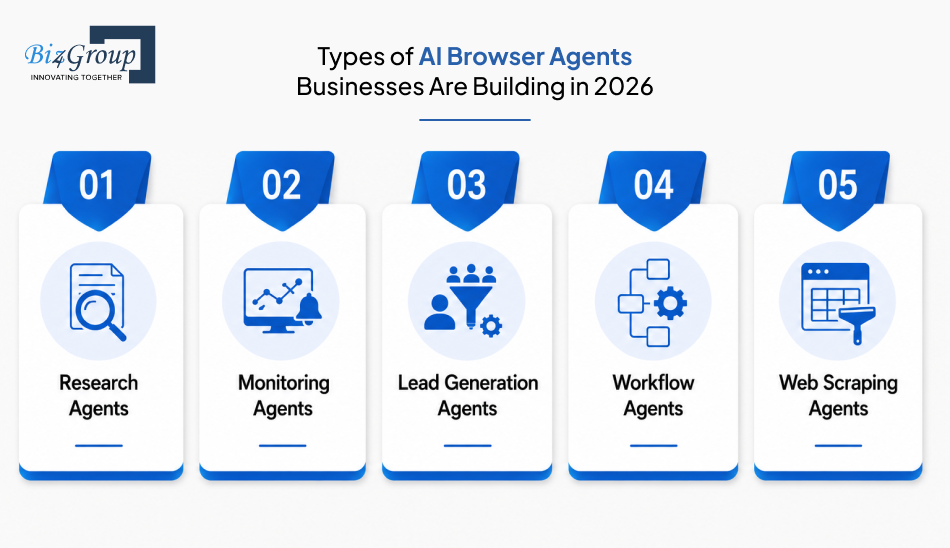
Browser agents are designed around different objectives. Some focus on gathering information, others specialize in monitoring online activity, while some are built to execute browser-based workflows. Understanding these categories helps define the type of agent required before starting an AI browser agent development project.
Research agents are designed to collect, organize, and summarize information from multiple online sources. They help users investigate topics, gather competitive intelligence, analyze information, and consolidate findings into structured outputs.
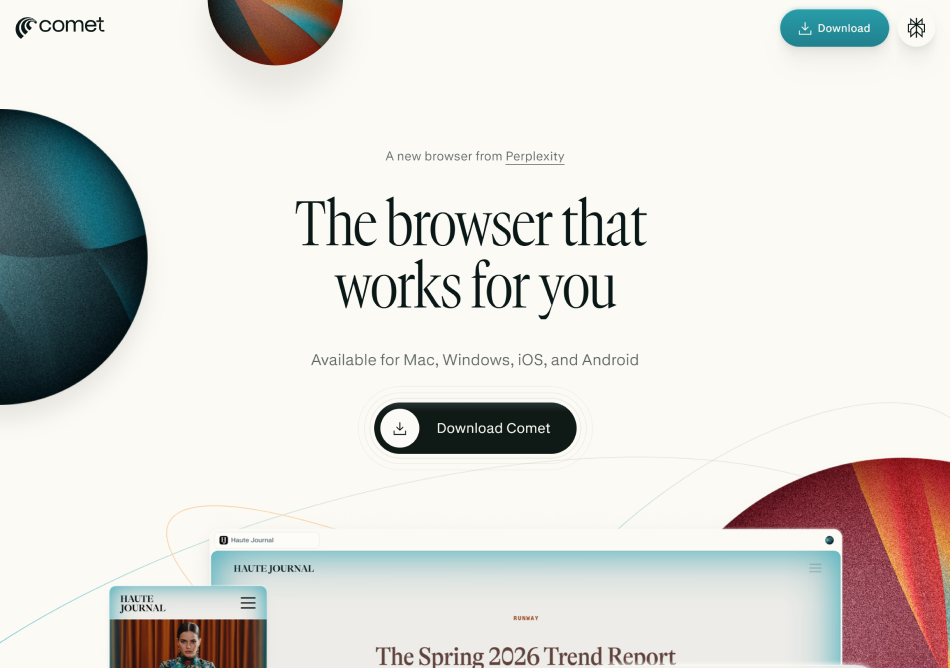
A good category example is Comet AI by perplexity, which combines web navigation, information gathering, and research-oriented interactions within a browser environment.
Monitoring agents continuously track websites, portals, dashboards, and online resources for changes. Their primary role is to identify updates, detect modifications, and surface new information as it becomes available.
These agents are commonly configured around specific monitoring objectives rather than one-time information gathering tasks.
Lead generation agents focus on identifying prospects, collecting relevant information, qualifying leads, and organizing contact data from online sources. Their activities are centered around discovering potential opportunities and maintaining structured lead pipelines.
Unlike research agents, their output is typically prospect-focused rather than information-focused.
Workflow agents are designed to complete browser-based activities involving multiple coordinated steps. They move through websites, interact with web applications, complete actions, and work toward a predefined outcome.
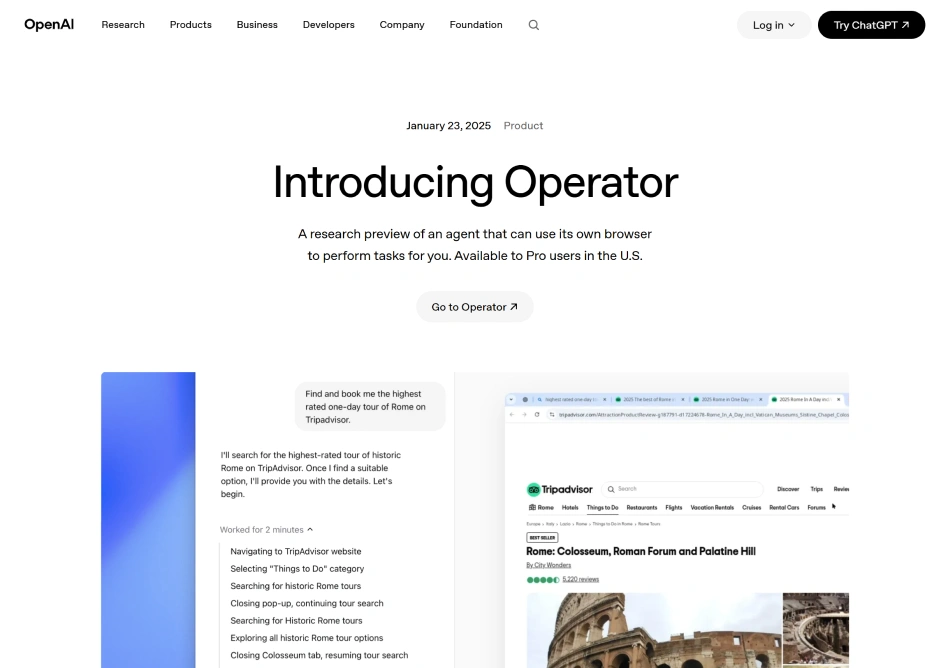
A strong example of this category is OpenAI Operator. Rather than focusing solely on information collection, it is designed around completing browser tasks and executing actions across web environments.
Web scraping agents specialize in extracting information from websites and organizing it into structured formats. Their primary objective is large-scale information collection rather than research, monitoring, or workflow execution.
These agents are often used when consistent data extraction across multiple web sources is the main requirement.
While these categories serve different purposes, modern browser agents increasingly combine capabilities from multiple types. A single implementation may include research, monitoring, workflow execution, and web data collection depending on the objectives it is designed to support.
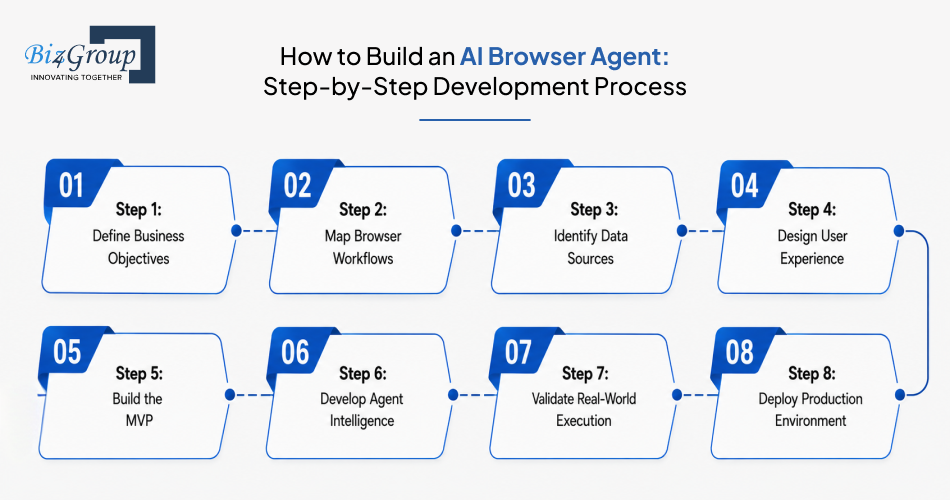
An AI browser agent becomes valuable only when its development process aligns with real business objectives and browser-based workflows. For organizations evaluating developing scalable AI browser agent for research, monitoring, and data collection, the following development framework provides a practical path from concept to deployment.
Every successful project starts with a clear understanding of what the agent is expected to accomplish. The focus should remain on outcomes rather than technology.
The next step is documenting how work currently moves through websites, portals, dashboards, and browser-based systems. This creates the foundation for automation planning.
Browser agents rely on information gathered from multiple environments. Understanding where information originates helps define execution requirements early.
Users still need visibility into tasks, outputs, and agent activities. This stage focuses on making interactions intuitive and easy to manage. Many organizations work with a specialized UI/UX design company to ensure usability requirements are addressed from the beginning.
Also Read: Top MVP Development Companies in USA
An MVP allows teams to validate assumptions before expanding functionality. This phase focuses on proving that core workflows can be executed successfully. Many organizations use MVP development services to accelerate validation while controlling investment risk.
Once the foundation is validated, the focus shifts toward improving how the agent interprets objectives and handles execution scenarios.
Controlled testing is rarely enough for browser agents because real web environments constantly change. Validation should focus on reliability under actual operating conditions.
Deployment marks the transition from testing to operational use. The focus moves toward stability, monitoring, and continuous improvement.
A successful project is not simply about building AI web automation agent capabilities. It is about moving through a structured development process that aligns objectives, workflows, execution logic, validation, and deployment into a reliable browser-agent ecosystem.
A browser agent is not powered by a single technology. Multiple architectural layers work together to support reasoning, browser interaction, workflow execution, data management, and system connectivity.
Understanding the role of each layer makes AI browser agent development easier to evaluate from both a business and technical perspective.
Architecture Layer |
Recommended Tools |
Purpose |
|---|---|---|
User Interface Layer |
React, Next.js |
Provides dashboards, controls, reporting screens, and user interactions. Teams often rely on ReactJS development and NextJS development to create responsive browser-based experiences. |
Application Layer |
Node.js, FastAPI |
Handles business logic, user requests, workflow coordination, and system communication. NodeJS development is commonly used for managing browser-agent services at scale. |
Agent Intelligence Layer |
OpenAI GPT-4o, Claude, Gemini |
Interprets objectives, evaluates information, and supports agent decision-making during execution. |
AI Model Access Layer |
OpenAI API, Anthropic API, Gemini API |
Connects the browser agent with large language models that power reasoning and task understanding. The OpenAI API is frequently used for objective interpretation and execution planning. |
Browser Automation Layer |
Playwright, Browser Use, Selenium |
Enables interaction with websites, portals, dashboards, and browser-based systems. |
Workflow Orchestration Layer |
LangGraph, CrewAI, AutoGen |
Coordinates activities, task sequencing, and execution flow across agent workflows. |
Memory Layer |
Redis, Pinecone, Weaviate |
Maintains context, stores historical information, and supports continuity across longer tasks. |
Data Processing Layer |
Python, Pandas |
Processes collected information, organizes outputs, and prepares data for analysis. Python development remains one of the most common choices for agent processing workloads. |
Database Layer |
PostgreSQL, MongoDB |
Stores operational records, workflow data, user information, and execution history. |
Integration Layer |
REST APIs, GraphQL, Webhooks |
Connects browser agents with enterprise applications, SaaS platforms, and external services. |
Authentication Layer |
OAuth 2.0, Auth0, Okta |
Manages user access, identity verification, and secure authentication processes. |
Cloud Infrastructure Layer |
AWS, Microsoft Azure, Google Cloud |
Provides hosting, scalability, deployment environments, and infrastructure management. |
Monitoring Layer |
Datadog, Grafana, Prometheus |
Tracks performance, system health, workflow activity, and operational reliability. |
Also Read: A Complete Guide to OpenAI API Integration for AI Applications
The exact technology combination varies depending on project requirements, but these layers form the foundation of most modern AI browser automation development initiatives. The objective is not adopting every tool available, but selecting technologies that support reliable execution, scalability, and long-term maintainability.
The cost of AI browser agent development depends on workflow complexity, browser interactions, automation depth, system integrations, and scalability requirements. Most projects fall between $30,000 and $200,000+, with investment levels varying based on functionality and the number of connected systems.
Organizations evaluating implementation costs often assess browser automation requirements alongside broader AI integration services to define the right development scope.
Development Level |
Estimated Cost Range |
Scope |
|---|---|---|
MVP Level AI Browser Agent |
$30,000 - $60,000 |
Supports a limited set of browser workflows, basic research or monitoring capabilities, essential browser automation, simple reporting, and initial validation of business requirements. |
Mid-Level AI Browser Agent |
$60,000 - $100,000 |
Includes multi-step workflow execution, expanded browser interactions, advanced monitoring capabilities, business system integrations, user management, and moderate AI integration costs associated with connected platforms. |
Advanced Level AI Browser Agent |
$100,000 - $200,000+ |
Supports large-scale workflow automation, multiple integrations, advanced decision-making, enterprise-grade security, high-volume execution, extensive reporting, compliance requirements, and production-scale deployment environments. |
The right investment level depends on the objectives being automated rather than the technology itself. Organizations focused on research and monitoring may start with an MVP, while those building autonomous web scraping agents or enterprise workflow platforms often require larger investments. Understanding project scope early remains one of the most effective ways to estimate AI agent development cost accurately.
AI browser agents operate in environments that are constantly changing. Websites evolve, workflows shift, and browser interactions rarely remain static for long periods. Understanding these technical challenges early helps organizations approach AI browser agent development with realistic expectations and stronger implementation plans.
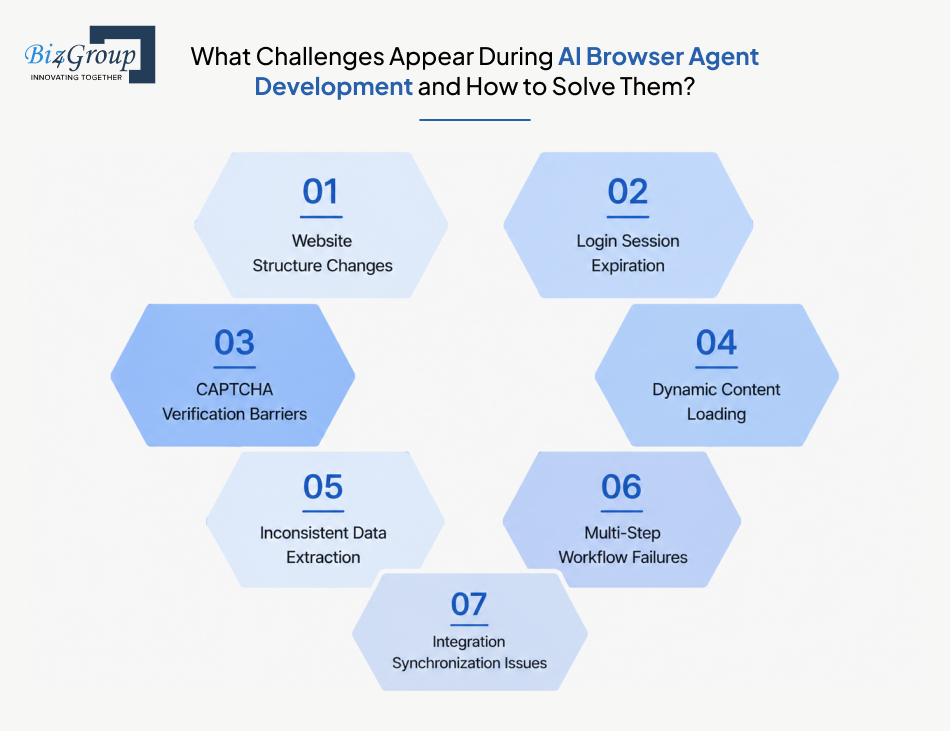
The most common reasons browser-agent initiatives struggle include:
Now let's look at them in detail:
Browser agents often depend on specific page elements to navigate websites and complete tasks. When websites update layouts or modify page structures, existing workflows can stop working correctly.
Solution: Regular workflow monitoring and automated testing help identify changes before they impact production activities. Teams that hire AI developers for long-term support often establish ongoing maintenance cycles to keep browser workflows aligned with evolving websites.
Many browser-based workflows require authenticated access to portals and web applications. Session expirations can interrupt execution and prevent agents from completing assigned tasks.
Solution: Session management mechanisms should be incorporated into the development process. This includes handling re-authentication workflows and monitoring session status throughout execution.
Some websites introduce CAPTCHA challenges to prevent automated activity. These verification requirements can interrupt browser-agent execution and create workflow bottlenecks.
Solution: Workflow design should account for environments where CAPTCHA challenges may occur. Organizations commonly identify these scenarios during testing and establish alternative execution paths where appropriate.
Many modern websites load information after the initial page is displayed. Agents attempting to access information too early may collect incomplete or inaccurate results.
Solution: Execution logic should verify that required information has fully loaded before proceeding. Reliable synchronization techniques help ensure browser interactions occur at the correct time.
Information may appear in different formats across websites, making it difficult to maintain consistent outputs during data collection activities.
Solution: Data validation rules should be implemented to verify extracted information before it enters downstream workflows. This helps improve output quality and reduce processing errors.
Browser agents frequently execute tasks involving multiple websites, portals, and decision points. A failure in one step can affect the entire workflow.
Solution: Task recovery mechanisms should be incorporated into workflow design. This allows agents to resume execution without restarting the entire process whenever a recoverable issue occurs.
Browser agents often exchange information with external platforms and business systems. Delays or synchronization failures can create inconsistencies between systems.
Solution: Integration monitoring should be established to track data movement across connected environments. Working with an experienced AI development company helps ensure integration requirements are addressed during architecture planning rather than after deployment.
Successful browser agent projects are rarely defined by how well an agent performs under ideal conditions. Long-term success comes from anticipating operational challenges, designing for reliability, and continuously improving execution quality. These considerations become especially important when an AI agent for web scraping, monitoring, or workflow automation is expected to operate at scale.
Validate technical risks before browser changes and workflow failures impact project success.
Review My Agent Requirements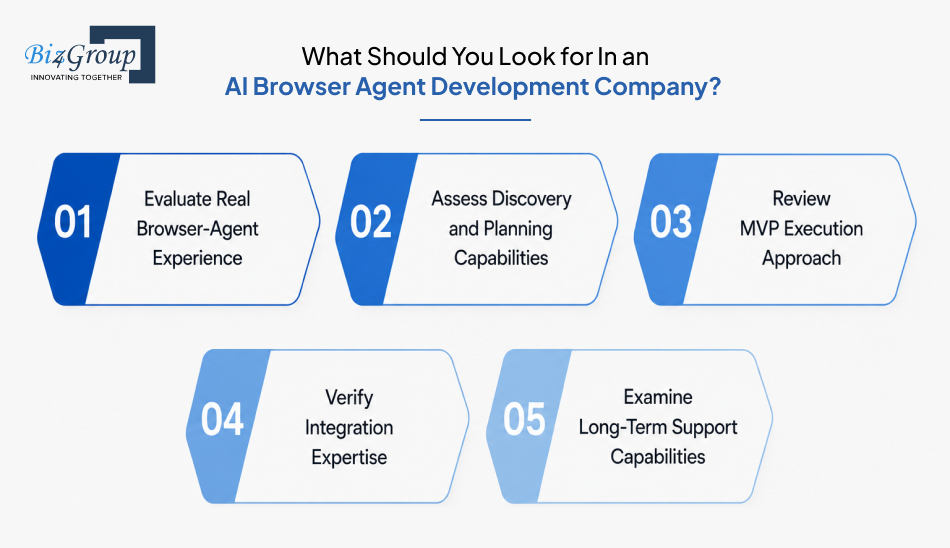
Many organizations reach a point where the technology itself is not the biggest question. The bigger concern becomes finding the right implementation partner with questions like: "We are evaluating development partners for AI browser agent projects and need cost and technical guidance."
The most reliable way to assess potential vendors is through a structured evaluation framework.
Many software vendors can build applications. Fewer have experience designing systems that operate across websites, portals, dashboards, and dynamic browser environments.
Checklist:
A strong partner should be able to define project scope before discussing implementation details. Poor planning often creates cost overruns and unnecessary complexity later in the project lifecycle.
Checklist:
Successful browser-agent projects rarely begin with enterprise-scale deployments. Early validation reduces risk and helps refine requirements before larger investments are made.
Checklist:
Browser agents rarely operate in isolation. They often exchange information with business applications, internal platforms, and external services.
Checklist:
Browser environments change constantly. Ongoing maintenance becomes a critical part of long-term project success.
Checklist:
With everything on the table, what we gain is that organizations evaluating implementation partners often look for a team that combines AI expertise with practical automation experience. As an AI agent development company in USA, Biz4Group LLC helps businesses design, validate, and deploy browser-agent solutions. They offer structured AI consulting services, AI automation services, and generative AI services tailored to real operational workflows.
The strongest development partner is not necessarily the one promising the most features. It is the one that can clearly define requirements, validate assumptions, manage execution risks, and support long-term growth. These evaluation criteria become equally important whether you are developing AI browser agent for personal or business use.
AI browser agents are becoming an increasingly practical way to automate browser-based work that spans research, monitoring, data collection, and workflow execution. The organizations seeing the most success are not treating them as standalone tools. They are aligning browser-agent initiatives with clear business objectives, well-defined workflows, and realistic implementation plans.
Turning an idea into a production-ready browser agent requires more than selecting technologies. It involves validating use cases, defining execution requirements, planning integrations, and establishing a roadmap for long-term scalability. This is where experienced teams providing AI product development services can help transform concepts into structured development initiatives with measurable goals.
The opportunity is not limited to early adopters. As browser automation continues to mature, organizations that act with a clear strategy today will be better positioned to capture value from intelligent web-based automation tomorrow.
Ready to evaluate how an AI browser agent can fit into your operations? Connect with us to discuss your requirements, assess feasibility, and define the right development path for your goals.
Yes. Modern browser agents can move across multiple websites, dashboards, and portals as part of a single objective. For example, an agent can gather information from several sources, validate findings, and organize outputs within one workflow instead of treating each website as a separate task.
Development timelines typically range from 2-18 weeks depending on workflow complexity, browser interactions, integration requirements, and testing needs. MVP implementations can often be delivered faster within 2-4 weeks, while enterprise-grade agents usually require additional time for validation and scalability planning.
Most AI browser agent projects fall between $30,000 and $200,000+. Final costs depend on workflow complexity, browser automation requirements, integrations, reporting capabilities, and deployment scale. MVP solutions generally require lower investment than enterprise-grade implementations.
Yes. Browser agents are typically designed around specific operational objectives rather than generic automation templates. Custom workflows, execution rules, reporting requirements, and browser interactions can be tailored to match the way a business operates.
Website updates can affect browser-agent execution because workflows often depend on page elements, navigation paths, and content locations. Ongoing monitoring, testing, and maintenance help ensure agents continue operating reliably as websites evolve over time.
Most organizations evaluate ROI through operational metrics such as time saved, workflow completion speed, reduced manual effort, productivity improvements, process consistency, and the volume of browser-based work automated across teams. The exact measurement framework depends on the business objective being automated.

Our website require some cookies to function properly. Read our privacy policy to know more.