 Location :
Orlando, FL, USA
Location :
Orlando, FL, USA +1 (407) 714-1616
 info@biz4group.com

 AI Summary Powered by Biz4AI
- Start with a defined business workflow, then design the right AI agent architecture, tools, data, memory, and evaluation framework.
- Custom AI agent development should focus on reliability, controlled autonomy, secure integrations, memory, and measurable business outcomes.
- The right AI agent development framework depends on workflow complexity, model requirements, integrations, deployment environment, and scalability needs.
- AI agent development cost typically ranges from $30,000 to $200,000+, with complexity, integrations, data infrastructure, security, and ongoing operations affecting the final investment.
- Businesses evaluating enterprise AI agent platforms can work with experienced teams such as Biz4Group to assess feasibility, architecture, development scope, and production requirements.
An AI agent can produce a polished answer and still be useless at its job.
We learned this while building Coach AI, a platform that uses five specialized AI agents to handle workflows across coaching, content, lead management, email, and client retention. The agents had to work with custom datasets, maintain relevant context, interact with third-party platforms such as Kajabi and Thinkific, and improve through testing and feedback loops. The project made one thing clear, an AI agent is only as reliable as the data, tools, workflows, permissions, and evaluation mechanisms surrounding it.
That lesson is increasingly relevant as enterprises move agents from experimentation into operational systems. Deloitte's 2026 State of AI in the Enterprise research surveyed more than 3,000 business and technology leaders and found that organizations are rapidly expanding their use of agentic AI, while governance remains a significant challenge.
For teams building an AI agent today, the challenge is not just getting an LLM to respond. The real work is defining its role, giving it trusted data and controlled access to tools, connecting it with existing systems, and proving that it can perform reliably in production.
Here we'll cover the decisions that matter across AI agent architecture, data, tools, memory, evaluation, security, deployment, and cost, helping you move from an initial prototype to a production-ready system.
Ready to build an AI agent that delivers real business value? Let's get into it.
What Is an AI Agent and How Does It Work?
An AI agent is a system that uses an AI model to pursue a defined goal by interpreting context, deciding what to do next, using available tools, and evaluating the results. Unlike a conventional automation script, it can adapt its next action to the information it receives rather than following the same predefined path every time.
For teams exploring building an AI agent, the focus should be on building a system that can understand business intent, access the right data and tools, make decisions, and complete tasks reliably within defined workflows.
How AI Agents Process Information, Make Decisions, and Take Action?
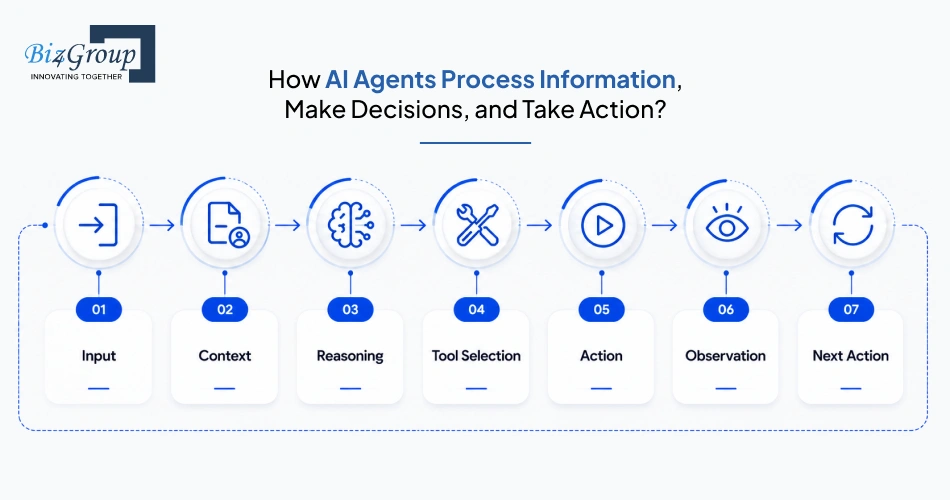
A practical AI agent typically operates through a continuous decision loop:
Input → Context → Reasoning → Tool Selection → Action → Observation → Next Action
For example, a project-management AI agent could receive a request to identify an overdue deliverable. It might retrieve project data, check task dependencies, determine which items need attention, update a project-management system, and notify the appropriate team member. The exact sequence can change based on what it finds at each step.
This is also where agentic AI workflows differ from simple automations. A fixed workflow follows predetermined rules. An agent can select its next step based on the current state of the task, available information, and defined constraints.
What Components Does an AI Agent Need to Work Reliably?
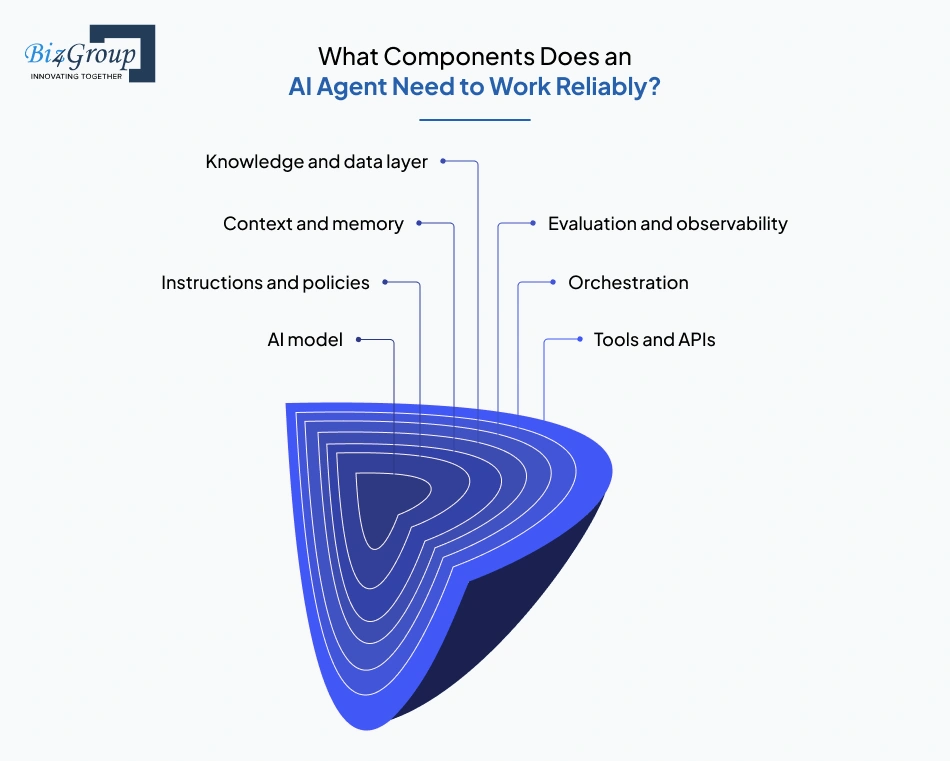
A production-oriented AI agent usually brings several components together:
|
Component |
Role in the system |
Key consideration |
|---|---|---|
|
Interprets requests, reasons over context, and generates decisions or outputs |
Capability, latency, cost, and model reliability |
|
|
Instructions and policies |
Define the agent's objectives, behavior, and boundaries |
Clear constraints are essential for predictable behavior |
|
Context and memory |
Provides conversation history, task state, user information, or relevant past interactions |
More context is not always better |
|
Knowledge and data layer |
Gives the agent access to business documents, databases, and other trusted information |
Data quality and retrieval accuracy directly affect results |
|
Tools and APIs |
Allow the agent to search, retrieve information, update systems, or perform actions |
Permissions should follow the principle of least privilege |
|
Orchestration |
Controls the sequence of reasoning, tool use, retries, and handoffs |
Complexity should match the workflow |
|
Evaluation and observability |
Measures performance and exposes failures, tool errors, latency, and cost |
Essential before an agent handles production workloads |
The exact setup depends on what you want the agent to accomplish. A simple internal assistant may only need a model, knowledge base, and a few tools. A more advanced enterprise AI agent platform may also need access controls, retrieval, approvals, monitoring, and evaluation.
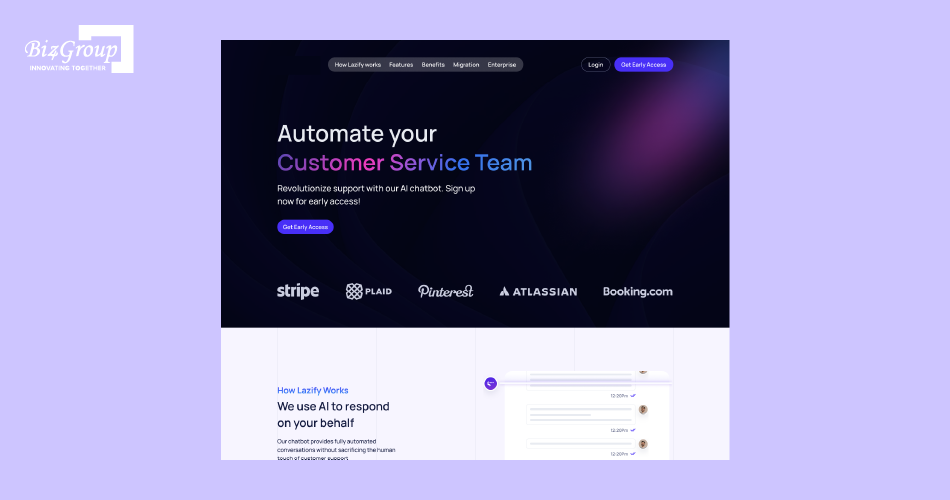
We learned this firsthand while building our AI-driven chatbot for human-like customer communication. The agent handles customer conversations, understands context, retrieves relevant information, and generates responses based on the interaction. Getting the model to respond was only one part of the job. The real work was making it deliver consistent, context-aware interactions and improve through feedback.
That experience shaped a simple approach to custom AI agent development: start with the workflow, then decide what data, tools, memory, and controls the agent actually needs. When these pieces work together, the result is an agent that can understand, decide, and act, rather than simply generate responses.
Turn Your AI Agent Idea Into Reality
Get expert guidance on choosing the right architecture and building your first working prototype.
Start My AI Agent Build PlanHow Do You Choose the Right AI Agent Architecture?
Start with the workflow, not the technology.
- Reactive agent for simple classification, routing, or rule-based responses.
- Tool-using agent when the agent needs to interact with APIs or business applications.
- RAG when it needs reliable access to internal documents and business knowledge.
- Agent memory when tasks depend on previous interactions or persistent context.
- Goal-oriented planning for multi-step workflows with dependent actions.
- Multi-agent architecture when specialized agents offer a clear advantage over a single agent.
These approaches can also work together. For example, a project-management agent could use RAG for project knowledge, memory for ongoing context, APIs for task updates, and goal-oriented planning for multi-step execution.
The practical rule is straightforward. Choose the least complex architecture that can reliably complete the workflow. This use-case-first approach is central to effective AI agent implementation, where architecture follows the business requirement rather than the other way around.
When Is Building an AI Agent Worth the Investment?
Building an AI agent is worth considering when it can take ownership of a meaningful, repeatable workflow and produce a measurable business outcome. The strongest use cases typically involve high task volumes, multiple systems, repetitive decisions, or processes where faster execution affects revenue, cost, or customer experience.
The business case becomes stronger when an agent can:
- Reduce operational effort by handling repetitive workflows and tasks.
- Accelerate decisions by working with real-time business data and context.
- Increase capacity without requiring proportional growth in manual operations.
- Improve customer experiences through faster, context-aware interactions.
- Create measurable ROI through lower processing costs, faster turnaround, or increased revenue.
For example, combining an agent with AI automation services can extend automation beyond individual tasks into connected business workflows.
The deciding factor is not how advanced the agent is, but whether the value it creates justifies its development and operating cost. That makes the next step identifying where AI agents can deliver the most practical business impact.
What Are the Top AI Agent Use Cases in 2026?
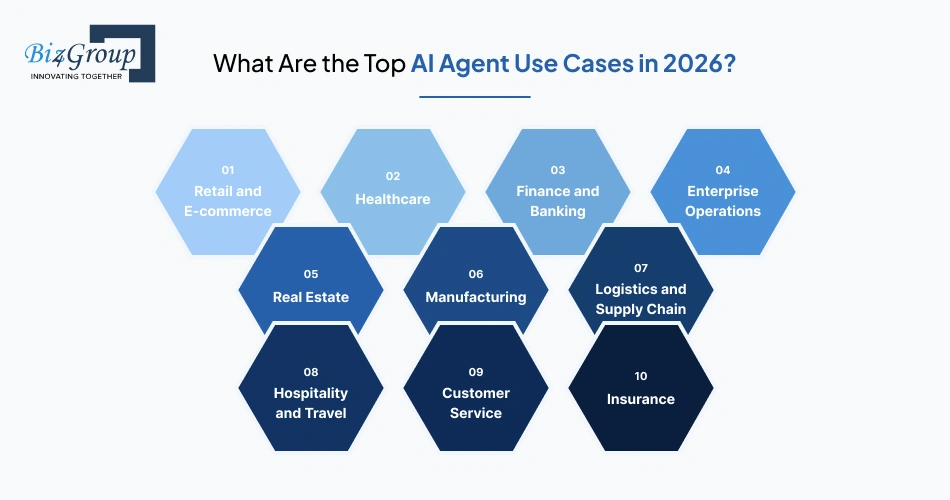
AI agents are most useful for workflows that involve changing inputs, multiple decisions, unstructured information, or actions across business systems. In 2026, common high-value use cases include customer service, sales, project management, IT operations, finance, healthcare, insurance, supply chain, and SaaS workflows.
The strongest use cases go beyond answering questions, allowing agents to retrieve information, decide what to do, and take bounded actions within defined business workflows.
1. Retail and E-commerce
AI agents can manage product inquiries, order workflows, inventory exceptions, and customer follow-ups by connecting with commerce platforms and back-office systems.
Example: An agent detects a low-stock product, checks current orders and supplier data, and creates a replenishment request.
2. Healthcare
Healthcare organizations can use agents for administrative workflows such as intake processing, appointment coordination, document handling, and patient communication, with appropriate privacy and human-review controls.
Example: An agent reviews an intake form, identifies the required department, and routes the case to the appropriate queue.
3. Finance and Banking
Agents can assist with document processing, transaction monitoring, financial research, customer requests, and internal reporting where decisions can be bounded by defined policies.
Example: An agent reviews transaction data, flags an unusual pattern, gathers supporting information, and sends the case to an analyst for review.
4. Enterprise Operations
Large organizations can use agents across interconnected systems for reporting, knowledge retrieval, workflow coordination, and operational support. Enterprise AI solutions can provide the broader infrastructure needed to connect these workflows.
Example: An agent gathers data from multiple departments, identifies missing inputs, and prepares a consolidated management report.
5. Real Estate
Agents can qualify leads, analyze property information, prepare follow-ups, and keep customer records updated across CRM and listing systems.
Example: An agent reviews a buyer's requirements, searches available listings, ranks suitable properties, and prepares a personalized follow-up.
6. Manufacturing
Manufacturers can use agents to interpret equipment data, investigate anomalies, coordinate maintenance workflows, and surface production issues.
Example: An agent detects an abnormal equipment reading, checks maintenance history, and creates a service request when predefined conditions are met.
7. Logistics and Supply Chain
Agents can monitor shipments, investigate exceptions, coordinate with carriers, and recommend actions when delivery conditions change.
Example: An agent detects a delayed shipment, checks available routing options, and alerts the relevant operations team with a recommended action.
8. Hospitality and Travel
Hotels and travel businesses can use agents for reservations, guest communication, itinerary changes, service requests, and coordination between operational teams.
Example: An agent receives a late-arrival request, checks room availability and guest details, and coordinates the required changes with hotel staff.
9. Customer Service
Customer-service agents can retrieve account information, classify issues, resolve eligible requests, and escalate cases that require human judgment, making AI agents for customer service a practical use case for workflow automation.
Example: An agent identifies a customer's issue, retrieves the relevant account and order data, resolves the request when permitted, or routes it to a human with the necessary context.
10. Insurance
Insurance is a strong fit for AI agents because many workflows involve large volumes of documents, repetitive verification, and frequent information retrieval. Agents can assist with claims intake, document review, case summarization, and internal knowledge access.
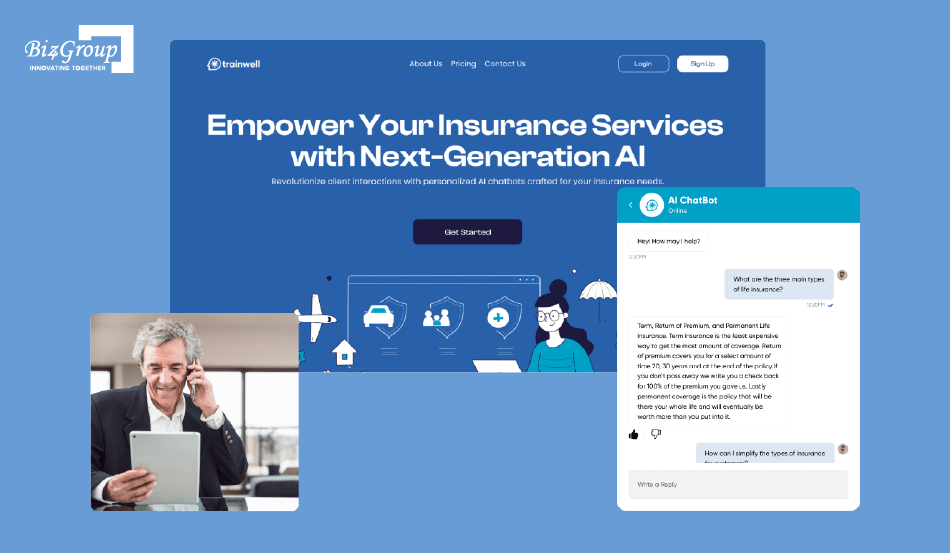
We saw this firsthand while building Insurance AI. The solution gives insurance teams quick access to training and operational information through document-based knowledge, feedback-driven improvement, interaction tracking, and an updatable knowledge base.
The experience showed us that building an effective insurance agent requires more than connecting an LLM to documents. The knowledge layer, feedback process, and workflow design all have to work together to keep the agent useful and reliable in practice.
11. Education and Coaching
AI agents can support learner communication, content workflows, progress tracking, lead follow-ups, and administrative tasks.
Example: An agent analyzes learner activity, identifies students who may need attention, and prepares personalized follow-up recommendations.
12. Software and IT Operations
IT teams can use agents to investigate alerts, analyze logs, retrieve technical documentation, create tickets, and coordinate remediation workflows.
Example: An agent detects an infrastructure alert, analyzes relevant logs, checks known incidents, and creates a prioritized incident ticket with its findings.
13. SaaS and Digital Products
SaaS companies can embed agents directly into their products to support onboarding, product discovery, analytics, configuration, and workflow automation. This approach is especially useful when integrating AI into an app so the agent can work within existing product workflows rather than operate as a separate chatbot.
Example: An agent analyzes a new user's activity, identifies an onboarding gap, and recommends the next product action or feature.
The strongest use cases have one thing in common, the agent is connected to the systems where work actually happens. The next step is defining the capabilities, data, tools, and controls required to make that agent reliable.
What Features Does an AI Agent Need to Work Reliably?
A production-ready AI agent needs more than an LLM. It needs the right combination of context, data, tools, permissions, evaluation, and operational controls to perform its assigned tasks reliably. Current agent-development practices also place greater emphasis on guardrails, tracing, evaluations, and standardized tool connectivity.
|
Feature |
What it enables |
Why it matters |
|---|---|---|
|
Context and memory |
Maintains relevant user, conversation, and task state |
Prevents the agent from losing important context across interactions |
|
Knowledge and RAG |
Retrieves information from documents, databases, and enterprise sources |
Grounds responses and decisions in current business data |
|
Tool and API integration |
Searches, retrieves data, updates systems, and executes actions |
Turns the agent from an information layer into an operational system |
|
Reasoning and orchestration |
Determines the next step and manages multi-step workflows |
Supports tasks that cannot be handled through fixed rules alone |
|
Guardrails and permissions |
Restricts data access and high-impact actions |
Reduces security, compliance, and operational risk |
|
Human handoff |
Escalates ambiguous or high-risk tasks |
Keeps humans in control where autonomous action is inappropriate |
|
Evaluation and testing |
Measures task accuracy, tool selection, failures, and edge cases |
Shows whether the agent is ready for production |
|
Observability and tracing |
Tracks actions, tool calls, errors, latency, and costs |
Makes failures diagnosable and performance measurable |
|
Error recovery |
Handles failed tools, missing data, timeouts, and retries |
Prevents individual failures from breaking the entire workflow |
|
Model flexibility |
Allows different or newer models to be evaluated without redesigning the application |
Helps optimize quality, latency, and cost over time |
|
Standardized connectivity |
Connects agents to tools and data through standards such as MCP |
Makes integrations easier to manage as the agent ecosystem grows |
For teams exploring how to build an AI agent with ChatGPT, these capabilities are best treated as architectural layers rather than features added later. A production-ready generative AI agent development approach needs to consider the model, data, integrations, controls, and evaluation strategy together.
The goal is to give it exactly what the workflow requires, with enough control to make its actions predictable.
What Advanced Features Can Take AI Agent Beyond Basic Automation?
Once the core agent is reliable, advanced capabilities can expand its autonomy, coordination, adaptability, and operational reach.
|
Advanced Feature |
What It Adds |
Best Use |
|---|---|---|
|
Multi-Agent Orchestration |
Coordinates specialized agents around a larger objective |
Complex workflows requiring different areas of expertise |
|
Adaptive Planning |
Dynamically breaks objectives into tasks and adjusts the plan as conditions change |
Research, project management, and multi-step operations |
|
Agent-to-Agent Collaboration |
Allows specialized agents to exchange tasks, results, and context |
Workflows involving distinct research, analysis, and execution roles |
|
Long-Term Memory |
Builds persistent user, task, or organizational context beyond a single session |
Personalization and long-running relationships |
|
Self-Evaluation and Reflection |
Lets an agent review its output or actions against defined criteria |
Quality-sensitive workflows and iterative tasks |
|
Dynamic Tool Selection |
Selects tools based on the current task instead of relying on a fixed sequence |
Large tool ecosystems and complex workflows |
|
Human-in-the-Loop Controls |
Introduces approval checkpoints for sensitive or irreversible actions |
Finance, healthcare, enterprise operations, and compliance-heavy workflows |
|
Real-Time Event Handling |
Allows agents to respond to incoming events rather than waiting for user prompts |
Monitoring, alerts, operations, and proactive customer workflows |
|
Agent Learning and Optimization |
Uses evaluation data and feedback to improve prompts, policies, workflows, or model selection |
Mature production systems with sufficient usage data |
|
Autonomous Workflow Execution |
Enables an agent to initiate and coordinate actions within predefined boundaries |
End-to-end business process automation |
|
Agent Analytics and Cost Optimization |
Analyzes agent behavior, model usage, latency, and workflow outcomes |
Enterprise deployments where scale and unit economics matter |
One important distinction is that self-evaluation, learning, and autonomy should not mean unrestricted self-modification. In production, these capabilities should operate within defined policies, evaluation criteria, and approval boundaries.
For teams moving beyond a single-agent implementation, AI agent implementation should account for orchestration, deployment, monitoring, and control as part of the broader system architecture.
What Is the Best Tech Stack for Building AI Agents in 2026?
The right combination of technology should support the model, tools, data, state, security, evaluation, and scale the agent actually requires. Production teams are increasingly treating observability and evaluation as core parts of the agent stack, not post-launch additions.
|
Layer |
Recommended Technologies |
What to Consider |
|---|---|---|
|
Frontend |
React, Next.js, Vue, Nuxt |
Use based on the agent experience, such as chat, dashboards, task interfaces, or multimodal workflows. React development and Next.js development are suitable for web-based agent products. |
|
Backend |
Python, Node.js, FastAPI, Express.js |
Python fits AI and data workloads, while Node.js is well suited to event-driven applications and APIs. Python development and Node.js development support both approaches. |
|
Agent Orchestration |
OpenAI Agents SDK, LangGraph, custom orchestration |
Use an orchestration layer when the agent needs tool calling, handoffs, state, approvals, or multi-step workflows. |
|
LLM / Model Layer |
OpenAI, Anthropic, Google, open-weight models |
Compare models on reasoning, tool use, context, latency, cost, and deployment requirements. |
|
Tool & API Connectivity |
REST APIs, function calling, MCP |
Connect agents to business systems through controlled tools and APIs. MCP is increasingly relevant for standardized access to tools and data. |
|
Knowledge & Retrieval |
PostgreSQL + pgvector, Pinecone, MongoDB Atlas, Elasticsearch/OpenSearch |
Choose based on data volume, retrieval requirements, filtering, latency, and existing infrastructure. |
|
State & Memory |
PostgreSQL, Redis, framework persistence layers |
Use durable state for long-running workflows, interrupted tasks, and resumable execution. |
|
Queues & Async Processing |
Redis, Kafka, Amazon SQS, Google Pub/Sub, RabbitMQ |
Useful for background jobs, retries, event-driven workflows, and concurrent tasks. |
|
Observability & Evaluation |
OpenTelemetry, LangSmith, provider-native tracing, custom evaluation pipelines |
Track traces, tool calls, failures, latency, costs, and task outcomes. Observability and evaluation are increasingly standard in production agent engineering. |
|
Security & Identity |
OAuth 2.0, OIDC, SSO, RBAC, secrets management, API gateways |
Apply least-privilege access to data and tools, with additional controls for sensitive actions. |
|
Cloud & Deployment |
AWS, Azure, Google Cloud, Kubernetes, containers, serverless |
Select based on compliance, workload, networking, scaling, and operational requirements. |
|
Sandboxed Execution |
Containers, isolated runtimes, provider-managed sandboxes |
Use isolation when agents need to execute code, manipulate files, or interact with potentially risky environments. Current agent runtimes increasingly provide sandboxed execution for these workloads. |
The right stack depends on the agent's complexity, integrations, data, autonomy, and scale. A simple agent can remain lightweight, while enterprise or long-running workflows may require orchestration, durable state, observability, evaluation, and stronger security controls.
How Do You Build AI Agent From Start to Production?
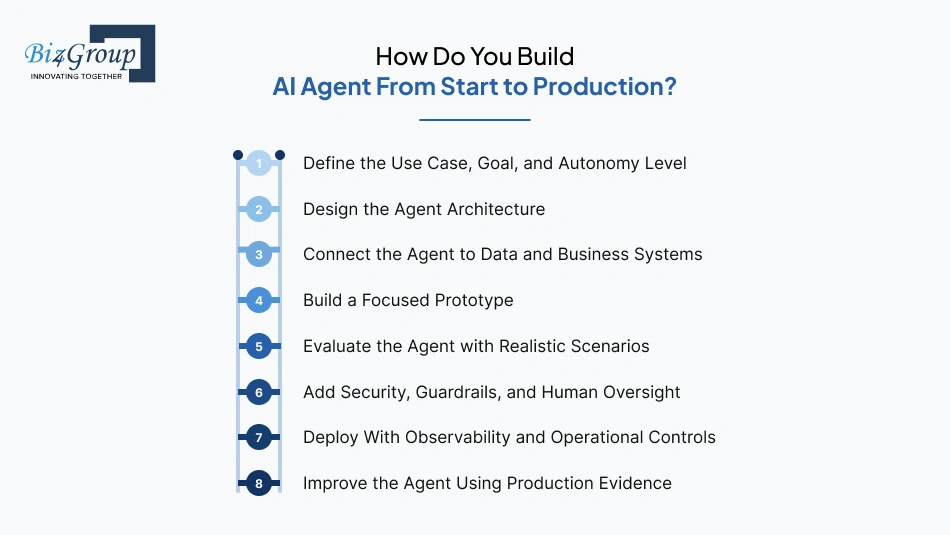
Building an AI agent starts with the business workflow, not the LLM. The development process should move from use-case definition and architecture to data, tools, evaluation, deployment, and continuous optimization, with security and observability built in throughout.
1. Define the Use Case, Goal, and Autonomy Level
Start by identifying the specific workflow the agent needs to improve. Define its objective, inputs, expected outputs, systems it can access, actions it can take, and decisions that require human approval.
- Map the current workflow and manual bottlenecks
- Define measurable success criteria
- Set clear autonomy and escalation boundaries
- Identify the data and systems the agent will need
The goal should be specific enough to evaluate. "Build an AI assistant" is not a useful specification. "Qualify inbound leads, enrich CRM records, and route qualified prospects to sales" is.
2. Design the Agent Architecture
Choose the simplest architecture that can complete the workflow reliably. Decide whether the system needs a single agent, RAG, memory, tool calling, planning, or multi-agent orchestration.
At this stage, define how the agent will move between reasoning, tool calls, observations, and subsequent actions. Avoid adding multi-agent complexity unless specialization provides a clear benefit.
3. Connect the Agent to Data and Business Systems
An agent cannot make useful business decisions without access to the right information. Connect the required documents, databases, APIs, SaaS applications, and internal systems while controlling exactly what the agent can access.
Use RAG when the agent needs current enterprise knowledge. For tool connectivity, teams can use APIs or standards such as Model Context Protocol (MCP). The latest MCP specification focuses on scalable, routable, cacheable, and more secure agent-to-tool communication.
4. Build a Focused Prototype
Build the smallest working version that can complete the target workflow. Start with the core model, instructions, relevant context, and only the tools required for the first use case.
At this stage, test the actual workflow rather than optimizing for feature count. For teams that need a rapid proof of concept, MVP development services can help validate the product before committing to a larger implementation.
Also Read: 12+ MVP Development Companies in USA
5. Evaluate the Agent with Realistic Scenarios
Do not wait until launch to test whether the agent works. Create an evaluation set covering normal tasks, ambiguous requests, incorrect inputs, tool failures, edge cases, hallucinations, and unauthorized actions. Measure task completion, factual accuracy, tool selection, latency, cost, and escalation behavior.
Agent development increasingly treats tracing and evaluations as part of the development lifecycle, rather than post-launch diagnostics.
6. Add Security, Guardrails, and Human Oversight
Before giving an agent access to production systems, establish permissions, authentication, data controls, audit trails, and approval requirements.
Test for prompt injection, unauthorized tool use, sensitive-data exposure, excessive permissions, and unsafe actions. High-impact operations should require human approval or clearly defined escalation paths. Broader software testing can complement agent-specific evaluation by covering application security, reliability, and integration behavior.
7. Deploy With Observability and Operational Controls
Production deployment requires more than hosting the model. Before increasing autonomy, establish:
- Observability to track agent traces, tool calls, failures, latency, token consumption, and cost.
- Outcome monitoring to measure task completion, accuracy, and user feedback.
- Version control for prompts, models, tools, and agent configurations.
- Rollback procedures to quickly revert faulty changes.
- Rate limits and fallbacks to control unexpected usage and failures.
- Incident response for handling security, reliability, and tool-execution issues.
Modern agent infrastructure is also moving toward dedicated runtimes for long-running, multi-step workflows, reflecting the operational demands of running agents continuously in production.
8. Improve the Agent Using Production Evidence
Once deployed, use evaluation results, traces, user feedback, and business outcomes to identify weaknesses.
Improvements may involve:
- refining instructions or workflows
- improving retrieval and data quality
- adding or modifying tools
- changing model configurations
- tightening permissions or guardrails
- improving evaluation datasets
- fine-tuning a model when the use case actually justifies it
This creates a controlled improvement cycle rather than assuming the agent will automatically "learn" from every interaction.
For teams considering how to train AI models, model training should be evaluated as one optimization option, not treated as a mandatory step in every AI agent project.
The development cycle is therefore not simply 'build → launch. It is define → architect → connect → prototype → evaluate → secure → deploy → optimize'. That distinction becomes critical when moving from a working demo to an agent that can safely operate inside a real business.
The development process should be driven by the agent's requirements, with each stage adding only what is needed for reliable production. The next question is how much those development decisions affect the cost of building and operating an AI agent.
Get The Perfect Tech Stack For Your AI Agent
Avoid costly rebuilds by selecting the right technologies from day one.
Help Me Choose The Best Stack for AI Agent DevelopmentHow Much Does It Cost to Build an AI Agent?
A custom AI agent typically costs $30,000 to $200,000+ to build. The actual investment depends on the agent's autonomy, integrations, data requirements, security controls, user volume, and production complexity.
|
Project Scale |
Estimated Cost |
Typically Includes |
Best Suited For |
|---|---|---|---|
|
MVP AI Agent |
$30,000–$60,000 |
Core workflow, model integration, limited tools and data sources, basic interface, testing, and monitoring |
Startups and teams validating an AI agent concept |
|
Mid-Level AI Agent |
$60,000–$120,000 |
Multi-step workflows, multiple integrations, RAG, authentication, evaluation, analytics, guardrails, and production deployment |
SMEs and growing businesses |
|
Enterprise AI Agent |
$120,000–$200,000+ |
Complex orchestration, enterprise integrations, advanced security, compliance requirements, multi-environment deployment, observability, and scalable infrastructure |
Large enterprises and regulated organizations |
What Are the Hidden Costs of Building an AI Agent?
The initial development estimate does not capture every expense. Businesses should also budget for:
- LLM and API usage: Ongoing model calls can become a major operating expense as usage grows.
- Cloud compute and storage: Hosting, processing, logs, and stored data add recurring infrastructure costs.
- Vector database and retrieval costs: Embeddings, indexing, storage, and retrieval operations create additional expenses.
- Third-party API and SaaS fees: External tools and business platforms may charge based on users, requests, or usage.
- Observability and evaluation tools: Monitoring traces, quality, latency, and agent performance may require paid platforms.
- Security audits and compliance reviews: Enterprise deployments may require recurring security assessments and compliance work.
- Human review and escalation: High-risk workflows may require people to review or approve agent actions.
- Ongoing testing and quality evaluation: Agents need continuous testing as models, data, tools, and workflows change.
- Integration maintenance: Changes to APIs or business systems can require ongoing engineering work.
- Model and prompt optimization: Improving accuracy, latency, and token efficiency can require continuous iteration.
- Data updates and synchronization: Keeping knowledge sources current can require recurring processing and engineering effort.
- Scaling for higher usage and concurrency: Growing workloads can increase compute, infrastructure, and API costs.
These expenses become particularly important after launch because AI agent costs continue with usage and maintenance. A realistic business case should separate initial development cost, recurring infrastructure cost, and ongoing optimization cost.
How Can Businesses Monetize AI Agent Solutions?
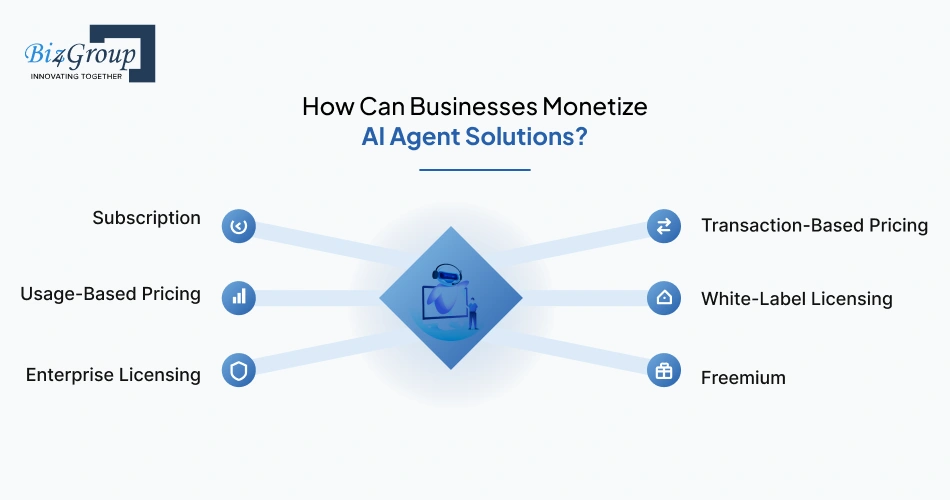
If the agent is being developed as a commercial product, the pricing model should reflect how customers receive measurable value from it.
- Subscription: Charge monthly or annually based on users, features, workflows, or usage limits.
- Usage-Based Pricing: Charge for measurable consumption such as tasks completed, documents processed, conversations, or API calls. This works particularly well for conversational AI agent products.
- Enterprise Licensing: Offer customized licensing, private deployment, integrations, security controls, and support for larger organizations. This fits enterprise AI agent development.
- Transaction-Based Pricing: Charge when the agent directly enables a booking, sale, transaction, or other measurable business event.
- White-Label Licensing: Allow agencies, SaaS providers, or partners to deploy the agent under their own brand.
- Freemium: Offer limited functionality at no cost and monetize advanced workflows, integrations, higher usage, or enterprise features.
For internal AI agents, monetization is not the objective. The business case should instead be measured through hours saved, operating costs reduced, revenue generated, faster processing, increased capacity, or improved customer outcomes.
The most useful cost estimate combines development cost with expected operating cost. That gives decision-makers a realistic view of the investment required to build, deploy, and scale an AI agent.
Accelerate AI Agent Development With Expert Guidance
Save time, reduce trial and error, and build confidently with expert-driven planning.
Book My AI Strategy SessionWhat Challenges Can You Face When Building an AI Agent?
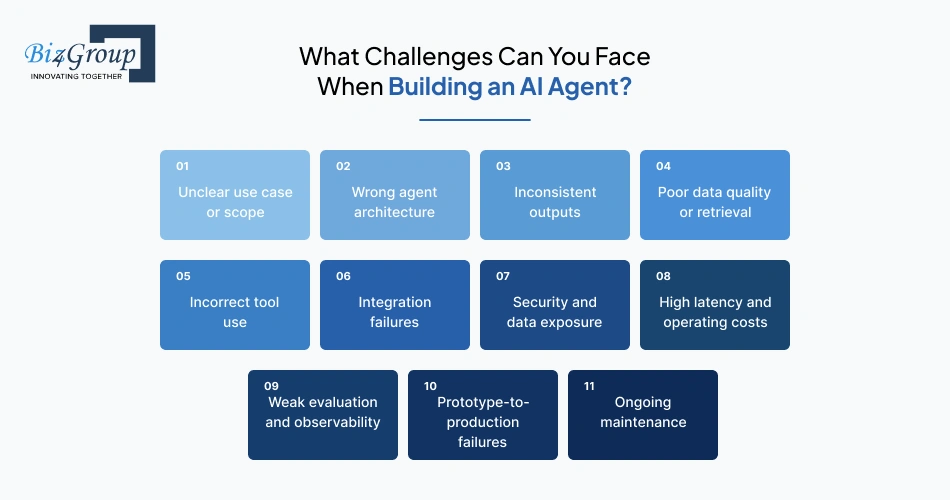
AI agent projects commonly face problems with scope, reliability, data, integrations, security, cost, and production operations. Addressing these areas early reduces rework and deployment risk.
|
Challenge |
Why It Occurs |
How to Solve It |
|---|---|---|
|
Unclear use case or scope |
Broad objectives lack defined tasks, users, boundaries, and success metrics. |
Define a specific workflow, measurable KPIs, user roles, and escalation rules before development. |
|
Wrong agent architecture |
Teams choose complex frameworks or multi-agent designs before validating the workflow. |
Start with the simplest architecture that reliably completes the required tasks. Add orchestration or additional agents only when necessary. |
|
Inconsistent outputs |
LLMs are probabilistic, while business processes often require predictable results. |
Use structured outputs, validation rules, evaluation datasets, fallbacks, and human approval for high-impact actions. |
|
Poor data quality or retrieval |
Outdated, incomplete, conflicting, or poorly indexed data reduces response accuracy. |
Clean and version knowledge sources, establish data ownership, implement appropriate RAG pipelines, and evaluate retrieval quality. |
|
Incorrect tool use |
Agents can select the wrong tool, generate invalid parameters, or exceed intended permissions. |
Define strict tool schemas, validation, permissions, retries, action limits, and approval workflows. |
|
Integration failures |
Legacy systems, fragmented data, authentication, and inconsistent APIs complicate connectivity. |
Assess API readiness early, use secure middleware, standardize interfaces, and test integrations independently. |
|
Security and data exposure |
Agents may access sensitive information or receive broader permissions than required. |
Apply least-privilege access, RBAC, encryption, secrets management, audit logs, and data isolation. |
|
High latency and operating costs |
Multiple model calls, long contexts, retrieval, tool execution, and high traffic increase resource usage. |
Use model routing, caching, context optimization, asynchronous processing, and usage monitoring. |
|
Weak evaluation and observability |
Standard application monitoring cannot fully capture agent decisions, tool calls, or task failures. |
Implement tracing, tool-call logs, evaluation datasets, quality metrics, cost tracking, and production monitoring. |
|
Prototype-to-production failures |
Controlled demos rarely account for real users, edge cases, concurrent workloads, and changing data. |
Test with production-like workloads, establish reliability thresholds, add guardrails, and roll out incrementally. |
|
Ongoing maintenance |
Models, APIs, business rules, integrations, and data change after deployment. |
Define ownership, maintenance cycles, evaluation schedules, incident procedures, and update processes. |
Reliable AI agents require controlled autonomy, quality data, secure integrations, measurable evaluation, and continuous monitoring. For complex enterprise integrations, AI integration services can help connect agent workflows with existing business systems.
What Will Shape the Future of AI Agents for Business Automation?
The next phase of AI agents will center on interoperability, persistent execution, agent identity, specialized collaboration, and model-independent infrastructure. These are the areas most likely to change how enterprises build and operate agentic systems.
1. AI Agents Will Work Across Platforms and Agent Networks
Future agents will increasingly communicate with external applications and other agents through standardized protocols instead of relying on one-off integrations. Emerging standards such as MCP and A2A are moving the ecosystem in this direction.
2. AI Agents Will Handle Long-Running Workflows
The next generation will move beyond short interactions toward workflows that can pause, retain state, recover from failures, and resume execution across hours or days. This will make agents more suitable for complex business processes that cannot be completed in a single session.
3. Agent Identity Will Become a Core Security Layer
As agents gain access to enterprise systems, future architectures will require dedicated identities, granular permissions, authorization policies, and auditable actions. NIST's 2026 AI Agent Standards Initiative already identifies agent security and identity as major standardization areas.
4. Specialized Agents Will Collaborate Across Business Functions
Future enterprise architectures will increasingly use specialized agents for defined roles rather than relying on one general-purpose agent. The challenge will be coordinating these agents while maintaining clear permissions, accountability, and control.
5. Agent Infrastructure Will Become More Model-Agnostic
Businesses will increasingly separate the agent runtime from the underlying model, allowing systems to route different tasks to different models based on cost, performance, latency, or data requirements. This approach can reduce dependence on a single model provider.
6. Autonomous Agents Will Require Stronger Governance Before Wider Deployment
The future of enterprise autonomy will depend on controlled execution rather than unrestricted independence. As agents gain access to business-critical systems, runtime policies, monitoring, human approvals, and auditability will become increasingly important.
For businesses planning their next AI agent, the strongest long-term architecture will be one that can connect, persist, specialize, switch models, and operate within enforceable controls.
Ready To Build Your AI Agent Without Guesswork?
From idea to deployment, get end-to-end help tailored to your business goal.
Get My Custom AI Build RoadmapWrapping Up: Why Now Is Your AI Agent Moment
Maybe you already know the workflow you want to automate. Maybe you're still figuring out whether an AI agent is actually the right solution. Either way, the decision should come down to business value, technical feasibility, reliability, and total cost of ownership, not the excitement around the latest AI capability.
A successful AI agent is more than an LLM connected to a few APIs. It needs the right architecture, trusted data, controlled tool access, useful memory, proper evaluation, security, monitoring, and a clear path from prototype to production. Start with one workflow that matters, prove the economics, then expand its capabilities as the results justify it.
That is the approach Biz4Group LLC brings to AI agent development, combining product strategy, AI engineering, integrations, UX, security, and production deployment to help businesses build agents around real operational needs.
Got a workflow you think an AI agent could handle?
Book a 20-minute discovery call with Biz4Group to discuss the use case, architecture, feasibility, timeline, and estimated investment before development begins.
FAQ’s
1. Can I build an AI agent without hiring an AI development team?
Yes, for simple use cases. No-code and low-code platforms can support basic agents, but businesses usually need engineering expertise when the agent must connect with private systems, execute business actions, meet security requirements, or operate at scale.
2. How much does it cost to build an AI agent?
A custom AI agent generally costs $30,000 to $200,000+. The final cost depends on integrations, agent complexity, data infrastructure, security, model usage, deployment requirements, and expected workload.
3. How long does it take to build a custom AI agent?
A focused MVP can take around 2-4 weeks. Production-ready systems with multiple integrations, advanced workflows, security requirements, and extensive evaluation can take 6-8 weeks or longer.
4. Should I build an AI agent from scratch or use an existing platform?
Use an existing platform when speed and standardized workflows matter more than deep customization. Custom development becomes more appropriate when you need proprietary workflows, specialized integrations, greater control over data, or enterprise-specific security and governance.
5. Can an AI agent use my company's existing software?
Yes. Agents can connect with CRMs, ERPs, databases, ticketing systems, communication platforms, internal APIs, and other business applications through APIs, middleware, and tool interfaces. The important consideration is controlling exactly what the agent can access and execute.
6. How do I know if my business actually needs an AI agent?
Look for workflows that involve repetitive decisions, multiple systems, unstructured information, and measurable manual effort. If a conventional automation rule can complete the task reliably, an AI agent may be unnecessary.
7. How can I prevent an AI agent from taking the wrong action?
Use restricted tool permissions, structured inputs and outputs, validation layers, confidence thresholds, approval steps, audit logs, and continuous evaluation. High-impact actions should not rely solely on unrestricted model decisions.
8. Can Biz4Group help turn an AI agent idea into a production system?
Yes. Biz4Group provides AI agent development services, covering use-case assessment, architecture, AI development, integrations, testing, deployment, and ongoing optimization. The team can also help determine whether an AI agent is actually the right solution before development begins.
9. What should I prepare before approaching an AI agent development company?
Have a clear business problem, target users, existing systems, expected outcomes, available data sources, security requirements, and approximate budget. You do not need a complete technical specification. A well-defined workflow is usually enough to start a technical discovery.
10. How can I estimate the ROI of an AI agent before building it?
Measure the current cost of the workflow first, including employee hours, processing time, error rates, delays, and missed opportunities. Then compare those benchmarks against expected automation coverage, operating costs, accuracy, and implementation investment. A focused proof of concept can further validate the economics before a full deployment.
