 Location :
Orlando, FL, USA
Location :
Orlando, FL, USA +1 (407) 714-1616
 info@biz4group.com

 AI Summary Powered by Biz4AI
- AI personal finance management app development pairs clean bank-sync and categorization with AI for forecasting, insights, and an optional advisor layer.
- Know your users first: freelancers, households, small businesses each need different features, and an AI expense tracker app MVP should stick to five to seven, not the full list.
- Security and compliance aren't optional: encryption, PCI DSS, GLBA, state privacy laws, and the investment adviser registration line all shape what AI financial advisor app development can legally say.
- Monetize with AI budgeting app development in mind: subscription, AUM fees, affiliate revenue, or enterprise licensing, usually layered, not picked one at a time.
- Budget $25,000 to $300,000 depending on scope, and pick a scalable tech stack to build AI money management app products that don't need rebuilding later.
- Biz4Group has built this exact category of product, including real fintech platforms like Worth Advisors, and knows where AI personal finance management app development services actually go wrong.
Why do most finance apps lose almost all their users within a month?
Because finance apps run on a brutal retention curve. The average finance app retains just 4.2% of users by day 30, according to Business of Apps' 2026 benchmark data. That means for every 100 people who download a budgeting app, roughly 96 are gone within four weeks. The app didn't fail because people stopped caring about their money. It failed because it asked users to do all the work: log the expense, build the budget, check back tomorrow, repeat.
AI personal finance management app development exists to break that cycle. Instead of waiting for input, the app watches spending patterns, predicts what's coming, and surfaces something the user didn't already know about their own money.
What's driving the current push toward these apps? The global market for these apps is projected to reach $167.56 billion by 2035. Money management is shifting from something people do manually to something software does for them, and the apps winning that shift are the ones built to earn a daily open, not just a first download.
So where do most teams actually lose ground when they try to develop AI personal finance management app products? Usually one of three places: the categorization model breaks down once real transaction data hits it, the bank integration takes longer than anyone budgeted for, or a compliance question surfaces that nobody on the team can answer with confidence.
This guide is built around fixing all three. Whether you're trying to build AI personal finance management application from a blank slate or figure out what's broken in something you already shipped, we'll walk through how these apps actually work, which features to build first, what security and compliance actually demand, and where the real costs and mistakes show up. If your team eventually wants a second set of eyes on the build itself, building an AI fintech app the right way is something we help with, but this guide stands on its own first.
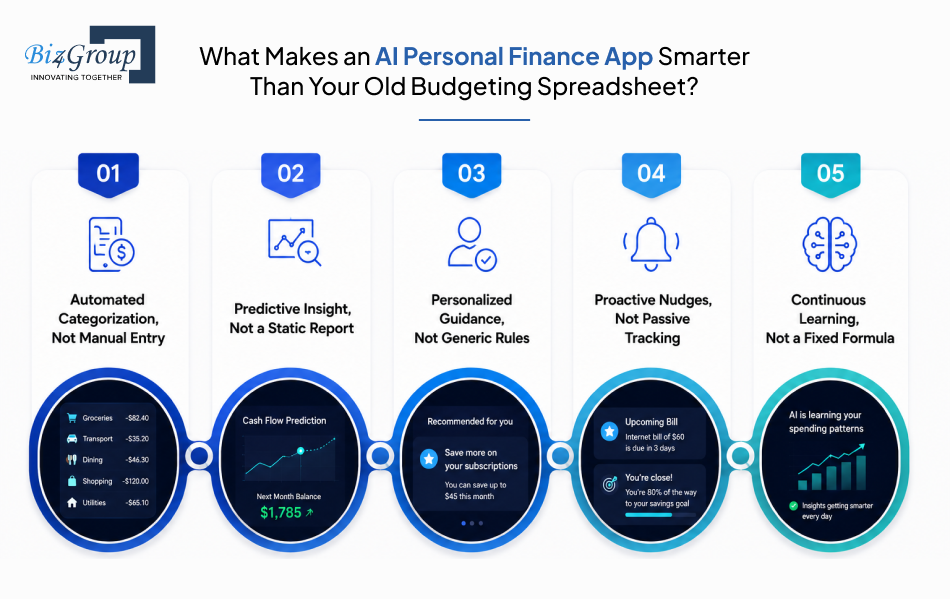
What Makes an AI Personal Finance App Smarter Than Your Old Budgeting Spreadsheet?
What actually separates an AI personal finance app from the spreadsheet or budgeting tool you've already tried and dropped?
An AI personal finance app is a tool that reads your financial behavior instead of just recording it. It watches how you spend, learns from the pattern, and uses what it learns to tell you something useful before you ask for it. A spreadsheet only knows what you type into it. An AI-driven app knows what you actually do with your money, including the parts you never meant to track.
That distinction is the whole reason AI personal finance management app development looks so different from building a standard budgeting tool. You're not designing a form for someone to fill out. You're designing a system that pays attention on its own.
Here's exactly where an AI system pulls ahead of a spreadsheet, one difference at a time.
1. Automated Categorization, Not Manual Entry
Every transaction gets sorted into a category the moment it hits the account. No dropdown menus, no fixing a mislabeled coffee purchase every Sunday night. Categorization engines built for this purpose now hit accuracy rates above 95% on common transactions, and that number climbs further as the model learns from user corrections. This is the layer every AI expense tracker app is built on, and it's usually the first thing users notice.
2. Predictive Insight, Not a Static Report
A spreadsheet tells you what you spent last month. An AI system tells you what you're on track to spend next month, early enough to actually change course. That shift from looking backward to looking forward is what makes AI budgeting app development fundamentally different from a spreadsheet with better formatting.
3. Personalized Guidance, Not Generic Rules
Older tools apply the same 50/30/20 rule to everyone who signs up. AI systems learn your specific income pattern, your recurring bills, and your actual habits, then shape recommendations around your life instead of a formula written for nobody in particular.
4. Proactive Nudges, Not Passive Tracking
A spreadsheet waits for you to open it. An AI app reaches out when something matters, a bill runs unusually high, a subscription renews quietly, spending spikes in one category. Rocket Money built an entire product around exactly this kind of nudge, and it's now credited with saving users over $245 million by catching subscriptions and charges people forgot they had. That single habit, reaching out before the user has to ask, is often what keeps someone opening the app daily instead of deleting it in week two.
5. Continuous Learning, Not a Fixed Formula
The model keeps adjusting as life changes. New job, new city, new spending pattern, the app recalibrates instead of running the same static rule indefinitely. This is the piece most founders underestimate when they're scoping how to create AI personal finance management app products, since it's an ongoing commitment to retrain and monitor, not a one-time build you ship and forget.
Put together, this is what separates a tool people use once and abandon from one they check every morning with their coffee. Getting the AI budget tracking layer right early on is what makes every feature after it, from insights to nudges to forecasting, actually trustworthy in the user's eyes.
But knowing what makes these apps smarter doesn't tell you how they pull it off. That's the part happening underneath the interface, where the actual data and models do the work.
Building This Solo, or Ready to Skip the Trial and Error?
You've got the market data. We've got the build scars. Let's talk before you learn these lessons the expensive way.
Talk to Our Fintech TeamSo How Does an AI Personal Finance App Actually Work Behind the Screen?
"I am building an AI budgeting app and our transaction categorization model keeps miscategorizing spending, and I want to know how production-grade personal finance apps actually train and maintain their categorization models to keep accuracy high over time."
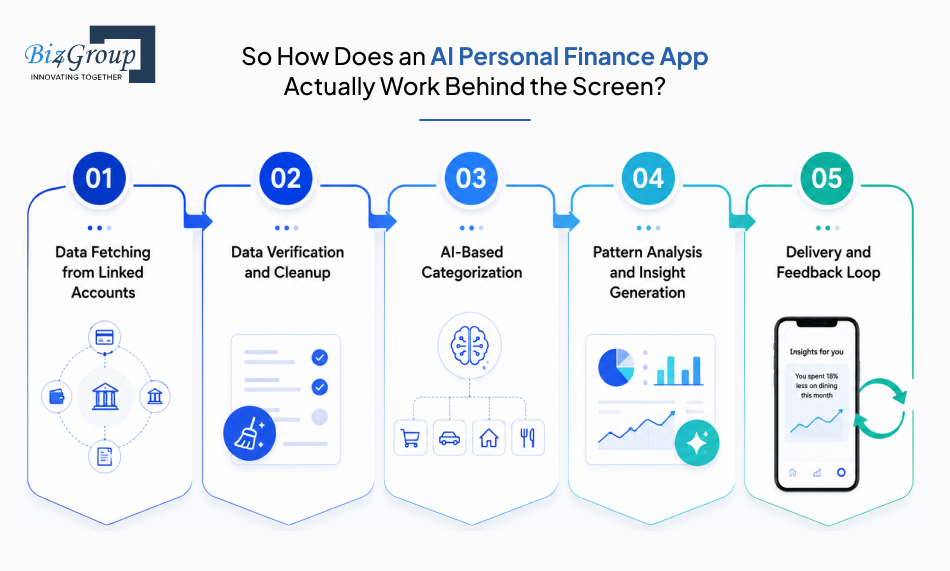
That's a question we hear often, and it only makes sense once you see the full sequence data moves through before it ever reaches a user's screen. Here's what actually happens, step by step, from the moment data enters the system to the moment it becomes something the user can act on. This full sequence is really what AI personal finance management app development boils down to at the engineering level, and it's the same sequence whether you're building a lean budgeting tool or a full AI-powered personal finance management app development platform with investment tracking layered in.
1. Data Fetching from Linked Accounts
The process starts when a user connects their bank, credit card, or investment account through an aggregator like Plaid. The app pulls raw transaction data, balances, and account details, and sets up a continuous sync so new transactions keep flowing in automatically. Getting this layer right early is non-negotiable if you're planning to build AI money management app products that need to scale across multiple account types later.
- Secure, token-based connection instead of stored login credentials
- Initial pull of historical transaction data, followed by ongoing sync
- Read-only access, so the app can view data but never move money
- Coverage checks for whether a user's specific bank is supported
2. Data Verification and Cleanup
Raw data coming in from banks is messy. Merchant names are inconsistent, duplicate transactions show up during sync, and some entries arrive incomplete. This step checks and cleans that data before anything downstream can trust it, and it's a step teams building an AI powered money management app often underestimate until bad data starts corrupting insights further down the pipeline.
- Deduplication of repeated or pending-then-posted transactions
- Merchant name standardization ("AMZN Mktp US" becomes "Amazon")
- Currency and date normalization across accounts
- Error flagging for incomplete or corrupted entries
3. AI-Based Categorization
Once the data is clean, the model assigns each transaction to a category, groceries, bills, dining, and so on, based on merchant patterns it has learned from prior data. This step is the backbone of any serious AI expense tracker app, and it's exactly where miscategorization problems like the one in that query above tend to show up if the feedback loop isn't built in from day one. It's also a core piece of building AI budgeting and expense tracking app products that hold up once real user data starts hitting them at scale.
- Category assignment with a confidence score per transaction
- Learning from user corrections to improve future accuracy
- Hierarchical tagging (Shopping > Groceries > Supermarkets)
- Custom category rules layered on top of the base model
4. Pattern Analysis and Insight Generation
With clean, categorized data in hand, the system looks for patterns across time, recurring bills, spending spikes, income changes, and turns those patterns into forecasts instead of historical charts. This is where AI budgeting app development and forecasting genuinely earn the word "intelligent," and where the groundwork for a future AI financial advisor app development feature actually gets laid, even if that feature ships later.
- Recurring transaction detection (subscriptions, bills)
- Spending trend comparison against the user's own history
- Cash flow forecasting for the days or weeks ahead
- Goal-progress calculations tied to savings targets
5. Delivery and Feedback Loop
The last step is surfacing all of this to the user in a way they'll actually act on, then feeding their response back into the model. A dismissed nudge, a corrected category, or a completed goal all become new training signal, which is exactly how a develop AI personal finance management platform approach stays accurate instead of drifting after launch, the maintenance gap most teams underestimate until accuracy starts slipping. Founders who eventually want to create AI financial planning application features on top of this same data pipeline will find the feedback loop built here does double duty later.
- Real-time alerts and nudges pushed to the user
- In-app dashboards summarizing trends and forecasts
- User actions (corrections, dismissals) logged as feedback
- Periodic model retraining based on accumulated feedback
This is also the loop where fraud detection sits, running quietly across every step above rather than as a separate feature bolted on afterward. Getting each of these steps to talk to each other cleanly is a big part of what it actually means to integrate AI into an app, rather than just adding a smart-sounding feature to something that wasn't built for it, and it's the same discipline any AI fintech app development for personal finance project needs regardless of which features ship first.
Knowing how the data moves is only half the picture. None of it matters if you haven't nailed down who you're actually building this for.
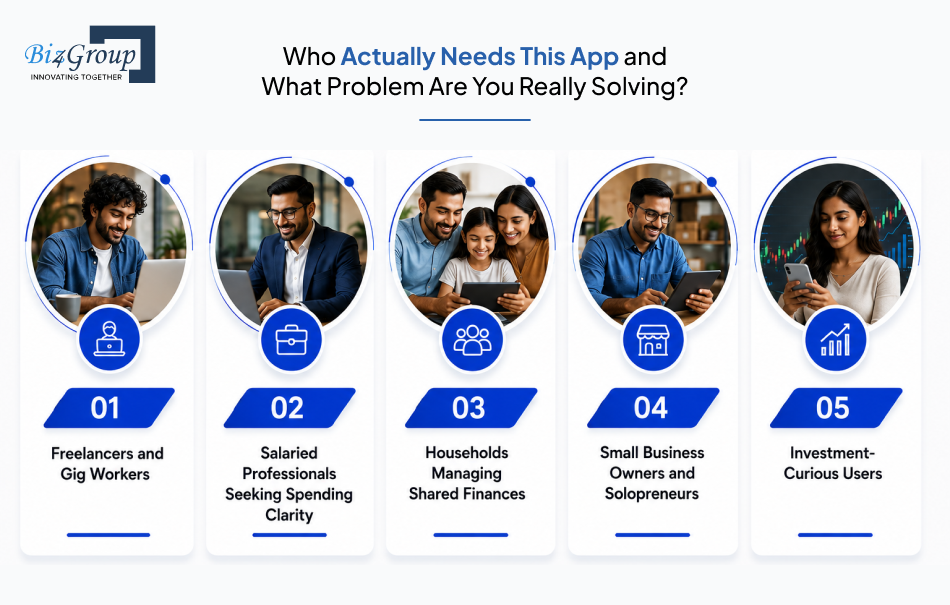
Who Actually Needs This App and What Problem Are You Really Solving?
"I am building an AI personal finance app and I am overwhelmed by the feature list because I want to include budgeting, expense tracking, investment insights, and an AI advisor, but I do not know which features actually belong in an MVP versus what I should save for version two."
That confusion usually clears up the moment you stop thinking in features and start thinking in users. Every feature decision gets easier once you know exactly who opens this app at 11pm stressed about rent, and who opens it once a month to check if they're on track. Here's who actually needs this kind of app, and what each one is really trying to solve.
1. Freelancers and Gig Workers
Income here is irregular by nature, arriving in uneven chunks from multiple clients or platforms instead of one predictable paycheck. This group struggles less with spending discipline and more with simply not knowing what they can safely spend in a given week.
What they solve: They need income smoothing and forward cash flow visibility, not another budget category. An AI expense tracker app built for this segment should forecast lean weeks before they hit, not just log what already happened.
2. Salaried Professionals Seeking Spending Clarity
The real split in this segment isn't age, it's income structure. Users with a steady paycheck already know roughly what's coming in each month. Their struggle is spending awareness, not income uncertainty, so they drift into overspending without seeing it coming until the account runs low.
What they solve: They need early, specific alerts, not a monthly summary that arrives after the money's already gone. This is where AI budgeting app development earns its value, catching a category overspend on day 16 instead of showing the damage on day 31.
3. Households Managing Shared Finances
Couples and families are juggling shared expenses, individual accounts, and often conflicting money habits under one roof. The core problem isn't tracking spending, it's getting visibility everyone in the household actually trusts.
What they solve: They need shared dashboards, joint goal tracking, and permission controls that respect who sees what. Getting this right is a core part of any serious AI personal finance management app development effort aimed at multi-user households instead of single users.
4. Small Business Owners and Solopreneurs
This segment blends personal and business finances more than most founders assume, often without a clean line between the two. Their real problem is separating business runway from personal spending without hiring a bookkeeper.
What they solve: They need categorization smart enough to split business versus personal spend automatically, plus forecasting that accounts for both. This is exactly the kind of edge case that tests whether you should build AI money management app logic broad enough to handle blended finances from day one.
5. Investment-Curious Users
These users have some savings built up and are starting to wonder what to do with it, but they don't have enough assets or confidence to justify hiring a human advisor. They want guidance, not a fully managed portfolio.
What they solve: They need lightweight investment insight layered onto their existing spending data, not a separate app. This is usually where teams start exploring AI financial advisor app development, and it's also the point where the top AI wealth management software development companies for financial advisors in USA become a useful reference for how far to take this feature versus when to stop.
Once you know which of these users you're actually building for, the feature list from that overwhelming query above starts sorting itself out on its own. But before any of these features ship, there's a harder question waiting, one that determines whether your app can even legally hold the data these users are about to hand you.
Is Your App Handling Money Safely or Just Pretending To?
"We are building a personal finance app with an AI financial advisor feature and I am concerned about the legal line between AI powered money guidance and regulated financial advice, because I do not want to accidentally require an investment adviser registration just to offer budgeting tips."
That's the real question underneath most security conversations in this space. Handling money safely isn't one checkbox, it's a stack of separate obligations, and missing any one of them can end a launch before it starts. Getting this stack right is as much a part of AI personal finance management app development as any feature on the roadmap. Here's what actually applies.
1. Encryption in Transit and at Rest
Every piece of financial data, in motion or sitting in a database, needs to be unreadable to anyone without the right key. This means TLS 1.2 or higher for data moving between the app and servers, and AES 256-bit encryption for anything stored.
This isn't a nice-to-have. It's the baseline every other certification on this list assumes is already in place.
2. Read-Only Bank Connections
The app should never be able to move a user's money, only view it. Connections through aggregators like Plaid use token-based access instead of storing raw login credentials, so a breach of the app never exposes the bank account itself.
This single architectural decision does more to earn user trust than any privacy policy language ever will, and it's foundational to any AI expense tracker app built for real users, not a demo.
3. PCI DSS Compliance
If the app stores, processes, or transmits payment card data at any point, PCI DSS applies, non-negotiably. Most teams avoid the heaviest compliance burden by using a PCI-compliant processor and tokenizing card data instead of storing it directly.
Skipping this isn't just a fine risk. Card networks can terminate processing agreements entirely, which shuts a payment feature down overnight.
4. GLBA Safeguards Rule
The Gramm-Leach-Bliley Act requires any business handling consumer financial data to run a documented information security program with administrative, technical, and physical safeguards. This applies broadly across fintech, not just to banks.
For a founder scoping AI personal finance management app development services, this means security can't just live in engineering decisions, it needs a written program a regulator can actually review.
5. SOC 2 Type II Certification
This one isn't legally mandated, but it's effectively required to do business. Enterprise partners and bank sponsors routinely refuse to work with a fintech product that can't produce a SOC 2 Type II report, which evaluates security controls over a sustained six to twelve month period rather than a single point in time.
Building toward this from day one is far cheaper than retrofitting it once a partnership is already on the table.
6. State Privacy Law Compliance
The US has no single federal privacy law, so state rules fill the gap, the California Consumer Privacy Act, Virginia's Consumer Data Protection Act, and Colorado's Privacy Act all impose their own consent, access, and deletion requirements. An app serving users across states needs to satisfy the strictest applicable rule, not just one.
This is a genuinely underestimated cost line for anyone trying to build AI personal finance management application products across multiple states, since compliance here isn't a one-time build, it's an ongoing legal review as more states pass their own versions.
7. AML and KYC Obligations
Any app that moves money between accounts, not just tracks it, typically qualifies as a financial institution under the Bank Secrecy Act, which triggers anti-money laundering and know-your-customer requirements. That means identity verification and ongoing transaction monitoring for suspicious activity.
Apps that stick to viewing and analyzing data, without initiating transfers, can often avoid this obligation entirely, which is a real scoping decision worth making before you develop AI personal finance management app features that touch money movement.
8. The Investment Adviser Registration Line
Under the Investment Advisers Act of 1940, giving advice about specific securities for compensation can trigger SEC or state registration, and that line sits closer to "budgeting tips" than most founders assume. Origin registered as an SEC investment adviser to offer its AI advisor feature, and Era, a newer entrant, filed as an RIA for the same reason.
General budgeting guidance typically stays outside this requirement. The moment the app recommends specific investment decisions, it doesn't. This is exactly what separates a compliant AI financial coaching app from an unregistered advisory service, and it's the same line that shapes how far any AI financial advisor app development effort can go before legal review becomes mandatory.
9. AI Marketing and Disclosure Rules
The SEC has pursued firms for "AI-washing," overstating what their AI actually does in marketing. If the app's claims outpace what the system genuinely delivers, that's its own enforcement risk, separate from registration entirely.
Getting all of this right from the architecture stage, not as a post-launch patch, is what separates apps that scale into enterprise partnerships from ones that stall the moment a bank sponsor asks for a compliance report. If your team is weighing how far to take the advisory layer specifically, fintech in wealth management is worth understanding before that feature gets scoped, not after.
Getting the legal and security foundation right protects the business. What goes on top of that foundation, the actual features users interact with, is what determines whether anyone sticks around to use it.
Wondering If Your AI Advisor Feature Just Became a Legal Problem?
Better to find out now than after the SEC does. Let's map your compliance line before you write another line of code.
Get a Compliance Reality CheckWhich Features Separate a Forgettable Finance App From One People Actually Open Daily?
Most feature lists for these apps read identically, the same items reordered, with no real logic for what belongs in a first release versus what waits. Here's the full feature landscape, split by what actually earns a place in your MVP and what earns a place later.
Core Features (MVP)
These are the features that make the app functional and trustworthy from day one. Without this layer working correctly, nothing built on top of it, forecasting, advice, insights, has anything reliable to draw from.
|
Feature |
What It Does |
|---|---|
|
Bank Sync and Account Aggregation |
Connects and continuously syncs checking, savings, and credit accounts through an aggregator like Plaid |
|
AI Transaction Categorization |
Automatically tags every transaction, the foundation of any real AI expense tracker app |
|
Smart Budgeting and Spend Alerts |
Flags overspending early instead of showing a summary after the damage is done, central to AI budgeting app development |
|
Recurring Bill and Subscription Detection |
Identifies recurring charges automatically and flags forgotten subscriptions |
|
Goal-Based Savings Tracking |
Lets users set a target and tracks real progress against it |
|
Net Worth Tracking |
Rolls up assets and liabilities across accounts into one running number |
|
Multi-Account Dashboard |
Gives a single view across every connected account instead of app-hopping |
|
Spending Reports and Trends |
Breaks down spending by category and time period so patterns are visible, not buried in a transaction list |
|
Receipt Scanning (OCR) |
Captures cash or manually-entered expenses by photographing a receipt instead of typing entries |
|
Biometric App Lock |
Face or fingerprint login, a baseline expectation once real financial data is on the line |
|
Real-Time Push Notifications |
Delivers nudges and alerts the moment something needs attention |
Advanced Features (Version Two and Beyond)
These features add depth and differentiation, but every one of them depends on the core layer already working correctly. A forecasting model built on shaky categorization produces confident, wrong predictions, and an AI advisor answering from unreliable data does more harm than having no advisor at all.
|
Feature |
What It Does |
|---|---|
|
Cash Flow Forecasting |
Projects upcoming income and expenses instead of just reporting the past |
|
AI Financial Advisor / Conversational Assistant |
Answers plain-language financial questions grounded in the user's real data |
|
Investment Portfolio Insights |
Surfaces allocation and performance insights across connected investment accounts |
|
Debt Payoff Planning |
Models payoff timelines and strategy across multiple debts |
|
Fraud and Anomaly Detection |
Flags transactions that break from a user's normal spending pattern |
|
Shared or Household Finance Controls |
Adds joint dashboards and permission-based visibility for couples and families |
|
Credit Score Monitoring |
Tracks score changes and explains what's driving them |
|
Tax Optimization Insights |
Surfaces deduction opportunities and tax-aware recommendations |
|
Bill Negotiation |
Identifies and negotiates lower rates on recurring bills and subscriptions on the user's behalf |
|
Round-Up Micro-Investing |
Rounds up transactions to the nearest dollar and auto-invests the difference |
|
Robo-Advisor / Auto-Investing |
Manages a portfolio automatically based on a user's risk profile and goals |
|
Financial Health Score |
Condenses spending, saving, and debt behavior into a single trackable score |
|
Voice Assistant Integration |
Lets users check balances or ask spending questions hands-free |
The categorization accuracy question from earlier comes back into play here too. Production-grade categorization stays accurate by treating user corrections as training data, so every re-tagged transaction feeds back into the model instead of the accuracy staying static after launch.
Once the advanced table is on the roadmap, this is where teams typically scope a genuine AI financial assistant app or a dedicated AI financial forecasting platform as its own build, rather than bolting it onto the MVP.
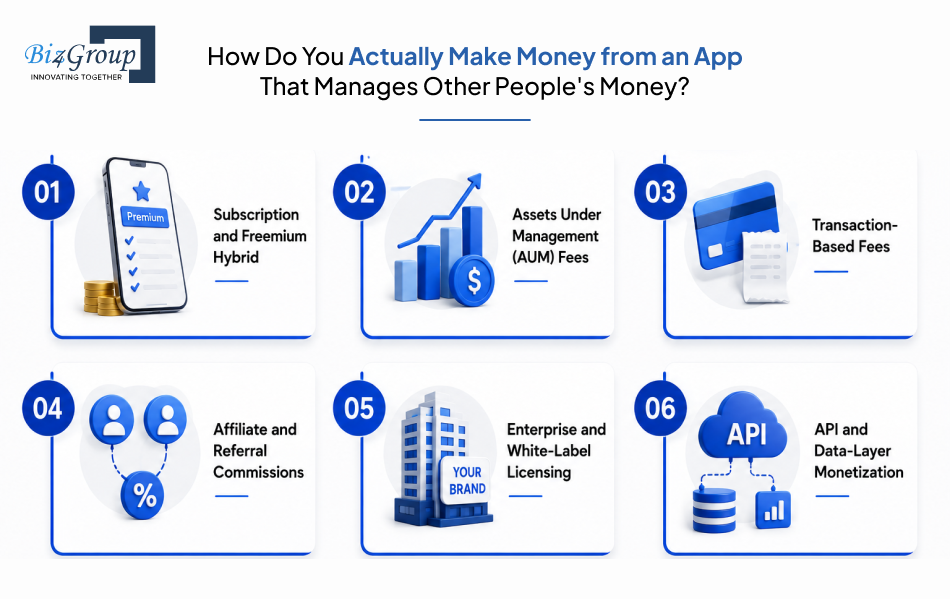
How Do You Actually Make Money from an App That Manages Other People's Money?
"I am running a fintech startup and I want to build an AI personal finance app but I am struggling to figure out the right monetization model because freemium alone does not feel sustainable for my target audience, and I need to understand what revenue models are actually working for apps in this space."
That instinct is correct, and the market backs it up. Mint shut down in 2024 largely because ad-supported personal finance couldn't fund real development, and its successors, Monarch, YNAB, Copilot, Rocket Money, all moved to paid subscriptions, charging roughly $100 to $150 a year. Freemium alone isn't dead, but it's rarely the whole answer anymore for anyone serious about AI personal finance management app development. Here's what's actually working.
1. Subscription and Freemium Hybrid
Core tracking and budgeting stay free, while AI insights, forecasting, and advanced categorization sit behind a paid tier. This remains the most common model for any AI expense tracker app, precisely because it lets users prove the app's value before paying for it.
Typical conversion from free to paid sits in the 2 to 5% range, which means this model only becomes meaningful once you've built real scale, not on day one.
2. Assets Under Management (AUM) Fees
For apps that manage investments directly, charging a small percentage of assets under management ties the app's revenue growth to the user's wealth growth. Robo-advisors have run on this model for years, and it works particularly well once AI financial advisor app development moves beyond insights into actual portfolio management.
This model only makes sense once a user has meaningful assets connected, so it's rarely a launch-day revenue stream.
3. Transaction-Based Fees
Apps that facilitate an action, a transfer, a trade, a bill payment, can take a small percentage or flat fee per transaction. Revenue here scales directly with usage instead of requiring a separate subscription decision from the user, which is a natural fit once you build AI money management app features that move money, not just track it.
This model needs volume to matter, so it tends to work better as a secondary stream layered onto a subscription base rather than a sole strategy.
4. Affiliate and Referral Commissions
Referring users to relevant financial products, credit cards, loans, insurance, savings accounts, earns a commission without charging the user directly. This works especially well in an AI-powered personal finance management app development context, since the app already has the spending and credit data to make relevant, well-timed recommendations.
Done well, this can feel like a genuine feature rather than an ad. Done poorly, it erodes exactly the trust a finance app depends on.
5. Enterprise and White-Label Licensing
Licensing the platform to banks or credit unions, who rebrand it as their own, generates substantial per-client revenue with a much longer sales cycle. This is a B2B pivot more than a consumer monetization tactic, and it's a common path for teams that originally set out to develop AI personal finance management platform products for consumers before realizing the bigger opportunity sits with institutions.
Deals here can run from tens of thousands to several hundred thousand dollars annually per institution but expect a six-to-twelve-month sales cycle to close one.
6. API and Data-Layer Monetization
If the app builds genuinely valuable infrastructure, a categorization engine, a forecasting model, other companies may pay to access it via API, the same model Plaid itself runs on. This only works once the underlying AI is strong enough that other businesses would rather license it than create AI personal finance management app infrastructure of their own from scratch.
This is the highest-margin path on this list, but it's realistically a later-stage move, not a launch strategy.
Most apps that succeed here don't pick one model, they layer two or three, usually starting with subscription and adding affiliate or transaction revenue once there's real usage data to work with. Getting the sequencing right and understanding which of these paths actually fits an AI fintech app development for personal finance product instead of a generic app, is covered in more depth in how to monetize an AI app.
What Does It Actually Take to Build This Thing, Step by Step?
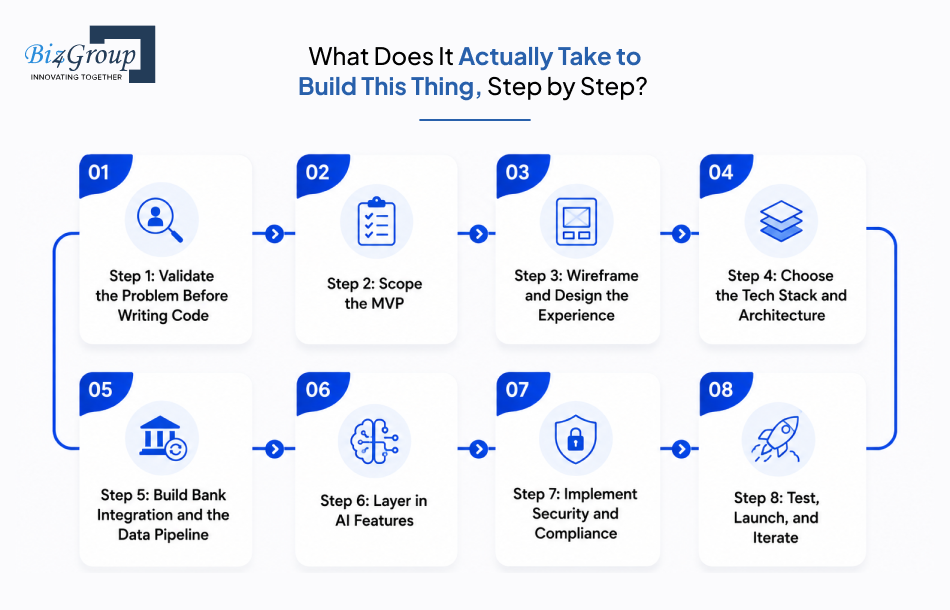
Every finished app looks obvious in hindsight. Getting there is a sequence, and skipping steps or doing them out of order is usually why teams end up rebuilding things they thought were done. This full sequence is really what AI personal finance management app development looks like once you move past planning and into execution.
Step 1: Validate the Problem Before Writing Code
Talk to 10 to 20 potential users about how they currently manage money and where it breaks down, before deciding what to build. This step gets skipped more than any other, and it's the cheapest one to do properly.
- Interview real users about pain points, not your proposed solution
- Ask open questions instead of leading ones
- Confirm the problem is worth solving before committing engineering time
Step 2: Scope the MVP
Take the core feature list from earlier in this guide and commit to five to seven features, nothing more. This is where MVP development discipline actually pays off, since a lean, working AI expense tracker app beats a half-built, overly ambitious one every time.
- Lock the MVP feature list before any design work starts
- Separate must-haves from nice-to-haves in writing
- Set a hard scope boundary the team can point back to later
Step 3: Wireframe and Design the Experience
Build low-fidelity wireframes first, then move into clickable prototypes users can actually test before a single line of production code gets written. Financial apps carry more anxiety than most categories, so UI/UX design decisions here directly affect whether users trust the app with their money.
- Wireframe core flows before visual design begins
- Build interactive prototypes for user testing
- Prioritize clarity over cleverness in financial data displays
Step 4: Choose the Tech Stack and Architecture
Lock in backend, cloud, and AI framework decisions with scale in mind from the start, since these choices are expensive to reverse later. This is a decision worth its own deep dive, covered in the next section, but it belongs in this sequence, not as an afterthought to AI budgeting app development.
- Choose a backend that supports real-time data sync
- Select AI/ML frameworks based on team expertise and scale needs
- Plan cloud infrastructure for future growth, not just launch-day load
Step 5: Build Bank Integration and the Data Pipeline
Connect to an aggregator like Plaid, then build the ingestion, cleanup, and categorization pipeline covered earlier in this guide. This is usually the single most time-consuming technical phase of any serious effort to build AI money management app products.
- Integrate the account aggregator and test coverage across banks
- Build data cleanup and deduplication logic
- Stand up the categorization model and its feedback loop
Step 6: Layer in AI Features
Add forecasting, insights, and any AI advisor functionality on top of a data pipeline that's already reliable. Building this before the core data layer is stable is the most common reason building AI budgeting and expense tracking app projects underperform after launch.
- Train and test categorization and forecasting models on real transaction data
- Build guardrails around any conversational AI advisor feature
- Validate model outputs against known-correct scenarios before shipping
Step 7: Implement Security and Compliance
Build encryption, access controls, and compliance requirements covered earlier directly into the architecture, not as a post-launch patch. Retrofitting security after launch costs far more than building it in from day one, whether you're working with an in-house team or an outside AI personal finance management app development services partner.
- Implement encryption in transit and at rest
- Build audit logging and access controls from the start
- Map which certifications and regulations apply before launch, not after
Step 8: Test, Launch, and Iterate
Run a closed beta before a full launch, collect real usage data, and treat the first few months as an active feedback loop rather than a finished product. The app that ships on day one is a starting point, not the final version of what it takes to develop AI personal finance management platform experiences that hold up long-term.
- Run a closed beta with a small group of real users
- Monitor categorization accuracy and model performance post-launch
- Prioritize fixes and features based on actual usage data, not assumptions
Getting the sequence right matters, but so does getting the underlying technology choices right within each step, especially the stack decisions that determine whether the app holds up once real users start hammering on it.
Still Staring at Step One?
Every great app started as someone's messy first sprint. Let's turn your roadmap into an actual build plan.
Start Your Build PlanWhat Tech Stack Keeps Your App Fast Today and Scalable Tomorrow?
"I am a developer building an AI personal finance management app and I want to choose the right tech stack for handling real time bank syncing, AI driven spending insights, and push notifications, and I need to know what architecture decisions made early on will prevent us from hitting a scalability wall later."
There's no single right answer here, the right stack depends on your team's expertise and expected transaction volume, but there's a well-tested combination most serious AI personal finance management app development builds converge on. Here's the breakdown by layer.
|
Layer |
Recommended Options |
Why It Fits |
|---|---|---|
|
Mobile Frontend |
Flutter or React Native |
Single codebase for iOS and Android, with React Native's newer Fabric architecture closing the performance gap for complex financial UI and real-time data views |
|
Web Frontend |
React.js |
A deep ecosystem of financial charting and data visualization components, which is why teams often bring in a dedicated React JS development services partner for the dashboard layer specifically |
|
Backend |
Node.js or Python |
Node.js, best handled by a specialized Node JS development company, suits real-time, event-driven workloads like live bank sync and notifications; Python, where a dedicated Python development company adds real value, is the stronger choice when the AI/ML layer is being built in-house |
|
Database |
PostgreSQL |
Handles structured financial records reliably and scales well for transaction-heavy workloads |
|
AI/ML Framework |
TensorFlow, PyTorch, or a hosted LLM API |
Build vs. buy decision, custom models for categorization and forecasting, hosted APIs for conversational AI financial advisor app development features |
|
Bank Data Aggregation |
Plaid, MX, or Yodlee |
Handles the connection to thousands of banks so you're not building and maintaining that integration layer yourself, core to any real AI expense tracker app |
|
Cloud Infrastructure |
AWS, Azure, or Google Cloud |
Cloud-native architecture with containerization supports both AI processing loads and traffic scaling without a full re-platform later |
|
Authentication and Security |
OAuth 2.0, JWT, TLS 1.3, MFA |
Token-based auth and encrypted connections form the security baseline covered earlier in this guide |
|
Architecture Pattern |
Microservices |
Lets payment, user, compliance, and AI modules scale independently, which matters most once you build AI money management app products past MVP scale |
Two decisions matter most for avoiding the scalability wall specifically. Microservices over a monolith is the biggest one, since a monolithic architecture forces every part of the app to scale together, even when only the notification system or the AI insight engine is under real load. Event-driven design for notifications and bank-sync matters just as much, since live updates need an architecture built for asynchronous events from day one, not bolted on later.
Getting this stack right is also what makes it realistic to expand into a full AI financial forecasting platform later without re-architecting the whole system to support it.
How Much Does It Actually Cost to Build an AI Personal Finance Management App?
"I am a non-technical founder who wants to develop an AI personal finance management app and every development quote I get is wildly different, and I want to understand what actually drives the cost so I can plan my budget and runway before approaching investors."
Here's a real number to start with: AI personal finance management app development typically runs between $25,000 and $300,000, depending on feature depth, AI complexity, and compliance scope. That range is wide on purpose, a lean MVP with core tracking sits at the low end, while a full platform with an AI advisor, investment insights, and multi-jurisdiction compliance sits at the high end. No two builds cost the same, so treat this as a planning range, not a quote.
Here's what drives that number feature by feature.
|
Feature |
Complexity |
Estimated Cost Range |
|---|---|---|
|
Bank Sync and Account Aggregation |
Medium |
$8,000 – $20,000 |
|
AI Transaction Categorization |
High |
$15,000 – $35,000 |
|
Smart Budgeting and Spend Alerts |
Medium |
$6,000 – $15,000 |
|
Goal-Based Savings Tracking |
Low |
$4,000 – $10,000 |
|
Multi-Account Dashboard and UI/UX |
Medium |
$10,000 – $25,000 |
|
Cash Flow Forecasting |
High |
$15,000 – $30,000 |
|
AI Financial Advisor / Conversational Assistant |
Very High |
$25,000 – $60,000 |
|
Investment Portfolio Insights |
High |
$15,000 – $35,000 |
|
Fraud and Anomaly Detection |
High |
$12,000 – $30,000 |
|
Security, Encryption, and Compliance Setup |
High |
$15,000 – $40,000 |
|
QA, Testing, and Deployment |
Medium |
$8,000 – $20,000 |
The core row features (bank sync, categorization, budgeting, dashboard) make up a realistic MVP, and building AI expense tracker app functionality well at that stage usually lands in the $40,000 to $80,000 range before any advanced features get added.
Factors That Push Cost Up or Down:
- Platform choice, native iOS and Android separately costs more than a single cross-platform build
- AI model complexity, custom-trained categorization and forecasting models cost more than using pre-built APIs
- Compliance scope, multi-state or enterprise-grade compliance (SOC 2, GLBA, multi-jurisdiction) adds real budget
- Team location, US-based teams cost significantly more per hour than offshore or nearshore teams
- Design approach, custom UI/UX costs more than template-based design but matters more in finance than most categories
- Number of bank integrations and aggregator coverage required
Hidden Costs Founders Consistently Underestimate:
- Ongoing model retraining and monitoring after launch, not a one-time cost
- Compliance audits and legal review, especially once AI personal finance management app development services expand into investment advice features
- Third-party API and aggregator fees that scale with user volume, not a flat fee
- Post-launch maintenance and bug fixes, commonly 40 to 60% of the original build cost in year one alone
- Customer support infrastructure once the user base grows past a few thousand active users
Ways To Optimize the Budget Without Cutting Corners:
- Launch with a true MVP, five to seven core features, not the full advanced feature set
- Use hosted AI APIs for the advisor layer instead of training custom models from day one
- Choose a cross-platform framework (Flutter or React Native) over separate native builds
- Work with an offshore or nearshore development partner for 30 to 50% cost savings without sacrificing quality
- Build compliance into the architecture from day one instead of retrofitting it later, which typically costs five to ten times more after launch
Buy vs. Build, By Component:
|
Component |
Buy (Third-Party) |
Build (Custom) |
|---|---|---|
|
Bank Data Aggregation |
Plaid, MX, Yodlee, faster to launch, ongoing usage fees |
Rarely worth building in-house |
|
Transaction Categorization |
Pre-trained categorization APIs, faster but less differentiated |
Custom-trained model, higher cost, better long-term accuracy and differentiation |
|
AI Advisor / Conversational Layer |
Hosted LLM APIs, lower upfront cost, faster to ship |
Fine-tuned or proprietary model, higher cost, tighter control over compliance guardrails |
|
Fraud Detection |
Third-party fraud APIs, quick to integrate |
Custom model trained on your own transaction data, better fit but expensive to build well |
|
Compliance Tooling |
RegTech platforms (Drata, Vanta, ComplyAdvantage) |
Rarely worth building in-house at MVP stage |
Most successful builds land somewhere in the middle of this table: buy the commodity infrastructure everyone needs, and build custom where the differentiation actually lives, usually categorization accuracy and the advisor experience. Knowing the cost is only useful once you also know where teams typically lose that budget to mistakes that could've been avoided.
Curious Where You'd Actually Land on That $25K to $300K Range?
Generic estimates won't tell you. A 30-minute call with our team will.
Get Your Real Cost EstimateWhat Goes Wrong When Teams Build These Apps, and How Do You Dodge It?
Most of what breaks after launch was visible during planning. Before getting into the general pitfalls, here's a real example of one we hit ourselves.
A Real Integration Challenge We Solved
We built Worth Advisors, a financial planning platform where clients complete 14 structured questionnaires and advisors turn that data into reports built from 37 modular components across 5 report types. The platform syncs with Redtail and Intelliflo to pull real client account and holdings data into those reports.
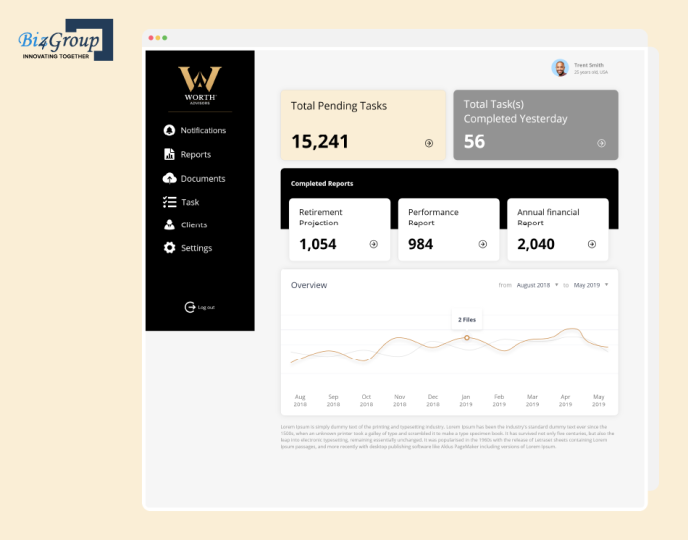
Two integration problems surfaced during that build. Redtail's contact fields didn't line up cleanly with our own data structure, which created inconsistent client records whenever data synced in both directions. Separately, Intelliflo's summary API returned incomplete performance data, which meant reports risked showing partial or misleading holdings information.
We solved the first problem by enforcing strict sync rules with edit locks on fields pulled from Redtail, preventing conflicting edits from corrupting client records. We solved the second by switching to a more detailed Intelliflo endpoint that returned complete holdings data instead of the summary-level feed we started with.
That experience is exactly why third-party data sync shows up as its own line item in the table below, it's not a theoretical risk, it's one we've engineered around directly.
Common Pitfalls in AI Personal Finance App Development
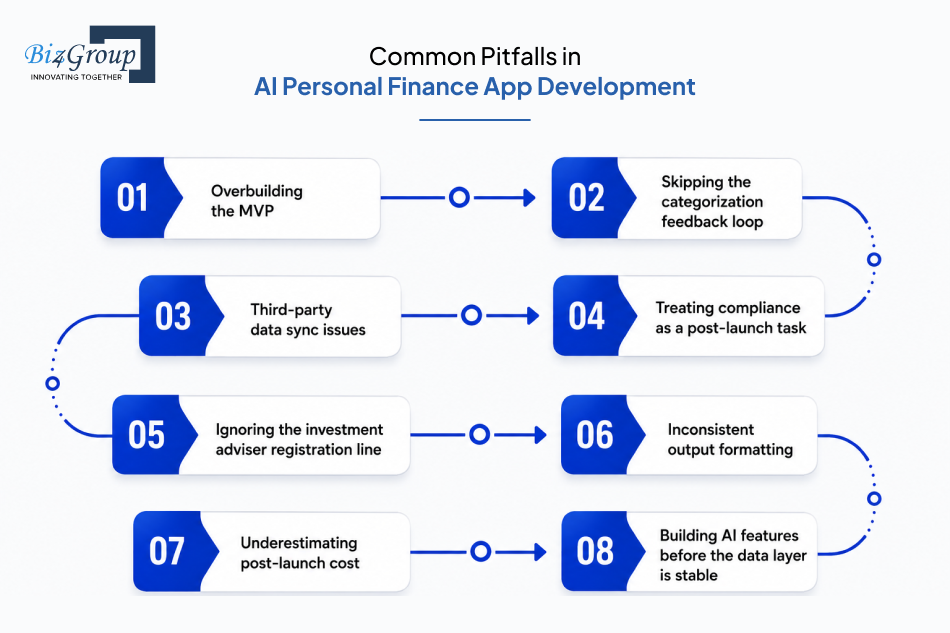
|
Mistake |
What Goes Wrong |
How to Dodge It |
|---|---|---|
|
Overbuilding the MVP |
Teams try to ship budgeting, an AI advisor, and investment tracking all at once, and the launch slips by months while none of the three gets built well |
Commit to five to seven core features and treat everything else as version two |
|
Skipping the categorization feedback loop |
Categorization accuracy looks fine in a demo, then quietly degrades once real, messy user data hits it |
Build the correction-to-retraining pipeline into the AI expense tracker app from day one, not as a post-launch fix |
|
Third-party data sync issues |
Aggregator, CRM, or account data integrations rarely match a platform's own data structure cleanly, causing inconsistent records and inaccurate reports |
Enforce strict sync rules and field-level edit locks, and use the most detailed API endpoint available instead of a summary-level feed |
|
Treating compliance as a post-launch task |
Security and regulatory requirements get bolted on after the product is built, costing five to ten times more to retrofit than to build in from the start |
Map every applicable certification and regulation before writing production code, not after |
|
Ignoring the investment adviser registration line |
Teams add "AI advisor" features without realizing specific investment guidance can trigger SEC or state registration |
Keep advisory features to general budgeting insight until legal review confirms whether registration applies |
|
Inconsistent output formatting |
Reports, dashboards, or generated documents get built module by module with no shared design system, creating visible inconsistency users notice immediately |
Standardize on one template and layout system across every module before scaling the feature set |
|
Underestimating post-launch cost |
Founders budget for the build and nothing else, then get blindsided by 40 to 60% additional cost in year one for maintenance, retraining, and support |
Budget hidden costs into the runway plan from day one, not as a surprise after launch |
|
Building AI features before the data layer is stable |
Forecasting and advisor features launch on top of unreliable categorization, producing confident, wrong answers that erode trust fast |
Confirm categorization accuracy is solid before layering any AI budgeting app development feature on top of it |
The pattern across almost every one of these: the fix is nearly always cheaper before launch than after it. Knowing what tends to go wrong is useful. Knowing who's actually solved these problems before is what turns that knowledge into a shorter path to launch.
Ready to Build Yours? Here's Why Founders Choose Biz4Group for This Exact Job
Everything in this guide, the MVP scoping, the compliance line most teams miss, the categorization feedback loop, the real cost breakdown, comes from having built this exact category of product, not from summarizing what other companies wrote about it. This is what real AI personal finance management app development experience looks like in practice.
Biz4Group has been building software since 2003, with a 300+ person team and over 1,000 delivered projects across fintech, healthcare, and AI-driven platforms, backed by an 85% client retention rate and ongoing partnerships with Fortune 500 companies. That includes Worth Advisors, the financial planning platform referenced in the previous section, where we solved the exact kind of third-party data sync problems, Redtail contact-field mismatches, incomplete Intelliflo data, that most teams don't discover until they're already live building their own AI expense tracker app.
If you're deciding between building this in-house or bringing in a partner who's already solved the categorization accuracy problem, the RIA registration question, and the bank integration edge cases covered throughout this guide, that's the conversation worth having next. Whether you want to build AI personal finance management application products from scratch or bring in help to create AI personal finance management app upgrades for something already live, our team covers the full build, from AI development company architecture to hands-on AI agent work. Happy to start with a straightforward scoping conversation, no pressure, no pre-built package.
Ready to Stop Reading About It and Start Building It?
We've shipped the hard parts before. Let's make your app the next one.
Book a Free ConsultationWrapping Up!
Building an AI personal finance management app isn't really about the AI. It's about getting the unglamorous parts right first, clean data, honest compliance, a categorization model that keeps learning, so the AI layered on top actually deserves the trust users give it. That discipline matters more than most teams expect: finance apps that get it wrong lose the vast majority of users within 30 days, and the ones getting it right are the ones building for daily trust, not just a first download.
Every section in this guide came from real AI personal finance management app development decisions, not theory, from scoping a lean AI expense tracker app in the early sections to building out full AI budgeting app development in the ones that followed, including lessons Biz4Group learned firsthand shipping financial platforms like Worth Advisors. That's the difference between a guide written from research and one written from having actually helped teams ship products that made it to launch and stayed standing after.
You've got the roadmap. Let's build the app, not just talk about it.
FAQ’s
1. How long does it take to build an AI personal finance management app?
A focused MVP with core tracking, budgeting, and bank sync typically takes 2 to 4 weeks. A full platform with AI forecasting, an advisor feature, and complete compliance hardening usually takes 6 to 8 weeks. Bank integration and security testing are the phases most likely to extend the timeline, so building buffer time into the schedule for AI personal finance management app development is worth planning for from day one.
2. Do I need an investment adviser license to launch an AI budgeting app?
Not for general budgeting insight and spending guidance. The requirement kicks in once the app gives specific advice about securities or investment decisions for compensation, which is when SEC or state investment adviser registration can apply. Keeping features limited to budgeting and cash flow guidance is the safer starting point for an AI financial coaching app before expanding into full advisory territory.
3. What's the difference between an AI expense tracker and a full AI financial advisor app?
An AI expense tracker app focuses on categorizing spending, tracking budgets, and surfacing patterns from a user's transaction history. AI financial advisor app development goes further, layering in investment guidance, portfolio insight, and personalized recommendations grounded in a user's complete financial picture, which is also where the regulatory requirements get heavier.
4. Can I build an MVP without full bank integration?
Technically yes, through manual entry or CSV import, but most users abandon apps that require manual data entry within days. A real MVP for AI budgeting app development should include at least one bank aggregator connection through Plaid, MX, or Yodlee, since automated data sync is what makes the AI layer useful in the first place.
5. How do you keep AI categorization accurate over time?
By treating every user correction as training data instead of a one-time UI fix. Production-grade categorization models improve with each correction cycle, tightening accuracy over time rather than staying static after launch, which is the single biggest technical differentiator in serious AI expense tracker app development.
6. How much does it cost to build an AI personal finance management app?
Costs typically range from $25,000 for a lean MVP to $300,000 for a full-featured platform with an AI advisor, investment insights, and enterprise-grade compliance. Feature complexity, AI model sophistication, and compliance scope are the biggest drivers of where a specific AI personal finance management app development services project lands within that range.
7. What security certifications does an AI personal finance app actually need?
At minimum, encryption in transit and at rest, PCI DSS if handling card data, and compliance with GLBA and applicable state privacy laws like the CCPA. SOC 2 Type II isn't legally required but is effectively necessary for enterprise partnerships and bank sponsorships once a develop AI personal finance management platform project moves beyond consumer-only distribution.
