Location :
Orlando, FL, USA
Location :
Orlando, FL, USA +1 (407) 714-1616
 info@biz4group.com


















Imagine a digital system that doesn’t wait for instructions but instead, understands your business goals, learns from real-time feedback, and takes independent actions to get the job done.
Read More

 AI Summary Powered by Biz4AI
A buyer may search for a three-bedroom home within a certain budget and still have plenty of flexibility. They might accept a longer commute for a bigger yard or consider a nearby neighborhood if the home feels right. How can a property platform pick up on those preferences and make its suggestions genuinely useful?
AI property recommendation engine development helps platforms connect buyer preferences and browsing signals with available homes. A well-built system can rank listings around what matters to each buyer, learn from actions such as saving or skipping a property, and refresh suggestions when inventory changes. This is the core of AI-powered property matching: helping buyers discover homes that fit their needs and priorities.
AI use is already showing up in homebuying plans. NerdWallet's 2026 Home Buyer Report found that 48% of Americans planning to buy a home in the next 12 months said they had used or planned to use AI during the process.
For Biz4Group LLC, in all its experience with AI product development, the important detail is how the recommendation model fits into the wider real estate workflow. A match is only useful when the listing information is current and the platform can carry that result into the buyer's next step, whether that means saving a home, contacting an agent, or arranging a viewing.
The result should feel less like scrolling through another long list and more like getting a useful shortlist built around the buyer's needs.
An AI property recommendation engine ranks homes based on how well they match a buyer's preferences and behavior. Unlike basic filters or sort-by-price, it can learn from signals such as saved listings, repeat views, and skipped properties to refine future suggestions. This helps buyers discover homes they may have overlooked using fixed search criteria alone.
A common question from real estate portal owners is:
"I run a real estate portal and my search results just show hundreds of listings sorted by price, so I want to know how to build an AI recommendation engine that actually understands what each buyer is looking for"
Combine buyer preferences, listing attributes, and permitted behavior signals to identify suitable homes and rank them by relevance. Start with clear requirements such as budget and location, then refine recommendations using actions like saves, repeat views, and feedback.
Explicit preferences are the details buyers tell you, such as their budget, preferred neighborhood, number of bedrooms, or must-have features. Implicit signals come from their actions: opening a listing, saving it, sharing it, or returning to view it.
Why does that matter? Buyers don't always know how to describe everything they want at the start. Their activity can offer clues that help refine recommendations over time. A click alone, though, doesn't prove genuine interest.
A recommendation engine can personalize the listings buyers see in their home feed, suggest similar properties on listing pages, and send saved-search alerts when relevant homes become available.
For example: If a buyer repeatedly views homes with spacious kitchens, the platform could suggest other listings with similar layouts. It can also help them discover comparable homes within their budget. Buyers should have a simple way to update their preferences when their plans change.
Zillow has described using home-shopping activity, including views, saves, and shares, to personalize recommendations. Redfin has discussed personalized property alerts and conversational search, where buyers can describe what they want and refine their search.
Smaller platforms can apply these broad ideas by combining buyer preferences with listing details, suggesting similar homes, and learning from feedback such as saves or dismissals. They can begin with simpler matching methods and explore more advanced models as they collect enough reliable data.
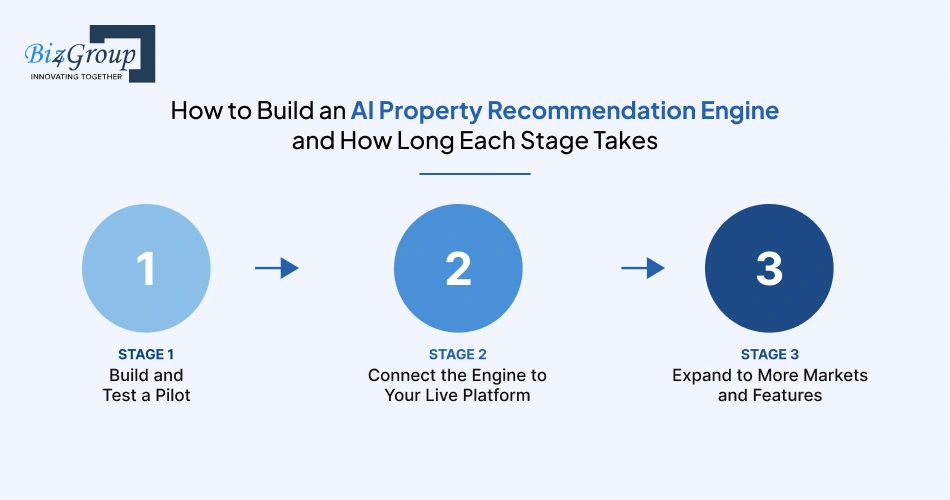
You can build a basic AI property recommendation engine in around 3-7 working days and move toward production in roughly 2-4 weeks, if your listing data is ready and the project has a clear scope. A limited rollout to more markets or product features may take another 2-6 weeks. These are practical estimates for a focused team using existing AI models, managed services, and AI-assisted development. Your actual timeline will depend on the data, integrations, and testing involved.
So, where should you start? Build the engine in stages. First, check whether it recommends homes buyers actually want to see. Then connect it to live listings and your platform. Once it's working reliably, expand its reach.
Estimated time: 3-7 working days
Start with one market or a small group of buyers. Use the listing data you already have and build a simple residential property matching model around details such as budget, location, property type, and number of bedrooms.
You can use an existing AI model or an embedding service to help match buyer preferences with property descriptions and attributes. AI-assisted development can also speed up data preparation and the first round of testing.
What should you check during the pilot? Try sample buyer searches and see whether the engine returns relevant homes. If you have historical browsing or saved-property data, use that too. Review poor matches and check whether the listings are accurate and available.
Pilot milestone: A working recommendation flow that has been tested against a defined set of buyer searches or historical activity.
Estimated time: 2-4 weeks
Once the pilot looks useful, connect it to your website or app and live property inventory. This stage includes setting up recommendation serving, handling listing updates, collecting buyer feedback, and adding basic logging and monitoring.
Think about what happens when a property becomes unavailable or a buyer changes their budget. Does the engine update its recommendations? Can the team spot when results become less relevant?
You can also run an A/B test, where one group sees the new recommendations and another sees the existing experience. That gives you a way to compare how each experience performs.
Production milestone: Buyers receive live recommendations, and your team can monitor the system and investigate issues.
Estimated time: 2-6 weeks for a limited expansion
Ready to support more locations, MLS feeds, or product surfaces? You can build on the recommendation engine you already have and adapt it to the new data and workflows.
Each market may bring differences in listing fields, data quality, feed updates, and usage permissions. Check those details before expanding. You'll also want to test whether recommendation quality holds up across markets and buyer groups.
AI tools can help with repetitive integration work and test creation. Data checks, permissions, and quality reviews still need careful attention.
Rollout milestone: The engine supports the agreed markets and features, with monitoring and a clear process for handling problems.
|
Stage |
Practical estimate |
Main outcome |
|---|---|---|
|
Pilot |
3-7 working days |
Testable property matching flow |
|
Production go-live |
2-4 weeks |
Recommendations connected to live inventory |
|
Limited rollout |
2-6 weeks |
Expanded coverage across selected markets or features |
These estimates assume usable listing data, access to the required systems, and a focused scope. If you need major data cleanup, new MLS agreements, or significant changes to your existing platform, allow more time.
An AI property matching system needs accurate real estate listing data and information about what buyers want. Start with property details and stated preferences, then bring in browsing activity, CRM records, and transaction history where available and permitted. These inputs help a property recommendation model find relevant homes and adjust its suggestions as it learns more.
Many real estate platforms already collect useful browsing activity but haven't turned it into meaningful recommendation signals, which makes them ask:
"We have a lot of buyer browsing data sitting unused in our system, and I want to know how to turn that into a recommendation engine that suggests better matched properties automatically."
Organize permitted browsing events such as searches, listing views, saves, and inquiries, then connect them to the properties buyers interacted with. Use these signals to refine buyer profiles and ranking, while treating clicks as clues rather than proof of intent.
Here's how each type of data helps and what to watch for when you use it.
A property recommendation engine can only match buyers with homes it understands. That means giving it useful details about each listing, including:
For example, a buyer might ask for a home with space to work remotely. The listing description may mention a study even if the structured fields don't include a home-office attribute. Natural language processing (NLP) can help identify that detail and make it available for matching.
Keep listing information up to date, too. A property that has already sold shouldn't keep appearing as a live recommendation.
Search behavior can help a real estate recommendation system understand preferences that buyers haven't entered directly. Useful signals include filter changes, listing views, saved properties, repeat visits, inquiries, and responses to previous recommendations.
Consider this pattern:
A buyer's search activity
The engine may use this pattern to give more attention to homes in that area, with outdoor space and prices closer to the buyer's activity.
But does browsing prove that someone intends to buy a particular property? No. A click might reflect curiosity, and a saved home may simply be part of a comparison. Buyer intent prediction works best when the system considers multiple signals alongside the buyer's stated preferences and allows them to correct its assumptions.
CRM and transaction records can add a view of the buyer journey beyond website activity. Depending on the records your business keeps, they may include:
|
Data source |
What it may contribute |
|---|---|
|
CRM notes and buyer requirements |
Needs discussed with an agent, such as budget, location, or preferred features |
|
Inquiries and viewing records |
Properties that prompted a question or a scheduled visit |
|
Offer and transaction history |
Later steps in the buying process and properties associated with those steps |
This information can help teams understand how property search behavior relates to real-world decisions. However, a completed transaction doesn't tell the full story of a buyer's preferences. Someone may have compromised on price, location, or features, while CRM notes may be incomplete.
Before using these records in a property matching algorithm, check their quality and whether the applicable agreements and privacy rules allow that use.
Already collecting website or app events? You may have the beginnings of a useful training dataset for personalized property recommendations.
The first job is to make those events understandable. Standardize the event names, connect them to the relevant listing or session where permitted, and define what each action could indicate. For example, saving a property might be treated as a positive interest signal, while dismissing a recommendation could suggest a mismatch.
What if you don't have much transaction history yet? You can still start with stated preferences and browsing interactions. Use them to build and evaluate an initial model, while remembering that these signals are imperfect and may not represent confirmed intent.
As feedback accumulates, you can test whether changes to the recommendation ranking lead to more relevant results. That gives your AI-powered property search a way to improve over time, provided the data is collected and used appropriately.
The right approach for an AI property recommendation engine depends on your data, inventory, and product requirements. Content-based filtering uses property features, collaborative filtering learns from buyer activity, and vector search matches listings by meaning. You can start with one method and combine them as your needs grow.
|
Approach |
How it works |
Main limitation |
|---|---|---|
|
Content-based filtering |
Matches listing features with buyer preferences |
Can produce repetitive suggestions |
|
Collaborative filtering |
Learns from patterns among buyers with similar activity |
Needs enough interaction data |
|
Vector search |
Finds listings with similar meaning using numerical representations called embeddings |
Similarity alone may miss strict requirements |
For example, vector search can connect "a home with space to work" with a listing that mentions a study, even if the wording differs. Price, location, and availability should still be handled through filters.
Collaborative filtering uses searches, saves, and other interactions to find patterns across buyers. If people with similar activity show interest in certain homes, the system can recommend related listings.
However, property searches often generate sparse data, especially for new users and newly added homes. What happens when there's no interaction history? The system has less behavioral evidence, so it may need to rely on listing features and stated preferences.
A hybrid recommendation model combines methods to use different kinds of evidence. Content-based filtering can match a buyer's requirements, while collaborative filtering adds patterns from similar users. Vector search can help interpret natural-language queries and detailed descriptions.
This can support more flexible personalized property recommendations, particularly when some buyers or listings have limited history.
Buyer intent prediction estimates the likelihood of actions such as saving a home, making an inquiry, or requesting a viewing. It can help a ranking model distinguish between properties that meet someone's requirements and listings they may be more interested in exploring.
These predictions are estimates, so use them alongside stated preferences and allow buyers to correct their search criteria.
Use your available data and platform needs to guide the decision:
Do you need a hybrid system right away? Not necessarily. Compare approaches using the same buyer scenarios, then measure relevance, inventory coverage, response time, and maintenance needs. This helps you choose a property recommendation algorithm that fits your platform without adding unnecessary complexity.
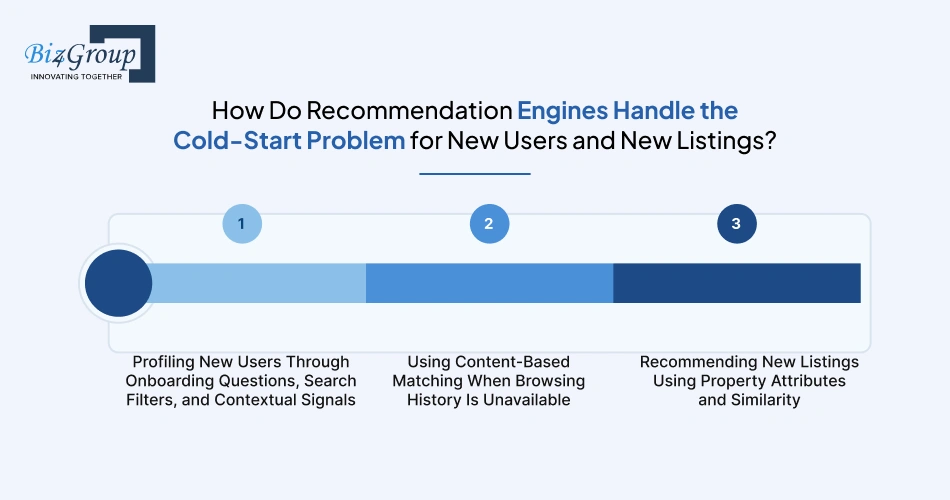
The cold-start problem happens when a real estate recommendation engine has little or no activity history for a buyer or property. You can still make useful matches using buyer search criteria, listing details, and property similarity. As people browse and share feedback, the system can use those signals to improve its recommendations.
A frequent query among real estate business owners when a buyer has just arrived or a property has no interaction history, is:
"We struggle with new users on our site because we have no data on their preferences yet, so I want to know how AI recommendation systems handle that cold start problem in real estate."
Ask new buyers for key preferences such as budget, location, and property type, then use content-based matching to suggest suitable homes. For new listings, match their attributes and descriptions against buyer requirements. Refine both as interaction data becomes available.
What can you recommend when a buyer has never searched before? Start with a few useful questions:
Use essential requirements to filter out unsuitable homes, then rank the remaining listings by preferred features. Search filters and session activity can help update the buyer profile as their needs change.
Content-based filtering compares the buyer's stated preferences with available property attributes. It can narrow results by budget, location, and property type, then rank homes by features such as size and amenities.
This gives a new user relevant recommendations without needing past clicks or saved listings. As browsing history builds, the real estate recommendation system can use those interactions to personalize future results.
A new property doesn't need previous views or saves to appear in recommendations. The engine can compare its price, location, size, amenities, and description with buyer preferences and similar homes. Vector search can also help find listings with related meaning in their descriptions.
|
Cold-start situation |
Data to use |
Matching approach |
|---|---|---|
|
New buyer with no browsing history |
Budget, location, property type, and onboarding answers |
Content-based filtering |
|
Buyer whose preferences are becoming clearer |
Search filters, saved homes, views, and feedback |
Update the buyer profile and refine rankings |
|
Newly added property with no engagement |
Price, location, amenities, description, and property attributes |
Attribute matching and vector similarity |
|
New buyer and new listing |
Stated requirements and listing details |
Match eligible homes first, then refine as activity builds |
How do you keep new listings from being overlooked? Add them to the searchable inventory when their data is ready, and refresh recommendations when key details such as price or availability change. This helps the system surface relevant homes even before they have engagement history.
Buyers have different priorities, and generic filters can only go so far. Biz4Group can help you build an AI property recommendation engine that matches buyer preferences with relevant listings and adapts as their needs change.
Explore Your AI Options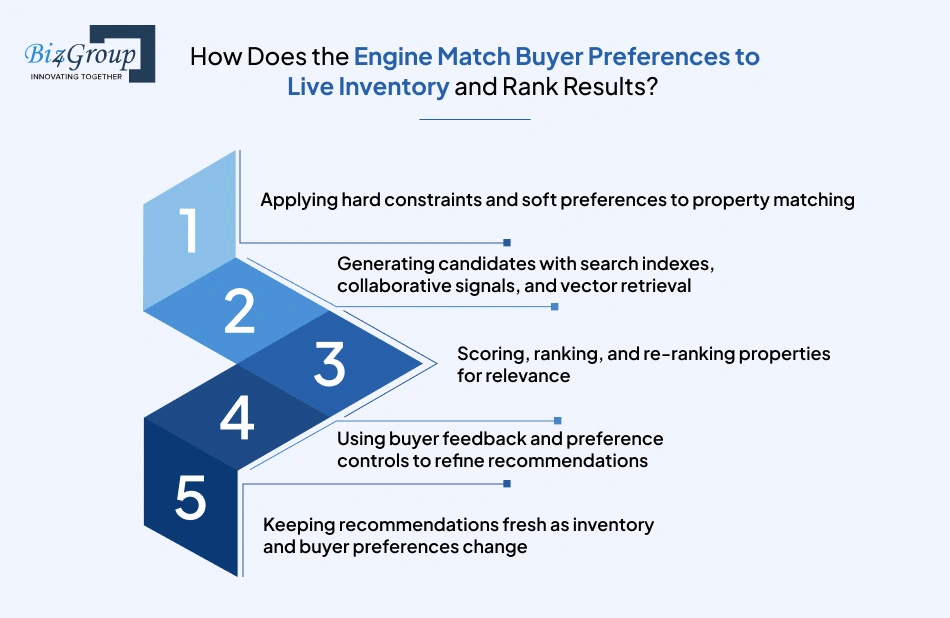
An AI property recommendation engine matches buyers with live listings by filtering out homes that fail essential requirements, finding relevant candidates, and ranking them around each buyer's preferences. As buyers interact with recommendations and inventory changes, the engine updates its results.
Think of the process as a series of decisions: What qualifies? What looks relevant? What should appear first? What has changed since the last search?
The first step is separating requirements a property must meet from preferences that can influence its ranking.
For example, if a buyer needs a two-bedroom home under a set budget, those conditions can define the eligible inventory. A balcony or a quiet street can then help determine which eligible properties appear higher.
Searching every property in detail for every buyer can be slow and unnecessary. Instead, the system first gathers a manageable set of candidate listings from different sources.
These methods can work together. Structured search protects essential requirements, while behavioral and semantic retrieval can surface relevant homes that a simple keyword search might miss.
Once the engine has its candidate listings, it assigns each one a relevance score. The score can combine several signals:
The system then sorts eligible homes using those scores. Re-ranking can adjust the order to account for factors such as duplicate-like results, variety, or newly updated listing information.
Example: Two homes may both meet a buyer's budget and location requirements. One has the extra workspace the buyer repeatedly searches for, so it may rank higher. The score should reflect the configured matching logic, rather than treating every click as proof of preference.
Recommendations improve when buyers can correct the system's assumptions. Give them simple ways to say what they want more of, what they want less of, and which requirements have changed.
|
Buyer action |
How the engine can use it |
|---|---|
|
Saves a listing |
Treat it as a possible positive preference signal |
|
Hides or dismisses a home |
Reduce the relevance of similar properties where appropriate |
|
Changes the budget or location |
Update the matching criteria immediately |
|
Marks a feature as important |
Give that preference more weight in future rankings |
|
Requests a viewing |
Record a stronger engagement signal, subject to the platform's rules |
These signals should be interpreted in context. A buyer might open a listing out of curiosity, and a dismissal may reflect price, timing, or a detail the system cannot see. Preference controls let buyers clarify those signals directly.
A recommendation can become irrelevant quickly if a property goes under contract, its price changes, or the buyer revises their search. The engine needs a refresh process that keeps results aligned with both.
A practical refresh loop
The refresh strategy depends on the platform. Status changes and removals may need prompt handling, while some ranking signals can be updated in scheduled batches. Monitoring stale listings, missing inventory, and ranking changes helps the team spot problems before they affect the buyer experience.
The goal is a recommendation list that stays eligible, relevant, and responsive as the buyer's search develops.
To connect an AI property recommendation engine to your real estate platform, you need to bring in current listing data, check how that data can be used, and connect recommendations to buyer and agent workflows. Here's what each part involves.
MLS integration gives the engine access to property details and availability. The method you use depends on the MLS, its data services, and your platform's needs.
|
Method |
How it fits into the system |
|---|---|
|
RESO Web API |
Provides a standardized way to exchange real estate data with a participating data source. |
|
Data replication |
Stores a permitted copy of listing data in your environment for searching and processing. |
|
Status updates |
Keep listing availability, prices, and other changing details synchronized. |
|
Data normalization |
Converts feed fields into a consistent format the recommendation system can use. |
Plan for missing fields, duplicate listings, delayed updates, and feed errors. When a property's status changes, the system should update its searchable record so outdated inventory is less likely to appear in recommendations.
Before using MLS or IDX data, confirm what the relevant agreements allow. Permission to display listing information does not automatically establish permission to use it for every AI purpose.
|
Intended use |
What to check |
|---|---|
|
Displaying listing details and photos |
Allowed fields, attribution, disclaimers, and display restrictions |
|
Storing listing data |
Retention periods, refresh obligations, and deletion requirements |
|
Training or fine-tuning models |
Whether the agreement permits the proposed training use |
|
Generating embeddings or similarity scores |
Whether processing and retaining derived representations are allowed |
|
Sharing recommendations with agents or other services |
Whether the recipients and intended use are covered |
RESO provides standards for data exchange. Access rights and permitted uses depend on the applicable MLS, provider, and agreements. Confirm those terms before building the data pipeline.
A CRM integration helps agents understand what buyers are looking for and follow up on meaningful actions. The engine can share relevant information with the CRM, subject to permissions and the brokerage's data policies.
|
CRM feature |
How the integration can work |
|---|---|
|
Buyer profile |
Sync stated preferences such as budget, location, and property type |
|
Saved listings |
Associate saved homes with the relevant buyer record |
|
Inquiries and viewing requests |
Create or update records that agents can act on |
|
Lead routing |
Send new leads through the brokerage's existing assignment rules |
|
Agent follow-up |
Give agents context about a buyer's expressed interests |
|
Recommendation feedback |
Use permitted interactions to help refine future matches |
Keep the information focused on what agents need. Define which events are recorded, how buyer records are matched, and who is allowed to view the data.
The engine needs to work with the platform's existing search, listing, account, and CRM services. A simple integration plan can help clarify what each component is responsible for.
|
Component |
Main responsibility |
|---|---|
|
MLS/IDX ingestion |
Receives listing data and updates |
|
Listing database and search index |
Stores and retrieves eligible properties |
|
Buyer profile service |
Maintains permitted preferences and relevant activity |
|
Recommendation API |
Retrieves candidates, scores them, and returns ranked results |
|
Website or mobile app |
Displays recommendations and lets buyers adjust preferences |
|
CRM connector |
Passes relevant buyer activity and inquiries into brokerage workflows |
|
Monitoring and logging |
Tracks service errors, response times, synchronization issues, and stale data |
During development, check how the recommendation API will authenticate requests, handle failures, and meet response-time requirements. Also decide what the platform should show if recommendations are temporarily unavailable, such as standard search results.
Start with the connections required for the first release. As the system expands, you can add more feeds, markets, and user-facing features while keeping data permissions and operational reliability in view.
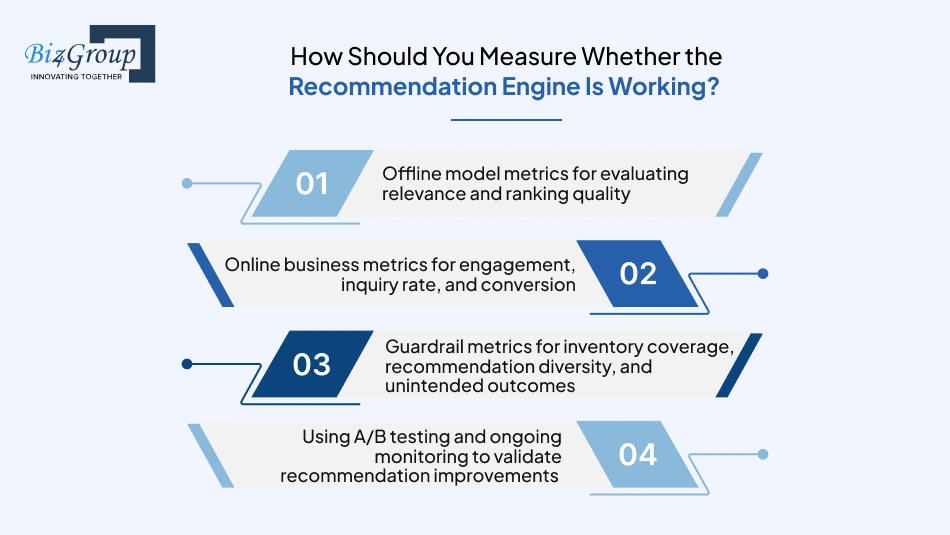
You'll know your AI property recommendation engine is doing its job when buyers see homes that fit what they want, take useful next steps, and keep finding relevant options as their search changes. To check that, look at three things: how well the model matches homes, how buyers respond, and whether the recommendations are creating any problems.
Before putting recommendations in front of buyers, test them against past searches and listing interactions. These metrics help you see whether the engine is putting useful homes near the top.
|
Metric |
What it tells you |
|---|---|
|
Precision@K |
Of the first few homes shown, how many were relevant? |
|
Recall@K |
How many of the relevant homes did the engine manage to find? |
|
NDCG@K |
Did the most relevant homes appear near the top of the list? |
|
MRR |
How far down the list does the first relevant home appear? |
|
Coverage |
Is the engine recommending a reasonable range of eligible properties? |
One thing to watch: a saved home or a click can suggest interest, but it doesn't prove the property was a perfect match. Use clear rules for what counts as relevant when you test the model.
Offline tests are useful, but you also need to see what happens when real buyers use the recommendations. Track actions that show whether people are finding homes worth exploring.
|
Metric |
What to look for |
|---|---|
|
Recommendation click-through rate |
Are buyers opening the homes they're shown? |
|
Save rate |
Are they saving recommended properties for later? |
|
Inquiry rate |
Are recommendations leading to questions about a property? |
|
Viewing request rate |
Are buyers asking to visit homes they discover? |
|
Conversion rate |
Are more buyers reaching the next step you care about, such as becoming a qualified lead? |
Keep the measurement consistent. For example, decide whether inquiry rate means inquiries per listing impression or per session. And remember that buying a home takes time, so a buyer may not convert during the same visit.
A recommendation list can get plenty of clicks and still leave buyers with a narrow view of what's available. Keep an eye on these areas too.
|
Guardrail |
What to check |
|---|---|
|
Inventory coverage |
Are eligible homes across different price ranges, property types, and markets getting a chance to appear? |
|
Recommendation diversity |
Is the buyer seeing a useful mix of homes, or the same kind of property over and over? |
|
Listing freshness |
Are sold, withdrawn, or otherwise unavailable properties being removed promptly? |
|
Exposure patterns |
Are some groups of listings receiving unusually little visibility? Investigate possible causes and relevant Fair Housing concerns. |
|
Privacy and data use |
Is the engine using buyer information only in ways the platform is permitted to use it? |
|
System reliability |
Are recommendations loading quickly, and what happens when a feed or service fails? |
These checks can help catch problems that a rising click-through rate might hide.
When you change the ranking logic, test it against the existing experience. An A/B test can help you see whether the change made a difference, rather than relying on a hunch.
Here's a straightforward way to run one:
The main question is simple: are buyers finding more relevant homes and taking useful next steps, while still seeing a healthy range of eligible properties? Track that over time, and you'll have a much clearer picture of whether the engine is helping.
Listing feeds, buyer activity, and CRM records can be tricky to bring together. Biz4Group can help you turn that data into a practical AI property matching system, with the right integrations and recommendation approach for your platform.
Plan Your AI Property Solution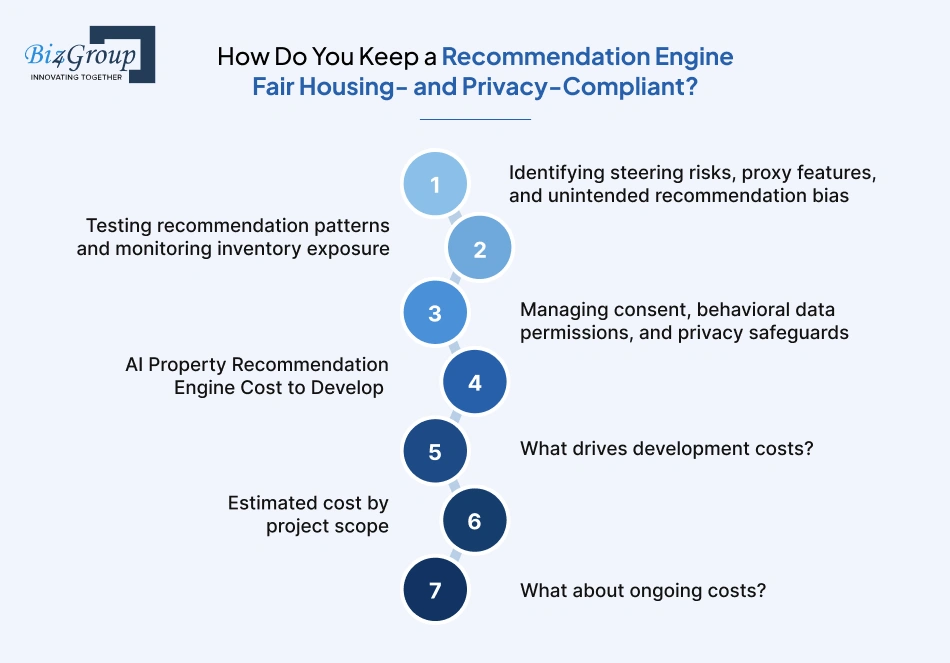
Keep an AI property recommendation engine Fair Housing- and privacy-compliant by checking how it ranks homes, looking for patterns that could unfairly limit buyers' choices, and making sure buyer data is used appropriately.
Location, browsing history, and other signals can affect which properties a buyer sees. Check that these signals reflect relevant housing preferences and don't introduce unfair restrictions.
For example, if buyers with similar requirements consistently receive recommendations from very different neighborhoods, investigate what's causing the difference. Historical activity and proxy features can influence results in unexpected ways, so the team should be able to explain why homes are included, excluded, or ranked highly. HUD has discussed fair housing concerns involving algorithmic systems in housing advertising.
Check whether buyers are seeing a reasonable range of eligible properties. Compare results for similar searches, look for listings that rarely appear, and investigate unexplained differences in exposure.
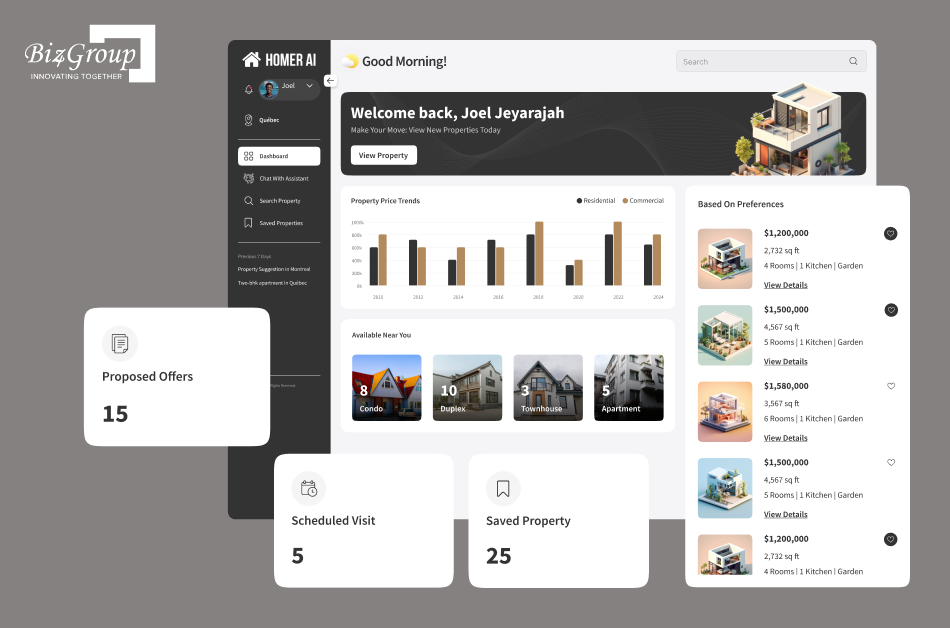
This is also where careful engineering matters. In its Homer AI project, Biz4Group worked on a conversational property search experience that gathers buyer requirements and presents matching homes. For a system like this, the same matching logic needs to be tested and monitored so personalization doesn't quietly narrow the options buyers can explore.
Browsing signals like saved homes and listing views can help refine recommendations, but the platform needs clear rules for using that information.
Explain what data is collected and how it affects recommendations. Check whether consent is required, limit access to appropriate people and systems, and define how long data is kept. Also confirm whether behavioral data can be used for analytics or model training.
|
Area to check |
What to verify |
|---|---|
|
Buyer preferences |
Recommendations reflect relevant housing needs and stated requirements. |
|
Steering and bias |
Similar searches aren't unfairly restricted by proxy features or historical patterns. |
|
Inventory exposure |
Eligible homes aren't consistently overlooked without a clear reason. |
|
Data permissions |
Buyer behavior data is used only for permitted purposes, with appropriate consent where required. |
|
Transparency |
The team can explain why a property was included, excluded, or ranked. |
|
Ongoing monitoring |
Ranking changes are tested, reviewed, and monitored after launch. |
The goal is to make recommendations relevant while protecting buyer information, maintaining fair access to eligible homes, and keeping the system's decisions understandable.
Building an AI property recommendation engine can cost between $10,000 and $200,000 USD, depending on your data, features, integrations, and platform scale.
|
Cost factor |
Why it matters |
|---|---|
|
Data readiness |
Cleaning listing data and preparing buyer preferences takes time. |
|
Integrations |
MLS/IDX feeds, CRM systems, and external APIs add development work. |
|
AI complexity |
Hybrid models and personalized ranking require more effort than basic property matching. |
|
Features and scale |
More users, markets, and product features increase the scope. |
|
Project scope |
Estimated cost (USD) |
|---|---|
|
Pilot |
$10,000-$30,000 |
|
MVP |
$30,000-$70,000 |
|
Production system |
$70,000-$140,000 |
|
Enterprise rollout |
$140,000-$200,000 |
These are indicative planning estimates. Actual costs depend on project requirements and existing infrastructure.
Plan for hosting, API usage, maintenance, data updates, and model retraining. A system serving live inventory across multiple markets will generally need more operational support than a small pilot.
Starting with a focused AI property matching system lets you test recommendation quality before expanding.
If you're planning to build an AI property recommendation engine, you have three main options: use your own team, hire a development company, or extend a platform you already have. The right fit comes down to your team's skills, budget, timeline, and how much flexibility you need.
|
Option |
When it may fit |
Things to weigh |
|---|---|---|
|
Build in-house |
You have developers and AI specialists who can build and maintain the system. |
You keep direct control, while your team takes responsibility for integrations, testing, and updates. |
|
Hire a development company |
You need additional AI expertise, real estate technology experience, or help delivering the project. |
Check the team's experience with property data, recommendation models, delivery timelines, and ongoing support. |
|
Extend or license an existing platform |
Your current property software already handles some of the features you need. |
It may reduce custom work, but check how easily it supports your preferred features and integrations. |
Look for experience with AI recommendation systems, property search, MLS/IDX data, and CRM integration. Ask how the team will test recommendation relevance, protect buyer data, and support the system after launch.
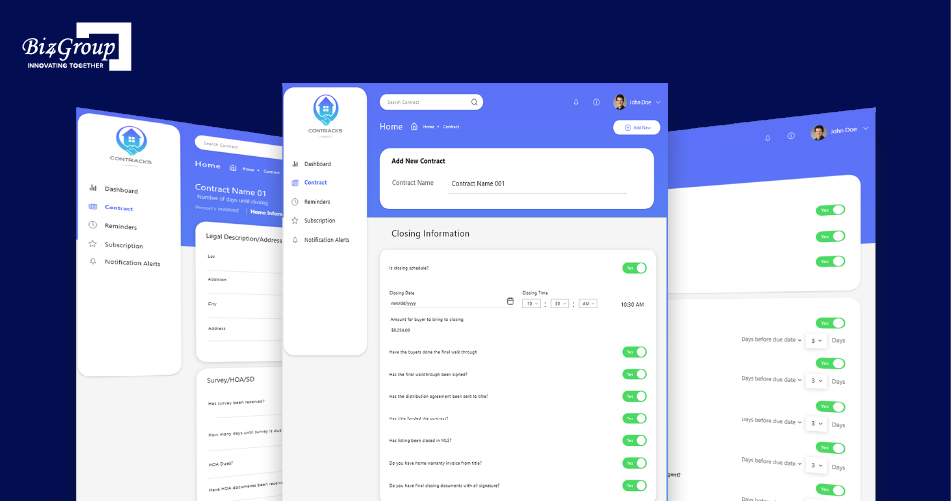
Biz4Group's Contracks project is a relevant example. The AI-powered real estate contract management platform includes contract summarization, smart search, alerts, and workflow features. This experience with real estate data and connected workflows can be useful context when assessing a team for a property recommendation project, though recommendation-model expertise should be evaluated separately.
You can also combine approaches: hire a company to build the first version of your real estate recommendation system, then have your in-house team take over or extend it as your needs grow.
A well-built AI property recommendation engine can make house hunting feel less like scrolling through an endless wall of listings and more like finding homes that genuinely fit. Getting there takes the right data, thoughtful matching, reliable integrations, and regular checks to keep recommendations relevant, fair, and up to date. Starting with a focused version and seeking AI consulting services when you need expert guidance can help you build with a clearer plan.
Buyer preferences can change as quickly as their wish lists. Is your engine ready to keep up? Can it surface a promising home before a buyer even knows how to search for it? With careful design and continuous improvement, your platform can make the search feel a little less overwhelming and a lot more personal.
It typically uses listing attributes such as price, location, and amenities, along with buyer preferences and permitted activity signals like searches, saves, and inquiries. CRM or transaction data can add context when available.
Start with details the buyer provides, such as budget, preferred area, property type, and bedrooms. Content-based matching can use those requirements to suggest eligible listings before browsing history builds up.
Yes. The inventory pipeline should process price, status, and listing-detail updates, then refresh affected recommendations so buyers aren't shown homes that no longer meet their requirements.
It can, but collaborative filtering needs enough user-property interactions to identify useful patterns. With sparse data, content-based matching and stated preferences can provide recommendations while interaction history grows.
Use an authorized MLS/IDX data connection to bring listings into your system, normalize the fields, and keep status changes updated. Connect the CRM to relevant buyer profiles, inquiries, and agent workflows. Confirm the MLS's permissions for data display, storage, and model use.
A project may range from $10,000 to $200,000 USD, depending on data quality, model complexity, integrations, features, and scale. A focused pilot costs less than a production system covering multiple markets.
A focused pilot may take days to a few weeks, while production development and broader rollout can take several more weeks or months. Data cleanup, MLS access, and integration requirements can affect the timeline.
Content-based filtering works well when you have listing attributes and buyer preferences. Collaborative filtering uses patterns in buyer activity, while vector search helps match meaning in descriptions or natural-language queries. A hybrid approach can combine these signals.
Track offline ranking metrics such as Precision@K and NDCG@K, then measure real user actions such as saves, inquiries, and viewing requests. Also monitor inventory coverage, diversity, freshness, and results from A/B tests.
Review which properties are shown and how they're ranked, test comparable searches for unexplained differences, and check whether proxy features or historical data are narrowing choices unfairly. Monitor the system after launch as well.
Build in-house if your team has the skills and capacity to maintain the system. Hiring a development company can help when you need specialist expertise or additional delivery capacity. Extending an existing platform may suit you if it already covers much of your functionality.

Our website require some cookies to function properly. Read our privacy policy to know more.