Location :
Orlando, FL, USA
Location :
Orlando, FL, USA +1 (407) 714-1616
 info@biz4group.com


















Imagine a digital system that doesn’t wait for instructions but instead, understands your business goals, learns from real-time feedback, and takes independent actions to get the job done.
Read More

What would you do if a debt collection lawsuit arrived and the response deadline was approaching fast? For many people, the real challenge begins after opening the court notice. Understanding how to prepare a proper legal response can feel confusing without legal guidance.
Platforms like SoloSuit address this problem by turning legal response preparation into a guided digital process. Instead of drafting documents manually, users move through structured questions that collect case details and generate the required response document.
Many legal tech founders and businesses exploring this space often ask: “Best US software companies that build AI for legal document automation?” This question reflects a growing demand for expert partners who can transform complex legal workflows into scalable digital solutions.
When organizations study the development of legal automation platform like SoloSuit, they usually focus on AI automation of legal workflows such as:
If you are planning to build a legal automation platform like SoloSuit, understanding how these workflows operate becomes essential. Teams often work with a software development company in Florida to translate these structured legal processes into scalable digital platforms.
Let’s dive further into the blog for more insights.
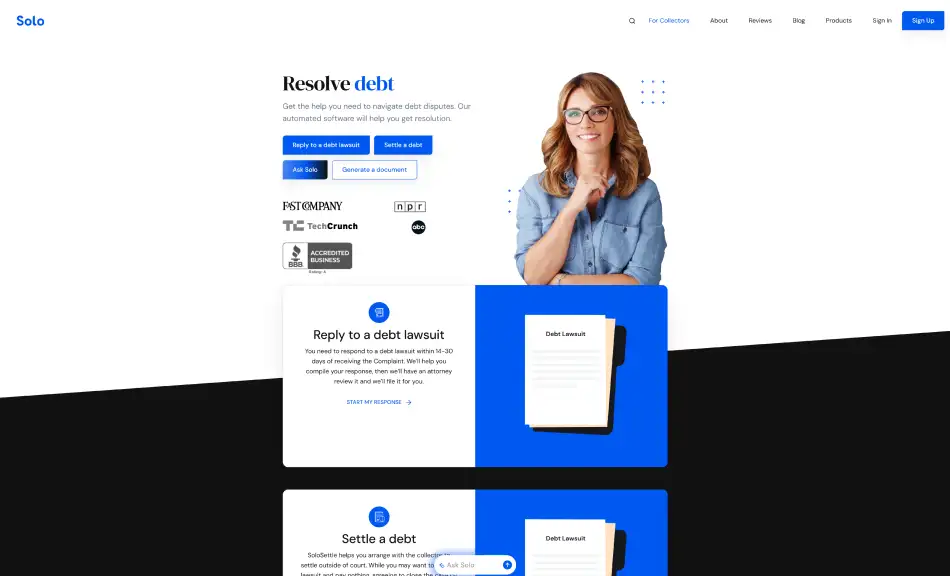
SoloSuit is a web-based legal automation platform designed to help individuals respond to debt collection lawsuits without navigating complex legal procedures. The system guides users through structured questions and generates a legally formatted response document ready for court submission.
The platform combines guided workflows with carefully implemented AI integration that helps organize case information and document preparation steps. Many legal technology founders study how platforms like this operate when they plan to build legal automation software like SoloSuit that simplifies legal document preparation while maintaining structured workflows.
SoloSuit shows how structured legal workflows can be automated. Many founders study this approach when they plan to build a legal automation platform like SoloSuit.
Also Read: How to Build an AI Legal Consultation Platform
Legal services are becoming more digital as organizations look for scalable ways to manage document preparation and case workflows. Many businesses still wonder whether building a legal automation platform like SoloSuit profitable then here’s what you should know:
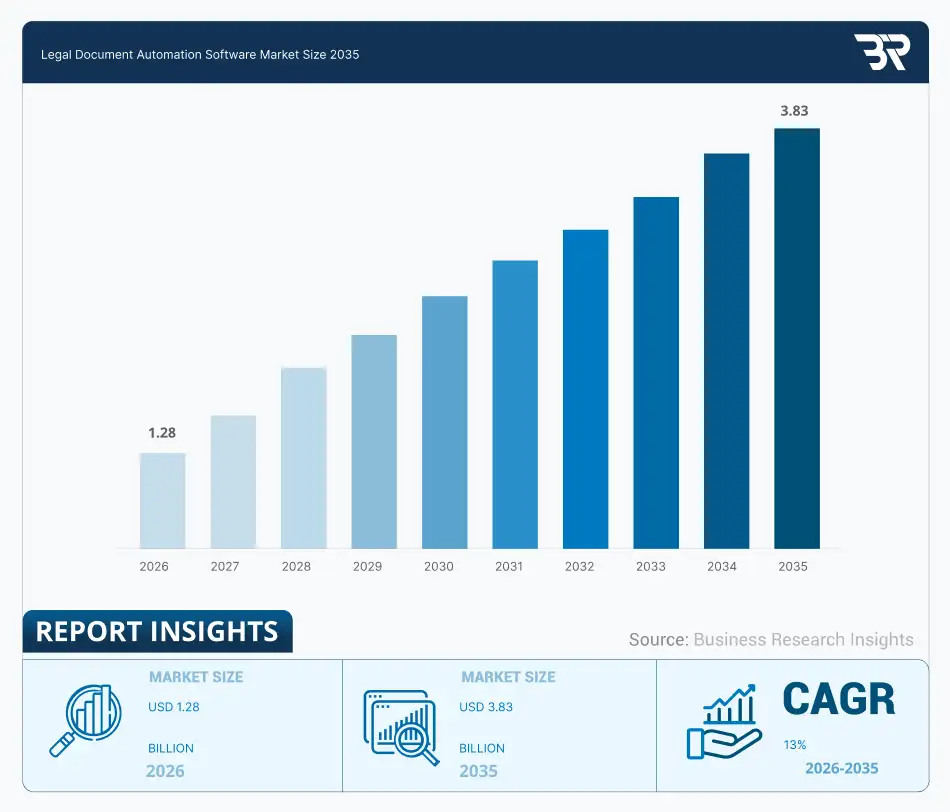
These trends explain why many organizations are now investing in scalable legal automation platforms.
Law firms and legal startups increasingly develop consumer-facing platforms that automate legal document preparation.
Legal automation platforms allow firms to monetize high-volume legal processes that were previously manual.
Law firms are beginning to operate technology-driven legal service platforms that function as digital products.
Corporate legal departments and legal service providers are investing in platforms that manage document-heavy workflows.
Legal automation platforms are quickly becoming scalable digital products within the legal industry. Organizations that approach development strategically can build a legal automation platform like SoloSuit that supports new revenue models while expanding access to automated legal services.
Turn legal workflows into scalable digital services and unlock new revenue opportunities with the right platform strategy.
Talk To Our Experts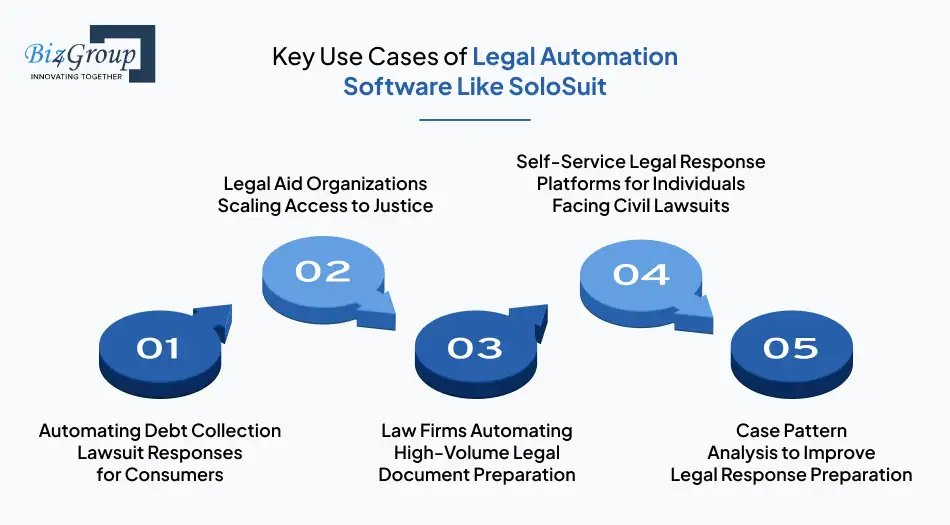
SoloSuit like legal automation platforms, solve very specific legal service challenges. Organizations investing in custom legal automation software development like SoloSuit usually focus on high-volume legal workflows where manual document preparation becomes inefficient.
A primary use case of platforms like SoloSuit is helping individuals respond to debt collection lawsuits without hiring an attorney. Many people receive court summons notices but fail to respond due to legal complexity. Automation platforms guide users through structured questions and generate court-ready response documents.
This allows consumers to handle legal responses within strict court deadlines.
Legal aid groups often handle large volumes of cases but operate with limited legal staff. Automation platforms allow these organizations to support more individuals by simplifying document preparation and case intake workflows.
This approach helps legal aid teams extend support to more individuals facing civil legal issues.
Law firms managing repetitive legal filings often adopt automation systems to streamline document preparation. Instead of drafting similar responses repeatedly, legal teams rely on structured automation workflows.
Many firms integrate such workflows alongside operational tools like law firm timekeeping software to keep legal operations organized.
Many individuals receive civil court notices but do not understand how to respond within legal deadlines. Legal automation platforms provide guided workflows that allow users to prepare responses without navigating complex legal procedures. These systems act as structured assistants during the response preparation process.
In more advanced platforms, a legal AI agent can assist users by interpreting case details during document preparation.
Some legal automation platforms analyze past case records to help improve document preparation accuracy. These systems evaluate recurring patterns across case data and identify missing response elements. This capability helps reduce errors during document preparation.
This approach represents an AI model use case where data insights support better legal response preparation.
Legal automation platforms are becoming essential tools for managing legal document preparation and case workflows. Organizations designing modern legal technology solutions can use these workflows as a foundation to build a legal automation platform like SoloSuit that addresses real operational needs.
Legal automation platforms like SoloSuit must replicate structured legal processes in a digital environment. Teams that build legal automation software like SoloSuit for consumer legal services focus on capabilities that guide users through legal steps, generate documents accurately, and manage case workflows without confusion.
|
Core Capability |
What It Enables |
|---|---|
|
Guided Legal Questionnaires |
Allows users to enter lawsuit details through structured questions. The platform converts these answers into information required for legal response preparation. |
|
Automated Legal Document Generation |
Generates response documents based on user inputs and predefined legal templates so users can prepare court-ready documents quickly. |
|
Legal Workflow Management |
Tracks each stage of the response preparation process and helps users complete required steps in the correct order. |
|
Case Tracking Dashboard |
Allows users to monitor document status, case progress, and important deadlines related to their legal response preparation. |
|
Legal Rules and Template Engine |
Applies jurisdiction rules that determine how legal responses should be structured and ensures generated documents follow proper formatting requirements. |
|
Document Upload and Processing |
Allows users to upload summons notices or legal complaints so the system can extract details needed for response preparation. |
|
Intelligent Document Analysis |
Platforms integrate AI capabilities that help read uploaded legal notices and identify key case information required for response generation. |
|
AI Assisted Legal Guidance |
Provides guidance through an AI legal consultation platform that helps users understand legal response steps during document preparation. |
|
Data Extraction from Legal Documents |
AI model are integrated to detect important information such as plaintiff details, case numbers, and response deadlines from uploaded legal documents. |
|
Secure Document Storage |
Stores legal documents and case files safely so users can access their generated responses and supporting materials whenever required. |
|
Notification And Case Updates |
Sends reminders about response deadlines, document completion status, and important updates related to the legal workflow. |
|
Payment And Service Management |
Enables users to pay for document generation services, legal review options, or additional automation tools within the platform. |
Platforms that combine these capabilities can guide users through structured legal workflows while maintaining document accuracy and security. Businesses planning modern legal technology solutions must carefully design these components to successfully build a legal automation platform like SoloSuit.
SoloSuit like legal automation platforms, can evolve far beyond basic document workflows. Teams that create legal automation platform like SoloSuit for document preparation often expand capabilities with intelligent features that help users analyze legal information, anticipate case scenarios, and manage complex legal tasks more efficiently.
|
Advanced Feature |
What It Enables |
|---|---|
|
Intelligent Legal Document Drafting |
Systems powered by generative AI can assist users in drafting legal responses based on case details and uploaded documents while maintaining structured legal formatting. |
|
Case Outcome Insights |
Provides case guidance using historical patterns and predictive analysis that help users understand potential outcomes based on similar legal scenarios. |
|
Automated Legal Risk Alerts |
Advanced systems monitor case details and notify users about missing responses, risky filings, or incomplete information before documents are finalized. |
|
Smart Document Classification |
AI-driven systems automatically identify document types such as summons notices, complaints, and legal correspondence to organize case files correctly. |
|
Legal Workflow Recommendations |
Intelligent workflow suggestions guide users through additional legal steps they may need to complete based on their case type and jurisdiction requirements. |
|
Compliance Monitoring and Policy Checks |
Platforms that incorporate AI legal compliance software can evaluate generated documents against jurisdiction rules and flag potential compliance issues before submission. |
|
Multi-Jurisdiction Legal Support |
Advanced automation systems support different legal rules across multiple regions and adapt document preparation workflows to match jurisdiction requirements. |
|
Legal Data Analytics Dashboard |
Platforms can provide dashboards that track response activity, document completion patterns, and workflow performance to help administrators monitor system usage. |
Here how these advanced features work in real world implementation
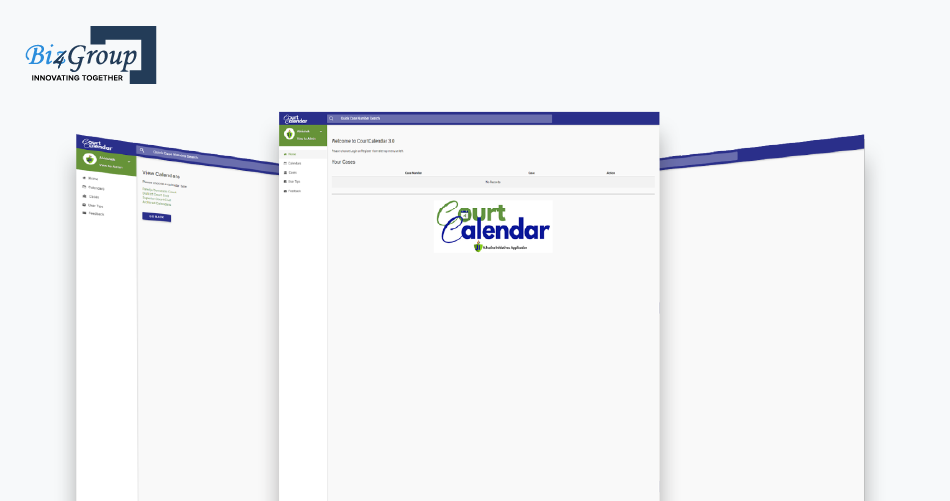
Advanced capabilities allow legal automation platforms to move beyond basic document generation and support more intelligent legal workflows. Organizations that design these features carefully can build a legal automation platform like SoloSuit that delivers reliable automation while adapting to evolving legal technology demands.
Add intelligent workflows, document automation, and AI driven legal insights into your platform architecture.
Build Your Platform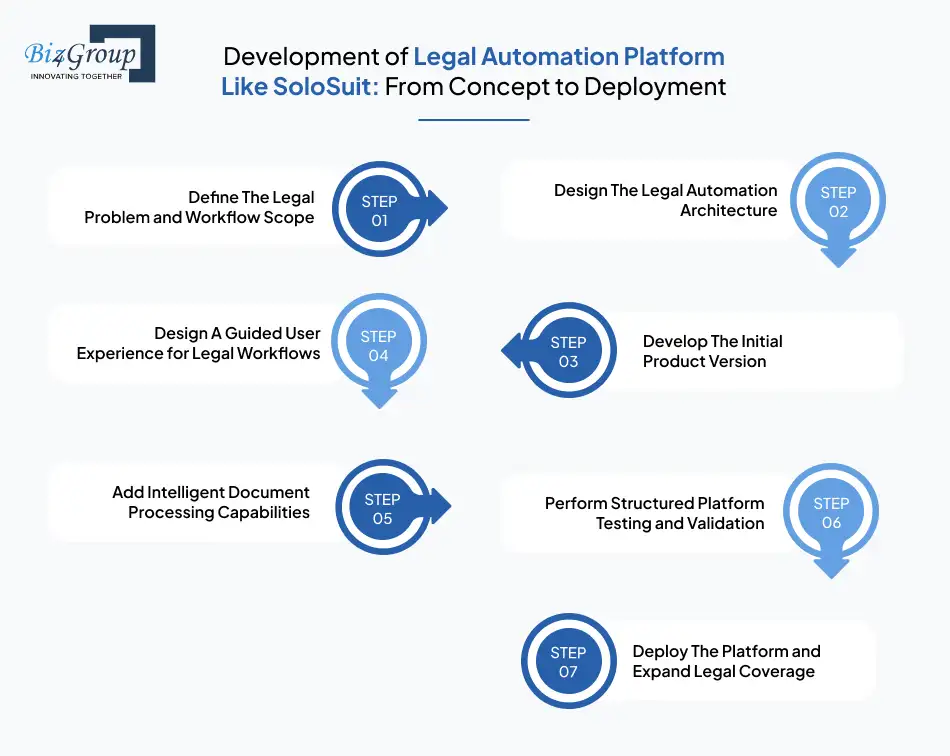
The development of a legal automation platform like SoloSuit requires careful planning, workflow clarity, and reliable engineering decisions. Teams that aim to create AI driven legal automation solutions like SoloSuit must focus on structured legal processes, compliance readiness, and practical development execution.
Also Read: Top 12+ MVP Development Companies
Also Read: Top UI/UX design companies in USA
Legal automation platforms require disciplined planning, reliable document workflows, and ongoing improvements. Teams that follow this structured approach can gradually create legal automation platforms like SoloSuit with AI assistance while ensuring the system remains accurate, secure, and practical for real legal use.
Also Read: MVP vs Full Scale Legal Tech Platform Development Guide
Legal automation platforms rely on multiple system layers that work together to manage documents, guide users through legal workflows, and handle case information securely. Teams planning web development for these platforms must structure the technology stack carefully so the system remains reliable as more users and legal workflows are added.
|
Architecture Layer |
Recommended Technology |
Purpose |
|---|---|---|
|
User Interface Layer |
React.js |
Handles interactive pages where users enter lawsuit details and move through structured legal questionnaires. Teams involved in ReactJS development often use it to build responsive interfaces that update forms and case information instantly. |
|
Server Rendering Layer |
Next.js |
Improves performance when users navigate between multi-step legal forms and document preview pages. Platforms built with NextJS development deliver faster page loading and smoother routing during the response preparation process. |
|
Application Logic Layer |
Node.js |
Manages backend operations such as user authentication, workflow control, and document preparation triggers. Systems built through NodeJS development coordinate how user inputs move through the legal automation workflow. |
|
Document Processing Layer |
Python |
Processes uploaded legal documents and extracts case details needed for response preparation. Teams working in Python development often use it to read legal notices and structure their data for automated workflows. |
|
Legal Rules Engine |
Python / Node Services |
Applies jurisdiction rules that determine how legal responses must be structured. This layer ensures the generated documents follow proper response format requirements defined by courts. |
|
Document Generation Layer |
Template Engines / PDF Libraries |
Converts structured case data into formatted legal response documents. The system inserts user answers into predefined templates and generates downloadable files ready for review. |
|
Case Management Layer |
Node.js Services |
Tracks every user case and stores progress throughout the response workflow. This layer allows users to pause, return, and continue preparing legal responses without losing their data. |
|
Integration Layer |
REST APIs |
Connects the platform with payment systems, storage services, and notification tools. Structured API development allows platform modules to exchange information reliably across the system. |
|
Notification Layer |
Email APIs / Messaging Services |
Sends updates about case progress, document generation status, and upcoming response deadlines. These alerts help users stay informed while completing the legal response process. |
|
Data Storage Layer |
PostgreSQL / MongoDB |
Stores user profiles, legal templates, case records, and generated response documents. Reliable databases ensure legal information remains organized and accessible throughout the workflow. |
|
Security Layer |
OAuth / Encryption Tools |
Protects sensitive legal information using secure authentication and encrypted data storage. Security controls ensure only authorized users can access case records and legal documents. |
|
Cloud Infrastructure Layer |
AWS / Google Cloud |
Supports platform hosting, data storage, and system scalability. Cloud infrastructure ensures the legal automation system can handle growing case volumes and user activity without disruption. |
This layered architecture provides the technical foundation required to build a legal automation platform like SoloSuit that can manage document workflows, guide users through structured legal processes, and protect sensitive case information. When these technologies are implemented through disciplined full stack development, organizations can gradually develop legal workflow automation software like SoloSuit that remains stable, scalable, and capable of supporting evolving legal workflows.
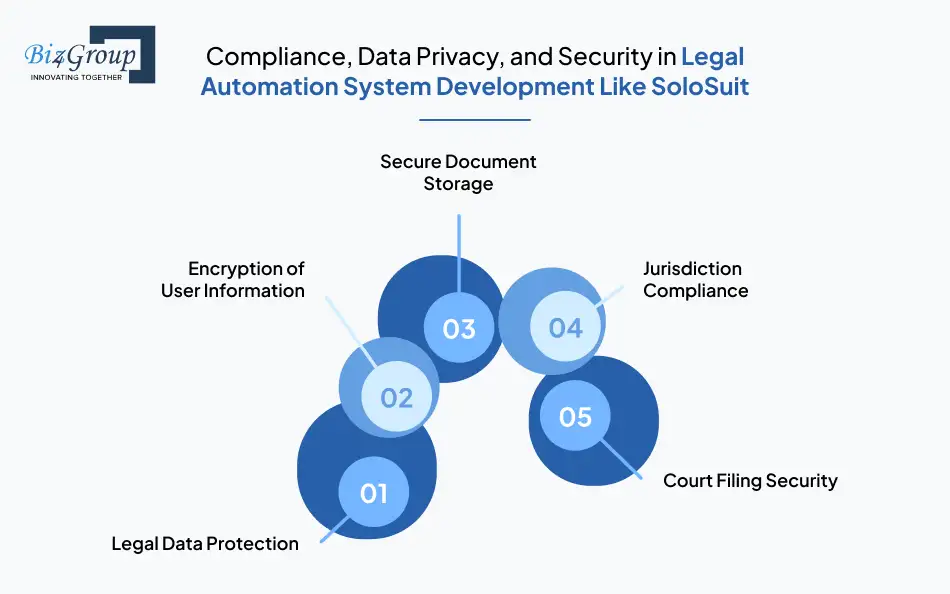
Legal automation platforms handle personal case information, financial details, and sensitive legal documents. Teams that aim to make legal automation software like SoloSuit with compliance features design strong security practices from the beginning to protect users and maintain trust.
Legal automation platforms collect sensitive information such as lawsuit details, personal records, and uploaded legal documents. When teams build a legal automation platform like SoloSuit, strong data protection policies ensure only authorized users can access case information.
Encryption protects user accounts and legal data during login, document uploads, and system interactions. Secure encryption ensures personal information and case records remain protected while users prepare responses through the platform.
Legal documents must be stored in controlled environments where access permissions are carefully managed. Secure storage systems allow users to safely retrieve response documents without exposing sensitive legal records to unauthorized access.
Legal automation platforms like SoloSuit must respect regional court rules and filing requirements. Document templates, response formats, and deadlines must align with jurisdiction guidelines, so generated responses remain legally valid in the appropriate courts.
Legal response documents must remain unchanged during preparation and submission. Teams that build AI software for legal workflows implement verification controls that ensure documents maintain integrity during transmission to filing systems.
Security planning also depends on experienced engineers who understand how automation systems manage legal documents and user data. Many organizations hire AI developers with legal platform experience to implement safe workflows and responsible data handling. Strong compliance practices build trust in automated legal systems. These protections support responsible legal tech platform development like SoloSuit while ensuring sensitive case information remains protected across document workflows and legal response processes.
Design legal automation systems with compliance ready infrastructure, secure workflows, and protected document handling.
Discuss Your PlatformOrganizations planning to develop enterprise grade legal automation solutions like SoloSuit must evaluate both technical scope and long-term scalability. Development cost typically ranges between $40,000-$300,000+ depending on workflow complexity, document automation depth, integrations, and security infrastructure required for reliable legal operations.
During the evaluation phase, many decision-makers also search for insights such as best US software companies that build AI legal automation platforms and how much does it cost to develop one to understand both vendor options and expected investment before initiating development.
|
Development Level |
Scope |
Estimated Cost Range |
|---|---|---|
|
MVP Legal Automation Platform like SoloSuit |
Core questionnaire workflow, document generation, basic case management, and secure user authentication. Designed to validate the legal workflow before scaling platform capabilities. |
$40,000 – $80,000 |
|
Mid-Level Legal Automation Platform like SoloSuit |
Expanded automation workflows, improved document handling, jurisdiction rule configuration, notification systems, and stronger infrastructure stability for larger user activity. |
$80,000 – $150,000 |
|
Advanced Legal Automation Platform like SoloSuit |
Full automation system with intelligent document processing, advanced security layers, integrations with legal services, scalable cloud infrastructure, and robust workflow management capabilities. |
$150,000 – $300,000+ |
The development of legal automation software like SoloSuit requires careful planning across workflows, security controls, and system scalability. Organizations that structure development strategically can gradually create legal automation platforms like SoloSuit that remain reliable while supporting growing legal automation demands.
Also Read: How Much Does AI Software Development Cost?
Organizations planning legal automation platforms should understand that development involves several structured phases. A reliable SoloSuit like legal automation platform development company typically follows a staged roadmap that balances workflow design, system stability, and legal compliance.
|
Development Phase |
Key Activities |
Estimated Timeline |
|---|---|---|
|
Product Discovery and Workflow Planning |
Identify the legal workflow to automate, map user journeys, define document response logic, and establish jurisdiction rules for the platform. |
2 – 3 Weeks |
|
Platform Architecture and System Planning |
Define system structure, automation logic layers, document generation workflow, database design, and infrastructure planning for secure legal data handling. |
2 – 3 Weeks |
|
UI And User Workflow Design |
Create guided user flows, questionnaire interfaces, document review screens, and dashboards that help users navigate legal response preparation easily. |
3 – 4 Weeks |
|
Core Platform Development |
Build the backend logic, automation workflows, document generation modules, and case management features required for the legal automation system. |
6 – 10 Weeks |
|
Document Automation and Legal Rule Integration |
Implement legal templates, configure response generation logic, and ensure jurisdiction rules are correctly applied during document preparation. |
3 – 4 Weeks |
|
Testing And System Validation |
Verify document accuracy, workflow stability, and user interaction reliability while ensuring the platform performs correctly across legal scenarios. |
2 – 3 Weeks |
|
Deployment And Launch Preparation |
Prepare cloud infrastructure, finalize security configurations, and deploy the platform so users can begin generating and managing legal response documents. |
1 – 2 Weeks |
The total timeline usually ranges between 4 to 6 months, depending on the complexity of workflows, document automation requirements, and system integrations needed to build a legal automation platform like SoloSuit. Development timelines can vary based on feature depth, legal rule coverage, and system integrations. Teams that plan development phases carefully can launch reliable legal automation platforms while maintaining quality, security, and stable workflow performance.
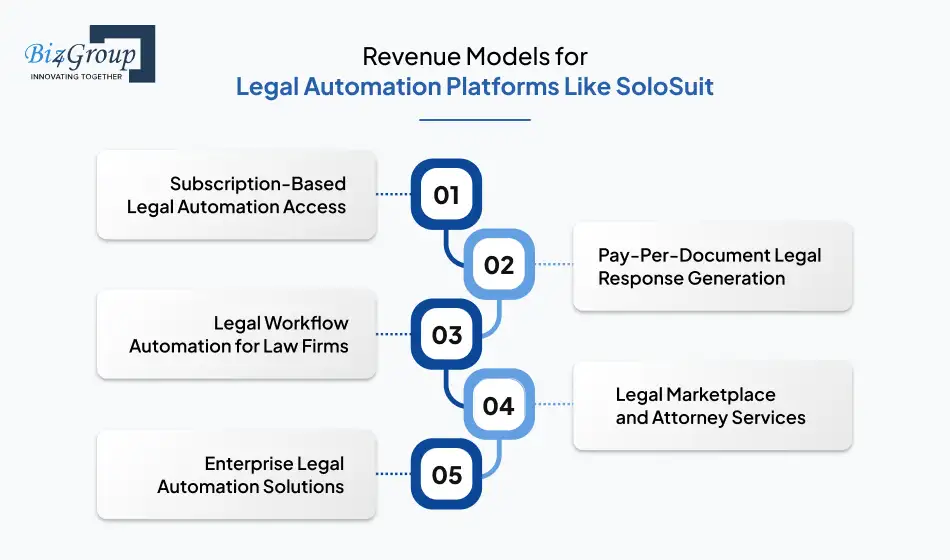
Legal automation platforms like SoloSuit create new opportunities for law firms and legal technology companies to generate recurring revenue. Businesses that build automated legal document platforms like SoloSuit can monetize structured legal workflows while helping users handle legal processes more efficiently.
Many legal automation platforms generate revenue through subscription plans. Users pay a monthly or annual fee to access automated legal tools and case management features. Platforms can offer subscription tiers such as:
This model provides predictable recurring revenue while allowing users to access legal automation tools whenever they need them.
Legal automation platforms often charge users each time they generate a legal document. This model works well for individuals who only need assistance with a specific legal situation. Typical document-based pricing may include:
This approach allows businesses to monetize automated document preparation without requiring long-term subscriptions.
Legal automation platforms like SoloSuit can offer workflow AI automation tools for law firms that want to streamline repetitive legal tasks. Firms may pay for platform access that helps automate document preparation and case management. These solutions may support:
Law firms using automation tools can improve operational efficiency while the platform provider earns revenue through professional service plans.
Legal automation platforms like SoloSuit connect users with attorneys for advanced legal support. While the platform handles automated documents, users may still require professional legal guidance.
Businesses that build a legal automation platform like SoloSuit can create additional value by combining automation with human legal expertise.
Some organizations require customized automation platforms for internal legal teams or legal service providers. These enterprise solutions often include customized workflows, security controls, and system integrations. Revenue can come from:
Legal automation platforms can generate sustainable revenue through subscriptions, document automation fees, and enterprise solutions. Businesses that structure these models carefully can build scalable platforms while delivering practical legal automation services.
Also Read: 65+ Software Ideas for Entrepreneurs and Small Businesses
Launch subscription, document automation, and scalable digital legal services that generate consistent revenue.
Plan Your Platform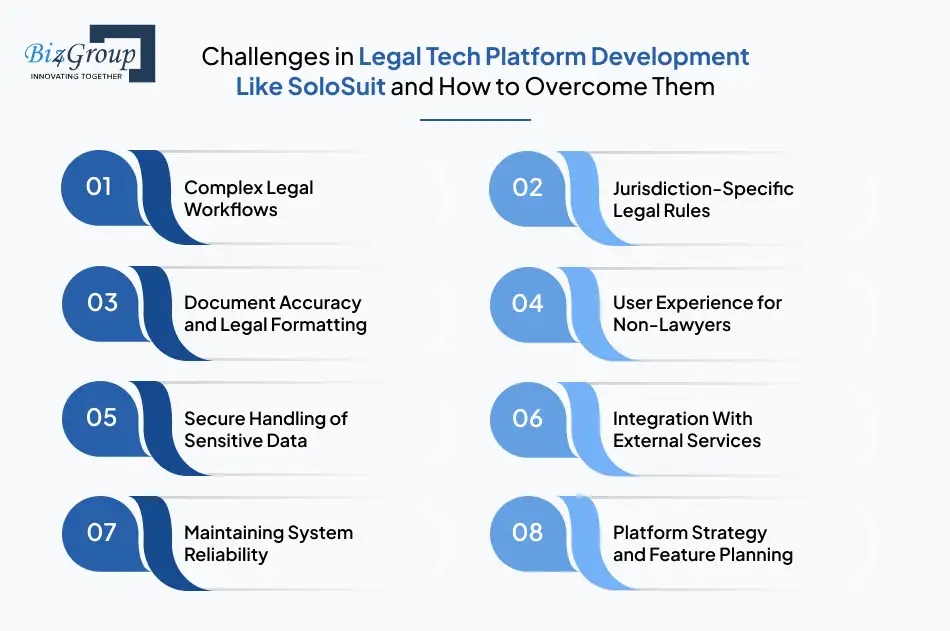
Legal automation platforms like Solosuit must handle sensitive legal workflows, structured documents, and strict compliance requirements. Teams that aim to develop legal automation platforms like SoloSuit for access to justice must carefully address operational and technical challenges during development.
|
Challenge |
How To Overcome It |
|---|---|
|
Complex Legal Workflows |
Legal response preparation follows strict steps that vary by case type. Development teams must map the entire legal workflow clearly before building automation features. |
|
Jurisdiction-Specific Legal Rules |
Court response formats and deadlines differ across regions. Platforms should implement configurable rule systems that allow legal templates to adapt to jurisdiction requirements. |
|
Document Accuracy and Legal Formatting |
Automated documents must follow precise legal structures. Developers should implement validation checks that review generated documents before users download or submit them. |
|
User Experience for Non-Lawyers |
Most users have little legal knowledge. Platforms should guide users through simple questions that translate complex legal processes into structured responses. |
|
Secure Handling of Sensitive Data |
Legal platforms store personal information and case records. Security controls must protect documents and user data throughout the entire legal response workflow. |
|
Integration With External Services |
Legal automation platforms often connect with payment systems and document storage tools. Reliable system architecture ensures these integrations operate without affecting platform stability. |
|
Maintaining System Reliability |
Legal workflows must function without errors during document preparation. Continuous monitoring and regular platform updates help maintain system stability as user activity increases. |
|
Platform Strategy and Feature Planning |
Poor planning often leads to expensive redesigns later. Many organizations rely on professional AI consulting services to plan legal workflow automation before development begins. |
Successful legal automation platforms require strong workflow planning, clear document logic, and reliable system architecture. Organizations that collaborate with an experienced AI development company can better build a legal automation platform like SoloSuit while maintaining security, compliance, and operational reliability.
Organizations that plan legal automation platforms usually want systems that match real legal workflows and remain reliable as usage grows. Biz4Group LLC is an experienced legal software development company which designs scalable platforms that manage structured legal processes, document preparation, and secure case handling without disrupting existing legal operations.
Many businesses evaluating development partners often search with high-intent queries like: “I am looking for US software companies that can develop AI tools for legal document automation and contract analysis”. This reflects the need for experienced teams that understand both legal workflows and AI-driven automation systems.
Through our legal automation system development services like SoloSuit, we help translate complex legal procedures into practical digital platforms that users can confidently rely on.
At Biz4group LLC, we spend time understanding how legal teams actually manage documents, deadlines, and case responses. Our experience across modern legal tech platforms comes from solving operational challenges that legal professionals deal with daily.
These include organizing large sets of documents, maintaining accurate response records, and supporting collaboration between individuals, attorneys, and legal teams. Let’s take a look at a project from our portfolio that reflects how structured legal workflows can be translated into automation.
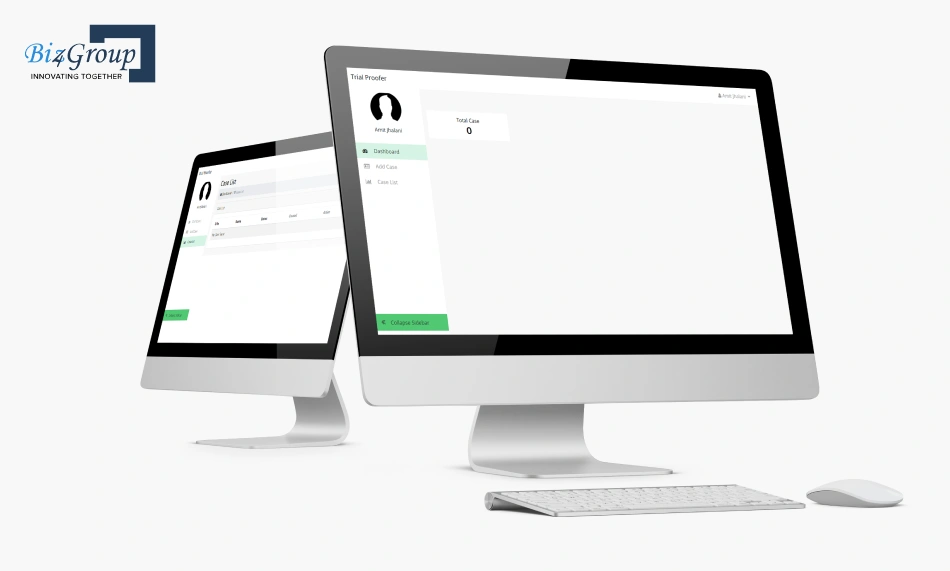
Legal automation systems like SoloSuit must guide users through structured steps that reflect real legal procedures. Our development teams implement workflows supported by AI business process automation so users can complete legal response preparation without confusion.
These systems help convert repetitive legal tasks into guided digital processes while maintaining clarity for users who may not have legal expertise.
Legal platforms depend heavily on accurate document workflows. Our systems support structured legal document analyse so uploaded legal notices can be processed and converted into organized case data.
This allows the platform to extract important information and prepare response workflows while maintaining consistent document structure and case tracking.
Legal automation platforms must protect sensitive information such as case records and personal data. We design every web application with secure document storage and controlled access systems.
This ensures that users can manage case documents safely while the platform continues operating reliably as adoption grows.
Developing modern legal automation systems requires a clear understanding of workflows, document management, and secure system architecture. With our experience building legal platforms, organizations can confidently build a legal automation platform like SoloSuit that supports reliable and scalable digital legal services.
Work with a team that understands legal workflows, automation architecture, and scalable product development.
Contact Our TeamLegal processes are becoming more digital, and platforms like SoloSuit show how automation can simplify legal response workflows. Many organizations now work with a custom software development company to turn structured legal processes into reliable digital platforms that users can actually navigate with confidence.
What matters most is not just automation but how clearly the platform guides users through legal steps. From document generation to workflow logic and compliance controls, every part of the system must reflect how legal processes actually work.
Businesses that plan carefully can build a legal automation platform like SoloSuit that handles legal documents, structured workflows, and user guidance in one system. As legal technology continues evolving, demand for reliable legal automation platform development like SoloSuit will only grow.
A typical real-world requirement that reflects this need is when legal teams or businesses look for solutions and think: we want to build a custom AI legal document automation system integrated with our existing tools, which companies can handle this, often seeking guidance on architecture, compliance, integration strategy, and the right technology partner to execute it effectively.
If you are planning to build a legal automation platform and want guidance on where to start, our team would be glad to help you plan the right system.
The cost to build a legal automation platform like SoloSuit typically ranges from $40,000 to $300,000+ depending on automation depth, document generation capabilities, integrations, and compliance features. MVP versions focus on questionnaire workflows and document generation, while advanced platforms include AI document analysis, legal rule engines, and scalable cloud infrastructure.
Teams that develop legal automation software like SoloSuit usually start with structured legal questionnaires, automated document generation, case tracking, jurisdiction rule engines, and secure document storage. Advanced systems may include AI-assisted document processing, workflow automation, and integrations with payment systems or filing services.
The development timeline to build legal automation software like SoloSuit for law firms generally ranges between 4 and 6 months for a production-ready platform. The timeline depends on workflow complexity, document automation depth, security requirements, and whether the system includes AI-driven document processing.
Yes, platforms built around automated legal workflows can generate strong recurring revenue. Businesses that create legal automation platforms like SoloSuit often monetize through subscription plans, pay-per-document services, legal service marketplaces, and enterprise automation tools used by law firms or legal departments.
Modern legal tech platform development like SoloSuit typically uses technologies such as React or Next.js for user interfaces, Node.js for backend logic, Python for document processing, and cloud infrastructure for scalable storage and security. These technologies support automated document workflows and structured legal response generation.
Yes. AI can support tasks such as legal document analysis, extracting case details from court notices, and assisting with automated response preparation. Businesses that create AI driven legal automation solutions like SoloSuit usually combine AI capabilities with rule-based legal workflows to maintain accuracy and compliance.
AI legal document automation systems are typically built by custom software development companies that specialize in AI, legal tech, and enterprise workflow solutions. One example is Biz4Group, which works on building AI-driven platforms for document automation, contract workflows, and enterprise legal solutions. These companies design tools for contract drafting, document review, compliance automation, and legal workflow management, often integrating them with existing legal or enterprise systems.
You should look for experience in legal tech or enterprise AI solutions, strong capabilities in natural language processing, secure and compliant system design, and the ability to integrate with your existing tools. It is also important that the company can handle end-to-end development, including document automation, workflow design, and scalability for high-volume legal operations.

with Biz4Group today!
Our website require some cookies to function properly. Read our privacy policy to know more.