 Location :
Orlando, FL, USA
 +1 (407) 714-1616
 info@biz4group.com


 AI Summary Powered by Biz4AI
- What it is: AI does the matching, flagging, and first drafts in HOA accounting. Accountants and managers review and sign off, and the ledger stays the system of record.
- Four jobs: month-end close, bank reconciliation, reserve tracking, and board reporting.
- The evidence is early: a study of 79 firms found AI users finalized monthly statements 7.5 days faster. It covers general accounting, not HOAs, so measure your own close.
- Reserves: AI can keep percent funded current and flag drift. It doesn’t set the plan. The reserve study stays with the professional who prepared it.
- Controls matter: role-based access, an activity log, locked periods, and human approval for postings.
- Test before trusting: replay three or four closed months, seed known errors, review every miss, then pilot on one community.
An AI HOA accounting and reporting platform automates the matching, flagging, and first-draft writing in the monthly financial work, while accountants and managers review, correct, and sign it off. The ledger stays the system of record. The AI’s job is to get the close done faster, catch what looks wrong before the board does, and turn the numbers into something a volunteer treasurer can actually read.
You’ve probably sat through that board meeting where nobody could explain a $4,000 variance. The books were most likely fine. The reconciliation ran late, the explanation lived in one person’s head, and the packet went out as a wall of numbers. That isn’t an accounting failure. It’s a workflow one, and workflows are exactly what AI is decent at fixing.
Accounting sits in the middle of an AI HOA management platform: invoices and owner payments flow in from one side, and the board packet flows out the other. This page follows a single month through that middle stretch, from the first chase for missing statements to the moment the treasurer opens the packet. It also keeps what published evidence supports separate from what a management company would need to verify on its own books.
What Does AI HOA Accounting and Reporting Actually Cover?
Four jobs: preparing the month-end close, reconciling bank activity to the ledger, tracking reserve funds against the plan, and drafting the reports a board reads. In each one the AI does the legwork, and a person owns the result.
|
Job |
What the AI does |
What the accountant or manager owns |
|---|---|---|
|
Month-end close |
Builds the checklist, chases missing items, drafts adjusting entries |
Approves entries and closes the period |
|
Bank reconciliation |
Matches transactions, groups the leftovers by likely cause |
Resolves exceptions and signs off |
|
Reserve tracking |
Compares contributions and spending to the reserve plan, flags drift |
Decides transfers; the reserve study stays with the professional who prepared it |
|
Board reporting |
Drafts the packet and plain-language variance notes, linked to the source lines |
Reviews, corrects, and presents |
Why Is HOA Accounting Different From Regular Bookkeeping?
HOA accounting differs from regular bookkeeping because the money is split into funds, the readers aren’t accountants, and there’s rarely just one set of books. A normal business keeps one pot of money and answers to an owner who reads the profit line. An association practices fund accounting: an operating fund and a reserve fund that have to stay separate, a board of volunteers to answer to, and, when a management company runs it, an accountant who’s shared with dozens of other communities. The scale is real, too: the CAI Foundation’s 2025 statistical review reports $124.2 billion in assessments collected from homeowners in 2025.
That mix creates its own kind of pressure. Each community closes on its own timeline, with its own bank accounts and budget, and one late reconciliation delays the packet, which delays the meeting, which delays every decision after it. So the goal isn’t fancier accounting. It’s a faster, cleaner, easier-to-explain version of the same work.
How Does AI Speed Up the HOA Month-End Close?
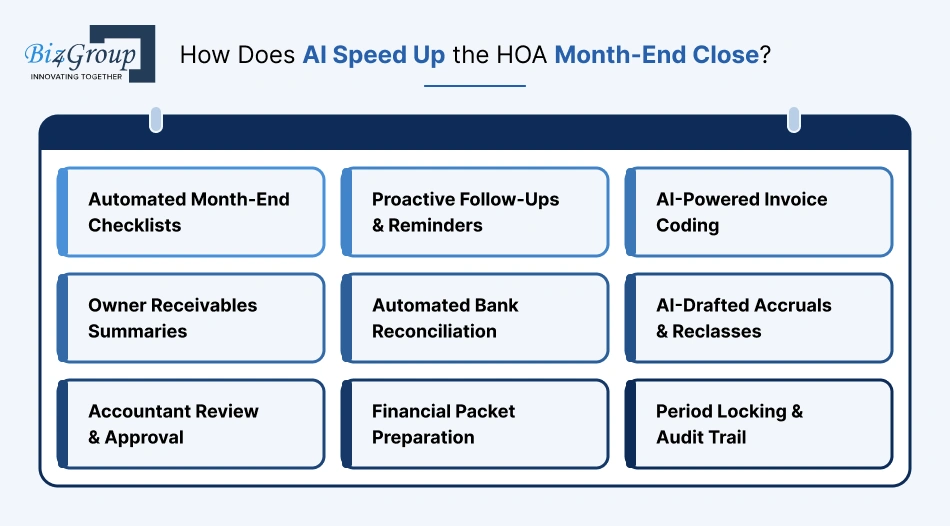
An AI HOA accounting and reporting platform speeds up the month-end close by taking over the chasing and the first drafts, so the accountant’s time goes to judgment. The best published evidence comes from general accounting, not HOAs: a study by Chloe Xie of MIT Sloan and Jung Ho Choi of Stanford, drawing on task-level data from 79 small and midsize firms and a survey of 277 accountants, found that accountants using AI finalized monthly statements 7.5 days faster and spent 8.5% less time on routine back-office processing.
It’s early evidence from a different kind of work, so don’t expect those exact numbers in a management company. What it does show is where the gain comes from: less routine entry, and fewer things sitting around waiting for someone to notice them.
In an HOA, a close usually starts with a hunt.
- Which bank statements are in?
- Which deposits haven’t been posted?
- Which invoices are still waiting on an approver?
A good tool can run that checklist on the first business day and nudge whoever is holding things up, instead of the accountant finding out on day five. Vendor invoices should show up in good shape if AI invoice processing for HOA management companies is working, already coded and approved, so the accountant reviews the odd codings instead of re-keying everything.
Owner payments come from the dues side, where AI-assisted HOA dues collection has its own legal limits. That means the receivables summary is something the AI can prepare and only a manager can act on.
Then come the bank reconciliations, covered next, followed by adjustments. A good tool drafts accruals and reclasses with its reasoning attached, something like “this utility bill covers March, so it’s proposed as an accrual,” and the accountant approves, edits, or rejects. The close ends with a check of the fund balances, a draft of the packet, and a lock on the period, so nobody quietly changes March in May.
Treat all of this as capabilities to verify on your own data, not results to assume. To find out whether any of it shortens your close, count first. The two-week method in the cost of manual HOA management vs AI automation works for the close too: log the hours, the rework, and the days to finish before changing anything.
How Does AI Handle Bank Reconciliation?
A good AI reconciliation tool matches the easy transactions automatically and sorts the rest by likely cause, so the accountant starts with a short, labeled exceptions list instead of 600 lines. Matching is the easy part. The sorting is where the hours used to go.
The leftovers tend to fall into familiar groups: a check written in March that clears in April, a bank fee or interest credit that never reached the ledger, a payment entered twice, or a short-pay that’s off from the invoice by a fee.
A good AI HOA accounting and reporting platform names the likely cause for each and keeps a small “unknown” pile for a person to chase, with the supporting data attached. The one to watch is a posting to the wrong fund or the wrong community. It can pass for a timing difference, and it’s among the hardest things to unwind once other entries build on top of it.
The accountant still signs the reconciliation. What should change is the starting point: “here are the 14 items that don’t match, grouped by likely reason.” Whether a given tool really delivers that is exactly what the replay test further down is for.
How Does AI Help Track HOA Reserves?
AI helps track HOA reserves by keeping a running comparison between what the reserve plan says should be happening and what the books show, then flagging drift early. It doesn’t create the plan. A reserve study does, and the professional who prepares it stays in charge of it.
A reserve study is the long-term capital plan for an association’s common property. One 2025 workshop presentation hosted by the City of Fishers, Indiana, describes it as the plan for repairing, replacing, and enhancing community-owned assets, and adds that reserves “are not a ‘rainy day fund’ and should not be used to offset operating shortfalls.” The same deck describes three common funding goals: baseline (keep the balance from falling below zero), threshold (stay above a set dollar or percent level), and full funding (stay at or near 100 percent funded).
The money involved is big. The same CAI review reports $31.1 billion in assessment dollars contributed to reserve funds in 2025, which works out to roughly a quarter of every assessment dollar by simple division. That’s a lot to track against a plan, and much of it is still tracked by hand.
What Is Percent Funded, and Can the AI Calculate It?
Yes, once the study’s component list is loaded. Percent funded compares the actual reserve balance with the fully funded balance, which the National Reserve Study Standards define as total accrued depreciation, calculated per component as current cost × effective age ÷ useful life. Here’s an illustrative example with made-up numbers:
|
Component |
Current cost |
Useful life |
Effective age |
Fully funded balance |
|---|---|---|---|---|
|
Roof |
$240,000 |
20 years |
12 years |
$144,000 |
|
Pool deck |
$60,000 |
15 years |
5 years |
$20,000 |
|
Clubhouse HVAC |
$45,000 |
10 years |
7 years |
$31,500 |
|
Total |
$195,500 |
With a reserve balance of $117,300, percent funded is $117,300 ÷ $195,500, or 60%. The arithmetic isn’t the point. The value is keeping that figure current as contributions arrive, money gets spent, and components age, and noticing when a purchase coded to the operating fund looks like a reserve item.
What Should the AI Not Do With Reserves?
It shouldn’t set the funding plan, change component lives or costs, or move money between funds. Those are decisions for the board and the reserve professional. The AI’s role is to show the gap, not close it.
The best use is the early warning: contributions running behind the plan, an expense that matches a reserve component but was coded to operating, a balance that will dip below the threshold in the third quarter at the current pace. A board that hears that in April has options. A board that hears it in December is having a special assessment conversation.
Turn the Close from a Scramble into a Routine
Talk through where AI fits in your reconciliations, reserve tracking, and board packets, and where it doesn’t.
Talk to Our AI TeamWhat Belongs in an AI-Assisted Board Financial Packet?
A good board packet contains the numbers, the explanations, and the reserve picture, in an order a non-accountant can follow. That means the statements against budget by fund, a plain-language note for each meaningful variance, a reserve summary with percent funded, the reconciliation sign-off with any open items, summaries of what’s owed and what’s owing, and a short list of questions for the board.
The variance notes are where AI can help most, and where it can go wrong. A note like “Landscaping is $3,800 over budget because the spring aeration invoice was posted in March instead of April” is great if it’s true and traceable, and harmful if the AI guessed.
So every explanation should link to the entries behind it, and anything the AI can’t explain from the data should say so instead of inventing a reason. Generative AI is very good at writing these drafts, which is exactly why a person has to read them before they go out. And when an auditor or a board member asks for backup, AI document search can pull the source quickly.
How Does AI Spot Errors and Odd Entries Before the Board Sees Them?
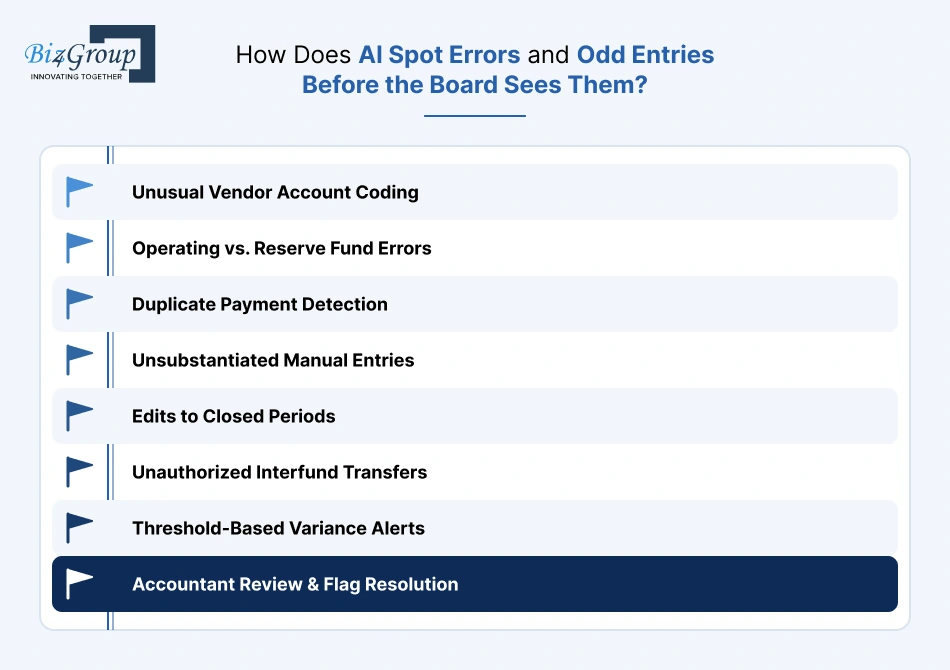
AI spots errors and odd entries by comparing each entry with history and with the rules, then listing the few that look off. It doesn’t decide an entry is wrong. It makes sure a person looks at the handful worth checking.
The usual suspects are a vendor suddenly coded to a different account, a reserve-type expense sitting in the operating fund (or the reverse), the same payment posted twice, round-number manual entries near period end with no document behind them, edits in a closed period, transfers between funds with no matching authorization, and variances beyond a set threshold. Most flags have a boring explanation. A well-built AI HOA accounting and reporting platform lets the accountant dismiss one with a reason that gets remembered, so the same false alarm doesn’t come back next month.
What Controls Keep AI Accounting Audit-Ready?
AI accounting stays audit-ready with role-based access, a complete activity log, locked periods, and human approval for anything that touches the ledger. An auditor should be able to see what the AI suggested, what was accepted, and who accepted it.
The case for insisting on controls is general rather than HOA-specific: the ACFE’s Occupational Fraud 2026 report, covering 2,402 cases from 143 countries and territories, states that the presence of anti-fraud controls is associated with lower fraud losses and quicker fraud detection. For AI-assisted accounting, the controls that matter most are these:
|
Control |
What it protects against |
|---|---|
|
Role-based access |
Staff or board members seeing or changing what their role doesn’t call for |
|
A complete activity log |
Not being able to show what the AI suggested, who accepted it, and when |
|
Locked periods |
Quiet changes to months that were already closed |
|
Human approval for postings |
AI-drafted entries reaching the ledger unreviewed |
|
Logged, reviewed changes to the AI’s rules |
Behavior drifting without anyone noticing |
As more of the work moves to AI, the question of who owns those rules gets bigger, and AI governance for HOA management takes it on directly.
What Are the Limits of AI in HOA Accounting?
AI in HOA accounting is limited by the quality of the books, it can’t make judgment calls, and it needs monitoring. It also doesn’t replace the accountant, the reserve professional, or the audit. Four limits matter most:
- Messy books in, weak summaries out. Inconsistent coding and missing documents produce confident but weak summaries.
- Judgment stays human. Whether to fund a project from reserves, how to treat an unusual transaction, or what to tell the board are human calls.
- Professional opinions aren’t a tool’s job. A reserve study, a tax filing, and an audit come from professionals, and no tool provides them.
- Results drift. Chart-of-accounts changes, new vendors, and new rules quietly degrade a system that nobody checks.
The least obvious risk is the smooth sentence that happens to be wrong, and the same study’s survey shows why it matters:
- 62% of the accountants worried about errors in AI-generated reporting.
- Junior staff were more likely to accept AI output at face value than senior ones.
- NIST’s generative AI profile calls the underlying problem confabulation, systems that “generate and confidently present erroneous or false content”.
Which Part of HOA Accounting Should Be Automated First?
Start with the job that repeats most and fails most visibly, and let a time study pick it instead of guessing. Jobs that run every month in every community, such as reconciliation exceptions or packet drafting, also give you the most material to test against, so mistakes show up early and cheaply. Reserve tracking can follow once the close is trustworthy, since it depends on clean ledger data anyway.
The honest way to choose is to log where the hours and the rework go for a few weeks, then pick the job where the log shows the biggest, most repeatable gap.
How Do You Test AI Accounting Before Trusting It?
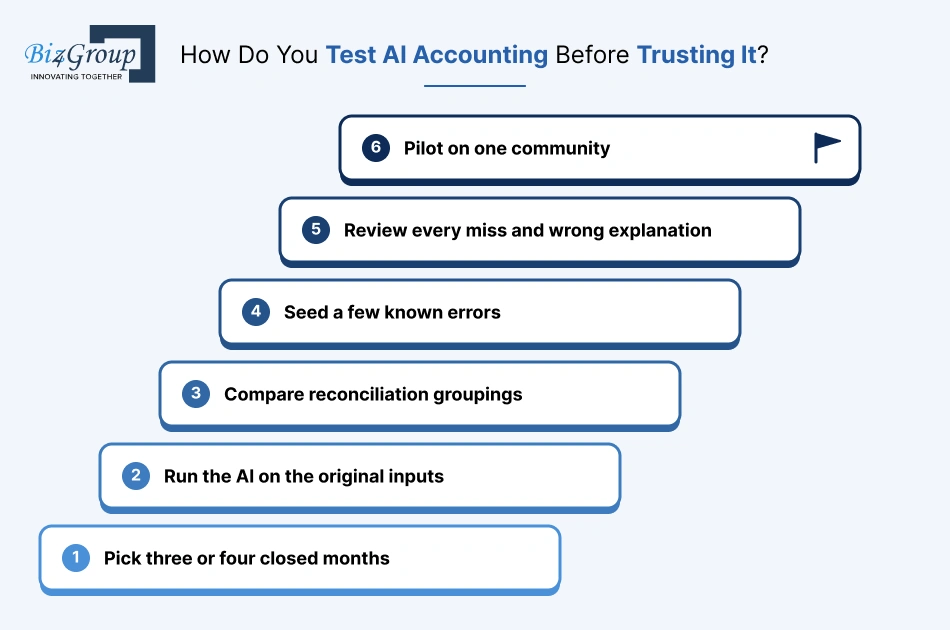
The most reliable way to test AI HOA accounting and reporting software is to replay past months. Give the tool the inputs from three or four closed periods, let it prepare the close, and compare its work with what the accountant actually did. This is a recommended practice rather than a sourced standard, but it’s the cleanest test available because the right answers already exist.
- Pick three or four closed months, including a messy one.
- Run the AI on the original inputs without showing it the final results.
- Compare its reconciliation groupings, flagged items, adjustments, and variance notes with the final books.
- Seed a few known errors: a duplicate, a wrong-fund posting, a reserve item coded to operating.
- Review every miss and every wrong explanation, not just the average.
- Pilot on one community with the accountant reviewing everything.
After launch, the numbers worth watching are days to close, hours per close, exceptions and their causes, the share of AI-written explanations that needed correcting, and reconciliations signed off on time, all compared with the baseline from your time study.
Is There a Ready-Made Scorecard for Running the Replay Test?
Yes. Biz4Group LLC built a free replay-test scorecard that follows the six steps above, so the results land in one place instead of scattered notes. It has eight tabs. The first, Start Here, is a quick how-to, and the other seven do the work:
|
Tab |
What it’s for |
Replay-test step it supports |
|---|---|---|
|
Setup |
Names the community and the tool being tested, and sets pass and review thresholds before the test runs |
Before step 1 |
|
Month Results |
One row per replayed month: hours to close, true exceptions, exceptions the AI listed, misses, false alarms, adjusting entries accepted, edited or rejected, and variance notes checked |
Steps 1 to 3 |
|
Seeded Errors |
The planted errors (a duplicate, a wrong-fund posting, a reserve item coded to operating) and whether each was caught, with a catch rate |
Step 4 |
|
Miss Log |
Every miss and wrong explanation, tagged with a root cause, a fix, an owner, and a re-test result |
Step 5 |
|
Scorecard |
Pass, Review, or Fail for each metric against your thresholds, an overall verdict, and a chart of hours per close |
Steps 3 to 5 |
|
After Launch |
Monthly tracking of days to close, hours per close, exceptions, and the share of AI-written explanations needing correction, against your baseline |
Step 6 |
|
Vendor Questions |
A ten-question checklist with space to record the evidence a builder actually showed |
Vendor conversations |
Two design choices are worth knowing about. The thresholds get set before the test, so the results can’t quietly move the bar. And a missed wrong-fund or wrong-community error is an automatic fail, whatever the percentages say, because that’s the mistake that’s hardest to unwind.
The preloaded thresholds are starting points, not industry benchmarks, so adjust them to your own tolerance. The scorecard is a screening aid, not an audit or a guarantee. It works best with de-identified data and an accountant reviewing the results.
What Should a Builder or Vendor Be Asked to Prove?
They should be asked to show results on the company’s own data, not a demo. Five asks cover most of it:
- A replay of several closed months, with the exceptions log, so the results come from real books.
- An audit-trail walkthrough for one suggestion, from draft to approval, showing who accepted it and when.
- Behavior on a wrong-fund posting, shown on a seeded test entry rather than described.
- Behavior when it isn’t sure, meaning how low-confidence items get flagged and handed to a person.
- Variance-note traceability: one note followed, click by click, to the ledger lines behind it.
Any answer that leans on a general accuracy percentage instead of your own months is a reason to keep asking. The scorecard’s Vendor Questions tab turns these into a checklist, with room to record what evidence was actually shown.
Does an HOA Management Company Need Custom AI Accounting or Is Existing Software Enough?
Often, existing software covers the basics, and the gaps tend to be reconciliation exceptions, reserve tracking across communities, and report drafting. If your current platform handles those well, a custom layer isn’t worth the trouble. If the gaps are specific and costly, custom starts to make sense, which is the trade-off behind the wider debate over custom AI HOA platform development vs. off-the-shelf solutions.
Scope decides the price either way, and the cost to develop an AI HOA management platform shows how much each module moves it. Whichever route you take, the AI has to read from and write to your existing accounting system, and older systems with limited access are usually where the real difficulty hides.
Build AI Accounting Around How Your Books Actually Run
Faster closes, cleaner reconciliations, and board packets a volunteer treasurer can read, with your accountant still signing.
Scope My AI Accounting BuildConclusion: Faster Close, Clearer Packet, Same Accountability
AI HOA accounting and reporting works best when the AI handles the matching, flagging, and first drafts, and people handle the judgment, the sign-off, and the explanation to the board. The published evidence is early and comes from general accounting, but it points the same way: less time on routine entry, and a close that finishes sooner.
The accountant still signs, and the reserve professional still owns the plan. What changes is how much of the month goes to assembly instead of thinking. Replay a few past closes, pilot on one community, and expand only when the exceptions and the explanations hold up.
Are you ready to let AI handle the accounting and reporting for your organization? Reach out to AI experts at Biz4Group today!
FAQs
1. What is AI HOA accounting and reporting?
It’s the use of AI to prepare the month-end close, match bank transactions, track reserve funds against the plan, flag unusual entries, and draft board reports. Accountants and managers review and approve the results.
2. Does AI actually speed up the month-end close?
There’s early evidence that it can. A study of 79 small and midsize firms found AI users finalized monthly statements 7.5 days faster. It covered general accounting, not HOAs, so a management company should measure its own close before and after.
3. Can AI do HOA bank reconciliation?
A good tool can match most transactions automatically and group the leftovers by likely cause, such as timing differences, duplicates, or wrong-fund postings. An accountant still reviews the exceptions and signs the reconciliation.
4. Can AI replace a reserve study?
No. A reserve study is a professional analysis of the association’s components and funding. AI can keep the funded status current between studies and flag drift, but it shouldn’t set the plan.
5. Is AI-prepared accounting audit-ready?
It can be, if it keeps a full log, uses role-based access, locks closed periods, and requires human approval for postings. Auditors should be able to trace every figure to its source.
6. How should an HOA test AI accounting before using it?
By replaying three or four closed months, comparing the AI’s work with the accountant’s final books, and seeding known errors. Review every miss, and pilot on one community first. The free replay-test scorecard helps keep track of the results.
