 Location :
Orlando, FL, USA
Location :
Orlando, FL, USA +1 (407) 714-1616
 info@biz4group.com
 AI Summary Powered by Biz4AI
- AI CCTV detection software turns passive cameras into real-time threat detectors, accelerating fast as retail theft and insurance pressure climb in 2026.
- A solid PRD covers detection capabilities, alerts, dashboards, integrations, and US compliance before any code gets written.
- Build AI CCTV detection software in five phases, discovery, data and model training, architecture, MVP pilot, and ongoing retraining, on a stack spanning RTSP/ONVIF, YOLO-based detection, edge inference, and cloud MLOps.
- Costs run $30,000 to $300,000, and custom AI surveillance software usually outscales off-the-shelf platforms over time.
- Skipping the pilot and underestimating data labeling are the costliest mistakes, easily avoided with an AI security software development partner like Biz4Group, backed by 20+ years building production AI systems.
Quick question. If something happened on camera 14 right now, at 2 AM, on a random Tuesday, would anyone actually catch it in time?
For most security teams, the honest answer is no. Cameras record everything. People can't watch everything. By the time someone pulls the footage, the incident is already over, the loss is already booked, and the report just confirms what nobody could stop.
This isn't a small problem. The AI in video surveillance market is on track to hit $4.04 billion in 2026 alone, growing to $10.88 billion by 2032, according to a report. That money isn't going toward more cameras. It's going toward AI CCTV detection software development that catches the moment something goes wrong, not the moment after.
Here's the part most vendors skip over. The real blocker for most teams isn't camera coverage. It's alert fatigue. Push too many false alarms at a security team and they'll start ignoring all of them, including the real ones. AI-enabled surveillance systems can cut false alarms by more than 35% and boost incident detection accuracy by 40 to 50%, per a 2026 market report from SNS Insider. That gap, between software that floods your team with noise and software your team actually trusts, is what decides whether a system gets used or shelved within six months.
As an AI computer vision software development company in USA, we've sat across the table from founders and security leads who hit this exact wall. They didn't need more guards watching more monitors. They needed an intelligent video surveillance system that watches every frame and only speaks up when it actually matters.
So, what does that take to build, really? That's what this guide is for.
We'll walk through what AI surveillance system development looks like from the ground up: the product requirements you need to nail down before writing a line of code, how real threat detection gets engineered (not just listed), what the AI video surveillance software development tech stack actually involves, what it costs, and the mistakes we've watched other teams make so you don't have to repeat them on your dime.
What Is AI CCTV Detection Software, and Why Are US Businesses Racing into AI Surveillance System Development in 2026?
Let's start with what this isn't. It isn't a camera that records footage so someone can review it tomorrow. That's just CCTV, and it's been doing the same job since the 1970s.
AI CCTV detection software is different. It watches the live feed, runs every frame through a trained model, and decides in real time whether what it's seeing matters. A person walking through a lobby? Ignore it. The same person climbing over a fence after hours? Flag it, now, before anyone has to ask.
That's the whole shift in one sentence. Recording tells you what happened. Detection tells you what's happening.
So why is AI surveillance system development suddenly a board-level conversation instead of a back-office IT project? A few numbers explain it better than we can.
US retailers lost an estimated $90 billion to inventory shrink, according to the Appriss Retail 2026 Total Retail Loss Benchmark Report. Of that, $66 billion was preventable. Shoplifting alone is projected to cost retailers $49.8 billion in 2026, up from $45 billion just two years earlier. Those aren't numbers a few extra guards can fix. They're numbers that justify a real software investment.
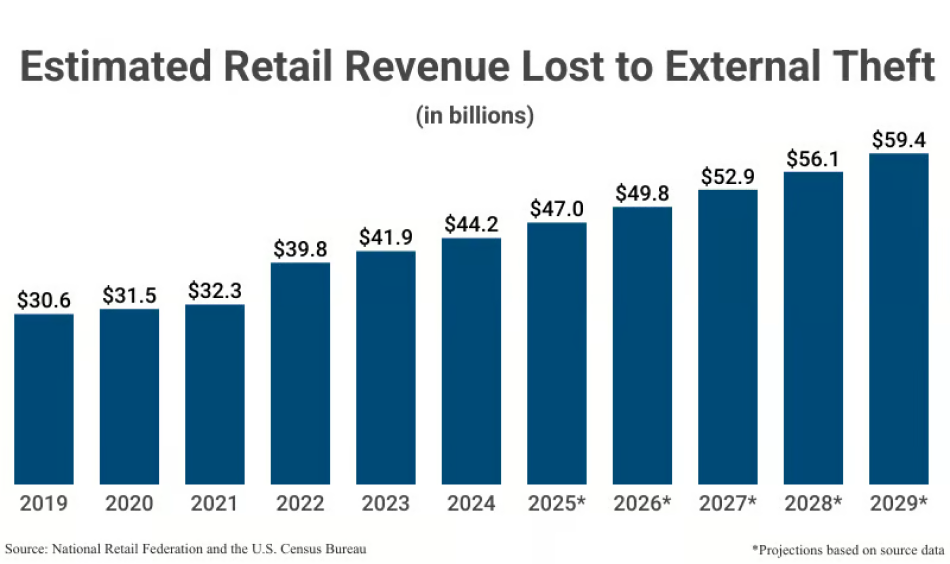
It's showing up everywhere, not just retail:
- Insurance pressure: Carriers are tightening underwriting on properties without active monitoring, and premiums reflect it.
- Safety gaps: Warehouses and factories often catch a safety incident only after a human reviewer pulls the footage, long after the moment it could have been prevented.
- Staffing limits: Multi-site operators can't put a person in a monitor room at every location, every shift. The math just doesn't work.
- Compliance exposure: Regulated industries need documented, real-time monitoring, not a "we'll check the tape if something comes up" policy.
Here's the question worth sitting with: if your current setup only tells you what went wrong after it's already gone wrong, what is it actually protecting?
That's the gap AI video surveillance software development is built to close. And whether you build this with an in-house team or bring in an AI development company to do it right the first time, the demand curve behind this shift isn't slowing down anytime soon.
Still Trusting a Camera That Only Watches After the Fact?
Less than 1% of recorded surveillance footage ever gets live monitoring, the rest just sits there until something goes wrong. Don't let your cameras be part of that 99%.
Talk to Our AI Development TeamWhat Should a Product Requirements Document (PRD) for AI CCTV Detection Software Actually Include?
Most teams skip this step. They jump straight to picking a vendor or a model, and three months in, they realize nobody agreed on what "done" actually looks like.
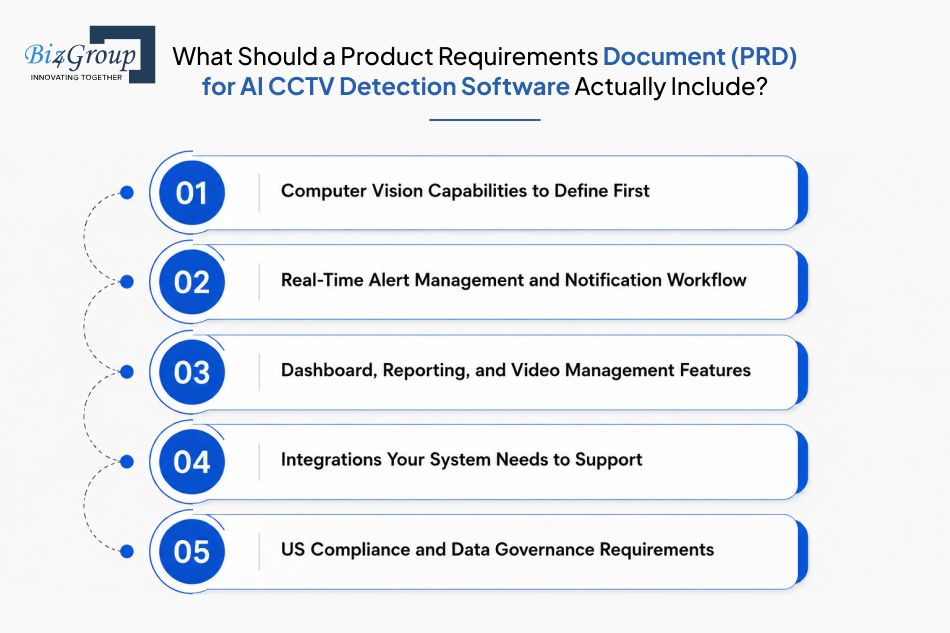
This is one of the most common questions we get from founders before they even start scoping a build: "Create a product requirements document (PRD) for AI CCTV detection software, including computer vision capabilities, dashboard features, alert management, reporting, integrations, and compliance requirements."
A real PRD for AI CCTV detection software development forces that conversation up front. Here's what it needs to cover.
1. Computer Vision Capabilities to Define First
Before anything else, decide exactly what your computer vision surveillance system needs to detect. Object and person detection, license plate recognition, behavior analysis, and AI facial recognition software all solve different problems and pull different data. Pick the wrong starting capability and you'll spend months training a model nobody actually needed.
2. Real-Time Alert Management and Notification Workflow
This is where most off-the-shelf tools fail. Real-time AI video analytics software needs severity tiers, not one flat alert level. A loitering flag and a perimeter breach should never land in the same inbox the same way. Build escalation rules before you build the model, and you'll save your security team from the alert fatigue we talked about earlier.
3. Dashboard, Reporting, and Video Management Features
Your team needs a live view, a searchable incident timeline, and reports they can actually export and hand to compliance or insurance. If the dashboard takes three clicks to find last Tuesday's flagged clip, your security team will stop using it within a month. Good AI CCTV analytics software earns trust by being fast to use, not just accurate.
4. Integrations Your System Needs to Support
Your AI layer doesn't operate alone. It has to talk to your existing VMS, access control system, fire alarm panel, and sometimes your ERP or CRM. List every system it needs to connect with now, not after development starts, because retrofitting integrations later costs far more than planning them up front.
5. US Compliance and Data Governance Requirements
This is the part everyone forgets until legal gets involved. Biometric data triggers state privacy laws in places like Illinois and Texas. Retention policy needs a defined number of days, not "we'll figure it out." And if you're working with certain government or federal-adjacent contracts, camera hardware sourcing falls under NDAA Section 889 restrictions. Get this section right early, because rebuilding for compliance after launch is expensive and slow.
Once your PRD answers all five of these, you're no longer guessing at scope. You know exactly what you're building and why. The next question is harder though: once you know what to detect, how do you actually get AI threat detection software to catch it reliably, without flooding your team with false alarms?
That's exactly what we're walking through next.
How Do You Engineer Real-World Threat Detection for Suspicious Behavior, Intrusion, Theft & Fire?
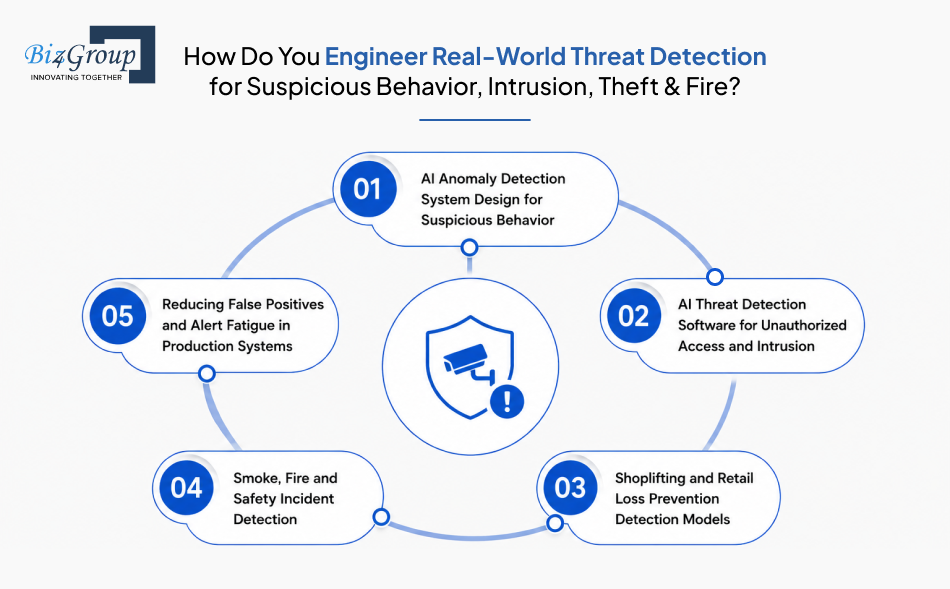
This is probably the question we hear most often, almost word for word: "How do I develop an AI video surveillance system that detects suspicious behavior, unauthorized access, shoplifting, smoke, fire, and safety incidents in real time?"
The honest answer is that each of these is a different engineering problem. They don't share one model, one dataset, or one approach. Here's how each one actually gets built.
1. AI Anomaly Detection System Design for Suspicious Behavior
An AI anomaly detection system doesn't look for a specific object. It learns what "normal" looks like for a given space, then flags whatever breaks that pattern. Loitering near a cash register, erratic movement through a hallway, a person standing still for too long near an exit. The model gets trained on baseline footage first, then tuned over weeks as it sees your actual environment, not someone else's. This is also where computer vision for video surveillance earns its keep, since static rules can't account for how "normal" looks different in every single location.
Example: icetana AI, a commercial surveillance analytics provider, builds systems that learn what's "normal" for a specific environment and only surface events that break from it, rather than relying on fixed rules that need constant manual reconfiguration.
2. AI Threat Detection Software for Unauthorized Access and Intrusion
Perimeter and access control are more straightforward technically, but it has zero tolerance for delay. AI threat detection software here typically combines zone-based rules (who's allowed where, and when) with object tracking across multiple camera feeds. A person climbing a fence after hours, tailgating through a badge-controlled door, or a vehicle parked where it shouldn't be all get flagged the moment the rule is broken.
Example: Vendors like IntelliSee market their platform's ability to add loitering, unauthorized dock access, and perimeter breach detection directly onto a warehouse's existing camera infrastructure, positioning it as a layer added on top of cameras already in place, with no new hardware required.
3. Shoplifting and Retail Loss Prevention Detection Models
This one is genuinely hard, because the model has to read intent from motion, not just identify objects. Concealment gestures, unusual dwell time near high-theft shelves, and self-checkout scan mismatches all feed into the model differently. Get the threshold wrong and you either miss real theft or flag every customer who pauses to read a label. This is one of the clearest cases for custom AI surveillance software, since a model trained on one store's layout rarely transfers cleanly to another.
Example: Industry survey data shows 29.8% of retailers are already using, or actively planning to adopt, AI-powered point-of-sale and self-checkout video analytics, making it one of the fastest-growing loss prevention technologies tracked across the retail sector.
4. Smoke, Fire and Safety Incident Detection
Fire detection through video works differently than smoke alarms. A camera can spot smoke or flame visually at the point of origin, often well before particles ever reach a ceiling-mounted sensor, which matters most in warehouses with high ceilings where smoke stratifies before it ever reaches a traditional detector. This isn't a replacement for code-required fire systems. It's an earlier layer on top of them.
Example: IREX, a video analytics provider operating across 300,000-plus cameras in 10 or more countries, updated its FireTrack module in 2026 to process visual fire and smoke signatures in roughly 75 to 105 milliseconds, running entirely on a customer's existing camera network with no new hardware required.
5. Reducing False Positives and Alert Fatigue in Production Systems
This is the piece that decides whether your real-time AI video analytics software actually gets used. Multi-frame confirmation (requiring the same event to show up across several consecutive frames before alerting), confidence thresholds tuned per use case, and a human-review step for borderline calls all reduce noise. Skip this layer and your security team will start ignoring alerts within weeks, including the real ones.
Example: A 2026 market analysis of school weapons-detection technology noted that even unrelated detection hardware can hit false-alarm rates as high as 50% once sensitivity is tuned aggressively, a reminder that any detection system, video-based or otherwise, has to be engineered against false positives from day one, not patched after deployment.
So, you've now got models that can catch the right threat. But detection alone isn't a product. The next question is what actually has to wrap around that detection layer, the dashboard, the alerting, the reporting, before this becomes something your team will actually open every day.
That's what we're covering next.
How Many of Your 24 Billion Hours of Footage Actually Get Watched?
That's how much CCTV video the world generates every single day, and almost none of it gets reviewed until after the damage is done. Let's make sure yours doesn't fall into that pile.
Build Your Threat Detection SystemWhat Features Actually Make AI CCTV Detection Software Worth Building?
A long feature list doesn't mean much on its own. What actually decides whether your team opens this software every day, instead of letting it sit untouched after week three, comes down to a short list of things done well. Here's the full breakdown of what real AI CCTV detection software development has to cover.
|
Feature |
What It Actually Does |
Why It Matters |
|---|---|---|
|
Real-time object and person detection |
Identifies people, vehicles, and objects across every camera feed as it happens, not after the footage is reviewed |
This is the baseline layer your entire AI surveillance system development effort is built on |
|
Behavior and anomaly detection |
Learns what "normal" looks like for a specific space and flags deviations like loitering or erratic movement |
Catches threats that don't match any predefined object, which static rule-based systems miss entirely |
|
Facial and license plate recognition |
Matches faces or plates against watchlists or access logs in real time |
Useful for repeat-offender alerts and vehicle access control, with privacy and compliance rules attached |
|
Tiered alert prioritization |
Sorts alerts by severity instead of dumping everything into one inbox |
This is what separates real-time AI video analytics software your team trusts from one they tune out |
|
Live dashboard and video wall |
Gives operators a single screen showing every camera, every active alert, and quick access to the relevant clip |
Reduces the time between "something happened" and "someone's looking at it" |
|
Searchable incident timeline |
Lets you pull up any flagged event by time, location, or type in seconds |
Saves hours during investigations, audits, and insurance claims |
|
Multi-camera and multi-site management |
Manages detection rules and feeds across multiple buildings or locations from one platform |
Critical for any multi-site operator who can't staff a monitor room at every location |
|
Edge and cloud hybrid processing |
Runs inference locally on-site for speed, while syncing data to the cloud for storage and reporting |
Keeps latency low without giving up centralized visibility, a core part of any computer vision surveillance system |
|
Open APIs and third-party integrations |
Connects your AI CCTV analytics software to your VMS, access control, ERP, or alarm systems |
Detection software that can't talk to your other systems creates more manual work, not less |
|
Reporting and compliance exports |
Generates exportable, timestamped reports for audits, insurance, or regulatory review |
Turns raw detection data into something legal and compliance teams can actually use |
|
Role-based access control |
Limits who can view footage, edit detection rules, or pull reports based on their role |
Protects against misuse of sensitive footage and keeps AI security monitoring software aligned with data governance requirements |
|
Mobile and remote monitoring |
Sends alerts and live feeds to a phone or tablet, not just a desktop in a back office |
Lets decision-makers respond from anywhere, especially useful for owners managing multiple sites |
The one feature teams consistently underbudget is behavior and anomaly detection. It needs weeks of baseline footage from the actual deployment site before it can reliably tell normal activity apart from something worth flagging. Skip that tuning window, and the system will either miss real incidents or flood your team with noise, the exact alert fatigue problem we talked about earlier in this guide.
Once you know what the system needs to do, the next question is how you actually get from a blank repository to a working, deployed product. That's the roadmap we're walking through next.
How Do You Actually Build AI CCTV Detection Software, Step by Step?
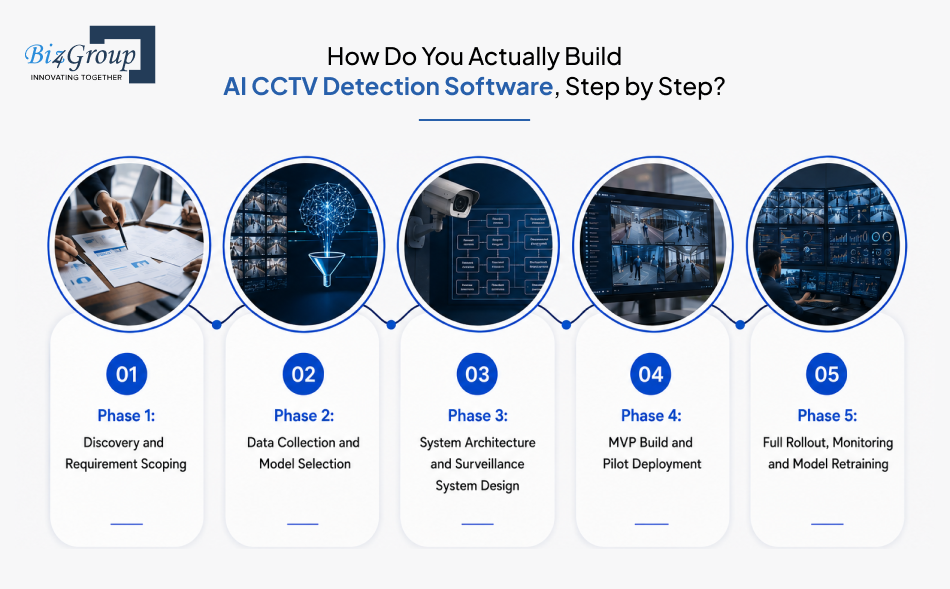
Founders ask this almost word for word, every time: "I want to build AI CCTV detection software for my business. Can you provide a complete development roadmap, recommended AI models, technology stack, timeline, and estimated development cost?"
Here's what that roadmap actually looks like, phase by phase, when you build AI CCTV detection software the right way.
Phase 1: Discovery and Requirement Scoping
This is where the PRD work pays off. You lock down exactly which threats matter most to your environment, what your existing camera setup can support, and what "success" actually looks like in numbers, not adjectives. Skipping this step is the fastest way to end up with AI surveillance camera development that solves the wrong problem entirely. We've seen teams jump straight to model selection without this step, only to realize months in that the use case they built for wasn't the one actually costing them money.
- Walk every site (or review floor plans remotely) to map camera coverage and blind spots
- Rank use cases by business impact, not by what sounds impressive in a pitch deck
- Set measurable accuracy and latency targets before any code gets written
Phase 2: Data Collection and Model Selection
Your model is only as good as the footage it learns from. Generic, pre-trained datasets get you a starting point, but real accuracy comes from training on footage that actually matches your lighting, camera angles, and crowd patterns. Most of the effort here goes into labeling, not training, which is the part teams consistently underestimate when scoping AI surveillance system development. Choosing the wrong model approach at this stage is one of the more expensive mistakes to fix later, since correcting it after launch means retraining from scratch instead of fine-tuning.
- Label edge cases deliberately, not just the obvious examples
- Choose pre-trained models to fine-tune versus training from scratch based on budget and timeline
Phase 3: System Architecture and Surveillance System Design
This is where edge versus cloud, latency budgets, and integration points all get decided. Get the architecture wrong here, and you'll be rebuilding it down the line instead of scaling it. A well-planned computer vision surveillance system also needs to talk cleanly to your VMS, access control, and alarm systems from day one, which is exactly where solid AI integration services save you from a costly second build later. This phase usually runs alongside the tail end of data collection rather than after it, since architecture decisions affect what kind of data pipeline you need in the first place.
- Decide which detections need edge processing and which can run on cloud inference
- Map every system this software needs to connect to, before development starts
- Plan for camera and site growth now, not as a future "phase two"
Phase 4: MVP Build and Pilot Deployment
Nobody should roll out a full enterprise deployment on day one. A focused MVP development effort, built around your highest-priority use case, lets you test real accuracy against real footage before committing the full budget. The dashboard your team will actually use every day also needs proper UI/UX design baked in here, not bolted on after the fact, since a clunky interface kills adoption just as fast as a noisy alert feed. We've watched technically accurate pilots get rejected by security teams purely because the dashboard took too many clicks to find what mattered.
- Build and test the single highest-value detection use case first
- Pilot on one site or one camera cluster before scaling further
- Collect real operator feedback, not just model accuracy metrics
Phase 5: Full Rollout, Monitoring and Model Retraining
Launch isn't the finish line. Models drift as lighting changes with the seasons, new camera angles get added, and environments evolve. Without a retraining plan, your AI CCTV monitoring software quietly loses accuracy and nobody notices until a real incident slips through. This phase doesn't have a clean end date, since it runs for as long as the system stays in production.
- Set a retraining cadence based on observed drift, not a fixed calendar guess
- Monitor false positive and false negative rates continuously, not just at launch
- Keep a rollback plan ready for any model update that underperforms in production
Once the system is live and learning, the conversation usually shifts from "how do we build this" to "what's actually powering it under the hood." That's exactly where we're headed next, the AI models, frameworks, and tech stack that make AI video surveillance analytics software development actually work in production.
What AI Models, Frameworks & Tech Stack Power AI Video Surveillance Analytics Software Development?
This is the question that comes up right after the roadmap, almost every time: "What AI technologies, computer vision models, and machine learning frameworks should I use to develop AI CCTV detection software for enterprise security?"
There's no single stack that fits every project, but here's what actually shows up across real AI video surveillance analytics software development builds, layer by layer.
|
Layer |
Tech / Tool / AI Model |
Why It's Used |
|---|---|---|
|
Video ingestion |
RTSP, ONVIF |
Standard protocols that let your software pull live feeds from existing IP cameras and NVRs, which is what makes retrofitting old CCTV setups possible |
|
Object detection models |
YOLO (v8 and newer), Faster R-CNN |
Fast, accurate frame-by-frame detection of people, vehicles, and objects, with YOLO favored when real-time speed matters more than marginal accuracy gains |
|
Behavior and anomaly models |
LSTM and transformer-based action recognition |
Tracks movement and behavior patterns across multiple frames instead of a single snapshot, which is what's needed for custom AI surveillance software that detects loitering or erratic movement, not just objects |
|
Facial recognition |
DeepFace, ArcFace, FaceNet |
Matches detected faces against a watchlist in real time, core to any custom AI computer vision software build that needs identity-based alerting |
|
Core frameworks |
PyTorch, TensorFlow, OpenCV |
The foundation almost every detection model gets built and trained on, with OpenCV handling the lower-level video processing work |
|
Edge inference hardware |
NVIDIA Jetson, Intel OpenVINO-compatible devices |
Runs detection locally on-site to cut latency, critical when an alert needs to fire in under a second, not after a round trip to the cloud |
|
Model optimization for edge |
TensorRT, ONNX Runtime |
Compresses and speeds up trained models so they run efficiently on edge hardware without losing meaningful accuracy |
|
Cloud infrastructure |
AWS, Google Cloud, Microsoft Azure |
Handles storage, centralized reporting, and any inference that doesn't need to happen on-site |
|
MLOps and model lifecycle |
MLflow, Weights & Biases, Docker, Kubernetes |
Tracks model versions, manages retraining, and keeps deployments consistent across multiple sites |
|
Backend and APIs |
Node.js, Python (FastAPI/Django) |
Powers the alerting logic and integrations, typically handled by a dedicated Node JS development company or Python development company depending on the stack |
|
Database |
PostgreSQL, MongoDB |
Stores incident logs, metadata, and user data in a structure that's fast to query during investigations |
|
Frontend |
React, Next.js |
Builds the live view, incident timeline, and reporting interface your security team interacts with, often built by a Next JS development company for performance-heavy dashboards |
A stack this broad almost never gets built end to end by one generalist team. We've found the detection layer (object models, behavior models, edge optimization) usually needs deep AI model development expertise on its own, separate from the engineers building the backend and dashboard, since fine-tuning a model for your exact camera angles and lighting is a fundamentally different skill from writing API logic or building a UI. The backend, database, and frontend layers matter just as much in practice. A perfectly accurate model is useless if the API connecting it to your alerting system is unreliable, or if the dashboard built on top of it is too slow or confusing during an actual incident.
Once the stack is decided, the next question almost every founder asks is the one with a dollar sign attached to it: what does all of this actually cost to build?
That's exactly what we're breaking down next.
What Does It Cost to Develop AI CCTV Monitoring Software?
This is the question every founder eventually asks: "I'm looking for an AI software development company to build custom CCTV detection software. What technical expertise, computer vision capabilities, project timeline, and budget should I expect?"
The honest range for most US-based AI CCTV detection software development projects sits between $30,000 and $300,000, depending heavily on scope, number of detection use cases, and whether you're training custom models or fine-tuning existing ones. That's a wide gap, and it should be, because a single-site pilot with off-the-shelf object detection costs nothing like a multi-site enterprise rollout with custom AI surveillance software built around behavior models and full compliance reporting.
Feature-by-Feature Cost Breakdown for AI Surveillance System Development
|
Feature |
Complexity |
Estimated Cost Range |
|---|---|---|
|
Real-time object and person detection |
Low to moderate |
$8,000 to $25,000 |
|
Behavior and anomaly detection models |
High |
$20,000 to $60,000 |
|
Facial recognition and watchlist matching |
Moderate to high |
$15,000 to $40,000 |
|
License plate recognition |
Moderate |
$10,000 to $25,000 |
|
Smoke and fire visual detection |
High |
$15,000 to $35,000 |
|
Alert management and tiered notification system |
Moderate |
$10,000 to $20,000 |
|
Live dashboard and video wall |
Moderate |
$15,000 to $35,000 |
|
Searchable incident timeline and reporting |
Moderate |
$8,000 to $18,000 |
|
VMS, access control, and third-party integrations |
Moderate to high |
$10,000 to $30,000 |
|
Multi-site and multi-camera management |
High |
$20,000 to $50,000 |
|
Edge deployment and on-device optimization |
High |
$15,000 to $40,000 |
|
Compliance, audit logging, and data governance layer |
Moderate |
$8,000 to $20,000 |
What Factors Actually Drive Your AI CCTV Detection Software Development Cost?
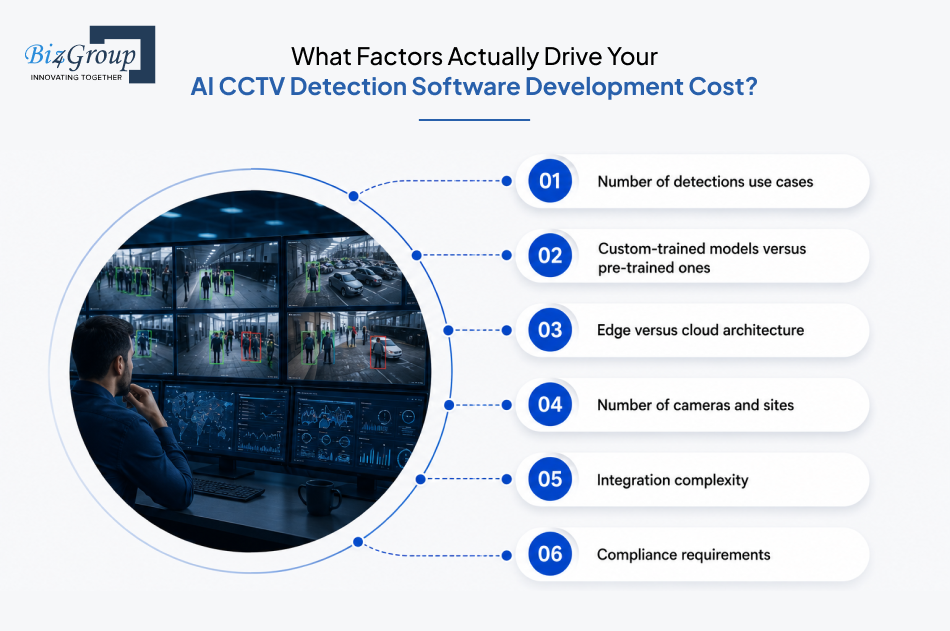
- Number of detection use cases: Each additional capability, behavior detection, fire detection, facial recognition, adds its own model, its own training data, and its own tuning cycle.
- Custom-trained models versus pre-trained ones: Fine-tuning an existing model is far cheaper than training one from scratch on footage specific to your sites, a core decision point in any AI model development plan.
- Edge versus cloud architecture: Edge hardware adds upfront device costs but lowers latency and ongoing cloud spend; the reverse is true for cloud-only setups.
- Number of cameras and sites: Cost scales with how many feeds the computer vision surveillance system needs to process simultaneously, not just how many features it has.
- Integration complexity: Connecting to a modern VMS is straightforward. Connecting to a decade-old legacy system with no documented API is not.
- Compliance requirements: Biometric data handling, retention policy enforcement, and audit logging all add real engineering time, not just paperwork.
Hidden Costs Most AI Video Surveillance Software Development Estimates Leave Out
- Data labeling: This is consistently the most underestimated line item in any AI surveillance budget, often costing more than the model training itself.
- Model retraining and drift monitoring: A model that performs well at launch can degrade within months as lighting, camera angles, or foot traffic patterns shift.
- False positive tuning after launch: Getting real-time AI video analytics software alert thresholds right almost always takes a few rounds of real-world adjustment post-deployment, not just pre-launch testing.
- Camera and network infrastructure gaps: Older cameras or unstable network bandwidth can force unplanned hardware upgrades mid-project.
- Staff training and change management: AI security monitoring software your team doesn't know how to use properly doesn't deliver the ROI it was built for.
How to Optimize AI CCTV Analytics Software Costs Without Cutting Corners
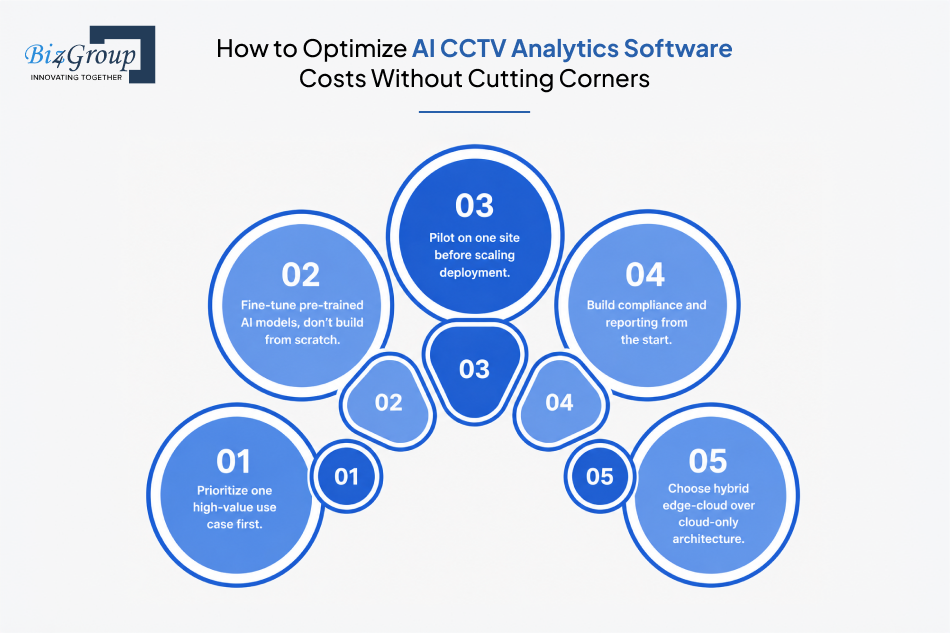
- Start with one high-value use case instead of building every detection capability at once.
- Use pre-trained AI models as a base and fine-tune them, rather than training from zero.
- Pilot on a single site before committing budget to a multi-site AI surveillance camera development rollout.
- Build the compliance and reporting layer early, since retrofitting it later almost always costs more.
- Choose a hybrid edge-cloud architecture instead of defaulting to cloud-only, which can quietly balloon in cost as camera count grows.
Also Read: Top 10+ AI Model Development Companies in USA (2026 Reviewed and Ranked)
Custom AI Surveillance Software vs. Off-the-Shelf: Cost Comparison
This is also where the build-versus-buy question usually comes up: "Should I build custom AI CCTV detection software or buy an existing video surveillance solution? Compare scalability, customization, implementation cost, and long-term ROI."
|
Factor |
Custom-Built Software |
Off-the-Shelf Platform |
|---|---|---|
|
Upfront cost |
Higher, $30,000 to $300,000+ depending on scope |
Lower, often subscription-based with quicker setup |
|
Customization |
Fully tailored to your exact use cases and environment |
Limited to whatever the vendor's product already supports |
|
Scalability |
Built to scale with your specific camera count and sites from day one |
Often capped by vendor pricing tiers or licensing limits |
|
Long-term ROI |
Higher over time once core use cases are dialed in and owned outright |
Can plateau, since you're paying recurring fees for capabilities you don't control |
|
Vendor lock-in risk |
Low, since you own the codebase and the model |
High, since switching platforms later means rebuilding workflows |
|
Time to first deployment |
Longer, since models need training and tuning |
Faster, since the core platform already exists |
Neither path is universally right. A fast-growing multi-site operator with specific compliance needs usually outgrows off-the-shelf options within a year or two. A single-location business testing the waters might be perfectly served by a subscription platform for now.
Once you've got a realistic number in mind, the next thing worth knowing is what actually goes wrong on these projects, the mistakes that turn a $50,000 build AI CCTV detection software budget into a $150,000 one. That's exactly what we're covering next.
Still Paying for Eyes That Blink, Sleep, and Take Lunch Breaks?
Round-the-clock human monitoring on just 50 cameras needs four full-time guards across three shifts, every single day, forever. One AI system costs a lot less and never clocks out.
Get a Custom Cost EstimateWhat Mistakes Do Companies Keep Making When They Develop AI CCTV Analytics Software?
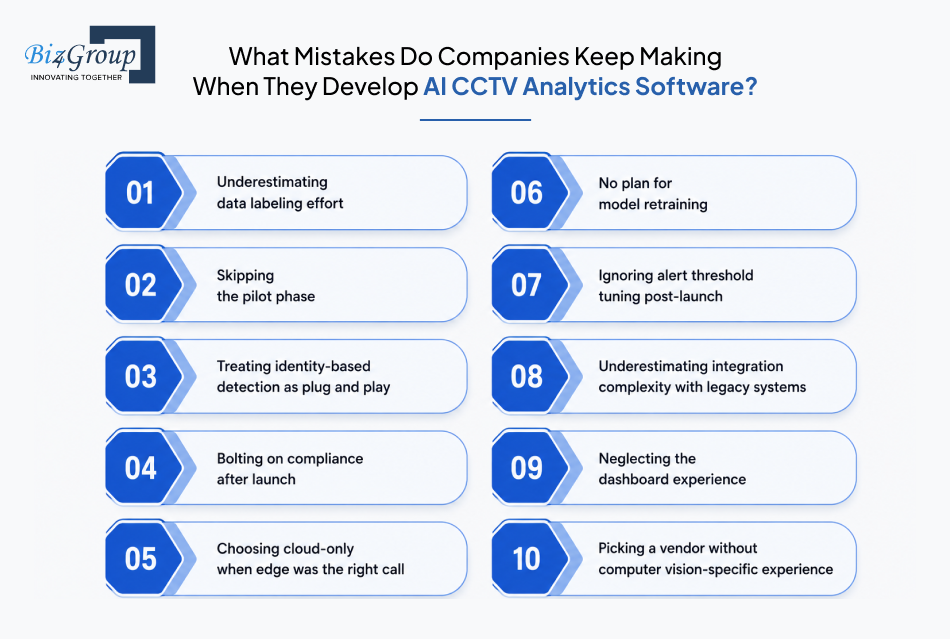
Most of these aren't exotic failures. They're the same handful of decisions, made early in AI CCTV detection software development, that quietly turn a manageable build into an expensive one.
|
Mistake |
Why It Happens |
What It Actually Costs You |
|---|---|---|
|
Underestimating data labeling effort |
Teams budget for model training but treat labeling as a quick formality, not the most time-consuming part of the build |
Timelines stretch by weeks, and rushed labeling produces a model that performs well in testing but poorly in your actual environment |
|
Skipping the pilot phase |
Pressure to deploy fast across every site at once, instead of proving accuracy on one location first |
A flawed detection model gets rolled out everywhere simultaneously, multiplying the cost of fixing it later |
|
Treating identity-based detection as plug and play |
Facial recognition and watchlist matching look simple on a feature sheet, but identity verification carries real accuracy and liability stakes that generic object detection doesn't, which is exactly why AI identity threat software is its own specialized discipline, not a checkbox feature |
Misidentifications create both security gaps and legal exposure, especially once biometric data is involved |
|
Bolting on compliance after launch |
Compliance gets treated as a legal afterthought instead of a PRD requirement from day one |
Retention policies, audit logging, and biometric data handling all need rebuilding into a system that wasn't designed for them, costing far more than building them in from the start |
|
Choosing cloud-only when edge was the right call |
Cloud feels simpler to set up, so latency-sensitive use cases get built on it by default |
Real-time alerts on threats like intrusion or fire detection arrive a beat too late, undermining the entire reason for real-time AI video analytics software in the first place |
|
No plan for model retraining |
Teams treat launch as the finish line instead of the start of an ongoing process |
Accuracy quietly degrades as lighting, camera angles, or foot traffic shift, and nobody notices until a real incident slips through |
|
Ignoring alert threshold tuning post-launch |
Thresholds get set once during testing and never revisited against real-world conditions |
Alert fatigue sets in fast, and a security team that stops trusting alerts stops responding to all of them, including the real ones |
|
Underestimating integration complexity with legacy systems |
Older VMS platforms and undocumented NVR setups get assumed to be "simple" to connect to |
Integration work balloons mid-project, often the single biggest source of scope creep in AI surveillance camera development retrofits |
|
Neglecting the dashboard experience |
Engineering effort goes entirely into model accuracy, with the interface treated as a final, low-priority step |
Even a highly accurate system gets abandoned by security teams if the dashboard is slow or confusing to use during an actual incident |
|
Picking a vendor or partner without computer vision-specific experience |
General software development experience gets assumed to transfer directly to AI security software development |
Projects stall on problems a computer vision-specialized team would have anticipated from the start, like data scarcity or model drift |
The common thread across nearly all of these is the same one we've come back to throughout this guide: planning for the unglamorous parts (labeling, compliance, retraining, the interface) up front always costs less than fixing them after launch. Every single mistake on this list is avoidable with the right AI CCTV analytics software partner who has actually shipped this kind of build before.
That brings us to the question worth asking before any of this gets underway: who's actually going to build it with you.
Why Choose Biz4Group for AI Security Software Development?
If you're searching for who actually builds this kind of software, here's the honest pitch: Biz4Group has been building custom software since 2003, with a 300-plus person team and over 1,000 delivered projects, including work for 15-plus Fortune 500 clients and an 85% client retention rate. That's not a number we're proud of in the abstract, it's the kind of number that only happens when clients keep coming back because the software actually works in production, not just in a demo.
On the technical side, our computer vision and AI model development work covers the exact building blocks this entire guide is about: object detection, facial recognition, behavior analysis, and real-time video analytics, the same model layer that powers any serious AI CCTV detection software development project. Our leadership team brings decades of large-scale systems experience from places like Disney, Oracle, MasterCard, and IBM, the kind of background that matters when a surveillance system can't afford downtime or false alerts at enterprise scale.
Here's what that actually means for your project, specifically:
- We scope the PRD properly before writing a line of code, the same discipline we walked through earlier in this guide, so you're not paying to discover requirements mid-build
- We've built custom AI surveillance software components, including the computer vision, facial recognition, and real-time alerting layers that make up an AI-powered CCTV software development project, not just generic AI features bolted onto an existing app
- We architect for edge and cloud hybrid deployment from day one, so latency-sensitive detection doesn't get built on the wrong infrastructure
- We treat compliance, data governance, and retention policy as a build requirement, not an afterthought
- Independent platforms like Clutch and GoodFirms list us among verified, reviewed development partners, not just a self-reported portfolio
If you're a founder or CTO ready to hire AI developers who understand both the model layer and the production realities of AI security monitoring software, or you're an enterprise team looking for a partner that handles AI product development end to end rather than just shipping a prototype and walking away, that's the work we do.
We're not going to pretend we have a hundred CCTV case studies sitting in a portfolio, because that wouldn't be honest. What we do have is direct, hands-on experience with the computer vision, real-time alerting, and AI model development that this kind of software is actually built on, plus two decades of delivering enterprise software that has to work correctly the first time. If you're scoping a real AI surveillance system development project, that combination is exactly what closes the gap between an idea and a system your security team will actually trust.
Ready to Build the System That Actually Watches Back?
Twenty years, a thousand-plus projects, and zero patience for surveillance software that just records and shrugs. Let's build yours properly.
Book an AppointmentConclusion
Cameras have been watching for decades. The difference now is whether anything is actually watching back, fast enough to matter.
Everything in this guide, the PRD, the threat engineering, the stack, the cost, the mistakes, exists to answer one question: can your AI CCTV detection software tell the difference between background noise and the moment that actually needs a human to look? Get that right with proper AI surveillance system development, and you've built something your security team trusts. Get it wrong, and you've built an expensive filing cabinet for footage nobody reviews until it's too late.
One detail worth knowing if you're still vetting partners for your AI video surveillance software development project: Biz4Group's own leadership includes a Forbes Business Council member, the kind of recognition that doesn't come from a portfolio page, it comes from sustained, scrutinized industry standing. That's the level of judgment behind how we scope and architect every custom AI surveillance software build.
So, ready to stop guessing and start building something your cameras can actually be proud of? Book an appointment, and let's make sure the next thing your system catches is the threat, not the blame for missing it.
FAQ’s
1. How much does AI CCTV detection software development actually cost?
Most US-based projects fall between $30,000 and $300,000, depending on how many AI CCTV detection use cases you need and whether you're training custom models or fine-tuning existing ones. A single-site pilot with basic object detection sits at the lower end. A multi-site rollout with behavior analysis, facial recognition, and full compliance reporting sits at the higher end. There's no flat number that fits every business, which is exactly why we broke down the cost by feature earlier in this guide.
2. Can I add AI detection to my existing CCTV cameras without replacing them?
Yes, in most cases. If your cameras support standard protocols like RTSP or ONVIF, AI surveillance camera development can run as a software layer on top of what you already own, no new wiring or hardware swap required. The detection logic runs either on a small edge device connected to your network or in the cloud, while your existing cameras keep doing exactly what they've always done, capturing the footage.
3. How accurate is AI CCTV detection software, and how does it reduce false alarms?
Accuracy depends heavily on how well the model was trained on footage from your actual environment, not generic stock data. Well-tuned real-time AI video analytics software can filter out a significant share of non-threat events, things like blowing leaves, shadows, or pets, that used to trigger basic motion detectors constantly. The real fix isn't a single magic setting, it's the multi-frame confirmation and threshold tuning we walked through in the threat detection section earlier.
4. Does AI CCTV detection software store facial recognition or biometric data?
It depends entirely on which capabilities you build in and how you configure them. Facial recognition features typically do store biometric identifiers, which is exactly why we covered US biometric privacy laws in the PRD section. Behavior and anomaly detection, on the other hand, can usually flag suspicious activity without identifying anyone personally. The right approach is deciding this at the requirements stage, not discovering it after launch.
5. How long does it take to build AI CCTV detection software?
Timelines vary by scope, but here's a real range to anchor expectations. At Biz4Group, a focused MVP built around pre-trained models and one priority use case typically takes 2 to 4 weeks. A fuller enterprise build, covering multiple threat types, custom-trained models, and multi-site integration, usually runs 6 to 8 weeks. AI surveillance system development that leans heavily on training models from scratch for highly specific environments can extend beyond that range, which is exactly why scoping the right starting point matters as much as the build itself.
6. Should I build custom AI surveillance software or buy an existing platform?
It comes down to how specific your environment is and how long you plan to run this system. Custom AI surveillance software costs more upfront but scales exactly to your camera count, sites, and use cases, with no vendor lock-in. Off-the-shelf platforms get you running faster and cheaper initially, but you're often limited to whatever the vendor already supports, and switching later means rebuilding your workflows from scratch.
7. What's the difference between AI video analytics and traditional motion detection?
Traditional motion detection flags any pixel change, a tree branch moving, a shadow shifting, a passing car, which is why older systems generate so many useless alerts. Computer vision for video surveillance actually classifies what it's seeing first. It can tell the difference between a person, a vehicle, and an animal, and only alert on the specific behavior or object you've defined as worth flagging.
