Location :
Orlando, FL, USA
Location :
Orlando, FL, USA +1 (407) 714-1616
 info@biz4group.com


















Imagine a digital system that doesn’t wait for instructions but instead, understands your business goals, learns from real-time feedback, and takes independent actions to get the job done.
Read More

 AI Summary Powered by Biz4AI
Are project delays, missed change orders, disconnected subcontractor updates, and scattered project data making it harder to keep construction projects on schedule and within budget?
If your teams are juggling multiple software tools, spreadsheets, emails, and manual workflows to manage projects, you're facing a challenge common across the construction industry. AI construction project management software addresses these issues by bringing scheduling, field operations, document management, subcontractor coordination, reporting, and predictive analytics into a single platform.
Despite significant investments in construction technology, many companies still rely on disconnected tools to manage projects. Scheduling may happen in one system, budgeting in another, and field reporting somewhere else. As projects become more complex, this fragmentation makes it harder to maintain visibility into project performance, costs, and risks.
A survey of architecture, engineering, and construction (AEC) professionals found that only 27% of organizations currently use AI in their operations, but 94% of those organizations plan to increase AI usage.
If you're reading this, chances are you're trying to figure out whether AI can actually help solve problems such as:
We've worked with several organizations facing such challenges. Some were trying to unify multiple systems into a single platform. Others wanted to add AI capabilities such as schedule prediction, document automation, or risk detection without disrupting existing operations.
In nearly every case, the questions were similar: What features should be included? How should the platform be architected? What will it cost? And is custom development even the right approach?
That's exactly what this guide is designed to answer. So, let’s dive right into it.
AI construction project management software combines traditional construction management tools with artificial intelligence to help teams manage projects more efficiently. While traditional software helps track schedules, budgets, documents, RFIs, submittals, and field activities, an AI-powered construction project management system can analyze that information, identify potential problems, automate repetitive tasks, and support better decision-making.
AI construction project management software works by collecting data from multiple project systems, analyzing that data using AI models, and generating forecasts, alerts, recommendations, or automated actions. Information from schedules, RFIs, submittals, change orders, daily reports, cost records, subcontractor updates, and field activities is continuously evaluated to identify risks and opportunities before they affect project performance.
|
Step |
How the System Works |
|---|---|
|
Data Collection |
The platform gathers information from schedules, project documents, field reports, BIM models, ERP systems, accounting tools, IoT devices, and subcontractor updates |
|
Data Processing |
Project data is cleaned, organized, standardized, and connected across systems |
|
AI Analysis |
AI models evaluate schedule dependencies, resource utilization, cost trends, subcontractor performance, document activity, and historical project outcomes |
|
Decision Support |
The system alerts teams to potential delays, budget variances, resource conflicts, safety concerns, and approval bottlenecks |
|
Workflow Automation |
Routine tasks such as document routing, notifications, reporting, approvals, and status updates are automated |
This allows AI software for construction project management to move beyond project tracking and help teams anticipate issues before they become costly problems.
Traditional construction management platforms are designed to record, organize, and display project information. They help teams manage schedules, track budgets, store documents, and monitor project progress. However, project managers are still responsible for reviewing the data, identifying risks, and deciding what actions to take.
AI-powered project management software for construction takes a more proactive approach. Instead of waiting for users to find issues themselves, the system can analyze project data, flag potential risks, automate routine workflows, and provide recommendations based on current project conditions.
This distinction is especially relevant for organizations using disconnected tools for project management, estimating, budgeting, and field reporting that are evaluating whether a unified AI-powered platform would provide greater operational value.
|
Capability |
Traditional Construction Platform |
AI-Powered Construction Platform |
|---|---|---|
|
Scheduling |
Tracks schedules, milestones, and dependencies |
Identifies activities that may cause delays and supports AI construction scheduling and planning |
|
Cost Management |
Records budgets, commitments, and expenses |
Forecasts potential budget risks using project and historical cost data |
|
Document Management |
Stores drawings, specifications, contracts, and reports |
Automatically classifies, searches, and routes documents |
|
RFI & Submittal Management |
Tracks requests, reviews, and approvals |
Prioritizes and routes documentation while reducing manual effort |
|
Subcontractor Management |
Manages assignments and communications |
Supports AI subcontractor management through performance and risk analysis |
|
Reporting |
Produces project reports and dashboards |
Delivers AI construction reporting and analytics with forecasting and risk visibility |
|
Risk Management |
Relies on manual issue identification |
Uses AI risk management software for construction to identify risks earlier |
|
Site Monitoring |
Depends on field inspections and manual updates |
Enables construction site monitoring with AI through image analysis and progress tracking |
|
Resource Planning |
Tracks labor, equipment, and material allocation |
Improves construction labor and resource planning software with forecasting capabilities |
|
Workflow Automation |
Requires manual coordination and approvals |
Automates repetitive tasks, approvals, and cross-team workflows |
A simple way to think about it is this: traditional construction software
tells teams what has already happened, while project management construction software with AI helps
them understand what is likely to happen next. Whether organizations choose to build AI
construction project management software internally, work with specialists offering AI consulting services, or extend an
existing platform, the goal is to detect problems sooner, reduce manual effort, and make better
decisions using project data.
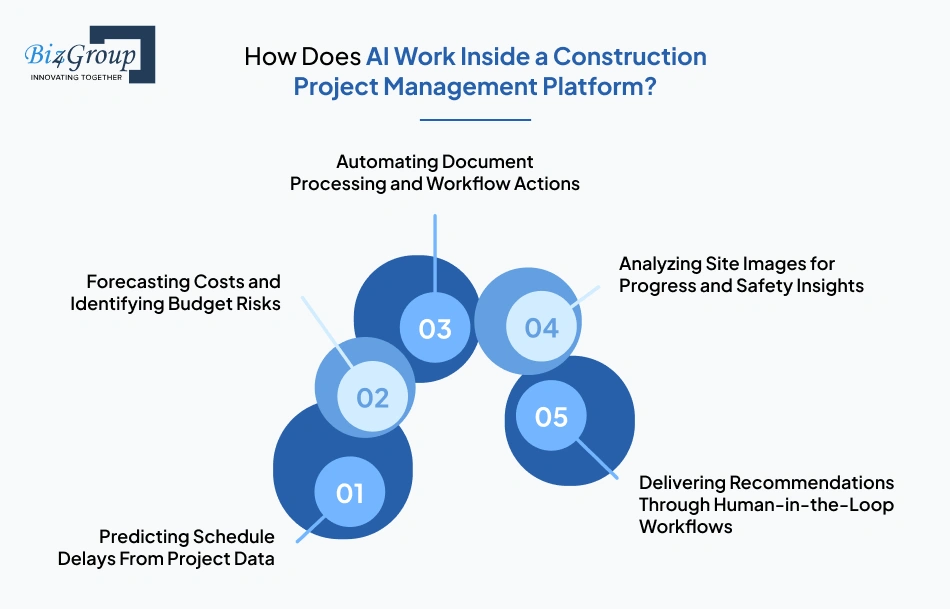
AI works inside a construction project management platform by analyzing project information and helping teams identify risks, automate routine tasks, and make better decisions. Instead of sitting on the side as a chatbot, AI becomes part of everyday construction workflows such as scheduling, budgeting, document management, subcontractor coordination, reporting, and site monitoring.
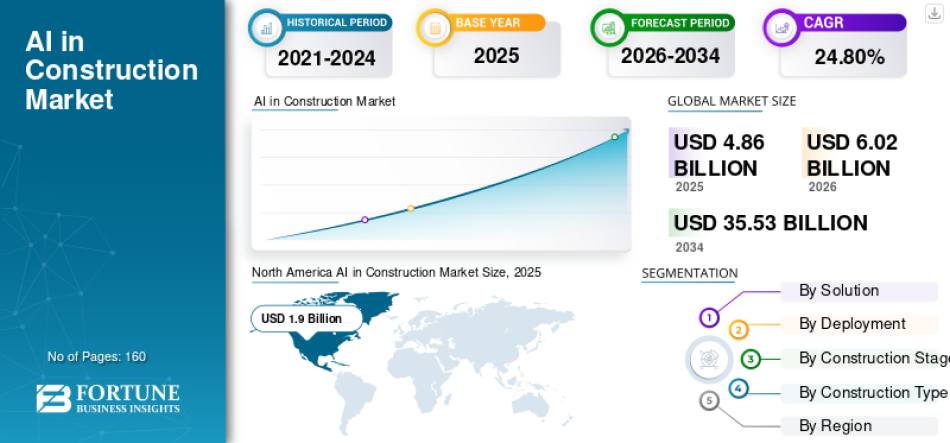
This shift is driving significant investment across the industry. The global AI in construction market is projected to grow from $6.02 billion in 2026 to $35.53 billion by 2034, reflecting sustained investment in AI-driven construction technologies and growing demand for AI construction software development.
AI construction scheduling and planning tools analyze schedules, task dependencies, labor availability, resource allocation, weather conditions, and historical project data to identify activities that may cause delays. This gives project teams time to address issues before they impact major milestones.
AI-powered construction cost estimation software reviews historical costs, approved change orders, procurement records, subcontractor commitments, and current spending trends to forecast future costs and highlight potential budget overruns early.
Construction projects generate large numbers of RFIs, submittals, contracts, drawings, meeting notes, and change orders. AI can automatically organize documents, extract important information, route approvals, send notifications, and support construction document control software workflows.
Using computer vision for construction site safety, AI can review site photos, drone imagery, and video footage to track project progress, identify safety concerns, verify completed work, and support construction site monitoring with AI.
Effective AI-based project management software for construction industry use cases are designed to support, not replace, project teams. AI can recommend actions, flag risks, and prioritize tasks, while project managers and superintendents remain responsible for final decisions. This approach is often a key consideration during AI model development, ensuring that AI improves decision-making without removing human oversight.
|
AI Capability |
Data Sources Used |
Business Outcome |
|---|---|---|
|
Schedule Delay Prediction |
Schedules, task dependencies, labor data, and progress reports |
Earlier identification of schedule risks |
|
Cost Forecasting |
Budgets, change orders, procurement records, and cost reports |
Improved cost control and budget visibility |
|
Document Intelligence |
RFIs, submittals, contracts, drawings, and specifications |
Faster document processing and less manual work |
|
Site Progress & Safety Analysis |
Site photos, drone footage, field reports, and video feeds |
Better visibility into project progress and safety conditions |
|
Workflow Recommendations |
Project activities, approvals, and historical project outcomes |
Faster and more informed decision-making |
A common question from construction firms is: "We keep losing money on projects
because of cost overruns and schedule delays that nobody saw coming until it was too late.
Someone told us there is AI software that can predict these problems before they happen. How
does that actually work?"
Whether organizations build these capabilities into a custom construction project management software platform or extend an existing solution, the goal remains the same: identify problems earlier, reduce manual work, and improve project outcomes through better use of project data.
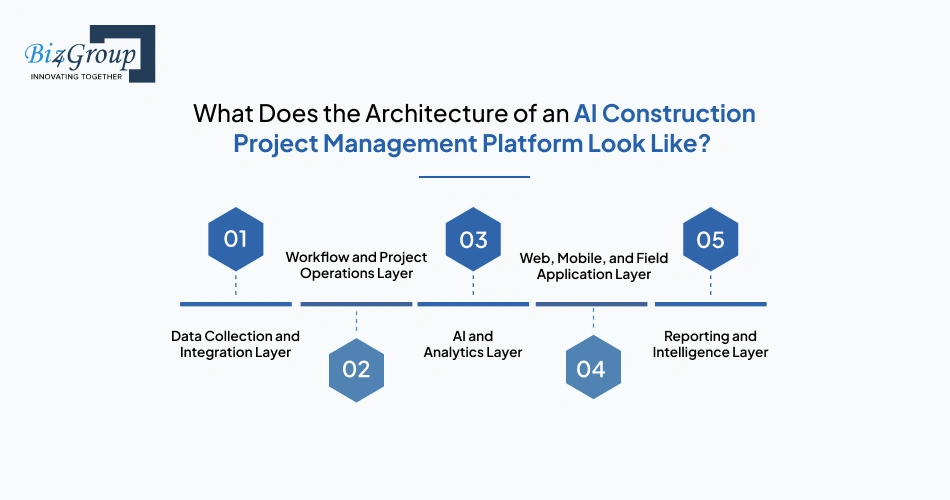
A modern AI-powered construction project management system is typically built as a set of connected layers that collect project data, manage workflows, run AI models, and deliver information to users. This structure allows scheduling, document management, field operations, reporting, and analytics to work together instead of operating as separate systems.
|
Architecture Layer |
Purpose |
Key Components |
|---|---|---|
|
Data Collection and Integration Layer |
Collects and connects project data from internal and external systems |
BIM integration in construction software, ERP systems, accounting platforms, IoT devices, project documents, field reports, subcontractor portals, and construction software integration with Procore and Autodesk |
|
Workflow and Project Operations Layer |
Manages day-to-day construction activities and business processes |
Construction workflow automation software, construction RFI management software, change order management software construction, subcontractor management, scheduling, resource planning, and construction daily report automation software |
|
AI and Analytics Layer |
Processes project data and generates predictions, recommendations, and automation triggers |
AI construction scheduling and planning, construction project delay prediction AI, construction cost overrun prediction software, AI anomaly detection in construction project data, and predictive analytics for construction project outcomes |
|
Web, Mobile, and Field Application Layer |
Provides access to project information for office and field teams |
Web dashboards, mobile applications, construction field-to-office communication software, field reporting tools, and subcontractor self-service portals |
|
Reporting and Intelligence Layer |
Delivers visibility into project performance and operational metrics |
Construction project dashboard and reporting, AI construction reporting and analytics, executive dashboards, forecasting tools, and project performance monitoring |
A common question from software architects is: "What does the system
architecture of a modern AI construction project management platform actually look like, and
how do the scheduling engine, document management layer, AI models, BIM integrations, and
mobile field tools fit together?" The answer is that each layer performs a
specific function, while APIs and integration services connect them into a single platform.
In a well-designed platform, each layer performs a specific job while sharing information with the other layers. For example, project data collected from BIM tools, ERP systems, field applications, and document repositories flows into operational workflows, which then feed AI models and reporting dashboards.
Unify scheduling, RFIs, change orders, subcontractor communication, and reporting with custom AI construction project management software built around your workflows.
Explore Your Project RequirementsAn AI-powered construction project management system should support the full construction lifecycle, from planning and budgeting to field execution and reporting. For companies looking to build AI construction project management software, the goal is not to collect more data but to create a platform that improves coordination, automates routine work, and helps teams make faster, more informed decisions.
Project planning and scheduling capabilities help teams manage milestones, task dependencies, baselines, and critical path activities while supporting AI construction scheduling and planning for early identification of potential delays.
Resource management tools help allocate labor, equipment, materials, and subcontractors across projects, reducing scheduling conflicts and improving workforce utilization.
Construction RFI management software centralizes requests, reviews, approvals, and communication workflows, helping teams reduce response times and maintain project momentum.
Change order management software construction capabilities help track scope changes, document approvals, and measure schedule and budget impacts before they affect project profitability.
Construction document management tools centralize drawings, specifications, contracts, permits, meeting notes, and project correspondence while maintaining version control and document history.
Subcontractor management features support onboarding, communication, task assignments, compliance tracking, performance monitoring, and collaboration across multiple project teams.
AI-powered construction cost estimation software supports estimating, budgeting, commitment tracking, cost forecasting, cash-flow monitoring, and variance analysis throughout the project lifecycle.
Construction field management software development typically includes mobile reporting, inspections, punch lists, issue tracking, field updates, and construction daily report automation software capabilities that improve visibility into site activities.
Safety management capabilities help teams document incidents, manage OSHA-related processes, track compliance requirements, and support computer vision for construction site safety initiatives.
Construction project dashboard and reporting tools provide real-time visibility into schedules, budgets, workforce utilization, project risks, and overall portfolio performance.
AI risk management software for construction analyzes project trends to identify potential schedule delays, cost overruns, subcontractor performance concerns, resource constraints, and emerging delivery risks.
Integration capabilities connect BIM platforms, ERP systems, accounting software, field applications, IoT solutions, and construction software integration with Procore and Autodesk to create a unified project environment.
The value of an AI-powered construction platform does not come from the number of features it includes. It comes from how well planning, cost management, document control, field operations, subcontractor coordination, reporting, and predictive analytics work together through shared workflows and project data. When these capabilities operate in a connected environment, teams gain better visibility, faster decision-making, and stronger control over project outcomes.
Portfolio Spotlight
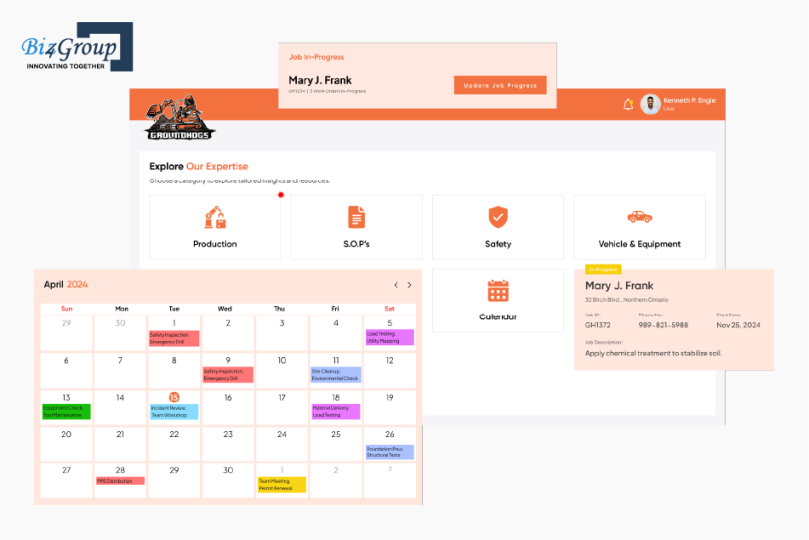
Groundhogs is a custom-built construction site management platform designed to centralize site activity logging, safety compliance tracking, job progress monitoring, checklist management, and document uploads in a single system. By giving field teams and administrators real-time visibility into construction operations, the platform eliminates many of the reporting and coordination challenges that construction firms face daily. It serves as a practical example of how custom construction software can bring together field operations, compliance workflows, and project oversight into one connected platform.
From schedule forecasting and cost prediction to document automation and risk detection, AI construction project management software helps teams make smarter decisions faster.
Discover the Right AI Features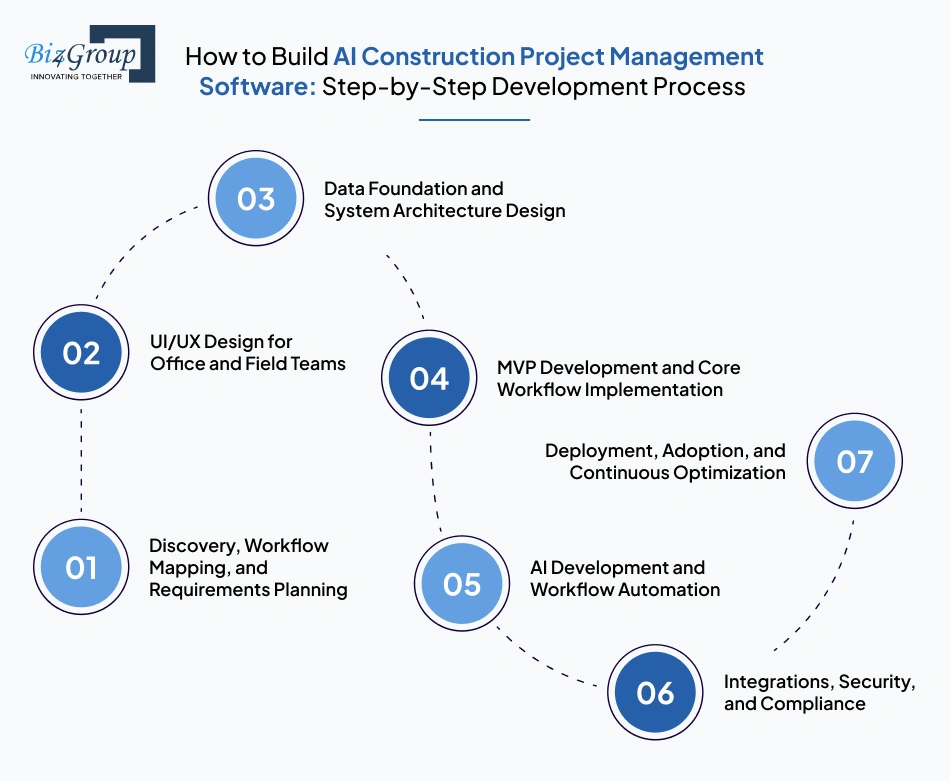
Building AI construction project management software involves defining construction workflows, designing the user experience, creating the system architecture, developing core project management capabilities, implementing AI functionality, integrating external systems, and continuously improving the platform after launch. The process below reflects how successful construction technology products are typically developed for general contractors, developers, and construction firms managing complex projects.
The first step is understanding how projects are planned, executed, and monitored across the organization. This means identifying how schedules, RFIs, submittals, change orders, field reports, safety processes, subcontractor communications, and budget approvals move through the business today. The goal is to uncover operational bottlenecks and define where AI can create measurable value.
Construction software must serve users in very different environments, from executives reviewing portfolio performance to superintendents working from active job sites. The interface should make common tasks easy to complete while reducing unnecessary clicks, data entry, and navigation complexity. Many organizations work with a UI/UX design company to ensure the platform supports both office and field operations effectively.
Also read: Top UI/UX Design Companies in USA
AI capabilities depend on connected and reliable project data. Before predictive analytics or automation can be introduced, the platform must establish how schedules, budgets, documents, field reports, equipment data, and operational records will be structured and shared across the system.
Rather than building every feature at once, most organizations should begin with an MVP that delivers immediate operational value. Working with teams offering MVP development services helps validate workflows, user adoption, and business requirements before expanding the platform.
Typical MVP development services for AI construction project management software include scheduling, document management, RFI tracking, subcontractor coordination, budgeting, and reporting.
Also read: 12+ MVP Development Companies in USA to Launch Your Startup in 2026
Once the core workflows are operational, AI capabilities can be introduced into areas where they provide the greatest value. In construction, this typically means helping teams identify risks earlier, automate repetitive work, and improve decision-making.
Construction firms rarely rely on a single software platform. The new system must integrate with existing business applications while protecting project and operational data.
Also Read: 15+ Software Testing Companies in USA in 2026
The platform should continue evolving after launch as project teams adopt new workflows and operational requirements change. Continuous improvement ensures the software remains aligned with business goals and project delivery needs.
Successful construction management platforms are built around the workflows construction teams use every day, including schedule management, RFIs, submittals, change orders, field reporting, cost control, and subcontractor coordination. When these workflows are supported by connected data and practical AI capabilities, the platform becomes a decision-support system rather than just another project management tool.
Build a custom AI construction project management platform with the exact workflows, integrations, dashboards, and automation capabilities your teams actually need.
Design Your Custom SolutionBuilding AI construction project management software requires a technology stack that can support project scheduling, document management, cost forecasting, field operations, AI-driven analytics, and integrations with construction-specific systems. The goal is not to use the largest number of technologies, but to select tools that can reliably support construction workflows, large project datasets, real-time collaboration, and AI-powered decision-making at scale.
|
Label |
Preferred Technologies |
Why It Matters |
|---|---|---|
|
Frontend Framework |
React.js, Angular |
ReactJS development powers project dashboards, scheduling interfaces, reporting modules, and collaboration workflows. |
|
Server-Side Rendering & SEO |
Next.js, Nuxt.js |
NextJS development improves performance and scalability while supporting modern web experiences for distributed construction teams. |
|
Mobile Development |
React Native, Flutter |
Enables project managers, superintendents, inspectors, and subcontractors to access project information directly from the field. |
|
Backend Framework |
Node.js, Python (FastAPI/Django) |
Python development and NodeJS development supports project workflows, integrations, APIs, business logic, and AI-driven services. |
|
API Development & Integration Layer |
REST APIs, GraphQL, Webhooks |
Connects BIM platforms, ERP systems, accounting software, field tools, payroll systems, and third-party construction applications. |
|
AI & Data Processing |
PyTorch, TensorFlow, Scikit-learn, LangChain |
Powers schedule forecasting, cost prediction, document intelligence, workflow automation, and predictive analytics capabilities. |
|
Database Layer |
PostgreSQL, MongoDB, Redis |
Stores schedules, project records, operational data, user activity, and workflow information across projects. |
|
Vector Database (Optional) |
Pinecone, Weaviate, Chroma |
Supports AI-powered search and retrieval across RFIs, contracts, drawings, specifications, and project documentation. |
|
Object Storage & Document Repository |
Amazon S3, Azure Blob Storage, Google Cloud Storage |
Stores drawings, BIM files, contracts, permits, site photos, videos, submittals, and other large project documents. |
|
Data Pipeline & ETL Layer |
Apache Airflow, AWS Glue, Apache Spark |
Consolidates and prepares project data from multiple systems for reporting, forecasting, and AI analysis. |
|
Real-Time Communication |
WebSockets, Socket.IO, SignalR |
Supports live notifications, workflow updates, field reporting, and real-time collaboration. |
|
Workflow Automation Layer |
Temporal, Apache Kafka, RabbitMQ |
Automates approvals, document routing, alerts, task assignments, and operational workflows. |
|
BIM Integration Layer |
Autodesk Platform Services, IFC Standards, Bentley APIs |
Connects building models with project schedules, reporting systems, and operational workflows. |
|
ERP & Accounting Integrations |
Sage, Acumatica, Oracle, QuickBooks, Viewpoint |
Synchronizes budgets, invoices, commitments, procurement records, and financial reporting data. |
|
Cloud Infrastructure |
AWS, Microsoft Azure, Google Cloud |
Provides scalability, reliability, disaster recovery, and support for multi-project operations. |
|
Reporting & Analytics |
Power BI, Tableau, Metabase |
Delivers executive dashboards, forecasting reports, project KPIs, and portfolio-level insights. |
|
Authentication & Security |
OAuth 2.0, Azure AD, Okta, Auth0 |
Secures project data through authentication, role-based access controls, and user management. |
The exact technology stack will vary based on project size, AI requirements, integration
complexity, and scalability goals. However, most successful AI construction project management
platforms share the same foundation: a reliable backend, strong integration capabilities, scalable
cloud infrastructure, and AI services that are tightly connected to construction workflows rather
than operating as standalone tools.
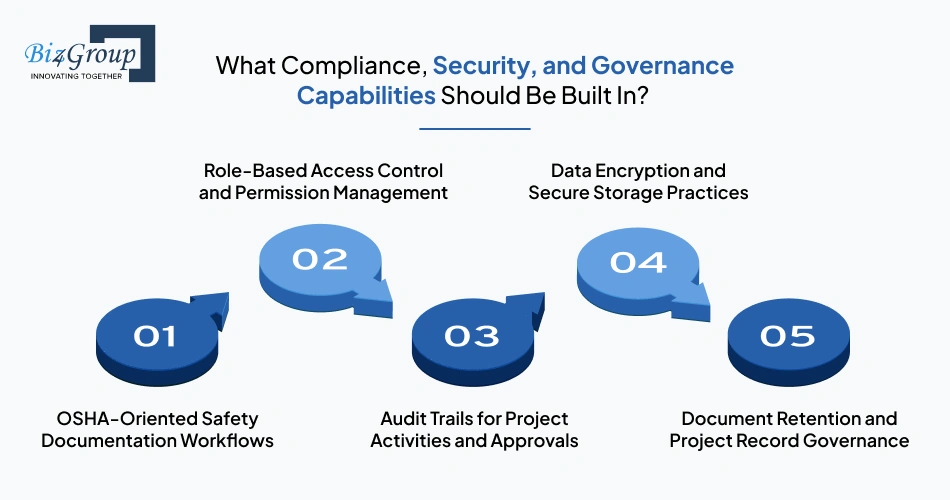
AI construction project management software should include safety documentation workflows, role-based access controls, audit trails, data encryption, and document governance capabilities. Together, these controls help protect project data, maintain accountability, and support compliance requirements across construction operations.
Construction teams generate large amounts of safety-related documentation throughout a project. The platform should support incident reporting, inspections, toolbox talks, corrective actions, safety observations, and OSHA-related documentation so safety records can be documented, reviewed, and retrieved when needed.
Not every user should have access to the same information. Project managers, superintendents, subcontractors, executives, and administrators all require different levels of access. Role-based permissions help protect sensitive project information and reduce the risk of unauthorized changes.
Every major project action should be recorded, including RFIs, submittals, approvals, budget updates, and change orders. Audit trails create a clear history of who made a change, when it happened, and what was modified. This is particularly important during disputes, delay claims, and project reviews.
Construction platforms often store contracts, drawings, financial records, payroll information, and project communications. The platform should encrypt data both in transit and at rest while supporting secure authentication, backups, and recovery procedures.
Many construction documents must be retained long after a project is completed. The platform should support document retention policies, version histories, record archiving, legal hold requirements, and controlled access to historical project records.
Organizations using generative AI for document processing or relying on AI automation services to automate approvals, notifications, and workflow actions should ensure every activity remains traceable, permission-controlled, and aligned with internal policies. Without these controls, automated workflows can create compliance, security, and accountability risks instead of reducing them.
Validate your feature roadmap, architecture, integrations, and development budget before investing in a custom AI construction management platform.
Talk to Our AI Construction Software Experts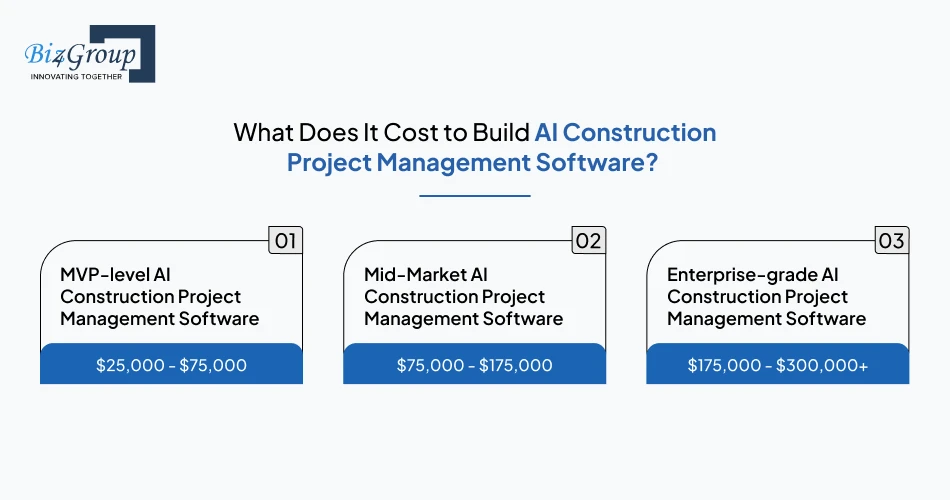
The cost to build AI construction project management software typically ranges from $25,000 to $300,000+. However, this is only a ballpark estimate. Actual development costs depend on factors such as the number of construction workflows being digitized, AI functionality, mobile app requirements, third-party integrations, security controls, reporting needs, and overall platform complexity.
|
Platform Type |
Estimated Cost Range |
Typical Scope |
|---|---|---|
|
MVP-level AI Construction Project Management Software |
$25,000 - $75,000 |
Scheduling, document management, RFI tracking, subcontractor coordination, change order management, reporting, and basic workflow automation |
|
Mid-Market AI Construction Project Management Software |
$75,000 - $175,000 |
Cost forecasting, advanced reporting, mobile applications, subcontractor portals, workflow automation, and integrations with accounting or project management systems |
|
Enterprise-grade AI Construction Project Management Software |
$175,000 - $300,000+ |
Multi-project operations, BIM integrations, ERP connectivity, predictive analytics, AI-driven risk detection, advanced security controls, custom workflows, and enterprise-scale reporting |
Development costs are largely determined by the number of construction workflows the platform needs to support, the depth of AI functionality, and the complexity of system integrations. A platform focused on scheduling, RFIs, and document management will cost significantly less than one designed to forecast project risks, analyze site imagery, automate subcontractor communication, and connect multiple enterprise systems.
For example: a contractor managing projects across multiple states may initially need scheduling, document management, RFI tracking, change order management, and subcontractor coordination in a single platform. Development costs increase when additional requirements such as AI cost forecasting, site safety monitoring, BIM integrations, predictive analytics, and enterprise reporting are introduced.
Use AI construction management software to automate repetitive workflows, improve forecasting accuracy, and help project teams spend less time chasing updates.
See What's Possible for Your ProjectsThere is no universal answer to whether a construction firm should build, buy, or customize project management software. The right choice depends on workflow complexity, AI requirements, integration needs, growth plans, and how well existing software supports project operations. For firms evaluating AI construction project management software, the goal should be finding the approach that delivers the greatest long-term value rather than simply the lowest upfront cost.
Custom development is usually justified when existing platforms create operational bottlenecks or cannot support the way the business actually operates. Common indicators include:
Many contractors ask: "Our construction company currently uses Procore for project management and a bunch of other disconnected tools for estimating, budgeting, and field reporting, and nothing talks to each other properly. We are thinking about building a unified custom AI-powered platform. Is that a realistic option for a mid-sized contractor?"
In several cases, yes. When teams spend significant time moving data between systems, reconciling reports, managing duplicate workflows, and manually tracking project information, a unified platform can improve visibility, reduce operational inefficiencies, and support AI capabilities that are difficult to implement across disconnected systems. However, the decision should be based on measurable business challenges rather than the desire to replace software alone.
Many construction firms can achieve their goals with established platforms when operational requirements closely align with existing product capabilities.
|
Good Fit for Off-the-Shelf Software |
Why It Works |
|---|---|
|
Standard RFI, submittal, and document management workflows |
Most leading construction platforms already support these processes |
|
Basic field reporting and project tracking requirements |
Proven functionality is available without custom development |
|
Limited integration needs |
Fewer systems reduce implementation complexity |
|
Smaller project portfolios |
Existing platforms often provide sufficient scalability |
|
Basic reporting and automation requirements |
Built-in workflows can satisfy most operational needs |
When the majority of project processes fit within existing platform capabilities, buying
software is often the fastest and lowest-risk option.
A hybrid strategy is often the most practical choice for mid-sized and enterprise construction firms. Instead of replacing core systems, organizations keep the software that already works well and build custom capabilities where gaps exist.
A common question is: "Our construction firm operates across 8 states and we are trying to decide whether to build our own AI construction project management software or heavily customize an existing platform like Procore or Autodesk Build. We process hundreds of RFIs, submittals, and change orders every month, and the off-the-shelf tools never fit our workflows exactly. What are the real trade-offs between building custom versus buying?"
The answer is neither extreme. Replacing an established platform can be expensive and disruptive, while relying entirely on off-the-shelf software may limit flexibility. A hybrid approach allows organizations to retain proven project management systems while building custom AI, automation, reporting, and integration capabilities around them.
Typical examples include:
This approach allows firms to add new capabilities without replacing systems that already work well.
Construction firms should evaluate each option against technical, operational, and business requirements.
|
Evaluation Area |
Build |
Buy |
Hybrid |
|---|---|---|---|
|
Workflow Flexibility |
High |
Low to Moderate |
High |
|
Upfront Investment |
High |
Low |
Moderate |
|
Time to Deployment |
Longer |
Faster |
Moderate |
|
AI Customization |
High |
Limited |
High |
|
Integration Flexibility |
High |
Moderate |
High |
|
Long-Term Scalability |
High |
Moderate |
High |
|
Vendor Dependence |
Low |
High |
Moderate |
The volume and complexity of project operations often become the deciding factor. A
contractor handling a small number of projects with straightforward workflows may find an
off-the-shelf platform sufficient. However, organizations managing hundreds of RFIs, submittals,
change orders, approvals, and subcontractor interactions every month often encounter limitations
that make customization more attractive.
Firms that identify significant workflow gaps during this evaluation process frequently work with specialized partners such as Biz4Group LLC to determine whether customization, integration, or full-scale product development offers the strongest return on investment. As a software development company in Florida, Biz4Group helps construction firms evaluate technology options, define development roadmaps, and build solutions tailored to their workflows.
The most successful construction firms start by identifying the problems they need to solve, then choose the option that offers the best balance of flexibility, speed, scalability, and long-term value.
Develop scalable AI construction project management software that supports growing project portfolios, multiple offices, subcontractor networks, and expanding operations.
Start Building for Long-Term Growth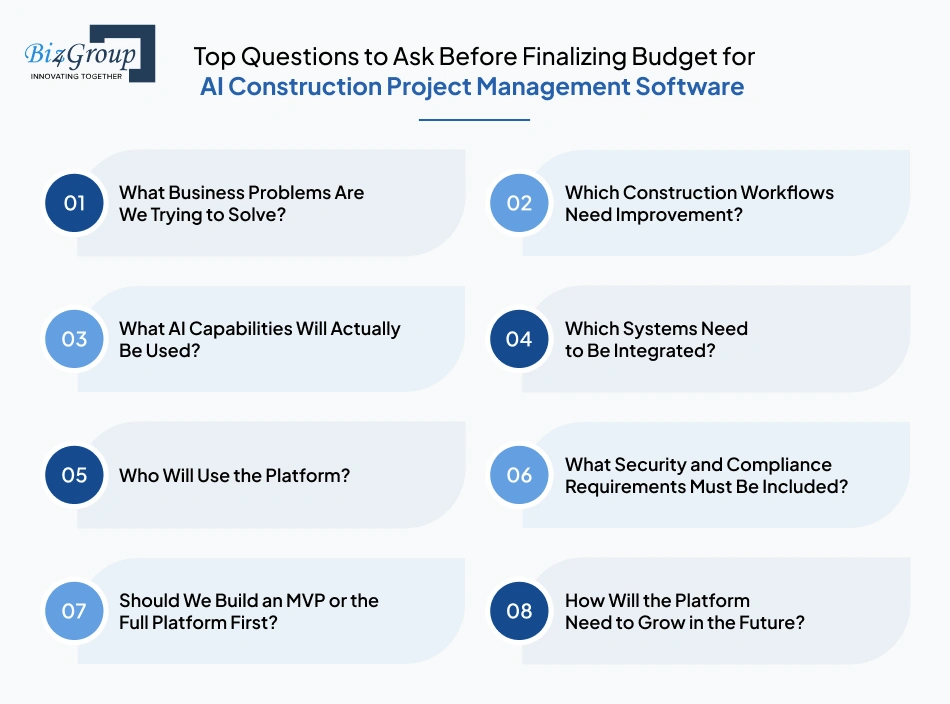
Before setting a budget for AI construction project management software, construction firms should understand what problems they want to solve, which workflows need improvement, what AI capabilities are required, and which systems must be connected. These decisions have the biggest impact on project scope, development effort, and overall cost.
Start by identifying the problems the software is expected to address. These may include schedule delays, cost overruns, missed change orders, disconnected reporting, inefficient subcontractor coordination, or excessive manual work. Defining the problem first helps ensure the budget is focused on outcomes rather than features.
The workflows causing the most operational challenges should be prioritized. This may include scheduling, RFIs, submittals, change orders, document management, field reporting, budgeting, or subcontractor management. The more workflows included, the larger the development effort and budget.
Many construction firms ask: "What are the biggest ways AI is actually being used inside construction project management software right now?" The most common use cases include predicting schedule delays, forecasting project costs, automating document workflows, identifying project risks, improving subcontractor coordination, and tracking site progress. Companies planning advanced AI functionality often choose to hire AI developers early to evaluate technical requirements and implementation costs.
Most construction companies already use multiple software platforms. Before budgeting, identify whether the new system must connect with BIM software, ERP systems, accounting tools, payroll platforms, project management software, or field applications. Integration requirements can significantly increase development complexity and cost.
Different users need different capabilities. Project managers, superintendents, subcontractors, executives, estimators, safety teams, and administrators often require separate permissions, dashboards, reports, and workflows. Supporting multiple user groups increases development effort.
Construction software often needs audit trails, role-based permissions, approval histories, document retention controls, encryption, and OSHA-related documentation workflows. Defining these requirements early helps avoid costly changes later in the project.
A common question is: "We need scheduling automation, RFI tracking, subcontractor management, AI cost forecasting, and real-time site monitoring. Should we build everything at once?" For most firms, the answer is no. Starting with an MVP allows teams to validate workflows, gather user feedback, and reduce upfront investment before expanding the platform.
A platform supporting a few projects today may need to support dozens or even hundreds of projects in the future. Growth plans affect infrastructure, integrations, security requirements, and long-term maintenance costs, making scalability an important budgeting consideration.
|
Budget Question |
Why It Matters |
|---|---|
|
What business problems are we solving? |
Keeps the project focused on measurable outcomes |
|
Which workflows need improvement? |
Determines feature scope and development effort |
|
What AI capabilities are required? |
Influences complexity, timelines, and cost |
|
Which systems need integration? |
Impacts development and testing requirements |
|
Who will use the platform? |
Affects permissions, workflows, and user experience design |
|
What security and compliance controls are needed? |
Defines governance and data protection requirements |
|
MVP or full platform? |
Impacts initial investment and delivery timelines |
|
How will the platform scale? |
Influences architecture and long-term costs |
If you're still deciding between building, buying, or customizing, the real question is not
which option is cheaper. It's which option best supports the way your construction business
operates today and where you want it to be in the next few years.
For some firms, an off-the-shelf platform is enough. For others, disconnected systems, complex approval workflows, growing project portfolios, and AI requirements make customization or custom development the more practical long-term choice.
This is where Biz4Group can help. Our AI team works closely with construction businesses to evaluate existing software ecosystems, identify workflow gaps, assess AI opportunities, and determine whether a build, buy, or hybrid strategy makes the most sense. From roadmap planning and architecture design to custom platform development, integrations, and AI implementation, we help organizations make informed technology decisions based on operational needs instead of assumptions.
AI construction project management software delivers the most value when it solves real operational challenges, whether that's schedule delays, cost overruns, fragmented reporting, inefficient subcontractor coordination, or manual project administration. The goal is not to add AI to every workflow, but to apply it where it improves visibility, decision-making, and project outcomes.
For organizations with unique workflows, complex integrations, or long-term technology goals, partnering with an experienced custom software development company can help identify the right approach. Once the business requirements are clearly defined, it becomes much easier to build AI software that supports how construction teams actually work rather than forcing them to adapt to software limitations.
Most projects take 3 to 8 months. An MVP typically requires 2-4 weeks, while a fully featured platform with AI forecasting, BIM integrations, ERP connectivity, and mobile applications can take 6-8 weeks .
Development costs typically range from $25,000 to $300,000+. The final cost depends on feature scope, AI capabilities, integrations, security requirements, mobile apps, and scalability needs.
Yes. Most platforms can integrate with BIM software, ERP systems, accounting tools, payroll platforms, project management software, and document management systems through APIs and custom integrations.
General contractors, construction management firms, developers, and specialty contractors managing multiple projects, subcontractors, documents, and budgets typically benefit the most.
No. Historical data improves forecasting accuracy, but the platform can start with current project data and become more effective as additional information is collected.
The most common reason is poor requirements planning. Building software before clearly defining workflows, integrations, user roles, and business goals often leads to cost overruns, delays, and low adoption.

with Biz4Group today!
Our website require some cookies to function properly. Read our privacy policy to know more.