Location :
Orlando, FL, USA
Location :
Orlando, FL, USA +1 (407) 714-1616
 info@biz4group.com

 AI Powered Summary by Biz4AI
- An ambient AI medical scribe listens to a clinician-patient visit, drafts a note such as a SOAP note, and lets the clinician review and sign it in the EHR. AI ambient clinical documentation runs in six steps, from audio capture to EHR write-back, and a five-hospital JAMA study found modest gains of about 16 fewer documentation minutes a day.
- A HIPAA compliant ambient AI medical scribe needs signed BAAs, encryption, audit logs, and a retention plan. Consent is a separate rule: state recording laws vary, so capture consent at every visit and have counsel confirm your state's requirements.
- How to build an ambient AI medical scribe for hospitals and clinics: start with core features for one specialty and one EHR, such as audio capture, speaker labels, note drafting, source links, a review screen, and EHR write-back. Add ambient clinical intelligence features like coding and order drafting only after a pilot proves clinicians keep using the tool.
- Ambient AI medical scribe development typically costs $30,000 to $300,000, and costs differ by project. At Biz4Group, a focused MVP takes 2 to 4 weeks and an enterprise build takes 6 to 8 weeks. Building makes sense when you need specialty depth, multi-EHR support, or data ownership that an EHR's built-in scribe does not offer.
- Most failures come from clinicians signing notes without reading them, missed details, and uneven adoption, so design the review step to be hard to skip and test on real visits. Biz4Group has delivered 100+ healthcare AI projects and can help you scope your first pilot.
For general information only, not legal or medical advice. Costs and timelines are estimates and vary by project.
Picture your best physician at 8 p.m. The clinic closed hours ago. Dinner is cold, and they're still finishing today's notes in the EHR.
Clinicians call it pajama time. It's the main reason an ambient AI medical scribe now sits on the roadmap of almost every hospital and clinic we talk with.
So why do so many teams still struggle to get real value from one?
The 2026 numbers explain a lot.
Doximity's 2026 State of AI in Medicine report found that 29% of physicians now use voice-based documentation tools such as ambient listening and AI scribes, up from 20% in April 2025. Adoption is moving fast.
The results are moving slower. A JAMA study found that more than 1,800 clinicians across five hospitals for over two years. AI scribe users spent 16 fewer minutes on documentation and 13 fewer minutes in the EHR each day and saw about half an extra patient per week.
Those gains are real. They're also smaller than many vendor pitches suggest.
What separates a tool clinicians keep using from one they quietly drop? Fit. It has to fit the specialty, the EHR, the review workflow, and the recording-consent rules in your state.
We've watched this play out across our work. Biz4Group has spent 20+ years building software and has delivered more than 100 healthcare AI projects. One lesson keeps coming back: teams that try to serve every specialty at launch end up with average accuracy everywhere, and clinicians stop trusting the notes. Teams that start with one specialty and one EHR earn trust first, then expand.
That is the core of building an ambient AI scribe that lasts. The same rule holds for any AI medical scribe you scope, from a one-clinic pilot to a hospital network.
The timing adds pressure. Epic has begun rolling out AI Charting, its own native ambient scribe, and other EHR vendors are bundling similar tools.
So, the question every CTO and founder now asks us is this: if your EHR ships its own, why would anyone still build an ambient AI medical scribe for healthcare?
Why build your own ambient AI medical scribe when your EHR already has one?
Because a native tool is designed for the average visit. EHR-native scribes offer zero integration friction inside one ecosystem, but limited specialty depth and no cross-platform portability. A custom build gives you specialty-specific note formats, support for every EHR you run, full ownership of your audio and patient data, and a product you can offer to other providers. Your EHR's scribe can still be one integration point, not your ceiling.
Whether you plan to create an ambient AI medical scribe for a hospital system or develop an ambient AI medical scribe for clinics, the same few decisions shape the outcome.
Next, we'll show you how AI ambient clinical documentation works, what HIPAA and state recording laws require, what to build first, and what it costs.
By the end, you'll know how to build an ambient AI medical scribe for hospitals and clinics. Just as important, you'll know how to make it one your clinicians keep using.
What Is an Ambient AI Medical Scribe, and Why Is Every Hospital Suddenly Investing in One?
Let's start with the plain answer.
What is an ambient AI medical scribe?
An ambient AI medical scribe is software that listens to a clinician-patient conversation through a microphone, converts the speech to text, and drafts a structured clinical note, such as a SOAP note. The clinician reviews, edits, and signs the note inside the EHR.
The word "ambient" is the part that matters. Nobody presses a button after every sentence or reads a note into a recorder. The clinician talks to the patient the way they always have, and the software works in the background.
That sounds simple. So how is it different from the tools clinics already tried?
AI Ambient Clinical Documentation vs. Dictation and Human Scribes
Most clinics have tested at least one alternative. Here's how the three approaches compare.
|
Aspect |
Dictation |
Human scribe |
Ambient AI medical scribe |
|---|---|---|---|
|
How it works |
Clinician speaks the note aloud, often after the visit |
A person documents in the room or remotely |
Software listens to the visit and drafts the note |
|
Clinician effort |
High: narrates every note |
Low to medium: reviews and signs |
Low to medium: reviews, edits, and signs |
|
Availability |
Whenever the clinician has time |
Limited by staffing and schedules |
Any visit, at any hour |
|
Main weak spot |
The work moves to after hours |
Hiring, training, and turnover |
Accuracy, consent, and review discipline |
Dictation has a hidden cost. The clinician still narrates the whole visit a second time, so the work shifts to a different part of the day instead of disappearing.
Human scribes solve that, but they're hard to hire, hard to train, and hard to scale across clinics. Remote scribes also add another person who can hear the visit.
AI ambient clinical documentation goes after both problems. The note is drafted during the visit, and no extra person is needed in the room.
You'll also see the term ambient clinical intelligence. It covers the note today and where the technology is heading: drafting orders, suggesting billing codes, and prompting the clinician when something is missing. That direction is the same one behind an AI assistant for physicians, which can reuse the same encounter audio for follow-up tasks.
When we scope projects with clients, we sort scribes into five types: ambient, dictation-assisted, template-driven, fully automated with EHR integration, and hybrid with human review. Ambient sits at the hands-free end. That also makes it the hardest to get right, because it needs strong noise handling and consent safeguards from day one.
What the 2026 Market Shift Means for Health Systems and Clinics
Why the sudden rush? Because these tools stopped being experiments.
As of 2026, 70% of physicians at UCSF Health use AI scribes in daily practice. At Kaiser Permanente, 7,260 physicians used them across more than 2.5 million patient encounters over 14 months, according to an NEJM Catalyst analysis cited in the same report.
Money followed the usage. Health Exec reported that ambient scribes generated about $600 million in sales in 2025, and analysts project the U.S. medical scribe market to approach $3 billion by 2033.
Then the EHR vendors joined in. Epic began limited availability of its native tool in early 2026, and athenahealth introduced athenaAmbient at no extra cost.
What does a free baseline change for you? It changes how buyers judge everything else. A custom product now has to win on what a bundled tool can't offer: specialty depth, support across several EHRs, ownership of your data, and proof of accuracy. That's the lens we recommend for ambient AI medical scribe development today.
Ambient scribes are one of several healthcare AI trends moving from pilot to standard tooling, and the ones that last are tied to a daily, measurable pain.
What the Independent Evidence Really Says About Time Saved
Some vendor pages advertise time savings of 70% or more. Independent studies describe something quieter, and more useful for planning.
- Five-hospital JAMA study (Mass General Brigham and UCSF): documentation time fell about 10% and total EHR time about 3%. The largest gains came from clinicians who used the scribe in more than half their visits, especially primary care physicians and advanced practice providers. The senior author noted that these modest time savings are unlikely to fully explain the burnout improvements seen in earlier research.
- UCSF study in JAMA Network Open (January 2026): across 1.2 million encounters and 1,565 physicians, scribe adopters saw roughly one more patient per week, with no increase in claim denials, according to Medical Economics.
- Spanish emergency care evaluation: across 48 hospitals and about 2.27 million emergency visits, clinicians used the scribe in 45.3% of consultations. Those consultations were 21.8% shorter on average, and transcription accuracy held at 93.9%. It was a retrospective observational study, so read it as a strong signal, not proof of cause. See the study.
One finding should change how you build. At UCSF, where 70% of physicians use a scribe, no technical mechanism confirms that a physician actually read the note before signing.
That's a product gap, not just a policy gap. You can design it for: highlight low-confidence sections and make the review step hard to skip.
So, the case for investing is solid, but the gains depend on how well the tool fits the workflow. Next, let's follow one visit from the microphone to the signed note.
Build or Buy: Which One Is Your Ambient AI Medical Scribe?
Tell us your specialty and your EHR, and we'll show you which path fits, including when your EHR's built-in scribe is enough.
Book a Free ConsultationHow Does Ambient AI Clinical Documentation Work Without Anyone Typing a Word?
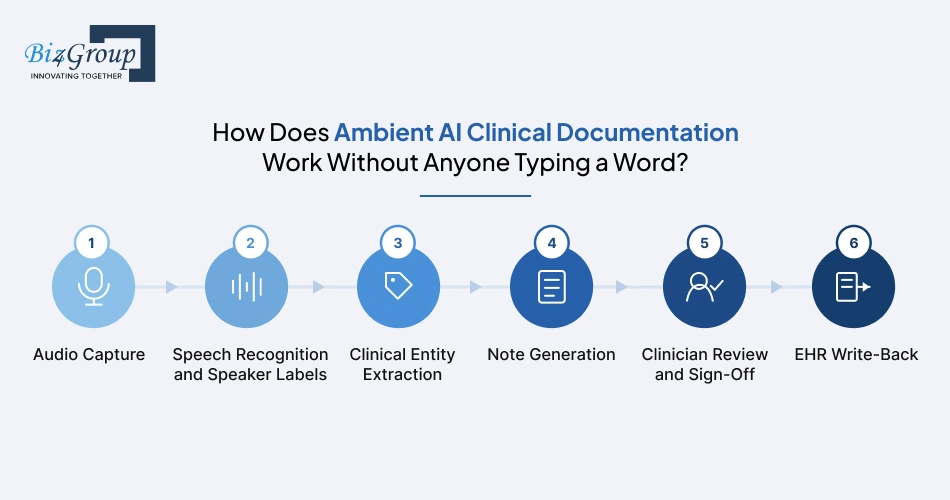
How does AI ambient clinical documentation work? The software captures the visit, turns speech into a speaker-labeled transcript, pulls out the clinical facts, drafts a note, and hands it to the clinician for review. In a well-built system, nothing becomes part of the chart until a clinician signs it.
Let's follow a fictional 44-second visit through every stage so you can see what each one actually produces. The patient and details are made up. The structure is what a real ambient AI medical scribe does.
The visit (fictional)
Step 1: Audio Capture
A tablet, phone, or room microphone records the visit after the patient agrees. The same capture layer often runs on a voice AI platform for healthcare, so it has to handle background noise, overlapping speech, and telehealth audio. Products differ here: some discard raw audio once the note exists, and others keep it for audit. That choice shapes your review process and storage risk.
What the system stores at this stage
Step 2: Speech Recognition and Speaker Labels
Automatic speech recognition converts speech to text and labels each speaker. Because the transcript contains protected health information, it needs the same controls as any HIPAA-compliant AI medical transcription platform. Test accuracy on drug names and speaker attribution, not just overall word error rate. A patient's symptom logged as the clinician's observation is the kind of error an overall score misses.
What comes out
Step 3: Clinical Entity Extraction
Language models pick out symptoms, medications, allergies, exam findings, and plan items. Each fact keeps its speaker and timestamp, so patient-reported and clinician-observed information never blur together. Many teams also map these facts to ontologies such as SNOMED CT and UMLS to keep terminology consistent.
What comes out
|
Fact |
Value |
Said by |
Source |
|---|---|---|---|
|
Symptom |
Knee pain, 2 weeks, worse on stairs |
Patient |
00:06 |
|
Symptom |
Swelling last week |
Patient |
00:17 |
|
Medication |
Ibuprofen 400 mg, twice daily |
Patient |
00:17 |
|
Allergy |
Penicillin (rash) |
Patient |
00:29 |
|
Exam |
Mild swelling, right knee. No warmth. Full range of motion |
Clinician |
00:35 |
|
Plan |
X-ray, ibuprofen with food, follow-up in 2 weeks |
Clinician |
00:44 |
Step 4: Note Generation
A generative model arranges the facts into the format your clinicians use, such as SOAP. A good rule to enforce in code: every line traces to a transcript span, and a section with no source stays empty instead of being guessed. This is also where AI SOAP notes quality is won or lost, so tune templates and prompts by specialty.
The draft note
Notice what the scribe did not do. The clinician never named a diagnosis, so the assessment stays empty. A guessed diagnosis such as "osteoarthritis" would look helpful and be wrong.
A real-world reference. A custom-built scribe at Included Health uses Whisper for transcription and a GPT-4o pipeline to draft SOAP notes. More than 540 clinicians have used it, and 94% of the 63 who were surveyed reported reduced cognitive load. That is a self-reported survey from the team that built it, so weigh it as a signal, not proof.
Step 5: Clinician Review and Sign-Off
The clinician sees the draft with flags and source links beside it. Every edit is logged, which gives you a running measure of note quality. A signed note is only as good as the review behind it, so design the screen so unresolved flags are hard to miss.
What the clinician sees
Step 6: EHR Write-Back
Once signed, the note posts to the chart through FHIR or HL7 interfaces. How much lands as discrete data, such as allergies and medications, depends on how your AI EMR/EHR system exposes note types and lists. Start with the note text, then add discrete fields only with clinician confirmation.
What gets sent (simplified, illustrative)
The Full Pipeline at a Glance
|
Stage |
Input |
Output |
Failure to watch |
|---|---|---|---|
|
Audio capture |
Live visit |
Recorded session with consent flag |
Noise, missing consent |
|
Speech recognition |
Audio |
Speaker-labeled transcript |
Wrong drug names, mixed-up speakers |
|
Entity extraction |
Transcript |
Facts with speaker and timestamp |
Patient claims logged as clinician findings |
|
Note generation |
Facts |
Draft SOAP note |
Invented details, filled-in gaps |
|
Clinician review |
Draft note |
Signed note plus edit log |
Signing without reading |
|
EHR write-back |
Signed note |
Chart entry |
Wrong note type, overwritten data |
Every stage above touches protected health information. So the next question is the one your security team will ask first: is this safe enough for real patients?
Is Your Ambient AI Medical Scribe Actually Safe Enough for Patient Data?
It can be, but only if safety is designed in from the first sprint. Every stage of an ambient AI medical scribe touches protected health information (PHI): the audio, the transcript, the draft note, and the logs.
We've learned this the hard way across healthcare builds. On NVHS, a HIPAA-compliant AI platform we built for U.S. veterans, encryption, authentication, and audit logging went into the architecture before any feature work. Retrofitting them later costs more and never fits as cleanly.
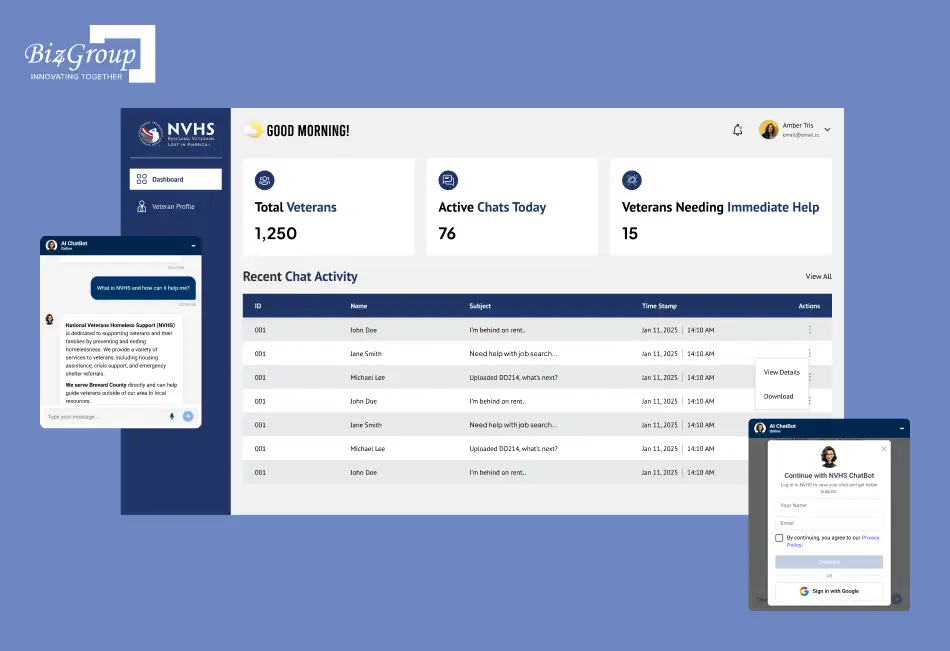
Below is every layer a HIPAA compliant ambient AI medical scribe has to cover, in the order your security and legal teams will ask about them.
1. HIPAA Privacy and Security Rules
Any scribe that handles PHI falls under HIPAA, and that includes audio, transcripts, and draft notes. HIPAA governs how PHI is handled after capture, not whether a visit can be recorded, which is a state-law question. Start with a documented security risk analysis before real patient data enters the system.
2. Business Associate Agreements and Subprocessors
A vendor that processes PHI on behalf of a covered entity is a business associate, so a signed BAA must exist before any audio flows. Read it closely: it should limit how the vendor may use your data and say whether the vendor can train models on it. It should also cover every subprocessor in the chain, including speech, language model, and cloud vendors.
3. De-Identification and Model Training
HIPAA recognizes two de-identification methods under 45 CFR 164.514: Safe Harbor, which removes 18 listed identifiers, and Expert Determination. Calling data "de-identified" without following one of them does not remove it from HIPAA. Default to no training on customer PHI unless the contract and your legal team explicitly allow it.
4. Encryption, Access Control, and Audit Logs
HIPAA's technical safeguards cover access control, audit controls, integrity, authentication, and transmission security (45 CFR 164.312). Encrypt audio and transcripts in transit and at rest, use role-based access with multi-factor authentication, and manage keys in a dedicated key service. Log every view, edit, and export of a note with the user, time, and version.
5. Audio and Transcript Retention
Decide how long you keep raw audio, transcripts, and drafts, and write it into the contract. Products differ here: some delete audio once the note exists, and others keep it for audit. Keep only what you can justify, and delete on a schedule with proof.
6. Breach Notification and Incident Response
HIPAA requires business associates to notify the covered entity of a breach without unreasonable delay and no later than 60 days. Hospital buyers often ask for much shorter, specific timelines in the contract. Write your incident response plan and notice timelines into the BAA before launch.
7. HIPAA Security Rule Update
HHS proposed updates to the HIPAA Security Rule in January 2025. The proposal points toward asset inventories, data-flow mapping, stronger encryption expectations, and tighter access controls. Ask your counsel for the current status, and build to those expectations now, because an ambient scribe's data flows map onto them directly.
8. Patient Consent and State Recording Laws
State recording laws decide whether a visit can be recorded, and a HIPAA-style contract does not change that. Some states require every person in the room to agree. Capture consent for each encounter, give patients a clear way to decline, and plan for interpreters and family members who join the visit.
9. State AI Disclosure Laws
Some states, including California and Texas, have enacted healthcare AI disclosure rules. Their scope differs, and some apply to patient-facing AI communications more than to clinician-reviewed notes. Make disclosures configurable by state and ask counsel which rules reach your product.
10. Sensitive Care Settings and 42 CFR Part 2
Behavioral health, reproductive health, substance use, and infectious disease visits call for extra care. Substance use disorder records also fall under 42 CFR Part 2, which has its own consent rules. Let each clinic switch ambient recording off by visit type and set retention by specialty.
11. FDA Rules: Documentation vs. Decision Support
A scribe that records what was said sits outside FDA device rules, but one that suggests diagnoses, orders, or care gaps edges toward decision support. FDA's January 2026 clinical decision support guidance ties non-device status to the clinician being able to independently review the basis of a recommendation. If your roadmap moves toward diagnosis or device data, the path for an AI system for medical devices is a different project from a documentation tool.
12. Joint Commission and CHAI AI Governance
The Joint Commission and the Coalition for Health AI published guidance in September 2025 with seven elements: governance, privacy and transparency, data security, ongoing monitoring, event reporting, bias assessment, and training. It is guidance, not law, but hospital buyers use it as a vendor checklist. Give customers the evidence a strong AI governance in healthcare program asks for: usage, edit rates, accuracy audits, and an issue log.
13. Clinical Safety Controls
Every note stays a draft until a clinician signs it, and every statement links back to the transcript. Design the review step so it's hard to skip, by highlighting low-confidence sections and requiring flags to be resolved. Track edit rates and audit sampled notes for omissions and invented details.
14. Third-Party Audits and Certifications
SOC 2 Type II, ISO 27001, HITRUST, and independent penetration tests show controls were actually tested. A badge alone isn't proof, so ask for the audit reports and pen-test summaries themselves. Get clear written answers on where data is stored and who can access it.
15. Medical Record Integrity and Patient Access
The signed note becomes part of the legal medical record, so retention, amendment, and patient-access rules apply to it. Version every draft and edit so you can show what the AI proposed and what the clinician approved. A platform built for AI medical records management already handles indexing, access requests, and audit history, and your scribe should feed it instead of creating a second store.
Compliance Checklist at a Glance
|
Layer |
What it covers |
What you build |
|---|---|---|
|
HIPAA Privacy and Security |
PHI in audio, transcripts, notes |
Risk analysis, safeguards, policies |
|
BAAs |
Vendor and subprocessor chain |
Signed BAAs, named subprocessor list |
|
Model training |
De-identification and data use |
No-training default, documented method |
|
Technical safeguards |
Access, audit, transmission |
Encryption, RBAC, MFA, immutable logs |
|
Retention |
Audio, transcripts, drafts |
Written schedule, automated deletion |
|
Incident response |
Breach notice |
Defined timelines, encounter-level tracing |
|
State recording laws |
Consent to record |
Per-encounter consent, opt-out, interpreter handling |
|
State AI disclosure |
AI use notices |
Configurable disclosures by state |
|
FDA |
Documentation vs. decision support |
Separate suggestions, show sources |
|
Governance |
Oversight and monitoring |
Usage, edit-rate, and accuracy reporting |
|
Records |
Legal record, access |
Versioning, EHR write-back, audit history |
Safe is the floor. Next, let's look at which features are worth building on top of it.
Which Ambient AI Medical Scribe Features Are Worth Building (and Which Are Just Noise)?
Feature lists are easy to write and expensive to build. The smarter question is which features earn a clinician's trust in the first month.
The tables below cover the full feature set for ambient AI medical scribe development, sorted by when to build each one.
- P1: ship at launch.
- P2: add after your pilot.
- P3: add once adoption is proven.
Effort is a typical estimate for a focused team and shifts with your specialty and EHR.
Core Features for a First Release
These turn a recording into a note a clinician will sign. Skip any of them and adoption stalls, because clinicians go back to typing. We recommend launching these for one specialty and one EHR before widening scope.
|
Feature |
What it does |
Why it matters |
Priority |
|---|---|---|---|
|
Ambient audio capture |
Records the visit on web, mobile, tablet, or a room microphone |
Works in any exam room or telehealth call |
P1 |
|
Consent capture and recording controls |
Records patient consent per visit, with a pause or decline option |
Recording rules vary by state, so consent must be built in |
P1 |
|
Speaker separation |
Labels who said what: clinician, patient, family member |
Keeps patient statements apart from clinician findings |
P1 |
|
Medical speech recognition |
Converts speech to text and handles drug names, abbreviations, and accents |
Wrong drug names erode trust fastest |
P1 |
|
Clinical fact extraction |
Pulls out symptoms, medications, allergies, exam findings, and plan items |
Feeds the note with structured facts |
P1 |
|
Note generation in your templates |
Drafts SOAP, H&P, or specialty notes in the clinician's format |
The draft must look like the notes clinicians already write |
P1 |
|
Source linking |
Ties each note statement back to the transcript and audio |
Lets clinicians verify a line in seconds |
P1 |
|
Review and edit panel |
Shows the draft with flags for empty sections and low-confidence lines |
Puts attention where errors hide |
P1 |
|
One-click sign-off with edit log |
Signs the note and records every change |
Creates the audit trail and quality data |
P1 |
|
EHR write-back |
Posts the signed note into the chart through FHIR or HL7 |
Removes copy and paste |
P1 |
|
Security controls |
Encryption, role-based access, multi-factor login, audit logs |
Required before any real patient data (see the compliance section above) |
P1 |
|
Telehealth and multi-speaker support |
Captures video visits and visits with several people |
Many visits are not two-person, in-room conversations |
P1 |
Features That Win Over Skeptical Physicians
Clinicians judge a scribe by how much editing it needs and how little it slows them down. These features decide whether they keep using it after week one. Build them early, because they move usage more than any advanced AI feature.
|
Feature |
What it does |
Why it matters |
Priority |
|---|---|---|---|
|
Learning from edits |
Adapts phrasing and structure to each clinician's corrections |
Notes start to sound like the clinician |
P2 |
|
Specialty templates and vocabulary |
Loads templates and terms for cardiology, pediatrics, behavioral health, and others |
Generic notes get rejected in specialty care |
P1 |
|
Per-clinician preferences |
Lets each user set note length, section order, and style |
Removes the "one size fits nobody" complaint |
P2 |
|
Fast turnaround |
Delivers the draft by the end of the visit |
A slow draft brings back after-hours charting |
P1 |
|
Voice and quick-edit commands |
Lets clinicians fix a section by voice or regenerate it with one tap |
Cuts the editing that eats time savings |
P2 |
|
Offline mode and sync |
Captures audio without connection and syncs later |
Keeps remote and low-signal clinics covered |
P2 |
|
Multilingual and accent support |
Handles Spanish and other languages, plus varied accents |
Serves diverse patient populations |
P2 |
|
Interpreter and family handling |
Captures and labels third parties in the room |
Avoids misattributed statements |
P2 |
|
Patient-friendly visit summary |
Drafts plain-language after-visit instructions for clinician approval |
Extends the note into patient communication, where healthcare conversational AI can also answer follow-up questions |
P2 |
|
In-app feedback button |
Lets clinicians flag a bad note in one click |
Feeds your accuracy fixes with real cases |
P1 |
Admin, Analytics, and Integration Features
These are the features your buyer, not the clinician, will ask about. A hospital CIO wants proof of usage, quality, and control before expanding a rollout. Build the basics early, then deepen them as customers ask.
|
Feature |
What it does |
Why it matters |
Priority |
|---|---|---|---|
|
Admin console |
Manages users, templates, consent rules by state, and retention settings |
Lets each clinic set its own rules without engineering help |
P1 |
|
Usage and quality analytics |
Tracks adoption, time in notes, edit rate, and turnaround |
Gives buyers proof of value |
P1 |
|
Governance reporting |
Exports usage, accuracy audits, and issue logs |
Answers hospital AI oversight requests |
P2 |
|
Single sign-on |
Connects to the customer's identity provider |
Standard in hospital IT reviews |
P1 |
|
Multi-EHR connectors |
Supports several EHRs through FHIR, HL7, or integration engines |
Opens more customers beyond one EHR |
P2 |
|
Model monitoring and drift alerts |
Watches accuracy and flags declines after updates |
Catches quality drops before clinicians do |
P2 |
|
Multi-tenant and white-label options |
Runs many clinics or brands on one platform |
Matters if you plan to sell the product to other providers |
P3 |
Ambient Clinical Intelligence: Orders, Coding, and Decision Support
Ambient clinical intelligence goes beyond the note. It uses the same conversation to suggest the next step, such as an order, a code, or a follow-up. Add these after adoption is proven, and keep every suggestion behind a clinician approval step. Features that recommend diagnoses or treatment can move toward decision support, which is why the FDA discussion in the compliance section above matters here.
|
Feature |
What it does |
Why it matters |
Priority |
|---|---|---|---|
|
Coding suggestions |
Proposes CPT and ICD-10 codes from the encounter for approval |
Supports billing accuracy and cuts rework |
P2 |
|
Order drafting |
Prepares lab, imaging, and referral orders for the clinician to confirm |
Saves clicks after the visit |
P3 |
|
Follow-up tasks and scheduling |
Creates follow-up appointments and reminders from the plan |
This is where a healthcare AI agent can act on what was said |
P3 |
|
Referral letters and prior authorization |
Drafts referral letters and prior authorization requests |
These paperwork-heavy tasks fit AI healthcare workflow automation |
P3 |
|
Medication and allergy checks |
Flags interactions and conflicts with the chart |
Adds safety, and needs careful clinical validation |
P3 |
|
Care-gap prompts |
Reminds clinicians about screenings and follow-ups |
Helpful but edges toward decision support |
P3 |
|
Discrete data updates |
Proposes updates to problem lists and medication lists |
Reduces double entry, and needs clinician confirmation |
P3 |
|
Documentation completeness alerts |
Warns when required elements are missing |
Helps compliance and coding |
P2 |
Features to Skip at Launch
Some ideas sound great in a pitch deck and drain your budget before you have proof anyone needs them. We suggest holding these until your pilot data says otherwise.
|
Feature |
Why to wait |
|---|---|
|
Notes signed with no clinician review |
Removes the safety net, and most buyers will not accept it |
|
Every specialty at once |
Spreads accuracy thin, so clinicians trust none of the notes |
|
Video and other sensor capture |
Adds cost and privacy questions before audio is proven |
|
Custom-trained speech models |
Measure off-the-shelf accuracy on your audio first |
|
Auto-placing orders |
Wait until suggestions are trusted and approval flows are tested |
|
Complex patient-facing chat |
Start with a clinician-approved visit summary |
|
Heavy custom analytics |
Begin with the handful of metrics buyers actually ask for |
How to Decide What Goes First
Start with the P1 rows for one specialty and one EHR. Run a pilot with real clinicians, measure edit rates and turnaround, and let those numbers pick your P2 list. Then add ambient clinical intelligence one feature at a time, each behind an approval step.
That is how a feature list becomes a product clinicians keep using. Next, let's turn it into a build plan.
So, How Do You Build a HIPAA Compliant Ambient AI Medical Scribe Without Cutting Corners?
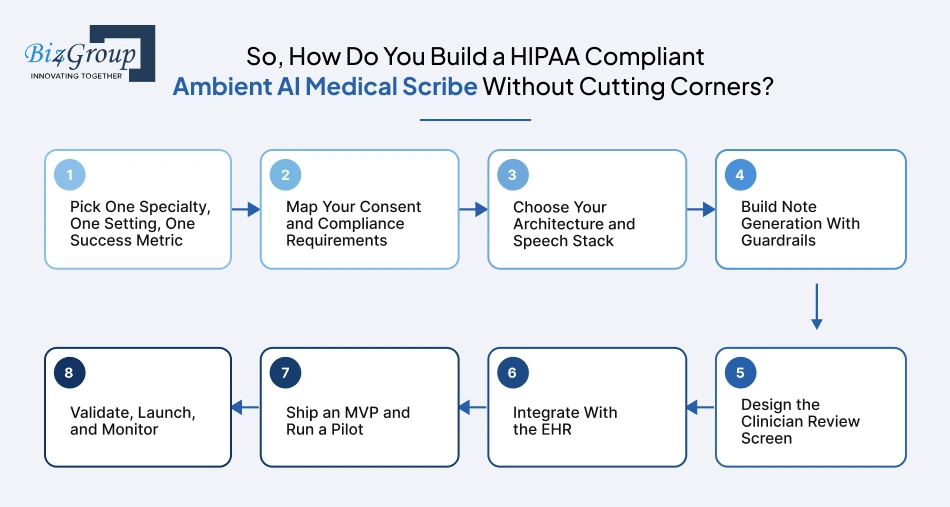
In eight steps, with compliance settled in step 2 and a pilot before any scale-up. That order is how to build an ambient AI medical scribe for hospitals and clinics without redoing the work later.
Step 1: Pick One Specialty, One Setting, One Success Metric
Start narrow. Choose one specialty, one care setting, and one measurable goal before writing code. Then sit with the clinicians who will use it, because a scribe built for the average visit fits no one.
- Choose the specialty and visit type first, such as primary care follow-ups.
- Record a baseline: time in notes, after-hours charting, note turnaround.
- Agree one success metric with a clinical lead.
- Interview physicians, nurses, and front desk staff about their real workflow.
Step 2: Map Your Consent and Compliance Requirements
List the rules that apply before you pick tools, because they shape the architecture. They decide where audio lives, how long it stays, and which vendors you can use. The compliance section above has the full checklist.
- Design the consent step for each visit, with a way to decline.
- Sign a BAA with every vendor that touches PHI.
- Write the retention schedule for audio, transcripts, and drafts.
- Complete a security risk analysis and have counsel review the plan.
Step 3: Choose Your Architecture and Speech Stack
Decide where the system runs, whether it processes audio live or after the visit, and which parts you buy or build. Test speech recognition on your own recordings, not vendor demos.
- Shortlist two or three speech engines and test them side by side.
- Measure drug-name accuracy and speaker attribution, not just overall accuracy.
- Use HIPAA-eligible hosting under a signed BAA.
- Log the model and prompt version behind every note.
Step 4: Build Note Generation With Guardrails
Turn extracted facts into notes in the format your clinicians already use. Every line should trace back to a transcript span, and a section with no source stays empty. Build a test set of real, de-identified visits with clinician-written reference notes.
- Constrain the output to a fixed note schema.
- Link each statement to its transcript source.
- Block unsupported content, such as a diagnosis nobody stated.
- Score drafts on omissions, invented details, and misattributed statements.
Step 5: Design the Clinician Review Screen
The review screen decides whether people keep using the product. Show the draft, the flags, and the source audio side by side so a clinician can verify a line in seconds. Track every edit, because your edit rate is your best quality signal.
- Flag empty sections and low-confidence lines.
- Add one-tap regenerate for any section.
- Require unresolved flags to be cleared before signing.
- Test the screen with real clinicians before building anything else on top of it.
Step 6: Integrate With the EHR
Plan write-back early, because EHR access and approvals take time. Start by posting the signed note text through FHIR or HL7, then add discrete fields once clinicians confirm them. Teams that already offer AI integration services can help with vendor programs, sandbox access, and note-type mapping.
- Pick one EHR first.
- Get sandbox access and confirm authentication early.
- Map your note format to the EHR's note types.
- Handle failed writes without losing the signed note.
Step 7: Ship an MVP and Run a Pilot
Launch the first-release features from the previous section for a small group of clinicians. Focused MVP development gets you real feedback before you spend on advanced features. Run the pilot long enough to see week-four behavior, since launch-week excitement fades.
- Set go and no-go criteria before the pilot starts.
- Track usage, edit rate, and turnaround against your baseline.
- Hold a short weekly feedback session with pilot clinicians.
- Fix the top three complaints before adding new features.
Step 8: Validate, Launch, and Monitor
Before scaling, audit a sample of notes for omissions, invented details, and mixed-up speakers. After launch, watch edit rates by specialty, because a model update can shift quality without warning. Give administrators the usage and quality reports they need for oversight.
- Audit sampled notes on a set schedule.
- Set alerts for drops in accuracy or jumps in edit rate.
- Version every model and prompt change.
- Keep an issue log that clinicians can add to in one click.
Create an Ambient AI Medical Scribe for a Hospital: Enterprise Requirements
Hospitals add security reviews, several EHR workflows, and formal AI oversight. Expect inpatient, emergency, and outpatient teams to need different note types. Once notes flow reliably, the same encounter data can feed AI automation services for referrals, prior authorization, and scheduling.
- Prepare for a full security questionnaire and penetration test summary.
- Support single sign-on and exportable audit logs.
- Provide reporting for the hospital's AI governance committee.
- Roll out department by department, not all at once.
- Plan downtime procedures for when the scribe is unavailable.
Develop an Ambient AI Medical Scribe for Clinics: A Leaner Path
Clinics need fast setup, low administrative overhead, and pricing that fits a small practice. Start with one specialty and the EHRs your clinics actually run. After the scribe earns trust, an AI automation system for clinics can take on intake, reminders, and follow-ups.
- Aim for onboarding in minutes, not weeks.
- Support telehealth visits from day one.
- Price per provider so cost stays predictable.
- Offer specialty templates that work out of the box.
- Provide hands-on support during the first weeks.
Build an Ambient AI Medical Scribe for Healthcare When Off-the-Shelf Falls Short
Your EHR's built-in scribe covers the average visit. Custom building ambient AI medical scribe products makes sense when your needs go past it, and your EHR's tool can still act as one integration point. If any of the points below describe you, a custom build is worth scoping.
- You need specialty depth that a general tool does not offer.
- You run more than one EHR or plan to.
- You want ownership of audio, transcripts, and note data.
- You plan to offer the scribe as a product to other providers.
- You need custom review flows, consent rules, or reporting.
Those eight steps give you the roadmap. Next, let's look at what sits under the hood.
How Much Does Ambient AI Medical Scribe Development Cost, and Where Does the Budget Go?
Most projects land between $30,000 and $300,000. Costs differ by project, so treat every figure in this section as an estimate.
The range is wide on purpose. A pilot for one specialty and one EHR sits near the bottom. A multi-specialty, multi-EHR product for a hospital network sits near the top.
What moves a project along that range is scope: how many specialties you cover, how many EHRs you connect, where the system runs, and how deep your compliance and clinical validation go. If you plan to build an ambient AI medical scribe for healthcare, start with the feature costs below.
Building an Ambient AI Scribe: Cost by Feature
|
Feature |
What it covers |
Typical cost |
|---|---|---|
|
Discovery and compliance planning |
Workflow mapping, requirements, consent and BAA planning |
$2,500 to $10,000 |
|
UI/UX design |
Review screen, admin screens, clickable prototypes |
$3,000 to $18,000 |
|
Audio capture and consent controls |
Recording on web and mobile, per-visit consent, pause and decline |
$2,000 to $12,000 |
|
Speech recognition and speaker labels |
Engine integration, medical vocabulary, accuracy testing |
$3,500 to $25,000 |
|
Clinical fact extraction and note generation |
Structured facts, SOAP or specialty notes, source linking, guardrails |
$7,000 to $45,000 |
|
Clinician review and sign-off |
Draft view, flags, edit log, one-click signing |
$2,500 to $12,000 |
|
EHR integration (first EHR) |
FHIR or HL7 write-back, authentication, note-type mapping |
$3,000 to $35,000 |
|
Security and audit logging |
Encryption, role-based access, multi-factor login, audit trail |
$2,500 to $18,000 |
|
Admin console and analytics |
User management, retention settings, usage and edit-rate reports |
$1,500 to $12,000 |
|
Testing, clinical validation, and pilot |
Accuracy audits, clinician testing, pilot support |
$2,500 to $15,000 |
|
Core build subtotal |
Rows above, for one specialty and one EHR |
About $30,000 to $200,000 |
|
Extra specialty (each) |
Templates, vocabulary, clinician validation |
$5,000 to $25,000 |
|
Additional EHR connector (each) |
Another integration and its testing |
$8,000 to $30,000 |
|
Live in-visit processing |
Streaming pipeline and latency testing |
$6,000 to $25,000 |
|
Learning from clinician edits |
Feedback loop and personalization |
$5,000 to $20,000 |
|
Multilingual and accent tuning |
Added languages and accent testing |
$4,000 to $15,000 |
|
Coding suggestions and completeness alerts |
Code proposals for approval, missing-element warnings |
$6,000 to $25,000 |
|
Governance reporting and drift monitoring |
Audit exports, accuracy tracking, alerts |
$4,000 to $20,000 |
|
Orders and follow-up drafting |
Ambient clinical intelligence features behind clinician approval |
$10,000 to $40,000 |
|
Full enterprise scope |
Core build plus several add-ons |
Up to about $300,000 |
Add-on ranges are not meant to be added up. Few projects need every add-on at its highest cost, and most pick two to four.
What Affects Ambient AI Medical Scribe Development Cost?
- Number of specialties. Each one needs its own templates, vocabulary, and clinician validation.
- Number of EHRs and depth of write-back. Posting note text costs far less than updating discrete fields across several EHRs.
- Live or after-visit processing. In-visit drafts need streaming pipelines and more testing.
- Deployment model. Public cloud, private VPC, and on-premises differ in setup and operating cost.
- Accuracy targets. Off-the-shelf speech models cost less than custom tuning for noisy rooms and varied accents.
- Compliance and validation depth. A hospital security review and clinician-led accuracy testing take more time than a small clinic pilot.
- Consent and state rules. Configurable consent and disclosures by state add admin and logic work.
- Team and timeline. Senior healthcare AI teams cost more per hour but reduce rework, and rushed schedules add parallel workstreams.
- Platforms. Web only is leaner than web plus iOS and Android.
Hidden Costs in Building Ambient AI Medical Scribe Products
- Cost per note at volume. Model usage grows with every visit, so track it from the pilot.
- Security and compliance audits. SOC 2 Type II, penetration tests, and HITRUST if buyers ask for it, plus legal review of BAAs and consent flows.
- EHR vendor programs. Some vendors charge fees or add review time before you can go live.
- Re-validation after model updates. Clinicians retest notes whenever a model or prompt changes.
- Clinician onboarding and support. Training sessions, office hours, and a support channel during rollout.
- Ongoing maintenance. Many teams budget 15 to 20 percent of the build cost per year.
- Incident response and cyber insurance. Planning and coverage for the day something goes wrong.
- Storage for audio, transcripts, and logs. It adds up quickly when retention is long.
How to Reduce Ambient AI Medical Scribe Development Cost
- Launch one specialty and one EHR first. Expand only after the pilot shows clinicians keep using it.
- Buy speech recognition and the base language model. Build the review workflow, consent handling, and note schema, where your product differs.
- Start with after-visit processing. Add live processing once accuracy holds.
- Match model size to the task. Lighter models can handle extraction, and stronger ones can draft the note.
- Delete audio on a schedule. Shorter retention lowers storage cost and risk.
- Gate spending on pilot results. Let edit rate and turnaround decide which add-ons you fund.
- Reuse compliant components. Don't rebuild consent, logging, and access control from scratch.
- Track cost per note from week one. Set alerts so usage costs never surprise you.
- Work with a team that has healthcare experience. Rework on compliance and integration is the most expensive kind.
Build vs. Buy: Is It Worth It to Create an Ambient AI Medical Scribe for a Hospital or Clinic?
|
Factor |
Buy a vendor scribe |
Build your own |
|---|---|---|
|
Upfront cost |
Low: setup and onboarding |
$30,000 to $300,000 |
|
Ongoing cost |
Per-provider subscription, often in the low hundreds to about $1,000 per provider per month |
Hosting, model usage, and maintenance |
|
Time to launch |
Days to weeks |
2 to 4 weeks for a focused MVP, 6 to 8 weeks for an enterprise build |
|
Specialty and workflow fit |
Standard templates and configuration |
Built around your specialties and note formats |
|
EHR coverage |
Limited to the vendor's certified integrations |
Any EHR you choose to integrate |
|
Data ownership and control |
Set by the vendor contract |
You control audio, transcripts, and retention |
|
Differentiation and resale |
None, since competitors use the same tool |
Can be offered as your own product |
|
Cost as you grow |
Rises with every provider added |
Mostly fixed build cost, plus usage |
Here is illustrative math. Fifty providers at $300 per provider per month is $180,000 a year in subscriptions. A $150,000 build with about $30,000 a year in upkeep costs less than those subscriptions from roughly the second year, before usage and support costs.
If your EHR bundles a scribe at no extra cost, the buy column gets cheaper. So, the case to create an ambient AI medical scribe for a hospital, or develop an ambient AI medical scribe for clinics, rests on specialty fit, multi-EHR coverage, data ownership, or a product you plan to sell.
Budget is one risk to manage. The next is what goes wrong once the build starts.
Does "$30,000 to $300,000" Feel Like a Very Wide Gap?
It is, until you know your specialty, your EHRs, and where the system runs. Share those three and we'll narrow it to a number you can plan around.
Get a Free EstimationWhat Goes Wrong When Building Ambient AI Medical Scribes, and How Do You Fix It?
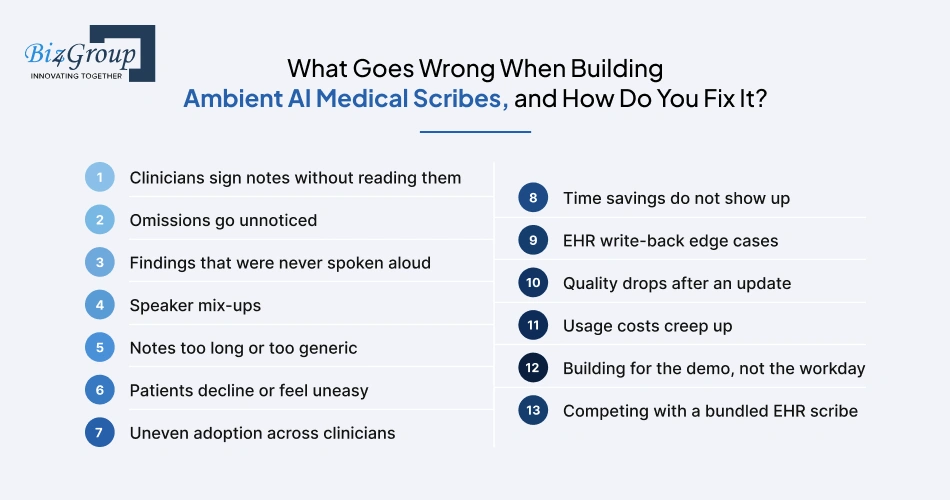
Most failures in building ambient AI medical scribe products do not come from the model. They come from the gap between a good demo and a busy clinic day. Here are the problems we see most often, why each one happens, and the fix.
What Goes Wrong When Building Ambient AI Medical Scribes?
|
Challenge |
Why it happens |
How to fix it |
|---|---|---|
|
Clinicians sign notes without reading them |
Note volume is high, and a polished draft looks finished |
Keep drafts short, flag only what needs a decision, require flags to be cleared, and audit sampled signed notes for errors that went through unchanged |
|
Omissions go unnoticed |
The model summarizes and quietly drops a negative finding, a counseling point, or a plan detail |
Test for missing items against clinician-written notes, and add completeness alerts for required elements |
|
Findings that were never spoken aloud |
Exam findings and observations are often not said out loud, so the transcript has nothing to draw from |
Leave unsupported sections empty, show "not stated" prompts, and coach clinicians to say key findings during the visit |
|
Speaker mix-ups |
Overlapping speech, family members, interpreters, and speakerphone confuse attribution |
Test with messy real recordings, label third parties, and ask for confirmation on sensitive statements |
|
Notes too long or too generic |
The model keeps small talk or over-explains routine points |
Tune length and style per specialty, allow per-clinician preferences, and track note length against edit rate |
|
Patients decline or feel uneasy |
The recording feels intrusive, or the explanation is unclear |
Give staff a short plain-language script, show a visible pause control, and offer a fast manual fallback |
|
Uneven adoption across clinicians |
Documentation styles differ, and some clinicians edit heavily |
Start with a few champions, share tips by specialty, track usage per clinician, and fix the top edit reasons |
|
Time savings do not show up |
Editing eats the gain, or freed time fills with new tasks |
Measure time in notes and after-hours charting, not just draft speed, and tune the areas where edits cluster |
|
EHR write-back edge cases |
Note types, locked encounters, duplicates, and timeouts break the happy path |
Test with real workflows, queue and retry failed writes, show write status to the clinician, and never lose a signed note |
|
Quality drops after an update |
A model or prompt change shifts output without any visible error |
Pin versions, run a clinician-reviewed test set before release, roll out in stages, and keep a rollback plan |
|
Usage costs creep up |
Longer visits, retries, and larger models raise cost per note |
Track cost per note by specialty, use lighter models for extraction, and set alerts on spikes |
|
Building for the demo, not the workday |
Teams add features before watching real clinic workflows |
Shadow clinics, pilot in real exam rooms, keep a clinical lead in every review, and build only what pilot data supports |
|
Competing with a bundled EHR scribe |
A free native tool sets the price expectation |
Compete on specialty depth, multi-EHR support, data control, and reporting, and be clear about which visits you win |
Most of these are cheaper to prevent than to repair, and the pilot is where you catch them. Next, here is why healthcare leaders choose Biz4Group to build it with them.
Why Do Healthcare Leaders Choose Biz4Group for Ambient AI Medical Scribe Development?
A scribe touches patient conversations, your EHR, and your compliance record, so the team you pick matters as much as the technology. Biz4Group is a HIPAA-compliant AI healthcare app development company based in Orlando, Florida, with an office in the Bay Area. We have spent 20+ years building software, including more than 100 healthcare AI projects, and our clients include Google, Adobe, and Citi.
What to Look for in a HIPAA Compliant Ambient AI Medical Scribe Development Company?
Here is what we suggest you ask any partner, and how we answer.
|
What to ask |
What Biz4Group brings |
What you can check |
|---|---|---|
|
Do you understand healthcare AI, or only AI? |
20+ years of software delivery and 100+ healthcare AI projects across clinical, patient, and administrative workflows |
Our healthcare portfolio, including CogniHelp, an AI companion app for dementia patients |
|
Is compliance part of the design? |
Privacy, access controls, encryption, and audit trails set during architecture, not added at the end |
NVHS, a HIPAA-compliant AI platform for U.S. veterans with encrypted data handling and real-time crisis detection |
|
Can you connect to our EHR? |
Interoperability work with FHIR, HL7, and SMART on FHIR, plus integration tools such as Redox and Mirth Connect |
Our published stack and integration process |
|
Will you start with our workflow? |
Requirements and workflow analysis with the people who will use the product, before development begins |
Our nine-step healthcare AI process |
|
Can you show delivery history? |
1,000+ projects and 750+ clients worldwide |
4.9 rating on Clutch and 4.8 on Upwork |
|
What happens after launch? |
Monitoring, security fixes, model updates, and ongoing support |
Our maintenance and support services |
Those answers are what a team that builds ambient AI medical scribes should be able to put in front of your CIO, compliance officer, and clinical lead.
How We Start: Four Questions for Your First Call
- Which specialty and visit type will you launch with?
- Which EHR do your clinicians use, and who owns the integration approval?
- Which states do you operate in, and how do you handle consent today?
- What number would tell you the pilot worked: minutes in notes, after-hours charting, or turnaround?
From those four answers, we scope a pilot, a timeline, and a budget you can defend to your board. If you are weighing a build against a bundled EHR tool, we will tell you when the bundled tool is enough.
That is how a HIPAA compliant ambient AI medical scribe development company earns trust before writing a line of code. Book a strategy session, and we will map your first pilot together.
Want an Ambient AI Medical Scribe That Works While Your Clinicians Eat Dinner?
Book a strategy session, and we'll scope your first pilot: a 2 to 4 week MVP or a 6 to 8 week enterprise build.
Book a Strategy SessionWrapping Up!
The evidence points one way. A well-built ambient AI medical scribe gives clinicians time back, but the gain depends on fit: the right specialty, the right EHR, consent handled properly, and a review screen your clinicians trust.
Three things to carry forward:
- Start narrow: One specialty, one EHR, and one success metric beat a broad launch every time.
- Design for safety first: Consent, BAAs, and clinician review belong in the architecture, not the final sprint.
- Let the pilot decide: Edit rates and turnaround should choose which features you fund next.
If you are ready to create an ambient AI medical scribe for a hospital or develop an ambient AI medical scribe for clinics, Biz4Group can help you scope your first pilot, timeline, and budget. Book a free consultation, and we will map it out with you.
FAQ
1. How does ambient AI clinical documentation work?
AI ambient clinical documentation works in five steps. The software records the visit with the patient's consent, converts speech into a speaker-labeled transcript, and pulls out symptoms, medications, and findings. It then drafts a note, such as a SOAP note, and hands it to the clinician to review, edit, and sign. Nothing enters the chart until the clinician signs it.
2. How accurate is an ambient AI medical scribe, and can it make things up?
Yes, it can make mistakes. An ambient AI medical scribe can mishear a drug name, leave out a detail, or add something nobody said. Published error rates vary widely because studies define errors differently, so test any scribe on your own visits before you commit. The safest design keeps every note a draft, links each statement to the transcript, and flags gaps for the clinician.
3. Is an ambient AI medical scribe HIPAA compliant, and do patients have to consent?
It can be, if it is built that way. To build a HIPAA compliant ambient AI medical scribe, sign a business associate agreement with every vendor that touches patient data, encrypt it, log all access, and set retention rules. Consent is a separate question. HIPAA generally does not require a separate authorization when a business associate handles the audio for treatment and operations. State recording laws differ, though, and some require everyone in the room to agree. Capture consent at each visit and confirm your state's rules with counsel.
4. How much does it cost to build an ambient AI medical scribe?
Most ambient AI medical scribe development projects cost between $30,000 and $300,000, and costs differ by project. A pilot for one specialty and one EHR sits near the bottom. A multi-specialty, multi-EHR product for a hospital network sits near the top. Buying a vendor scribe instead usually means a per-provider monthly subscription, often in the low hundreds of dollars and sometimes up to about $1,000.
5. How long does it take to build an ambient AI medical scribe for hospitals and clinics?
At Biz4Group, a focused MVP for one specialty and one EHR takes 2 to 4 weeks, and an enterprise-grade build takes 6 to 8 weeks. Timelines depend on scope. EHR vendor approvals, security reviews, and clinical validation can add time outside the build itself, so start those early.
6. Should you build your own ambient AI medical scribe if your EHR already has one?
Build an ambient AI medical scribe for healthcare when you need specialty depth, support for more than one EHR, ownership of your audio and note data, or a product to offer other providers. Epic's native tool, AI Charting, works inside Epic only. If your workflow is standard outpatient care on one EHR and speed matters most, the native scribe may be enough. A team that builds ambient AI medical scribes can help you scope both paths before you commit.
7. Can an ambient AI medical scribe integrate with Epic and other EHRs?
Yes. Most integrations post the signed note through FHIR or HL7 standards, often with SMART on FHIR to launch the scribe inside the EHR. Start by posting the note text. Add discrete fields such as medications and allergies once clinicians confirm them. Plan for EHR vendor approvals early, and design for multiple EHRs from day one if you intend to sell across customers.