 Location :
Orlando, FL, USA
Location :
Orlando, FL, USA +1 (407) 714-1616
 info@biz4group.com

- AI chatbot development is now used for support, onboarding, lead generation, and workflow automation across industries.
- A strong chatbot development process starts with one focused workflow and scalable integrations.
- Most custom AI chatbot development projects use RAG for easier updates and better knowledge retrieval.
- AI chatbot development costs usually range from $20,000 to $200,000+ based on complexity and integrations.
- Enterprise AI chatbots require stronger security, monitoring, analytics, and API integration workflows.
- Biz4Group LLC builds scalable AI chatbot systems for support, automation, and enterprise operations.
AI chatbot development is the process of building chatbots that can understand questions, retrieve information, generate responses, and interact with business systems in real time. Modern AI chatbots use technologies like large language models, natural language processing, workflow automation, and AI chatbot integration to support customer service, onboarding, lead qualification, and internal business operations.
Businesses are increasingly investing in AI chatbot development to automate repetitive conversations, improve response times, and reduce support ticket volume. But building a chatbot that can handle real customer questions is very different from adding a simple scripted bot with pre-written replies.
This guide is designed for founders, CTOs, product managers, and business leaders exploring custom AI chatbot development for customer support, operations, onboarding, and business automation. Whether you want to build an AI chatbot for your product, create a 24/7 customer service chatbot, or understand chatbot development cost and timelines, one of the biggest challenges is figuring out what type of chatbot your business actually needs.
In this blog, you’ll learn how AI chatbots work, what the chatbot development process looks like, which tools and frameworks are commonly used, what affects development complexity, and how to choose the right approach for your business.
What Is AI Chatbot Development?
AI chatbot development is the process of building chatbots that can understand questions, retrieve information, generate responses, and interact with business systems in real time. Modern AI chatbots use technologies like natural language processing, large language models, workflow automation, and retrieval systems to support customer service, onboarding, lead generation, and internal operations. Depending on the use case, businesses may use a chatbot development platform for simple automation or invest in custom AI chatbot development for more advanced workflows and integrations.
How AI Chatbots Differ From Traditional Chatbots
Traditional chatbots follow fixed rules and scripted conversation flows. AI chatbots can understand context, generate responses dynamically, and handle more natural conversations using machine learning models and conversational AI development techniques.
|
Traditional Chatbots |
AI Chatbots |
|---|---|
|
Follow predefined rules |
Generate responses dynamically |
|
Use fixed replies |
Understand natural language queries |
|
Break when wording changes |
Handle different ways of asking questions |
|
Mostly support FAQs |
Support multi-turn conversation |
|
Need manual updates |
Improve using chatbot training data |
|
Limited integrations |
Support API integration and workflow automation |
|
Best for simple tasks |
Better for complex business workflows |
Traditional chatbots still work well for simple tasks like routing users or answering repetitive questions. But businesses trying to automate customer support with AI, reduce support ticket volume, or improve customer engagement automation usually need AI chatbot development instead of rule-based systems. This is especially true for companies looking to scale operations, streamline support workflows, or build AI software that can support more complex user interactions.
Portfolio Spotlight
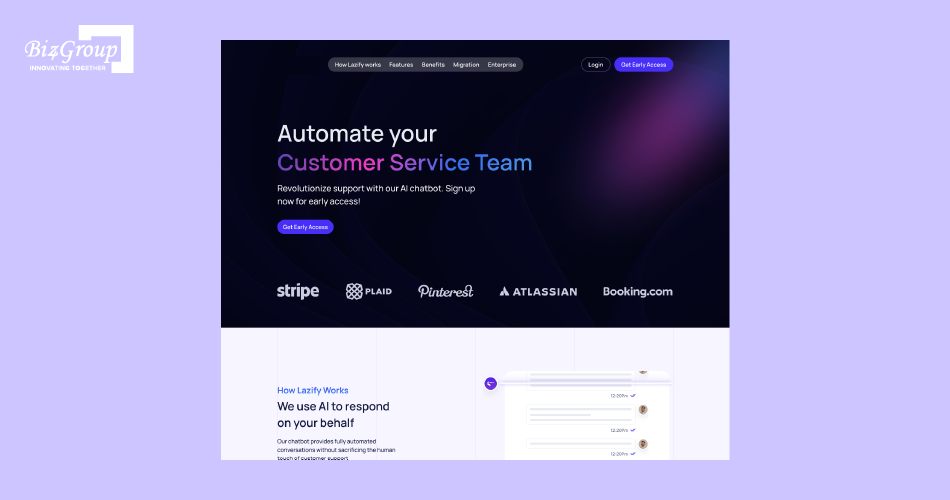
This AI-driven chatbot showcases how conversational AI can move beyond scripted replies and deliver more natural, human-like customer interactions. The system was designed to improve engagement quality, contextual understanding, and response flow across customer conversations. It reflects how modern AI chatbot development increasingly focuses on context-aware communication instead of basic rule-based automation.
The Core Technologies Behind Modern AI Chatbots
Modern AI chatbot development combines several technologies that work together to understand user questions, retrieve information, and generate useful responses.
- Natural Language Processing (NLP): Helps chatbots understand user intent, conversational meaning, and entity extraction instead of relying only on exact keywords.
- Large Language Models (LLMs): Pre-trained language models generate human-like responses and support context-aware chatbot interactions.
- Retrieval-Augmented Generation (RAG): Allows chatbots to pull information from documents, knowledge bases, or internal systems before generating a response.
- Machine Learning Models: Improve chatbot accuracy using chatbot training data, user behavior, and feedback over time.
- API and Workflow Integration: Connects chatbots with CRMs, ERPs, support tools, and third-party systems using API integration and webhook integration.
- Dialogue Management Systems: Help chatbots manage multi-turn conversation, fallback handling, escalation logic, and conversation flow.
Many businesses focus only on the language model when planning AI chatbot development. In practice, chatbot performance often depends more on retrieval quality, conversation design, workflow logic, and system integration. That is why companies often use AI consulting services before deciding how to build an AI chatbot for production use.
The Main Types of AI Chatbots and Their Use Cases
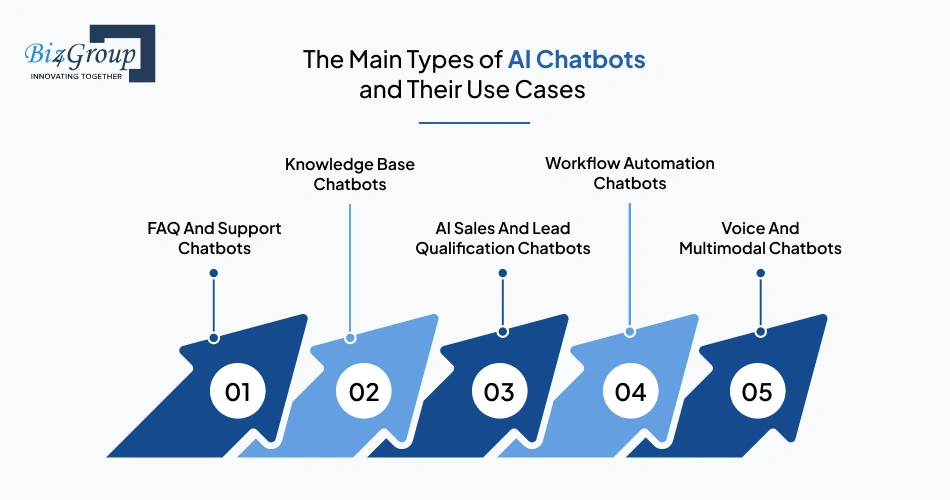
Different types of AI chatbots solve different business problems. The right choice depends on the type of conversations, the systems involved, and the level of automation needed.
1. FAQ And Support Chatbots
These chatbots answer common customer questions using predefined knowledge sources and conversational AI workflows. Businesses often use them to automate customer support with AI and provide 24/7 customer service chatbot experiences.
2. Knowledge Base Chatbots
Knowledge-based chatbots retrieve information from company documents, product manuals, help centers, or internal databases using retrieval-augmented generation. They are commonly used for SaaS onboarding, employee support, and educational AI chatbot development.
3. AI Sales And Lead Qualification Chatbots
These chatbots qualify leads, recommend products, schedule demos, and guide users through sales funnels. Businesses use them for customer engagement automation and AI-powered lead generation bot workflows.
4. Workflow Automation Chatbots
These chatbots connect with CRMs, ERPs, ticketing systems, and internal tools to automate repetitive tasks. This often includes AI chatbot integration with CRM platforms and support systems.
5. Voice And Multimodal Chatbots
These systems support voice, text, and sometimes image-based interactions. They are commonly used in healthcare, customer support, virtual assistants, and AI conversation app experiences.
The best AI chatbot development projects usually start with one clearly defined business problem instead of trying to automate everything at once. Businesses that focus first on repetitive, high-volume interactions often achieve faster deployment, lower implementation complexity, and better chatbot ROI for businesses.
Do You Actually Need a Custom AI Chatbot?
Not every business needs custom AI chatbot development. Some companies can solve their problem using a basic chatbot development platform, while others require a more advanced system with workflow automation, knowledge base integration, API integration, and conversational AI capabilities. The right choice depends on the complexity of the workflow, the quality of the data available, and how deeply the chatbot needs to interact with business systems.
The Business Problems AI Chatbots Solve Best
AI chatbot development works best when businesses need to automate repetitive conversations, improve response times, or handle workflows that follow predictable patterns.
- High Support Ticket Volume: AI chatbots can answer repetitive customer questions, reduce support ticket volume, and improve response times without expanding support teams.
- Lead Qualification And Routing: Businesses use AI-powered lead generation bot workflows to qualify leads, collect information, and route prospects to sales teams automatically.
- Customer Onboarding: SaaS companies often use conversational AI development to guide users through setup, onboarding flows, and product education.
- Internal Knowledge Access: AI chatbots help employees retrieve information from documents, policies, or internal systems using retrieval-augmented generation and knowledge base integration.
- Workflow Automation: Businesses use AI chatbot integration with CRM systems, ticketing tools, and operational platforms to automate repetitive tasks and improve workflow efficiency.
- 24/7 Customer Assistance: AI chatbots support customer engagement automation by providing continuous support outside normal business hours.
AI chatbots deliver the most value when the business problem is repetitive, high-volume, and process-driven. They are less effective when conversations require deep human judgment or highly specialized decision-making.
When an AI Chatbot Is the Wrong Solution
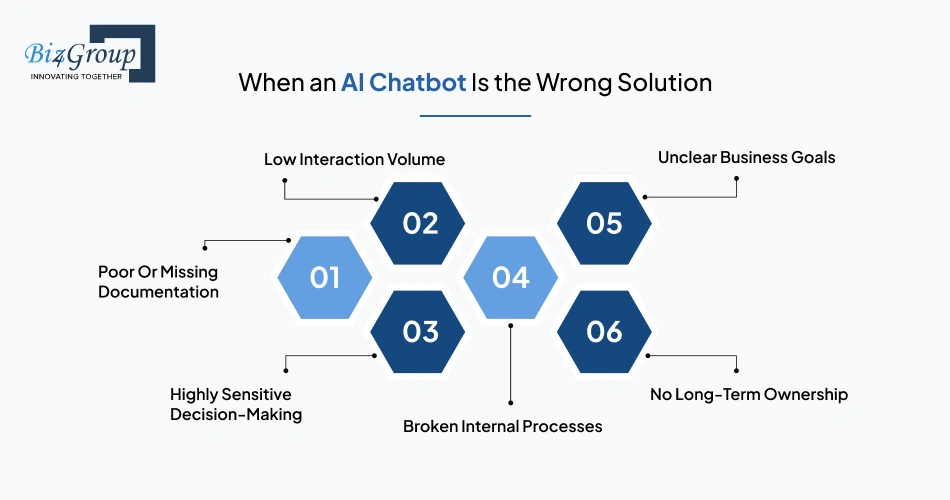
AI chatbot development is not the right fit for every workflow. In some cases, adding a chatbot increases complexity without solving the actual problem.
- Poor Or Missing Documentation: Chatbots depend heavily on chatbot training data, knowledge sources, and structured information. Weak documentation usually leads to inaccurate responses.
- Low Interaction Volume: If customers rarely ask repetitive questions, chatbot development cost may outweigh the operational benefits.
- Highly Sensitive Decision-Making: Workflows involving legal advice, medical diagnosis, or high-risk financial decisions often require human oversight and escalation workflows.
- Broken Internal Processes: A chatbot cannot fix inefficient operations, disconnected systems, or unclear workflows. Automation usually amplifies existing process problems.
- Unclear Business Goals: Many chatbot projects fail because businesses try to “add AI” without defining measurable goals like reducing support volume or improving onboarding speed.
- No Long-Term Ownership: AI chatbots require monitoring, chatbot analytics, testing, and optimization after deployment. Teams without ownership plans often struggle to maintain performance.
Businesses evaluating enterprise AI solutions should first validate the workflow itself before deciding to build an AI app or automate it with conversational AI systems.
Build vs Buy: When Custom Development Makes Sense
Businesses choosing between off-the-shelf chatbot platforms and custom AI chatbot development usually need to balance speed, flexibility, scalability, and long-term operational requirements.
|
Build Custom AI Chatbot |
Buy Existing Chatbot Platform |
|---|---|
|
Supports advanced workflow automation |
Faster initial deployment |
|
Better for complex API integration |
Lower upfront chatbot development cost |
|
Easier to customize conversation logic |
Good for simple FAQs and support |
|
Works better for enterprise chatbot development |
Requires less technical management |
|
Allows deeper knowledge base integration |
Limited customization options |
|
Better for multi-system workflows |
Faster setup using templates |
|
Easier to control security and governance |
Vendor controls platform capabilities |
Off-the-shelf platforms work well for simple support automation and early-stage validation. Custom AI chatbot development makes more sense when businesses need deeper integrations, advanced conversation flows, workflow automation, or tighter operational control.
How AI Chatbots Actually Work
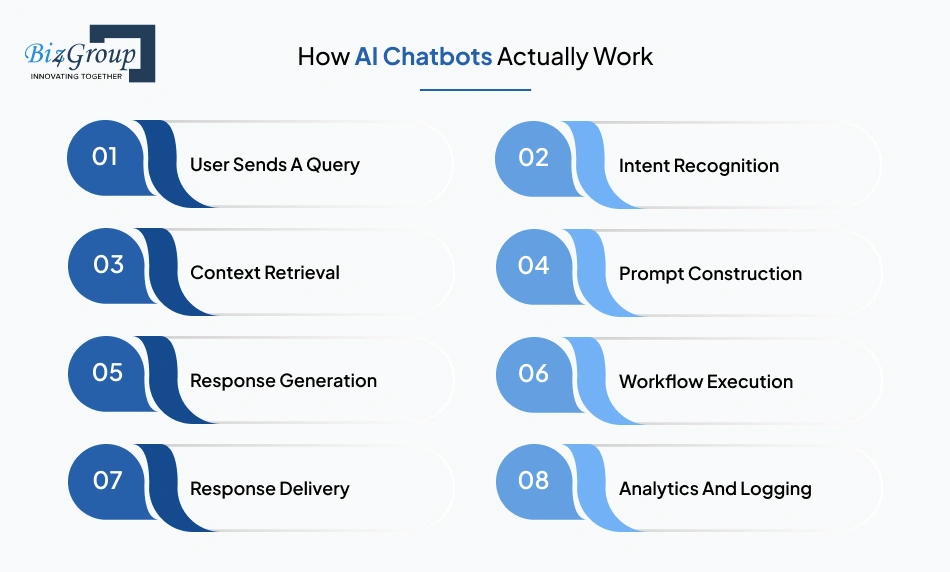
Modern AI chatbot development combines language models, retrieval systems, workflow automation, and business integrations to process user queries and generate useful responses. Instead of following fixed scripts, AI chatbots use natural language processing, machine learning models, and contextual retrieval to understand intent, retrieve relevant information, and respond in real time.
The Core Workflow From User Query to Response
Every AI chatbot follows a workflow that starts with a user query and ends with a generated response or automated action. The complexity of this workflow depends on the chatbot architecture, integrations, and business requirements.
|
Workflow Step |
What Happens |
|---|---|
|
User Sends A Query |
The chatbot receives a message through a website, app, or messaging platform |
|
Intent Recognition |
Natural language processing identifies user intent and important entities |
|
Context Retrieval |
The system retrieves information from knowledge bases, APIs, or internal systems |
|
Prompt Construction |
Relevant context and instructions are combined into a structured prompt |
|
Response Generation |
A large language model generates the response |
|
Workflow Execution |
The chatbot may trigger actions using API integration or webhook integration |
|
Response Delivery |
The final response is returned to the user through the chatbot interface |
|
Analytics And Logging |
The interaction is stored for chatbot analytics, monitoring, and optimization |
In modern conversational AI development, the quality of the retrieval layer and workflow logic often matters more than the language model itself. Strong retrieval systems and structured workflows usually produce more reliable chatbot behavior.
Retrieval-Augmented Generation vs Fine-Tuning vs Prompt Engineering
Most AI chatbot systems use a combination of retrieval-augmented generation, prompt engineering, and pre-trained language models. Fine-tuning is useful in some cases, but it is not always necessary.
|
Approach |
Purpose |
Best Use Case |
Limitations |
|---|---|---|---|
|
Retrieval-Augmented Generation (RAG) |
Retrieves external information before generating a response |
Knowledge base chatbots, support systems, internal documentation |
Depends heavily on data quality |
|
Fine-Tuning |
Trains a model on specialized data |
Industry-specific language or repetitive structured tasks |
Higher maintenance and training cost |
|
Prompt Engineering |
Structures instructions and context for the model |
Improving response quality and workflow behavior |
Limited without good retrieval systems |
Most businesses building AI chatbot development solutions start with retrieval-augmented generation because it allows the chatbot to use updated company information without retraining the model. Fine-tuning is usually added later when workflows become more specialized or domain-specific.
What Multi-Turn Conversations Require
Multi-turn conversation allows a chatbot to remember context across multiple messages instead of treating every query as a separate interaction.
1. Conversation Memory
The chatbot needs short-term memory to track previous questions, responses, and user context during the conversation.
2. Dialogue Management
Dialogue management systems control conversation flow, fallback handling, escalation logic, and how the chatbot moves between tasks.
3. Context Retention
The system must retain relevant details without overloading the language model with unnecessary conversation history.
4. Intent Tracking
User intent can change during a conversation. The chatbot needs to continuously identify intent recognition patterns across multiple interactions.
5. Workflow Coordination
Complex chatbot workflows often involve APIs, databases, CRMs, or operational systems working together in real time.
Many businesses underestimate how difficult multi-turn conversation becomes once workflows involve real customer data, operational systems, and dynamic business logic. This is often where teams decide to hire AI developers or work with experienced implementation partners.
How AI Chatbots Integrate With Business Systems
AI chatbot integration allows chatbots to retrieve information, trigger actions, and automate workflows across business platforms and internal systems.
- CRM Integration: Chatbots can retrieve customer data, update records, qualify leads, and support AI chatbot integration with CRM systems.
- Knowledge Base Integration: Chatbots retrieve information from documentation, help centers, internal databases, and support content using retrieval-augmented generation.
- Support Platform Integration: Chatbots connect with ticketing systems to automate support workflows and escalate unresolved conversations.
- ERP And Operational Systems: Businesses can develop ERP AI chatbot workflows for inventory checks, order management, scheduling, and internal operations.
- Webhook And API Integration: APIs and webhooks allow chatbots to exchange data with external applications and trigger automated workflows.
- Analytics And Monitoring Tools: Chatbot analytics platforms track containment rate, fallback handling, response accuracy, and operational performance.
The value of AI chatbot development usually increases when the chatbot becomes part of larger business workflows instead of operating as a standalone support widget.
Increase Customer Response Speed by Up to 70%
Use conversational AI development and AI chatbot integration workflows to improve support efficiency and reduce operational delays.
Optimize Customer Operations With AIHow to Develop an AI Chatbot: A Step by Step Process
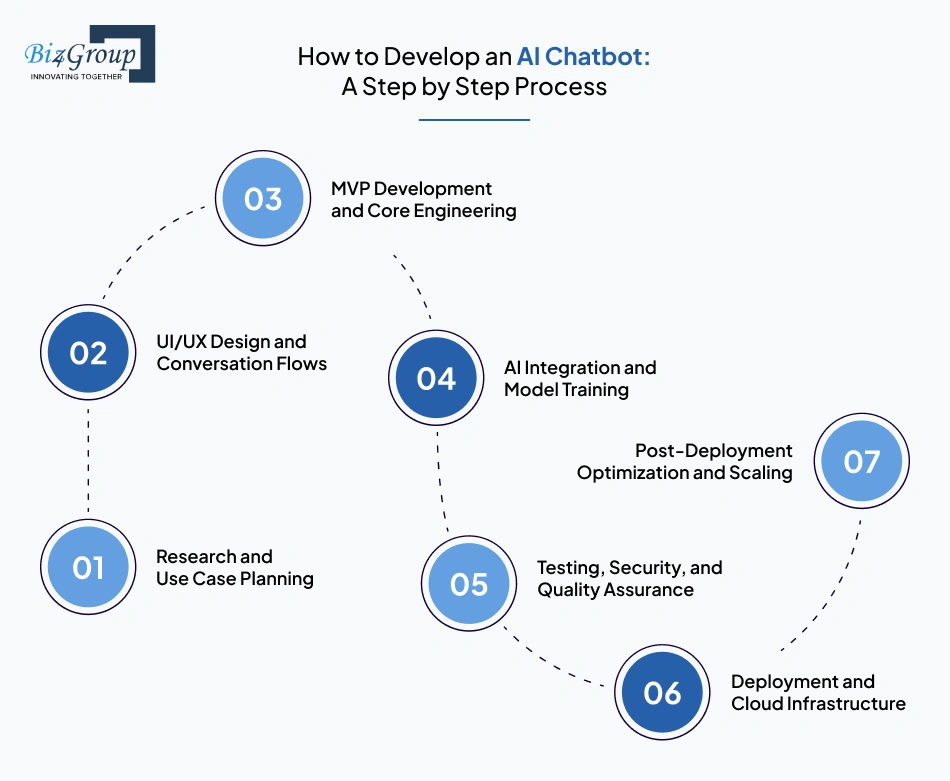
AI chatbot development is usually implemented in stages instead of building the entire system at once. A production-ready chatbot requires business planning, conversation design, backend engineering, AI integration, testing, deployment, and continuous optimization. The exact chatbot development process depends on whether the system is being built for customer support, SaaS onboarding, lead qualification, HR chatbot automation, or internal workflow automation.
1. Research and Use Case Planning
The first step in AI chatbot development is defining the exact workflow the chatbot should handle. Most businesses fail when they try to build a general-purpose chatbot instead of solving one operational problem first.
For example:
- a support chatbot may focus on helping businesses automate customer support with AI,
- a chatbot for SaaS onboarding may guide users through setup,
- and an internal chatbot may help employees retrieve company information faster.
At this stage, teams typically:
- identify repetitive conversation patterns,
- analyze support tickets and user queries,
- define escalation workflows,
- map AI chatbot integration requirements,
- and establish KPIs such as containment rate, response time, and ticket reduction.
This phase also helps businesses decide whether they need custom AI chatbot development or a simpler chatbot development platform.
2. UI/UX Design and Conversation Flows
After defining the use case, the next step is designing how users will interact with the chatbot. In conversational AI development, conversation design directly affects adoption, engagement, and completion rates.
This stage focuses on:
- chatbot user interface design,
- multi-turn conversation behavior,
- response formatting,
- dialogue management,
- fallback handling,
- and escalation logic.
For example, a 24/7 customer service chatbot may require:
- quick-reply actions,
- ticket escalation workflows,
- account verification steps,
- and context-aware chatbot behavior.
A chatbot for SaaS onboarding may require:
- guided setup flows,
- onboarding checklists,
- and contextual product assistance.
Teams building customer-facing chatbot systems often work with a professional UI/UX design company to improve usability and reduce friction during interactions.
Also read: Top UI/UX design companies in USA
Conversation structure directly affects containment rate, escalation frequency, and user completion rates.
3. MVP Development and Core Engineering
Most businesses should start with an MVP instead of launching a fully featured chatbot system immediately. In AI chatbot development, MVPs help validate workflow automation, user behavior, and operational value before expanding the platform.
This stage focuses on building:
- the chatbot backend,
- retrieval systems,
- knowledge base integration,
- API integration,
- chatbot analytics,
- and the initial chatbot interface.
For example, an MVP support chatbot may initially support:
- order tracking,
- refund status,
- password reset assistance,
- and ticket creation.
A SaaS onboarding chatbot MVP may initially focus on:
- onboarding guidance,
- product walkthroughs,
- and help center retrieval.
Many businesses use a phased MVP development service approach before scaling conversational AI systems across multiple workflows.
Also read: 12+ MVP Development Companies in USA to Launch Your Startup in 2026
This phase determines whether the chatbot can support real production workflows or only limited pilot use cases.
4. AI Integration and Model Training
This stage configures the AI systems that power chatbot responses, retrieval, and workflow automation. In most AI chatbot development projects, the goal is not training a model from scratch but improving how the chatbot retrieves information and handles conversations.
This stage typically includes:
- configuring pre-trained language models,
- implementing retrieval-augmented generation,
- structuring chatbot training data,
- optimizing prompt engineering,
- improving intent recognition,
- and refining entity extraction accuracy.
For example:
- a healthcare chatbot may retrieve appointment policies and intake instructions,
- an eCommerce chatbot may retrieve order and shipping data,
- and an HR chatbot may retrieve policy documents and onboarding information.
Businesses often use AI integration services during this stage to connect AI chatbot systems with CRMs, support tools, ERPs, and operational platforms.
Retrieval quality, data structure, and workflow orchestration usually have a larger impact on chatbot accuracy than model customization alone.
5. Testing, Security, and Quality Assurance
Before deployment, the chatbot must be tested across real workflows, conversation patterns, and edge cases. Chatbot testing and QA help identify hallucinations, retrieval failures, escalation issues, and workflow breakdowns before users encounter them.
Testing usually includes:
- response accuracy validation,
- fallback handling checks,
- sentiment analysis evaluation,
- API integration testing,
- chatbot scalability testing,
- and multi-turn conversation validation.
For example, teams often test:
- how the chatbot handles incomplete questions,
- whether escalation triggers correctly,
- whether CRM updates succeed,
- and whether retrieval systems return accurate responses.
Enterprise chatbot development also requires:
- compliance validation,
- access control testing,
- and monitoring for sensitive data exposure.
Testing failures in production environments usually create operational issues long before model limitations become visible.
Also Read: 15+ Software Testing Companies in USA in 2026
6. Deployment and Cloud Infrastructure
After testing, the chatbot is deployed across production environments such as:
- websites,
- mobile apps,
- support portals,
- Slack,
- WhatsApp,
- or internal business systems.
This stage focuses on:
- chatbot deployment,
- infrastructure scalability,
- uptime reliability,
- monitoring,
- and operational stability.
Teams typically:
- configure cloud infrastructure,
- implement CI/CD pipelines,
- monitor chatbot analytics,
- and optimize systems for increasing conversation volume.
Businesses planning to integrate AI into an app usually prioritize scalable infrastructure early because chatbot traffic and retrieval workloads grow quickly after adoption.
Cloud infrastructure decisions become more important once chatbot usage expands across channels, users, and business workflows.
7. Post-Deployment Optimization and Scaling
AI chatbot development continues after launch. Production systems require ongoing optimization using chatbot analytics, feedback loops, and operational data.
Post-deployment optimization usually includes:
- analyzing unresolved conversations,
- improving retrieval quality,
- refining prompt engineering,
- retraining workflows,
- expanding integrations,
- and improving chatbot containment rate.
For example:
- support chatbots may expand into billing workflows,
- onboarding chatbots may support upselling,
- and internal AI assistants may integrate with more operational systems over time.
Post-launch optimization is usually where businesses identify new automation opportunities, workflow gaps, and scalability requirements.
Planning Your AI Chatbot Development Strategy?
Learn how to build an AI chatbot with scalable integrations, retrieval systems, and production-ready workflows.
Talk to Our AI Chatbot ExpertsWhat Is the Ideal AI Chatbot Tech Stack?
Modern AI chatbot development requires more than just connecting a language model to a chat interface. A production-ready AI chatbot stack typically includes frontend frameworks, backend infrastructure, retrieval systems, vector databases, APIs, orchestration layers, analytics tools, and cloud deployment services. The exact stack depends on whether the chatbot is being built for customer support, onboarding, enterprise workflows, internal operations, or AI chatbot integration with existing business systems.
|
Label |
Preferred Technologies |
Why It Matters |
|---|---|---|
|
Frontend Frameworks |
React.js, Vue.js, Angular |
Frontend frameworks help build responsive AI chatbot interfaces, onboarding flows, and conversational dashboards. Many businesses use professional ReactJS development services for scalable chatbot experiences. |
|
Server-Side Rendering & SEO |
Next.js, Nuxt.js, Remix |
Server-side rendering improves chatbot portal performance, SEO visibility, and page loading speed for AI-powered applications. Teams often use NextJS development solutions for production-ready AI chatbot platforms. |
|
Backend Framework |
Python, Node.js, FastAPI, Express.js |
Backend systems manage workflow automation, retrieval pipelines, API integration, and chatbot orchestration with Node.js development. AI-heavy workflows commonly rely on scalable Python development services. |
|
API Development & Integration |
REST APIs, GraphQL, gRPC, Postman |
APIs connect AI chatbots with CRMs, ERPs, payment systems, ticketing platforms, and operational workflows. |
|
AI & Data Processing |
LangChain, LlamaIndex, Haystack, Apache Spark |
AI processing layers manage retrieval-augmented generation, chatbot training data, prompt engineering, and conversational workflow execution. |
|
Large Language Models (LLMs) |
GPT-4, Claude, Gemini, Llama |
LLMs generate chatbot responses, summarize information, and support conversational AI development workflows. |
|
Vector Databases |
Pinecone, Weaviate, Chroma, pgvector |
Vector databases store embeddings for semantic search and context-aware chatbot retrieval. |
|
Database Layer |
PostgreSQL, MongoDB, Redis |
Databases manage user sessions, chatbot analytics, workflow data, and conversation memory. |
|
AI Orchestration Layer |
LangGraph, Semantic Kernel, CrewAI |
Orchestration tools manage workflow execution, agent coordination, fallback handling, and AI automation logic. |
|
Authentication & Access Control |
OAuth 2.0, JWT, Auth0, Firebase Auth |
Authentication systems secure enterprise chatbot development workflows and control access to sensitive business data. |
|
Messaging & Communication Channels |
Twilio, WhatsApp API, Slack API, Microsoft Teams API |
Communication APIs allow AI chatbots to operate across websites, mobile apps, messaging platforms, and support systems. |
|
Caching & Performance Optimization |
Redis, Memcached, Cloudflare |
Caching layers improve chatbot response speed, reduce retrieval latency, and support chatbot scalability during high traffic. |
|
Monitoring & Observability |
Langfuse, Datadog, Grafana, OpenTelemetry |
Monitoring tools track chatbot containment rate, fallback handling, latency, response accuracy, and production failures. |
|
Cloud Infrastructure |
AWS, Azure, Google Cloud, Vercel |
Cloud platforms support chatbot deployment, infrastructure scalability, uptime reliability, and production AI workloads. |
The ideal AI chatbot tech stack depends more on workflow complexity, integration requirements, and scalability needs than on choosing the most advanced tools. Businesses usually benefit more from a scalable architecture aligned with operational workflows than from overcomplicated AI infrastructure early in development.
Enterprise Chatbot Development Without the Guesswork
Build secure AI chatbot systems with scalable infrastructure, API integration, analytics, and workflow automation.
Schedule a Call With Our AI ExpertsWhat Drives AI Chatbot Development Cost?
AI chatbot development cost depends on the complexity of the workflows, integrations, AI infrastructure, deployment scale, and customization requirements. A basic AI chatbot MVP may cost around $20,000 to $40,000, while advanced enterprise AI chatbot systems with custom integrations, retrieval pipelines, analytics, and workflow automation can exceed $200,000. These numbers are ballpark estimates and vary based on business requirements, deployment scope, and long-term scalability needs.
Infrastructure, API, and Model Costs
Modern AI chatbot development includes ongoing infrastructure and AI usage costs in addition to engineering effort. These costs usually increase as chatbot traffic, integrations, and automation workflows grow.
- Large Language Model Usage: GPT-4, Claude, and other large language models charge based on token usage, conversation volume, and context size.
- Cloud Infrastructure: AI chatbots often require scalable cloud infrastructure for retrieval systems, orchestration layers, databases, and real-time APIs.
- Vector Database Costs: Retrieval-augmented generation systems rely on vector databases for semantic search and knowledge retrieval.
- API And Third-Party Services: CRM integrations, payment gateways, messaging APIs, and operational platforms add recurring API costs.
- Monitoring And Analytics Tools: Chatbot analytics, observability platforms, and performance monitoring tools create additional operational expenses.
- Data Storage And Retrieval: Knowledge base integration and chatbot conversation history require secure storage and retrieval infrastructure.
Infrastructure costs become more noticeable after chatbot adoption scales across users, workflows, and communication channels.
Integration and Customization Complexity
The largest cost driver in custom AI chatbot development is usually integration complexity rather than the chatbot interface itself. AI chatbot integration with CRM systems, ERPs, ticketing platforms, authentication systems, and operational databases requires significant engineering effort.
Cost typically increases when businesses need:
- multi-system workflow automation,
- custom retrieval pipelines,
- complex API integration,
- role-based access control,
- multi-language support,
- advanced chatbot analytics,
- or enterprise-grade security and compliance workflows.
For example, a chatbot answering FAQ-style support questions may require limited customization. In contrast, businesses trying to develop ERP AI chatbot workflows or automate operational processes often require much deeper backend integration and orchestration layers.
Many companies also underestimate the cost of scaling conversational AI systems after launch. Infrastructure optimization, workflow expansion, chatbot scalability improvements, and retrieval quality tuning often continue well beyond the first deployment phase.
The Hidden Costs Teams Often Miss Considering during AI Chatbot Development
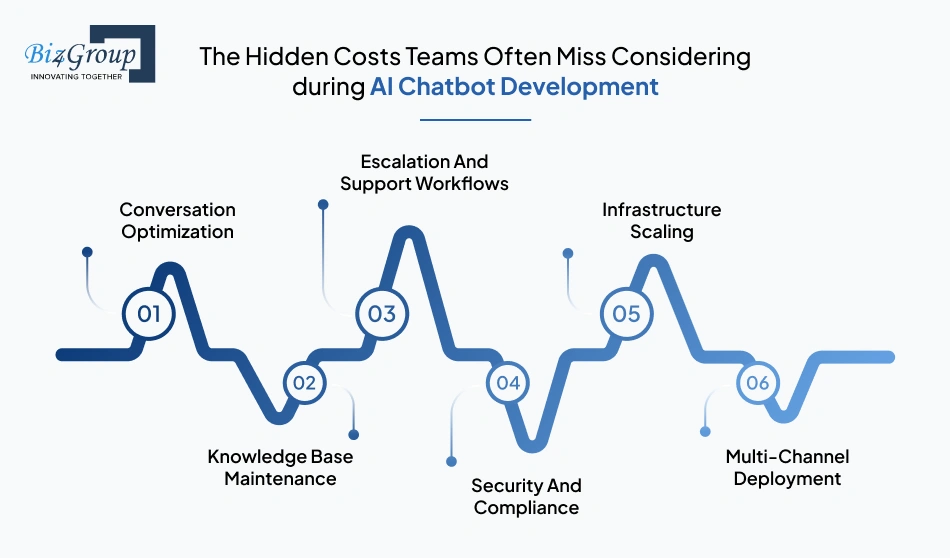
Many businesses calculate initial development effort but overlook long-term operational costs associated with AI chatbot development.
1. Conversation Optimization
Chatbot responses usually require ongoing refinement through prompt engineering, retrieval tuning, and chatbot analytics after deployment.
2. Knowledge Base Maintenance
Retrieval-augmented generation systems depend on updated documentation, structured chatbot training data, and clean knowledge sources.
3. Escalation And Support Workflows
Human escalation systems, fallback handling, and operational monitoring often require additional engineering and support resources.
4. Security And Compliance
Enterprise chatbot development may require compliance validation, access control systems, audit logging, and data protection measures.
5. Infrastructure Scaling
Cloud infrastructure, vector databases, API traffic, and orchestration workloads become more expensive as chatbot usage grows.
6. Multi-Channel Deployment
Supporting websites, mobile apps, Slack, WhatsApp, and customer portals increases testing, deployment, and maintenance complexity.
Businesses evaluating enterprise AI chatbot development cost should account for both initial implementation and long-term operational overhead.
Offshore vs Onshore AI Chatbot Development
Businesses evaluating AI chatbot development often compare offshore and onshore development teams based on budget, communication, scalability, and technical expertise.
|
Development Model |
Advantages |
Challenges |
|---|---|---|
|
Offshore Development |
Lower engineering costs, larger talent pool, faster scaling |
Time zone differences, communication gaps, varying AI expertise |
|
Onshore Development |
Easier collaboration, stronger domain alignment, faster feedback loops |
Higher development and operational costs |
|
Hybrid Teams |
Balance between cost efficiency and project oversight |
Requires strong coordination and workflow management |
Some businesses work with a specialized custom software development company for enterprise AI solutions, while others use hybrid teams for specific phases like AI integration services, UI/UX design, or chatbot testing and QA.
The right development model depends more on project complexity, operational requirements, and integration scope than on hourly rates alone.
Typical Cost Ranges by Project Type
|
AI Chatbot Type |
Estimated Cost Range |
|---|---|
|
Basic FAQ Chatbot |
$20,000 - $40,000 |
|
SaaS Onboarding Chatbot |
$35,000 - $70,000 |
|
AI Customer Support Chatbot |
$50,000 - $100,000 |
|
AI-Powered Lead Generation Bot |
$40,000 - $80,000 |
|
Internal Knowledge Base Chatbot |
$60,000 - $120,000 |
|
AI Chatbot Integration With CRM And ERP Systems |
$80,000 - $150,000 |
|
Enterprise Conversational AI Platform |
$120,000 - $200,000+ |
The final chatbot development cost depends heavily on workflow complexity, integration depth, compliance requirements, deployment scale, and long-term optimization needs.
Reduce Support Tickets With Conversational AI
Deploy an AI chatbot for business workflows and automate repetitive support requests with faster response handling.
Build a Smarter Support ChatbotHow Long Does AI Chatbot Development Take?
AI chatbot development timelines depend on workflow complexity, integrations, AI capabilities, testing requirements, and deployment scope. A simple AI chatbot MVP may take 4 to 8 weeks, while enterprise chatbot development projects with advanced integrations, retrieval systems, and workflow automation can take several months.
Timeline Estimates by Chatbot Type
Different AI chatbot systems require different development timelines depending on conversation complexity, AI infrastructure, integrations, and operational requirements.
|
AI Chatbot Type |
Estimated Timeline |
|---|---|
|
Basic FAQ Chatbot |
4 - 6 Weeks |
|
AI Customer Support Chatbot |
6 - 12 Weeks |
|
SaaS Onboarding Chatbot |
8 - 12 Weeks |
|
AI-Powered Lead Generation Bot |
6 - 10 Weeks |
|
Internal Knowledge Base Chatbot |
8 - 14 Weeks |
|
AI Chatbot Integration With CRM Systems |
10 - 16 Weeks |
|
Enterprise AI Chatbot Platform |
4 - 8 Months |
|
Multi-Channel AI Conversation App |
3 - 6 Months |
Timelines usually increase when chatbot workflows involve multiple integrations, compliance requirements, advanced retrieval pipelines, or large-scale workflow automation.
What Causes AI Chatbot Projects to Slow Down?
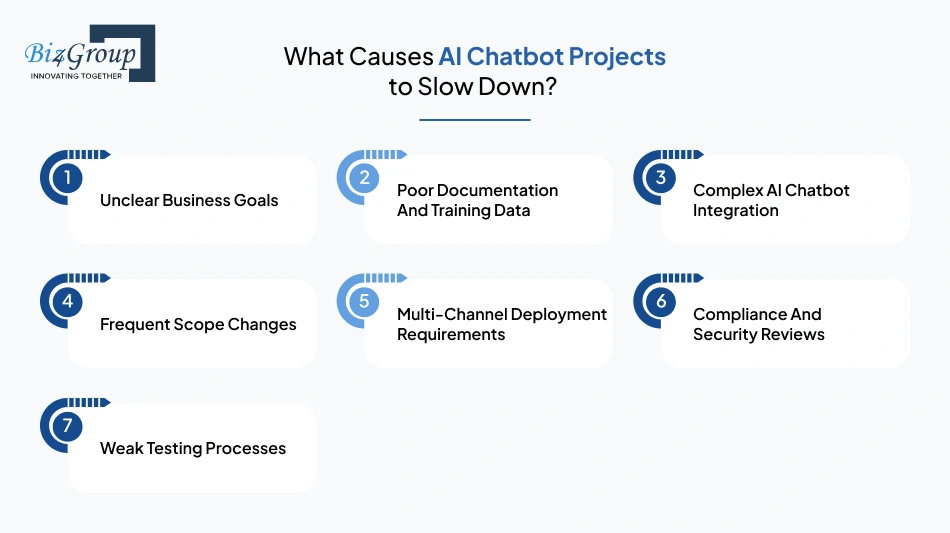
Most delays in AI chatbot development happen because of workflow complexity, unclear requirements, or integration issues rather than the AI model itself.
- Unclear Business Goals: Teams often start development before defining the exact workflows the chatbot should automate.
- Poor Documentation And Training Data: Weak knowledge bases and unstructured chatbot training data slow down retrieval quality and testing.
- Complex AI Chatbot Integration: Connecting CRMs, ERPs, ticketing systems, and operational platforms adds significant engineering effort.
- Frequent Scope Changes: Expanding chatbot capabilities mid-project usually increases development timelines and testing requirements.
- Multi-Channel Deployment Requirements: Supporting websites, mobile apps, Slack, WhatsApp, and customer portals increases deployment complexity.
- Compliance And Security Reviews: Enterprise chatbot development often requires additional validation for security, access control, and sensitive data handling.
- Weak Testing Processes: Insufficient chatbot testing and QA usually create delays during deployment and production rollout.
Businesses planning to integrate AI into an app should define integrations, workflows, and deployment requirements early to avoid unnecessary implementation delays.
How to Phase Development for Faster ROI?
Most successful AI chatbot development projects launch in phases instead of trying to automate every workflow immediately.
1. Start With One High-Volume Workflow
Focus first on repetitive conversations like support FAQs, onboarding assistance, or ticket routing where automation creates immediate operational value.
2. Launch A Limited MVP
Deploy a focused chatbot MVP with core workflows, retrieval systems, and basic integrations before expanding into advanced automation.
3. Add Integrations Gradually
Integrate CRMs, ERPs, payment systems, and operational platforms in stages instead of connecting every system during the first release.
4. Improve Retrieval Before Expanding Features
Optimizing retrieval-augmented generation, chatbot training data, and prompt engineering usually improves response quality faster than adding more workflows.
5. Expand Using Real User Data
Use chatbot analytics, unresolved conversations, and containment rate data to prioritize future workflow automation and feature expansion.
6. Scale Infrastructure After Adoption Grows
Cloud infrastructure, orchestration layers, and chatbot scalability requirements become more important once chatbot traffic increases across teams and channels.
Phased implementation usually reduces deployment risk, shortens time-to-value, and helps businesses validate operational impact before scaling AI chatbot development further.
AI Chatbot Use Cases by Industry
AI chatbot development is being used across industries to automate repetitive workflows, improve response times, reduce operational overhead, and provide scalable customer interactions. Modern AI chatbots are no longer limited to FAQs. Businesses now use conversational AI systems for onboarding, lead qualification, employee support, workflow automation, and real-time operational assistance.
|
Use Case |
How AI Chatbots Are Used |
Business Impact |
|---|---|---|
|
Customer Support and Ticket Deflection |
AI chatbots answer repetitive support queries, retrieve account information, automate ticket routing, and support multi-turn conversation workflows. |
Helps automate customer support with AI, reduce support ticket volume, and improve response times. |
|
Sales Qualification and Lead Generation |
AI-powered lead generation bot systems qualify leads, collect user information, schedule demos, and route prospects to sales teams. |
Improves customer engagement automation and reduces manual lead qualification effort. |
|
SaaS Onboarding and Product Support |
AI chatbots guide users through setup, product walkthroughs, feature discovery, and troubleshooting workflows using knowledge base integration. |
Improves onboarding completion rates and reduces support dependency for SaaS platforms. |
|
E-Commerce and Post-Purchase Support |
AI chatbots assist with product discovery, order tracking, refund requests, shipping updates, and customer retention workflows. |
Many businesses deploy custom AI chatbots for eCommerce to improve conversion rates and post-purchase support efficiency. |
|
Internal Knowledge Base and Employee Support |
Internal AI chatbots retrieve company policies, HR information, SOPs, operational documentation, and workflow instructions. |
Improves internal productivity and reduces dependency on manual knowledge sharing. |
|
Healthcare Appointment Booking and Medicinal Intake |
Healthcare chatbots automate appointment scheduling, patient intake workflows, FAQs, and pre-visit instructions. |
Reduces administrative workload while improving patient communication workflows. |
|
Fintech and Compliance-Sensitive Workflows |
AI chatbots assist with onboarding, transaction support, compliance workflows, account verification, and customer assistance. |
Supports scalable customer operations while maintaining security, escalation, and compliance controls. |
The most effective AI chatbot for business deployments usually focus on high-volume workflows where automation improves operational efficiency, response speed, and user experience without replacing critical human decision-making processes.
Portfolio Spotlight
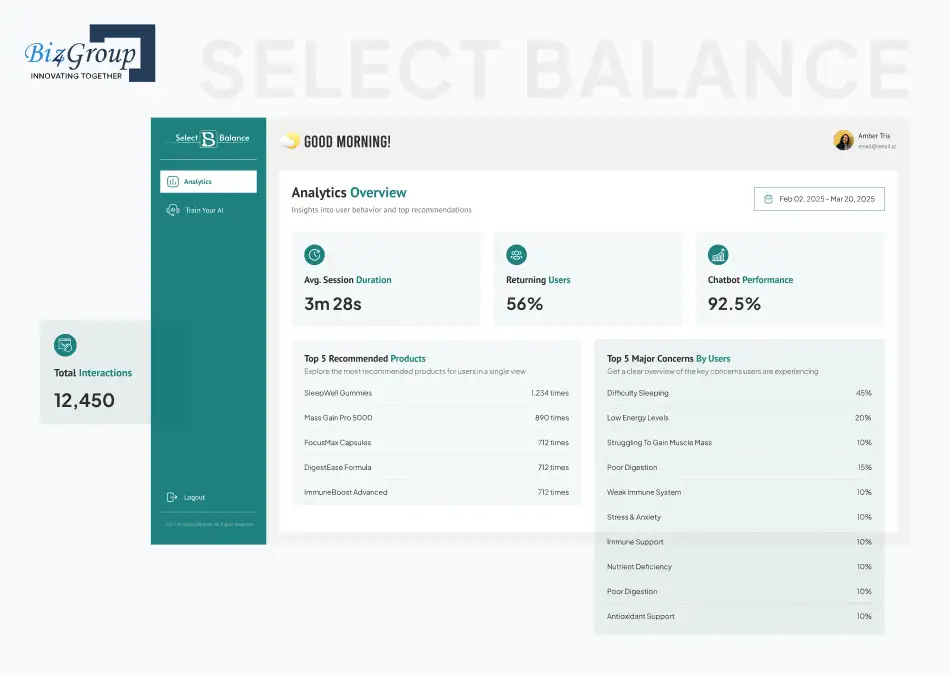
Select Balance is a health-focused AI chatbot built to recommend supplements and wellness products through personalized conversations and guided quizzes. Instead of static product filters, the chatbot delivers real-time recommendations based on user responses and contextual inputs. It highlights how conversational AI development is expanding into personalized healthcare and wellness workflows.
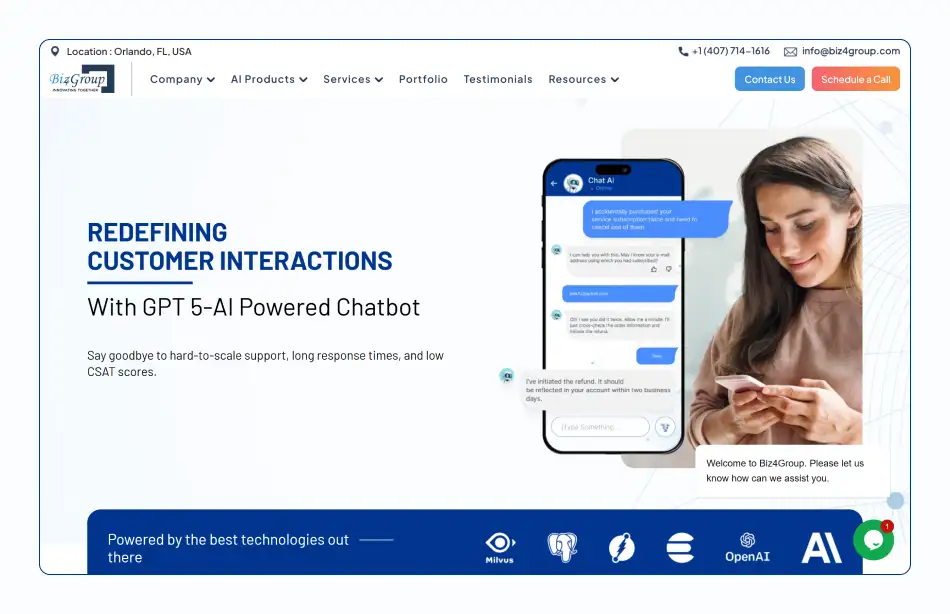
This GPT-powered customer service AI chatbot was designed to improve customer communication through faster response handling, automated support workflows, and human-like interactions. The implementation showcases how AI chatbot integration can reduce repetitive support load while improving response consistency, scalability, and overall customer support efficiency.
What Usually Goes Wrong in AI Chatbot Projects?
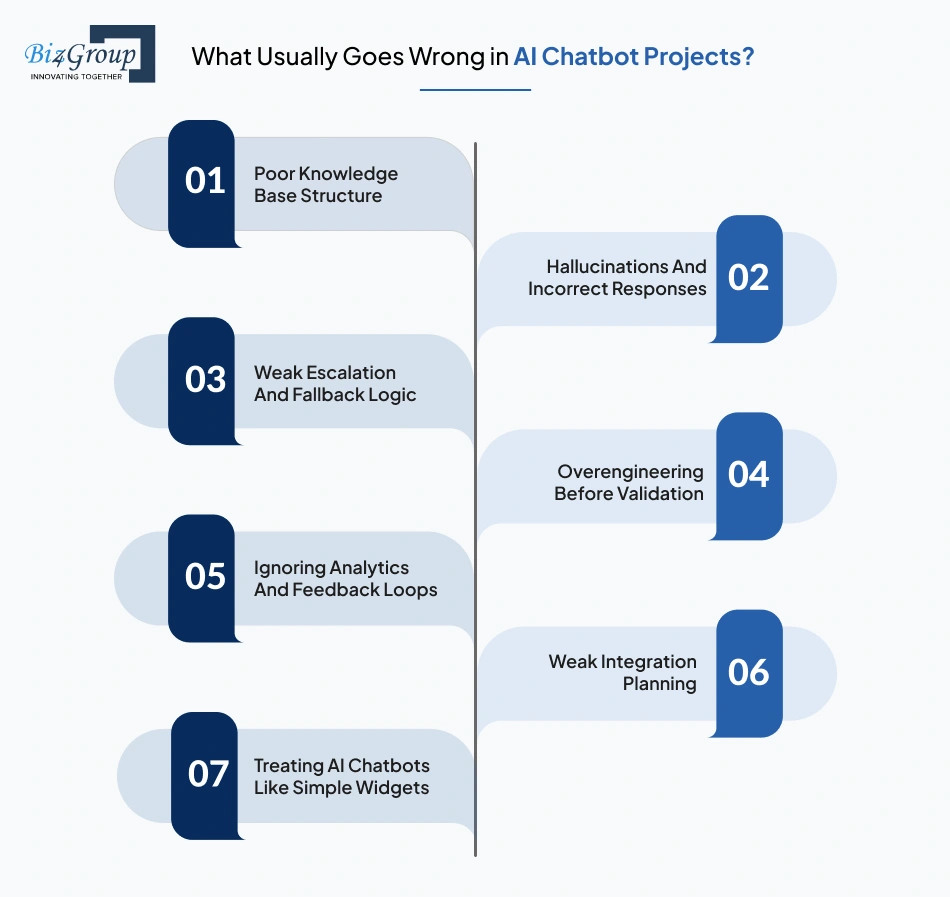
Most AI chatbot development problems are caused by poor planning, weak integrations, low-quality data, or missing operational workflows. Many businesses focus heavily on AI features without preparing the systems, documentation, and processes required to support a reliable chatbot in production.
1. Poor Knowledge Base Structure
AI chatbots depend on structured chatbot training data and clean knowledge sources. If documentation is outdated, duplicated, or scattered across systems, retrieval-augmented generation workflows often return inaccurate or incomplete responses.
2. Hallucinations And Incorrect Responses
Large language models can generate incorrect answers when retrieval systems, prompt engineering, or workflow rules are weak. Hallucinations become more common when chatbots respond without verified business data or operational context.
3. Weak Escalation And Fallback Logic
AI chatbots cannot handle every conversation independently. Missing fallback handling, poor escalation workflows, and weak dialogue management often leave users stuck when the chatbot cannot resolve a request.
4. Overengineering Before Validation
Many teams try to build an AI app with advanced automation, multi-agent workflows, and deep integrations before validating a single use case. This usually increases chatbot development cost, delays deployment, and creates unnecessary complexity early in the project.
5. Ignoring Analytics And Feedback Loops
Chatbot analytics help businesses track containment rate, unresolved conversations, fallback frequency, and workflow performance. Without feedback loops, teams cannot improve response quality or identify workflow issues after deployment.
6. Weak Integration Planning
AI chatbot integration with CRM systems, support platforms, ERPs, and internal databases requires clear workflow planning. Weak integrations often cause inconsistent automation behavior, missing data updates, and unreliable chatbot workflows.
7. Treating AI Chatbots Like Simple Widgets
AI chatbots rely on retrieval systems, APIs, orchestration layers, analytics, and scalable infrastructure. Businesses using structured AI integration services usually manage production chatbot workflows more effectively than teams treating chatbots as lightweight frontend features.
Most chatbot issues appear after real users interact with live workflows, operational systems, and business data in production environments.
Custom AI Chatbot Development That Scales
From chatbot development process planning to enterprise deployment, build AI chatbot systems designed for long-term growth.
Start Your AI Chatbot ProjectWhat Changes in Enterprise AI Chatbot Deployments?
Enterprise AI chatbot development involves more than building conversational workflows. Enterprise deployments require stronger security, scalable infrastructure, reliable integrations, access control, monitoring systems, and governance processes because these chatbots often interact with sensitive business data and operational systems.
Security, Compliance, and Data Privacy Requirements
Enterprise AI chatbots often handle customer records, financial data, healthcare information, and internal business workflows. Because of this, security and compliance become critical parts of the system architecture.
|
Enterprise Requirement |
Why It Matters |
|---|---|
|
Role-Based Access Control |
Restricts chatbot access based on employee roles and permissions |
|
Data Encryption |
Protects customer and business data during storage and transmission |
|
Audit Logging |
Tracks chatbot activity and operational workflows |
|
Compliance Validation |
Supports HIPAA, GDPR, SOC 2, PCI DSS, and industry regulations |
|
Secure API Integration |
Protects chatbot integrations with business systems and operational tools |
|
Human Escalation Controls |
Prevents sensitive workflows from being fully automated |
Enterprise chatbot deployments usually require security reviews and compliance validation before production rollout.
Portfolio Spotlight
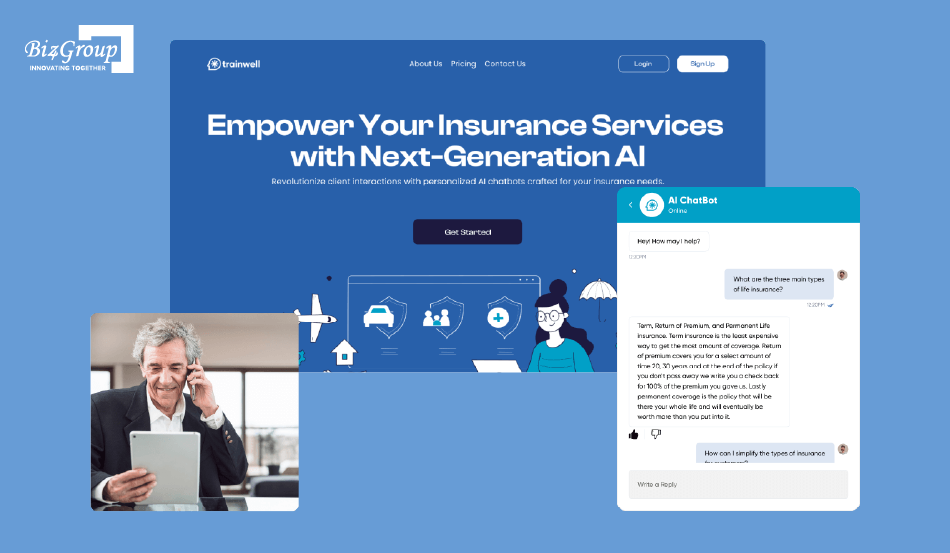
Insurance AI was developed to streamline insurance training and support workflows through conversational AI interactions. The platform helps agents access guidance, learning resources, and operational assistance more efficiently. It demonstrates how enterprise AI chatbot development often requires domain-specific knowledge handling, workflow accuracy, and structured information retrieval in compliance-sensitive industries.
Scalability, Performance, and Reliability
Enterprise AI chatbots must handle large conversation volumes, multiple integrations, and real-time workflows without slowing down or failing during peak usage.
Common infrastructure priorities include:
- chatbot scalability across departments and communication channels,
- low-latency retrieval systems,
- high uptime reliability,
- distributed cloud infrastructure,
- real-time monitoring,
- and failover systems for operational continuity.
For example, an internal AI conversation app may need to support thousands of employee requests across HR, finance, IT, and operations workflows at the same time.
Organizations investing in AI model development often prioritize infrastructure stability early because performance issues become more visible as chatbot usage increases across teams and workflows.
Enterprise Integrations and Access Control
Enterprise AI chatbot development usually involves deep integration with operational systems instead of standalone chatbot workflows.
1. CRM And Customer Data Systems
Enterprise chatbots often retrieve customer information, support history, and operational records through AI chatbot integration with CRM platforms and customer support systems.
2. ERP And Operational Platforms
Many businesses connect AI chatbots with inventory systems, scheduling tools, finance platforms, and internal workflow systems.
3. Identity And Authentication Systems
Single sign-on systems and role-based permissions help secure chatbot access across departments and internal tools.
4. Internal Knowledge Systems
Retrieval-augmented generation workflows often rely on company documentation, SOPs, policy databases, and operational knowledge bases.
5. Workflow Automation Platforms
Enterprise chatbots commonly integrate with workflow systems for approvals, ticket routing, notifications, and operational automation.
Businesses working with a specialized custom software development company often plan integrations early because enterprise chatbot workflows usually depend on multiple connected systems.
Governance, Monitoring, and Human Escalation Workflows
Enterprise AI chatbot systems require continuous monitoring after deployment. Governance workflows help businesses control chatbot behavior, monitor operational risks, and maintain response quality.
- Monitoring systems track chatbot analytics, fallback handling, response accuracy, escalation frequency, and latency.
- Governance workflows define which actions the chatbot can perform automatically and which require human approval.
- Human escalation systems route sensitive conversations to support teams or compliance personnel when needed.
- Prompt engineering and retrieval systems are updated regularly to reduce hallucinations and incorrect responses.
- Enterprise teams often review chatbot training data, workflows, and operational policies on an ongoing basis.
Organizations using AI automation services usually treat monitoring and governance as ongoing operational processes instead of one-time deployment tasks.
Governance workflows become more important as enterprise AI chatbots gain access to sensitive systems, customer data, and operational workflows.
How to Evaluate an AI Chatbot Development Company?
Choosing the right AI chatbot development company affects the quality of the chatbot, integration reliability, scalability, and long-term maintenance. A strong development partner should understand conversational AI workflows, retrieval systems, integrations, deployment infrastructure, and real business operations instead of only building chatbot interfaces.
Questions to Ask Before Hiring an AI Chatbot Development Expert
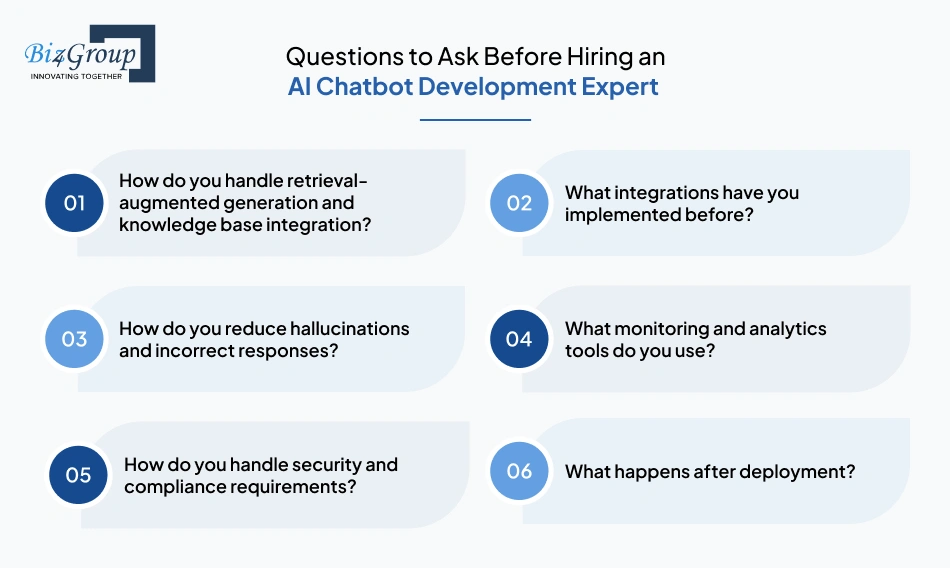
Before hiring an AI chatbot development company, businesses should evaluate technical expertise, workflow understanding, and deployment experience.
|
Question |
Why It Matters |
|---|---|
|
How do you handle retrieval-augmented generation and knowledge base integration? |
Shows how the chatbot retrieves accurate business information |
|
What integrations have you implemented before? |
Helps validate experience with CRMs, ERPs, APIs, and workflow automation |
|
How do you reduce hallucinations and incorrect responses? |
Evaluates testing, prompt engineering, and retrieval quality processes |
|
What monitoring and analytics tools do you use? |
Shows whether the company supports long-term chatbot optimization |
|
How do you handle security and compliance requirements? |
Important for enterprise chatbot development and sensitive workflows |
|
What happens after deployment? |
Clarifies support, scaling, monitoring, and maintenance processes |
Businesses planning AI chatbot integration with CRM systems or operational workflows should focus more on implementation experience than polished demos.
Technical and Strategic Red Flags
Some AI chatbot vendors focus heavily on sales demos while overlooking production reliability and long-term scalability.
Common warning signs include:
- promising fully autonomous AI workflows without human escalation systems,
- weak understanding of retrieval systems and chatbot training data,
- limited experience with APIs and enterprise integrations,
- unclear testing and QA processes,
- no monitoring or analytics strategy,
- and no long-term optimization plan.
Some companies also market themselves as experts in generative AI without showing real experience in production chatbot deployments, workflow automation, or conversational AI development.
Many chatbot issues only become visible after deployment when the system starts handling real users, integrations, and operational workflows.
What Good Discovery and Planning Should Include
Strong AI chatbot development projects usually begin with a structured discovery phase before engineering starts.
1. Workflow Identification
The team should identify the exact workflows the chatbot will automate first and define measurable business goals.
2. Integration Mapping
Planning should include CRM systems, APIs, support platforms, operational tools, and retrieval systems required for the chatbot.
3. Knowledge Base Review
The company should evaluate documentation quality, chatbot training data, and retrieval readiness before development begins.
4. Conversation Flow Planning
Teams should define multi-turn conversation flows, escalation logic, fallback handling, and chatbot user interface behavior early in the process.
5. Infrastructure And Scalability Planning
The architecture should support chatbot scalability, monitoring, and future workflow expansion instead of only supporting the first release.
6. Security And Governance Planning
Enterprise chatbot projects often require compliance validation, access control planning, and monitoring workflows before deployment.
Businesses exploring business app development using AI usually get better results when the discovery phase focuses on operational workflows instead of broad automation goals.
In-House Team vs Agency vs Freelancers
Different development models work better for different AI chatbot development needs.
|
Model |
Best For |
Limitations |
|---|---|---|
|
In-House Team |
Long-term product ownership and internal AI expertise |
Higher hiring and infrastructure costs |
|
AI Development Agency |
End-to-end delivery, integrations, deployment, and scaling |
Higher upfront investment |
|
Freelancers |
Small MVPs or short-term chatbot tasks |
Limited scalability and operational support |
|
Hybrid Model |
Combining internal oversight with external expertise |
Requires stronger coordination |
Enterprise AI chatbot projects usually require broader engineering support across integrations, infrastructure, testing, analytics, and deployment workflows.
Why Biz4Group LLC is a Top Choice for AI Chatbot Development?
Biz4Group LLC is an experienced AI chatbot development company that builds production-ready AI chatbot systems for customer support, SaaS onboarding, workflow automation, and enterprise operations. The company supports conversational AI development across integrations, retrieval systems, backend infrastructure, and scalable deployment environments.
Their experience includes:
- AI chatbot integration with CRM systems,
- enterprise workflow automation,
- AI assistant app design,
- retrieval-augmented generation systems,
- and scalable conversational AI platforms.
As a software development company in Florida, Biz4Group LLC provides support across strategy, UI/UX, backend engineering, AI integrations, deployment, and long-term optimization.
Businesses evaluating chatbot development partners should prioritize implementation quality, integration expertise, scalability planning, and operational reliability over short-term demo features.
AI Chatbot Analytics, Optimization, and Scaling
AI chatbot development continues after deployment. Production chatbot systems need regular monitoring, optimization, retraining, and infrastructure updates to maintain response quality and workflow performance. As chatbot usage grows, businesses need analytics systems that track user behavior, retrieval quality, automation performance, and operational reliability.
The Metrics and Analytics That Matter
AI chatbot analytics help businesses understand whether the chatbot is improving support workflows, onboarding, automation, and customer interactions.
|
Metric |
Why It Matters |
|---|---|
|
Chatbot Containment Rate |
Shows how many conversations are resolved without human support |
|
Fallback Frequency |
Tracks how often the chatbot fails to answer properly |
|
Response Accuracy |
Measures retrieval quality and response reliability |
|
Escalation Rate |
Shows how often conversations need human intervention |
|
Average Resolution Time |
Measures how quickly the chatbot solves requests |
|
User Satisfaction Score |
Helps evaluate conversation quality and user experience |
|
Retrieval Performance |
Tracks how effectively the chatbot retrieves knowledge base information |
|
API Failure Rate |
Measures reliability across integrated systems and workflows |
These metrics usually expose workflow bottlenecks, weak retrieval logic, poor escalation handling, and integration failures that are difficult to identify during testing alone.
Continuous Improvement and Retraining
AI chatbots require ongoing optimization because workflows, user behavior, and business data constantly change after deployment.
Common optimization activities include:
- improving prompt engineering,
- refining retrieval-augmented generation workflows,
- updating chatbot training data,
- improving fallback handling,
- expanding API integration logic,
- and optimizing multi-turn conversation performance.
For example, a support chatbot may initially struggle with billing-related queries or incomplete customer questions. Chatbot analytics and conversation logs help identify weak response areas and improve retrieval accuracy over time.
Teams investing in AI assistant app design often prioritize post-launch optimization because conversation quality directly affects engagement, retention, and workflow completion rates.
How to Scale AI Chatbot MVP to Production?
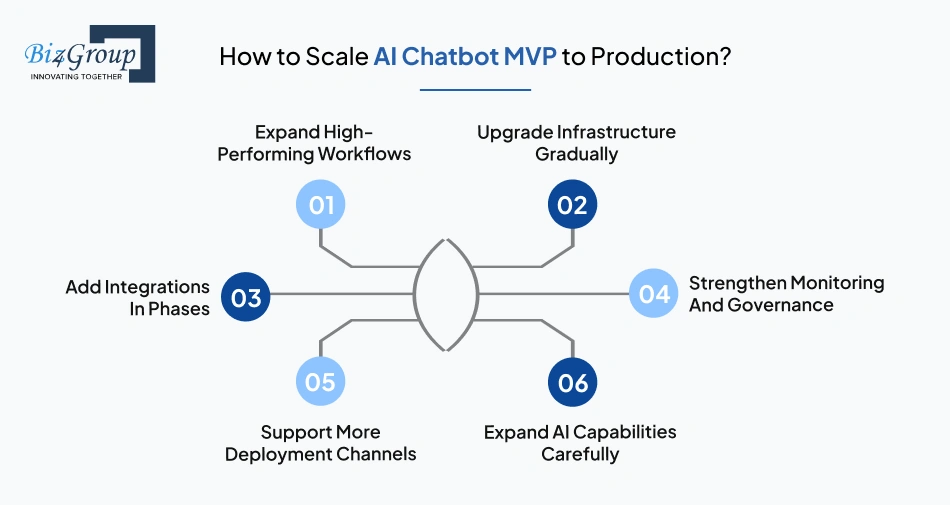
Most AI chatbot development projects begin with a focused MVP before expanding into larger workflows and enterprise operations.
1. Expand High-Performing Workflows
Workflows with strong containment rate, high automation efficiency, and stable retrieval quality are usually scaled first.
2. Upgrade Infrastructure Gradually
Cloud infrastructure, vector databases, retrieval systems, and orchestration layers often need upgrades as chatbot traffic increases.
3. Add Integrations In Phases
CRMs, ERPs, support tools, payment systems, and operational platforms are typically integrated over multiple deployment stages.
4. Strengthen Monitoring And Governance
Production systems usually require stronger monitoring, escalation workflows, audit logging, and operational controls as usage grows.
5. Support More Deployment Channels
Scaling often includes expanding chatbot deployment across websites, mobile apps, Slack, WhatsApp, and internal systems.
6. Expand AI Capabilities Carefully
Advanced conversational AI workflows, personalization, and automation features are usually introduced after operational stability is validated.
Scaling becomes significantly easier when workflow stability, retrieval quality, and infrastructure reliability are validated during the MVP stage.
Retrieval quality and workflow refinement usually have a larger impact on chatbot performance than adding new AI features repeatedly.
How to Plan an AI Chatbot Development Project?
Planning is one of the most important stages in AI chatbot development. A clear implementation plan helps define the business problem, identify workflows to automate, estimate chatbot development cost, and reduce deployment risks before engineering begins. Projects usually perform better when teams start with a focused use case instead of trying to automate multiple workflows at once.
Signs Your Business Is Ready for AI Chatbot Development Project
Not every company needs custom AI chatbot development immediately. Certain operational patterns usually indicate when conversational AI can create measurable business value.
|
Sign |
Why It Matters |
|---|---|
|
High Volume Of Repetitive Queries |
AI chatbots work best for repetitive support and operational workflows |
|
Growing Support Costs |
Automation can reduce manual support workload and improve response speed |
|
Existing Knowledge Base Or Documentation |
Retrieval-augmented generation depends on structured information sources |
|
Multiple Business Systems |
AI chatbot integration becomes more valuable when workflows involve CRMs, ERPs, or support platforms |
|
Delayed Response Times |
AI chatbots help provide faster customer and employee assistance |
|
Clear Workflow Bottlenecks |
Repetitive onboarding, ticket routing, or internal queries are easier to automate |
Businesses usually struggle with AI chatbot projects when workflows, ownership, or operational goals are still unclear before development starts.
What the First 30 Days Should Look Like
The first month of an AI chatbot development project should focus on planning, workflow validation, and technical preparation instead of rushing directly into full-scale development.
Common priorities during the first 30 days include:
- identifying the primary workflow the chatbot will automate,
- reviewing chatbot training data and documentation quality,
- mapping API integration requirements,
- defining escalation workflows,
- selecting the AI chatbot tech stack,
- planning chatbot deployment channels,
- and defining success metrics like containment rate or ticket reduction.
For example, a support-focused AI conversation app may prioritize ticket deflection workflows first, while an onboarding chatbot may focus on reducing setup friction for new users.
When It Makes Sense to Bring in AI Chatbot Development Services
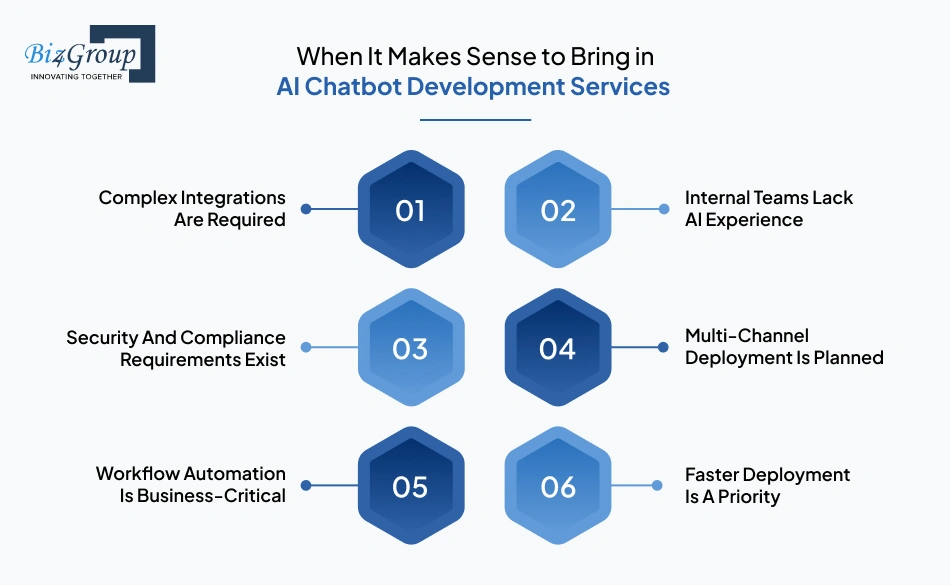
Some businesses can manage lightweight chatbot deployments internally, but larger AI chatbot projects often require specialized development support.
1. Complex Integrations Are Required
AI chatbot integration with CRM systems, ERPs, support tools, and operational platforms usually requires experienced backend engineering and workflow orchestration.
2. Internal Teams Lack AI Experience
Conversational AI development often involves retrieval systems, prompt engineering, vector databases, orchestration layers, and chatbot analytics that many internal teams have not implemented before.
3. Security And Compliance Requirements Exist
Enterprise chatbot development frequently includes compliance validation, access control systems, audit logging, and governance workflows.
4. Multi-Channel Deployment Is Planned
Deploying chatbots across websites, mobile apps, Slack, WhatsApp, and internal systems increases testing and infrastructure complexity.
5. Workflow Automation Is Business-Critical
Production chatbot systems handling onboarding, support automation, operations, or internal workflows usually require higher reliability and monitoring standards.
6. Faster Deployment Is A Priority
Experienced AI chatbot teams often reduce implementation delays by using proven architectures, testing workflows, and deployment processes.
Many companies evaluating implementation partners compare portfolios, infrastructure expertise, integration capabilities, and deployment experience before shortlisting vendors or exploring top AI development companies in Florida.
Planning becomes significantly easier once the business problem, workflow scope, and operational requirements are clearly defined.
This stage usually determines whether the chatbot architecture can support long-term scalability and workflow expansion later in the project.
Conclusion
Most companies do not fail at AI chatbot development because the AI is bad. They fail because the chatbot was never connected properly to real workflows, business systems, support operations, or usable knowledge sources in the first place.
A chatbot that only answers surface-level FAQs stops being useful very quickly. A chatbot that can retrieve operational data, understand context, escalate correctly, work across systems, and improve through analytics becomes part of the business infrastructure itself.
That is why successful AI chatbot projects usually start small:
- one workflow,
- one integration,
- one measurable problem.
Then the system expands gradually into onboarding, support automation, internal operations, lead qualification, or enterprise workflows after the foundation is stable.
The companies getting the best results from conversational AI right now are not necessarily building the flashiest demos. They are building systems that:
- reduce ticket volume,
- shorten response times,
- automate repetitive workflows,
- and remove operational bottlenecks without creating new ones.
Working with an experienced AI product development company also becomes important once integrations, retrieval systems, compliance requirements, analytics, and workflow orchestration start becoming part of the deployment scope.
If the chatbot quietly saves teams hours every week and users stop noticing there is a workflow behind it, the implementation is probably working.
Need an AI chatbot that actually works beyond scripted replies? Let’s build a conversational AI system around your real workflows, integrations, and operational goals.
FAQs
How do I know if my business actually needs an AI chatbot?
AI chatbot development usually makes sense when teams are dealing with repetitive support requests, onboarding delays, slow response times, or operational workflows that require manual handling at scale. Businesses with structured documentation, high conversation volume, or multiple support channels often see the strongest ROI.
Can AI chatbots connect with tools like Salesforce, HubSpot, Slack, or internal databases?
Yes. Modern AI chatbot systems commonly support API integration with CRMs, ERPs, ticketing platforms, internal knowledge bases, payment systems, and communication tools. Integration depth depends on the chatbot architecture, workflow complexity, and access requirements.
How much does AI chatbot development cost?
AI chatbot development cost can range from $20,000 to $200,000+ depending on the complexity of the workflows, integrations, infrastructure, security requirements, analytics, and deployment scope. Simple support chatbots usually cost significantly less than enterprise conversational AI platforms with advanced automation and multi-system integrations.
Do AI chatbots need ongoing maintenance after deployment?
Yes. Production AI chatbots require continuous optimization, monitoring, retrieval updates, prompt engineering improvements, and analytics reviews after deployment. Knowledge bases, workflows, and operational systems change over time, so chatbot responses and retrieval logic also need regular updates.
What is the difference between a chatbot using RAG and one using fine-tuning?
Retrieval-augmented generation (RAG) allows AI chatbots to retrieve real-time information from documents, knowledge bases, or databases before generating responses. Fine-tuning trains a model on specialized datasets to change how the model behaves or responds. Most business chatbots start with RAG because it is easier to update and maintain.
Can AI chatbots handle sensitive industries like healthcare or finance?
Yes, but enterprise chatbot development in regulated industries requires stronger security controls, compliance validation, audit logging, role-based access control, and human escalation workflows. Healthcare, fintech, and insurance chatbots usually require additional governance and monitoring before deployment into production environments.
