 Location :
Orlando, FL, USA
Location :
Orlando, FL, USA +1 (407) 714-1616
 info@biz4group.com

 AI Summary Powered by Biz4AI
- AI women safety app development builds apps that sense danger through voice and movement, so alerts go out automatically. Nearly 840 million women worldwide have faced partner or sexual violence.
- Main types include emergency alert apps, location tracking, safe route suggestions, and wearable-based detection. Most apps combine a few of these together.
- Core features are the one-tap SOS button, live location sharing, and silent gesture triggers. Advanced versions add voice activation and mood detection.
- Development of AI women safety app follows seven steps, from mapping the use case to testing and compliance. Launch is just where the improvement cycle begins.
- AI women safety app development cost usually ranges from $25,000 to $80,000+. Price depends on feature depth and wearable integration.
- Privacy and trust matter more than extra features here and getting this right takes real experience. Biz4Group brings that expertise to AI women safety application development, helping build apps people actually trust and keep.
Our phones already recognize our face, our voice, even our coffee order. So why can't they recognize our fear?
They can. Most of them just haven't been built to.
That gap, between what AI is already capable of and what most safety apps actually use it for, is exactly where AI women safety app development lives.
AI women safety app development is the process of building mobile applications that use artificial intelligence, like voice analysis, movement tracking, and behavioral pattern recognition, to detect danger and respond automatically, without requiring the user to manually press a button.
That's not a smarter panic button. It's a system that notices what a scared, shaking hand can't type into a screen fast enough to say.
Are there AI apps built specifically for women's safety?
Yes. A growing number of apps now use AI for real-time threat detection instead of relying only on a manual SOS button. These systems combine voice stress detection, GPS pattern analysis, and wearable data to flag danger and alert emergency contacts automatically. We'll walk through the specific types, features, and technical approach later in this guide.
The scale behind why this matters isn't shrinking. The World Health Organization released updated global data in November 2025: nearly 1 in 3 women worldwide, an estimated 840 million, have experienced partner or sexual violence at some point in their life. In the past year alone, 316 million women, 11% of women aged 15 and older, faced physical or sexual violence from an intimate partner. In the US, CDC's 2023/2024 NISVS Stalking Data Brief puts lifetime stalking prevalence among women at over 1 in 5, close to 28.8 million people.
Read that stalking figure again. It isn't a hypothetical risk sitting in a report somewhere. It's a pattern, tracked and repeated, happening to tens of millions of women right now.
This is why women safety AI app development has moved from a feature request into its own category. Parents want peace of mind. Universities want safer campuses. Companies want employees protected on late shifts. Cities and NGOs want data they can act on instead of guess at. And founders, maybe you included, want to build something that actually meets this moment instead of gesturing at it.
Here's what separates a modern build from the safety apps of five years ago. You're no longer limited to a button someone has to remember to press mid-panic. Voice cues, movement patterns, location anomalies, even heart rate spikes from a wearable, all of it can feed into a system that notices something is wrong before a person finds the strength to ask for help.
That's the real promise of a well-built women safety AI app. Not surveillance. Not a checkbox feature. A genuine layer of protection that responds the way a person would, if that person never got tired and never looked away.
We've scoped and built AI products across healthcare, fintech, and enterprise workflows at Biz4Group, and one pattern shows up in nearly every safety-focused conversation we have with founders: they underestimate the trust and privacy work, and overestimate how hard the AI itself is to build. Partnering with the right AI app development company rarely comes down to the technical build alone. Getting the trust, privacy, and response accuracy right is where most AI women safety app projects succeed or stall.
This guide walks through exactly that. What to build, what it costs, which technical decisions matter most, and honest answers to the questions founders keep bringing us before they write a single line of code.
AI Women Safety App vs. Traditional Safety Apps: What's Actually Different?
You might ask: "What makes an AI safety app different from a regular safety app?"
A traditional safety app waits. It needs a free hand, an unlocked phone, and a button pressed before it does anything. An AI-powered safety app watches for signals, voice stress, sudden movement, an unfamiliar route, and can act without that button ever being touched.
Here's exactly what that shift changes in AI women safety app development, and why each change actually matters, not just what sounds better on paper.
Traditional App |
AI-Powered Safety App |
Why It Matters |
|---|---|---|
Relies on user to press SOS |
Detects distress via voice, movement, or signals |
Removes the biggest failure point: needing a free hand and a clear head in the exact moment someone is least likely to have either. |
One-size-fits-all response |
Learns and personalizes based on user behavior |
A student walking home and a night-shift delivery driver don't face the same risks. Personalized alerts match the actual situation instead of a generic script. |
Static features |
Continuously improves with AI model training |
The app gets better at catching real danger and ignoring false alarms over time, not just when a developer pushes a manual update. |
Often uninstalled within weeks |
Built to earn continued trust through transparency and control |
Trust is what keeps the app open long after the novelty wears off, and that has to be designed for, not assumed. |
That last row isn't a guess. A 2026 market analysis of personal safety apps found that nearly half of non-adopters cite limited trust in how third parties handle their data, and over 42% of existing users uninstall apps specifically because of aggressive data permission requests. This is one of the reasons teams researching AI women security app development are now designing for transparency from day one instead of bolting on a privacy policy after launch. The AI isn't what gets a safety app deleted. Vague permissions and unclear data handling are.
That's the real difference between a checkbox feature and an innovative women safety app people actually keep installed.
Building that right usually means working with an experienced custom software development company from the ground up, or bringing in AI integration services if you're adding this intelligence to something you've already shipped.
Next, let's open up the hood and walk through how this actually works, step by step.
Ready to turn your "what if" into "we built it"?
The future of women's safety needs more than ideas—it needs execution. Let's build it right.
Let's Talk Safety + AIHow Does an AI Women Safety App Actually Work?
You're probably wondering how any of this actually triggers without someone tapping a screen. It's a fair thing to want answered before you commit budget to it.
Here's the honest version, not the pitch-deck version.
1. Passive Sensing
The phone's accelerometer, gyroscope, and GPS run continuously in the background. This is cheap on battery and doesn't need a constant cloud connection. Voice works differently in most well-built AI safety apps for women: instead of streaming audio nonstop, the app listens locally for a specific trigger phrase using on-device wake-word detection, the same category of tech behind "Hey Siri", and nothing gets sent anywhere until that phrase is actually heard.
2. Real-Time Pattern Analysis
Once a signal crosses a threshold, an unexpected stop, a sudden sprint, a detected trigger phrase, on-device models do the first pass. Anything heavier, like deeper tone analysis on a voice clip, can move to the cloud if the situation calls for it. The initial catch has to happen locally, both for speed and for keeping raw data off a server it doesn't need to touch.
3. Action Triggers
Depending on severity, the app can alert emergency contacts, start discreet evidence capture, or escalate further. One thing worth knowing upfront: direct 911 or local-dispatch integration isn't something you get by default in AI women safety app development.
RapidSOS, the emergency-data platform most connected safety products in the US actually route through, describes this as a formal API integration paired with 24/7 monitoring and verification, not a simple call straight into a 911 system. That distinction matters for planning, it's a partnership and integration project, not a plug-in. We'll walk through exactly what that process looks like later in this guide.
4. Logging and Model Improvement
Incident data gets encrypted and anonymized. It doesn't retrain the model in real time, no production system safely works that way. It feeds into periodic retraining cycles instead, where reviewed, aggregated data helps a women safety AI app get better at telling real distress from false alarms over time.
Any experienced AI women safety app developer will tell you this is where most of the real engineering work sits, not in the flashy trigger, but in getting steps 2 and 4 right so the app doesn't cry wolf or miss the real thing.
Types of AI Women Safety Applications
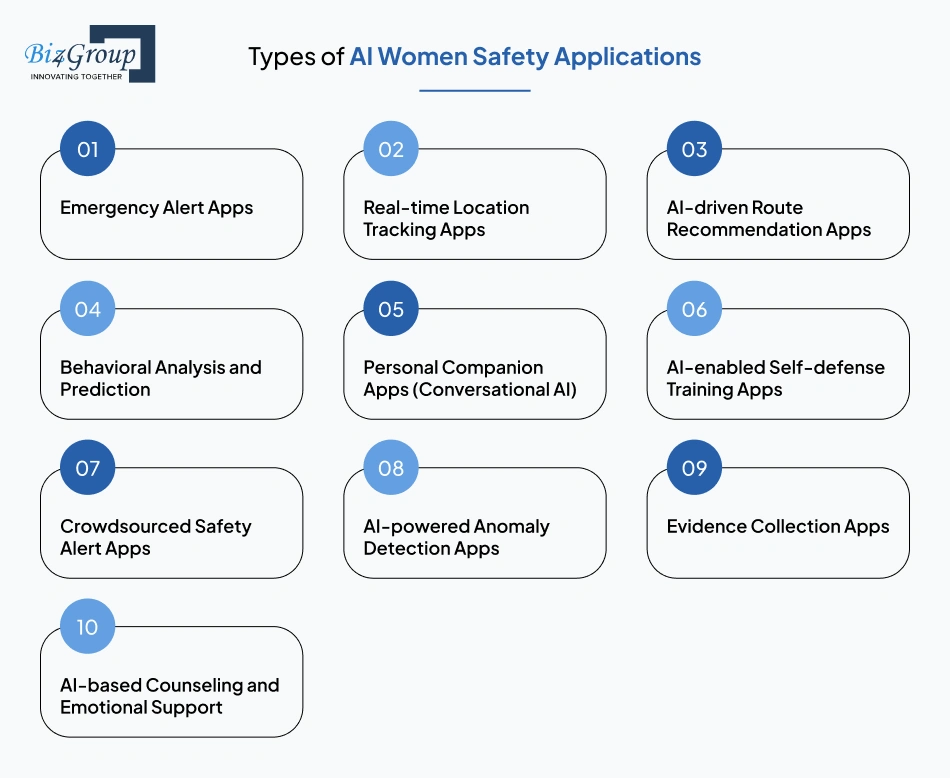
AI women safety app development isn't a single solution, it's a smart combination of formats, tools, and user needs. Let's break down the most impactful types that are shaping the safety landscape today:
1. Emergency Alert Apps
These are the most essential type of AI women safety mobile app development. AI-driven panic buttons automatically send real-time location, audio, and video recordings to emergency contacts and, in some cases, local authorities. Voice-activated triggers allow alerts even when the phone is hidden or locked. These apps eliminate reliance on manual action during high-stress moments and serve as the backbone of most AI women safety application development projects.
Example: Noonlight, a US-based app formerly known as SafeTrek, lets a user hold a button and release it with a PIN to cancel. If the PIN isn't entered, the app automatically alerts local emergency services with the user's location.
2. Real-time Location Tracking Apps
These apps continuously monitor user movement and use AI to identify unusual patterns like staying stationary in unfamiliar areas or sudden route changes. Predictive alerts are sent if the system detects something out of the ordinary. Geo-fencing technology adds another layer by notifying designated contacts when users enter or leave high-risk or predefined zones. This approach is common when you build AI women safety app for families or institutions needing real-time oversight.
Example: Life360, based in San Francisco, lets users create private "Circles" where family or friends see real-time location, get notified on arrival at set places, and receive an alert if a crash or unusual stop is detected.
3. AI-driven Route Recommendation Apps
These use machine learning and historical crime data to map the safest possible routes in real time. Users are guided to avoid high-risk areas, poor lighting zones, or isolated streets. The app adapts to time of day, crowd density, and environmental risk factors. This type of AI mobile application development for women safety is great for commuters, travelers, and solo pedestrians.
Example: There isn't yet one dominant, purpose-built "safe route" app for women specifically, but the underlying data layer already exists. Services like SpotCrime aggregate US crime data that safety and navigation apps can pull from to flag risk along a route, rather than every app building crime-mapping from scratch.
4. Behavioral Analysis and Prediction
Through sensors, motion detection, and computer vision, these apps observe both the user and their surroundings to detect early threats. AI tracks behavioral changes, voice tones, and body movements to spot signs of stress or danger. This level of developing AI women safety application helps the system trigger alerts even without direct user input, offering a more proactive protection layer.
Example: bSafe's voice-activated SOS trigger is a working version of this idea in the market today, it responds to a spoken cue instead of requiring the screen to be unlocked and a button found.
5. Personal Companion Apps (Conversational AI)
These act as a real-time chatbot assistant offering emotional support, safety advice, or even small talk during a stressful commute. When built right, they feel less like a bot and more like a companion that actually listens. That's where intelligent design and deep learning matter, just like what's explored in AI conversation app development. These apps offer real-time communication, guidance, and even custom safety plans, turning everyday interactions into personalized protection.
Example: Replika, built by a US-based company, is the best-known example of an AI companion built for ongoing conversation and emotional presence, though it wasn't built specifically for safety use cases. It shows what's technically possible when this pattern gets adapted for a safety-specific companion.
We've built a version of this technical foundation ourselves. Biz4Group's AI-driven wizard assistant uses real-time conversational AI, NLP, and secure cloud infrastructure for business communication and knowledge retrieval, not safety. But it's the same underlying stack, natural conversation handling, secure data flow, real-time response, that a safety-focused companion app would need. It's a good reference point for what our team can bring to this specific feature, even outside the safety domain itself.
6. AI-enabled Self-defense Training Apps
These apps use computer vision to assess users' self-defense training in real time, offering feedback on techniques and response times. Some versions include AR or VR to simulate real-life scenarios. AI ensures the training adapts to individual skill levels, making it a personalized learning tool. A powerful use case in AI app development for women safety, especially for younger demographics and institutions.
7. Crowdsourced Safety Alert Apps
These allow users to report harassment or unsafe locations, which AI then verifies and maps in real time. It creates a community-driven safety net, alerting others nearby. Predictive models help anticipate future incidents based on trends. This form of AI women safety application development is perfect for NGOs and city safety projects aiming to improve public safety intelligence. It's also a proven model for teams looking to build smart applications with AIaaS.
Example: Hollaback!, a US-based nonprofit initiative, lets users report street harassment and access support resources, building the kind of community safety data layer this category depends on.
8. AI-powered Anomaly Detection Apps
These apps integrate with IoT wearables and smartphone sensors to track biometric signals like elevated heart rate, falls, or sudden motion. The AI then compares live data against user norms to detect signs of distress. A powerful angle in AI tool development for women safety app, this approach offers real-time safety without requiring active user engagement, making it ideal for high-risk environments.
Example: Apple Watch's Fall Detection and Crash Detection features are the most widely deployed real-world version of this pattern. If the watch detects a hard fall and the wearer stays still for about a minute, it automatically calls emergency services and alerts emergency contacts with location data.
9. Evidence Collection Apps
When triggered by distress signals, these apps start recording discreet audio or video, often without the user's visible interaction. AI compresses and encrypts the data, then securely uploads it to the cloud. This protects both privacy and legal integrity. It's especially valuable for building a development of AI women safety app that supports law enforcement or judicial processes with verifiable data trails.
Example: bSafe already includes this as part of its SOS flow, automatically recording audio and video once triggered, rather than requiring a separate dedicated evidence app.
10. AI-based Counseling and Emotional Support
These apps use sentiment analysis, NLP, and mood tracking to provide mental health support. Users can talk to an AI therapist or receive daily check-ins and mood-based strategies. Ideal for recovery from trauma or ongoing support, these are key in long-term engagement models for AI women safety app development offering value beyond crisis moments.
Example: Woebot, a US-based AI mental health chatbot built on cognitive behavioral therapy principles, is a real, widely used version of this pattern, though built for general mental health rather than safety recovery specifically.
Each type solves one piece of the problem. Most serious AI women safety app builds combine two or three of these, not just one, since real protection rarely comes from a single feature working alone.
What Are the Real Benefits of AI Women Safety Mobile App Development?
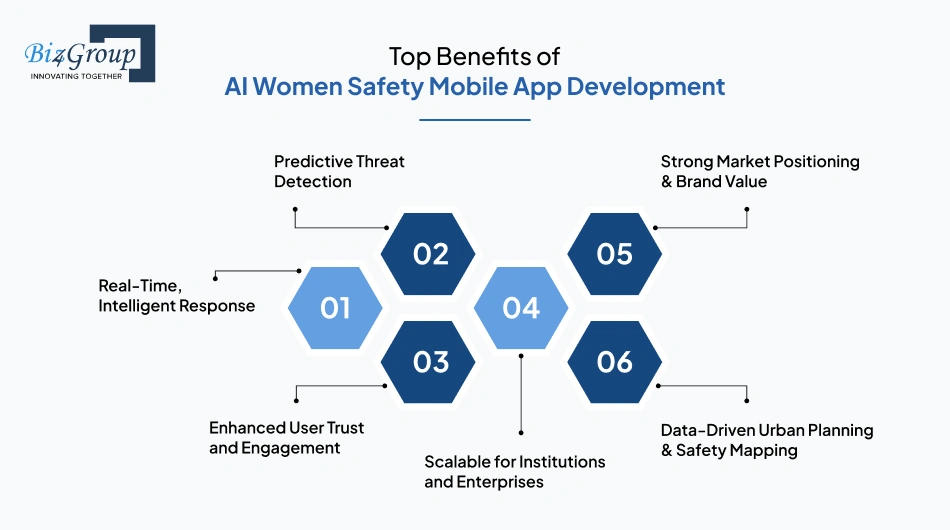
Let's be clear, AI isn't here to replace instincts. It's here to sharpen them. Developing AI women safety applications not only empowers users but also creates meaningful value for businesses, governments, and social ventures.
Here are the top reasons this space is booming and why now is the time to act:
1. Real-Time, Intelligent Response
With traditional safety apps, alerts are manual. With AI, the system thinks for you when you can't. That's the edge AI women safety application development brings.
- Detects danger without user intervention
- Uses voice, movement, and biometric inputs to assess threat levels
- Delivers faster, smarter SOS actions, even under pressure
This is where AI app development for women safety transforms from utility to lifesaver.
2. Predictive Threat Detection
Instead of waiting for danger, AI models can predict when a situation might escalate using behavioral patterns, routes, or verbal cues.
- Learns from user behavior, time, and location history
- Identifies unusual activity like loitering, route deviations, or stress in voice
- Enables proactive alerts before something goes wrong
It's a crucial function in the development of AI women safety app and a must-have when you hire AI developers to build a safety-focused solution.
3. Enhanced User Trust and Engagement
Apps that feel intuitive and protective build loyalty faster and keep users coming back. It's one reason many brands are investing in AI mobile application development for women safety.
- Conversational AI builds a sense of human connection
- Ethical data practices and transparency inspire user confidence
- Personalized safety plans improve stickiness and daily use
It's not just about building an app. It's about building trust.
4. Scalable for Institutions and Enterprises
Whether it's a university, government body, or corporate workplace, safety apps powered by AI scale easily across user groups and geographies.
- Centralized admin dashboards and multi-user management
- Geo-fencing, group alerts, and predictive analytics for teams
- Fits seamlessly into enterprise workflows
Perfect for organizations investing in smart, secure enterprise AI solutions and AI women safety mobile app development.
5. Strong Market Positioning & Brand Value
Let's be honest, social impact sells. Launching or supporting a women safety app positions your brand as responsible and future-ready. Plus, it's a competitive edge in the crowded tech landscape.
- Increases brand trust among female users and families
- Aligns perfectly with CSR and ESG initiatives
- Attracts press, funding, and community partnerships
For startups and NGOs, this is an ideal angle to build AI women safety app with long-term purpose.
6. Data-Driven Urban Planning & Safety Mapping
AI doesn't just react, it helps governments and organizations plan better for public safety through insight-rich safety data.
- Crowd-sourced incident data feeds into heatmaps
- Trend analysis highlights high-risk zones and time windows
- Enables better resource deployment, especially for city planning and law enforcement
This makes AI tool development for women safety app valuable far beyond individual use cases.
The best part? These benefits aren't just "nice to have." They're foundational to AI women safety app development that matters, for people, for institutions, and for society at large.
Thinking, "Should we even build this?"
If your app protects even one life, that's ROI no spreadsheet can measure. We'll help you get there.
Start Building Smart SafetyCore Features to Build in Your AI Women Safety App
Every successful app begins with strong fundamentals. Before diving into advanced machine learning models or predictive algorithms, your AI women safety app development project should prioritize these essential, non-negotiable features.
These aren't bells and whistles, they're the baseline for user trust, app utility, and long-term success.
1. One-Tap SOS Button
At the heart of any AI women safety mobile app development, the SOS button is your user's lifeline. It must be simple, reliable, and fast.
- Triggers real-time alerts to emergency contacts
- Sends GPS location, timestamp, and status in one tap
- Can be customized for silent or vibration-only mode
This feature is the backbone of developing AI women safety application that works under stress.
2. Real-Time Location Sharing
Live GPS tracking is critical for rapid response. Whether walking home or riding in a cab, users need someone watching over them.
- Share live route with family or friends
- Continuous location updates every few seconds
- Auto-alerts if the user deviates from a predefined route
Location intelligence is a non-negotiable in AI mobile application development for women safety.
3. Emergency Contact Management
Who gets alerted and when matters. A good safety app lets users customize this easily.
- Add and prioritize multiple emergency contacts
- Control what data is shared with each (location, video, etc.)
- Time-based escalation: If one contact doesn't respond, alert the next
A feature often overlooked—but essential for scalable AI women safety application development.
4. Silent & Gesture-Based Triggers
In unsafe situations, loud alerts aren't always ideal. Silent triggers save lives.
- Shake phone, press power button 3x, or use a gesture to activate SOS
- Works even if the screen is locked or offline
- Can auto-start evidence recording or location ping
Perfect for those building privacy-first apps using AI automation services like passive input detection.
5. In-App Chat or Hotline Integration
In moments of panic, users may prefer to text or speak with someone instantly.
- Live chat support with safety responders or friends
- Direct integration with helplines and emergency services
- Conversation logs auto-backed for security
It's a practical UX feature and can evolve into more intelligent support in the next stage of AI app development for women safety.
6. Map-Based Safety Navigation
Let users visualize their environment before they even step out.
- Integrated map showing safe zones, danger zones, and nearby help
- Tap-to-navigate to police stations or hospitals
- Add crowd-sourced safety feedback for specific routes
A must if your AI women safety app development is focused on urban or campus safety use cases.
7. Incident Logging & Reporting
Even if the danger has passed, capturing the details is key for justice and learning.
- Allow users to document events via text, voice, or images
- Secure logbooks stored with timestamps
- Option to export reports for authorities or legal follow-up
This is also a key component if you're working on compliance-driven projects with law enforcement or NGOs.
8. Quick Access Widgets & Wearable Integration
Speed matters. The ability to trigger core functions from outside the app is powerful.
- Home screen widgets, lock screen actions, smartwatch compatibility
- Bluetooth sync for wearable panic buttons or fitness bands
- Haptic alerts for subtle emergency feedback
As wearables evolve, so does the development of AI women safety app in multi-device environments.
These core features form the minimum viable foundation for any safety-focused mobile app. If you're planning an MVP rollout, they'll cover critical user expectations and legal best practices. For more on that process, our guide on MVP development is a must-read.
But let's not stop at the basics. In the next section, we'll explore the advanced and AI-powered features that elevate your app from functional… to phenomenal.
What Advanced AI Features Should a Women Safety App Actually Have?
Once your core features are locked in, the next step is turning your app into a smart, context-aware digital guardian. These advanced AI-driven features elevate your product from "just another safety app" to a life-saving, scalable platform with true intelligence.
Here's a breakdown of next-gen features you should consider when moving beyond MVP in your AI women safety app development journey:
Feature |
How It Works |
Why It Matters |
|---|---|---|
Voice Command Activation |
AI listens locally for a specific trigger phrase using on-device wake-word detection, the same category of tech behind "Hey Siri," rather than streaming audio constantly. |
If you're asking "how do I train the voice recognition model to work reliably across different accents, ambient noise levels, and languages without triggering accidentally in normal conversation," the answer is a genuinely diverse training dataset plus a two-stage confirmation trigger, not just a bigger model. |
Behavioral Anomaly Detection |
Machine learning tracks typical user movement, location, and activity. Flags erratic or unusual patterns in real-time. |
Enables proactive safety alerts even without manual input—ideal for solo travelers or night commuters. |
AI-Powered Safe Route Suggestions |
Uses crime data, time of day, and environmental patterns to suggest the safest route. |
Boosts everyday usability, especially in urban settings. Builds user trust over time. |
Emotion Detection via NLP |
Sentiment analysis in chat or voice identifies fear, panic, or distress in user tone. |
Powers AI-driven chatbot responses and real-time support. Useful in AI assistant app design. |
Smart Video Surveillance |
Activates front/back camera to capture surroundings when triggered. AI blurs sensitive visuals and uploads footage securely. |
Supports evidence collection and strengthens legal protection for users. |
Dynamic Geofencing with Risk Scoring |
AI adjusts geofence boundaries based on live data (crowds, alerts, news). |
Helps users avoid dynamic risks rather than relying on fixed danger zones. |
Conversational AI Support Agent |
Chatbots trained to provide support, guidance, or emergency coaching in real-time. |
Enhances user trust and app engagement. Perfect if you're working with an AI agent. |
Real-Time Multi-Device Sync |
AI detects nearby synced devices (wearables, headphones, smart rings) and engages the fastest communication channel. |
Reduces activation time and ensures alerts go out, even if phone is inaccessible. |
Incident Forecasting & Heatmaps |
Predictive modeling highlights areas likely to experience safety threats, based on pattern analysis. |
Helps NGOs, city safety planners, and CSR teams plan better. Adds huge value in AI women safety mobile app development for enterprise deployment. |
Auto Evidence Upload with Cloud Encryption |
Sensitive media is auto encrypted and backed up securely when distress is detected. |
Ensures data remains protected and tamper-proof in critical situations. Great for legal documentation. |
These features not only elevate user experience but position your app as a credible, intelligent solution in a market where AI women safety application development is quickly becoming a benchmark of social tech innovation.
What Is the Process of AI Women Safety App Development?
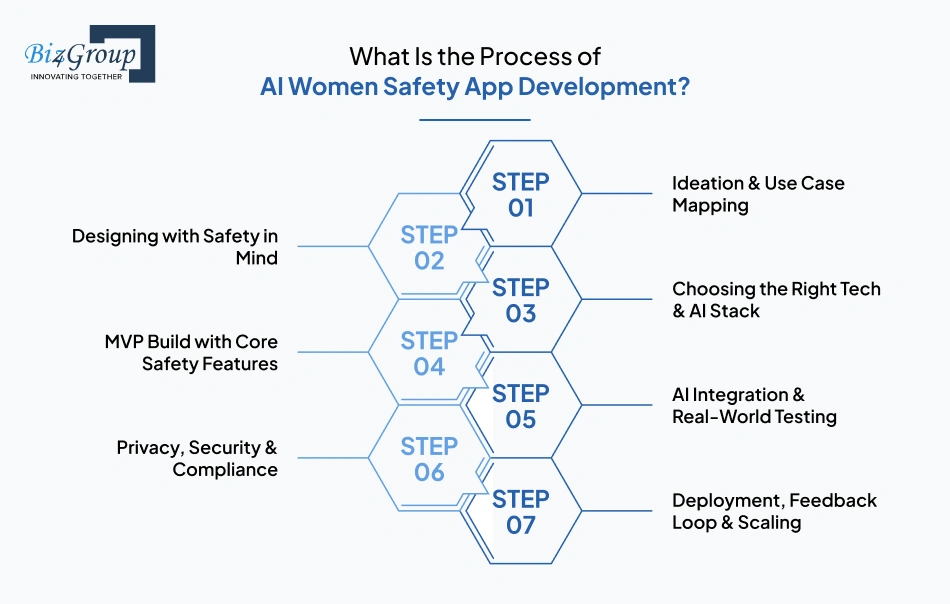
Every serious build follows roughly the same seven stages, but the order of priorities shifts. In a typical consumer app, privacy and edge-case testing are things you tighten before launch. In AI women safety app development, they're part of the core build from day one, not a cleanup pass at the end.
Here's how the process actually breaks down.
Step 1: Ideation & Use Case Mapping
Before any design or code work starts, you need real clarity on who this app is for and what specific problem it solves for them. A solo commuter, a university campus, and a corporate lone-worker program all need meaningfully different feature sets, not the same app with a different skin.
- Define your primary user: individual, institution, or enterprise
- Decide the core focus: emergency alerts, predictive safety, or ongoing mental health support
- Map which AI features actually serve that specific audience, not every feature available
Getting this right early is what separates a focused AI women safety app project from one that tries to be everything at once.
Step 2: Designing with Safety in Mind
People opening this app are often scared, rushed, or in a low-light environment with one hand free. The UI has to work under those exact conditions, not just in a clean design mockup.
- Gesture-based or one-tap emergency activation that works without reading instructions
- Flows tested specifically in low-light and offline conditions
- Visible trust signals: privacy toggles, encryption indicators, and clear permission requests
Skilled UI/UX design matters more here than in most app categories, since a confusing interface in this context isn't just bad UX, it's a safety failure.
Step 3: Choosing the Right Tech & AI Stack
This is the decision that's hardest to reverse later. Every AI feature, voice triggers, route prediction, anomaly detection, depends on an early choice between on-device processing and cloud-based processing, and that choice affects speed, cost, and privacy for the life of the product.
- Select your ML approach: NLP, AI computer vision, or anomaly detection models
- Identify what training data you'll actually need: voice samples, route history, biometric inputs
- Decide what runs on-device for speed and privacy, and what can safely move to the cloud
Most experienced teams working in women safety AI platform development will tell you this step, not the UI, is where the real long-term cost gets decided.
Step 4: MVP Build with Core Safety Features
A strong MVP development proves the core value fast without trying to launch every feature at once. The essentials, not the advanced AI layer, are what earn early user trust.
- Ship the fundamentals first: SOS button, live location tracking, emergency contact list
- Keep AI light but purposeful at this stage, one well-built feature like voice activation beats five half-built ones
- Build the backend for fast response and secure data handling from the start, not as a later fix
This lean approach is usually what turns a good idea into an innovative women safety app people actually use, instead of a feature-bloated release nobody finishes onboarding into.
Step 5: AI Integration & Real-World Testing
This is where the model meets real conditions instead of a clean test environment.
"I am developing a women safety app with AI-powered threat detection and I am concerned about false positives triggering emergency alerts when there is no real danger." This is one of the most common concerns we hear at this exact stage, and it's a fair one. False positives erode trust fast, a few false alarms and users start ignoring real ones too.
- Connect your AI models to the live app interface
- Fine-tune using real beta-user data, not just synthetic training sets
- Test explicitly for edge cases: voice under stress, patchy GPS, background noise, different accents
- Set detection thresholds deliberately conservative at launch, then tighten gradually as real data comes in, rather than starting aggressive and dialing back after users complain
Getting this right is really about learning how to integrate AI into an app without trading away speed, privacy, or accuracy in the process. It's also exactly the kind of judgment call an experienced AI women safety app developer should be able to walk you through before you commit to a model architecture.
Step 6: Privacy, Security & Compliance
A safety app that mishandles personal data undermines its own purpose. This step isn't a formality before launch, it's as central to the product as the SOS button itself.
- End-to-end encryption across all communication and stored media
- CCPA and GDPR compliance, especially for any multi-region rollout
- Anonymized data models with audit logs, not just a privacy policy nobody reads
Step 7: Deployment, Feedback Loop & Scaling
Launch is the start of real learning, not the finish line. Women safety AI app development works best as a continuous loop, not a one-time release.
- Collect real user feedback and incident data after launch
- Retrain models on a scheduled cycle using reviewed data, not automatically after every event
- Plan for enterprise or public-sector scaling only once real usage data supports it
With the process mapped out, it's time to get technical. Next, let's break down the actual tech stack that powers reliable AI tool development for women safety app, from backend infrastructure to the AI layer itself.
Have a plan but need the people?
From MVP to machine learning—we've built it before, and we'll build it better with you.
Bring Your App to LifeWhat Tech Stack Do You Actually Need for AI Women Safety App Development?
Behind every intelligent women safety app is a reliable, scalable, and secure tech stack. Whether you're working on AI mobile application development for women safety or scaling an enterprise solution, your tech choices determine your app's speed, adaptability, and intelligence.
Here's a breakdown of the essential components:
Category |
Technology/Tool |
Purpose & Why It Matters |
|---|---|---|
Frontend (Mobile) |
Flutter, React Native, Kotlin, Swift |
Enables cross-platform or native app development with quick UI rendering and seamless user experience—vital for real-time interactions in safety scenarios. |
Backend Framework |
Node.js, Express.js, Firebase, Python (Django) |
Powers APIs, user management, incident logging, and notification systems. Backend flexibility is key for integrating AI services smoothly. |
AI & ML Frameworks |
TensorFlow, PyTorch, OpenCV, spaCy |
Used for training models in behavior prediction, facial recognition, and NLP for chatbots. Critical in developing AI women safety applications that adapt to real-world inputs. |
NLP & Voice AI |
Dialogflow, Google Speech API, OpenAI API, Whisper |
Enables AI voice activation, emergency commands, and intelligent chatbot conversations. A must-have for building advanced AI women safety app development functionality. |
Maps & Navigation |
Google Maps API, Mapbox, SafeRoute API |
Supports real-time tracking, geo-fencing, and safe route suggestions using live crime data and environmental context. |
Cloud & DevOps |
AWS, Azure, Google Cloud, Docker, Kubernetes |
Hosts AI models, media storage, and scalable backend services. Ensures high uptime and quick data processing during critical moments. |
Database & Storage |
MongoDB, PostgreSQL, Firebase Realtime DB, Amazon S3 |
Stores incident logs, user profiles, and media securely. Supports encrypted and fast-read data architecture. |
Security & Compliance |
OAuth 2.0, SSL, JWT, End-to-End Encryption, GDPR tools |
Protects personal data, ensures privacy laws compliance, and builds user trust—a dealbreaker in any AI women safety mobile app development strategy. |
Analytics & Monitoring |
Google Analytics, Mixpanel, Sentry |
Helps track app performance, crash reports, and user behavior to continually improve UX and retrain AI models. |
If you're planning to launch in the U.S. or benchmark against the best in the space, it's worth reviewing this guide to top AI app development companies in USA.
Also, if you're looking to future-proof and scale faster, our article on business app development using AI can help you align your tech stack with long-term growth.
How Much Does It Cost to Build AI Women Safety App in 2026?
Let's be real, AI women safety app development isn't a weekend hackathon project. But when done right, it offers real returns, both in user trust and social impact.
The estimated cost to develop AI women safety app typically ranges between $25,000 to $80,000+, depending on features, AI depth, device integration, and scale. That figure isn't fixed, it varies based on goals, geography, and whether you're planning to build a community tool or enterprise-grade solution.
Feature-Wise Cost Breakdown
Here's what you'll likely pay when developing AI women safety applications, especially when balancing core features with intelligent AI capability:
Feature / Module |
Estimated Cost Range |
|---|---|
One-Tap SOS Button | $1,000 – $2,500 |
Real-Time Location Tracking | $2,000 – $4,000 |
Emergency Contact Management | $800 – $1,500 |
Geo-fencing + Route Deviation Alerts | $2,500 – $5,000 |
AI-Enabled Voice Command Trigger | $3,000 – $6,000 |
Behavioral Anomaly Detection | $5,000 – $10,000 |
Chatbot or Virtual Companion (AI-based) | $3,500 – $7,500 |
Safe Route Recommendation (AI + Map APIs) | $3,000 – $6,500 |
Evidence Capture & Auto-Upload | $2,500 – $4,500 |
Admin Dashboard (For Institutions) | $4,000 – $8,000 |
Backend Setup & Cloud Integration | $5,000 – $10,000 |
UI/UX Design & Testing | $2,500 – $5,000 |
This breakdown helps estimate early investment into AI women safety mobile app development, particularly for teams building from scratch.
Factors That Affect the Cost of AI Women Safety App Development
Several variables influence your overall budget, especially when you plan to build a smart, scalable, and responsible solution.
- AI model complexity – Deep learning, real-time decision-making, or on-device inference increases dev time
- Wearable & IoT integration – If you're planning AI tool development for women safety app with hardware, factor in testing & sync setup
- Data privacy compliance – Encryption, tokenization, and GDPR/CCPA frameworks impact cost
- Cross-platform deployment – Native + hybrid builds require more development effort
- Backend scalability – Apps handling thousands of users need enterprise-grade infrastructure
If you're unsure where your idea fits, this guide on how much does it cost to develop AI app lays out smart budget paths for startups and enterprises alike.
Hidden Costs in AI Women Safety Application Development
Here's what many forget to plan for when jumping into AI app development for women safety:
- Cost of labeled data for training custom models
- Subscription to cloud-based AI inference or voice APIs
- Model retraining cycles post-deployment
- Data security certifications and compliance documentation
- Customer education, onboarding modules, and walkthroughs
These costs don't show up in day-one invoices, but they'll hit your roadmap unless proactively addressed.
Cost Optimization Tips for Building AI Women Safety App
Smart budgeting doesn't mean skipping features, it means building strategically and scaling smart.
- Start with essential features and MVP-style development
- Use pre-trained models or open-source frameworks where possible
- Build scalable backends to avoid rebuilds later
- Choose modular architecture to add features without major rewrites
- Work with teams who've already done it like top AI app development companies in USA, so you're not paying to reinvent the wheel
Whether you're designing a community platform or planning AI mobile application development for women safety at the enterprise level, a clear cost structure lets you move confidently from idea to impact.
Next up, let's talk about what often blocks the road and how to bulldoze right through it: challenges in AI women safety app development and how to solve them smartly.
Budget whispering, "Don't go overboard"?
Smart doesn't have to mean expensive. We build powerful apps that respect your bottom line.
Get a Cost Estimate That Makes SenseWhat Are the Real Challenges in AI Women Safety App Development, and How Do You Solve Them?
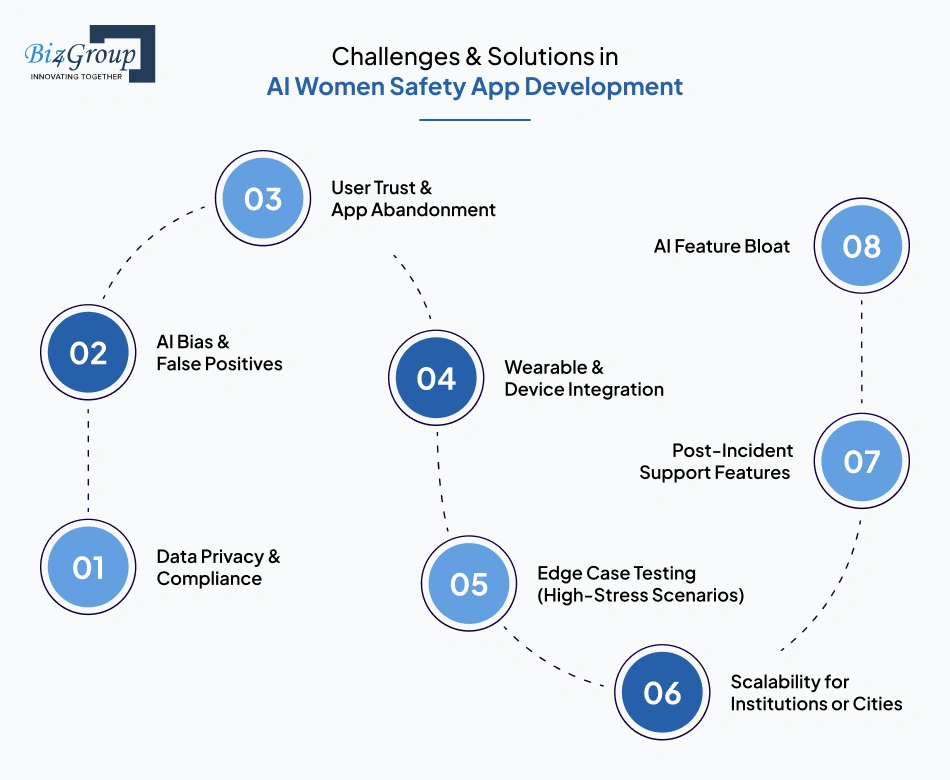
No safety app gets built without real friction along the way. Here's what actually trips teams up during AI women safety app development, and what a real fix looks like, not just a talking point.
Challenge |
What's the Issue? |
How to Solve It |
|---|---|---|
Data Privacy vs. Surveillance |
"We are building a women safety app and I want to include continuous location tracking and AI behavior monitoring but I am worried about creating something that functions like a surveillance tool instead of a genuine safety product." This is one of the most common concerns founders bring to us building an AI women safety app project. |
Process as much as possible on-device instead of streaming raw data to a server by default. Give users granular control over exactly what's tracked and when, not an all-or-nothing toggle. The difference between surveillance and safety isn't the sensors, it's who controls the data and how transparently that's communicated. |
AI Bias & False Positives |
Poorly trained models misread non-threatening behavior or miss genuine risk in AI-based safety alerts app development. |
Use diverse training data, human-reviewed retraining cycles, and conservative alert thresholds at launch, tightened gradually as real usage data comes in. |
User Trust & App Abandonment |
"We are running a women safety tech startup and our app has all the right features but we are struggling with user adoption because women in our target market do not trust that the app will not misuse their location data." |
Trust gets built through specifics, not reassurance. Show exactly what data is collected, exactly who sees it, and give users a way to delete it on demand. This is where AI Women Security App Development either earns daily use or gets uninstalled fast. |
Law Enforcement & Emergency API Integration |
"We are building a women safety app and I want to integrate direct alerts to local police or emergency services but I do not know how these law enforcement API integrations actually work, what approvals are needed, and whether this is even feasible for a startup without government backing." |
This is feasible without government backing, but it requires going through an emergency-data platform like RapidSOS rather than connecting to 911 infrastructure directly, a real, well-defined AI women safety app developer project with existing precedent. |
Wearable & Device Integration |
"I am building a women safety app and I want to extend it to wearables like smartwatches and safety rings so users can trigger SOS without reaching for their phone, and I want to know what technical integration work is actually required and which wearable platforms are most feasible to start with." |
Start with platforms that already have the infrastructure: Apple WatchOS and Wear OS both support background sensors and Bluetooth Low Energy, which is what most wearable integrations for an innovative women safety app rely on. |
Scalability for Institutions or Cities |
Apps that work fine for 1,000 users often fail at 10,000+. |
Use cloud-native architecture and elastic APIs from the start, especially if institutional rollout is part of your women safety AI platform development roadmap. |
Post-Incident Support Features |
Logging an event is one thing. Helping the user through what comes after is another. |
Build in follow-up flows like guided reflection or connections to real support resources, not just an incident log that closes the loop technically but not emotionally. |
AI Feature Bloat |
More AI doesn't always mean better. Overloading users with features confuses more than it protects. |
Start with the AI that solves one real problem, anomaly detection or voice triggers, for instance, and add more only when there's a clear reason to, a core principle in sound women safety smart AI system development. |
None of this is a reason to slow down. It's a reason to build with a partner who's already worked through these exact decisions instead of learning them on your project. That's exactly what comes next.
Why Choose Biz4Group for AI Women Safety App Development?
We're a US-based AI development company with 20+ years of experience and 1,000+ completed projects across healthcare, fintech, and enterprise workflows.
The engineering behind a reliable safety app, real-time response, secure data handling, natural language processing that holds up under real conditions, isn't unique to this category. It's the same foundation we've built for clients solving different problems under the same constraints.
Our AI-driven wizard assistant is one example: real-time conversational AI, NLP, and secure cloud infrastructure built for live business communication and knowledge retrieval. Different use case, same underlying capability a women safety AI app depends on to work when it actually matters.
If you're building AI women safety app for a specific use case, a campus program, a corporate safety initiative, a consumer product, we can walk through exactly how that experience applies to your build, feature by feature, instead of a generic AI capabilities pitch.
That's a conversation worth having before you write a single line of code.
Why settle for average when you can build with proven AI experts?
We don't just code features—we craft intelligent solutions that protect people.
Partner With Biz4GroupConclusion
Technology has finally caught up to a problem it should have solved years ago. Whether that potential turns into something a person can actually rely on in a dangerous moment depends entirely on how carefully it gets built, not just on how much AI gets packed in.
That's the real distinction between a rushed AI women safety app project and one built to last. AI women safety app development done right treats privacy, accuracy, and trust as the product itself, not features layered on top of it.
Whether you're planning a consumer launch, a campus safety program, or a city-wide women safety AI platform development initiative, the fundamentals stay the same: build for the moment someone actually needs it, not just the demo.
The standard worth building to isn't the most features. It's the one someone trusts enough to keep installed. If that's the app you're building, let's put a date on the calendar before the idea cools off.
FAQ's
1. How much does it cost to develop an AI women safety app?
The cost of AI women safety app development typically ranges between $25,000 to $80,000+, depending on your feature set, AI complexity, and platform requirements. If you're including advanced features like behavioral analysis, safe route recommendation, or chatbot integration, your development costs will increase. Custom features, wearable integrations, and compliance requirements also play a role.
2. What are the key features to include in AI women safety mobile app development?
When planning your AI women safety mobile app development, must-have features include an SOS button, real-time GPS tracking, emergency contact sync, and silent gesture triggers. AI-powered features like voice recognition, predictive threat detection, and AI chatbot support enhance both safety and engagement.
3. Why should businesses invest in developing AI women safety applications?
Investing in the development of AI women safety app shows your brand's commitment to social impact, user safety, and innovation. These apps support corporate CSR goals, help brands align with ESG benchmarks, and open new markets—particularly among women-centric audiences, universities, and urban safety planners.
4. How long does it take to build an AI-powered women safety app?
A basic MVP for AI women safety application development can take 2–4 weeks. More complex builds with features like AI tool development for women safety app, wearable syncing, and institutional dashboards typically require 6–8 weeks. Timeline depends on your tech stack, data readiness, and AI integration depth.
5. Can I integrate AI into an existing safety app?
Yes, you can integrate AI into an app you already have. With the right team, it's possible to add NLP-powered chatbots, real-time voice command triggers, or risk scoring models into your existing architecture. This allows you to modernize your solution without a full rebuild.
6. What makes Biz4Group a strong partner for AI women safety app development?
Biz4Group is a trusted leader in AI women safety app development, with proven experience in AI mobile application development for women safety, ethical AI frameworks, and scalable system architecture. From NLP chatbots to smart geo-fencing and wearable integrations, we've helped brands across industries build socially impactful, user-focused AI solutions.
7. How do I ensure data privacy and compliance in women safety apps?
To ensure compliance in developing AI women safety applications, your app should implement secure cloud infrastructure, data anonymization, and follow regulations like GDPR and CCPA. Trust is everything in safety apps—make sure you build with privacy-first architecture, encryption, and transparent user permissions.
