Location :
Orlando, FL, USA
Location :
Orlando, FL, USA +1 (407) 714-1616
 info@biz4group.com

















Imagine a digital system that doesn’t wait for instructions but instead, understands your business goals, learns from real-time feedback, and takes independent actions to get the job done.
Read More

Businesses are moving beyond basic automation toward systems that can think, plan, and take actions across workflows. This shift is driven by better AI models, easier tool integration, and the need for faster decision-making. In this guide, we explain how to build an agentic AI workflow automation system for business using a practical, step-by-step approach.
An agentic AI workflow automation system uses AI agents to manage tasks by understanding goals, breaking them into steps, and executing them using data and connected tools. Many organizations are starting to build agentic AI workflow automation system capabilities that can handle changing inputs and conditions without relying on fixed rules.
These systems are useful for areas like customer support, sales operations, and internal workflows, where processes often change based on context. This shift is part of a larger move toward AI for business process automation, where systems are expected to handle more complex and dynamic tasks.
For developers, product teams, and business leaders asking questions like:
This guide covers system design, tools, and step-by-step methods to develop agentic AI systems for business automation, with a focus on building solutions that are reliable and ready for real-world use.
An agentic AI workflow automation system is designed to handle business tasks by combining decision-making with structured workflows. Instead of following fixed steps, it works toward a goal, chooses actions based on context, and interacts with different tools to complete tasks.
Core Characteristics:
How It Works (Simplified Flow):
In business settings, this helps automate complex workflows, reduce manual work, and improve decision speed. These systems are now part of many enterprise AI solutions, especially where workflows cannot be fully defined in advance. As part of agentic AI workflow automation software development for business, they support more flexible and scalable automation.
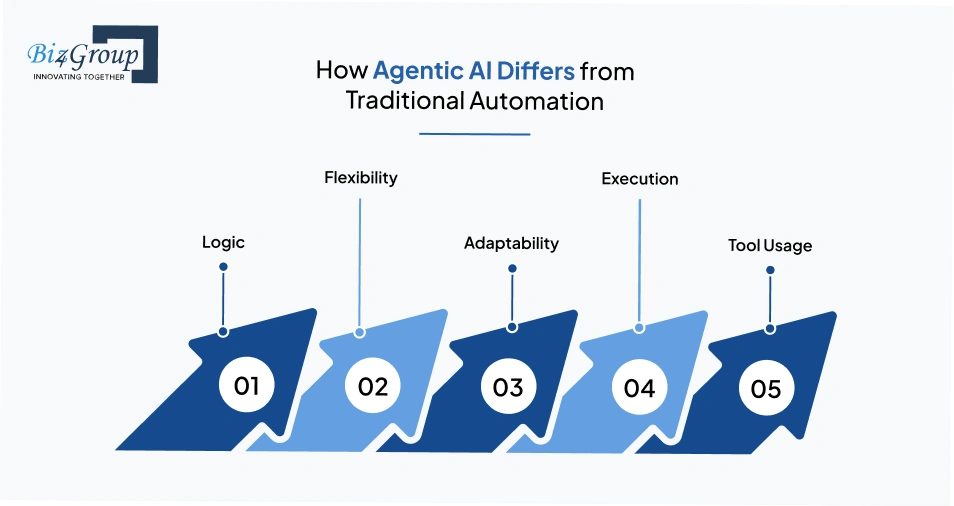
Traditional automation works well when workflows are stable and predictable. However, most business processes involve changes, exceptions, and dependencies across systems. Agentic AI systems are designed to handle these situations without needing constant updates.
|
Aspect |
Traditional Automation |
Agentic AI Systems |
|---|---|---|
|
Logic |
Predefined rules |
Goal-driven decisions |
|
Flexibility |
Low |
High |
|
Adaptability |
Breaks with change |
Adjusts to context |
|
Execution |
Fixed workflows |
Multi-step reasoning |
|
Tool Usage |
Limited integrations |
Uses multiple tools dynamically |
Key Differences in Practice
Traditional systems:
Agentic systems:
This change is supported by advances in generative AI, which help systems understand instructions, reason through tasks, and use tools more effectively. As a result, businesses can build AI software that handles more complex and changing workflows.
These terms are often used together, but they mean different things in business systems.
|
Feature |
AI Workflows |
Autonomous Agents |
Agentic AI Workflow Systems |
|---|---|---|---|
|
Structure |
High |
Low |
High |
|
Autonomy |
Low |
High |
Medium to High |
|
Business Readiness |
High |
Medium |
High |
|
Use Case Fit |
Repetitive tasks |
Experimental |
Real-world workflows |
Where Each Fits in Business:
For example, in customer support, a system may follow a basic process but also needs to handle unclear questions or multi-step issues. Agentic systems manage this by combining structure with decision-making.
This approach is commonly used in the development of agentic AI workflow automation system for business, where systems must work reliably while adapting to real-world conditions.
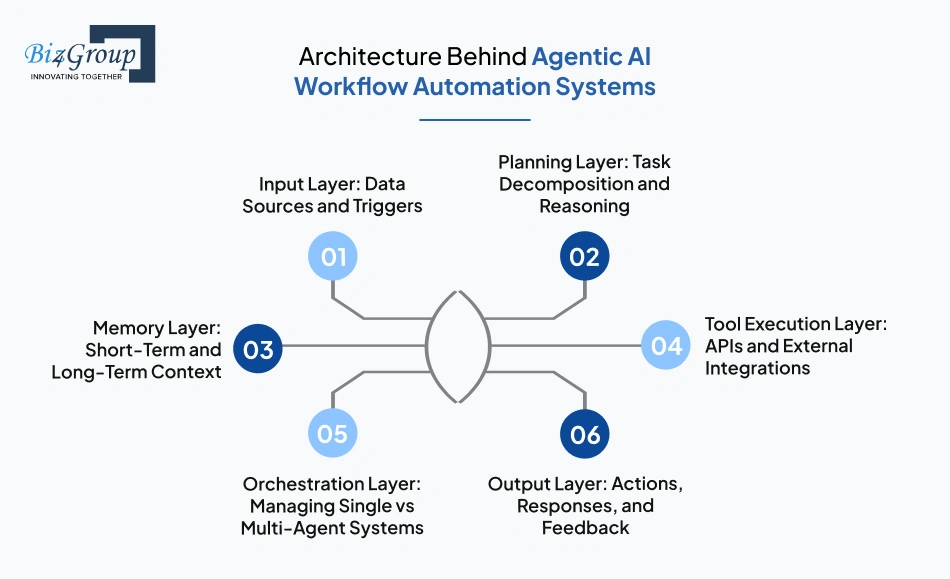
The architecture behind an agentic AI workflow automation system is built as a set of connected layers that work together to process inputs, plan tasks, store context, and execute actions. To build an agentic AI workflow automation system for business, it is important to understand how each layer contributes to the workflow and how they interact in real-world scenarios.
A typical system follows this flow:
Input → Planning → Memory → Tool Execution → Orchestration → Output
|
Layer |
What It Does |
Key Components |
Role in Business Workflows |
|---|---|---|---|
|
Input Layer: Data Sources and Triggers |
Captures inputs that start workflows |
User queries, APIs, events, databases |
Ensures the system receives relevant data in real time |
|
Planning Layer: Task Decomposition and Reasoning |
Breaks down goals into steps using reasoning loops |
LLMs, prompt logic, planning modules |
Determines what actions are needed to complete a task |
|
Memory Layer: Short-Term and Long-Term Context |
Stores and retrieves context for continuity |
Vector databases, session memory, logs |
Helps maintain state across multi-step workflows |
|
Tool Execution Layer: APIs and External Integrations |
Executes actions using APIs and tool calling |
CRMs, SaaS tools, internal systems |
Connects AI decisions with real operations |
|
Orchestration Layer: Managing Single vs Multi-Agent Systems |
Manages workflow execution across agents |
Workflow engines, routing logic, agent managers |
Controls task flow and coordination |
|
Output Layer: Actions, Responses, and Feedback |
Delivers results and captures feedback |
Dashboards, notifications, reports |
Completes workflows and enables improvements |
In production environments, these layers are often built as modular components. Teams working on AI model development design them so each layer can scale or be updated independently. This modular approach helps businesses create a scalable AI workflow automation system for my business processes without rebuilding the entire system as requirements grow.
A clear architectural structure makes it easier to scale workflows, integrate new tools, and improve performance over time. Many organizations use AI automation services to connect these layers with existing systems and deploy them reliably. This approach supports the transition from basic automation to systems that can handle complex, real-world workflows.
Learn how to build an agentic AI workflow automation system for business that can handle decisions, not just tasks.
Start Building Your AI Workflow System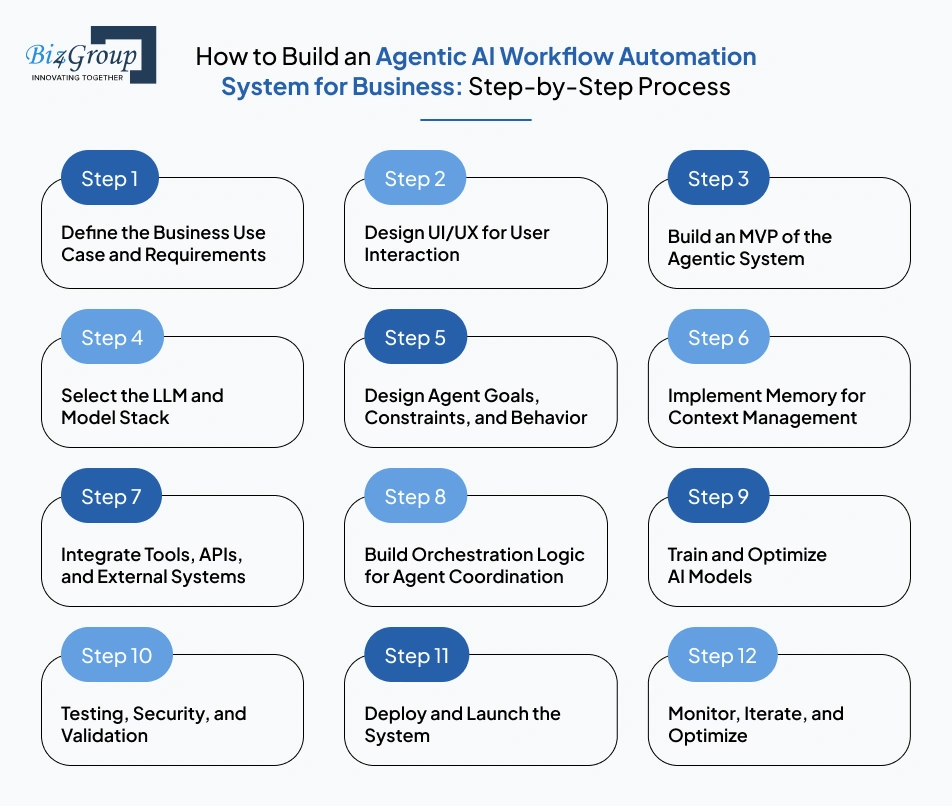
To build an agentic AI workflow automation system for business, teams need a process that connects product thinking with AI system design. The goal is not just to automate tasks, but to create a system that can understand inputs, make decisions, and act across tools in a reliable way. Each step builds on the previous one, so skipping clarity early often leads to issues later.
Everything starts with a clearly defined workflow. Instead of trying to automate multiple processes at once, focus on one use case and break it down.
For example, a lead qualification system may involve reading incoming queries, identifying intent, assigning priority, and updating a CRM. Writing this flow in simple steps helps identify where decisions are needed and what the system must handle.
At this stage, it helps to answer a few key questions:
If these are not clear, later steps like agent design and orchestration become difficult to manage.
Before building the system, define how users will interact with it and what they will see.
Some systems work best as chat interfaces, especially when users ask questions or give instructions. Others require dashboards where users can track actions, review outputs, and intervene when needed. The UI/UX design depends on the workflow and the level of control required.
It is also important to decide how transparent the system should be. In some cases, users only need the final result. In others, showing the steps taken by the system helps build trust and makes debugging easier.
A well-designed interface does not just improve usability, it also shapes how the agent behaves and how outputs are interpreted.
Also Read: Top 15 UI/UX Design Companies in USA (2026 Edition)
The next step is to build a simple version that can complete one workflow from start to end.
With the help of MVP development services, this version should:
For example, a basic support agent could read a query, classify it, and suggest a response without handling all edge cases yet.
Keeping this stage simple is important. Adding multiple agents or complex logic too early makes the system harder to test and debug. This step is a key part of agentic AI workflow automation system development for business, where early validation helps confirm that the approach works before scaling.
Also Read: Top 12+ MVP Development Companies to Launch Your Startup in 2026
Model selection should match the task, not follow trends.
Simple tasks such as classification or routing often work well with smaller models. More complex workflows that require reasoning or multi-step planning may need more capable models. Testing a few options with the same inputs can help compare output quality, speed, and cost.
In practice, teams often combine models instead of relying on just one. For example, a smaller model can handle routing while a larger model handles reasoning. This approach helps balance performance and cost.
Choosing the right model early helps avoid issues later when scaling the system.
At this point, the system starts to behave like an agent rather than a simple workflow.
The agent needs clear goals, but it also needs limits. For instance, a customer support agent may be allowed to answer questions and retrieve data, but not perform sensitive actions without approval.
It is equally important to define how the agent should respond in uncertain situations. Instead of guessing, it should ask for clarification or follow a safe fallback path. This reduces errors and improves reliability.
Clear behavior design ensures that the system remains predictable even when inputs are incomplete or unexpected.
Memory allows the system to handle workflows that involve multiple steps or interactions.
In practice, this means storing recent inputs and retrieving only the information that is relevant to the current task. For example, a support system should recall previous messages in the same conversation, but not unrelated history.
The challenge here is balance. Too much context can confuse the system and slow it down, while too little can lead to inconsistent responses. Good memory design focuses on relevance, not volume.
This is where the system moves from generating responses to taking real actions.
For example, after identifying a qualified lead, the system should update the CRM. After resolving a query, it may send a confirmation message or trigger a follow-up workflow.
Each integration needs clear input and output handling. It should also include error handling so the system can recover if a tool fails or returns unexpected data.
This step is essential to create a scalable AI Workflow automation system for my business processes, where automation must connect with existing systems rather than operate in isolation.
As workflows become more complex, you need to define how different parts of the system work together.
In simple cases, one agent can handle the entire process. In more advanced setups, tasks may be divided across multiple agents, such as planning, execution, and validation.
A central orchestration layer helps manage:
Without this coordination, the system may repeat actions, skip steps, or produce inconsistent outputs. This becomes especially important when building scalable agentic AI workflow automation system for enterprise workflows, where multiple tasks run in parallel.
Once the system works end-to-end, the focus shifts to improving performance.
In many cases, the biggest improvements come from refining prompts and improving how context is retrieved, rather than changing the model itself. Reviewing real interactions helps identify patterns where the system fails or produces weak outputs.
For example, if responses are inconsistent, the issue may be:
Addressing these issues by training AI models improves both accuracy and consistency.
Before launching, the system needs to be tested under realistic conditions.
This includes normal workflows as well as edge cases and unexpected inputs. Testing should also cover how the system behaves when tools fail or return incorrect data.
Security is equally important. The system should not have unrestricted access to tools, and sensitive actions should be validated before execution. This reduces risk and ensures safe operation.
Also Read: 15+ Software Testing Companies in USA in 2026
Deployment moves the system into a production environment where real users interact with it.
It is usually best to start with a limited rollout. This allows teams to monitor performance, identify issues, and make adjustments before scaling. Logging and monitoring should be in place to track errors, latency, and system behavior.
A controlled launch reduces risk and improves system stability.
After launch, the system needs continuous improvement.
Real-world usage will reveal issues that are not visible during testing. By tracking performance, collecting feedback, and analyzing failures, teams can refine the system over time.
Small changes, such as improving prompts or adjusting workflows, often lead to significant improvements. This ongoing process completes the end-to-end process to build AI workflow automation platform for business, ensuring the system remains effective as requirements evolve.
Summary of the Build Process
The process moves from defining a clear problem to designing interaction, building a working system, and improving it over time. Each step adds a layer of capability, from basic automation to a system that can handle complex, real-world workflows in a reliable way.
Follow a proven end-to-end process to build AI workflow automation platform for business and simplify operations.
Explore Your AI Workflow StrategyTools and frameworks form the base of any agentic AI system. To build an agentic AI workflow automation system for business, teams need a combination of agent frameworks, memory systems, and orchestration tools that work well together in real workflows.
An agentic AI workflow automation stack usually includes agent frameworks, memory systems, tool integrations, and orchestration logic working as one system.
Agent frameworks are used to design and manage how agentic AI systems plan, reason, and take actions across workflows. They manage prompts, reasoning, and how the system connects to tools.
In practice, different frameworks are used for different needs. LangChain is often used for flexible workflows and quick integrations. AutoGen is useful when multiple agents need to work together. CrewAI works well when each agent has a defined role in the workflow.
The choice depends on how complex the workflow is. A simple process may need only one agent. More complex workflows may need multiple agents working together. This is often how teams start when they try to develop autonomous AI workflow system for automating business processes beyond basic automation.
These systems often rely on tool calling to interact with external APIs and services.
Memory helps the system stay consistent across steps. Without memory, each action is treated as a new task, which breaks multi-step workflows.
These systems allow agents to retrieve relevant context across steps using vector search and similarity matching.
Most systems use vector databases to store and retrieve context. Data is converted into embeddings, and the system retrieves relevant information based on meaning.
The main challenge is deciding how much context to use. In practice:
For example, in a support workflow, retrieving only related past queries improves both speed and accuracy. This layer is often built with AI integration services, where data from different business systems is connected and made usable for the agent.
As workflows grow, orchestration is needed to manage how tasks move through the system.
At a basic level, orchestration controls the order of steps. In more advanced systems, it manages how multiple agents interact using task routing, agent orchestration, and workflow logic.
For example, one agent may plan the steps, another may execute them, and a third may validate the result. This setup helps keep workflows consistent.
Without orchestration, systems may repeat tasks, skip steps, or produce unreliable results. As workflows become more complex, this layer becomes essential for stability.
Different frameworks are built for different types of workflows, so the choice depends on your use case.
|
Framework |
Where It Fits Best |
What to Expect |
|---|---|---|
|
LangChain |
General workflows with tool integrations |
Flexible, widely used, easy to extend |
|
AutoGen |
Multi-agent collaboration |
Strong coordination, more setup required |
|
CrewAI |
Role-based workflows |
Clear roles, easier to manage structured tasks |
In simple terms, use LangChain for flexible workflows, AutoGen for systems with multiple agents, and CrewAI for structured, role-based setups.
Choose based on workflow complexity, number of agents involved, and level of coordination required.
In real systems, teams often combine these frameworks with custom logic instead of relying on one tool alone. When workflows are closely tied to business systems, teams may work with a custom software development company to adapt these tools for production use.
For teams exploring options and asking who can build a custom agentic AI system for my business workflows?, the answer depends on finding the right mix of tools, integrations, and development approach for the specific use case.
Use agentic AI to reduce manual effort and improve execution speed across business processes with intelligent automation.
Optimize My Business Workflows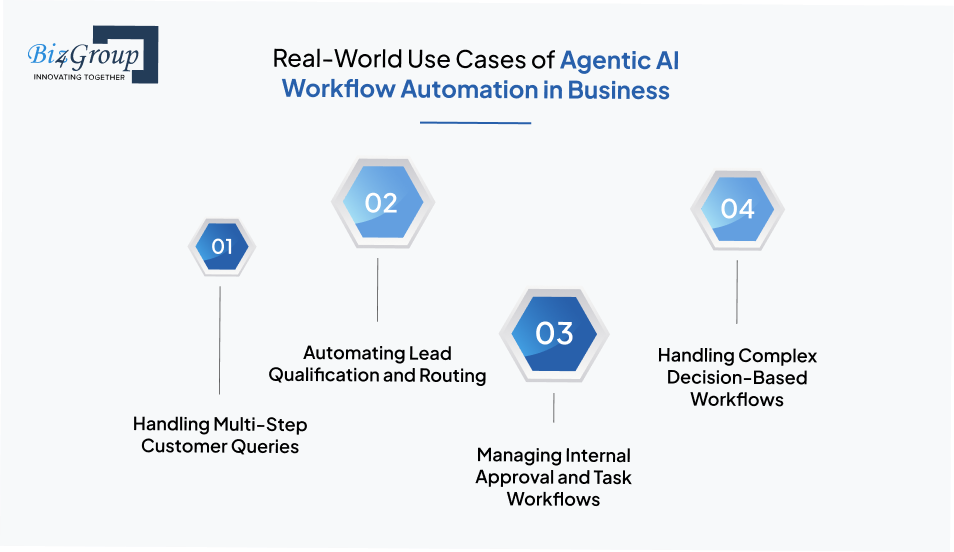
Agentic AI systems are used in business workflows where tasks involve multiple steps, decisions, and integrations. To build an agentic AI workflow automation system for business, it is important to understand how these systems operate in real scenarios and how they handle dynamic workflows across different functions.
Agentic systems can manage support queries that require understanding the issue, retrieving relevant data, and guiding the user through resolution. Instead of following fixed scripts, the system evaluates the query, decides the next step, and adapts based on user responses. This allows support workflows to handle variations without breaking.
For example, an AI conversation app can identify a billing issue, fetch account details, and guide the user through payment or dispute steps in a single interaction.
In sales workflows, agentic systems process incoming leads, analyze intent, and decide how to route them. The system can evaluate factors such as urgency, relevance, and user behavior before assigning the lead or triggering follow-up actions. This improves response time and reduces manual effort.
For example, a system built to build AI software for sales can analyze lead messages, score them based on intent, and automatically assign them to the appropriate sales team.
Agentic systems can automate internal processes where multiple steps and approvals are required. They can validate inputs, check conditions, and route tasks based on rules and context. This reduces delays and ensures workflows move without manual tracking.
In business app development using AI, an approval system can review requests, verify conditions, and send them to the right manager while tracking status automatically.
Some workflows require decisions across multiple stages, where each step depends on previous outcomes. Agentic systems break these workflows into smaller tasks, evaluate data at each stage, and decide the next action. This is useful in operations, risk analysis, and planning systems.
In systems focused on building AI-driven workflow management systems for business, incoming transactions can be analyzed, risks identified, and actions triggered without manual review.
These use cases show how agentic AI systems move beyond simple automation and handle workflows that require context, reasoning, and real-time decisions. As businesses look to build agentic AI workflow automation system, these examples provide a clear view of where such systems can create measurable value.
Portfolio Spotlight
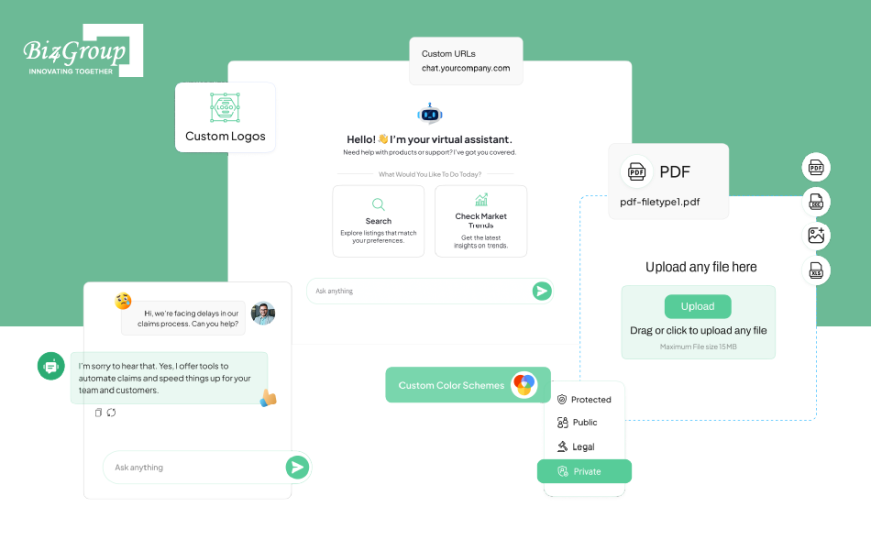
Custom Enterprise AI Agent is designed to automate workflows such as customer support, HR queries, and information retrieval across departments. It uses structured context and task handling to manage multi-step processes, showing how businesses can apply agentic AI principles in real-world workflow automation systems.
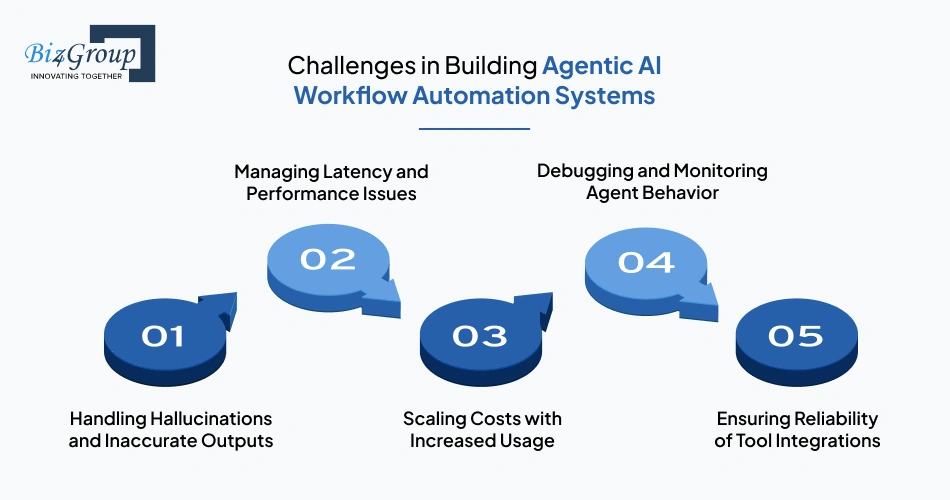
Agentic AI workflow automation systems face challenges related to accuracy, latency, cost, and system reliability. When teams try to build an agentic AI workflow automation system for business, these issues often appear because the system combines reasoning, memory, and tool execution across multiple steps. Understanding these challenges early helps in designing systems that are stable and scalable.
Key Challenges and How They Impact Systems
|
Challenge |
What It Means in Practice |
Impact on System |
What Helps Reduce It |
|---|---|---|---|
|
Handling Hallucinations and Inaccurate Outputs |
Incorrect or misleading responses occur when context is incomplete or reasoning is unclear |
Reduces trust and may lead to wrong decisions |
Clear prompts, validation layers, and controlled outputs |
|
Managing Latency and Performance Issues |
Reasoning, retrieval, and tool calls increase response time in multi-step workflows |
Slower user experience and delayed execution |
Caching, optimized model selection, and fewer unnecessary steps |
|
Scaling Costs with Increased Usage |
Frequent model calls, memory retrieval, and integrations raise costs as usage grows |
High cost per workflow at scale |
Efficient model usage, batching, and usage monitoring |
|
Debugging and Monitoring Agent Behavior |
Hard to trace decisions across multiple reasoning and execution steps |
Difficult to identify issues and improve performance |
Logging, step-level tracking, and observability tools |
|
Ensuring Reliability of Tool Integrations |
External APIs may fail or return inconsistent data during execution |
Breaks workflows or leads to incomplete outputs |
Error handling, retries, and fallback mechanisms |
These challenges are interconnected, as issues in one layer, such as memory or tool execution, can affect the overall system behavior.
In real-world implementations, teams working to develop agentic AI systems for business automation often focus on improving system design instead of just changing models. This includes refining prompts, improving how context is retrieved, and adding validation steps before actions are executed.
Apply a practical guide to building AI-powered workflow automation systems that delivers real results, not just concepts.
Build My AI Workflow SolutionAgentic AI systems do not fail because of models alone. Most issues come from how the system is designed, how agents interact with tools, and how workflows are structured. To build an agentic AI workflow automation system for business, teams need to follow clear practices that improve reliability, keep outputs consistent, and make the system easier to scale.
These practices are important because agentic systems combine reasoning, memory, and tool execution across multiple steps.
Agents should be built as modular components that handle specific tasks. This makes it easier to reuse them across workflows and update them without affecting the full system. In practice, the same agent can be used for tasks like classification, data retrieval, or validation across different workflows, which is useful in agentic AI workflow automation software development for business environments.
Guardrails help control how the system behaves and reduce the chances of incorrect or unsafe actions. These include validation checks, limited access to tools, and clear response boundaries. When teams integrate AI into an app, these controls help keep outputs accurate and aligned with business rules, even when inputs are unclear.
Outputs should follow a clear and consistent format so they can be used easily by other systems. This can include structured formats like JSON or predefined response templates. In practice, consistent outputs reduce errors and make it easier to connect the system with APIs and other tools.
Balancing cost, speed, and accuracy is important for long-term performance. This means choosing the right models, avoiding unnecessary steps, and tracking how the system performs over time. In real systems, this balance is a key part of the development of agentic AI workflow automation system for business, especially as usage grows.
Overall, these best practices help reduce errors, improve performance, and make systems easier to scale. This ensures that agentic workflows remain reliable and consistent as they become more complex.
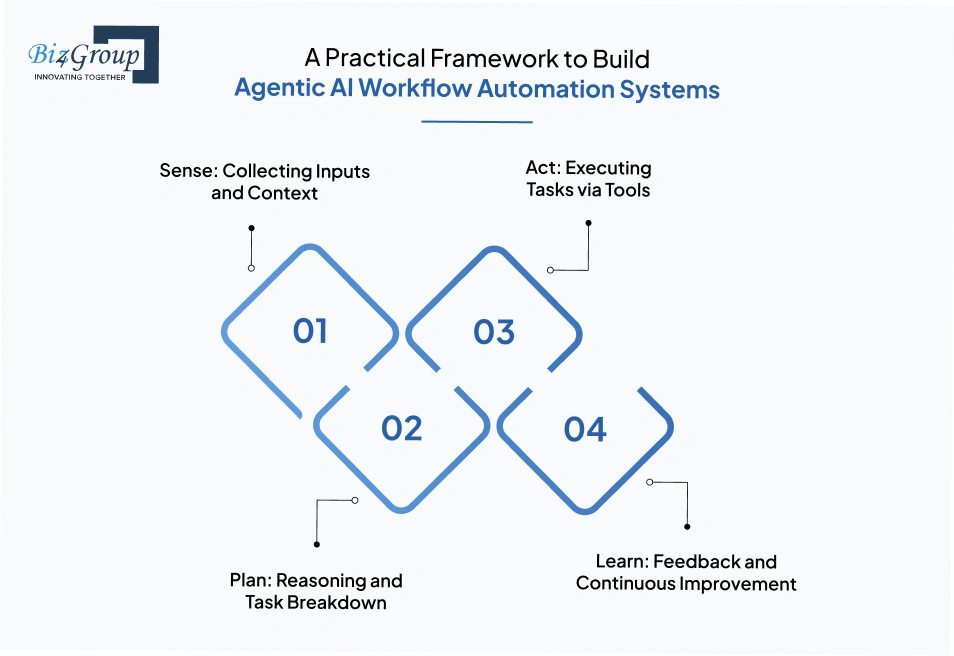
Agentic AI systems work best when their behavior is structured into clear stages. To build an agentic AI workflow automation system for business, it helps to think of the system as a cycle where it collects inputs, plans actions, executes tasks, and improves over time. This structure makes complex workflows easier to design, test, and scale.
Core Framework for Agentic AI Workflows
The framework below shows how agentic AI systems move from input to action and improvement in a structured way.
|
Stage |
What Happens in This Stage |
How It Works and Why It Matters |
|---|---|---|
|
Sense: Collecting Inputs and Context |
The system gathers inputs from users, systems, or triggers and prepares context |
Inputs such as user queries, events, or API data are filtered and structured so the system starts with relevant context and avoids errors early |
|
Plan: Reasoning and Task Breakdown |
The system analyzes the input and decides the steps needed to complete the task |
Tasks are broken into smaller actions, tools are selected, and steps are ordered, which improves accuracy and reduces unnecessary actions |
|
Act: Executing Tasks via Tools |
The system performs actions using APIs, databases, or external tools |
Actions such as updating records or retrieving data connect decisions to real outcomes and ensure the workflow completes as expected |
|
Learn: Feedback and Continuous Improvement |
The system improves based on feedback, logs, and outcomes |
Feedback is used to refine prompts, adjust workflows, and improve context handling, which increases accuracy and efficiency over time |
In real-world implementations, this framework is applied across different workflows depending on business needs. For example, in top use cases of agentic AI, systems follow this cycle to handle customer queries, process transactions, or manage internal operations with minimal manual effort.
This framework provides a simple way to design and understand agentic AI systems without adding unnecessary complexity. By structuring workflows into sensing, planning, acting, and learning stages, teams can create a scalable AI Workflow automation system for my business processes that remains consistent, adaptable, and easier to improve over time.
Plan how to build an agentic AI workflow automation system for business with the right architecture and tools.
Talk to Our AI ExpertsThe cost of building agentic AI systems depends on the complexity of workflows, integrations, and scale of usage. To build an agentic AI workflow automation system for business, most projects typically fall in the range of $20,000 to $100,000+, depending on features, number of agents, and infrastructure requirements. Understanding where these costs come from helps in planning budgets and estimating long-term return on investment.
LLM usage is one of the main cost drivers in agentic systems. Every reasoning step, tool call, or context retrieval adds to token usage.
In smaller systems, this cost may remain a minor portion of the total budget (around 10–20%), especially when workflows are simple. In more complex systems with multi-step reasoning, this can increase to 20–30% of the overall cost due to repeated model interactions.
In practice, teams reduce this by optimizing prompts, limiting unnecessary calls, and using smaller models where possible. Managing this effectively is a key part of agentic AI development cost, especially in high-usage systems.
Infrastructure includes hosting, APIs, databases, and storage systems required to run the workflows.
For most projects, infrastructure typically accounts for 20–30% of the total cost, depending on usage and scale. Smaller systems can rely on managed cloud services, while larger systems may require more customized setups. Costs increase with:
Choosing the right setup early helps avoid unnecessary scaling costs later.
Scaling costs depend on how efficiently the system is designed. Without optimization, costs can increase quickly as usage grows.
In many cases, inefficient workflows can raise operational costs by 15–25% over time due to repeated model calls and redundant steps. This is why optimization is treated as an ongoing process rather than a one-time setup. Common strategies include:
Many teams work with an AI app development company to design systems that stay within budget while scaling.
ROI depends on how much manual effort the system replaces and how efficiently workflows are completed.
For most business use cases, systems start delivering returns within 6–12 months, depending on usage and scale. Savings typically come from reduced operational effort, faster execution, and improved accuracy. For example:
ROI is best measured by comparing operational cost before and after implementation. This is often part of the end-to-end process to build AI workflow automation platform for business, where cost and value are evaluated together.
Cost and ROI should be viewed together rather than separately. While initial investment may vary, well-designed systems tend to recover costs through efficiency gains and improved workflow performance. For teams following a guide to building AI-powered workflow automation systems, focusing on cost control and measurable outcomes helps ensure long-term value.
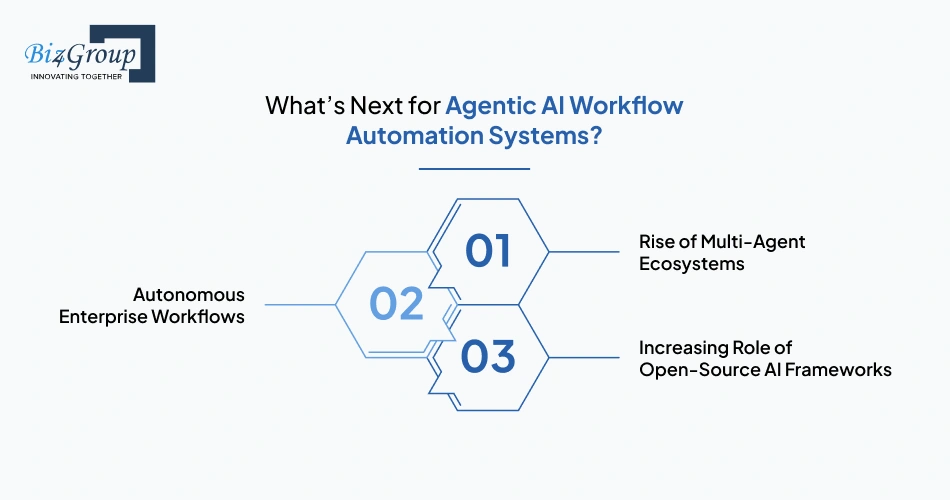
Agentic AI workflow automation systems are becoming more flexible and easier to scale. As businesses continue to build an agentic AI workflow automation system for business, the focus is moving from basic automation to systems that can handle tasks, make decisions, and improve over time. These trends show how agentic AI is becoming more useful in real business workflows.
Multi-agent systems are becoming more common as workflows get more complex. Instead of one agent doing everything, different agents handle tasks like planning, execution, and validation. This makes workflows easier to manage and scale, especially when teams build agentic AI assistant solutions for tasks that involve multiple steps.
Workflows are becoming more autonomous, with systems handling tasks from start to end with less human input. This helps reduce manual work and speeds up operations. It is an important part of the end-to-end process to build AI workflow automation platform for business, where systems move closer to full automation. Teams often use product development services to design workflows that can run smoothly with minimal effort.
Open-source frameworks are making it easier to build and customize agentic systems. They give more flexibility and allow teams to experiment and improve systems faster. Many teams also work with top agentic AI development companies in USA to turn these setups into reliable production systems.
Agentic AI workflow automation is moving toward systems that are easier to manage, more autonomous, and ready to scale. For teams following a guide to building AI-powered workflow automation systems, understanding these trends helps in building systems that stay useful as business needs change.
Build systems that can think, act, and adapt using a structured end-to-end process to build AI workflow automation platform for business.
Start My Agentic AI JourneyBuilding agentic AI systems requires more than just model integration. It involves designing workflows, managing context, and ensuring systems can act reliably across multiple steps. To build an agentic AI workflow automation system for business, Biz4Group LLC focuses on real-world implementation rather than just theoretical architecture.
Our custom enterprise AI agent reflects how these systems are applied in production environments, where agents handle tasks like support, internal operations, and data-driven decision-making across workflows.
What sets Biz4Group LLC apart:
In practice, this ensures that businesses are building systems that can operate, scale, and deliver measurable value over time.
Agentic AI is not about adding another automation layer. It is about designing systems that can handle workflows end to end, make decisions at each step, and improve based on feedback. That shift changes how businesses operate, not just how they automate.
As seen across the architecture, frameworks, and real-world examples in this blog, the difference comes down to how well the system is designed, not just the model used. This is where working with an experienced AI development company or leveraging structured AI consulting services becomes important, especially when moving from isolated use cases to scalable systems.
Agentic AI systems use context, memory, and reasoning to deal with unclear inputs. They can ask follow-up questions, retrieve additional data, or make decisions based on past interactions. This allows them to continue workflows instead of failing when inputs are not fully defined.
Yes, agentic AI workflows are designed to connect with existing tools such as CRMs, ERPs, and internal databases. They use APIs and integrations to access data and perform actions, which allows businesses to automate workflows without replacing their current systems.
Performance is usually measured using metrics like task completion rate, accuracy of outputs, response time, and reduction in manual effort. Businesses also track how often workflows need human intervention to understand how reliable the system is over time.
Processes that require strict human judgment, high-risk decision-making, or lack structured data may not be ideal for full automation. In such cases, agentic AI is often used to assist rather than fully automate the workflow.
The cost typically ranges from $20,000 to $100,000+, depending on the complexity of workflows, number of integrations, and scale of deployment. Simpler systems fall on the lower end, while enterprise-level, multi-agent systems with advanced features fall on the higher end.
Most systems take between a few weeks to a few months to build, depending on complexity. Basic workflows can be developed faster, while systems with multiple agents, integrations, and optimization layers require more time for testing and refinement.

with Biz4Group today!
Our website require some cookies to function properly. Read our privacy policy to know more.