 Location :
Orlando, FL, USA
 +1 (407) 714-1616
 info@biz4group.com

- Develop an AI chatbot for online coaches or course creators to automate support, save time, and deliver 24/7 personalized engagement.
- Build AI-powered chatbot for online coaches with must-have features like FAQs, onboarding, payments, scheduling, and analytics.
- Creating an AI coaching chatbot with advanced features such as contextual memory, sentiment analysis, and voice-enabled coaching boosts learner outcomes.
- A clear process to create chatbots for online coaches and course creators with AI ensures smooth setup, training, deployment, and scaling.
- The development of AI chatbot for online coaches or course creators can cost $15K–$200K, depending on scope, integrations, and scalability.
- Choosing between AI chatbot development for online coaches or course creators (custom build) or prebuilt tools depends on budget and growth goals.
- Future-ready strategies to make scalable AI chatbot for online coaches and course creators include personalization, voice-first learning, and AR/VR.
- Partner with Biz4Group, a trusted AI chatbot development company in USA, to get tailored, ROI-driven solutions that accelerate business growth.
Guess what? While you’re buried in emails and juggling FAQs, there’s someone with a chatbot of their own. A chatbot that answers student questions at midnight, books calls while they sleep, and gently nudges learners to buy their next course, all without lifting a finger.
Yep, it’s really happening.
Sounds unfair? It is.
And it’s also the reason AI chatbots are quickly becoming the quiet growth engine behind successful coaching businesses.
For online coaches and course creators, time is your most valuable asset.
Imagine if every repetitive student query, scheduling hiccup, or onboarding question was handled instantly, leaving you free to focus on the part of your business that actually drives growth.
That is the promise of AI chatbot development for online coaches or course creators: efficiency, personalization, and a 24/7 presence that does not burn you out.
This blog is your practical guide to develop an AI chatbot for online coaches or course creators. We will explore the steps to create chatbots for online coaches and course creators with AI, cover the costs, highlight features, and explain how to turn your chatbot into both a support system and a growth engine.
Here is what you will walk away with:
- A clear step by step process to build AI powered chatbot for online coaches that actually works in the real world
- Smart tips on AI bot development for online coaches or course creators that keep things human and engaging
- Practical strategies to maximize ROI, avoid common pitfalls, and scale your chatbot as your business grows
So if you are ready to explore how chatbots can give your coaching business an edge, stick around.
Up next, we will uncover why coaching businesses need to develop AI chatbots for course creators right now, and what happens if you wait too long.
Why Coaching Businesses Should Develop an AI Chatbot for Online Coaches or Course Creators Now?
The online coaching and e-learning market is exploding, but so is the competition.
Students and clients now expect instant responses, personalized guidance, and round-the-clock availability.
Falling short here can mean losing potential learners to a competitor who simply replies faster.
A few market signals make the case crystal clear:
- According to reports, the global chatbot will hit nearly 27 billion dollars by 2030. That kind of growth shows one thing, that AI chatbots are not a passing trend, they are becoming the backbone of digital interaction.
- The e-learning services market itself is projected to exceed 800 billion dollars by 2030. When learners are investing that much, they expect premium experiences, not long email wait times, which is why working with an expert e-learning app development company can give your business a serious competitive edge.
Here is where developing AI chatbots for course creators makes sense:
- Save time on repetitive tasks: No more typing the same welcome email or answering “When does the course start?” twenty times a week. The chatbot handles it instantly.
- Increase student satisfaction: Learners feel valued when they get real-time answers and tailored guidance. A happy learner is a loyal learner.
- Boost conversions: Chatbots can engage prospects the moment they land on your site, qualify them, and direct them toward your courses or coaching packages.
- Personalize learning journeys: By recommending the right content at the right time, a chatbot can nudge learners to finish modules and stay motivated.
- Work around the clock: Unlike humans, a chatbot does not log off. It engages clients in every time zone, keeping your business open 24/7.
- Collect valuable insights: Every interaction is data. Coaches can see patterns in student questions, refine courses, and adjust strategies.
- Scale without burning out: Whether you have 10 students or 1,000, the workload on your time remains the same because the bot does the heavy lifting.
If you are still on the fence, remember that technology adoption in coaching is not slowing down. The sooner you create chatbots for online coaches and course creators with AI, the sooner you free yourself to focus on coaching, not customer service.
Next, let’s look under the hood and understand what role these chatbots actually play, and how they work in the coaching and course creation space.
Also read: How to build an eLearning platform?
Ready to Coach Smarter, Not Harder?
Let’s turn late-night questions into business opportunities.
Build with Biz4GroupUnderstanding the Role of AI Chatbot Development for Online Coaches or Course Creators
Let’s start simple.
A coaching bot is your always on assistant that greets prospects, guides learners, and keeps operations tidy while you do the high value coaching, especially when built by a custom AI EdTech software development company that knows the nuances of digital learning.
Think of it as a patient teammate that never forgets, never sleeps, and loves FAQs more than any human ever could.
How Does It Work?
First up, a quick tour on how does an AI coaching chatbot works.
- Understands Questions
The bot reads messages, detects intent, and extracts key details. You get clarity at scale, not guesswork. - Finds the Right Answer
It checks a vetted knowledge base, course docs, lesson outlines, or policies. Accuracy comes from good content, not luck. - Keeps Context
Conversation memory makes replies feel natural across sessions. Learners feel seen, not shuffled. - Personalizes Guidance
It looks at progress, goals, or tags to recommend the next lesson or resource. Precision replaces one size fits all. - Takes Action
With integrations, it books sessions, sends reminders, captures leads, or processes payments. Conversations turn into outcomes. - Loops You In
When a human touch is needed, it routes to you with full context. Handoffs feel smooth and helpful.
That is your engine. Now let’s see the lanes it drives in.
Core Roles and Real Impact
Read across to see what the bot does, who benefits, and how you measure wins.
| Role | What It Does | Who Benefits | Business Impact |
|---|---|---|---|
|
Onboarding concierge |
Welcomes new learners, shares first steps, sets expectations |
Cohort or evergreen courses |
Faster time to first value and fewer drop offs |
|
FAQ helpdesk |
Answers program, pricing, access, and policy questions |
Prospects and students |
Lower support load and faster response times |
|
Learning guide |
Recommends lessons, quizzes, and resources by goal and progress |
Active students |
Higher completion and better outcomes |
|
Sales assistant |
Qualifies leads, handles objections, collects emails, books calls |
Prospects on site or chat |
Increased conversion and cleaner pipelines |
|
Retention coach |
Sends nudges, reminders, and micro wins to keep momentum |
Busy learners |
Improved retention and lower churn |
|
Admin sidekick |
Books sessions, syncs calendars, updates CRM, logs notes |
You and your team |
Fewer manual tasks and fewer scheduling issues |
Tables are neat, but real life is where the fun begins.
Also read: Top 7 benefits of eLearning mobile apps
Practical Use Cases for Coaches and Course Creators
Here is a quick list that maps to daily work. Each point starts with where it helps and ends with what you gain.
- Lead Capture on Landing Pages
Greets visitors, answers key questions, and captures emails with consent.
You turn traffic into predictable leads. - Program Fit Assessment
Asks a few targeted questions, assigns a fit score, and proposes the right path.
You book quality calls, not random chats. - Course Navigation and Progress Boosts
Guides learners to the next lesson, flags blockers, and suggests quick wins.
You get more completions with less handholding. - Accountability Nudges
Sends time boxed reminders, gentle check ins, and week end summaries.
You create habits that learners can keep. - Upsell and Cross Sell Moments
Spots readiness signals and introduces advanced tracks or 1 to 1 coaching.
You increase lifetime value without pressure. - Community Care and Moderation
Surfaces unanswered questions and highlights standout contributions.
You keep communities supportive and safe. - After Session Follow Ups
Shares notes, links, and action items right after calls.
You lock in momentum while motivation is high.
You now have a clear picture of what the bot is and where it fits.
Next we will list the features that matter most when you create chatbots for online coaches and course creators with AI, starting with a simple table you can use as a shopping list.
Also read: Top 8 use cases of AI chatbots in business
Key Features to Create Chatbots for Online Coaches and Course Creators with AI
When you are investing time and money into building a chatbot, the last thing you want is to discover it is missing the basics.
Below is your complete feature checklist, the essentials that every online coach and course creator should demand in their AI chatbot.
| Feature | Why It Matters | Example in Action | Benefit to Coaches & Learners |
|---|---|---|---|
|
24/7 Automated Support |
Learners and prospects expect answers any time of day |
A student asks at midnight, "When is the live Q&A session?" and gets an instant reply |
Higher satisfaction and no lost leads |
|
Personalized Recommendations |
Tailors learning journeys and coaching experiences |
Suggests the next module based on progress and goals |
Improved engagement and course completion |
|
Multi-Platform Deployment |
Meet learners where they are: web, mobile, WhatsApp, Messenger |
Bot integrated into course portal and WhatsApp group |
Wider accessibility and more interactions |
|
Integration with LMS & CRM |
Connects seamlessly with Thinkific, Kajabi, HubSpot, or Zoho |
Syncs new leads into CRM and marks student progress in LMS |
Streamlined operations and accurate data |
|
Calendar & Scheduling |
Automates booking of coaching calls or group sessions |
Bot checks your availability and books a Zoom slot instantly |
Saves hours of admin work every week |
|
Payment & |
Enables course purchases and renewals within the chat |
Learner asks about pricing, bot shares a link to pay securely |
Faster conversions and reduced drop-offs |
|
Multilingual Capabilities |
Supports global audiences by speaking their language |
Spanish learner gets onboarding in Spanish |
Expanded reach without extra effort |
|
Progress Tracking & Nudges |
Keeps learners accountable and motivated |
Bot sends a reminder: "Time to finish Lesson 3 today" |
Higher retention and completion rates |
|
Feedback Collection & Surveys |
Captures insights on courses, sessions, and content |
After a module, bot asks "How useful was this lesson?" |
Better content decisions backed by data |
|
Secure Authentication |
Protects learner data and course access |
Bot verifies login before giving access to premium content |
Builds trust and keeps platforms compliant |
|
Analytics Dashboard |
Provides insights into learner behavior and chatbot performance |
Coach sees top questions asked each week |
Data-driven improvement of both courses and bot |
|
Human Handoff Option |
Transfers complex queries to a real coach seamlessly |
A student wants in-depth strategy advice, bot routes to you |
Balanced automation with human touch |
These are the essentials. With these in place, your chatbot is not just a Q&A machine but a true coaching ally.
And once the basics are handled, it is time to step up the game. In the next section, we will dive into the advanced features that give your chatbot an edge and make it feel less like a machine, more like a coaching partner.
Want a Chatbot That Does More Than Just “Chat”?
We pack in the features that keep learners hooked and your pipeline full.
Book Your Strategy Call NowAdvanced Features in AI Chatbot Development for Online Coaches or Course Creators
The must-have features we just covered set the foundation.
But if you want your chatbot to feel less like a digital receptionist and more like a real coaching assistant, you will need to layer on advanced capabilities, something a skilled AI app development company can help you execute seamlessly.
These are the game changers that transform a good chatbot into a great one.
1. Contextual Memory and Long-Term Conversations
Nobody likes repeating themselves.
With contextual memory, your chatbot remembers details from past chats, so conversations flow naturally.
For example, if a learner said last week, “I struggle with sales objections,” the bot can follow up later with, “Want to revisit that sales objection module today?”
This creates a sense of care and continuity.
2. Sentiment Analysis for Empathy
Words carry emotions, and your chatbot should pick up on them.
Sentiment analysis allows the bot to detect frustration, excitement, or confusion.
If a student sounds overwhelmed, the chatbot can respond with empathy and suggest easier resources.
This turns a robotic exchange into a supportive experience.
3. Voice-Enabled Coaching
Typing is fine, but sometimes learners want to talk things out.
Voice-enabled chatbots bring coaching closer to a real conversation.
Imagine a learner asking, “What’s my next step?” while on a walk, and the chatbot guiding them without needing a screen.
Accessibility plus convenience equals higher engagement.
4. AI-Driven Content Generation
Your chatbot does not just deliver content, it can create it too.
From summarizing long video lessons into quick notes to generating practice quizzes, this feature helps learners absorb material faster and keeps them actively learning, especially when guided by expert AI product development services.
Coaches benefit by extending the value of their existing content.
5. Smart Upselling and Cross-Selling
Every learner’s journey is unique, and so are their needs.
Advanced bots can detect readiness signals, like a student finishing a beginner module, and suggest the next level program.
Instead of feeling pushy, it feels like timely, personalized advice that also drives revenue.
6. Community Management and Engagement
For course creators with active forums or groups, an advanced chatbot can highlight popular discussions, answer community FAQs, or even moderate comments.
It ensures that online communities stay vibrant and learners feel supported.
These advanced features take your chatbot from “functional” to “indispensable.” They add depth, empathy, and business smarts.
And now that you know what to aim for, it is time to look at the step-by-step process of actually building an AI-powered chatbot for online coaches.
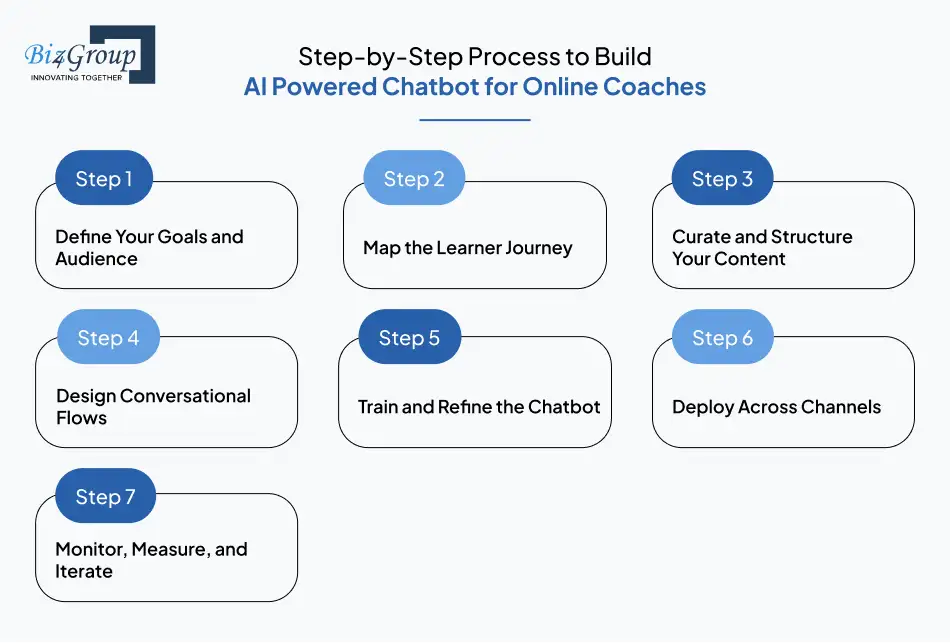
Step-by-Step Process to Build AI Powered Chatbot for Online Coaches
Building a chatbot may sound like the territory of hoodie-wearing developers in dark rooms, but truth is, it is far more approachable.
Think of it like setting up a new coaching program: define goals, prepare content, structure flow, and then let the tech do its thing.
Here is your roadmap, no jargon required.
Step 1: Define Your Goals and Audience
Before you build anything, decide why you are building it. Is the chatbot for lead generation, student support, or both?
Get specific, or your bot will feel like a generalist who knows a little about everything but is useful for nothing.
- Pinpoint use cases (FAQs, onboarding, upselling).
- Profile your audience (new learners, advanced students, corporate clients).
- Prioritize one or two high-value goals to start.
Clear goals set the stage for measurable wins.
Step 2: Map the Learner Journey
Coaching is not random, it is a guided journey. Your chatbot needs the same clarity.
Visualize what your learners experience and where the bot can step in.
- Sketch a learner’s flow from discovery to enrollment to completion.
- Identify pain points where support is most needed.
- Plan interactions that feel like a natural part of that journey.
This step ensures the bot adds value rather than just popping up like an intrusive pop quiz.
Step 3: Curate and Structure Your Content
Chatbots are only as smart as the material you feed them. Dumping raw transcripts and lesson notes will not cut it.
You need clean, structured, and purposeful content.
- Organize FAQs, lesson summaries, and policies.
- Use bite-sized formats for quick delivery.
- Keep tone consistent with your coaching style.
A well-fed chatbot is a confident chatbot.
Step 4: Design Conversational Flows
Every good chatbot feels like it “gets” you. That comes from thoughtful dialogue design, not just machine learning.
- Start with common questions and build tree-style flows.
- Add personality cues that reflect your coaching brand.
- Prepare fallback messages for when the bot is stumped.
Flows give structure, but personality gives soul.
Step 5: Train and Refine the Chatbot
AI does not become brilliant overnight. It learns.
Use sample conversations to teach it what works and what does not.
- Feed it real student questions to practice.
- Label intents and responses for better accuracy.
- Run test sessions and refine continuously.
This is where your chatbot goes from “clueless intern” to “reliable assistant.”
For faster results, many coaches choose to hire AI developers who can fine-tune training data and speed up accuracy improvements.
Step 6: Deploy Across Channels
Your learners are not all hanging out in one place. They are on your website, inside your course portal, and sometimes messaging you at odd hours.
Your chatbot should be there too.
- Deploy on website, LMS portal, and mobile apps.
- Add messaging integrations like WhatsApp or Messenger.
- Keep the brand experience seamless everywhere.
Meet learners where they are, and they will meet you halfway.
Step 7: Monitor, Measure, and Iterate
Launch day is just the beginning. The best chatbots evolve based on data and user feedback.
- Track KPIs: response time, satisfaction rate, conversion lift.
- Collect user feedback after conversations.
- Keep updating content as your courses grow.
Iteration turns a good chatbot into an exceptional one.
And there you have it, a clear path to build AI powered chatbot for online coaches without the overwhelm. Now that you know the steps, let’s talk about the technology stack and integrations that will actually power all this magic.
Also read: A complete guide to AI chatbot development
Got the Roadmap, But Need a Driver?
We’ll handle the tech while you handle the coaching.
Schedule a Free CallRecommended Tech Stack for Development of AI Chatbot for Online Coaches or Course Creators
Now that you know the steps, the natural question is, what powers the engine under the hood? Building a scalable chatbot is not about one magic tool, it is about picking the right mix of frameworks, platforms, and integrations.
Let’s break it down category by category, with quick tables for easy scanning.
Frontend Frameworks and UI Libraries
This is the face of your chatbot. Make it friendly, fast, and accessible with a trusted UI/UX design company.
| Framework | What It Does | Why It Works For Coaches |
|---|---|---|
|
React |
Component-based web UI |
Mature ecosystem and chat SDK support for clean widgets |
|
React with routing and rendering |
Fast pages, great SEO for course sites and portals |
|
|
Vue / Nuxt |
Lightweight reactive UI and SSR via Nuxt |
Smooth learning curve and solid performance |
|
SvelteKit |
Compiler-driven web apps |
Snappy UX for lean chat widgets and dashboards |
| UI Library | What It Does | Why It Works For Coaches |
|---|---|---|
|
Tailwind CSS |
Utility-first styling |
Rapid, consistent theming that matches your brand |
|
Chakra UI / Material UI |
Accessible components |
Ready-made buttons, modals, and forms for chat UIs |
|
Web Chat SDKs |
Prebuilt chat widgets |
Drop-in chat experiences that respect your styles |
Polished frontend equals higher engagement. Keep it simple, fast, and on-brand to invite conversation.
Also read: Top 15 UI/UX design companies in USA
Backend Frameworks and Orchestration
This is where requests are routed, logic runs, and integrations come alive.
| Framework | What It Does | Why It Works For Coaches |
|---|---|---|
|
Node.js with Express or NestJS |
API services and webhooks |
Great for real-time chat, fits many integrations |
|
Python with FastAPI |
High-performance APIs |
Clean data processing for transcripts and summaries |
|
LangChain / LlamaIndex |
LLM orchestration and retrieval |
Glue for RAG pipelines and tool calling |
|
Serverless Functions |
Event-driven execution |
Scale per request on AWS, GCP, or Azure without ops toil |
Backend is your control room. Keep endpoints lean, stateless where possible, and well logged for easy debugging.
AI and NLP Frameworks
These give your chatbot its brain for understanding and responding intelligently.
| Tool | What It Does | Why It Works For Coaches |
|---|---|---|
|
OpenAI GPT (ChatGPT API) |
Natural language generation and conversation |
Human-like responses for personalized coaching chats |
|
Google Dialogflow |
Intent recognition and multi-channel deployment |
Solid for structured Q&A and multilingual use cases |
|
Rasa |
Open source NLU and dialogue management |
Deep customization for advanced coaching workflows |
|
Microsoft Bot Framework |
SDK and connectors for enterprise bots |
Ideal if you already use Microsoft services |
A smart brain needs smart guidance. Pair the model with clear prompts and a clean knowledge base for best results.
Chatbot Builders and Platforms
Ideal for coaches who want ready-made frameworks without reinventing the wheel.
| Platform | What It Does | Why It Works For Coaches |
|---|---|---|
|
Voiceflow |
Visual builder for conversation flows |
Design learner dialogues without heavy coding |
|
ManyChat |
Marketing bots for Messenger, WhatsApp, Instagram |
Great for lead capture and course promotion |
|
Tidio |
Web chat plus automation with live handoff |
Practical for small to mid-size coaching teams |
|
Landbot |
Conversational forms and journeys |
High-converting lead funnels before enrollment |
Builders speed up iteration. You still define the strategy and voice so the bot feels on-brand.
Integrations with LMS and CRMs
The bot shines when it plays nicely with your existing tools, which is why professional AI integration services are crucial to tie everything together smoothly.
| Tool | What It Does | Why It Works For Coaches |
|---|---|---|
|
Thinkific / Teachable / Kajabi |
Course hosting and learner management |
Sync progress and send module reminders |
|
HubSpot / Zoho CRM |
Lead tracking and nurture automation |
Capture bot leads and run segmented campaigns |
|
Calendly |
Scheduling and calendar sync |
Book discovery calls and sessions on autopilot |
|
Stripe / PayPal |
Secure payments |
Let prospects purchase inside the chat flow |
Tight integrations turn conversations into actions. That is where ROI starts to compound.
Also read: AI chatbot integration in various industries
Deployment Channels
Meet learners where they already are.
| Channel | What It Does | Why It Works For Coaches |
|---|---|---|
|
Website Widget |
Embedded chat on your site |
Capture leads and answer FAQs instantly |
|
WhatsApp / Messenger |
Conversational messaging |
Engage on familiar, high-response channels |
|
Slack / MS Teams |
Community and cohort spaces |
Support group programs and corporate training |
|
Mobile App Integration |
Bot inside your app |
Seamless help inside a branded experience |
The right channel increases usage. Offer at least two options so learners can choose.
Analytics and Optimization Tools
What gets measured gets better.
| Tool | What It Does | Why It Works For Coaches |
|---|---|---|
|
Botpress Analytics |
Conversation and engagement metrics |
See trending questions and fix content gaps |
|
Google Analytics Integration |
Conversion tracking |
Connect chatbot touchpoints to sales outcomes |
|
Dashbot |
Conversation and sentiment insights |
Tune tone, empathy, and flow effectiveness |
Insights fuel iteration. Review monthly and ship small improvements often.
Databases and Vector Stores
Content retrieval and memory make answers accurate and personal.
| Store | What It Does | Why It Works For Coaches |
|---|---|---|
|
PostgreSQL / MySQL |
Relational data for users and courses |
Reliable source of truth for enrollments and progress |
|
MongoDB / DynamoDB |
Flexible document storage |
Simple schemas for chat logs and preferences |
|
Pinecone / Weaviate |
Managed vector databases |
Fast semantic search over lessons and FAQs |
|
FAISS |
Local vector search library |
Cost-effective retrieval for MVPs and pilots |
Good data equals good answers. Start small with clear schemas and evolve as your catalog grows.
When you put all these elements together, you get a complete ecosystem: a smart brain for language, a friendly face for users, a dependable backend for logic, and the right integrations to turn chats into business outcomes.
Next, let’s explore a side of chatbot building that often gets overlooked but is absolutely critical.
Also read: How to integrate AI chatbot in website?
Security, Privacy and Compliance in AI Bot Development for Online Coaches or Course Creators
If your chatbot is the friendly face of your coaching business, security and compliance are the invisible bodyguards keeping everything safe.
Without them, even the smartest chatbot can create serious risks.
Here are the six pillars you cannot ignore:
1. Data Encryption Everywhere
All learner conversations, payment details, and personal data should be encrypted both in transit (SSL/TLS) and at rest.
This ensures no eavesdropping or unauthorized access sneaks in.
2. User Authentication and Access Controls
Limit access to sensitive dashboards or learner records through secure logins, multi-factor authentication, and role-based permissions.
Coaches get peace of mind, learners get trust.
3. Privacy Regulations Compliance (GDPR, CCPA, FERPA)
Depending on where your learners are, you must comply with regional laws. GDPR in Europe, CCPA in California, FERPA in US education settings.
Non-compliance is not just a fine, it is reputational damage.
4. Data Minimization and Retention Policies
Collect only what is necessary, and never hoard data longer than needed.
Learners want value, not a lifelong archive of their private chats.
5. Audit Trails and Logging
Keep transparent records of bot interactions, data access, and system changes.
These logs help detect suspicious behavior and prove compliance if audited.
6. Human Fallback and Transparency
Always disclose that the user is talking to a bot, and provide a clear path to human escalation.
This avoids ethical pitfalls and builds trust through honesty.
Strong security and compliance are not just about avoiding lawsuits. They are about signaling professionalism, integrity, and respect for your learners.
Now that the safety net is in place, let’s talk about the real question on every coach’s mind: how much does it cost to make AI chatbot for online coaches and course creators?
How Much Does It Cost to Make AI Chatbot for Online Coaches and Course Creators?
Let’s talk money.
On average, the cost to make AI chatbot for online coaches and course creators falls between $15,000 and $200,000 depending on scope, features, integrations, and scale.
That is a wide range because not all chatbots are created equal, some are MVP pilots, others are enterprise-grade engines.
Below, we’ll break down the factors that influence cost, what an MVP versus a full-scale build looks like, and the hidden costs most people overlook.
Factors Influencing the Cost of AI Chatbot Development for Online Coaches or Course Creators
A chatbot’s price tag is shaped by several moving parts. Each one comes with its own financial footprint:
- Complexity of Features
A simple FAQ bot costs around $15,000 to $30,000, while advanced bots with personalization, sentiment analysis, and upselling features can range from $50,000 to $120,000. The more intelligence you pack in, the higher the bill. - Integration Requirements
Connecting your chatbot to LMS platforms, CRMs, and scheduling apps adds development effort. Basic LMS integration might add $5,000 to $15,000, while complex multi-CRM and payment setups could raise costs by $20,000 to $40,000. - Customization and Branding
Prebuilt templates are cheap, but tailoring your bot’s personality and UI to match your coaching brand can tack on $10,000 to $25,000. It is the difference between “generic assistant” and “your business voice.” - Channels of Deployment
Deploying only on your website keeps costs low (around $5,000 to $10,000). Expanding to WhatsApp, Messenger, Slack, and mobile apps pushes the range up by $15,000 to $35,000. - Data Volume and AI Training
Feeding your bot large datasets (course materials, transcripts, FAQs) requires cleaning and structuring. Data preparation can cost $5,000 to $20,000, while fine-tuning AI models may run $20,000 to $50,000. - Team Expertise
Hiring freelancers might get you a basic bot for $10,000 to $20,000, but professional development firms with proven experience often charge $40,000 to $200,000, depending on scope.
Costs scale with ambition. An MVP may be light and lean, but a long-term coaching ally takes real investment.
MVP vs Full-Scale Development of AI Chatbot for Online Coaches or Course Creators
Here’s how costs break down across maturity levels.
| Build Stage | Features Included | Cost Range | Ideal For |
|---|---|---|---|
|
Basic FAQ automation, single-channel deployment, limited integrations, simple UI |
$15,000 – $30,000 |
Coaches testing chatbot viability before heavy investment |
|
|
Advanced Build |
Multi-channel support, LMS/CRM integration, scheduling automation, branded UI |
$40,000 – $80,000 |
Growing coaching businesses that want to improve engagement and streamline operations |
|
Enterprise-Grade Solution |
Full-scale AI orchestration, RAG pipeline, adaptive learning, custom workflows, large-scale integrations |
$90,000 – $200,000+ |
Established institutes or platforms scaling globally |
This ladder shows how you can start small and scale up as ROI becomes clear.
Also read: Top 12+ MVP development companies in USA
Hidden Costs in AI Bot Development for Online Coaches or Course Creators
The sticker price rarely tells the whole story. Smart planning means budgeting for what’s beneath the surface.
- Ongoing Training and Updates
AI needs fresh data to stay relevant. Budget around $5,000 to $15,000 annually for content refresh and retraining. - Hosting and Infrastructure
Cloud hosting and compute for AI processing can cost $200 to $2,000 per month, depending on usage. - Third-Party API Fees
Using NLP engines like OpenAI or integrations like Calendly incurs usage fees. Expect $500 to $5,000 annually depending on activity volume. - Support and Maintenance
Bugs happen, platforms update, and learners find new questions. Ongoing maintenance usually adds 15 to 20 percent of initial development cost per year. - Compliance and Security Upgrades
Staying GDPR or FERPA compliant may require audits and upgrades. Budget $2,000 to $10,000 annually for peace of mind. - Scalability Enhancements
As your audience grows, you may need stronger servers or more robust AI models. Expansion can add $10,000 to $30,000 unexpectedly.
Hidden costs are not deal breakers, they are simply the price of growth. Planning for them ensures your chatbot remains reliable, compliant, and effective long after launch.
Cost is not just an expense; it is an investment into efficiency, learner satisfaction, and business scalability. And once you know what to spend, the next question is: how do you optimize costs and monetize your chatbot so it pays for itself and then some?
Worried About Costs Turning into Chaos?
We design chatbots that pay for themselves faster than you think.
Get a Custom QuoteHow to Maximize ROI While You Build AI Chatbot for Online Coaches?
Smart coaches do not just ask, “How much will this cost?” They ask, “How quickly will this pay for itself?”
The answer lies in two strategies: minimizing waste and squeezing every ounce of revenue out of your chatbot.
Let’s break it down.
1. Cost Optimization Strategies of Online Coaches AI Chatbot
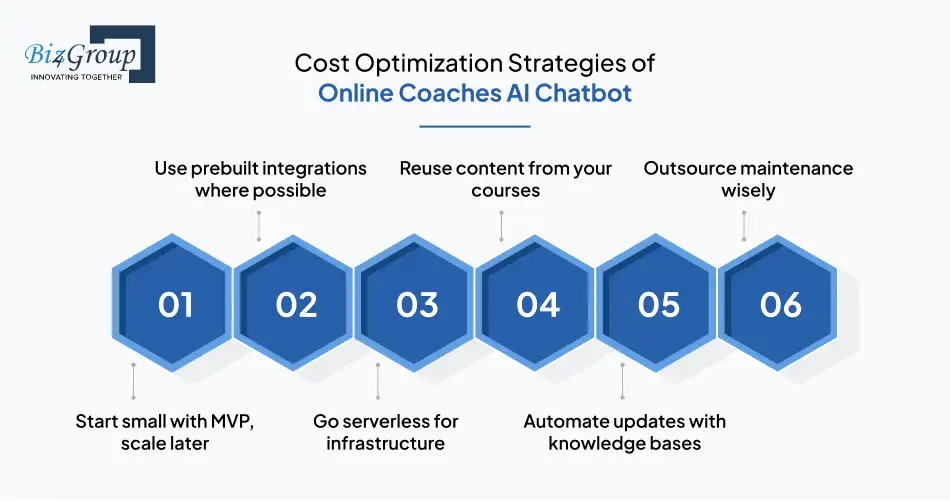
Here’s how to keep development lean without cutting corners:
Start small with MVP, scale later
- Launch with essentials like FAQs and scheduling before adding advanced features.
- Savings: up to 40 percent on initial build compared to going full-scale from day one.
Use prebuilt integrations where possible
- Instead of custom APIs, leverage ready-made connectors for LMS, CRMs, and calendars.
- Savings: around $5,000 to $15,000 in dev costs per integration.
Go serverless for infrastructure
- Cloud-based serverless hosting charges only per request, not per idle hour.
- Savings: 20 to 30 percent monthly compared to traditional hosting.
Reuse content from your courses
- Train your bot with lesson transcripts, FAQs, and program docs you already own.
- Savings: $3,000 to $10,000 in dataset creation.
Automate updates with knowledge bases
- Link your bot to a dynamic knowledge base instead of retraining from scratch.
- Savings: cut ongoing training costs by 25 percent annually.
Outsource maintenance wisely
- Retainers with development firms are cheaper than ad-hoc fixes.
- Savings: up to 15 percent yearly compared to one-off hourly rates.
Smart spending does not mean going cheap, it means going strategic.
2. Monetization and ROI Strategies for Online Coaches AI Chatbot
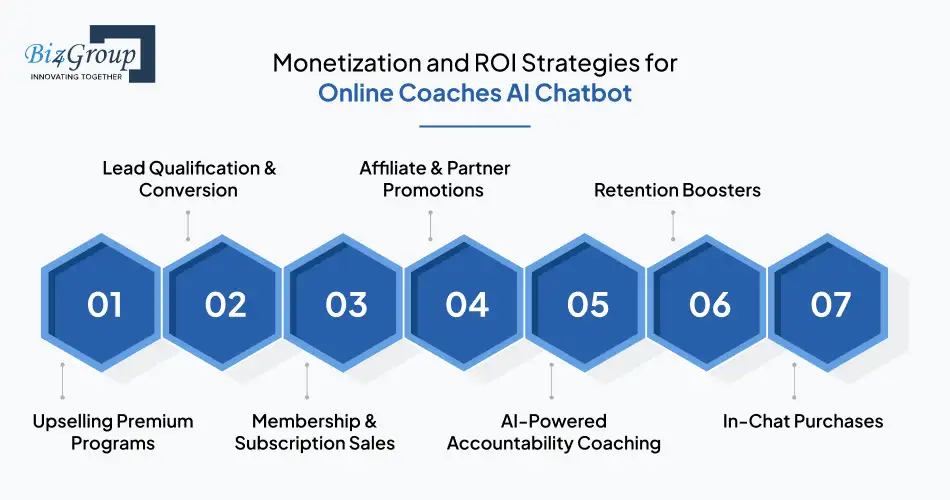
Your chatbot is more than a support tool. Done right, it becomes a revenue engine.
Here’s how to turn conversations into cash:
| Monetization Strategy | How it Works | ROI Potential |
|---|---|---|
|
Upselling Premium Programs |
Bot detects when learners complete a basic course and offers advanced modules |
Boosts average revenue per learner by 20–35% |
|
Lead Qualification & Conversion |
Engages prospects on your site, collects emails, books calls |
Increases conversion rates by 15–25% |
|
Membership & Subscription Sales |
Bot promotes exclusive communities or content subscriptions |
Adds predictable recurring revenue; 10–20% increase in MRR |
|
Affiliate & Partner Promotions |
Recommends partner tools or resources learners already need |
Generates passive revenue; $5,000–$20,000 annually for mid-sized audiences |
|
AI-Powered Accountability Coaching |
Offer “premium AI support” as an add-on package |
Coaches charge 10–15% higher prices for added bot support |
|
Retention Boosters |
Automated nudges reduce churn and keep learners engaged |
Saves $500–$1,000 per retained learner annually |
|
In-Chat Purchases |
Direct payments for upsells, mini-courses, or coaching sessions |
Shortens sales cycle; up to 25% more impulse buys |
By combining these strategies, most coaching businesses see chatbot ROI within 6–12 months of launch, sometimes even faster if the bot doubles as a sales assistant.
When you optimize costs upfront and set up monetization streams early, your chatbot quickly shifts from expense to investment. Next, we’ll tackle the classic decision every coach faces: should you build a custom AI chatbot or buy an off-the-shelf solution?
Buy vs Build: AI Chatbot Development for Online Coaches or Course Creators
Every coach faces the same fork in the road: do you buy an existing solution or invest in building your own? The answer depends on budget, goals, and appetite for control.
Here’s a side-by-side look:
| Criteria | Buy (Prebuilt Solution) | Build (Custom Development) |
|---|---|---|
|
Upfront Cost |
Typically $100 – $1,000 per month subscription |
One-time build cost of $40,000 – $200,000 depending on scope |
|
Time to Launch |
Fast setup, often within days or weeks |
Longer cycle, usually 3 – 6 months for full deployment |
|
Features & Flexibility |
Fixed set of features, limited customization |
Tailored features, integrations, and branding |
|
Integrations |
Basic integrations with common LMS or CRM platforms |
Deep, custom integrations with your entire coaching stack |
|
Scalability |
Limited scaling, performance depends on vendor |
Fully scalable to handle thousands of learners |
|
Ownership |
You rent the platform; vendor controls roadmap |
You own the IP, data, and long-term roadmap |
|
Maintenance |
Vendor handles updates and fixes |
Requires ongoing investment of 15–20% of build cost annually |
|
Data Privacy & Compliance |
Dependent on vendor policies |
You control data handling, compliance, and security standards |
|
Long-Term Cost |
Lower short-term costs, higher recurring fees |
Higher upfront cost, lower long-term ownership costs |
Bottom line:
- Buy if you want quick wins, minimal customization, and are comfortable with vendor limitations.
- Build if you are serious about long-term scale, ownership, and creating a chatbot that grows with your coaching business.
Next, let’s get real about the roadblocks. Every build has bumps, so we’ll explore the challenges, mistakes, and how to solve them in the next section.
Also read: How to create a generative AI chatbot?
Challenges in Creating an AI Coaching Chatbot and How to Solve Them
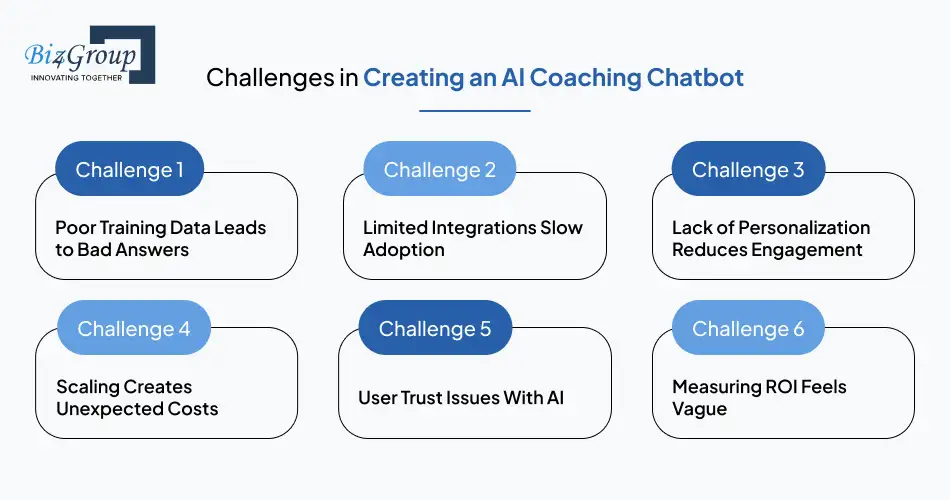
Even the smartest coaches hit a few bumps on the road to AI chatbot development.
The good news? Every challenge has a solution if you know where to look.
Challenge 1: Poor Training Data Leads to Bad Answers
If your chatbot is fed messy, outdated, or incomplete content, it will confuse learners instead of helping them.
Solution:
Curate FAQs, course transcripts, and lesson notes in clean, structured formats. Run test questions regularly and update content every quarter.
Challenge 2: Limited Integrations Slow Adoption
A bot that cannot connect to your LMS, CRM, or payment system is basically a disconnected assistant.
Solution:
Plan integrations during the strategy phase, not after launch. Use APIs or prebuilt connectors to make sure your chatbot plugs into your full tech stack.
Challenge 3: Lack of Personalization Reduces Engagement
Learners lose interest if every reply feels generic.
Solution:
Use contextual memory and tagging. Let the chatbot recommend modules based on progress, goals, or learner profile. Personalization increases engagement by up to 30%.
Challenge 4: Scaling Creates Unexpected Costs
More users means higher hosting bills and heavier API usage fees.
Solution:
Opt for cloud-based or serverless architectures to scale efficiently. Negotiate API usage tiers early to avoid surprise bills, or leverage professional AI automation services to streamline the scaling process.
Challenge 5: User Trust Issues With AI
Learners may hesitate to interact if the bot feels too robotic or secretive.
Solution:
Be transparent that it is an AI assistant, provide a clear path to human handoff, and use warm, human-like tones in responses.
Challenge 6: Measuring ROI Feels Vague
Many coaches do not track how their chatbot affects leads or course completions.
Solution:
Define KPIs upfront (conversion rate, retention rate, support time saved) and review them monthly. Coaches typically save 20–30 hours per month with automation.
Bonus: Mistakes to Avoid in AI Chatbot Development for Online Coaches or Course Creators
These are the traps that sink many chatbot projects. Steer clear of them, and you’ll save yourself time, money, and headaches.
- Over-automation with no human fallback
Learners get frustrated when the bot can’t escalate complex queries. Always provide a “talk to a coach” option. - Ignoring ongoing training
Launching and forgetting is the fastest way to make your chatbot irrelevant. Set a quarterly content refresh schedule. - Copy-pasting tone from other bots
Your bot should sound like you, not a generic helpdesk. Define a personality that reflects your coaching brand. - Neglecting mobile-first design
Most learners engage on phones. If your chatbot UI is clunky on mobile, you lose engagement instantly. - Skipping analytics setup
Without data, you cannot improve. Connect your chatbot to analytics tools from day one to track usage and ROI.
Overcoming challenges and avoiding these common mistakes ensures your chatbot does not just exist, but actually drives results.
Now that we know how to dodge pitfalls, let’s look ahead to future trends in AI bot development for online coaches or course creators and see what’s coming next.
Tired of Pitfalls and Rookie Mistakes?
Let our experts help you skip the mess and launch with confidence.
Talk to Our ExpertsThe Future of Creating Chatbots for Online Coaches and Course Creators with AI
If today’s AI chatbots feel like your reliable assistant, tomorrow’s chatbots will feel like your co-coach. The horizon of chatbot technology is opening doors that go far beyond FAQs and reminders.
For online coaches and course creators, here’s what the future holds.
1. Hyper-Personalized Learning Journeys
Chatbots will not just recommend the next module, they will adapt entire coaching programs in real time.
Imagine a learner struggling with public speaking, the bot notices hesitation in voice tone and instantly curates confidence-building exercises.
Expect personalization that drives engagement rates up by 40% or more.
2. Voice-First Coaching Experiences
The future is hands-free. Learners will interact with chatbots while driving, walking, or working out.
Voice-enabled bots, powered by natural-sounding AI, will become a coach in your ear, not just a text on your screen.
3. Emotionally Intelligent AI
Today’s sentiment analysis scratches the surface. Tomorrow’s bots will detect mood shifts with precision, spotting stress, fatigue, or enthusiasm.
For coaches, this means providing empathy at scale and ensuring no learner feels left behind, which is exactly where a forward-looking AI agent development company adds value.
4. AI-Powered Course Creation Assistants
Bots will not only deliver lessons, they will help you design them.
From generating quizzes to drafting lesson outlines based on learner gaps, your chatbot will act as a creative partner, not just a delivery tool, echoing the wider role of AI in eLearning.
5. Blockchain and Certification Integration
Future chatbots will securely issue certificates, validate credentials, and even tie achievements to blockchain for tamper-proof recognition.
This will add credibility to your programs and give learners proof of progress they can carry anywhere.
6. Immersive AR/VR Coaching Bots
Picture a fitness coach bot leading a learner through a virtual gym or a business coach bot simulating a sales meeting in VR.
This blend of AI and immersive tech will make learning deeply experiential.
The road ahead is not just about creating an AI coaching chatbot, it is about building entire ecosystems where bots, coaches, and learners grow together.
And while these trends sound futuristic, the seeds are already being planted today.
Next, let’s ground this vision in credibility by exploring...
Why Trust Biz4Group for AI Chatbot Development for Online Coaches or Course Creators in USA?
In the crowded world of tech vendors, Biz4Group stands apart as more than just another AI chatbot development company.
We are a team of seasoned innovators based in the United States, dedicated to building intelligent, scalable, and business-ready digital solutions. For years, we’ve partnered with entrepreneurs, educators, and enterprises to design software that doesn’t just work but drives measurable growth.
Our specialty lies in creating custom AI chatbots, enterprise AI solutions, and next-gen platforms that align with real-world business goals.
When it comes to AI chatbot development for online coaches or course creators, we understand the stakes. It is not just about automating answers, it is about amplifying your ability to coach, engage, and convert.
As a trusted software development company, our solutions are engineered with precision, every workflow, integration, and feature is designed to give you an edge in a fiercely competitive e-learning market.
Here’s why companies choose us:
Proven Expertise
Delivered multiple digital solutions with a track record of innovation and excellence. Our portfolio speaks for itself.
Tailored Development
We do not sell cookie-cutter bots. Every chatbot we create reflects your brand, goals, and learner needs.
Cutting-Edge Tech
From GPT-based NLP to secure cloud architectures, we stay ahead so your business stays ahead.
Scalability in Mind
Whether you are a solo coach or a large training institute, our chatbots grow with you.
Business-First Approach
Every feature we build is tied to ROI, retention, and long-term scalability.
Trusted Partner in the USA
We bring not just coding expertise, but also industry knowledge and reliable communication that global clients value.
Need proof? Read on...
Customer Service AI Chatbot
One of our flagship innovations, the Customer Service AI Chatbot, showcases what true intelligence looks like in action. This bot was designed to go beyond scripts. It learns, adapts, and delivers seamless user experiences across industries. And the results speak for themselves:
- 50% increase in agent productivity
- 60% savings in operational costs
- 80% of queries self-served by the chatbot
- 80% increase in customer satisfaction (CSAT)
For businesses, these are not just numbers, they are proof that the right AI chatbot can drastically improve efficiency, cut costs, and delight customers.
Coach AI
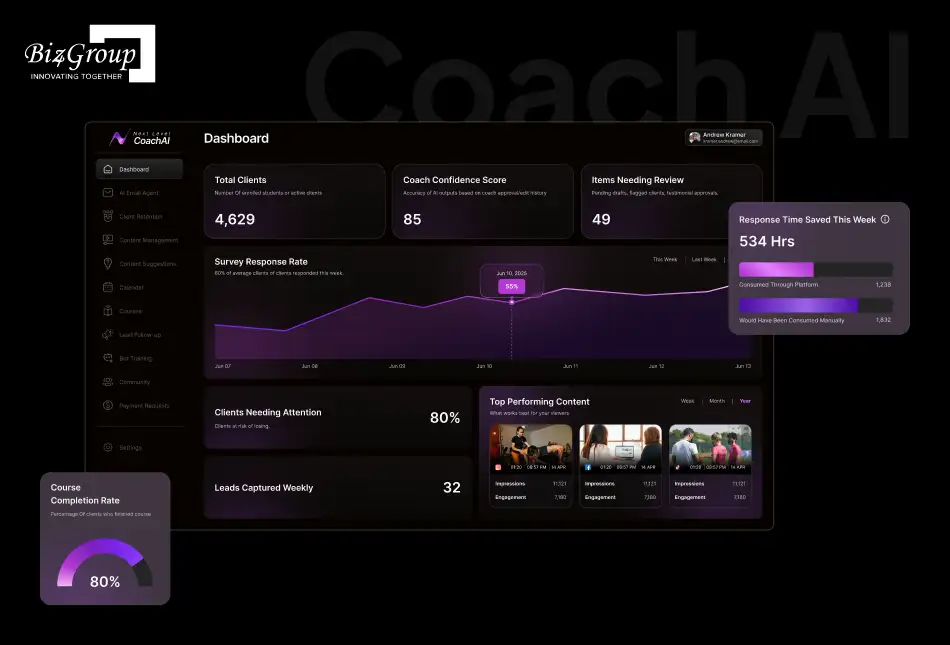
Our proudest achievement in the e-learning space is Coach AI. Built for modern coaches and course creators, Coach AI is not just a chatbot, it’s a digital coaching companion. It guides learners through personalized journeys, answers queries in real time, provides nudges to keep engagement high, and recommends the right resources at the right moment. Coaches and learners alike have praised its ability to create a seamless, supportive, and motivating digital coaching experience.
Biz4Group is not just a development partner, we are your growth partner. Our work proves that when cutting-edge AI meets thoughtful design and deep industry expertise, the results are nothing short of transformative.
For online coaches and course creators, we build chatbots that become business accelerators, driving more sign-ups, improving student satisfaction, and giving you back time to focus on what you do best: coaching.
If your vision is to scale, engage, and lead in the e-learning industry, then our expertise is the bridge between where you are now and where you want to be. Choosing Biz4Group means choosing innovation, trust, and measurable impact.
Ready to turn your coaching business into a growth engine powered by AI? Partner with Biz4Group today and let’s build your custom AI chatbot that sets you ahead of the competition.
Wrapping Up
From understanding the role of chatbots to exploring features, advanced capabilities, cost structures, ROI strategies, and even future trends, we’ve seen how AI is no longer optional in the world of coaching and course creation. It is the secret weapon that helps online coaches scale, engage learners better, and free up time for what truly matters... coaching.
At Biz4Group, we don’t just build AI chatbots, we craft intelligent coaching allies that align with your goals, integrate seamlessly with your tech stack, and deliver measurable business outcomes. Whether you are just starting with an MVP or ready for a full-scale enterprise solution, our expertise ensures your chatbot becomes a growth engine, not just another tool.
The shift toward AI-driven coaching experiences is only accelerating, and those who act now position themselves as leaders in a crowded digital education space. With Biz4Group’s proven record of delivering advanced AI chatbot solutions for businesses across industries, you get more than technology. You get a trusted partner invested in your success.
So, here’s the bottom line: the longer you wait, the more learners and opportunities slip through the cracks.
And it’s high time to partner with a leading AI development company to build your custom AI chatbot and make your coaching business smarter, faster, and unstoppable.
FAQs
1. Can an AI chatbot handle both coaching queries and sales-related tasks?
Yes. A well-designed chatbot can answer learner questions while also handling lead qualification, upselling premium programs, and even processing payments. This makes it a versatile tool that works as both a support assistant and a revenue generator for your business.
2. Are AI chatbots suitable for group coaching or only for one-to-one coaching?
They work for both. For group coaching, chatbots can moderate discussions, send session updates, and share resources with cohorts. For one-to-one coaching, they personalize reminders and recommendations, creating a highly supportive learning experience.
3. Can chatbots support multilingual learners in global coaching programs?
Absolutely. AI chatbots can be trained or configured to interact in multiple languages, making them ideal for coaches with international audiences. This not only breaks down barriers but also improves accessibility and inclusivity across diverse learner groups.
4. How do AI chatbots help in gathering feedback from learners?
They can prompt learners for quick surveys after sessions or modules, capturing real-time feedback that helps coaches refine courses without waiting for end-of-program reviews. These insights give you a continuous improvement loop for your content.
5. Do AI coaching chatbots replace human coaches?
No. Chatbots are designed to enhance, not replace. They handle repetitive tasks and initial interactions, while coaches focus on deeper strategy, mentoring, and personalized support. Think of them as reliable assistants who clear your desk, so you can spend more time coaching.
6. What kind of ongoing support is needed after deploying a chatbot?
Ongoing support includes content updates, AI training refreshes, and system monitoring. Typically, this requires a modest monthly or quarterly investment to keep the chatbot effective. Regular updates also help your bot evolve alongside your coaching business and learners’ needs.
