 Location :
Orlando, FL, USA
Location :
Orlando, FL, USA +1 (407) 714-1616
 info@biz4group.com

- Pharmacy management software development helps streamline prescriptions, inventory, billing, and compliance while improving accuracy and patient service.
- A strong system manages core features like prescriptions and stock control, plus advanced features such as telepharmacy, delivery, automation, and analytics.
- Building the platform requires clear development phases including discovery, design, MVP development, integrations, testing, and scaling.
- Costs range from $30,000 to $200,000+, depending on feature depth, automation, integration, and long-term goals for your custom pharmacy management system.
- Biz4Group stands out with proven healthcare projects, AI capability, scalability expertise, and the skills needed to develop pharmacy management software tailored to your workflow.
Picture the start of a typical day at your pharmacy. Orders waiting to be filled. Patients calling for refills. A technician scrolling through outdated inventory numbers. Someone trying to resolve an insurance claim that failed again. You can feel the pressure rising before the day even begins.
If this sounds familiar, you are not the only one facing it. Many pharmacies deal with disconnected tools, manual steps, and constant workarounds that waste time and drain focus. As expectations rise and regulations tighten, outdated workflows make it even harder to keep operations steady.
This is often the moment when teams start looking seriously at pharmacy management software development. Not as another tech upgrade, but as a real solution that simplifies daily work, reduces errors, and supports growth. The numbers show how important modern systems have become.
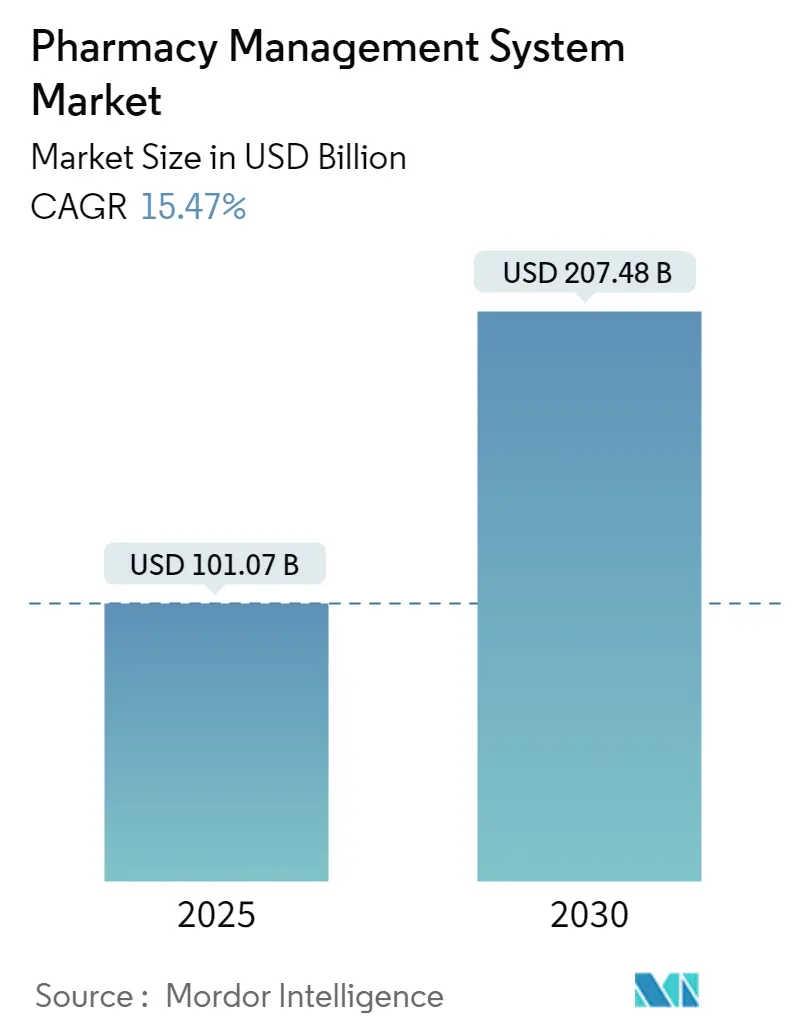
The global market for pharmacy management software is expected to reach USD 101.07 billion in 2025.
In the United States, the retail pharmacy market is projected to hit USD 609.6 billion in 2025, driven by higher prescription volume and shifting patient needs.
These trends make one thing clear. Pharmacies are under increasing pressure to modernize. When your workflow slows down, it affects your patients first, your staff second, and your business overall.
This is why many organizations choose a custom software development company to build a tailored pharmacy management system. A custom platform supports how you work instead of forcing your team to adjust to a rigid tool. It gives you control over prescriptions, inventory, billing, compliance, reporting, automation, and patient services in one place.
As you move through this guide, you will see how pharmacy management software development helps streamline operations, reduce errors, and improve decision making. You will learn the key features to consider, the development phases that keep the project on track, and the technology choices that support long term scalability.
Take a moment to imagine your pharmacy running with fewer manual tasks, real time visibility into inventory, faster prescriptions, cleaner billing, and a smoother workflow from end to end. That level of clarity is possible. And this guide will help you to get that clarity.
Pharmacies using modern digital systems see up to 40 percent faster fulfillment, 30 percent fewer errors, and higher patient satisfaction within months.
Ready to see results like these in your own pharmacy?
Let’s Build ItWhat Is Pharmacy Management Software and Why It Matters Today?
If you have tried to keep prescriptions moving, track inventory, handle billing issues, and answer patient questions at the same time, you already know how quickly things can get overwhelming. This constant pressure is exactly why pharmacy management software development has become essential for modern pharmacies.
Here is a simple definition that sets the stage.
Pharmacy management software is a digital system designed to manage prescription workflows, medication inventory, billing, patient records, and operational reporting in one unified platform. It gives your team a reliable structure to work faster, reduce errors, and keep daily operations consistent.
When you choose to develop pharmacy management software, you are creating a tool that aligns specifically with your workflow instead of adapting an off-the-shelf template. That difference alone can remove countless manual steps that slow your team down.
Today’s pharmacies do far more than dispense medications. Your staff manages immunizations, counseling, patient follow-ups, therapy management, and insurance conversations. Without the right technology, even simple tasks begin to pile up.
This is why more organizations bring automation and intelligence into their systems through tools like AI healthcare solutions. These solutions support real-time insights, fewer errors, and smoother day-to-day management.
Here are a few reasons why strong pharmacy management software development matters today:
- Supports higher prescription volumes without overwhelming your team
- Reduces manual data entry and common errors
- Improves medication stock accuracy and reorder timing
- Speeds up insurance and billing workflows
- Strengthens compliance and record keeping
- Helps your staff focus more on patient care and less on admin work
Choosing the right approach to pharmacy management software development is not just about efficiency. It is about giving your team the tools they need to deliver care confidently, serve patients faster, and stay competitive in a rapidly changing healthcare landscape.
What Pharmacy Management Software Manages and How It Supports Modern Pharmacy Operations?
If you have ever wondered why your team feels stretched even on a normal day, it usually comes down to one thing. Too many workflows happen across too many disconnected tools. This is exactly where strong pharmacy management software development makes a difference. The goal is to bring every critical task into one system so your staff can focus on patients instead of chasing information.
A well-built platform handles every major operational area. Think of it as the central nervous system of your pharmacy. Here are the core functions it manages and how each one supports your daily operations.
1. Prescription and Refill Management
Prescriptions move quickly throughout the day, and mistakes here affect your patients directly. A modern system helps you:
- Receive, validate, and process prescriptions
- Manage digital scripts and e prescribing
- Track refills with full history
- Reduce manual entry that leads to errors
When you develop pharmacy management software correctly, your staff spends less time fixing prescription mistakes and more time counseling patients.
2. Medication Inventory and Stock Control
Inventory is where many pharmacies lose time and money without realizing it. Your software should help you:
- Track stock levels with real time accuracy
- Monitor batch numbers, lot details, and expiry dates
- Set reorder points so you never run short
- Manage stock across multiple locations if you operate more than one site
Strong inventory workflows also help avoid emergency orders, stockouts, or overstock situations.
3. Billing, Insurance, and Claims
Billing mistakes slow everything down. Your software supports smoother financial operations by handling:
- Automated billing
- Insurance eligibility checks
- Claim submissions
- Payment tracking
- Overdue or rejected claim alerts
When you add intelligent automation, your team can avoid repetitive billing tasks. Many pharmacies use systems that automate pharmacy workflow using AI to reduce errors and speed up reimbursement.
4. Patient Profiles and Medication History
A complete patient picture makes your pharmacy more reliable. Your software manages:
- Personal information
- Medication history
- Allergies and interaction alerts
- Refill reminders
- Communication logs
This helps your pharmacists make safer recommendations and enhances patient trust.
5. Point of Sale and In Store Transactions
If you also want to create pharmacy POS and billing software, this becomes part of your management system. It typically covers:
- Retail checkout
- Barcode scanning
- OTC product sales
- Real time stock deduction after each sale
A unified POS ensures that your retail inventory and prescription inventory stay aligned.
6. Compliance and Audit Support
Regulatory requirements get stricter every year. Your system should help you stay compliant by managing:
- Audit logs
- Controlled substance tracking
- Secure record storage
- Access controls and permissions
- Standard reporting for regulators
This becomes essential when scaling up or when serving hospital networks.
7. Reporting, Analytics, and Performance Insights
Every pharmacy grows faster when decisions come from real data, not guesswork. Strong reporting tools support:
- Sales analytics
- Inventory turnover insights
- Staff performance metrics
- High demand medication trends
- Forecasting for purchasing
As you move deeper into pharmacy management software development, analytics becomes one of your most valuable modules.
8. Telepharmacy and Remote Service Management
More pharmacies now support remote care. Well-built systems help manage:
- Virtual consultations
- Digital prescription handling
- Remote verification
- Online patient communication
This matters even more for rural or high-volume regions.
9. Home Delivery and Medicine Dispatching
Some pharmacies choose to expand with delivery services. If you plan to develop features similar to a medicine delivery app, your management software can support:
- Delivery scheduling
- Order tracking
- Driver assignment
- Patient notifications
This helps improve customer satisfaction and adds another revenue channel.
10. Workflow Automation and Task Optimization
Daily tasks like refill reminders, stock alerts, claim checks, or prescription validations can drain your team. Behind the scenes, advanced pharmacy management software development adds:
- Automated reminders
- Smart queue management
- Low stock alerts
- Error detection prompts
- Intelligent routing for tasks
These features lift a huge burden off your staff and increase operational clarity.
11. Multi Location or Chain Management
If you operate multiple pharmacies, you likely need:
- Centralized inventory views
- Shared reporting
- Access controls by location
- Stock transfers
- Unified customer profiles
This feature becomes essential when you build a scalable pharmacy management solution.
When all these functionalities work together inside one system, your team finally gets the breathing room they need. Tasks become predictable. Data becomes clear. And your pharmacy becomes easier to manage, grow, and streamline.
Still Managing Your Pharmacy With Workarounds?
If you are juggling tools, spreadsheets, and manual tasks, your software is slowing you down. You could streamline everything in one smart platform built for growth.
Get Expert HelpCore and Advanced Features for Effective Pharmacy Management Software Development
Before you decide how to develop pharmacy management software, it helps to get a clear picture of the features that carry out your daily workload. When you begin any development of pharmacy management software, you want to understand which features are essential and which ones help you scale over time.
That is why we group features into two categories.
- Core features are the foundation you need from day one.
- Advanced features help you expand, automate, and innovate once your basics are in place.
This structure keeps your project strategic and prevents you from overbuilding too early during retail pharmacy management system development.
Your software becomes the engine that runs your pharmacy. When the core is strong, everything feels smoother. When the advanced layer is planned well, your business grows without operational stress. These two tables will help you define what your system truly needs.
Core Features Table for Pharmacy Management Software
These are the must-have features that every pharmacy depends on, whether you operate in a single location or a multi-site network. They provide stability, accuracy, and predictable performance in daily operations.
|
Core Feature |
Description |
|
Prescription Management |
Handles intake, validation, refill processing, and digital prescriptions with accuracy and traceability. |
|
Inventory and Stock Control |
Tracks real time stock, expiry dates, lot numbers, and automates reorder triggers to prevent shortages. |
|
Billing and Insurance Processing |
Manages automated billing, payment collection, insurance eligibility checks, and claims submissions. |
|
Patient Profiles and Medication History |
Stores complete patient data, medication records, allergies, and interaction alerts for safer dispensing. |
|
POS and In Store Transactions |
Supports checkout, barcode scanning, OTC sales, and instant stock sync after each sale. |
|
Compliance and Audit Logs |
Keeps secure logs, controlled substance data, and regulatory reports required for audits. |
|
Reporting and Analytics |
Offers insights on sales, inventory trends, patient patterns, and performance metrics. |
|
User Roles and Permissions |
Provides secure access control for pharmacists, technicians, managers, and admins. |
Advanced Features Table for Pharmacy Management Software
These features help you scale, automate workflows, and create a next level of customer experience. They become especially valuable as you grow or expand into new services.
|
Advanced Feature |
Description |
|
Enables remote consultations, digital verification, and virtual care interactions. |
|
|
EHR and E Prescription Integration |
Connects with healthcare systems securely for fast, accurate data exchange. |
|
Home Delivery and Dispatching |
Manages delivery scheduling, live tracking, driver assignment, and notifications, similar to a medicine delivery app workflow. |
|
Automates refills, alerts, claim checks, and workflow routing. Many teams rely on an AI app development company to build these functions. |
|
|
Advanced Analytics and Forecasting |
Predicts stock needs, demand trends, and purchasing patterns from real data. |
|
Multi Location or Chain Management |
Centralizes reporting, inventory, and access control across every branch. |
|
Supports mobile access, refill requests, notifications, and communication channels. |
|
|
Supply Chain and Vendor Integration |
Tracks purchase orders, vendor timelines, and delivery coordination. |
|
Scalable Cloud Hosting |
Helps you develop cloud-based pharmacy management systems with automation that grows with your business. |
|
Workflow Optimization Tools |
Improves speed with smart queues, task routing, and automated workflows. |
When you compare both tables, you can see a clear path for your pharmacy management software development project. Start with the essentials that stabilize your operations. Then grow into the advanced capabilities that create speed, accuracy, automation, and stronger patient experiences.
This balanced approach keeps your system flexible without overwhelming your team, and it prepares you for a smooth transition into the next stage of development.
Project in Action: How Biz4Group Built a Modern Medicine Delivery App

Before we dive into the development phases, let’s see what a real-world build looks like. One of the strongest examples is Green Ryder, a full-scale delivery platform created by Biz4Group. Although it serves a specialized delivery market, the structure, user experience, automation, and operational flow line up closely with what a pharmacy or medicine delivery service needs.
This solution shows how a well-designed delivery app supports users, drivers, and administrators with clarity and ease. It also demonstrates the type of foundation required when you plan to build any advanced delivery or dispatching feature into your pharmacy ecosystem.
Here are some key highlights of the project:
- A simple user journey for browsing, ordering, and tracking deliveries
- Real time driver location tracking and optimized delivery routes
- Secure user authentication and profile management
- Scalable architecture that supports high order volume
- A smooth admin dashboard for managing orders, drivers, and customer interactions
- Clean UI that keeps navigation fast and intuitive
- Integrated notifications for order updates and delivery status
- Strong backend structure designed for accuracy and reliability
Green Ryder gives you a clear view of what a polished, high performing system can look like when modern design, automation, and smart development practices come together. It is the kind of framework pharmacies aim for when planning home delivery, dispatching, or online ordering capabilities.
This sets the stage perfectly for understanding how to structure your own build. Now let’s look at the development phases that help you create a scalable, future-ready pharmacy platform.
Development Phases for Building a Scalable Pharmacy Management Solution
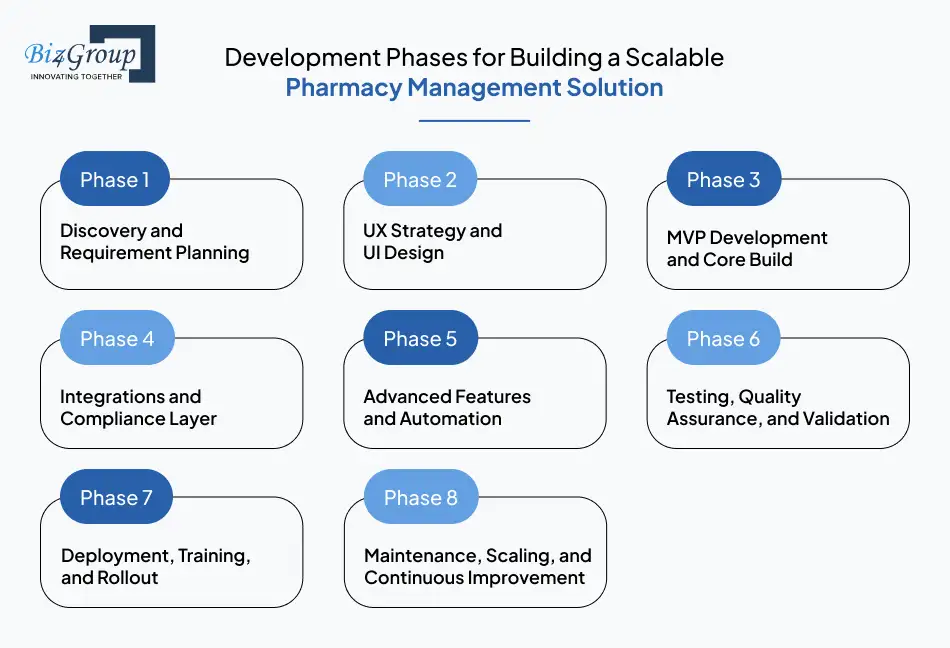
Every successful pharmacy management software development project moves through clear, structured phases. When you follow a phased approach, you reduce risk, avoid wasted development time, and build a platform that supports long-term growth. These steps apply whether you want to develop pharmacy management software, build a scalable pharmacy management solution, or begin retail pharmacy management system development for a single location or a multi-site chain.
Below are the essential phases you should expect in any well-planned build.
Phase 1: Discovery and Requirement Planning
Before writing a single line of code, your team needs full clarity on what you want to build. This stage helps you uncover gaps in your current workflow, define system requirements, and outline the exact features needed for your custom solution. A strong discovery phase prevents expensive rework later and keeps the entire development of pharmacy management software aligned with your goals.
Key activities include:
- Mapping prescription, billing, inventory, and compliance workflows
- Identifying core and advanced features based on business size
- Defining data, security, and regulatory requirements
- Documenting all integrations your system must connect to
Phase 2: UX Strategy and UI Design
This is where your software begins to take shape visually. A clean, intuitive design makes your system easier for pharmacists, technicians, and managers to use. This is especially important if you plan to create custom pharmacy management system interfaces for mobile, desktop, and POS screens.
For a polished and user-friendly design, many pharmacies partner with UI/UX design
experts to create a consistent, easy to navigate experience.
This phase includes:
- Wireframes and screen layouts
- User flow diagrams for each role
- Prototypes for early feedback
- Mobile responsive design for field and delivery teams
Phase 3: MVP Development and Core Build
The MVP, or Minimum Viable Product, lets you launch faster with only the essential features. This helps you validate real workflows, gather feedback, and understand how your team uses the system. It is a smart way to develop pharmacy management software without overspending.
Many companies work with experienced teams specializing in MVP development
to ensure the early version is functional, stable, and ready for real users.
The MVP typically includes:
- Core prescription workflows
- Basic billing and insurance
- Inventory controls
- User roles and access permissions
Phase 4: Integrations and Compliance Layer
Once your core platform is functioning, you add the essential integrations that support daily operations. This stage is especially valuable if you want to create pharmacy software that integrates with EHR and e prescriptions, which is a top requirement for modern clinical workflow.
This phase includes:
- EHR and HL7 or FHIR integrations
- Insurance claim processing tools
- Secure audit logs and reporting
- Controlled substance management modules
Phase 5: Advanced Features and Automation
With the foundation in place, you can begin adding features that make your software more powerful, efficient, and future ready. This is where you introduce automation, telepharmacy, and advanced analytics. These are critical components when you want to develop cloud-based pharmacy management platform, build a digital pharmacy management tool for hospital pharmacies, or modernize an existing system.
Advanced phase elements include:
- Telepharmacy workflows
- Delivery and dispatching management
- Predictive analytics and forecasting
- Task automation and real time alerts
Phase 6: Testing, Quality Assurance, and Validation
Before releasing your system, every module needs careful testing. This protects your pharmacy from operational issues and ensures patient safety. Testing is especially important when you aim to develop a cloud-based pharmacy management system with automation, since automation requires precise, predictable behavior.
Typical testing steps include:
- Functional and regression tests
- Performance testing under load
- Compliance and data security validation
- Final user acceptance testing
Phase 7: Deployment, Training, and Rollout
Deployment brings your software into real operation. This stage focuses on staff training, data migration, and structured rollout. Good adoption makes the difference between a system that works, and a system people actually use.
Deployment includes:
- Live environment setup
- Staff onboarding and role-based training
- Migration from legacy systems
- Gradual rollout across departments or locations
Phase 8: Maintenance, Scaling, and Continuous Improvement
Once your platform is live, you focus on long term performance and scalability. This stage helps you keep the software updated, secure, and ready for new workflows as your pharmacy grows.
This phase covers:
- Adding new modules over time
- Security patches and feature updates
- Scaling for more users or additional stores
- Ongoing monitoring and optimization
Also Read: AI Medical eCommerce Marketplace Development
Tools and Tech Stack to Create a Custom Pharmacy Management System
The tools you choose play a major role in performance, scalability, security, and long-term maintenance. When you create a custom pharmacy management system or develop pharmacy management software, you need a tech stack that supports fast transactions, secure data handling, multi device access, and real time updates. The table below outlines common choices used in modern pharmacy management software development.
|
Category |
Tools and Technologies |
Why It Matters |
|
Frontend (Web and Dashboard UI) |
React, Angular, Vue |
Creates fast, responsive, and user-friendly interfaces for pharmacists, technicians, and admins. |
|
Mobile App Frameworks |
Flutter, React Native |
Ideal if you plan to build a digital pharmacy management tool for hospital pharmacies or support delivery staff with mobile apps. |
|
Backend Frameworks |
Provides a secure, stable backend for managing prescriptions, billing, inventory, and compliance workflows. |
|
|
Databases |
PostgreSQL, MySQL, MongoDB, Firebase |
Stores patient records, medication history, stock data, and logs with high reliability. |
|
Cloud Platforms |
AWS, Google Cloud, Azure |
Essential when you develop cloud based pharmacy management platform that requires scalability, backups, and secure hosting. |
|
API Protocols and Interoperability Standards |
REST APIs, GraphQL, HL7, FHIR |
Needed when you create pharmacy software that integrates with EHR and e prescriptions or other clinical systems. |
|
Security and Compliance Tools |
JWT auth, OAuth 2.0, HIPAA compliant libraries, data encryption tools |
It helps maintain privacy, protect sensitive data, and supports regulatory requirements. |
|
DevOps and CI/CD |
Docker, Kubernetes, Jenkins, GitHub Actions |
Enable smoother deployments, automated updates, and reliable release cycles. |
|
Communication and Notification Systems |
Twilio, Firebase Cloud Messaging, SendGrid |
Supports alerts, refill reminders, delivery notifications, and workflow updates. |
|
Analytics and Reporting Tools |
Power BI, Tableau, Elastic Stack, custom dashboards |
Helps you manage advanced forecasting and insights as part of the development of pharmacy management software. |
|
Testing Frameworks |
Jest, Mocha, Selenium, Postman |
Ensure your retail pharmacy management system development remains stable and error free across devices. |
Why the Right Tech Stack Matters
Choosing the right tools gives you:
- Faster development and easier updates
- Stronger security for patient and prescription data
- Better performance during peak prescription hours
- Ability to scale into new services like telepharmacy or delivery
- Flexibility to add automation or AI later
A well selected stack becomes the backbone of your entire project and ensures your platform remains future ready.
Also Read: Next JS Development Company
Cost Breakdown for Developing Pharmacy Management Software
When you begin planning your pharmacy management software development, one of the first questions you will ask is cost. Most businesses want a realistic number so they can budget confidently. On average, the cost to develop pharmacy management software ranges from $30,000 to $200,000+, depending on size, workflow complexity, integrations, automation, and long-term scalability needs. Your actual investment may differ based on the features you choose, and the level of customization your pharmacy requires.
To help you understand the pricing more clearly, the table below outlines the cost range for core and advanced features commonly included in the development of pharmacy management software.
Cost Breakdown Table for Pharmacy Management Software Development
|
Feature Category |
Included Components |
Estimated Cost Range |
|
Core Feature Set |
Prescription workflows, inventory control, POS, patient records, basic reporting |
$18,000 to $45,000 |
|
Billing and Insurance |
Eligibility checks, claims, payment tracking |
$5,000 to $15,000 |
|
Compliance and Audit Layer |
Access controls, logs, controlled substance tracking |
$7,000 to $20,000 |
|
Multi Location Management |
Central dashboard, shared data, role permissions |
$8,000 to $25,000 |
|
Telepharmacy Capabilities |
Remote verification, consultation modules |
$10,000 to $30,000 |
|
Home Delivery Module |
Dispatching, tracking, notifications |
$7,000 to $25,000 |
|
EHR and E Prescription Integrations |
HL7 or FHIR APIs, interoperability |
$12,000 to $40,000 |
|
AI Driven Automation |
Stock forecasting, refill reminders, smart workflows |
$10,000 to $50,000 |
|
Advanced Analytics |
Predictive dashboards, insights, forecasting |
$8,000 to $25,000 |
|
Cloud Hosting and DevOps |
Deployment, CI/CD, scalability setup |
$5,000 to $20,000 |
Factors Affecting the Cost of Pharmacy Management Software Development
Several elements influence how much you will invest in retail pharmacy management system development or when you want to build a scalable pharmacy management solution.
- Feature Depth
More complex workflows or automation increase development hours. - Integrations
Systems that must connect with EHRs, billing networks, or POS hardware require additional work. - Customization Level
Fully custom modules cost more than adapting prebuilt components. - Compliance Requirements
Security, audits, controlled substance reporting, and data privacy add extra development time. - Scalability and Hosting
Cloud based design, multi-location support, and real-time data syncing increase scope. - Team Expertise
Specialized pharmacy development experience typically reduces long term maintenance.
For broader cost insights, many teams refer to cost of implementing AI in healthcare
understand digital cost patterns across the healthcare industry.
Hidden Costs You Should Not Overlook
Some expenses do not appear during early planning, but they influence the total investment in pharmacy management software development.
- Data Migration
Moving old records into the new system requires careful engineering. - Training and Onboarding
Staff training time and materials may add cost. - Third Party API Fees
Some integrations require monthly or usage-based pricing. - Security Testing
Required for HIPAA compliance and controlled substance features. - Long Term Maintenance
Updates, patches, enhancements, and optimization must be budgeted.
Cost Optimization Strategies for Pharmacy Management Software Development
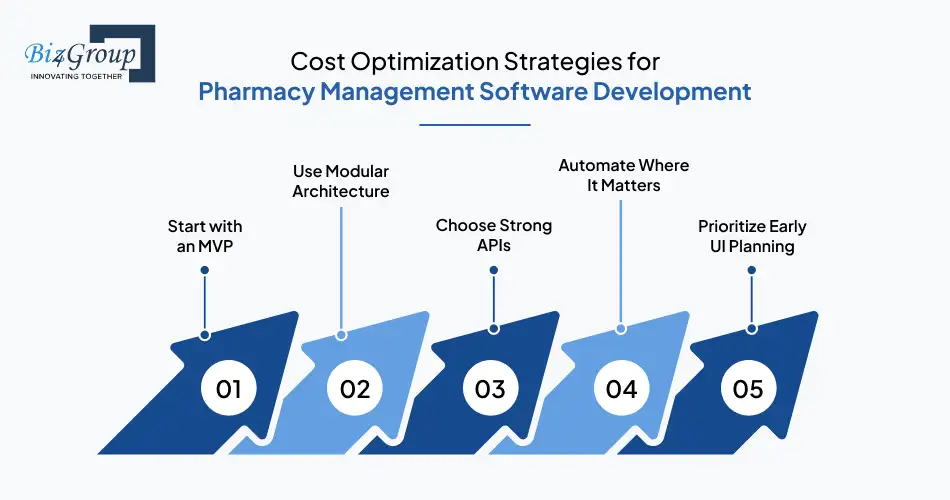
If you plan to make a pharmacy inventory and billing management platform or develop cloud-based pharmacy management platform, you can reduce costs by being strategic.
- Start with an MVP
Build essential features first and expand gradually. - Use Modular Architecture
Add new modules without rebuilding the entire system. - Choose Strong APIs
Saves custom development time during integrations. - Automate Where It Matters
Focus on automation that brings true operational value. - Prioritize Early UI Planning
Clean design prevents costly rework after launch.
Want a Development Roadmap That Actually Works?
From UX to MVP to launch, a clear path keeps your project on time and stress free. Let’s build your pharmacy system the right way from day one.
Plan Your BuildChallenges in Pharmacy Management Software Development and How to Solve Them
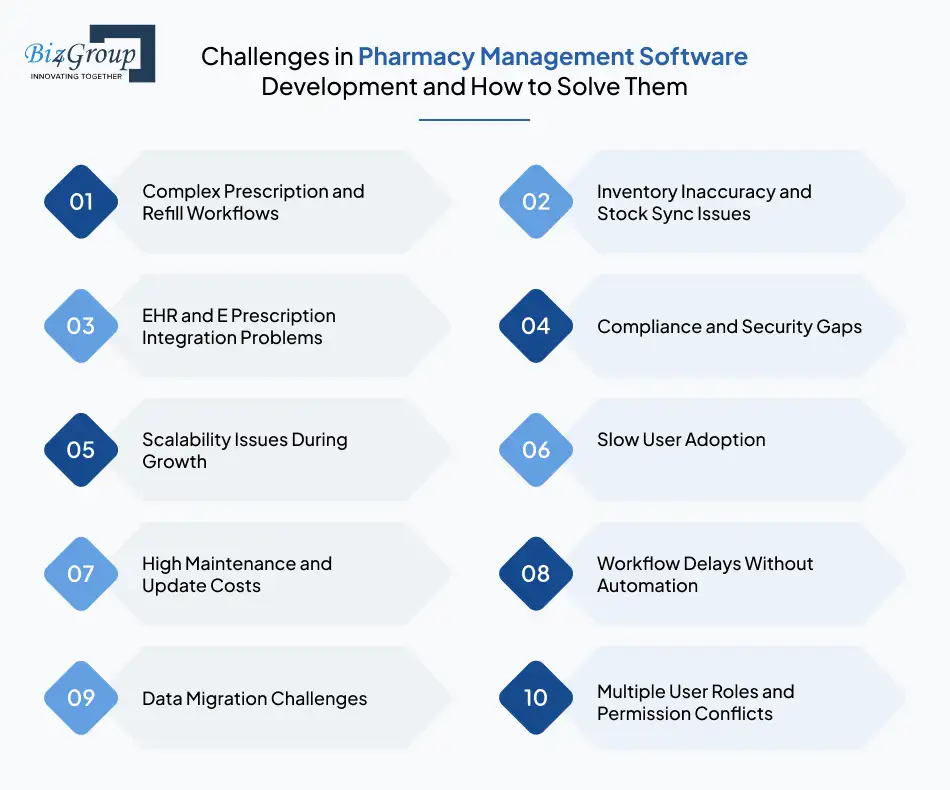
Every project comes with obstacles, especially when you plan pharmacy management software development at scale. From compliance concerns to workflow automation gaps, each challenge can slow down your progress if you do not prepare ahead. The good news is that most problems are preventable with the right planning, architecture, and tools. The table below outlines the most common challenges and practical solutions to address them.
|
Challenges |
Why It Happens |
How to Solve It |
|
Complex Prescription and Refill Workflows |
Multiple steps and validations increase the risk of delays or mistakes. |
Map workflows early, test real scenarios, and focus on core modules when you develop pharmacy management software. |
|
Inventory Inaccuracy and Stock Sync Issues |
Manual entries, disconnected systems, and multi-location syncing cause errors. |
Use automation tools and real time tracking features to automate pharmacy workflow using AI and improve stock accuracy. |
|
EHR and E Prescription Integration Problems |
Standards like HL7 and FHIR can be complex, and third-party APIs differ widely. |
Work with specialists who know how to create pharmacy software that integrates with EHR and e prescriptions securely and reliably. |
|
Compliance and Security Gaps |
HIPAA rules, audit trails, and controlled substance requirements add complexity. |
Build strong access controls, encryption, and a full compliance layer. Many teams refer to HIPAA compliant AI app development for healthcare providers ensure they meet clinical security standards. |
|
Scalability Issues During Growth |
Systems not built for expansion slow down under higher user or location load. |
Use cloud infrastructure and modular design when you develop cloud based pharmacy management platforms. |
|
Slow User Adoption |
If the interface is confusing, staff adoption drops. |
Conduct user testing and simplify the workflow during retail pharmacy management system development. |
|
High Maintenance and Update Costs |
Poor early architecture creates expensive long-term fixes. |
Document your system thoroughly and plan future modules early to build a scalable pharmacy management solution. |
|
Workflow Delays Without Automation |
Manual steps slow down prescription filling and billing. |
Add real time alerts, automated refill tools, and smart routing for smoother operations. |
|
Data Migration Challenges |
Legacy systems often store inconsistent or incomplete data. |
Clean, map, and migrate data in stages to reduce risk. |
|
Multiple User Roles and Permission Conflicts |
Pharmacies manage pharmacists, techs, admins, and delivery staff. |
Build role based workflows and test each role independently during pharmacy management software development. |
Understanding these challenges early helps you build the right system from the start. When you plan ahead, you control costs, avoid delays, and ensure your final software is reliable, scalable, and easier for your team to adopt.
Real World Example: How Goldleaf Overcame Key Challenges in Pharmacy and Medical Product Software Development

A practical example always helps you see how these challenges show up in real projects. One of Biz4Group’s projects, Goldleaf, highlights what it takes to build a secure, compliant, and scalable medical product platform.
Although it focuses on medical products rather than prescriptions, the operational hurdles align closely with the challenges of pharmacy management software development. Here are a few real issues the project faced and how they were solved:
Key Challenges and Solutions
- Challenge: Strict compliance requirements for medical product listings
Solution: Added a compliance first architecture with structured product validation and approval workflows. - Challenge: Large catalog of medical supplies needing accurate categorization
Solution: Created a centralized catalog system with clean data structure, updated categories, and fast search. - Challenge: Secure user data handling and protected transactions
Solution: Built encrypted login, secure checkout, and protected customer data aligned with healthcare compliance needs. - Challenge: Multiple user types requiring different access levels
Solution: Implemented detailed permission-based access similar to what you would build in a scalable pharmacy management solution. - Challenge: Slow ordering and checkout flows causing friction
Solution: Designed a streamlined cart and ordering experience so users could browse and reorder easily. - Challenge: Need for real time tracking of orders and delivery
Solution: Added live order status updates to keep customers informed at each step. - Challenge: Platform has to scale as inventory and traffic increased
Solution: Used cloud based infrastructure and modular development similar to what is needed when you develop cloud based pharmacy management platform.
This mini case study helps show how the same problems pharmacies face also appear in medical product software. And with the right approach, each challenge has a practical solution that keeps the system reliable, secure, and ready to scale.
Evolving Trends Shaping the Future of Pharmacy Management Software
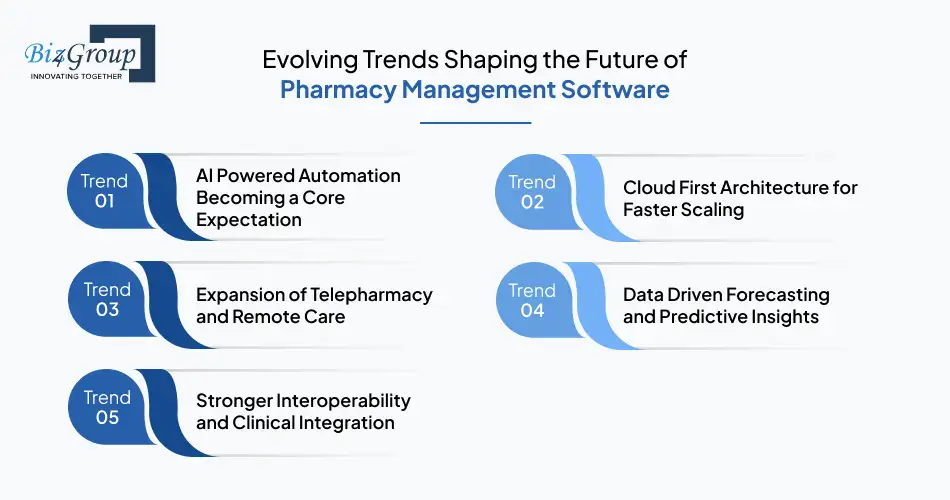
As the healthcare industry shifts toward digital first operations, the future of pharmacy management software development depends on smarter automation, better patient engagement, and stronger clinical connectivity. These trends are shaping how pharmacies plan their systems today so they can stay competitive tomorrow. Each trend supports long term scalability and aligns with the growing need for accuracy, speed, and integrated care.
Trend 1: AI Powered Automation Becoming a Core Expectation
Automation is no longer optional. Pharmacies now rely on AI to speed up prescription validation, optimize inventory, reduce billing errors, and route daily tasks intelligently. This shift allows your team to work with fewer interruptions and more accuracy. Many pharmacies use insights from AI medical software development to plan automation that supports real world operations instead of replacing human oversight. AI also improves patient outcomes by predicting needs, flagging risks, and supporting proactive care. This direction fully aligns with stable workflows you establish during development of pharmacy management software.
Trend 2: Cloud First Architecture for Faster Scaling
Cloud adoption continues to rise because pharmacies need reliable access, automatic backups, and flexible infrastructure. When you develop cloud-based pharmacy management platform, it becomes much easier to add new locations, handle higher prescription volumes, or integrate new features without rebuilding the system. Cloud hosting also supports secure remote access for telepharmacy, delivery teams, and admin staff. Healthcare brands planning for long term digital growth often partner with an AI development company to create scalable systems that stay fast even when demand increases.
Trend 3: Expansion of Telepharmacy and Remote Care
Telepharmacy is rapidly becoming part of everyday service. Patients want easier access to pharmacists, especially in rural areas or high demand regions. As a result, systems now support remote consultations, digital verifications, and online prescription management. This improves patient convenience and helps pharmacies reach new customers. Telepharmacy also fits naturally into the workflow automation methods often used when you build a scalable pharmacy management solution, making your platform future ready while maintaining clinical quality.
Trend 4: Data Driven Forecasting and Predictive Insights
Pharmacies are turning to advanced analytics to make better decisions about stock levels, purchasing cycles, and patient needs. Predictive insights help pharmacies stay ahead of shortages, expiration risks, and seasonal demand. This data driven approach improves efficiency and reduces waste. Modern systems take inspiration from AI powered patient management software to understand trends and create smarter workflows. These forecasting abilities also support strategic planning for multi-location operations during retail pharmacy management system development.
Trend 5: Stronger Interoperability and Clinical Integration
Pharmacies must connect smoothly with EHRs, insurance systems, and national e prescription networks. Interoperability is becoming a requirement rather than a choice. Systems built today emphasize secure data exchange, real time communication, and compliance ready integrations. This trend directly supports the needs of pharmacies that want to create pharmacy software that integrates with EHR and e prescriptions, ensuring that clinical information stays consistent and accessible across all platforms. Better connectivity ultimately leads to fewer errors and faster patient service.
Why Biz4Group Is the Leading Partner for Pharmacy Management Software Development
When you begin your journey into pharmacy management software development, choosing a partner with real domain experience can make or break the entire project. Biz4Group has a proven record of delivering secure, scalable, and high performing healthcare and pharmacy solutions that support everything from prescription workflows to advanced automation. Their work on projects like Green Ryder, a full-scale delivery and dispatching platform, and Goldleaf, a regulated medical eCommerce system, shows how well they handle the same complexities required to develop pharmacy management software.
What sets Biz4Group apart is the ability to translate real world pharmacy operations into intuitive digital workflows. Whether you want to create a custom pharmacy management system, develop cloud-based pharmacy management platform, or build a scalable pharmacy management solution for multiple locations, their team understands how to design systems that fit seamlessly into day-to-day operations. Their engineers and strategists combine healthcare experience with advanced technologies to support everything from automation and compliance to long term scalability.
Many organizations also rely on Biz4Group for modern capabilities that elevate performance over time. Their teams build deeper intelligence into platforms using services such as agentic AI development and enterprise grade automation available through enterprise AI solutions. These strengths make Biz4Group the ideal partner for pharmacies and healthcare brands looking to modernize operations, enhance patient services, and move confidently into the future of digital care.
Looking for a Partner Who Understands Healthcare Tech?
Biz4Group has built complex healthcare platforms, automated workflows, and scalable systems that actually hold up in the real world. Yours can be next.
Talk to Our TeamConclusion: Moving Forward with Confident Pharmacy Management Software Development
Strong pharmacy systems are no longer just a competitive advantage. They are essential for safe, efficient, and scalable care. As prescription volumes rise and patient expectations shift, your ability to invest in the right pharmacy management software development approach determines how smoothly your pharmacy will operate in the years ahead. Whether you plan to develop pharmacy management software, expand delivery workflows, or integrate clinical tools for deeper visibility, the right digital foundation prepares your team for long term success.
The future belongs to pharmacies that blend automation, accuracy, and intelligent workflows into one connected ecosystem. With modern tools, secure integrations, and clear workflows, your pharmacy can provide better service, reduce daily pressure on staff, and maintain full compliance without unnecessary complexity.
Biz4Group brings the experience and leadership needed to guide this journey. Their work across advanced healthcare platforms, high performance delivery systems, and compliant medical solutions proves their capability to support complex, enterprise level builds. They understand what it takes to create a custom pharmacy management system that is secure, scalable, and truly aligned with how your team works. Their deep technical expertise, combined with real world healthcare experience, makes them a trusted partner for organizations ready to modernize operations and build future ready digital infrastructure.
If you are prepared to elevate your pharmacy operations, streamline your workflow, and improve patient care, now is the right time to take the next step. With the right vision and the right development partner, strengthening your pharmacy’s digital ecosystem becomes a clear and achievable path.
FAQ
Q1. What features should be included when you develop pharmacy management software for retail or hospital pharmacies?
A complete platform should cover prescription processing, inventory tracking, billing and insurance validation, POS features, patient records, compliance tools, and analytics. These modules form the foundation of strong pharmacy management software development and support smooth daily operations without relying on manual steps.
Q2. How much does it cost to build a custom pharmacy management system from scratch?
The cost to develop pharmacy management software typically ranges from $30,000 to $200,000+. The price depends on feature depth, the number of integrations, automation levels, whether you plan for multi-location support, and the long-term scalability you expect from your platform.
Q3. Can a pharmacy management solution integrate with existing EHR or e prescription systems?
Yes. Modern systems can create pharmacy software that integrates with EHR and e prescriptions using HL7, FHIR, and secure API connections. This ensures faster prescription handling, accurate medication histories, and better clinical communication between healthcare providers and pharmacies.
Q4. How does pharmacy management software help with compliance and audit requirements?
Compliance becomes easier when you include audit logs, access controls, encrypted data handling, and controlled substance tracking. These features are essential in the development of pharmacy management software, especially for pharmacies that handle high volume dispensing and strict regulatory checks.
Q5. Should I begin with an MVP or build a full system right away when creating a custom pharmacy management solution?
Starting with an MVP is often the best approach. It allows you to validate core features like prescriptions, billing, and inventory before investing in advanced capabilities. This approach works well for businesses planning to build a scalable pharmacy management solution without overspending at the beginning.
Q6. Can pharmacy management software support telepharmacy or home delivery services?
Yes. Modern systems can support telepharmacy features, remote consultations, and home delivery functions with tracking and notifications. These capabilities fit naturally into advanced retail pharmacy management system development and help pharmacies expand their reach across more locations and patient groups.
Q7. What hidden costs should pharmacies consider during pharmacy management software development?
Hidden costs often include data migration from older systems, training staff, third party API fees, security testing, compliance updates, and long-term maintenance. Considering these early helps control the overall budget when you create a custom pharmacy management system or plan to scale it over time.
