 Location :
Orlando, FL, USA
Location :
Orlando, FL, USA +1 (407) 714-1616
 info@biz4group.com

- AI kiosk software development helps businesses automate customer interactions, reduce wait times, and lower operational costs using intelligent self-service systems.
- Companies across retail, healthcare, hospitality, banking, transportation, and smart cities use AI kiosks to improve service speed, accuracy, and scalability.
- Successful AI kiosks rely on key features like conversational AI, voice and facial recognition, system integrations, analytics, and enterprise-grade security.
- The AI kiosk software development cost estimate typically ranges from $25,000 to $200,000+, depending on features, integrations, compliance needs, and deployment scale.
- Partner with Biz4Group LLC, an experienced provider of AI kiosk software development services ensures reliable architecture, smoother deployment, and long-term ROI.
Have you ever waited in line, watching customers get frustrated at a slow counter because your team was swamped? If you have, you know exactly why businesses are pushing toward smarter self-service solutions.
Here is a striking fact. In 2025, the global self-service kiosk market is expected to be worth more than $44 billion, with continued growth through 2030.

Even more compelling, 66% of U.S. consumers prefer self-service kiosks over traditional staffed checkouts because they feel faster and more convenient.
Those numbers reveal a clear shift in customer expectations.
The issue is not whether kiosks work. It is whether they work well enough for today’s customers. Many self-service setups still rely on rigid menus and fixed flows. The moment a user hesitates or does something unexpected, the experience breaks down.
This is where AI kiosk software development truly changes the experience.
Instead of forcing customers to adapt to the machine, the system adapts to them. When you develop AI powered kiosk software, interactions feel more natural. The kiosk can guide users, respond to intent, and handle variations without friction. This is how businesses quietly reduce queues, ease staff workload, and keep service moving during peak hours.
You may be wondering if this level of intelligence is realistic for your operations right now. We have seen both growing companies and large enterprises take this step successfully by working with the right AI development company that understands not just the technology, but the operational pressure behind it.
What Is AI Kiosk Software Development and Why Modern Businesses Are Betting on It?
At a glance, most kiosks look familiar. A screen, a few buttons, and a fixed flow that assumes every user will behave the same way. The moment someone hesitates, asks an unexpected question, or needs guidance, the experience starts to fall apart.
That limitation is exactly what AI kiosk software development addresses.
Instead of relying on rigid scripts, AI-powered kiosks are designed to understand intent and respond dynamically. They can interpret voice or touch inputs, guide users through choices, and adjust interactions based on behavior or context. When you develop AI powered kiosk software, the system adapts to real people rather than forcing people to adapt to the system.
This shift goes beyond technology. It directly affects how your business operates day to day. When teams build AI kiosk applications for businesses, they introduce intelligent front-facing systems that manage high volumes of interactions without increasing staff workload.
The reason modern businesses are investing in this now is tied to a few practical realities.
- Operational pressure keeps increasing
Labor costs continue to rise and staffing repetitive service roles are becoming harder. AI kiosks take over routine interactions while maintaining consistent service quality. - Customer patience is shrinking
People expect self-service to be quick and intuitive. AI makes it possible to create smart self service kiosk software that responds naturally instead of frustrating users with rigid menus. - Growth demands scalable systems
As organizations expand across locations, manual processes struggle to keep up. AI kiosks integrate naturally into broader AI automation services, allowing operations to scale without added complexity. - Every interaction becomes a data point
AI kiosks capture insights into where users hesitate, what questions repeat, and which steps cause drop-offs. This visibility helps teams refine workflows across the business. - Long-term flexibility matters
Investing in AI self service kiosk development creates a foundation that can evolve. New features, improved models, and deeper integrations can be introduced without replacing the entire system.
AI kiosks are no longer just self-service terminals. They function as intelligent operational tools that reduce friction for customers while giving your teams greater control, visibility, and consistency across interactions.
Still Relying on Long Lines and Overworked Staff?
AI kiosks are no longer optional when speed and experience define your brand. The real question is how smart your self-service should be.
Talk to an AI Kiosk ExpertIndustry Use Cases Where AI Kiosk Software Development Creates Measurable Business Impact
AI kiosks are not limited to one sector or use case. Their real value shows up when everyday interactions become faster, clearer, and more consistent across different environments. From customer-facing industries to internal operations, AI kiosk software development helps organizations remove friction, reduce manual effort, and scale service delivery without adding complexity. Below are the industries where businesses are seeing the strongest and most practical impact today.
1. Retail: Smarter Stores Built with AI Kiosk Software Development

Retail industries deal with peak-hour rush, long queues, and repeated customer questions. With AI kiosk software development, retailers automate product discovery and checkout while keeping the experience smooth.
Key benefits
- Faster self-checkout and assisted shopping
- Consistent experience across locations
- Higher order value through intelligent suggestions
Example
A national retail brand decided to build AI kiosk applications for businesses operating in high-footfall stores. Customers used kiosks to search products, compare options, and complete purchases. Queue times dropped, staff shifted to in-aisle support, and conversions improved during busy hours.
Also Read: How to Build AI Shopping Assistant App
2. Healthcare: Reliable AI Self Service Kiosk Development for Patient Flow

AI Healthcare environments require speed, accuracy, and privacy. Through AI self service kiosk development, clinics and hospitals reduce front-desk congestion without compromising compliance.
Key benefits
- Faster patient check-ins
- Reduced administrative workload
- Improved data accuracy
Example
A multi-location clinic chose to develop AI kiosk software for modern business operations such as patient intake and appointment confirmations. Patients completed check-ins independently, helping staff manage peak hours with fewer delays.
3. Hospitality and QSR: Interactive AI Kiosk Systems That Keep Lines Moving

Restaurants and hotels operate under constant time pressure. When brands build interactive AI kiosk systems, they speed up ordering while reducing mistakes.
Key benefits
- Faster service during rush hours
- Fewer order errors
- Improved upsell opportunities
Example
A quick-service restaurant chain worked to create smart self service kiosk software that guided customers through menu options and add-ons. Orders became more accurate, service speed improved, and staff focused on food quality instead of order taking.
Also Read: How to Build an AI Receptionist Avatar for Hospitality
4. Airports and Transportation: Intelligent Kiosk Platforms for Real-Time Guidance

Travel hubs handle large volumes of confused and time-sensitive travelers. Operators that develop intelligent kiosk platforms reduce pressure on help desks.
Key benefits
- Clear directions and updates
- Reduced dependency on staff counters
- Better crowd flow
Example
An international airport invested in AI kiosk application development to provide gate directions, boarding updates, and navigation support. Passenger movement improved, and congestion near information desks dropped noticeably.
5. Smart Cities and Public Services: AI Driven Kiosk Solutions for Citizens

Public service departments need accessibility and consistency. Governments that create AI driven kiosk solutions provide essential services without long waits.
Key benefits
- 24/7 access to civic services
- Reduced load on municipal staff
- Consistent information delivery
Example
A city administration rolled out kiosks in public buildings to create AI kiosk software solutions for permits, service requests, and local updates. Citizens completed routine tasks independently, freeing staff for complex cases.
6. Banking and Financial Services: Secure AI Kiosk Software for Branch Efficiency

Banks handle repetitive service requests that slow down branches. With custom AI kiosk software development, financial institutions streamline everyday interactions.
Key benefits
- Shorter branch wait times
- Reduced teller workload
- Better focus on advisory services
Example
A regional bank implemented kiosks to support balance inquiries, card services, and appointment scheduling. Customers completed routine tasks independently while staff focused on high-value consultations.
Also Read: AI Banking Bot Development
7. Education and Campus Services: Scalable AI Kiosk Solutions for Students

Universities and large campuses face constant information requests. Institutions that create AI kiosk software solutions simplify access without expanding admin teams.
Key benefits
- Faster access to schedules and services
- Reduced administrative workload
- Always-available support
Example
A university deployed kiosks across campus buildings for enrollment queries, navigation, and event information. Student wait times decreased, and staff handled fewer repetitive questions.
Also Read: Custom AI EdTech Software Development
8. Manufacturing and Warehousing: AI Kiosk Systems for Internal Operations

Factories and warehouses rely on speed and coordination. When teams build AI kiosk systems, internal workflows become more efficient.
Key benefits
- Faster shift check-ins
- Real-time task assignment
- Improved operational visibility
Example
A logistics facility introduced kiosks for worker check-ins, safety instructions, and task routing. Supervisors gained better oversight, and floor operations moved faster.
Also Read: AI Predictive Maintenance Software Development for Manufacturing
9. Events, Stadiums, and Entertainment Venues: High-Volume AI Kiosk Solutions
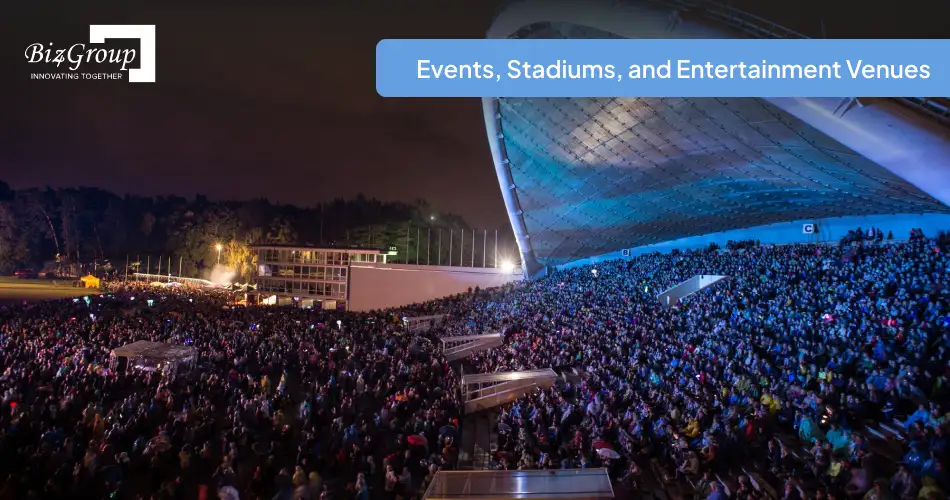
Large venues experience short bursts of heavy traffic. AI kiosk solutions for enterprises and startups help manage crowds without overstaffing.
Key benefits
- Faster ticketing and concessions
- Improved crowd flow
- Reduced staffing pressure
Example
A sports arena installed kiosks for ticket scanning, food ordering, and directions. Lines shortened, and attendees spent more time enjoying the event instead of waiting.
Also Read: AI Event Management Software Development Guide
10. Automotive Dealerships and Service Centers: Intelligent Kiosks for Faster Service

Dealerships often lose customers to slow check-ins and paperwork. With custom AI kiosk software development services, service centers streamline the experience.
Key benefits
- Faster service check-ins
- Better appointment management
- Increased service upsells
Example
An automotive service chain used kiosks to handle vehicle check-ins and maintenance recommendations. Customers spent less time waiting, and service throughput increased across locations.
Also Read: AI Automotive Diagnostic and Repair App Development
Key Features That Make AI Kiosk Software Work in Real-World Conditions
AI kiosks succeed or fail based on their features. Not surface-level features, but the ones that handle real behavior, real pressure, and real-world unpredictability. When businesses invest in AI kiosk software development, these are the core capabilities that must be part of the system from day one.
| Feature Category | What the Feature Does | Why It Matters for Your Business |
|---|---|---|
|
Intelligent User Interaction |
Understands user intent through touch, voice, or contextual inputs |
Reduces confusion and helps users complete tasks without assistance |
|
Enables natural, human-like conversations instead of rigid menus |
Makes self-service feel intuitive and lowers drop-off rates |
|
|
Allows hands-free interaction for accessibility and speed |
Improves usability in healthcare, airports, and public spaces |
|
|
Identifies users or adapts experience based on recognition |
Enables personalization and faster repeat interactions |
|
|
Automatically adapts language based on user preference |
Expands reach across diverse customer groups |
|
|
Smart Recommendation Engine |
Suggests next actions, products, or services |
Increases conversions and improves user satisfaction |
|
Dynamic Workflow Handling |
Adjusts flows based on user behavior or errors |
Prevents dead ends and incomplete sessions |
|
Secure Authentication |
Supports PIN, QR, biometric, or token-based access |
Protects sensitive transactions and user data |
|
Handles cards, wallets, and contactless payments |
Enables seamless transactions without staff involvement |
|
|
Data Capture and Analytics |
Tracks behavior, bottlenecks, and usage patterns |
Helps teams improve operations using real data |
|
Remote Device Management |
Monitors kiosk health, updates software, and manages content |
Reduces downtime and maintenance costs |
|
Offline Mode Support |
Continues limited operations during connectivity issues |
Prevents service disruption in critical environments |
|
Keeps data consistent across business systems |
||
|
Custom UI and Branding |
Adapts design to match brand identity and workflows |
Maintains brand consistency across locations |
|
Accessibility Compliance |
Supports screen readers, large text, and guided flows |
Ensures inclusivity and regulatory compliance |
|
Improves responses based on real usage data |
Makes the kiosk smarter over time |
|
|
Security and Data Privacy Controls |
Encrypts data and manages access permissions |
Meets enterprise and regulatory requirements |
|
Scalability Architecture |
Supports deployment across multiple locations |
Allows growth without rebuilding the system |
|
Role-Based Admin Access |
Controls who can manage content and settings |
Reduces operational risk and errors |
|
Hardware Compatibility |
Works with multiple kiosk form factors and devices |
Avoids vendor lock-in and supports future upgrades |
When companies create AI driven kiosk solutions, missing even a few of these features often leads to poor adoption or operational friction. The goal is not to overload the kiosk with complexity, but to ensure it can handle real user behavior without breaking.
Do Your Kiosk Features Actually Solve Real Problems?
Fancy screens mean nothing if users get stuck. The right features turn kiosks into revenue and efficiency drivers, not liabilities.
Design My AI KioskHow to Build AI Kiosk Software That Works in Real Business Environments?
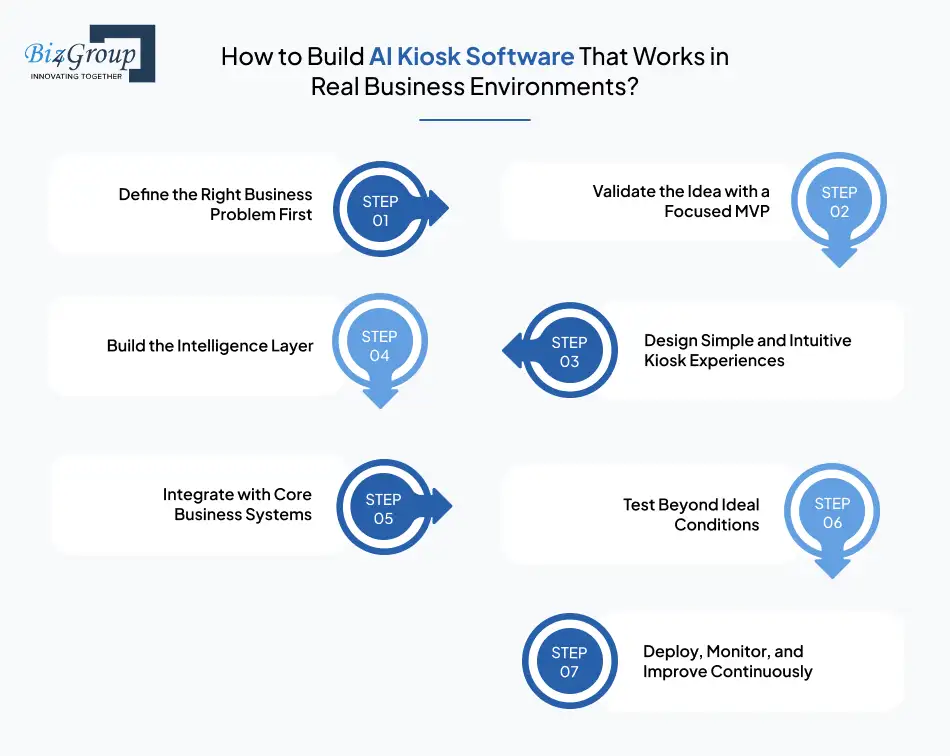
Building kiosks is easy. Building kiosks that people actually use, trust, and rely on is where most projects fail. Successful AI kiosk software development follows a clear, disciplined process that balances business goals, user behavior, and technical feasibility. Below is a proven development flow used by teams that consistently deliver results.
Step 1: Define the Right Business Problem First
AI kiosks work best when they solve a specific, measurable problem. This step sets direction for everything that follows, from features to integrations.
- Identify where queues, delays, or manual effort hurt the most
- Decide whether you need to develop AI kiosk software for modern business operations or start smaller
- Set success metrics tied to cost, speed, or experience
Step 2: Validate the Idea with a Focused MVP
Before committing to full rollout, teams test assumptions using a lean version of the product. This reduces risk and speeds up learning. A structured MVP development approach helps validate real-world usage early.
- Test core workflows and AI responses
- Observe real user behavior at kiosks
- Refine scope before scaling
Step 3: Design Simple and Intuitive Kiosk Experiences
Even advanced AI fails if users feel confused. Kiosks must guide users clearly, handle mistakes gracefully, and feel approachable. Strong UI/UX design is critical when you create smart self service kiosk software.
- Design clear visual and conversational flows
- Account for accessibility and edge cases
- Reduce steps without removing clarity
Step 4: Build the Intelligence Layer
This is where static kiosks become adaptive systems. AI models are trained to understand intent, respond accurately, and improve over time. When teams develop AI powered kiosk software, this layer defines how natural the interaction feels.
- Select NLP, voice, or vision models
- Train models using realistic data
- Continuously improve accuracy
Step 5: Integrate with Core Business Systems
Kiosks must work as part of your ecosystem. Integration ensures the kiosk reflects real-time data and supports operational workflows.
- Connect with CRM, POS, ERP, or scheduling systems
- Enable secure data exchange
- Support AI kiosk application development at enterprise scale
Step 6: Test Beyond Ideal Conditions
Real users do not behave predictably. Testing must account for high traffic, unexpected inputs, and partial system failures.
- Stress test during peak usage
- Validate AI fallback scenarios
- Ensure reliability across locations
Step 7: Deploy, Monitor, and Improve Continuously
AI kiosks improve with use. Monitoring real interactions helps teams refine flows and unlock additional automation opportunities.
- Track usage and performance metrics
- Identify friction points and drop-offs
- Evolve features as needs change
Following this process helps businesses build interactive AI kiosk systems and create AI kiosk software solutions that scale confidently, perform reliably, and deliver measurable value over time.
Technology Stack Behind Scalable AI Kiosk Software Development
The performance of an AI kiosk depends heavily on the technology choices made early on. A strong tech stack ensures reliability, security, and the ability to evolve as business needs grow. When planning AI kiosk software development, each layer of the stack must support real-time interactions, AI processing, and enterprise integrations.
Below is a practical, production-ready technology stack used to build AI kiosk systems that scale across locations.
| Technology Layer | Tools and Technologies Used | Role in AI Kiosk Software Development |
|---|---|---|
|
Frontend and Kiosk UI |
React, Angular, Vue, Flutter |
Delivers responsive touch and voice interfaces for kiosk screens |
|
Operating System |
Windows IoT, Linux, Android |
Powers kiosk hardware and ensures system stability |
|
Conversational AI |
Dialogflow, Rasa, Azure Bot Services |
Enables natural language understanding and response handling |
|
Voice Recognition |
Google Speech-to-Text, Azure Speech Services |
Supports hands-free and accessibility-focused interactions |
|
OpenCV, AWS Rekognition, Azure Vision |
Enables facial recognition and visual input processing |
|
|
Backend Frameworks |
Handles business logic, APIs, and AI orchestration |
|
|
AI and ML Models |
TensorFlow, PyTorch, Scikit-learn |
Trains and runs models for intent recognition and predictions |
|
Cloud Infrastructure |
AWS, Azure, Google Cloud |
Supports scalability, availability, and secure data storage |
|
Edge Computing |
AWS Greengrass, Azure IoT Edge |
Enables low-latency processing close to the kiosk |
|
Database Systems |
PostgreSQL, MongoDB, Redis |
Stores user interactions, configurations, and logs |
|
Payment Gateways |
Stripe, Square, PayPal |
Enables secure transaction processing |
|
System Integrations |
REST APIs, GraphQL, Webhooks |
Connects kiosks with CRM, ERP, and POS systems |
|
Device Management |
MDM tools, Remote Monitoring APIs |
Monitors kiosk health and manages updates |
|
Analytics and Monitoring |
Power BI, Tableau, Google Analytics |
Tracks usage, performance, and behavioral insights |
|
Security and Compliance |
OAuth, JWT, TLS Encryption |
Protects data and supports regulatory compliance |
This stack allows teams to develop intelligent kiosk platforms that handle high traffic, adapt to user behavior, and integrate seamlessly with enterprise systems. The right combination of technologies ensures kiosks remain reliable today and flexible for future enhancements.
Also Read: Next JS Development Company
AI Kiosk Software Development Cost Breakdown: What You Should Budget and Why
If you are planning AI kiosk software development, cost clarity matters early. Most decision makers want a realistic range before committing time and teams.
In 2025, the AI kiosk software development cost estimate typically falls between $25,000 to $200,000+. The wide range exists because costs vary based on feature depth, AI complexity, integrations, security requirements, and rollout scale. A focused pilot is very different from an enterprise deployment spread across locations.
Here is how those costs usually break down.
Feature-Wise Cost Breakdown for AI Kiosk Software Development
| Feature or Component | Estimated Cost Range | What You Are Paying For |
|---|---|---|
|
Core Kiosk Application |
$8,000 to $20,000 |
Base UI, workflows, device controls |
|
AI Conversation and NLP |
$6,000 to $25,000 |
Intent recognition, dialog handling |
|
Voice Recognition |
$4,000 to $15,000 |
Speech processing and hands-free interaction |
|
Facial Recognition |
$6,000 to $30,000 |
Identity detection and personalization |
|
Backend and APIs |
$8,000 to $25,000 |
Business logic, data handling, scalability |
|
System Integrations |
$5,000 to $20,000 |
CRM, POS, ERP connectivity |
|
Analytics and Reporting |
$3,000 to $10,000 |
Usage tracking and performance insights |
|
Security and Compliance |
$4,000 to $15,000 |
Encryption, authentication, access control |
|
Admin and Management Panel |
$3,000 to $10,000 |
Monitoring, content, and configuration |
This is why companies that build AI kiosk applications for businesses often phase development instead of launching everything at once.
Key Factors That Affect AI Kiosk Software Development Cost
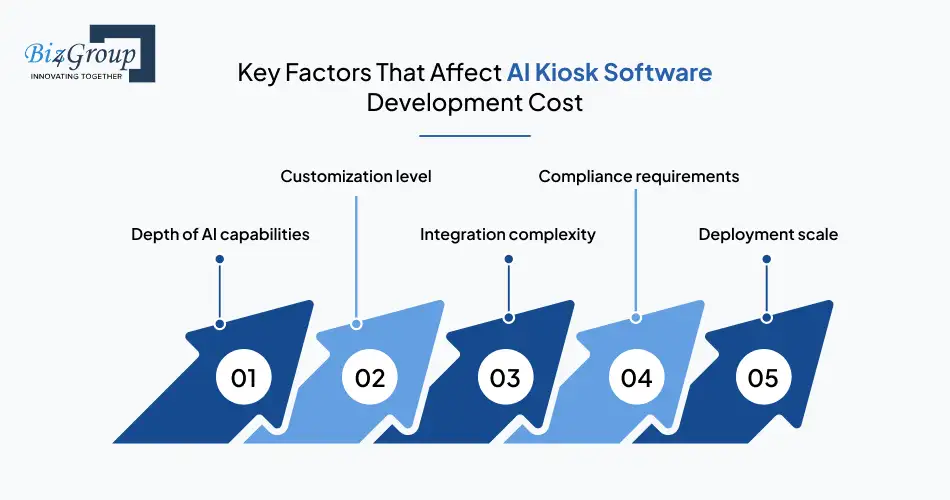
Several variables directly shape how much you will spend when you develop AI kiosk software for modern business operations.
- Depth of AI capabilities
Basic intent handling costs less. Advanced NLP, voice, vision, and learning systems increase investment but deliver stronger long-term returns. - Customization level
Fully custom AI kiosk software development services cost more upfront but fit workflows far better than generic solutions. - Integration complexity
Connecting kiosks to existing platforms often requires reliable AI integration services to ensure data consistency and security. - Compliance requirements
Regulated industries like healthcare or finance require additional safeguards that increase development and testing effort. - Deployment scale
A single-site deployment costs far less than rolling out kiosks across dozens or hundreds of locations.
Hidden Costs Businesses Often Miss
When planning AI kiosk application development, teams sometimes focus only on building costs and overlook long-term expenses.
- Ongoing AI model tuning and improvement
- Cloud infrastructure and API usage fees
- Hardware servicing and replacements
- Security updates and compliance audits
- Post-launch support and feature enhancements
Factoring these in early avoids surprises later.
How to Optimize AI Kiosk Software Development Costs Without Compromising Quality
Cost efficiency comes from smart planning, not cutting features blindly.
- Prioritize features that directly impact operations and customer experience
- Build modular systems so new capabilities can be added incrementally
- Reuse existing platforms instead of rebuilding functionality from scratch
- Work with an experienced custom software development company that understands AI, integrations, and enterprise delivery
Teams that follow this approach often launch faster, control spend better and still deliver robust AI kiosk solutions for enterprises and startups that scale confidently.
Wondering What Your AI Kiosk Should Really Cost?
Overbuilding wastes money. Underbuilding kills adoption. A clear scope keeps budgets and outcomes aligned from day one.
Get a Cost EstimateChallenges in AI Kiosk Software Development and How Modern Businesses Overcome Them
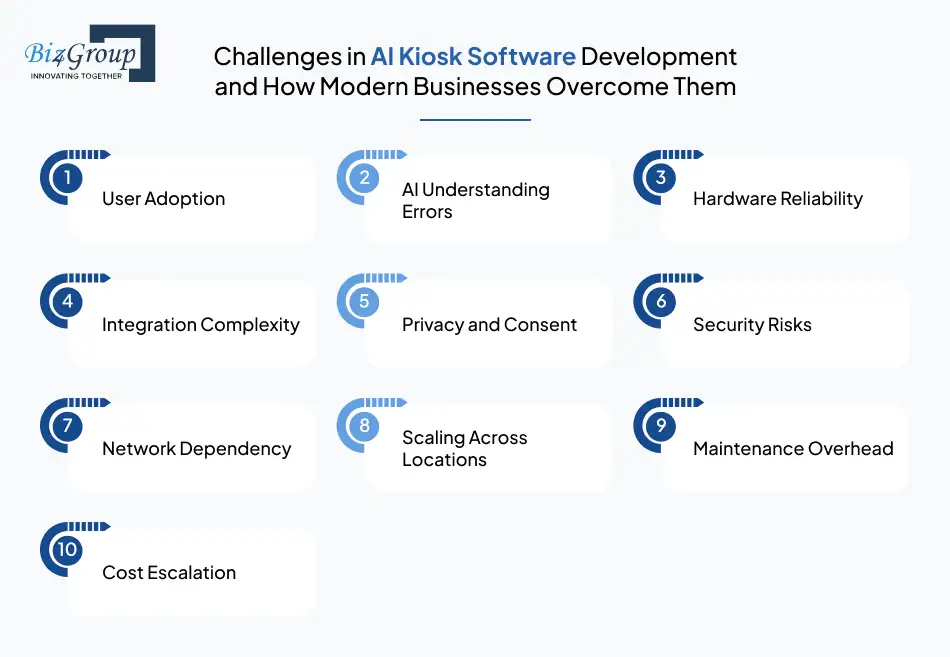
Building kiosks that work reliably in real environments is harder than it looks. Many projects struggle not because the idea is wrong, but because common challenges are underestimated. Successful AI kiosk software development accounts for these risks early and designs around them instead of reacting later.
Below is a practical view of the most frequent challenges, why they occur, and how teams building AI kiosk solutions for enterprises and startups address them.
| Challenge Area | What Typically Goes Wrong | How to Solve It in AI Kiosk Software Development |
|---|---|---|
|
User Adoption |
Users feel unsure or abandon the kiosk mid-flow |
Design intuitive journeys and conversational guidance when you create smart self service kiosk software |
|
AI Understanding Errors |
The kiosk misunderstands user intent or context |
Improve training data and fallback logic when you develop AI powered kiosk software |
|
Hardware Reliability |
Touchscreens, cameras, or microphones fail under load |
Use enterprise-grade hardware and proactive monitoring |
|
Integration Complexity |
Data becomes inconsistent across systems |
Plan integrations early when you build AI kiosk applications for businesses |
|
Privacy and Consent |
Users hesitate due to facial or voice data concerns |
Apply consent flows and privacy-by-design principles |
|
Security Risks |
Unauthorized access or data exposure |
Enforce encryption and role-based access controls |
|
Network Dependency |
Kiosks stop working during connectivity loss |
Support offline workflows when you develop intelligent kiosk platforms |
|
Scaling Across Locations |
Performance drops as deployments grow |
Use cloud and edge architectures aligned with enterprise AI solutions like those delivered through enterprise AI solutions |
|
Maintenance Overhead |
Updates require manual effort across devices |
Enable centralized updates and remote device management |
|
Cost Escalation |
Feature creep pushes budgets beyond estimates |
Phase features strategically in custom AI kiosk software development services |
These challenges are not blockers. They are design signals. Teams that plan for real behavior, system dependencies, and long-term scale are far more likely to create AI kiosk software solutions that perform reliably in live environments and continue delivering value as usage grows.
The Future of AI Kiosk Software Development: What Forward-Looking Businesses Are Preparing For
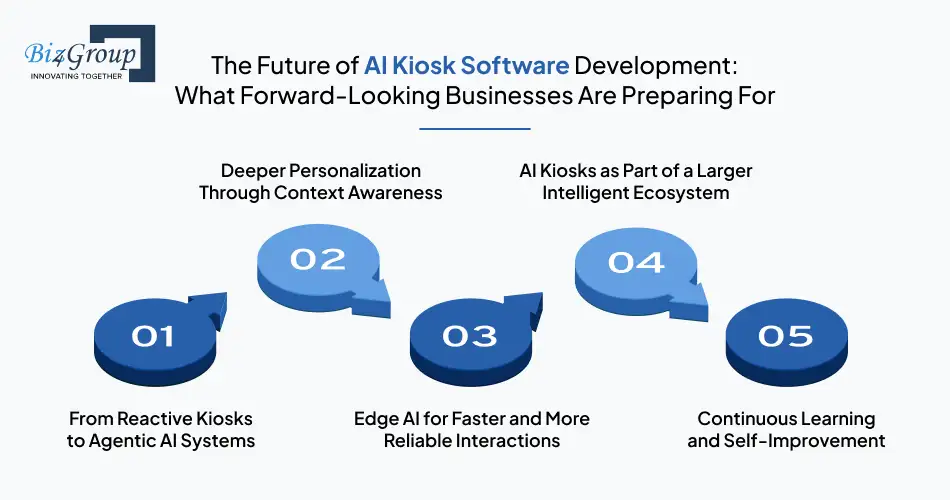
AI kiosks are no longer just about automating today’s tasks. They are quickly becoming adaptive systems that learn, reason, and act with minimal supervision. As AI kiosk software development matures, the focus is shifting from simple interaction to autonomy, intelligence, and deeper business integration.
Below are the key trends shaping what comes next.
1. From Reactive Kiosks to Agentic AI Systems
Future kiosks will not just respond to inputs. They will make decisions, take actions, and coordinate workflows on their own. This is where agentic AI development plays a critical role, enabling kiosks to handle multi-step tasks without constant human oversight. These systems can anticipate user needs, trigger follow-up actions, and resolve issues proactively. For businesses, this means fewer interruptions and more consistent service delivery across locations.
2. Deeper Personalization Through Context Awareness
AI kiosks are moving beyond basic personalization. Future systems will use context like time of day, location, user history, and behavioral patterns to shape interactions in real time. When companies create AI driven kiosk solutions, this level of awareness helps deliver experiences that feel relevant instead of generic. Customers get what they need faster, while businesses see higher engagement and completion rates.
3. Edge AI for Faster and More Reliable Interactions
Latency matters in high-traffic environments. Processing more AI logic directly on the device, rather than relying entirely on the cloud, is becoming a priority. By adopting edge-based architectures, teams that develop intelligent kiosk platforms ensure faster responses, better reliability during network issues, and improved data privacy for sensitive interactions.
4. AI Kiosks as Part of a Larger Intelligent Ecosystem
Kiosks are increasingly being designed as one component of a broader AI ecosystem. They connect seamlessly with mobile apps, digital signage, backend systems, and even other kiosks. This approach allows businesses to build AI kiosk systems that work in sync with existing platforms rather than operating in isolation. The result is smoother operations and better visibility across touchpoints.
5. Continuous Learning and Self-Improvement
The future of AI kiosk application development is not static. Kiosks will continuously learn from interactions, improve accuracy, and refine workflows without full redeployment. This capability turns kiosks into long-term assets rather than one-time installations. Over time, they adapt to changing user behavior, new services, and evolving business priorities.
For businesses planning ahead, investing in AI kiosks today is not just about solving current challenges. It is about building a foundation for intelligent, autonomous, and scalable customer interactions that will define how services are delivered in the years to come.
Why You Should Choose Biz4Group LLC for AI Kiosk Software Development
Choosing a partner for AI kiosk software development is a strategic decision. You are not just building a screen with AI features. You are designing a system that will sit at the front of your operations, interact with real users, and scale as your business grows.
Biz4Group LLC works with U.S.-based businesses to build AI kiosk applications for businesses that need reliability, intelligence, and long-term flexibility. Our focus stays on outcomes, not experiments.
Here is what differentiates Biz4Group.
- Proven expertise in AI kiosk software development services
We help organizations develop AI kiosk software for modern business operations, whether it is customer-facing kiosks or internal operational systems designed for scale. - Strong AI product engineering foundation
As an experienced AI product development company, we understand how to architect kiosks as part of a larger product ecosystem, not as isolated tools. - Advanced conversational and interaction intelligence
Our experience as an AI chatbot development company allows us to build interactive AI kiosk systems that understand intent, manage complex flows, and handle real-world user behavior. - Customization without complexity
We specialize in custom AI kiosk software development that aligns with your workflows, industry regulations, and user expectations, without unnecessary technical overhead. - Enterprise-grade scalability and security
From integrations to compliance, we design solutions that support growth across locations, making them ideal AI kiosk solutions for enterprises and startups alike. - Business-first delivery approach
Every feature is mapped to a clear business goal such as reduced wait times, lower staffing pressure, or improved service consistency.
When you work with Biz4Group, you gain a partner that understands how to create AI kiosk software solutions that perform reliably in live environments and continue delivering value as your business evolves.
Looking for a Partner Who Builds More Than Just Software?
Biz4Group builds AI kiosks that survive real traffic, real users, and real scale. Strategy, execution, and accountability come standard.
Start My AI Kiosk ProjectWhere This Leaves Us!
AI kiosks have moved far beyond basic self-service. Today, AI kiosk software development plays a direct role in how modern businesses reduce friction, control costs, and deliver consistent experiences at scale. When built correctly, kiosks stop being support tools and start acting as intelligent extensions of your operations.
The real advantage comes from treating AI kiosks as long-term systems, not one-time installations. Businesses that develop AI powered kiosk software with the right strategy see faster service, better operational visibility, and smoother customer journeys across locations. The impact compounds as the system learns, adapts, and integrates deeper into everyday workflows.
Biz4Group LLC brings years of hands-on experience building AI-driven products for U.S. enterprises and growth-focused companies. Our teams understand how to build AI kiosk applications for businesses that need reliability, compliance, and measurable outcomes. From intelligent interaction design to enterprise-scale deployment, we focus on solutions that work in real environments, not just controlled demos.
If you are planning to create AI kiosk software solutions that can scale with your business and deliver value long after launch, the right foundation matters. Working with a partner that understands AI, systems, and business realities makes that difference.
Build kiosks that do more than serve users. Build systems that quietly scale your operations.
FAQ
1. What is AI kiosk software and how does it work in real business environments?
AI kiosk software is the intelligence layer that powers self-service kiosks to understand user intent and respond intelligently. Through AI kiosk application development, kiosks handle tasks like check-ins, ordering, payments, and information access by connecting with backend systems. When businesses develop AI powered kiosk software, these systems adapt to real user behavior instead of relying on fixed menus.
2. What business problems does AI kiosk software development solve?
AI kiosk software development services help automate repetitive customer and operational tasks while maintaining consistency. Businesses use kiosks to reduce wait times, lower staffing pressure, and improve service speed. When you build AI kiosk applications for businesses, kiosks handle high-volume interactions so teams can focus on higher-value work.
3. How much does AI kiosk software development cost and what should I budget?
The AI kiosk software development cost estimate typically ranges from $25,000 to $200,000+. Cost depends on features, AI complexity, integrations, security needs, and deployment scale. Simple kiosks cost less, while systems that build AI kiosk systems with voice and facial recognition require higher investment due to AI training and compliance requirements.
4. Can AI kiosks integrate with POS, CRM, and enterprise systems?
Yes. Modern AI kiosk solutions for enterprises and startups are designed to integrate seamlessly with POS, CRM, ERP, inventory, and payment systems. Integration ensures real-time data sync and smooth workflows when companies develop intelligent kiosk platforms for large-scale operations.
5. How do AI kiosks improve ROI for businesses?
AI kiosks increase ROI by speeding up transactions, reducing manual work, and capturing valuable operational data. Businesses that create AI driven kiosk solutions see fewer abandoned interactions, improved throughput, and better upsell opportunities. Over time, usage data helps refine workflows and further optimize costs.
6. What features should a modern AI kiosk include to succeed?
Successful kiosks include conversational AI, voice support, optional facial recognition, secure payments, analytics, and accessibility features. When businesses create smart self service kiosk software, these features ensure smooth adoption and consistent performance across environments.
7. How do you ensure users actually adopt AI self service kiosks?
User adoption depends on intuitive design and guided interactions. Clear flows, voice assistance, and error handling make kiosks easier to use. Teams that invest in AI self service kiosk development focus on simplicity first, then layer intelligence to support real-world behavior instead of forcing rigid processes.
