Location :
Orlando, FL, USA
Location :
Orlando, FL, USA +1 (407) 714-1616
 info@biz4group.com

 AI Summary Powered by Biz4AI
- Building a real AI fitness coaching app means going beyond a workout tracker. It personalizes plans, corrects form in real time, and adapts as user data grows, which is why trainer and consumer adoption of AI coaching tools is already high heading into 2026.
- These apps fall into distinct types, personal trainer, form correction, wearable-integrated, and corporate wellness, and picking the right one shapes which benefits (scale, retention, new revenue streams) actually apply to your product.
- A strong AI fitness coaching app development project needs core features like personalization and progress tracking, plus advanced capabilities like agentic coaching and predictive health insights, built on a tech stack designed for real-time performance and backed by genuine encryption and compliance from day one.
- Development costs typically range from $35,000 to $300,000, depending on features and AI complexity, and most real-world challenges, from the cold start problem to camera accuracy issues, are solvable with the right planning upfront.
- This guide walks through real, verifiable examples later on, including AI Workout App and SweatJoy, both built by Biz4Group, whose 20+ years in software development are covered in detail further down.
A recent fitness industry report found that 64% of personal trainers already use AI regularly in their day-to-day work, mostly for programming, admin, and nutrition planning.
Think about that for a second. These are people whose entire job is coaching. And even they're leaning on AI to do it better. When the humans who coach for a living start trusting AI with real client work, that tells you exactly where the fitness industry is headed next.
It's not just trainers either. The money backs this up too. The global AI in fitness and wellness market is projected to reach $57.80 billion by 2035, growing at a 19.3% CAGR, according to InsightAce Analytic. That's close to a six-fold jump in a decade.
So, if you're a founder, a CTO, or a fitness brand owner asking yourself whether now is the right time to build an AI fitness coaching app, the numbers are already answering that question for you.
We've spent years inside this exact problem, and not just in theory. Our team has built AI-powered fitness and wellness platforms for real clients, from an AI workout app that adapts to real performance data, to a social fitness app built for community engagement, to enterprise wellness tools used across hundreds of employees. We'll walk through a few of these later in this guide.
What we've learned across all of them is this. The founders who win aren't chasing the flashiest feature. They're the ones who understand how to create an AI fitness coaching app the right way from day one, starting with real user behavior and real data, long before anyone touches a line of code.
You've probably noticed something else too, if you've been paying attention to this space. Plain workout apps with static video libraries are losing users. Nobody wants a library anymore. People want a coach in their pocket who adapts, remembers, and pushes back when needed.
That shift is exactly why AI fitness coaching app development has moved from an interesting experiment to the baseline expectation for anyone entering this market in 2026.
So, where do you actually start? What features matter versus what's just noise? How much should this really cost, and what mistakes do most teams make along the way?
That's exactly what we're going to walk through together. We'll cover what it actually takes to build fitness coaching app products that people stick with, the technology choices that quietly make or break the user experience, real cost ranges, and the traps we've watched other teams fall into so you don't have to learn them the hard way.
Partnering with the right AI development company at this stage can save you months of trial and error. We've seen what that costs founders, in both time and budget, and we'd rather hand you the shortcut.
Let's get into it.
What Is an AI Fitness Coaching App, and Why Build One Right Now?
An AI fitness coaching app is a mobile or web application that uses artificial intelligence to personalize workouts, correct form, and adjust training plans based on a user's real performance data, not a fixed schedule set at signup. Instead of handing every user the same routine, it learns from what they actually do, then changes course when they do.
That's the core difference between this and a regular fitness app. A regular app gives you a plan. An AI coaching app gives you a plan, watches how you respond to it, and rewrites itself around you.
This matters more than it sounds. Most fitness apps still work like a printed workout sheet with a nicer interface. You pick a program, you follow it, and if it's too hard or too easy, that's on you to figure out. AI fitness coaching app development flips that responsibility. The app carries the adjustment work that used to sit entirely on the user, or on a human trainer who isn't available at 6 AM or during a business trip.
So why does the timing matter so much right now? A few things are converging at once.
- User expectations have already shifted: People who've used ChatGPT, Spotify's recommendations, or Netflix's personalization now expect that same intelligence from a fitness app. A static plan feels outdated the moment they compare it to anything else on their phone.
- The AI tooling has matured enough to build this affordably: Pose estimation models, LLM APIs, and wearable integrations that used to require a research team are now available off the shelf. That changes what "custom AI fitness app development" actually costs to get to market.
- Consumer adoption is already proven, not theoretical: AI-powered fitness tracking apps are already used by 61% of active fitness consumers, according to Glofox's 2026 industry data. That's not an early trend anymore. That's most of the market already voting with their downloads.
- Corporate wellness is opening a second revenue door: Employers are actively looking for scalable ways to support employee health, and an app that adapts per employee is a far easier sell than a one size fits all wellness portal.
- The gap between early movers and late entrants is closing fast: The founders building well-differentiated, AI-native products now are the ones who'll own the category before it gets crowded with copycats.
If you're weighing whether to build this yourself, bring in freelancers, or work with a dedicated AI fitness software development company, this is usually the point where that decision starts to matter. The technical pieces (pose detection, adaptive recommendation models, wearable syncing) are each solvable on their own. Getting them to work together reliably on day one, for real users, is where most teams either save months or lose them.
Still Deciding, or Already Behind?
The founders reading this instead of building are the ones who'll be studying someone else's success story next year
Let's Build Yours InsteadWhat Types of AI Fitness Coaching Apps Can You Build?
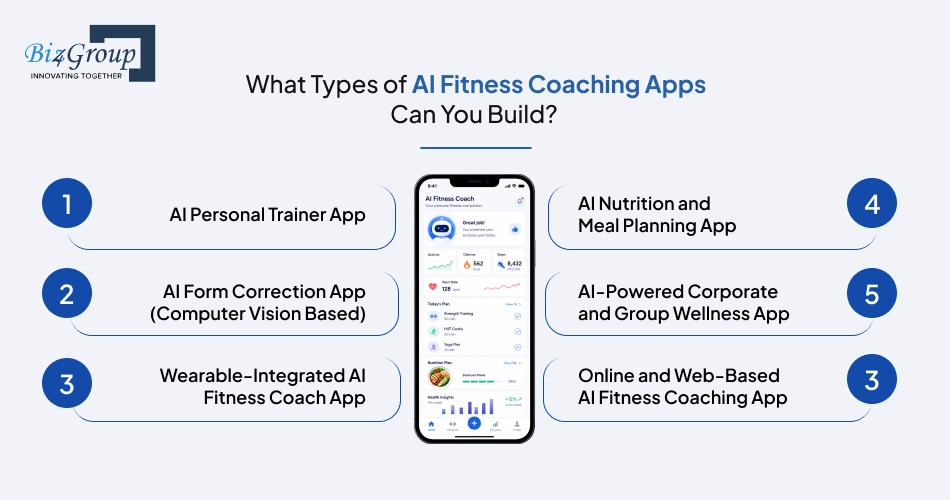
Not every AI fitness coaching app solves the same problem. Before you lock in features or budget, it helps to know which type you're actually building, since that decision shapes everything downstream, from the tech stack to the AI models you'll need for your AI fitness app development project.
1. AI Personal Trainer App
This is the closest thing to a human trainer living inside your phone. AI personal trainer app development means building a system that creates a workout plan around your goals, then adjusts sets, reps, and intensity as it learns how you respond to training.
The benefit here is consistency. Users get a coach who never cancels a session or forgets what they worked on last week, which is exactly why apps like Fitbod built their entire model around this single idea. Some teams take this further by building an AI avatar fitness trainer app, where a visual, conversational avatar delivers the coaching instead of plain text or static video.
2. AI Form Correction App (Computer Vision Based)
This type uses the phone's camera to watch a user's movement in real time and flag bad form before it turns into an injury. Think about squat depth, elbow position, or spine alignment during a deadlift. This is one of the more technically demanding directions inside AI integration in fitness app projects, since it depends on the model as well as AI computer vision seeing the user clearly and consistently.
The benefit is safety and trust. Users who've never had access to a trainer standing next to them finally get that same feedback loop, just through a lens instead of a person. This is also the hardest type to build well, since lighting, camera angles, and clothing all affect accuracy, so it's worth scoping carefully before committing to it as a core feature.
3. Wearable-Integrated AI Fitness Coach App
Here, the app pulls live data from an Apple Watch, Garmin, Fitbit, or Whoop, then uses that data (heart rate, recovery, sleep) to shape the next workout recommendation. If you're wondering how to build a wearable-integrated AI fitness coach app, the honest answer is that the AI stops reacting to what a user logs manually and starts reacting to what their body is actually doing.
The benefit is precision. A plan built on real biometric data adapts to an off night or a poor sleep score in a way a static calendar never could. This is also where AI fitness tracking app development earns its keep, since tracking alone is only useful when it feeds back into a smarter plan.
4. AI Nutrition and Meal Planning App
This type pairs workout data with food intake, using AI to suggest meals, track macros, or flag when calorie intake doesn't match training load. It's often built as a companion layer inside a broader coaching app rather than a standalone product, similar in spirit to how a fitness app like MyFitnessPal approaches food tracking, just with AI doing the recommending instead of the user doing all the searching.
The benefit is completeness. Training and nutrition are two halves of the same result, and users notice quickly when an app only handles one of them.
5. AI-Powered Corporate and Group Wellness App
Built for a different buyer entirely. Instead of one user, this type manages hundreds of employees or gym members under one account, with admin dashboards, team challenges, and aggregate health reporting for HR or gym owners. This is one of the more overlooked directions in AI-driven fitness coaching apps, mostly because founders default to thinking consumer-first.
The benefit is a second revenue stream most consumer fitness apps never touch. Employers are actively looking for scalable ways to support employee health, and a platform that personalizes at the individual level while reporting at the group level is a much easier sell than a generic wellness portal.
6. Online and Web-Based AI Fitness Coaching App
Not every fitness coach needs a mobile app on day one. Learning how to create AI fitness web app first, rather than jumping straight into iOS and Android builds, lets a coach or fitness brand serve clients through a browser dashboard instead of an app store download. This is also the fastest route for anyone exploring how to build an online fitness coaching app without the overhead of native development from day one.
The benefit is speed to market. A web-based version lets you validate demand and pricing before investing further, and it applies just as well to a broader AI fitness coaching mobile app development roadmap later, once the model's proven.
Each of these types can stand alone, or work together inside one product, depending on the audience you're actually building for. Figuring out which combination fits your users is usually the first real conversation we have with a founder before any AI health and fitness app development work begins.
Knowing which type you're building answers the "what." The next question is the one investors and users actually care about most, which is "why should this exist at all." That's exactly what we'll get into next.
Why Are AI-Driven Fitness Coaching Apps Worth the Investment?
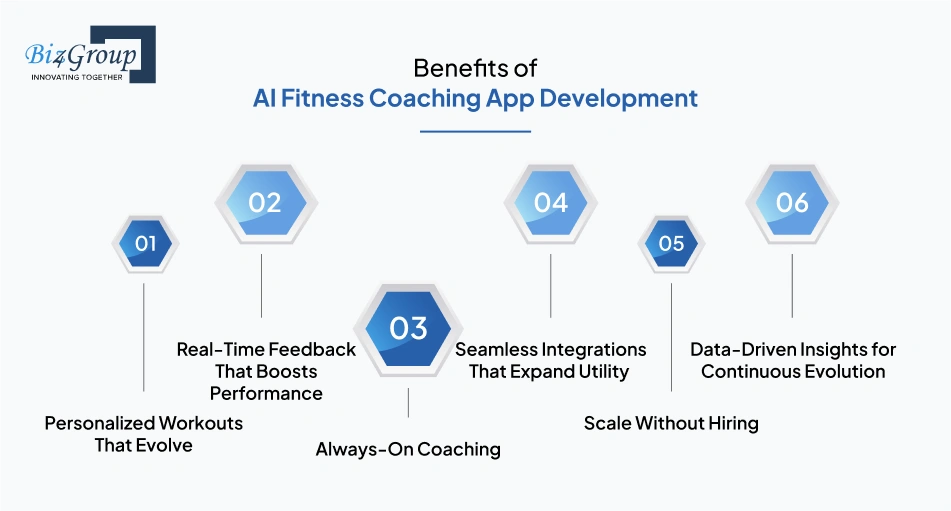
Knowing what type of app to build answers one question. Whether it's actually worth building is the one that decides if you move forward at all. Here's where the real payoff shows up.
1. Personalization That Actually Scales
A single trainer can personalize a plan for maybe 20 to 30 clients before quality starts slipping. AI doesn't have that ceiling. AI powered fitness coaching apps can tailor a plan for one user or one hundred thousand users with the same level of precision, since the model isn't running out of hours in a day.
That's the real unlock behind building a fitness coaching app on AI instead of on a human coaching team alone. Growth stops being a hiring problem.
2. Real-Time Feedback That Builds Trust and Reduces Injury
Waiting until next week's check-in to hear "your form was off" is too late to matter. Real-time feedback, delivered the moment a rep goes wrong, is what separates a coaching app from a glorified calendar.
This is also one of the trickiest features to actually deliver well, and we've learned that the hard way on our own builds. The camera doesn't always get a clean view. Bad lighting, loose clothing, or an awkward phone angle can throw off form detection more than the AI model itself ever does. The fix isn't chasing perfect accuracy, it's building a fallback into the experience, like a quick "not sure, please confirm" prompt, so the app stays useful even when the camera can't see everything clearly.
3. Round-the-Clock Coaching Without Round-the-Clock Costs
A human trainer sleeps, takes weekends off, and can only be in one place at a time. An AI coach can't get tired, and it doesn't need overtime pay to show up at 5 AM or midnight.
For anyone thinking about developing a fitness coaching app as a business, this is the line item that changes the entire cost structure. Support scales without your payroll scaling alongside it.
4. Stronger User Retention Through Adaptive Engagement
Static plans go stale fast. Once a user plateaus or gets bored, they churn, and no amount of push notifications brings them back. An AI system that adjusts difficulty, suggests new goals, and reacts to slipping motivation keeps the experience feeling alive.
We've seen this play out firsthand on one of our own builds. Adding the AI wasn't what fixed retention. What actually moved the needle was the gamification and community layer sitting on top of it, things like streaks, challenges, and visible progress against other users. The AI kept the workouts smart. The social layer is what kept people opening the app. Some teams take this further with a conversational layer, using an AI agent for coaches to check in, answer questions, and nudge users the way a real coach would between sessions.
5. Data That Sharpens Every Future Decision
Every workout logged, every skipped session, every completed goal becomes a data point. Over time, that data doesn't just improve the AI's recommendations, it tells you which features are working and which ones users are ignoring entirely.
That feedback loop is often the difference between a second version of the app that actually grows and one that just adds more features nobody asked for.
6. New Revenue Streams Beyond a Single Subscription
An app built only around one monthly fee caps its own ceiling. AI coaching apps open up tiered pricing, premium coaching add-ons, corporate wellness licensing, and even white-labeling to smaller gyms or independent trainers who don't want to build their own tech.
Founders exploring build an AI gym app ideas often start with one revenue stream in mind and discover two or three more once the platform is live and usage patterns become clear.
Knowing why this is worth building is one thing. Knowing exactly what to put inside the app to earn that payoff is the next question, and that's what we're covering right now.
What Core Features Do You Need to Build an AI Fitness Coach App?
Every one of the app types we covered earlier needs the same foundation underneath it. These are the features that make AI fitness coaching app development worth the investment from day one, before anything advanced gets added on top. Get this list right, and you've got the backbone of a strong AI health and fitness app development project, regardless of which app type you're building.
1. User Onboarding and Profile Setup
Before the AI can personalize anything, it needs to know who it's working with. This feature captures fitness level, injury history, goals, and equipment access during signup, since the quality of every future recommendation depends on what gets collected here. Rushed onboarding is one of the most common reasons early recommendations feel off. Users blame the AI, when really the app never asked the right questions to begin with, and getting this right is often the difference between a smooth first week and an early uninstall.
2. Exercise Library with Instructional Content
Before an AI can generate a smart plan, users need a baseline library of exercises with clear instructional videos or images to follow. This is the reference layer everything else in the app points back to. Skipping this or treating it as an afterthought is a common early mistake. Even the smartest workout recommendation means nothing if a user doesn't know how to actually perform the movement being suggested.
3. Personalized Workout Plan Generator
This is the engine room of the entire app, and the feature most founders mean when they talk about wanting to develop an AI workout coaching app in the first place. It takes a user's goals, fitness level, and equipment, then builds a plan that shifts as performance changes week to week, instead of handing everyone the same static routine. Apps like Fitbod built their entire reputation on getting this one feature right before adding anything else. If you're studying how an AI fitness app like Fitbod structures this, the lesson is simple: solidify the personalization engine first, then layer in everything else.
4. Real-Time Form Correction
Using the camera or wearable sensors, this feature watches a user's movement and flags bad form before it turns into an injury. It's one of the more technically demanding features on this list, but also one of the most trusted by users once it works. We touched on this earlier, but it matters as a build decision too, not just a benefit. Build the fallback confirmation prompt alongside the AI detection from day one, not as an afterthought once accuracy issues show up.
5. Progress Tracking and Analytics
Users need to see proof that the work is paying off, or they stop showing up. This feature logs workout history, visualizes trends, and breaks down performance by activity type so progress feels visible, not assumed. This is also where the app quietly builds its own future intelligence. Every logged session becomes training data the AI uses to sharpen its next recommendation.
6. Wearable and Device Integration
Syncing with Apple Watch, Fitbit, Garmin, or Whoop pulls in heart rate, sleep, and recovery data automatically, instead of relying on users to log everything by hand. This is often what separates a real coaching app from a basic workout tracker, and it's a core piece of most AI workout app development roadmaps today. It also reduces user effort dramatically. The less someone has to manually input, the longer they tend to stick around and keep using the app.
7. Nutrition and Meal Planning
Pairing workout data with food intake lets the app suggest meals, track macros, and flag when calorie intake doesn't match training load. This feature turns the app from a workout tool into a full wellness companion. Users training hard but eating poorly tend to plateau and blame the workouts, when nutrition was the real gap. This feature closes that blind spot before it costs you a user.
8. In-App Chatbot and Coaching Assistant
A built-in AI assistant answers questions, sends reminders, and keeps users engaged between workouts, functioning as the app's always-on support layer. This is usually where fitness coach app AI automation starts, handling the repetitive questions a human coach would otherwise spend hours answering. Getting this right often comes down to AI integration services that connect the chatbot cleanly to user data, so responses feel relevant instead of generic and scripted.
9. Push Notifications and Habit Nudges
Smart, well-timed reminders, not generic "don't forget to work out" pings, keep users on track without feeling nagged. The best versions of this feature adjust timing and tone based on a user's actual behavior patterns, not a fixed schedule. Done poorly, this feature drives people to disable notifications entirely. Done well, it's often the quiet reason retention numbers hold steady months later.
10. Admin Dashboard and Backend Management
Someone on your team needs visibility into users, content, and app performance without digging through raw data. This feature gives that control, covering user management, content updates, and usage analytics in one place, and it's a non-negotiable part of any serious build fitness coaching app using AI effort. It's easy to overlook this during planning since users never see it, but it's the feature your own team will depend on daily once the app is live.
These core features are the baseline every strong entry in the growing world of AI-driven fitness coaching apps needs before anything advanced gets layered on. Once they're solid, that's when the more differentiating, harder to copy capabilities are worth adding, and that's exactly where we're headed next.
What Advanced Features Set Custom AI Fitness App Development Apart?
The core features get your app to launch. These are the ones that make people talk about it, upgrade to premium, or choose your app over the dozen others doing the basics. Most teams pursuing custom AI fitness app development add these in phase two, once the foundation is proven.
|
Advanced Feature |
What It Does |
Why It's Worth Adding |
|---|---|---|
|
LLM-Powered Conversational Coaching |
Uses a large language model to hold real conversations, answer training questions, and explain the reasoning behind a workout, not just deliver instructions. |
Feels less like a tool and more like a coach who can actually explain "why," which is what keeps users engaged long term. |
|
Agentic AI Workflows |
Goes a step further than a chatbot by letting the AI take actions on its own, like rescheduling a missed workout, adjusting next week's plan, or flagging a user to a human trainer without being asked. |
This is where building AI fitness coaching app projects start to feel genuinely autonomous instead of just reactive. |
|
Predictive Health and Injury Risk Alerts |
Analyzes patterns in training load, recovery, and form data to flag a likely injury or burnout before it happens. |
Shifts the app from reactive to preventive, which is a meaningfully different value proposition to sell users on. |
|
Edge AI for Offline Form Correction |
Runs the form correction model directly on the device instead of the cloud, so feedback works even without a strong internet connection. |
Removes latency and keeps the app usable in gyms with poor signal, which is more common than most founders assume. |
|
Voice-Activated Coaching |
Lets users control the app and receive spoken feedback hands-free during a workout, useful when hands are literally busy holding weights. |
Removes friction during the exact moments users are least likely to want to touch a screen. |
|
Adaptive Difficulty via Reinforcement Learning |
Uses reinforcement learning to adjust intensity in real time based on how a user is actually performing that day, not just their historical average. |
Prevents both plateaus and burnout, since the plan responds to today's performance, not last month's. |
|
Multi-Modal Input Support |
Accepts voice, text, and camera input interchangeably, letting users interact however is most convenient in the moment. |
Widens accessibility and makes the app usable across more contexts, home, gym, outdoors, without forcing one input method. |
|
Corporate Wellness and Group Analytics |
Adds team dashboards, aggregate health reporting, and multi-user management built for HR teams or gym owners managing large groups. |
Opens the B2B revenue path we covered earlier, and it's a feature most consumer-first apps never bother building. |
|
AI-Powered Recovery and Sleep Coaching |
Pulls in wearable sleep and recovery data to recommend rest days or lighter sessions when the body actually needs them. |
Rounds out the coaching experience beyond just workouts, which is often what separates a fitness app from a genuine wellness platform. |
Teams that get this stage right, whether they're building from scratch or trying to create an AI fitness coaching app on top of an existing product, tend to treat these as optional add-ons validated by real user demand, not a checklist to rush through before launch.
Which API Is Best for Building a Custom AI Agent for Client Inquiries?
If you're a coaching business wondering which API actually handles this well, the honest answer depends on what you need the agent to do. For natural, context-aware conversation with clients (answering questions, explaining plans, handling routine check-ins) large language model APIs like Claude or GPT-based models tend to perform best, since they're built specifically for nuanced, multi-turn conversation rather than scripted responses.
Where it gets more interesting is when you want the agent to actually take action, not just talk. That's where agentic AI development comes in, since it lets the assistant do things like reschedule a session, update a plan, or escalate a client to a human coach, instead of just answering questions and stopping there. Pairing that with AI automation services is usually what turns a simple chatbot into something that meaningfully reduces the manual workload on a coaching team.
There's no single "best" API here so much as a right fit for the job. Simple Q&A leans toward a straightforward LLM integration. Anything involving real actions on a user's behalf leans toward an agentic setup built specifically for that purpose.
Once you know which advanced features are worth chasing, the next real question is how you actually get from an idea to a working product, step by step. That's exactly where we're headed next.
Cool Features, But Who's Actually Wiring Them Together?
Agentic coaching and predictive health alerts sound great on a slide. We've built the kind that actually works on a phone
Talk to Our AI TeamHow Do You Actually Develop an AI Workout Coaching App, Step by Step?
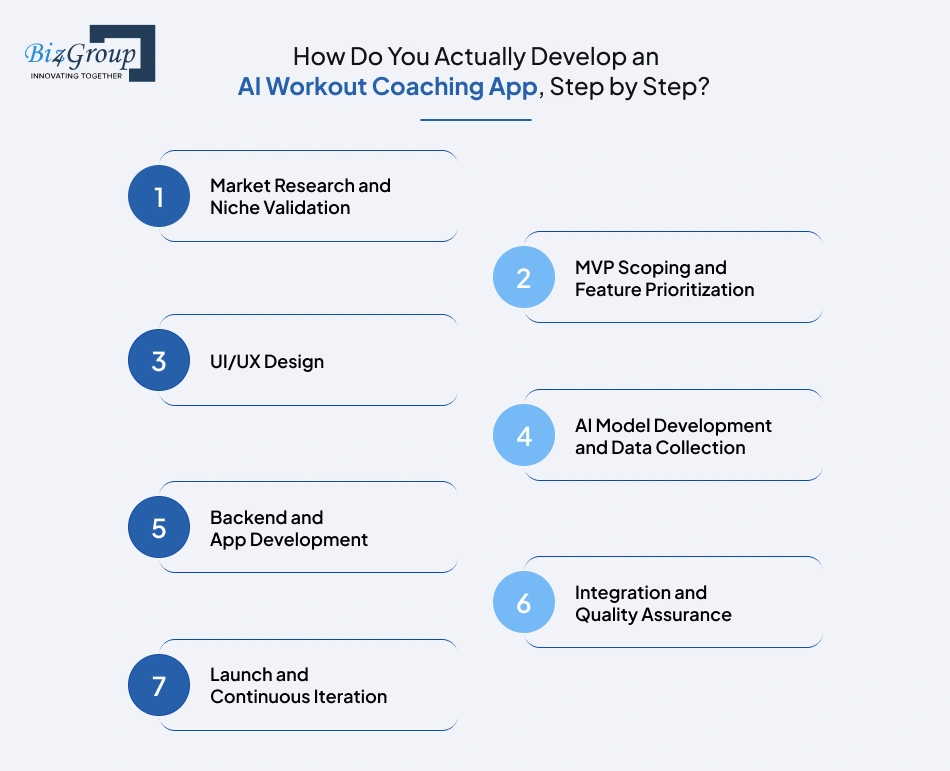
Knowing what to build is one thing. Knowing the order to build it in is what actually keeps a project on time and on budget. Here's the real sequence founders follow when they create an AI fitness coaching app that actually makes it to launch, not the simplified version most guides give you.
Step 1: Market Research and Niche Validation
Before any design or development starts, you need to know exactly who this app is for and what gap it's actually filling. Skipping this step is the single most common reason founders end up building features nobody asked for.
- Study existing apps in your target niche and note where users complain
- Define one clear audience segment instead of trying to serve everyone at once
- Validate demand through surveys or direct outreach before writing a spec
Step 2: MVP Scoping and Feature Prioritization
This is where you decide what actually ships in version one versus what waits. Trying to launch with every feature from our Core and Advanced lists at once is how budgets balloon and timelines slip past a year. A tightly scoped MVP development plan keeps the first release lean, testable, and fast to market, which matters just as much whether you're building a simple tracker or a full AI fitness coaching app.
- Lock in must-have features only, defer the rest to a documented roadmap
- Set clear success metrics for what "working" looks like before you build
- Get a small group of real users lined up to test before public launch
Step 3: UI/UX Design
Good design is what makes users trust an app enough to hand over their fitness data and stick around past week one. This stage turns your feature list into actual screens, flows, and interactions people will use mid-workout, often sweaty and glancing at their phone for two seconds at a time. Working with an experienced UI/UX design team here matters more than most founders expect, since fitness app usability has very specific constraints regular apps don't.
- Design for one-handed, glanceable use during active workouts
- Keep onboarding short, since long forms lose users before they even start
- Test wireframes with real users before committing to final visuals
Step 4: AI Model Development and Data Collection
AI model development is the technical core of the entire project, and usually where teams underestimate both time and cost. You're deciding between pre-trained models and custom-built ones, and you're sourcing the data (workout logs, movement patterns, wearable feeds) that the AI actually learns from. Anyone serious about how to build an AI app in this category needs to plan for this stage taking longer than expected, since good training data rarely exists in the exact shape you need on day one.
- Choose between pre-trained AI models and custom training based on budget and accuracy needs
- Source or generate diverse datasets to avoid biased or inaccurate recommendations
- Plan for ongoing retraining, not a one-time model build
Step 5: Backend and App Development
This is where the actual product gets built, the APIs, the database, the infrastructure that connects the AI models to what users see on screen. Whether you're aiming to develop an AI-based fitness app for consumers or something built specifically for a coaching business, this is also where scalability decisions get made that are expensive to undo later if you get them wrong.
- Build secure APIs for AI model requests and user data handling
- Choose cloud infrastructure that can scale without a full rebuild later
- Set up real-time data pipelines if your app includes live feedback features
Step 6: Integration and Quality Assurance
Before anything reaches real users, everything needs to work together under real conditions, not just in a controlled demo. This is the stage that separates apps that feel reliable from ones that generate one-star reviews in the first week.
- Test AI accuracy against edge cases, not just ideal conditions
- Run usability testing with real users, not just internal team members
- Check cross-device compatibility across different phones and OS versions
Step 7: Launch and Continuous Iteration
Launch day isn't the finish line, it's the point where real data starts coming in. Founders who understand how to build AI-powered products for a coaching business know that the apps that grow are the ones that keep refining based on actual usage instead of treating version one as the final version.
- Monitor early user behavior closely for drop-off points
- Use real feedback to retrain models and refine features
- Plan your next release cycle before the current one even ships
Getting through these seven steps well usually depends on having the right people involved at each stage, whether that means bringing in specialists to hire AI developers for the model work, or partnering with an experienced AI product development company to manage the whole build end to end. This sequence works whether you're trying to build an AI workout app from a blank slate or make an AI fitness coaching app that upgrades something you've already got live.
Once the app is actually built, the next decision that shapes everything is which technologies you choose to build it on, and that's exactly what we're covering next.
Which Tech Stack Should You Choose to Build a Fitness Coaching App Using AI?
The tech stack decision is where a lot of good ideas quietly go sideways. Pick tools that don't talk to each other well, and you'll spend months fighting integration issues instead of shipping features. Here's what we actually recommend when we sit down to develop a fitness coaching app with a client, and why.
One thing we've learned building these systems ourselves: the biggest stack mistake isn't picking the wrong framework, it's picking a pose estimation approach without testing it on real phones in real lighting first. A model that performs beautifully in a demo can fall apart the moment a user's in a dim living room wearing dark clothes. We test on-device and cloud-based options side by side before committing, not after.
|
Tech Layer |
Recommended Tools |
Why It Matters |
|---|---|---|
|
Frontend Framework |
React Native, Flutter |
Lets you ship one codebase across iOS and Android, which matters a lot when you're trying to build fitness coaching app products fast without doubling your dev team. |
|
Backend Framework |
Node.js, Python (Django), Ruby on Rails |
Handles app logic, user sessions, and API traffic. Node.js development tends to win for real-time features like live coaching feedback, since it handles concurrent connections well, while Python development is often preferred when the AI and backend logic need to stay closely connected in the same codebase. |
|
AI and ML Frameworks |
TensorFlow, PyTorch, ONNX |
Powers the personalization engine and any computer vision work. ONNX specifically helps when you need a model trained in one framework to run efficiently on mobile devices. |
|
Pose Estimation (Computer Vision) |
MediaPipe, OpenPose, TensorFlow Lite |
This is the layer that makes real-time form correction possible. MediaPipe runs well on-device for low latency, OpenPose tends to be more accurate but needs more processing power. |
|
Cloud Infrastructure |
AWS, Google Cloud, Microsoft Azure |
Hosts your AI models and scales as your user base grows. Also, where most of your ongoing inference costs will show up, so this choice affects your budget long after launch. |
|
Database Systems |
PostgreSQL, MongoDB, Firebase |
Stores user profiles, workout history, and analytics. PostgreSQL suits structured relational data well, Firebase is faster to set up for early MVPs. |
|
Wearable Integrations |
Apple HealthKit, Google Fit, Fitbit API, Garmin Connect API |
Pulls in heart rate, sleep, and recovery data automatically. Each has its own SDK quirks, so budget real time for testing each integration individually, not just once. |
|
DevOps and CI/CD |
Docker, Kubernetes, Jenkins, GitHub Actions |
Automates deployment and keeps the app stable as you push updates. This matters more than most founders expect once you're retraining AI models regularly. |
|
Video and Voice Processing |
WebRTC, Twilio, Mux |
Powers any live coaching sessions, voice-activated commands, or video-based feedback features. |
Choosing the right combination here isn't really about picking the most popular tools. It's about matching each layer to what your specific app actually needs to do, which is exactly the kind of decision an experienced AI app development company helps you get right the first time instead of the third.
Getting the stack wrong doesn't usually show up on day one. It shows up six months in, when you're trying to scale and realize the foundation can't keep up, which is precisely why this decision deserves as much attention as the features themselves if you're serious about how to create an AI fitness coaching app that lasts past year one.
Once your stack is locked in, the next conversation that has to happen is around data protection, since fitness apps handle sensitive health information that comes with real legal responsibility. That's exactly what we're covering next.
How Do You Build a Fitness Coaching App with Encryption and Real Compliance?
Health and fitness data is personal in a way most app data isn't. Getting this section wrong doesn't just risk a bad review, it risks real legal exposure. This is one part of AI fitness coaching app development that founders tend to underestimate until it's too late. Here's what actually needs to be in place.
1. End-to-End Data Encryption
Every piece of user data, workout history, biometric readings, personal health details, needs to be encrypted both in transit and at rest. This means data is protected while it's moving between the app and your servers, and while it's sitting in your database doing nothing. Skipping encryption at rest is a common shortcut teams take to save time early on. It's also one of the fastest ways to turn a minor data breach into a serious legal and trust problem, especially for anyone serious about how to build fitness coaching app with encryption done properly from the first release.
2. HIPAA and GDPR Compliance
If your app handles anything resembling health data in the US, HIPAA rules likely apply, and GDPR applies the moment you have European users, regardless of where your company is based. These aren't optional guidelines, they carry real financial penalties for non-compliance. Getting HIPAA compliant AI app development right from the start is far cheaper than retrofitting it after launch. Most founders assume compliance is a legal team's job. In practice, it shapes technical decisions from day one, like how data is stored, who can access it, and how long it's retained, which matters just as much for a solo trainer's app as it does for large scale AI-driven fitness coaching apps serving thousands of users.
3. Secure Authentication and Access Controls
Strong login security, multi-factor authentication, and role-based access controls determine who can see what inside your app. Not every team member or admin needs access to every user's raw health data. This matters more once you add corporate wellness or trainer-facing features, where multiple people touch the same user's data for different reasons.
4. Data Minimization and Retention Policies
Collecting only the data you actually need, and deleting it when it's no longer necessary, reduces your exposure if a breach ever happens. Many apps collect far more than they use, simply because nobody set a policy limiting it. This also builds user trust. People are more comfortable sharing sensitive fitness data with AI powered fitness coaching apps that are transparent about what they keep and why, rather than ones that stay vague about it.
5. Ongoing Compliance Monitoring
Compliance isn't a one-time checklist you complete before launch, it's an ongoing responsibility as regulations change and your app adds new features. Working with a team that offers dedicated AI compliance support means someone is actually watching for these changes instead of you finding out after an audit. This is especially important if you plan to expand into corporate wellness or international markets, where compliance requirements shift depending on the region and the buyer.
6. Transparent User Consent and Data Control
Users should always know what data is being collected, why, and have a clear way to opt out or delete their information entirely. Burying this in a lengthy terms of service document that nobody reads doesn't count as real consent.
Apps that handle this well, with clear, plain-language privacy settings, tend to earn more trust and fewer support complaints down the line, which matters just as much for a simple AI fitness coach app as it does for a full enterprise wellness platform.
Getting security and compliance right isn't just a legal safeguard, it directly affects how much your app costs to build and maintain, which is exactly what we're breaking down next.
How Much Does It Cost to Develop a Fitness Coaching App?
Let's get straight to the number you're probably here for. The cost to develop a fitness coaching app typically ranges from $35,000 to $300,000, depending on features, AI complexity, and how many integrations you're building in.
That range is wide on purpose. A simple app with a basic workout generator sits at the lower end. A full AI fitness coaching app with real-time form correction, wearable integrations, and enterprise features sits closer to the top. Your actual number depends entirely on which features from our Core and Advanced lists you're building, so treat this as a starting point for planning, not a fixed quote.
What Does a Feature-Based Cost Breakdown Look Like for AI Fitness Coaching App Development?
Breaking the cost down by feature gives you a much clearer picture than a single flat range ever could. Here's roughly where the money goes across a typical AI fitness coaching app development project.
|
Feature |
Estimated Cost Range |
What Drives the Cost |
|---|---|---|
|
User Onboarding and Profiles |
$2,000 to $5,000 |
Straightforward to build, cost rises with how detailed the intake questionnaire gets |
|
Exercise Library With Video Content |
$3,000 to $7,000 |
Depends on whether you license existing content or shoot original instructional videos |
|
Personalized Workout Plan Generator |
$8,000 to $18,000 |
Core AI model development, higher cost for deeper personalization logic |
|
Real-Time Form Correction |
$10,000 to $25,000 |
Computer vision integration and model training, one of the most expensive features on this list |
|
Progress Tracking and Analytics |
$4,000 to $9,000 |
Charts, history logs, and performance breakdowns by activity type |
|
Wearable and Device Integration |
$5,000 to $12,000 |
Cost scales with how many wearable APIs (Apple HealthKit, Fitbit, Garmin) you support |
|
Nutrition and Meal Planning |
$4,000 to $10,000 |
Depends on whether you're building custom recommendation logic or integrating a third-party meal database |
|
In-App Chatbot and Coaching Assistant |
$6,000 to $15,000 |
Conversational AI setup, cost rises significantly if you're building agentic AI development into the assistant |
|
Corporate Wellness Features |
$6,000 to $14,000 |
Multi-user dashboards, team reporting, admin controls for HR or gym owners |
|
Admin Dashboard and Backend |
$4,000 to $10,000 |
Content management, user oversight, and usage analytics for your own team |
|
UI/UX Design |
$5,000 to $12,000 |
Higher end for custom illustrations, animations, and accessibility-focused design |
|
Security and Compliance Setup |
$5,000 to $15,000 |
Encryption, HIPAA and GDPR alignment, and access control implementation |
|
Testing and Quality Assurance |
$3,000 to $8,000 |
Functional testing, AI accuracy checks, and cross-device compatibility |
What Factors Actually Push Your AI Fitness App Development Cost Up or Down?
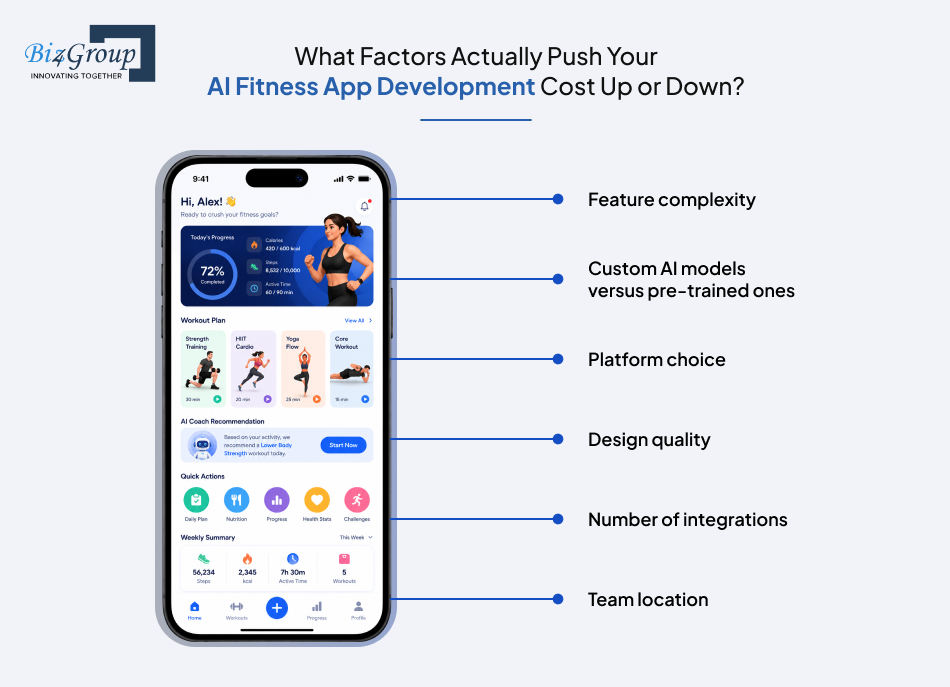
Beyond the feature list, a handful of bigger decisions swing your final number more than anything else.
- Feature complexity – A basic tracker costs far less than a full AI fitness coach app with computer vision and voice coaching built in
- Custom AI models versus pre-trained ones – Training a model from scratch costs significantly more than fine-tuning an existing one
- Platform choice – Native iOS and Android apps generally cost more than a single cross-platform build
- Design quality – Premium, custom UI/UX design costs more upfront but tends to pay off in retention
- Number of integrations – Every additional wearable API, payment gateway, or third-party service adds development time
- Team location – Rates vary significantly between US-based, European, and offshore development teams
What Hidden Costs Catch Founders Off Guard in Fitness Coaching App Development?
The build itself is only part of the budget. These costs show up after launch and catch a lot of first-time founders by surprise.
- Cloud hosting and AI model inference costs, which scale with your user base, not a flat monthly fee
- Ongoing model retraining, since AI recommendations degrade in quality if the model never learns from new data
- API and licensing fees, for wearable integrations, video content, or third-party data sources
- Post-launch maintenance and bug fixes, typically 15 to 20 percent of your original build cost annually
- Compliance audits and updates, especially if regulations shift or you expand into new regions
- Marketing and user acquisition, which is often underestimated even though it's essential for gaining real traction
How Do You Optimize Cost for an AI Fitness Coaching App?
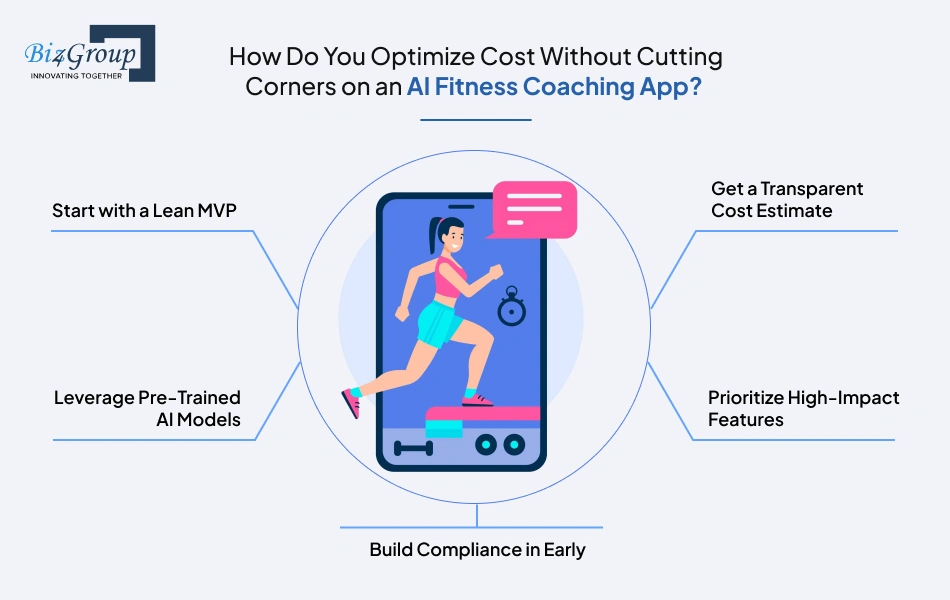
You can control your budget without shipping a weaker product, if you're deliberate about where you spend first.
- Start with a lean MVP covering only must-have features, then expand based on real user feedback
- Use pre-trained AI models where possible instead of building custom ones from scratch on day one
- Get a clear, itemized AI fitness app development cost estimate upfront, so you know exactly what you're paying for before development starts, rather than discovering scope creep halfway through
- Prioritize the features that directly drive retention or revenue before nice-to-have additions
- Plan for compliance and security from the start, since retrofitting them later almost always costs more
Should You Buy an Off-the-Shelf Solution or Build Custom AI Fitness Coaching App Software?
This decision shapes your entire budget and timeline, so it's worth weighing honestly before you commit either way.
|
Factor |
Off-the-Shelf Solution |
Custom AI Fitness Coaching App Software |
|---|---|---|
|
Upfront Cost |
Lower, often subscription-based |
Higher, but you own the product outright |
|
Customization |
Limited to what the platform allows |
Fully tailored to your exact features and users |
|
Scalability |
Often capped by the vendor's infrastructure |
Built to scale however your business grows |
|
Ownership of Data and IP |
Usually retained by the platform vendor |
Fully owned by you |
|
Long-Term Cost |
Recurring fees that add up over years |
Higher initial investment, lower long-term dependency |
|
Best For |
Testing an idea quickly with minimal investment |
Founders serious about building a defensible, differentiated product |
If your goal is genuinely to build AI fitness coaching app software that becomes a long-term business asset rather than a rented platform, custom development is almost always the stronger path once you've validated demand.
Once you know what this actually costs, the natural next question is what tends to go wrong along the way, and how to avoid those mistakes before they become expensive. That's exactly what we're covering next.
Still Staring at That Range, Wondering Where You'll Land?
Every app is different, and so is every budget. Let's get you an actual number instead of a guess
Get Your Real Cost EstimateTop Challenges in Building a Fitness Coaching App
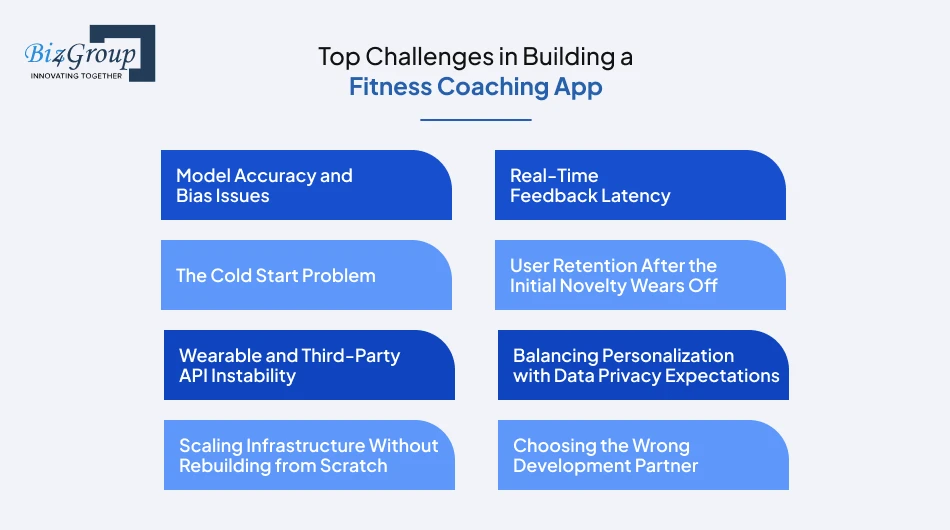
Every founder we've worked with in this space hits at least a few of these while pursuing fitness coaching app development with AI. Knowing them ahead of time is the difference between planning around them and getting blindsided halfway through your build.
|
Challenge |
Why It Happens |
How to Solve It |
|---|---|---|
|
Model Accuracy and Bias Issues |
AI trained on limited or narrow datasets produces recommendations that don't work well across different body types, fitness levels, or training styles. |
Use diverse, representative training data from the start, and keep testing against real user feedback rather than just internal QA. This is a common early stumble in AI fitness coaching app development, even for well-funded teams. |
|
Real-Time Feedback Latency |
Processing camera or sensor data fast enough to feel instant is technically demanding, and slow feedback breaks the entire experience. |
Combine on-device processing for speed with cloud processing for accuracy, rather than relying on one or the other alone. |
|
The Cold Start Problem |
Your AI has little to no real user data on day one, so early recommendations are often generic or slightly off, no matter how good the model is in theory. |
Launch with simple rule-based logic layered under the AI and let real usage data sharpen the model over the first few months. We've seen this firsthand. Our own early builds got noticeably smarter within the first ninety days, once real workout data started flowing in, not before. |
|
User Retention After the Initial Novelty Wears Off |
Users get excited by AI personalization at first, then drift away once the plan starts feeling repetitive or the app stops surprising them. |
Layer in gamification, community features, or adaptive goal shifts, so the app keeps evolving alongside the user instead of settling into a routine. This is a common gap in AI-powered fitness coaching apps that stop at launch and never revisit engagement mechanics. |
|
Wearable and Third-Party API Instability |
APIs for Apple HealthKit, Fitbit, or Garmin change without much warning, and integrations that worked at launch can break months later. |
Build flexible, well-documented integration layers, and assign ownership internally for monitoring when a partner API changes. |
|
Balancing Personalization with Data Privacy Expectations |
The more personalized the AI gets, the more data it needs, which can make privacy-conscious users hesitant to share everything the app asks for. |
Be transparent about what data drives which recommendations and let users control how much they share without breaking core functionality. |
|
Scaling Infrastructure Without Rebuilding from Scratch |
Apps built quickly for an MVP often hit a wall when user numbers grow past what the original architecture was designed to handle. |
Design with cloud scalability in mind from day one, even if you're not using the full capacity yet, so growth doesn't force a costly rebuild later. This is exactly where building a fitness coaching app without a scalability plan gets expensive fast. |
|
Choosing the Wrong Development Partner |
Founders often pick based on price alone, then discover the team has no real experience with computer vision or AI model training once the project is already underway. |
Ask to see real, relevant project history before committing, and lean toward the top AI fitness app development companies in USA if you want a team that's actually shipped in this exact space. |
Every one of these challenges is solvable. None of them are reasons to delay building a fitness coaching app, they're just things worth planning for before they show up uninvited. Founders who plan for these upfront, whether they're building a focused coaching app or a broader AI lifestyle fitness app covering nutrition and recovery too, tend to launch with far fewer surprises.
Talking about challenges is one thing. Seeing how a real team actually navigated them is what makes this practical instead of theoretical, and that's exactly what we're covering next.
Who's Already Building This Right? Real Fitness App Case Studies
Reading about features and cost ranges only gets you so far. Seeing how real products actually applied these ideas, both ours and others in the market, makes everything we've covered so far concrete instead of theoretical.
AI Workout App: Full-Body Analysis Meets Adaptive Planning
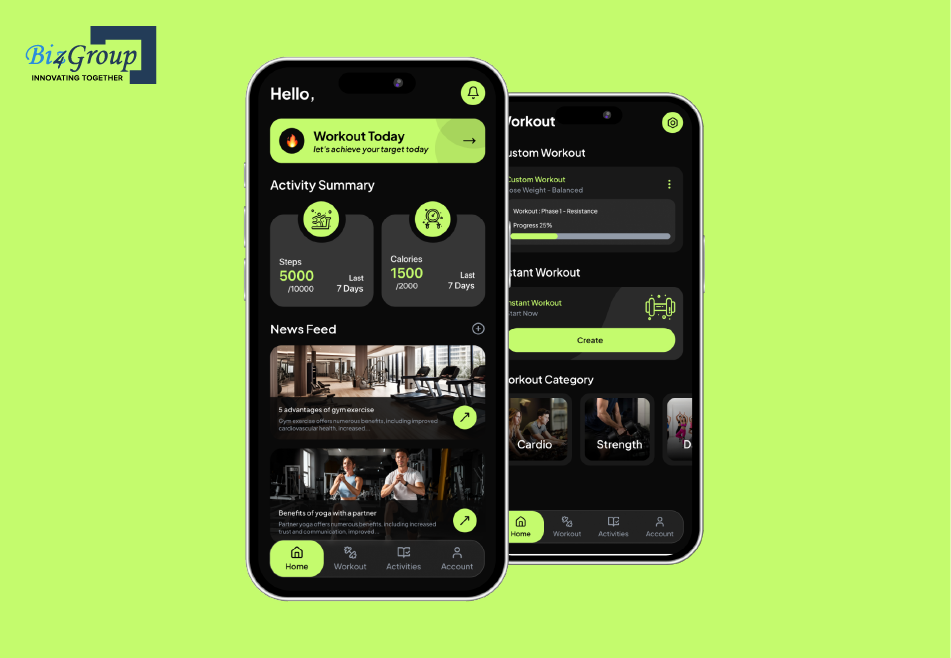
AI Workout App tackles a problem most workout apps never touch. Instead of relying only on user input, it uses AI-driven full-body analysis paired with a 3D Look API to capture precise body measurements, then builds an adaptive workout plan around that data.
As the user progresses, the plan shifts with them, and real-time progress visualization gives them a clear, visual sense of change over time instead of just a number on a scale. The lesson here for anyone exploring AI fitness coaching app development is straightforward. Personalization gets exponentially better when the AI has real physical data to work from, not just self-reported goals typed into a form.
SweatJoy: Coaching That Covers the Whole Day, Not Just the Workout
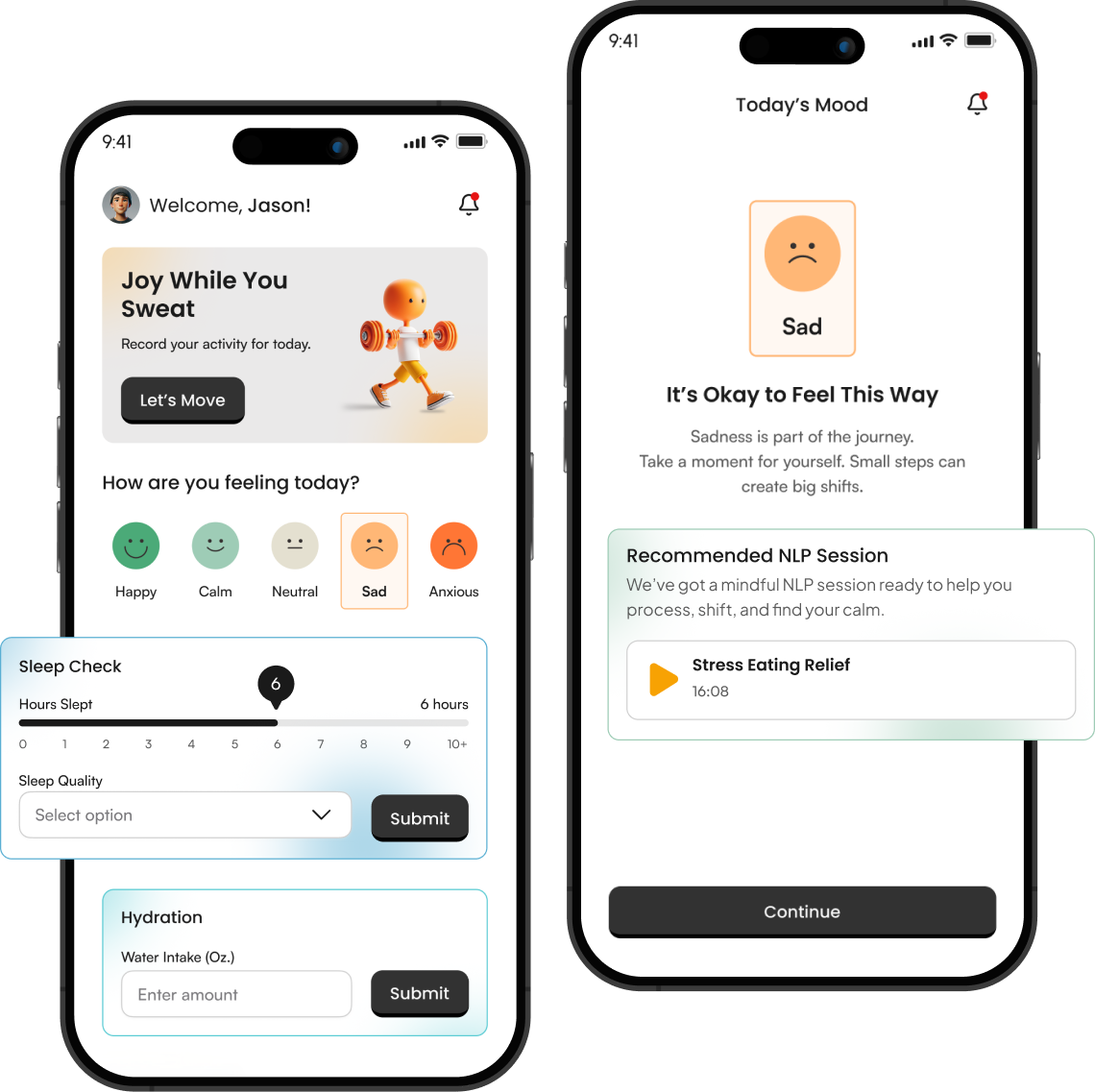
SweatJoy is arguably the closest match to what a true AI fitness coach app should aim for. It was built to turn everyday wellness into a guided behavioral journey, tracking mood, sleep, hydration, and activity, all in one place instead of treating fitness as an isolated hour of the day.
It also includes NLP-based coaching sessions created around mindfulness, plus meal planning with real nutritional insight built in. What makes SweatJoy worth studying is the scope. Most fitness apps stop at the workout. This one treats the workout as one part of a much bigger picture, which is exactly the direction AI-driven fitness coaching apps are heading as user expectations keep expanding.
Fitbod: Proof That Recommendation Logic Alone Can Win
Fitbod is one of the clearest market examples of AI personal trainer app development done well without leaning on computer vision at all. Its entire product is built around a recommendation engine that adjusts sets, reps, and exercise selection based on a user's logged workout history and stated goals.
There's no camera, no pose estimation, no complex real-time feedback loop. Just a very well-tuned personalization model. The takeaway for founders is worth repeating. You don't need every advanced feature we covered earlier to build something people pay for and stick with. You need the one core feature done exceptionally well.
Freeletics: AI Coaching Built Around Bodyweight Training at Scale
Freeletics took a different angle, building its app around AI-adjusted bodyweight training that adapts intensity based on user feedback and performance, without requiring gym equipment. It later added voice coaching to make the experience feel more like a real trainer talking a user through a session, rather than just displaying the next exercise on screen.
What stands out about Freeletics is how it scaled personalization without needing users to own expensive equipment or wearables. For founders thinking about building a fitness coaching app aimed at a global, equipment-light audience, this is a useful model to study.
Four different products, four different approaches, and yet the pattern holds across all of them. The apps that win aren't the ones chasing every feature at once. They're the ones that pick a clear angle, whether that's full-body data, whole-day wellness, pure recommendation logic, or equipment-free scaling, and execute it well before adding anything else.
That pattern also shows up in the mistakes we've seen founders make along the way, which is exactly what we're covering next.
What Makes Biz4Group the Right Partner for AI Fitness Coaching App Development?
You've read through the features, the tech decisions, the costs, and the mistakes other teams make. At some point, the question shifts from what to build to who actually builds it well.
We've been doing custom software development for over 20 years, and AI has become one of our core practices, not something added to a homepage because it's trending. A lot of agencies added "AI" to their service list in the last two years without the engineering depth to back it up. We've been building applied AI systems, personalization engines, computer vision, conversational AI, long enough that AI fitness coaching app development isn't new territory for us.
We built an AI Workout App, using full-body analysis and a 3D Look API to power adaptive training plans. We built SweatJoy, a whole-day wellness platform combining mood, sleep, and hydration tracking with NLP-based coaching sessions.
Building an AI fitness coach app isn't one project, it's four. A computer vision project, a data science project, a UX project, and a compliance project, running at the same time. Most teams are strong in one or two of those. We've built internal teams around all four, so you're not stitching together three vendors to get one working product.
We also don't disappear after launch. AI models need retraining as real user data comes in. Compliance requirements shift. Wearable APIs change without warning. Our engagement model is built around that, not around a one-time handoff.
If you're serious about building a fitness coaching app that holds up under real users and scales past month six, we've already solved the version of this problem you're about to face. That's a track record you can verify, not a claim you have to take on faith.
Convinced, or Still Window Shopping?
Twenty years in, and we still get excited about a good fitness app idea. Bring us yours
Start the ConversationConclusion
You now know what separates a real AI fitness coaching app from a glorified workout tracker. You know which features actually belong in version one, which ones can wait, and where most teams quietly lose months and budget without realizing it until it's too late.
You've seen real numbers, not vague ranges pulled from nowhere, and real products, both ours and others in the market, that prove AI fitness coaching app development holds up outside a slide deck. You also know the parts most guides skip entirely, the cold start problem, the camera lighting issue, and the compliance work that has to happen before a single line of code gets written, not after.
None of that changes if you wait six more months. The market will still be growing, users will still expect more from their apps, and someone else will still be building the version of this idea you've been sitting on.
Twenty years of building software, and a track record you can actually verify, is what separates a partner from a vendor. As an AI development company that's shipped real, working AI systems across fitness, wellness, and beyond, Biz4Group brings exactly that difference to every AI fitness coaching apps project we take on.
If you're ready to stop reading about building a successful AI-powered fitness app and start building one, we're already warmed up. Let's start building one.
FAQ
1. How much does it cost to develop an AI fitness coaching app?
The cost to develop a fitness coaching app typically ranges from $35,000 to $300,000, depending on features, AI complexity, and how many integrations you need. A basic version with a workout generator sits at the lower end, while a full AI-powered fitness coaching app with real-time form correction, wearable integrations, and enterprise features sits closer to the top. Get an itemized breakdown before committing to a number, since a flat quote rarely tells the whole story.
2. How long does it take to build an AI fitness coach app?
Building an AI fitness coach app usually takes between 2 to 8 weeks, depending on scope. A lean MVP with core features can launch in 2 to 4 weeks, while a version with real-time form correction, voice coaching, and wearable integrations often needs closer to 8 weeks or more. Planning for iterative releases, rather than one massive launch, tends to get products to market faster.
3. Can I monetize an AI fitness coaching app, and how?
Yes, and most successful apps in this space don't rely on just one revenue stream. Common models for AI powered fitness coaching apps include monthly or annual subscriptions, freemium tiers with paid upgrades, pay-per-session coaching, corporate wellness licensing, and white-labeling to smaller gyms or independent trainers. Founders who explore two or three of these tend to build a more resilient business than ones betting everything on a single subscription price.
4. How do I validate my AI fitness coaching app idea before building it?
Start with real conversations, not assumptions. Talk to your target users directly, study competing apps for gaps they haven't addressed, and build a simple clickable prototype to test reactions before writing production code. Founders serious about how to build an AI fitness coaching app that actually finds users tend to skip this step at their own risk, since it's far cheaper to learn a feature doesn't resonate at the prototype stage than after full development.
5. What industries besides consumer fitness are adopting AI coaching apps?
Corporate wellness is the most active adjacent market right now, but it's not the only one. Telehealth providers, sports teams, physical therapy practices, and even insurance companies are exploring AI-driven fitness coaching apps to encourage healthier behavior and reduce long-term costs. If you're building for a single consumer audience today, it's worth designing your data model flexibly enough to serve a B2B buyer later without a full rebuild.
6. What's the biggest mistake founders make when building a fitness coaching app with AI?
Trying to launch with every feature at once. Real-time form correction, voice coaching, wearable syncing, and nutrition planning all sound essential on paper, but cramming them into version one is how budgets balloon and timelines slip past a year. The founders who succeed at fitness coaching app development with AI almost always launch lean, prove the core personalization engine works, and add complexity only once real users are asking for it.
7. Is building a custom AI fitness coaching app worth it for a small startup with a limited budget?
Yes, if you scope it correctly. You don't need computer vision or wearable integrations in version one. A focused MVP with a strong workout recommendation engine and clean onboarding can validate your idea for a fraction of the cost of a full-featured build. Many founders exploring how to create an AI fitness coaching app on a tight budget succeed by picking one clear niche, like beginner strength training or postpartum recovery, rather than trying to serve everyone at once.