 Location :
Orlando, FL, USA
 +1 (407) 714-1616
 info@biz4group.com


 AI Summary Powered by Biz4AI
- A phone adds push alerts, location, the camera and one-tap contact, and each platform is its own build unless you share code with a cross-platform framework.
- The buyer loop is simple: save a search, get an alert, open the listing, request a tour. Build that path first.
- Notifications need the user's permission on both platforms. Apple advises asking in context, and Android 13 and later requires a runtime permission, so ask right after a user saves a search.
- The agent side matters as much as the buyer side: tour requests, reminders and lead handoff need their own screens.
- Native gives the most control over each platform. Cross-platform shares code and often fits a first version.
- Published estimates put a full platform with a native app at about $100,000 to $300,000 or more, and US budgets belong near the top of that band.
A real estate application like Redfin is a phone-first product: it sits on the buyer's home screen, tells them the moment a matching home appears and helps them book a tour before someone else does. Real estate application development is mostly about making that loop fast, and making the agent on the other end just as quick to respond.
This guide covers what a phone adds, the buyer features that carry the most weight, how tours and alerts work, what agents need and how to pick between native and cross-platform. If you are still choosing between an app, a portal or a marketplace, that choice decides how much of this applies to you.
What does a mobile app add that a website does not?
A mobile app adds a direct line to the buyer's pocket: alerts that arrive on their own, access to location and camera, and contact with an agent in one tap. The table lists the main additions and why each matters for house hunting.
|
Phone capability |
What it does for a buyer or agent |
|---|---|
|
Push notifications |
Tells a buyer about a new match or a price drop without opening the app |
|
Location services |
Shows homes nearby while the buyer is standing outside one |
|
Camera |
Lets agents and sellers add photos straight from the property |
|
One-tap contact |
Calls, texts or emails an agent and adds a tour to the calendar |
|
Biometric login |
Gets a returning buyer into saved homes without typing a password |
The listing feed, search and map layer underneath are the same as on the web, and how those systems work decides how fast the app feels. The app adds the screens and the phone features on top.
Which real estate app features matter most on a phone?
The features that matter most are the ones that complete the buyer loop: save a search, get an alert, open the listing and request a tour. Build those five real estate app features before anything else:
- Saved searches that sync with the website, so a search started on a laptop shows up on the phone.
- Alerts for new matches and price drops, with a choice of instant or daily digest.
- A fast listing screen, with swipeable photos that load quickly on a weak connection.
- Favorites with notes, so buyers can compare homes after a day of viewings.
- A tour request button on every listing, not buried in a menu.
How should tour booking work for buyers and agents?
Tour booking should take a buyer from a listing to a confirmed time in as few taps as possible, and tell the agent right away. A workable flow has five steps:
- The buyer taps the tour button on a listing.
- The app shows open times, drawn from the agent's calendar.
- The buyer confirms, and the visit lands in their calendar.
- Both sides get reminders before the visit.
- Either side can reschedule or cancel without a phone call.
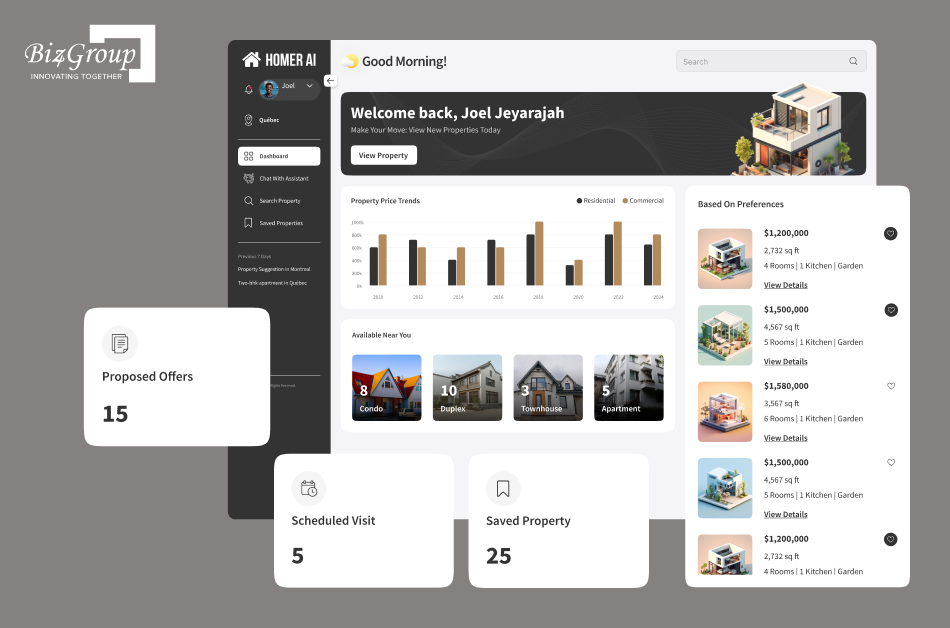
Visit requests can stay small. Homer AI, which Biz4Group built, asks a buyer for just a name, email and mobile number to request a property visit.
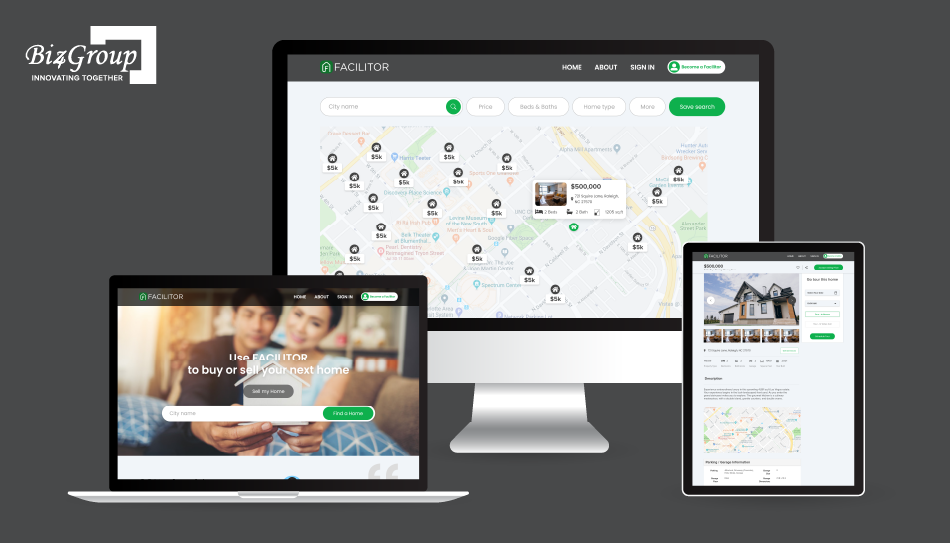
Tours also do not all have to happen in person. The realtor-led visits on Facilitor, a Biz4Group product, run either on site or over a video call, an option worth weighing for buyers who are relocating.
How do alerts and push notifications work on iOS and Android?
Alerts work only after the user grants permission, so the app has to earn that permission at the right moment. Delivery runs through Apple's Push Notification service (APNs) on iOS and Firebase Cloud Messaging (FCM) on Android, and each alert should deep-link to the listing it describes. Both platforms say the same thing about timing.
Apple's documentation says an app must obtain permission before it uses notifications, that the system prompts only the first time and that the request works best in a context that explains why the app needs it. It also describes provisional authorization, which delivers notifications quietly to the notification center so the user can judge them before deciding.
On Android 13 and later, apps need the POST_NOTIFICATIONS runtime permission and cannot send notifications until the user grants it. Android's guidance is to wait and trigger the prompt from a user action, such as tapping an alert bell or following an account.
For a real estate app, that points to one rule: ask right after a buyer saves a search, because that is the moment alerts make sense. A few habits keep the permission once you have it:
- Say what the alerts will contain before the system prompt appears.
- Offer a frequency choice, instant or a daily digest.
- Check the permission status before sending, since users can change it at any time.
- Keep email as a fallback for buyers who say no.
Put Your Real Estate App in Buyers' Pockets
Biz4Group designs and builds the alert flow, tour booking and agent screens for real estate apps
Scope My AppWhat do agents need from a real estate app?
Agents need a short list of screens that let them answer a buyer fast: new tour requests, their calendar, buyer details and reminders. A buyer who waits a day for an answer may well book with someone else, so the agent side deserves the same care as the buyer side. These are the pieces to build:
- A requests inbox, showing new tour requests and inquiries with the listing attached.
- Calendar sync, so confirmed tours land in the agent's own calendar and double-booking is avoided.
- Quick replies, for the answers agents send all day.
- Lead status, so an agent can mark a buyer as new, touring or following up, with the record syncing to their CRM.
- Reminders and alerts, for upcoming tours and unanswered requests.
A work dashboard can go further than most teams expect. Contracks, which Biz4Group designed for agents, brokers and property managers, combines a to-do list, an event calendar, reminders and a notification panel in one view.
If agents pay to receive these leads, the rules around lead fees apply to how the app routes and prices them.
Is native or cross-platform better for real estate mobile app development?
Neither wins outright, and the right pick depends on how much of the app leans on platform-specific features. The table compares the two approaches for a real estate app.
|
Approach |
What it means |
Fits when |
|---|---|---|
|
Native (Swift for iOS, Kotlin for Android) |
Two separate codebases, one per platform |
You need the deepest access to platform features, such as heavy map use, rich media or tight notification control |
|
Cross-platform (React Native or Flutter) |
One shared codebase for most screens |
You are launching a first version and the screens are mostly lists, forms and standard navigation |
Many teams share the back end and the business logic either way, so the split mostly affects the screens. Whichever you pick, test the alert flow and the map on real devices, since those are the parts users notice first.
How do you build a real estate app, step by step?
Build the back end and the buyer loop first, then the agent screens, then launch to one market. A custom real estate application usually follows seven steps:
- Settle build or buy, since choosing between building, buying and white-labeling changes how much of this list you do yourself.
- Choose native or cross-platform, using the table above.
- Set up the back end, with listings, accounts and the search that the app will call.
- Build the buyer loop: saved search, alert, listing, tour request.
- Build the agent screens: inbox, calendar and reminders.
- Add the notification and permission flow, asking at the right moment.
- Submit to the app stores and launch in one market, then watch tour requests per listing before you widen.
Recommendations that rank homes by a buyer's behavior are an add-on, and the AI features worth adding come after the basics work.
What does it cost to build a real estate application?
Published estimates put a full platform with a native app at about $100,000 to $300,000 or more, and US budgets belong near the top of that band. A cross-platform build that shares code sits lower, and the final figure depends on how many screens, roles and integrations you need. The full cost breakdown shows how hours and team rates add up to a figure for your own scope.
Choosing Between Native and Cross-Platform?
Share your feature list and get a recommendation on the build approach.
Talk to Our TeamWhere should a first release start?
Start with one market and the buyer loop: save a search, get an alert, request a tour. Add the agent screens next so replies stay fast, and ask for notification permission when a buyer has a reason to say yes. If you want the app designed and built for you, reach out to Biz4Group: the team takes the alert flow, tour booking and agent side from plan to app store.
Frequently asked questions
1. Do you need both an iOS and an Android app?
Not on day one. A cross-platform framework can cover both from one codebase, and the website keeps serving everyone else. Look at which devices your first market's buyers and agents use before you decide.
2. What happens when a buyer says no to notifications?
On iOS, the system does not prompt again after the first answer, and on Android 13 and later the app cannot send notifications until the user grants permission. That leaves two options: point the buyer to the phone's settings when they want alerts back, and keep email as a fallback so saved searches still reach them.
3. Should the app and the website share one back end?
Yes, in most cases. One back end means a search saved on the website appears in the app, a tour booked on the phone shows up for the agent on a laptop and listing data only has to be fixed in one place.
4. How long does it take to build a real estate app?
It depends on scope and team size. As an illustration only, 1,500 build hours split across five people, each doing about 30 productive hours a week, comes to roughly ten weeks. Ask any team you hire for a schedule tied to your feature list.
5. Can an app text buyers about new listings?
Texting buyers marketing messages generally requires clear prior consent, so build an explicit opt-in into the alert settings and have an attorney review the wording and the flow before launch. Push notifications and email avoid some of that complexity.
6. What should you test before launch?
Test alerts on real phones in each permission state, tour booking for double-bookings and time zones, calendar sync in both directions and listing photos on a slow connection. Those four areas are where buyers and agents notice problems first.
