 Location :
Orlando, FL, USA
Location :
Orlando, FL, USA +1 (407) 714-1616
 info@biz4group.com

- AI court scheduling platform development gives law firms a smarter way to manage hearings, deadlines, and court coordination.
- AI court scheduling platform development services help reduce manual workload and improve scheduling accuracy for busy attorneys.
- Firms that create AI court scheduling solutions for law firms gain better team alignment and fewer conflicts across cases.
- Platforms built with legal scheduling software development with AI for attorneys and law firms support faster decision making and smoother workflows.
- Advanced systems support AI court scheduling software with case management integration for a more connected legal environment.
- Biz4Group LLC delivers high performing custom scheduling platforms backed by deep legal tech expertise and reliable development practices.
Picture this:
Two law firms handle the same volume of cases. One leans on automation. The
other handles scheduling by hand. Six months later, the automated firm moves faster, closes more
matters, and delivers smoother client experiences. The difference often comes down to how they
manage their calendars.
According to the Clio Legal Trends
Report, attorneys
spend only 33% of their day on billable work. This reality pushes many legal teams to explore AI
court scheduling platform development.
For firms that want freedom from the constant shuffle of hearings, deadlines, and filings, the move to develop AI court scheduling software for attorneys and law firms feels less like a luxury and more like a strategic shift. It gives attorneys a clearer path through their day and creates a sense of control that manual coordination rarely delivers.
Businesses now choose to create AI court scheduling solutions for law firms because they want systems that understand the real rhythm of legal work. They want tools that feel supportive, not intrusive. They want technology that pulls its weight and makes each day more predictable for partners and staff.
Others are ready to build AI powered court scheduling platforms because they see automation as a competitive edge. Early adopters tend to streamline operations sooner and attract clients who value speed and reliability. The momentum behind these platforms continues to grow as firms look for ways to modernize without overwhelming their teams.
Core Concepts Behind AI Court Scheduling Platform Development for Attorneys and Law Firms
Legal teams deal with a constant cycle of dates, deadlines, filings, and hearings. Even seasoned attorneys feel the strain when they have to track everything manually. Understanding how an AI court scheduling platform fits into this world helps clear the picture of what it can do and why so many firms are moving toward smarter systems.
What the Platform Does
This type of system acts as a reliable digital assistant that stays on duty at all times. It keeps calendars accurate, tracks important case milestones, and updates schedules based on court activity.
Here is a quick snapshot of how these platforms usually operate.
|
Component |
Role in Scheduling |
|---|---|
|
AI and NLP Engine |
Reads and interprets court notices, filings, and emails to uncover dates and deadlines |
|
Rule Logic |
Applies jurisdiction specific rules and filing requirements |
|
Calendar Sync |
Updates attorney and team calendars with verified court events |
|
Case Links |
Connects schedule items to matters for quick reference |
|
Notifications |
Sends alerts to avoid missed hearings or filing dates |
|
Integration Layer |
Connects with practice management tools and cloud calendars |
How It Works
When a new court notice arrives, the system reads it, extracts all the important dates, checks the
rules for the relevant jurisdiction, and updates the calendar.
If anything conflicts with
another event, the platform flags it.
If a filing deadline is coming up, the system alerts
the right people.
Attorneys feel more confident when they know their calendars are accurate. Support staff work more efficiently when they are not chasing updates all day. Leadership gains clearer visibility into how the firm moves through its caseload. This is why understanding AI court scheduling platform development for attorneys and law firms has become such a priority across the legal industry.
Also read: AI legal research platform development guide
Why Should Law Firms Invest in AI Court Scheduling Platform Development Services Today?
Many firms feel the weight of increased caseloads and client expectations. Attorneys often report that administrative load slows down their ability to deliver timely responses. In fact, 83% of legal professionals said that administrative work hinders their ability to focus on strategic priorities. This pace has pushed decision makers to look at AI court scheduling platform development services as a strategic investment.
Firms that adopt early often benefit from smoother daily operations. Their teams move faster, they reduce errors, and they experience more predictable workflows.
Pain Points That AI Scheduling Helps Address
Modern law firms face a series of recurring coordination challenges. These include scheduling accuracy, staffing alignment, and last-minute updates from courts. AI powered scheduling platforms help resolve these issues in a practical and efficient way.
Common pain points include:
- Frequent calendar conflicts for attorneys
- Errors caused by manual date entry
- Time consuming review of court notices
- Difficulty managing multi jurisdiction matters
- Limited visibility across teams and departments
Each of these pain points chips away at productivity. Many firms eventually realize that they need a resilient system that reduces the mental load on attorneys while improving operational clarity.
Business Benefits That Make the Investment Worthwhile
Once firms adopt AI scheduling systems, they usually notice improvements across multiple parts of their operations. Here is a simple view of the core benefits.
|
Benefit |
Description |
|---|---|
|
Lower Administrative Load |
Attorneys and staff regain hours once spent on calendar management |
|
Fewer Missed Deadlines |
Rule logic and automated checks enhance accuracy |
|
Better Coordination |
Teams collaborate more smoothly when calendars stay aligned |
|
Enhanced Client Trust |
Clear communication and timely updates improve satisfaction |
|
Operational Scalability |
Firms handle more cases without overwhelming their staff |
These benefits highlight the appeal of partnering with experts who provide AI court scheduling platform development services. The goal is to help firms operate with confidence and consistency.
Ready to Reduce the 40% Admin Overload?
Attorneys spend a huge slice of their day on manual tasks. Imagine reclaiming most of that time with smarter automation.
Build Smart with Biz4GroupMust Have Features When You Create AI Court Scheduling Solutions for Law Firms
Here are the core features that form the backbone of an effective scheduling platform. They improve accuracy, speed, and coordination across teams. Each feature plays a separate role, and together they form a system that makes legal scheduling more controlled and reliable.
|
Feature |
What It Is |
What It Does |
|---|---|---|
|
Automated Calendar Sync |
A connection to attorney and team calendars that updates in real time |
Keeps schedules accurate without manual entry and mirrors all court related changes across the firm |
|
Court Rule Engine |
A logic-based system that follows jurisdiction specific rules and calculations |
Ensures deadlines, filing windows, and hearing times align with local requirements |
|
Conflict Detection |
A smart checker that scans all calendars before scheduling anything |
Spots overlapping hearings, unavailable attorneys, and resource conflicts before they occur |
|
Smart Reminders |
Automated alerts tied to hearings, filings, and upcoming tasks |
Reduces the risk of missed deadlines and supports timely communication |
|
Case Based Linking |
A structured way to tie events directly to specific matters |
Helps attorneys understand context quickly and retrieve related information with less effort |
|
Document Driven Scheduling |
Automated extraction of dates from notices, filings, and emails |
Removes the need for manual data entry and speeds up the intake process |
|
Multi Role Access |
A permission system that tailors views based on user roles |
Keeps sensitive information protected while giving everyone the right amount of visibility |
|
Audit Trails |
A log of all scheduling changes made across the platform |
Supports compliance requirements and helps firms track how decisions were made |
|
Integration Layer |
Connectors for case management tools, cloud calendars, and document systems |
Allows the platform to work seamlessly within a firm’s existing environment |
These essentials form the foundation of a reliable system. They create consistency across the firm and support attorneys who depend on accurate schedules every day.
Also read: AI legal case management software development guide
Advanced Features That Strengthen AI Powered Court Scheduling Platforms
These are the capabilities that elevate a scheduling platform from helpful to remarkable. These features give attorneys deeper insight, better accuracy, and more strategic control.
1. Predictive Scheduling and Workload Forecasting
This feature gives attorneys a forward view into how their schedules may shift based on historic patterns and case movement. It helps teams understand potential bottlenecks and prepare ahead of time. Firms gain value when they can spot heavy periods early and realign resources before pressure builds.
2. Automated Document Interpretation for Faster Scheduling
Many platforms speed up intake by reading documents and pulling dates directly from notices, motions, and filings. This lowers the chance of human error and cuts down on time spent reviewing documents manually. It is especially helpful for firms with high case volume or rapid response requirements.
Project Spotlight: Automated Legal Services with a Web App

This web app supports automated online legal services. It displays our AI app development skill in transforming complex legal content into structured, actionable data. Key achievements include:
- Automated mapping of timelines and case evidence
- Simplified document handling for attorneys
- Intuitive workflows that reduce administrative pressure
This project supports accuracy and clarity, two traits that are essential for advanced scheduling automation.
3. Intelligent Case Routing and Attorney Assignment
This feature assigns tasks, hearings, or deadlines to the right attorney based on availability, experience, or workload. It allows a firm to avoid uneven distribution of work. Over time, these assignments build a more balanced and productive environment.
Project Spotlight: Web Application for Attorneys and Law Associates

This web app for attorneys highlights our ability to design platforms that connect legal professionals with the right opportunities. Key strengths of the project:
- Smart matching and filtering to pair clients with suitable attorneys
- Smooth communication pathways
- Scheduling tools that improve appointment coordination
The same logic used here supports systems that route legal work efficiently within a firm.
4. Real-Time Court Calendar and Hearing Integrations
Some courts provide digital feeds that include hearing dates and status updates. A platform with this feature can pull information automatically. Attorneys stay informed without constant manual checks. This leads to better awareness of changes and fewer last-minute surprises.
Portfolio Spotlight: Judiciary Platform for Attorneys and Law Firms
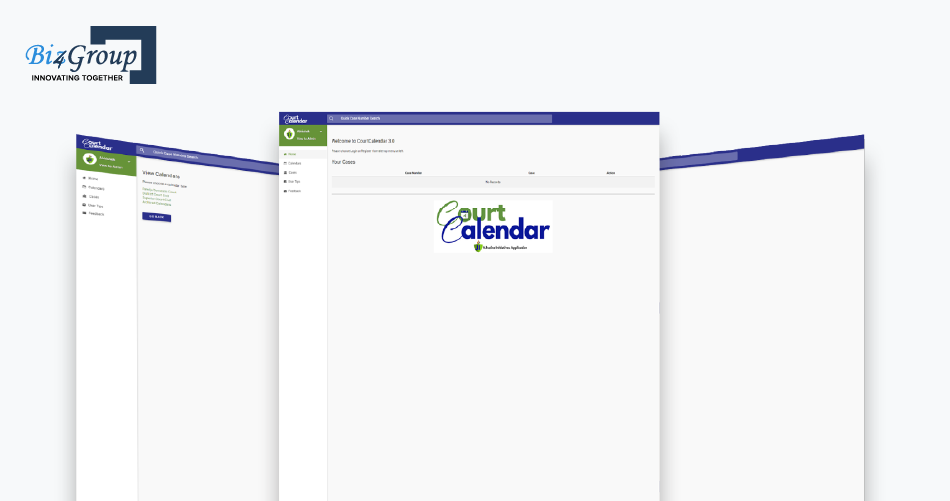
This judiciary platform for attorneys showcases our experience in developing a judiciary platform tailored for attorneys. Notable capabilities include:
- Integrated case dashboards
- Ongoing status updates on hearings
- In app communication and document sharing
The platform allows attorneys to manage schedules with precision while coordinating active and pending cases.
5. Secure Document Workflow and Tamper Resistant Records
Security becomes even more important as firms handle sensitive materials. Features like encrypted document sharing, version tracking, and tamper resistant logs give firms confidence that their information stays protected. This builds trust with both clients and partner organizations.
Portfolio Spotlight: Blockchain System for Document Management

This advanced blockchain solution underscores our commitment to secure and reliable document ecosystems. Highlights include:
- Automated generation of legal documentation
- Blockchain backed data integrity
- Customized user interfaces that support enterprise level workflows
These strengths translate seamlessly into secure scheduling environments that require strong verification.
6. Insight Driven Reporting and Decision Support
Reporting tools provide patterns and trends that help leaders understand productivity and case movement. This can include scheduling volume, attorney utilization, or missed deadline analysis. Actionable insights allow firms to refine their processes and sharpen operational strategy.
Portfolio Spotlight: Quotation Platform Development

This quotation platform illustrates our experience in building comparison and reporting engines that guide informed decisions. Key accomplishments:
- Smart algorithms that evaluate legal options
- Clean and informative reporting panels
- Robust database architecture
These concepts enrich scheduling platforms by offering clarity and improving long term planning.
These advanced capabilities give firms a platform that grows with them. They support higher accuracy, better communication, and more dependable processes. When combined with the right strategy and development partner, they help law firms operate at a higher level.
Want a Platform That Works as Hard as Your Attorneys?
If your scheduling tool cannot predict, route, or adapt, it is slowing you down.
Book a Strategy Call TodayRecommended Tech Stack for Custom AI Court Scheduling Platform Development
A strong scheduling platform depends on a reliable technical foundation. It supports smooth integrations, accurate automation, and the ability to scale as the firm grows. We have outlined the technologies often selected for these systems.
|
Layer |
Purpose |
Common Tools and Frameworks |
|---|---|---|
|
AI and NLP |
Interprets notices, filings, and emails with high accuracy |
SpaCy, Hugging Face Transformers, TensorFlow, PyTorch |
|
Backend APIs |
Handles scheduling logic, rules, and secure data flow |
Node.js, Python FastAPI, Java Spring Boot |
|
Frontend Interface |
Creates intuitive dashboards for attorneys and staff |
React, Vue, Angular |
|
Database and Storage |
Manages case data, schedules, and audit logs |
PostgreSQL, MongoDB, Redis, Amazon RDS |
|
Integrations |
Connects the platform with calendars, case management tools, and document systems |
REST APIs, GraphQL, webhook based connectors |
|
Cloud Hosting |
Ensures performance, uptime, and flexible resource scaling |
AWS, Google Cloud, Azure |
|
Authentication |
Controls access and protects sensitive legal records |
OAuth 2.0, JWT, AWS Cognito |
|
Logging and Monitoring |
Tracks usage patterns and system behavior for quality assurance |
ELK Stack, Grafana, Datadog |
|
DevOps and CI Pipelines |
Supports smooth deployments and reliable updates |
Docker, Kubernetes, GitHub Actions |
|
Security Tools |
Protects data through encryption, permissions, and threat detection |
Vault, IAM services, TLS encryption libraries |
These technologies work together to create stable, responsive, and secure scheduling environments. With the right selections in place, firms gain a platform that supports consistent performance and long term adaptability.
Step by Step Process to Build AI Powered Court Scheduling Platforms
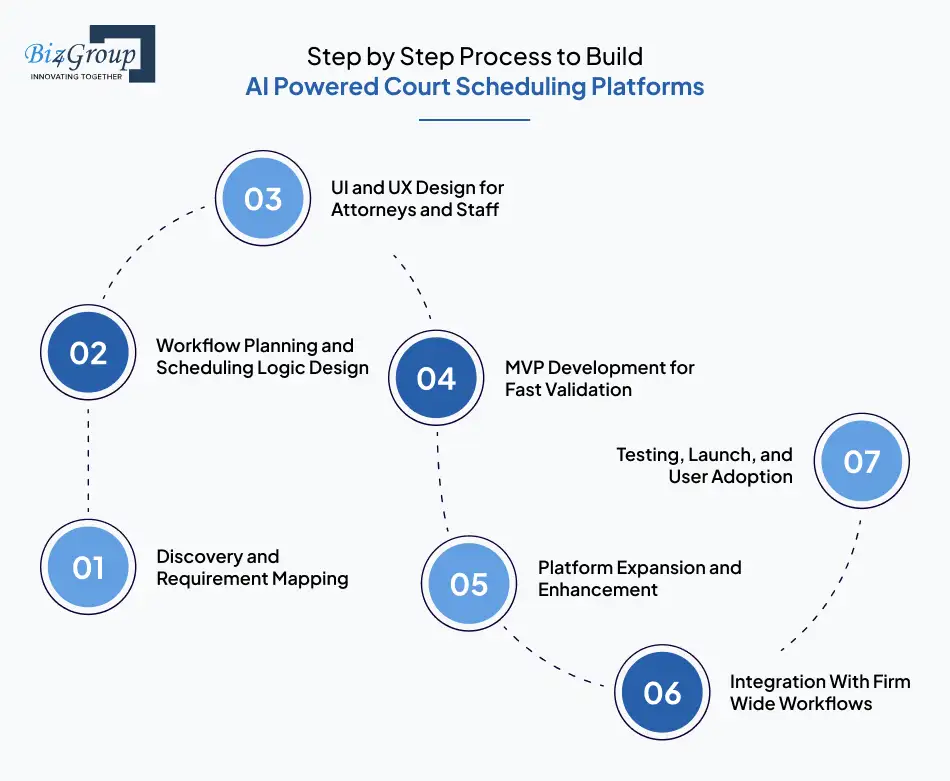
A successful scheduling platform begins with a clear plan. Each step in the development journey shapes how the final AI product performs for attorneys and staff. The following process help leaders understand what to expect as they move through the transformation.
Step 1. Discovery and Requirement Mapping
This step helps everyone align on the platform’s goals. We review operations, interview key team members, and understand the challenges attorneys face during scheduling. These insights help define what the system must accomplish. Key outcomes include:
- Clarity on workflow gaps
- Identification of must have features
- A roadmap that reflects the firm’s priorities
Step 2. Workflow Planning and Scheduling Logic Design
Once needs are clear, we shape the logic that drives automation. This involves outlining how the platform interprets dates, applies rules, and updates calendars. It ensures that the scheduling engine performs consistently. This step establishes:
- Event handling flows
- Rule decision paths
- Timelines for automated updates
Step 3. UI and UX Design for Attorneys and Staff
User experience plays a central role in daily adoption. The goal is to help attorneys navigate the platform without confusion. A trusted UI/UX development company designs screens that are intuitive and supportive for each role in the firm. Design tasks include:
- Creating clean dashboards
- Simplifying navigation for case linked events
- Aligning visuals with firm branding
Also read: Top 15 UI/UX design companies in USA
Step 4. MVP Development for Fast Validation
Before building the full platform, it is important to create a minimum viable product. This version focuses on the most essential scheduling capabilities. It allows the firm to test the system with real scenarios. The MVP gives:
- Early feedback from attorneys
- Insight into required enhancements
- Confirmation that the core scheduling logic works as intended
Also read: Top 12+ MVP development companies in USA
Step 5. Platform Expansion and Enhancement
After the MVP proves its value, the development shifts toward additional features. This includes advanced or AI automation services, reporting tools, or expanded workflow support. Each enhancement refines the user experience. Enhancement priorities often include:
- Additional scheduling rules
- More automation triggers
- Convenience features for daily operations
Step 6. Integration With Firm Wide Workflows
For the platform to be useful across the entire firm, it must connect smoothly with daily routines. This stage focuses on aligning the scheduling engine with existing software and communication channels. AI integration services cover:
- Calendar syncing
- Case data alignment
- Email based triggers
Step 7. Testing, Launch, and User Adoption
The final stage verifies that everything runs smoothly. Attorneys test different scenarios, staff confirm workflows, and any refinements are made before release. Launch goals include:
- High accuracy across scheduling events
- Smooth onboarding for users
- Reliable daily performance
Those steps help law firms understand the practical journey of adopting an automated scheduling system. When teams follow a structured process, the transition becomes smoother and more predictable.
Also read: How to develop an AI lawyer app?
Curious How Fast You Can Launch an MVP?
With reusable components, Biz4Group can get your MVP running in 2-3 weeks.
Contact UsSecurity and Regulatory Compliance Considerations When You Create AI Court Scheduling Software for Legal Operations
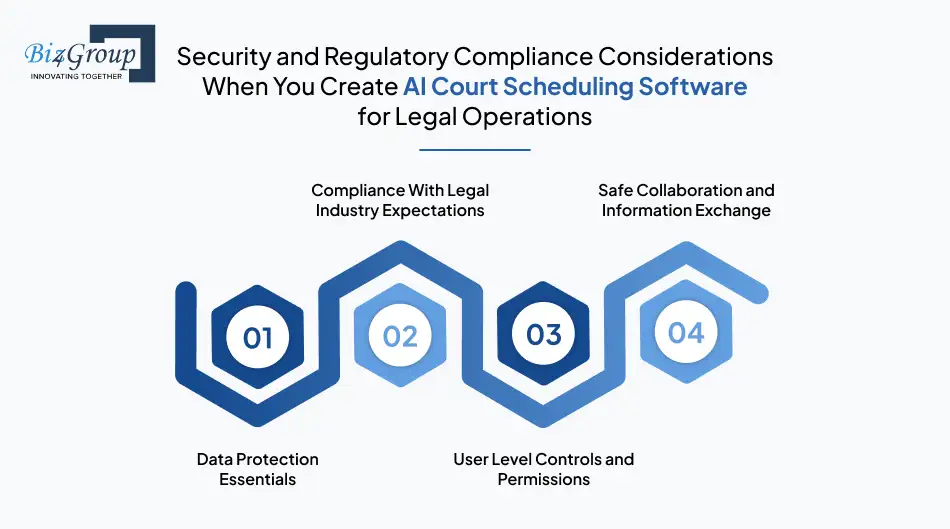
Security plays a central role in legal technology. Law firms handle confidential information every day, and clients expect their records to stay protected. This section outlines the safeguards and standards that guide responsible scheduling system development.
Data Protection Essentials
- Encryption of data during storage and transmission
- Strict access permissions for different roles
- Monitoring tools that track unusual activity
- Protection methods that prevent unauthorized data exposure
Compliance With Legal Industry Expectations
- Adhering to local rules governing client confidentiality
- Implementing policies that follow ethical and professional guidelines
- Maintaining auditability to support internal and external reviews
- Keeping documentation that shows how sensitive data flows through the platform
User Level Controls and Permissions
- Role based access that shapes what each user can view
- Approval flows for sensitive updates
- Logs that show how and when changes were made
- Clear separation of responsibilities to reduce risk
Safe Collaboration and Information Exchange
- Controlled document sharing within authorized groups
- Secure channels for internal communication
- Reliability across collaborative workflows
- Protection of client notes and case strategy documents
A scheduling platform that respects these compliance factors positions the firm for long term success. It protects attorneys and clients while supporting efficient daily operations.
Also read: How to develop AI legal compliance software?
Understanding the Cost to Develop AI Driven Court Scheduling Platforms for Law Firms
The investment for a custom scheduling platform often lands between $30,000-$200,000+. The exact figure depends on the complexity of features, number of integrations, and the long-term strategy of the firm. The goal of this section is to help decision makers shape expectations before moving ahead.
Below is a quick summary that compares scope against typical cost ranges. This helps firms position where their needs fall before exploring deeper details.
|
Build Level |
What It Includes |
Average Cost Range |
|---|---|---|
|
MVP |
Core scheduling logic, calendar sync, basic rule engine |
$30,000-$60,000 |
|
Advanced Level |
Smart document extraction, conflict resolution, team workflows |
$60,000-$120,000 |
|
Enterprise Level |
Multi office support, custom reporting, advanced AI, deep integrations |
$120,000-$200,000+ |
Main Cost Drivers
Every platform involves essential components that shape the overall budget. These drivers reflect the work required behind the scenes. They help firms understand where their investment goes and why certain features increase complexity.
|
Cost Driver |
Description |
Typical Cost Impact |
|---|---|---|
|
Scope of Features |
More automation, deeper rule logic, expanded scheduling flows |
$10,000-$70,000 based on complexity |
|
Document Extraction |
NLP that interprets notices, emails, and filings |
$8,000-$35,000 depending on accuracy targets |
|
UI and UX Design |
Attorney friendly dashboards with intuitive navigation |
$5,000-$25,000 based on role variations |
|
Integrations |
Syncing with calendars, CMS tools, and communication channels |
$5,000-$40,000 depending on systems involved |
|
Reporting and Analytics |
Insights on productivity, scheduling trends, and conflicts |
$10,000-$30,000 based on depth of insights |
|
Multi Office Support |
Handling teams, regions, or jurisdictions |
$10,000-$40,000 depending on scale |
|
Testing and QA |
Real case testing, load checks, and refinement cycles |
$5,000-$20,000 based on platform size |
|
Launch and Support |
Rollout planning, onboarding, and maintenance |
$3,000-$15,000 depending on training needs |
These drivers influence both initial build and long-term investment. Firms that prioritize clarity early tend to manage their budgets with more confidence.
Hidden Costs Firms Often Overlook
Many law firms plan their platforms based on primary needs and forget the smaller expenses that add up over time. A clear understanding of these hidden costs helps avoid surprises and keeps the project on track. Each point below includes its own cost implication to support planning.
- Ongoing Rule Updates
Courts update schedules, filing rules, and procedures often enough that automation must adapt. This
ongoing refinement improves accuracy and keeps the platform dependable.
Expected cost
impact: $2,000-$10,000 per year depending on how many jurisdictions the firm covers
- Training and Team Onboarding
Attorneys and staff learn faster with structured guidance. Proper onboarding increases adoption and
reduces support calls.
Expected cost impact: $1,500-$7,500 depending on firm size
- Data Cleanup Before Migration
Many firms use spreadsheets or outdated systems before switching to automation. Organizing this
data improves scheduling accuracy in the new platform.
Expected cost impact: $1,000-$8,000
depending on data quality
- Additional Integrations Over Time
Firms often add new tools as they grow. Each addition may require new sync points.
Expected
cost impact: $2,000-$20,000 per integration depending on its complexity
- Expanded AI Training
AI models improve with additional training. Firms that handle unique case types may require more
customization.
Expected cost impact: $5,000-$25,000 depending on specialization
These hidden factors shape the real world cost of owning and scaling an automated scheduling system. Firms that plan both the build and ongoing investment tend to experience smoother operations and fewer conflicts during high pressure periods.
Also read: How much does it cost to develop an AI lawyer app?
What If a $30K Build Saves Hundreds of Hours a Year?
Smart automation pays for itself by cutting wasted time and missed opportunities.
Get a Custom QuoteChallenges, Risks, and Mistakes in AI Court Scheduling Platform Development
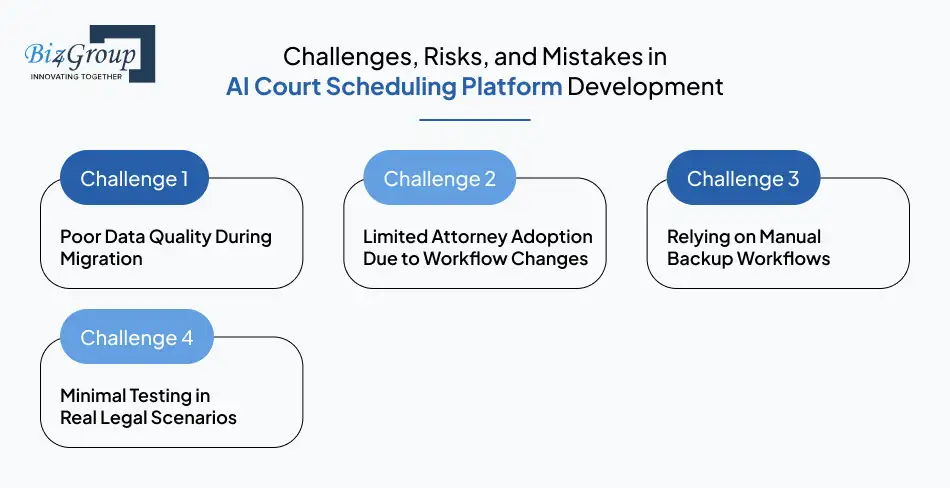
Every transformation comes with a learning curve. Moving from a manual system to an automated one introduces new considerations, and firms that understand these early, experience a smoother adoption.
Challenge 1. Poor Data Quality During Migration
A scheduling platform performs well when its foundation is clean and structured. Many firms start with spreadsheets or mixed sources, which can create conflicts after migration.
Solutions
- Perform a structured audit of existing calendars and matter records
- Remove duplicate events and outdated hearing entries before importing
- Validate case associations to prevent mismatches during automation
Challenge 2. Limited Attorney Adoption Due to Workflow Changes
Some attorneys avoid new tools if they feel complicated or unfamiliar. Adoption succeeds when the platform feels natural to use.
Solutions
- Provide role based onboarding sessions
- Offer quick reference guides for daily tasks
- Encourage early user feedback to refine the experience
Challenge 3. Relying on Manual Backup Workflows
If teams continue old habits, such as maintaining separate personal calendars, conflicts may persist.
Solutions
- Establish a single official calendar source for the entire firm
- Set policies that outline how scheduling requests should be handled
- Provide reminders during onboarding to shift usage patterns
Challenge 4. Minimal Testing in Real Legal Scenarios
A legal calendar carries high stakes. Insufficient testing can lead to missed deadlines or duplicate hearings.
Solutions
- Run mock scenarios using real case types
- Test for stress, concurrent updates, and cross team visibility
- Document findings to guide future improvements
Challenges tend to fade when firms take a structured approach and involve attorneys early. Understanding these risks helps law firms move from manual scheduling to AI-enabled systems with more confidence and fewer surprises.
Also read: Top 12+ AI legal software development companies in USA
Ready to Skip the Usual Adoption Headaches?
Most firms hit the same roadblocks. You can bypass nearly all of them with the right development partner.
Talk to Our ExpertsFuture Trends in AI Court Scheduling Software with Case Management Integration
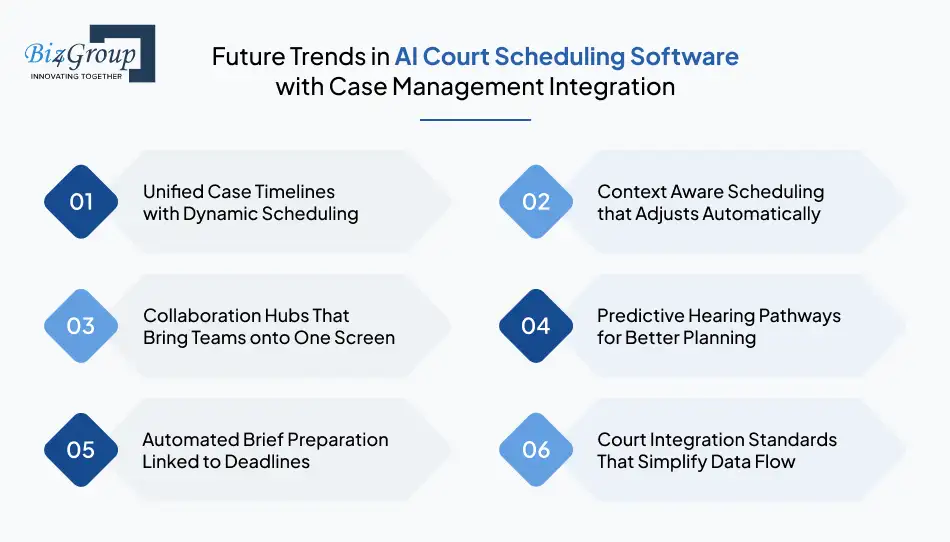
Scheduling platforms are beginning to play a larger role in how firms track cases, manage workloads, and maintain transparency. The trends below give a preview of where innovation is heading and how future ready firms may operate.
1. Unified Case Timelines with Dynamic Scheduling
Future platforms will generate a single timeline that combines filings, hearings, communications, and tasks. This timeline will evolve automatically as matters progress. Attorneys will spend less time piecing together information and more time preparing for the next step.
2. Context Aware Scheduling that Adjusts Automatically
Systems will begin to understand case stages and attorney workloads. When a deadline shifts or a hearing extends longer than expected, the calendar will adjust itself. This adaptive behavior will help reduce the pressure of rapid courtroom changes.
3. Collaboration Hubs That Bring Teams onto One Screen
Scheduling tools will grow into centralized collaboration spaces. Attorneys, paralegals, and admins will work from the same interface without switching platforms. Features such as shared notes, event level messaging, and joint task lists will support this evolution.
4. Predictive Hearing Pathways for Better Planning
Platforms will begin to forecast possible hearing sequences based on historical data. Attorneys will see potential paths ahead of time, which supports stronger strategic planning and reduces last minute scrambles.
5. Automated Brief Preparation Linked to Deadlines
Future systems may generate structured outlines or checklists tied to upcoming events. When a filing deadline appears on the calendar, the platform will prepare a task framework. This will help attorneys move from scheduling awareness into active preparation more smoothly.
6. Court Integration Standards That Simplify Data Flow
As courts improve their digital infrastructure, scheduling systems will connect with them more consistently. This will reduce delays caused by manual entry and improve the accuracy of hearing details across the industry.
These trends suggest a future where scheduling becomes more connected, intuitive, and intelligent. Law firms that prepare early will experience smoother operations and a more efficient practice environment.
Also read: How to build an AI legal consultation platform?
Why Biz4Group LLC Is the Best Company to Develop AI Court Scheduling Platforms in the USA?
A successful scheduling platform is a partnership with a team that understands legal workflows, technical complexity, and the expectations of modern firms. Biz4Group LLC brings that combination to the table in a way few companies can match.
We are a USA-based software development company known for building intelligent, reliable, and carefully crafted solutions for attorneys, legal teams, and businesses that want to innovate with confidence. Our experience in legal software development spans enterprise AI solutions, secure document ecosystems, and feature rich legal applications.
Clients work with us because they want a partner that understands the rhythm of legal operations. They want someone who can translate complex requirements into clear workflows. They want a team that can guide their vision from idea to launch with the kind of discipline that protects performance and long term value. Our work across the legal field demonstrates that level of mastery and our portfolio continues to grow with platforms that serve real attorneys in real court environments.
Why Businesses Choose Us
Firms choose Biz4Group LLC because they want solutions that hold up under pressure. Our team delivers platforms that manage heavy caseloads, support multi office collaboration, and remain responsive even during peak scheduling cycles.
There are several reasons our clients consider us an exceptional partner.
- We understand the nuances of legal scheduling through years of hands on project experience across the United States
- Our team delivers platforms that align with a firm’s workflow instead of forcing new habits
- We transform complex case processes into simple and effective digital experiences
- We build systems that support long term scalability rather than short term fixes
- Our delivery approach emphasizes clarity, communication, and measurable results
These qualities help law firms move forward with technology that strengthens their daily work. Clients see improvements in productivity, accuracy, collaboration, and strategic planning once their new platform goes live. As a seasoned AI development company, our ability to translate attorney expectations into well engineered solutions has become one of our strongest advantages.
Biz4Group LLC has built a reputation across the USA for partnering with visionary legal teams who
want to operate with greater efficiency and precision. If you want a competitive edge, you must
look for a team that can deliver dependable results.
We are that team. Let’s talk.
Final Thoughts
Scheduling has always been one of the quiet burdens inside a law firm. It affects deadlines, preparation, client experience, and the pace at which matters move. This blog explored how AI court scheduling platform development helps firms replace chaotic coordination with clarity and accuracy. From core automation to advanced capabilities, these platforms give attorneys more control over their workload and reduce the risk of conflicts that slow down a case.
We reviewed what goes into building such a system, how much it costs, the trends shaping its future, and the clear ROI firms can expect once automation becomes part of their daily operations. With smarter scheduling tools in place, teams spend more time delivering legal impact and less time fighting with calendars.
Biz4Group LLC supports law firms that want to make this shift with purpose and precision. Our experience, portfolio, and commitment to building dependable legal technology make us a trusted partner for firms across the United States. We help attorneys adopt platforms that match their workflows, reflect their operational realities, and strengthen their competitive stance in a rapidly changing market.
If your team is ready to move past manual scheduling, now is an excellent time to take the next step. Reach out to Biz4Group LLC and build a platform that gives your firm the speed, control, and clarity it deserves.
FAQs
How long does it typically take to launch a custom AI court scheduling platform for a law firm?
Most projects take 12-20 weeks depending on workflow complexity, team size, and the number of calendars or case systems involved. Biz4Group, however, can deliver an MVP in 2-3 weeks because our team uses reusable components that streamline development and reduce both cost and delivery time.
Can an AI scheduling system handle last minute courtroom changes without manual updates?
Yes. Modern platforms can detect new notices, hearing modifications, and updated court communications as they arrive. The system then refreshes the schedule and notifies the right users, which reduces the strain of rapid changes in active matters.
Will attorneys and staff need technical training to use an AI scheduling platform?
Users do not need a technical background. Most systems follow familiar layouts, similar to common calendar tools. A short orientation helps attorneys understand where events appear, how updates flow into the system, and how to manage their personal filters.
Can these platforms work for firms that manage both litigation and transactional matters?
Yes. Litigation events rely heavily on courthouse activity, while transactional work revolves around internal deadlines. A well designed system can support both by applying separate rules, workflows, and event categories for each practice area.
What happens if court systems in my region do not offer direct digital integrations?
The platform can still function effectively. It can read notices, extract key details, and apply relevant rules even without an API. When courts expand their digital capabilities later, the system can integrate those upgrades without disrupting attorney workflows.
Can I customize alerts so attorneys only receive notifications that matter to their caseload?
Yes. Notification filters allow attorneys to receive updates tied to their matters, practice groups, or priority hearings. This prevents information overload and keeps each user focused on what they need to prepare for.
