 Location :
Orlando, FL, USA
Location :
Orlando, FL, USA +1 (407) 714-1616
 info@biz4group.com

 AI Summary Powered by Biz4AI
- AI for real estate agents can handle repetitive tasks, speed up lead response, manage follow-ups, update CRMs, and make everyday client communication easier.
- Pricing decisions, negotiations, legal communication, fair-housing-sensitive decisions, and emotionally sensitive client interactions should keep a human in control.
- Agents can use AI task automation for real estate agents for routine work such as lead qualification, appointment reminders, call summaries, and CRM updates.
- A safe AI setup uses clear inputs, verifiable outputs, human checkpoints, and an escalation path when AI is unsure.
- AI for real estate agent workflows can also support listing creation, marketing, and market analysis when the underlying data is current and trustworthy.
- AI implementation can range from $30,000 to $300,000+, depending on the workflows, integrations, data, and level of customization involved.
- Start with one useful workflow, measure the results, and expand only when the numbers show that AI is actually helping.
A buyer can tell an agent they want a three-bedroom home under $700,000 in Austin, mention a preferred neighborhood during a call, and ask for a Saturday tour by text. For how to use AI as a real estate agent, the interesting part is what happens to all that information next.
At Biz4Group LLC, a U.S.-based AI product development company, this is one of the practical details we have run into while building AI products for real estate. AI needs access to the right context at the right moment. In Homer AI, for example, buyer preferences such as budget and location could be captured through conversation and carried into property discovery and visit scheduling. That kind of handoff is where an AI feature starts becoming part of a real workflow.
For an agent, there are plenty of places where this approach can save time. AI can sort incoming leads, spot buying intent, trigger follow-ups, draft client messages, turn conversations into tasks, create listing content, organize market information, and keep CRM records up to date.
The real question is where to let AI take the work, where an agent should review it, and which decisions should stay with the human. This guide walks through those workflows, along with the data, integrations, costs, safeguards, and implementation choices behind them.
Which Daily Tasks Can AI Automate for Real Estate Agents?
AI can automate repetitive real estate tasks that follow clear steps and use accessible data. For AI for real estate agents, practical starting points include administrative work, routine research, meeting documentation, reminders, and task creation.
Automating Repetitive Administrative Work
AI can handle routine CRM updates, lead categorization, document organization, data entry, and recurring reports. These are strong candidates for AI task automation for real estate agents because the process is predictable and the output is easy to verify.
If an agent is spending part of every morning cleaning up yesterday's leads or updating contact records, that is a good place to start. AI can extract relevant details and prepare or complete those updates through a connected CRM workflow.
Automating Routine Research and Information Processing
AI can organize property information, summarize market or neighborhood data, extract details from documents, and prepare research notes. The source data still matters, so current property and market information should come from trusted sources and be checked before client use.
What about the research that usually takes several browser tabs and a pile of notes? AI can bring that information together and turn it into a usable summary. The agent should still verify figures, property details, and other facts that could influence a client decision.
Automating Meeting Notes, Reminders, and Task Creation
AI can turn calls and meetings into structured notes, identify follow-up items, and create reminders or tasks. This keeps important actions from depending on someone remembering to write them down later.
A client says, "Send me the listings on Friday and check whether that condo allows pets." That should not have to live inside a transcript. A connected AI workflow can turn those requests into specific tasks and reminders.
Identifying Tasks That Are Suitable for AI Automation
The best starting tasks are frequent, repeatable, data-supported, and easy to verify. Tasks involving negotiation, legal interpretation, sensitive decisions, or professional judgment need stronger human oversight.
A simple test works well: if the task happens often, follows roughly the same process, and someone can quickly tell whether the output is correct, it is worth evaluating for automation.
Start with one workflow where the time savings are easy to measure. If it performs reliably, expand AI into the next suitable workflow.
How Can AI Help Real Estate Agents Qualify and Prioritize Leads?
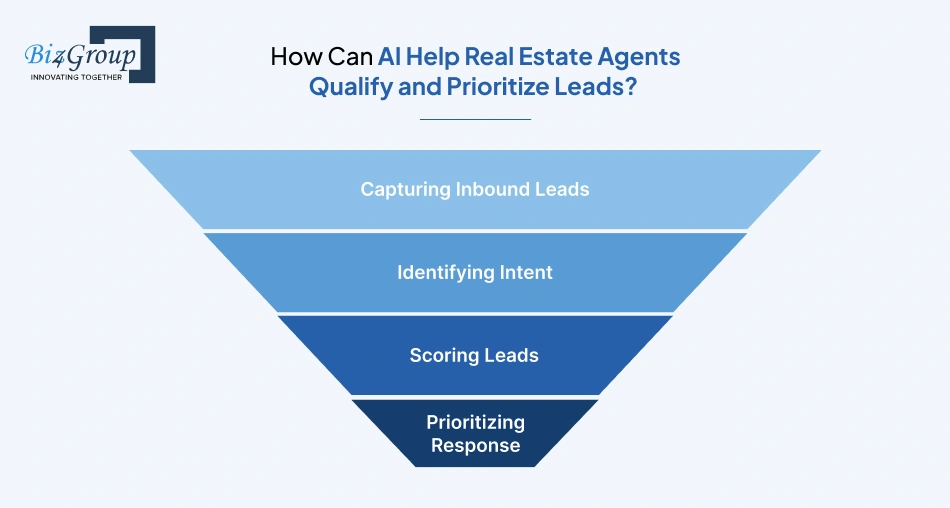
AI can help agents sort through new leads, figure out what each person is looking for, and bring the most promising or time-sensitive ones to the top. It can pull details from inquiries, spot buying or selling intent, score leads using your chosen signals, and help agents decide who to contact first.
This is something many real estate teams start asking once inquiry volume increases. More leads are useful only if agents can respond quickly and know which ones need immediate attention.
"We receive a lot of property inquiries but our agents cannot respond to every lead quickly, so how can AI help us qualify and follow up with prospects?"
AI can capture lead details, identify intent, score prospects using available data, and trigger follow-up actions. Agents can then spend more time on high-value or uncertain leads that need human attention.
|
Lead Activity |
How AI Helps |
Data Used |
Agent's Role |
|---|---|---|---|
|
Capturing inbound leads |
Pulls out contact details, requirements, and inquiry context |
Forms, emails, chats, calls |
Check missing or incorrect details |
|
Identifying intent |
Spots buying or selling intent, urgency, preferences, and timeline |
Conversations, CRM history, inquiries |
Clear up anything uncertain |
|
Scoring leads |
Scores leads using agreed criteria |
Budget, engagement, source, activity, preferences |
Set the criteria and review exceptions |
|
Prioritizing response |
Moves high-intent or time-sensitive leads to the top |
Lead score, recent activity, urgency |
Decide who to contact and what to do next |
A simple example: someone asks about three properties, shares their budget, and wants to schedule a showing this weekend. Those signals can tell the system that this lead deserves quicker attention than someone who only downloaded a market guide.
For AI lead management for real estate, the scoring rules should come from the team's actual sales process. AI can handle the sorting and flagging; the agent decides what happens next.
Built in Practice: Conversational Property Qualification
In one real estate platform developed by Biz4Group, conversational AI was used to gather buyer preferences such as location and budget before presenting relevant property options. The workflow also connected property discovery with features such as property details and visit scheduling.
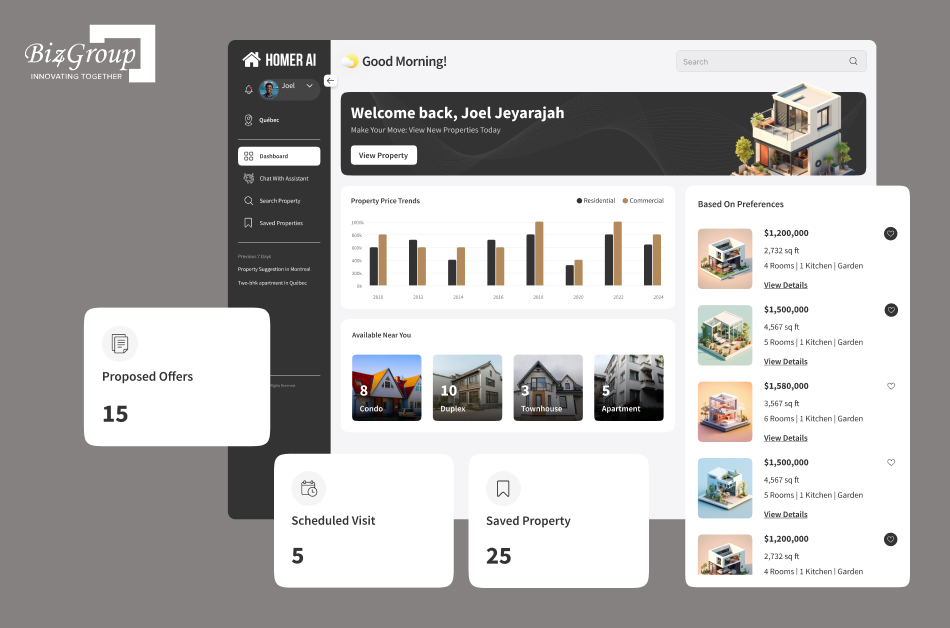
The important implementation lesson is that the AI is not simply answering questions. It is collecting structured intent from a conversation and using that information to drive the next step in the property-search workflow.
How Can AI Improve Follow-Up Speed and Consistency for Real Estate Leads?
AI can speed up lead follow-up by tracking activity, triggering the next action, and using conversation history to keep messages relevant. When it comes to AI for real estate agents, this can mean fewer missed follow-ups and less time spent checking who needs a response.
Triggering Follow-Ups From Lead Activity
AI can watch for actions such as a new inquiry, property view, email response, showing request, or change in lead status and trigger the next step. The follow-up can happen when the lead shows a meaningful signal instead of waiting for a fixed schedule.
- A prospect requests a showing online, and the system immediately creates a follow-up task for the assigned agent.
Personalizing Follow-Ups Using Lead and Conversation Context
Nobody wants to receive the same "Just checking in" message three times. AI can use previous conversations, property preferences, questions, and CRM information to prepare a follow-up that matches the lead's situation.
Wondering whether AI can make follow-ups feel less robotic? Yes, when it has enough context to work with. For how to use AI for real estate, the useful part is giving the system access to relevant conversation and lead history.
- A buyer previously asked for homes with a dedicated office, so the next follow-up highlights newly listed properties that match that preference.
Maintaining Consistent Follow-Up Across the Pipeline
Keeping up with dozens of leads at different stages is where consistency usually slips. AI can track pending actions, handle approved routine communications, and flag leads that have gone quiet or missed a planned touchpoint. AI automation for real estate agents can connect these actions with an existing CRM and communication workflow.
- A lead who has not replied after several planned touchpoints is flagged for agent review instead of being left in the pipeline indefinitely.
Escalating High-Value or Uncertain Leads to an Agent
Should every lead stay inside the automated sequence? No. AI can route a conversation to an agent when it detects strong buying signals, unusual requests, unclear intent, or situations outside the workflow rules.
- A prospect asks about making an offer, so the conversation is handed to the assigned agent with the relevant lead history attached.
Good follow-up automation should make the pipeline easier to manage while leaving agents free to focus on conversations that actually need their judgment.
How Can AI Automate Client Communication and Appointment Scheduling?
AI can handle routine client communication, turn conversations into useful records, create follow-up tasks, and coordinate appointments. For AI client communication for real estate, the main benefit is keeping these small interactions moving without making the agent manage every step manually.
Drafting Routine Client Communications
AI can prepare emails, texts, appointment confirmations, listing updates, and other routine messages using information from the CRM. Agents can review them before sending, while approved message types can be automated for faster responses.
Still rewriting the same appointment confirmation or listing update? An AI assistant can create a ready-to-review draft using the client's name, property details, and previous conversation.
Summarizing Client Calls and Conversations
AI can turn calls, meetings, and chats into short summaries covering client preferences, questions, important details, and agreed next steps. This gives agents a quick reference for the next interaction.
For an AI conversation app, these summaries can also be added to the client's record so important context does not disappear inside a conversation history.
Converting Conversations Into Tasks and Follow-Ups
Client conversations often contain several small commitments. AI can identify them and turn them into tasks, reminders, or follow-up activities inside the agent's workflow.
A buyer says, "Send me the new listings tomorrow and check whether the HOA allows rentals." AI can turn those two requests into separate follow-up tasks instead of leaving them buried in the chat.
Coordinating Appointment Scheduling and Reminders
AI can help clients find available slots, check calendar availability, confirm appointments, and send reminders. This works well for scheduling because the available actions and rules can be clearly defined.
Wondering how to use AI for real estate agents without handing over too much control? Limit the system to approved calendars, appointment types, availability rules, and reminder workflows. The agent can step in whenever scheduling falls outside those boundaries.
|
Communication Task |
AI Can Handle |
Agent Stays Involved For |
|---|---|---|
|
Routine messages |
Drafts, confirmations, updates |
Sensitive or important messages |
|
Call summaries |
Key points and client preferences |
Checking accuracy |
|
Follow-ups |
Tasks, reminders, next actions |
Deciding what needs personal attention |
|
Scheduling |
Availability, bookings, reminders |
Exceptions and special requests |
The payoff is simple: fewer small coordination tasks competing for an agent's attention during the day.
Which Parts of Real Estate Marketing and Listing Creation Can AI Handle?
AI can take a lot of the repetitive work out of real estate marketing. It can turn property details into listing drafts, reuse that information for emails and social posts, tailor content for different audiences, and catch obvious issues before anything goes live. This makes AI for real estate marketing useful when an agent wants to spend less time writing and more time working with clients.
|
Marketing Task |
How AI Can Help |
What the Agent Should Check |
|---|---|---|
|
Listing drafts |
Write descriptions and headlines from verified property details |
Facts, pricing, availability, and disclosures |
|
Content repurposing |
Turn one listing into emails, social posts, ads, and website copy |
Whether the message fits each channel |
|
Audience personalization |
Highlight property features that matter to a specific audience |
Targeting and fair-housing concerns |
|
Content review |
Spot missing details, inconsistencies, or unsupported claims |
Final accuracy before publishing |
Generative AI works especially well when the same property information needs to be turned into several pieces of content. Give it the approved details, let it create the drafts, then have the agent review them before they go out.
That keeps AI in the role of a fast content assistant while the agent stays responsible for what clients actually see.
How Can Real Estate Agents Use AI for Market Analysis?
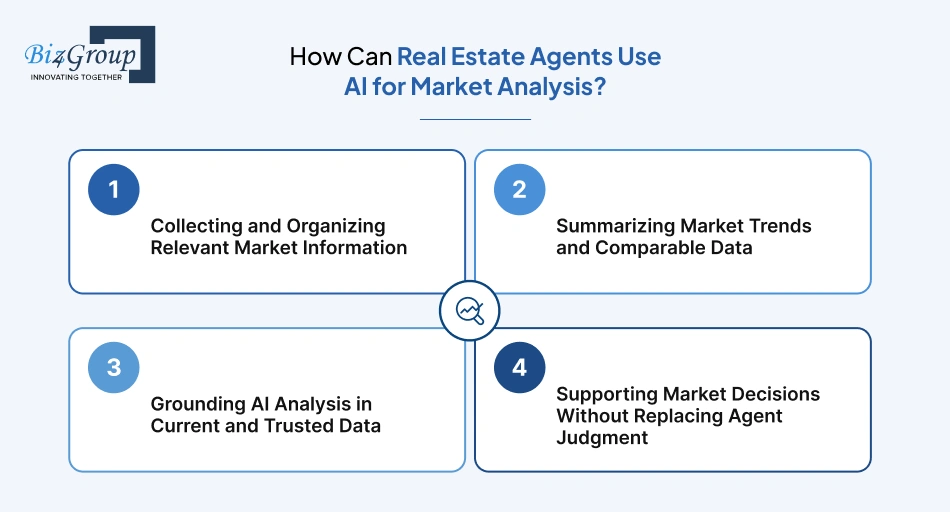
Real estate agents can use AI to pull together market data, compare properties, spot trends, and cut down the time spent on research. To really know how to use AI for real estate market analysis, a good starting point is simple: give AI reliable data, let it do the heavy lifting, and let the agent make the final call.
Collecting and Organizing Relevant Market Information
Market research can get messy fast. There might be MLS data in one place, spreadsheets somewhere else, and reports or notes sitting in different folders. AI can bring the useful pieces together and organize them around the property or area being researched.
- Practical example: An agent preparing a listing can use AI to pull together recent sales, active listings, price changes, and days-on-market data for nearby properties.
Summarizing Market Trends and Comparable Data
Sometimes you don't need to read through every number. You just need to know what's changing. AI can look through comparable properties and market data and give the agent a quick summary of the patterns worth paying attention to.
- Practical example: AI might spot that similar homes in a neighborhood are selling faster when they fall within a certain price range.
Grounding AI Analysis in Current and Trusted Data
Here's the catch: AI can only work with what you give it. If the data is old, incomplete, or unreliable, the analysis can go in the wrong direction. When a business needs tighter control over how its AI handles market data, AI model development can help connect the system to approved sources and rules.
- Practical example: A brokerage could set up an AI workflow that uses approved MLS and internal transaction data instead of pulling random market figures from the web.
Supporting Market Decisions Without Replacing Agent Judgment
AI can find patterns, but it doesn't know every detail behind a property. An agent may notice that one comparable has a much better location or that another was recently renovated. Those details can change the decision.
- Practical example: AI can shortlist three comparable sales, while the agent chooses the strongest comparison after checking the property's condition, location, and upgrades.
That division of work makes sense. AI handles the digging and sorting, while the agent brings the local knowledge and judgment that give the numbers some meaning. For teams looking to implement generative AI in real estate, that balance is worth building into the workflow from day one.
How Can AI Help Real Estate Agents Grow Their Business?
AI can help real estate agents grow by getting back to leads faster, keeping follow-ups on track, cutting down repetitive work, and freeing up more time for clients. If you're figuring out how to use AI as a real estate agent, these are some of the easiest places to start because they affect the work agents already do every day.
|
Growth Area |
How AI Helps |
Practical Impact |
|---|---|---|
|
Lead response |
Replies to new inquiries quickly and flags leads that need an agent's attention |
Leads get a response while they're still interested |
|
Lead follow-up |
Tracks activity, sets reminders, and helps prepare follow-up messages |
Fewer good leads get lost in the shuffle |
|
Repetitive work |
Handles things like data entry, CRM updates, and routine admin |
Agents spend less time on busywork |
|
Client-facing time |
Keeps routine tasks moving in the background |
More time goes toward calls, showings, negotiations, and clients |
For teams with several connected tasks, AI automation services can help keep those steps moving together instead of making agents handle each one manually.
And if an agency has a workflow that off-the-shelf tools simply can't handle, build AI software may be worth considering. The key is to start with a real problem that is slowing the business down.
That way, growth comes from making the existing workflow work better, rather than simply adding more technology.
What Should Real Estate Agents Avoid Automating With AI Because Human Judgment Is Still Required?
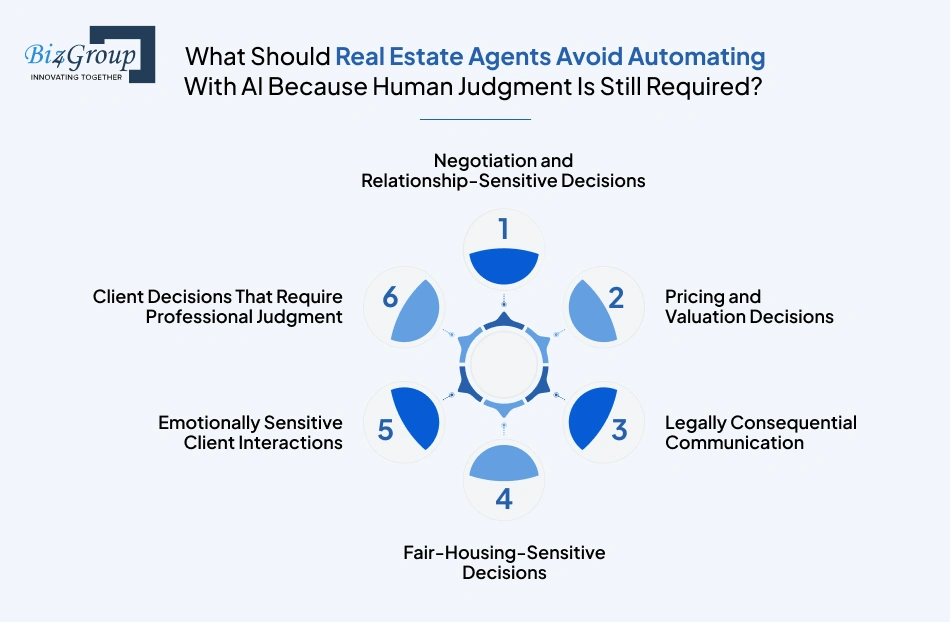
Real estate agents should avoid letting AI make decisions involving negotiations, pricing, legal matters, fair-housing issues, sensitive client conversations, or professional judgment. AI for real estate agents can handle the work around these decisions, but the agent should stay in control of the decision itself.
Negotiation and Relationship-Sensitive Decisions
Negotiations need some human reading of the room. An agent has to understand what the other side wants, what the client is comfortable with, and when pushing harder could backfire. AI can help the agent prepare, but it shouldn't be the one negotiating.
- Practical example: AI can pull together a buyer's previous offers and priorities before a negotiation, while the agent decides how to respond.
Pricing and Valuation Decisions
AI can compare properties and crunch the numbers, but property value isn't always that straightforward. Renovations, condition, location, and what's happening in the local market can all change the picture.
- Practical example: AI can find recent comparable sales, while the agent decides whether a newly renovated home is really comparable to those properties.
Legally Consequential Communication
Contracts, disclosures, deadlines, and similar matters need careful review. AI can organize information or prepare a draft, but an agent should check the details before anything legally important is sent to a client.
- Practical example: AI can flag an upcoming contract deadline, while the agent checks the agreement and decides what the client needs to be told.
A Useful Example of Where Automation Stops Short of Judgment
Biz4Group's ConTracks focused on organizing property contract information, tracking important dates and events, and providing notifications around outstanding formalities.
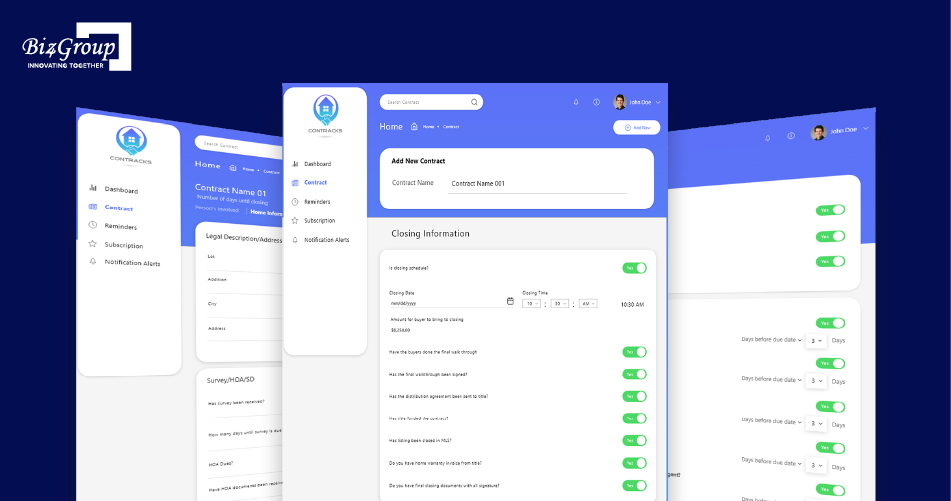
That distinction matters. A system can automate reminders, surface missing steps, and keep a transaction organized without independently interpreting a contract or giving legal advice. In higher-risk workflows, automation can handle coordination while the professional retains decision authority.
Fair-Housing-Sensitive Decisions
AI should not be left to make decisions that could lead to discriminatory treatment. This includes certain types of audience targeting, lead handling, and property recommendations. When working on AI in real estate development, these boundaries need to be considered from the beginning.
- Practical example: AI can organize property features for a marketing campaign, while the agent reviews the targeting and final messaging.
Emotionally Sensitive Client Interactions
Some situations call for a person, not an automated reply. A frustrated buyer, worried seller, or client dealing with a failed deal may need empathy and a real conversation.
- Practical example: AI can flag a message that sounds particularly frustrated, while the agent calls the client to understand what's going on.
Client Decisions That Require Professional Judgment
AI can lay out options, compare information, and point out patterns. It can't fully understand every client's priorities or the context behind a decision. The agent should make the recommendation when professional judgment is involved.
- Practical example: AI can rank homes based on a buyer's stated preferences, while the agent helps them weigh location, budget, condition, and other trade-offs.
|
Keep Human |
Let AI Assist |
|---|---|
|
Negotiations |
Summarizing offer history |
|
Pricing decisions |
Comparing market data |
|
Legal communication |
Flagging deadlines |
|
Fair-housing decisions |
Checking content for potential issues |
|
Sensitive client conversations |
Flagging messages that need attention |
|
Professional recommendations |
Comparing options and surfacing patterns |
AI doesn't need to stay out of these workflows completely. It can do the research, preparation, and admin work, while the agent keeps control where the stakes are higher.
Give Your Real Estate Agents Their Time Back
See how AI task automation for real estate agents can take repetitive admin, scheduling, and follow-up work off your team's plate.
Automate My Real Estate WorkflowHow Can AI Integrate With a Real Estate Agent's CRM and Existing Workflow?
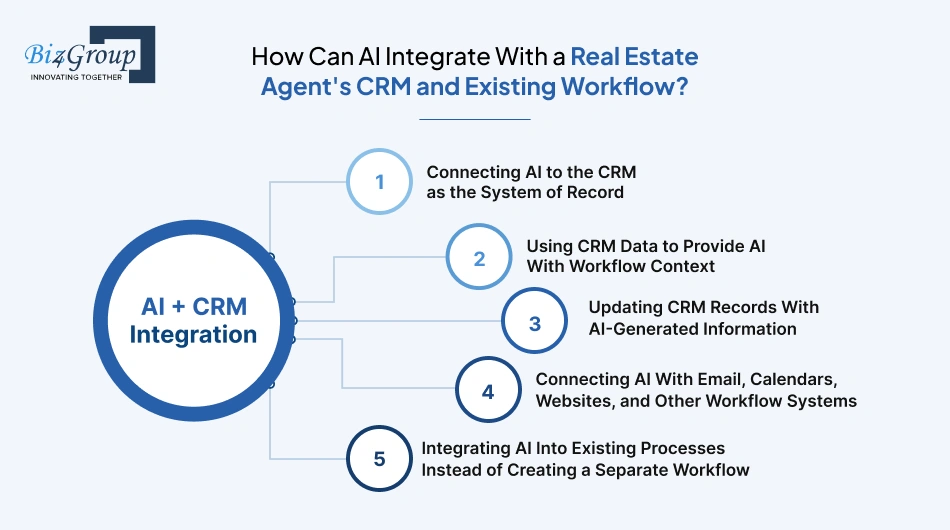
AI can plug into the CRM an agent already uses, read the right lead and client details, handle routine tasks, and update records as things happen. It can also connect the CRM with email, calendars, websites, and other tools. Done well, AI for real estate agent workflows feels like part of the existing setup rather than another system to learn.
Connecting AI to the CRM as the System of Record
The CRM should stay the main place for lead, client, property, and activity information. AI can pull what it needs from there, do a specific job, and put the result back into the same record. The agent can then see everything in one place.
Using CRM Data to Provide AI With Workflow Context
A new lead isn't just a name and phone number. There may already be a conversation, a preferred location, a budget, or a follow-up waiting. AI can use those details to understand what's going on and choose a more useful next step. That's particularly helpful with AI lead management for real estate, where treating every lead the same can quickly become a problem.
|
CRM Information |
What It Helps With |
|---|---|
|
Lead status |
Knowing where the lead stands |
|
Conversation history |
Keeping replies relevant |
|
Property preferences |
Tailoring recommendations |
|
Upcoming tasks |
Knowing what needs attention |
Updating CRM Records With AI-Generated Information
What happens after the agent finishes a client call? Someone still has to update the CRM. AI can take care of much of that busywork by turning calls and messages into summaries, new preferences, tasks, or reminders.
For agents handling a steady stream of leads, this is a straightforward use of AI task automation for real estate agents.
|
After a Client Interaction |
Possible Update |
|---|---|
|
Phone call |
Key points from the conversation |
|
New requirement |
Updated client preference |
|
Follow-up discussion |
Next task or reminder |
|
Appointment request |
Scheduling information |
Connecting AI With Email, Calendars, Websites, and Other Workflow Systems
The CRM is only one piece of the puzzle. Leads might come through a website, conversations happen over email, and appointments live on a calendar. Why make an agent move information between all of these systems? AI can help pass the right information from one step to the next.
For a client-facing product that already has its own workflow, a team may choose to integrate AI into an app instead of sending users to a separate AI tool.
|
Tool |
Possible AI Role |
|---|---|
|
Website |
Capture and qualify inquiries |
|
|
Prepare routine replies |
|
Calendar |
Handle scheduling |
|
CRM |
Store lead activity and updates |
Integrating AI Into Existing Processes Instead of Creating a Separate Workflow
AI shouldn't force agents to change how they work. If a website already sends new leads into the CRM, AI can work from there. It might qualify the inquiry, prepare a reply, or create a follow-up task without adding another step for the agent.
The best integration is usually the one that makes the agent's day feel a little easier without making the technology itself part of the daily workload.
How Can Real Estate Agents Use AI Without Creating Accuracy, Privacy or Compliance Problems?
AI for real estate agents can be useful without creating unnecessary risk when agents check important outputs, protect client information, follow data-use rules, and keep people involved in higher-risk decisions. These safeguards matter whether AI is used for a single task or across wider AI for real estate agent workflows.
Verifying AI-Generated Property and Market Information
AI can get property details, prices, dates, or market figures wrong. Agents should check important information against the original source before sharing it with a client or using it in a decision. This is especially important when artificial intelligence for real estate agents is being used to work with current market information.
As AI becomes part of everyday real estate workflows, accuracy is a concern that comes up quickly. Agents need to know how much of the work can be trusted before it reaches a client.
"I want to use AI for my real estate business, but I am worried that it could generate inaccurate property information or misleading client communications. How can I use it safely?"
Keep AI connected to current, approved data and add human review before high-risk or client-facing outputs are used. Property details, market claims, legal communication, and sensitive recommendations should always have a verification step.
Protecting Personal and Confidential Client Information
Client data can include financial details, contact information, addresses, and private conversations. Agents should know how an AI tool handles that data and avoid sending sensitive information to unapproved systems.
Respecting MLS and Third-Party Data Restrictions
Access to MLS or third-party data doesn't automatically allow unrestricted AI use. Storage, sharing, training, and other uses may have specific rules. Hire AI developers only after those requirements are clear enough to build around them.
Reviewing AI-Generated Client-Facing Communications
AI can quickly draft emails, messages, and listing content, but agents should check the facts, tone, and claims before anything reaches a client or gets published. This matters even more when AI for real estate professionals is used across a larger team, where one incorrect message can reach many clients.
Applying Human Oversight to High-Risk AI Outputs
The higher the potential impact, the more important human review becomes. Financial, legal, compliance, and client-impacting outputs should have a clear approval step before AI takes further action.
Another real estate project developed by Biz4Group focused on rental agreements and tenant/property-related interactions. This type of workflow highlights a practical prerequisite for AI: before automating anything, the underlying information needs to be structured, accessible, and governed appropriately.
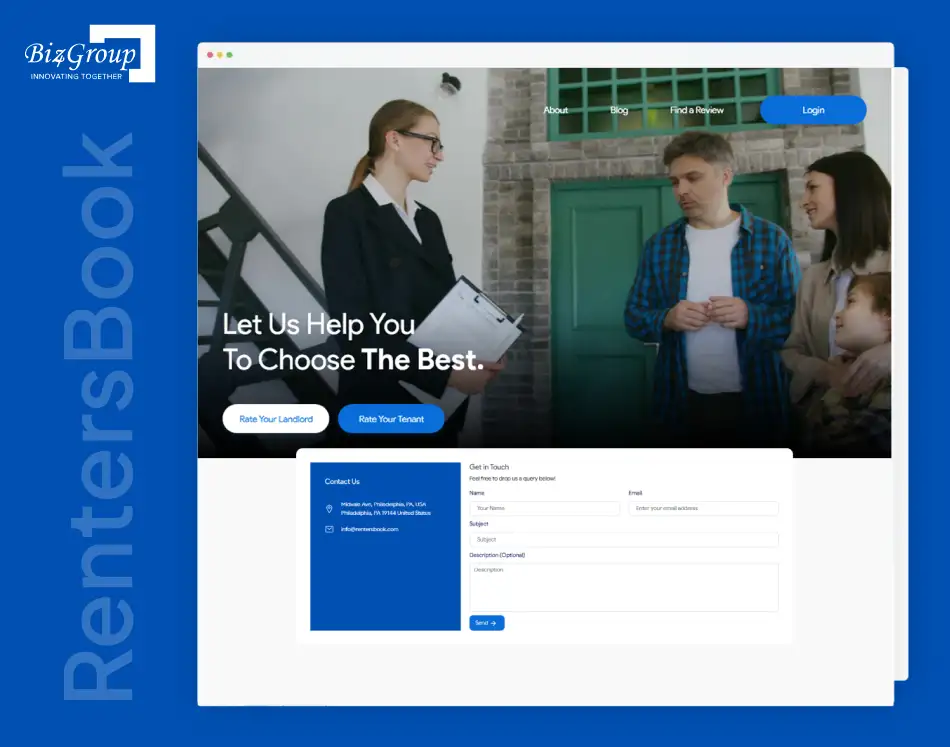
For an AI implementation, that foundation determines what information can safely be retrieved, processed, and passed to an AI system.
A simple rule works well: AI prepares, the agent checks, and the system acts.
Target 30% Faster Lead Response
Build smarter AI automation for real estate agents around lead capture, qualification, routing, and follow-up to create a faster path from inquiry to conversation.
Explore Faster Lead ManagementShould a Real Estate Business Buy AI Software, Automate Existing Tools, or Build Custom AI?
A real estate business should choose based on what it actually needs. Buy ready-made AI software for common tasks, automate existing tools when the workflow needs better coordination, and consider custom AI when the business has specialized processes, data, or scale that off-the-shelf products can't handle well.
|
Approach |
Best For |
When It Makes Sense |
|---|---|---|
|
Buy AI software |
Common needs such as writing, lead handling, or scheduling |
You need something quick and don't need much customization |
|
Automate existing tools |
Connecting CRM, email, calendars, forms, and other systems |
The tools work well individually but don't work smoothly together |
|
Build custom AI |
Specialized workflows or proprietary data |
Your process is unique enough that standard tools fall short |
|
Combine approaches |
Businesses with different needs across teams |
Some tasks are standard while others need custom workflows |
For example, a brokerage may use ready-made AI for content while automating how new leads move through its CRM. A more specialized business might explore real estate AI apps ideas when it has a workflow worth turning into its own product.
The smartest choice usually starts with the workflow, not the technology. If an existing tool already solves the problem, there may be little reason to build something from scratch.
How Much Does AI Implementation Cost for a Real Estate Business?
AI implementation for a real estate business can cost anywhere from $30,000 to $300,000+. A focused project using existing AI tools and a few integrations will sit closer to the lower end. A larger setup with custom AI, multiple systems, complex workflows, and ongoing development can move well beyond $300K. The scope of how to implement AI in real estate business is what usually drives the budget.
|
Cost Area |
Typical Cost |
What You're Paying For |
|---|---|---|
|
AI software & APIs |
$3K–$15K+ |
AI models, APIs, usage, and subscriptions |
|
CRM & system integrations |
$10K–$40K+ |
Connecting CRM, email, calendars, websites, and other tools |
|
Custom AI development |
$20K–$150K+ |
Custom features, workflows, data handling, and AI logic |
|
Testing & deployment |
$5K–$25K+ |
Testing, security, deployment, and fixes |
|
Ongoing maintenance |
$10K–$70K+ / year |
Monitoring, updates, model changes, and improvements |
A small AI automation for real estate agents project might only need a few integrations and a focused workflow. A brokerage building a broader AI platform could need custom development across lead management, client communication, analytics, and internal systems.
For a CXO, the price tag matters less than what the investment is expected to change. Time saved, faster lead response, lower manual workload, and increased team capacity are the numbers worth putting next to the development cost.
Build Around the Way Your Brokerage Works
When standard AI tools don't fit your processes, create custom AI for real estate brokerages around your data, CRM, business rules, and team workflows.
Plan My Custom AI SolutionHow Should Real Estate Agents Measure Whether AI Is Actually Helping?
Real estate agents should measure AI by looking at time saved, lead response, follow-up, business results, and how much correction the AI's work needs. With AI for real estate agents, the goal is simple: if a workflow gets faster without hurting quality, client experience, or accuracy, the AI is adding value.
|
What to Measure |
What to Track |
What Good Looks Like |
|---|---|---|
|
Time saved |
Hours spent on a task before and after automation |
Agents spend less time on repetitive work |
|
Lead response |
Average response time and follow-up completion |
Leads get attention faster and more consistently |
|
Business outcomes |
Appointments, conversions, deals, and client engagement |
More leads move forward and clients stay engaged |
|
AI accuracy |
Errors, rejected outputs, and agent corrections |
Less time spent fixing AI's work |
For AI task automation for real estate agents, even a few saved hours each week can add up. It's worth tracking the baseline before automation so the improvement is easy to see.
The same idea applies to AI real estate automation across a larger workflow. Look at the whole process, not just whether one AI task works well.
And don't overlook AI for real estate professionals who use the system every day. If agents avoid the tool because it creates extra steps, the numbers will tell you that too.
How Can a Real Estate Agent Start Implementing AI Without Overhauling the Entire Business?
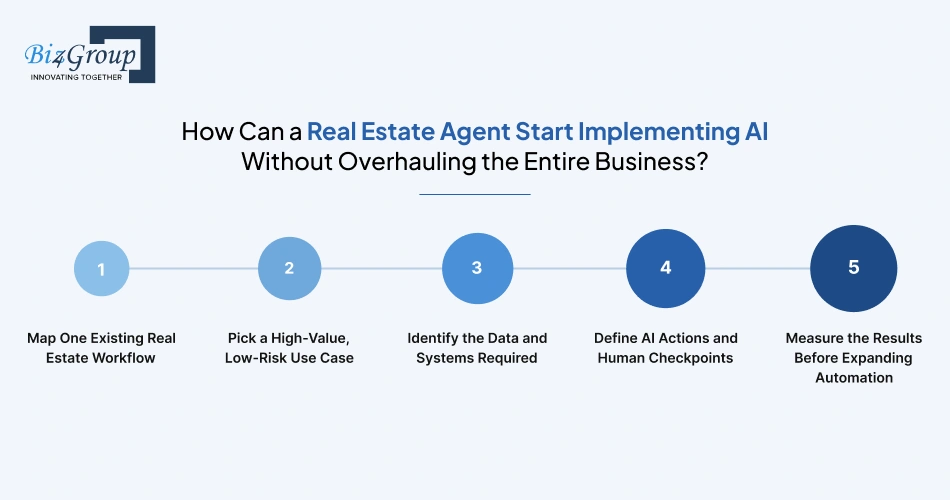
A real estate agent can start using AI without changing the whole business. Pick one workflow, improve a small part of it, and see what happens before expanding. This keeps the first step manageable and gives the team something real to measure.
A common question among agents who are interested in AI is where to actually begin:
"I know other real estate agents are using AI, but I do not know where to start or which tasks are actually worth automating. How can I identify the best AI use cases for my business?"
Start with repetitive, high-volume tasks that have clear inputs and outputs, such as lead qualification, follow-ups, CRM updates, call summaries, and appointment reminders. Test one workflow first, measure the result, and expand from there.
1. Map One Existing Real Estate Workflow
Start with something agents already do, such as handling a new lead or sending follow-ups. Map the process from start to finish and note where people spend the most time or where things tend to get missed.
Look for:
- Repetitive steps
- Manual data entry
- Slow responses
- Missed follow-ups
2. Pick a High-Value, Low-Risk Use Case
Don't start with the hardest workflow. Choose something that happens often, takes time, and has an easy-to-check outcome. Lead follow-up, meeting summaries, and CRM updates are good places to start when figuring out how to use AI to automate real estate tasks.
|
Good First Use Case |
Why It Works |
|---|---|
|
Lead qualification |
Happens frequently and is easy to review |
|
Call summaries |
Cuts down manual note-taking |
|
CRM updates |
Removes repetitive data entry |
|
Appointment reminders |
Simple and predictable |
3. Identify the Data and Systems Required
Next, work out what AI needs to do the job and where that information lives. It could be the CRM, email, website forms, calendar, or property data. This step often reveals missing or messy data that needs fixing first.
4. Define AI Actions and Human Checkpoints
Be clear about what AI can do on its own and when an agent needs to step in. It might classify a lead or prepare a message, while the agent reviews anything sensitive or client-facing. That's a practical way to structure AI for real estate agent workflows without giving AI more control than it needs.
A simple setup looks like:
Input → AI action → Human check → System action
5. Measure the Results Before Expanding Automation
Run the workflow for long enough to get useful numbers. Compare it with the old process and check response time, hours saved, accuracy, follow-up completion, and lead outcomes. These numbers show whether the change is actually helping.
If the results are good, move to another workflow. If they aren't, fix what's getting in the way before adding more AI.
Start with one useful improvement. Once the team sees that it works, expanding AI task automation for real estate agents becomes a much easier decision.
AI Automation for Real Estate Agents: What to Automate and What to Keep Human
The best tasks to automate are repetitive, predictable, and easy to check. Keep decisions involving judgment, negotiation, empathy, or higher risk with the agent. For AI automation for real estate agents, this simple split helps teams get the time savings without handing too much control to AI.
Automate Repetitive, Rules-Based Tasks
Start with work that follows the same pattern every time. Data entry, lead routing, appointment reminders, CRM updates, and routine follow-ups are good candidates because AI can handle them with little human input.
Automate Tasks With Clear Inputs and Verifiable Outputs
AI works best when you know what information it should receive and what a correct result looks like. A task such as turning a client call into CRM notes is easier to automate than one where the answer depends on personal judgment.
This is also a practical starting point for AI task automation for real estate agents, since the results can be checked before the workflow moves forward.
Keep Decisions That Require Judgment, Negotiation, or Empathy Human
AI can prepare information, suggest options, or draft a response. The agent should still handle decisions where context and human understanding matter, especially pricing, negotiations, sensitive client situations, and important recommendations.
Require Human Review for High-Risk AI Outputs
The more a mistake could affect a client, transaction, or business, the more important human review becomes. Client-facing messages, financial information, legal matters, and compliance-sensitive outputs should have a clear approval step.
Escalate Exceptions Instead of Forcing Full Automation
AI doesn't need to handle every situation. If a request falls outside the rules, the system can flag it and send it to an agent. This works much better than forcing AI to guess when the situation is unclear.
Start With Low-Risk Workflows and Expand Gradually
Start with one workflow, measure how it performs, fix the weak spots, and then move to the next. Agents exploring how to use AI in real estate can learn a lot from a small rollout before making bigger changes.
The goal isn't maximum automation. It's giving AI responsibility where it can reliably help and keeping people involved where they add the most value.
Putting AI to Work in Real Estate
If you're figuring out how to use ai as a real estate agent, start with the work that keeps eating into your day. Lead follow-ups, CRM updates, call notes, and appointment reminders are good places to test AI because the work is repetitive and easy to check. When it comes to AI for real estate agents, according to Biz4Group's experience, that's a much better starting point than handing AI something like pricing or negotiation.
Once you've proved that a workflow actually saves time, look at what comes next. If your CRM, property data, and business rules need to work together in a way standard tools can't handle, an AI development company can build around that workflow instead of making you change how the business operates.
Want to explore what AI could realistically handle in your real estate workflow? Reach out to Biz4Group's real estate AI experts to discuss your use case and possible next steps.
Frequently Asked Questions About Using AI as a Real Estate Agent
1. Can AI work with the CRM we already use, or do we need a new platform?
AI can usually be connected to an existing CRM. It can use lead history and client data for context, then update records, create tasks, or trigger follow-ups without replacing the CRM.
2. How much client data should we actually give an AI system?
Only the data the workflow needs. Access should be limited by role and purpose, with sensitive client information kept out of tools that aren't approved to handle it.
3. Can AI use MLS data for training or property recommendations?
That depends on the MLS and its data-use terms. Access to MLS data does not automatically give a business permission to use it for AI training, embeddings, recommendations, or other AI applications.
4. Where should we keep a human in an AI-powered real estate workflow?
Keep human approval around pricing, negotiations, legal communication, fair-housing-sensitive decisions, and situations where the AI is uncertain or the potential impact is high.
5. How do we stop AI from sending an incorrect property detail to a client?
Ground the workflow in verified property data and add an approval step for client-facing outputs. High-risk information should never depend on an unchecked AI response.
6. Is it better to automate our existing real estate tools or buy a new AI platform?
If your current tools work well individually, connecting them may be enough. A new platform makes more sense when existing tools can't support the workflow you need.
7. When does custom AI make more sense than ChatGPT or another off-the-shelf tool?
Custom AI becomes more useful when the workflow depends on proprietary data, several connected systems, specific business rules, or automation that general-purpose tools can't handle reliably.
8. What should we automate first if our real estate team is new to AI?
Start with a frequent, low-risk task that has clear inputs and an easy-to-check output, such as lead routing, call summaries, CRM updates, or appointment reminders.
9. How can a brokerage tell whether an AI project is worth the investment?
Compare the cost with measurable changes in response time, hours saved, follow-up completion, conversion, and correction rates. The business case should come from the workflow's results, not the number of AI features.
10. What happens when AI isn't sure what to do?
The workflow should stop or escalate the case to an agent. A good system has an exception path instead of forcing AI to make a guess.
11. Can AI handle different workflows for different agents or teams?
Yes. Permissions, CRM context, business rules, and workflow triggers can be configured around different teams or roles. The important part is keeping those rules clear and manageable.
12. How long does it take to implement AI in a real estate business?
It depends on the workflow and integrations. A focused automation can be implemented much faster than a custom system connected to multiple business platforms and proprietary data.
