Location :
Orlando, FL, USA
Location :
Orlando, FL, USA +1 (407) 714-1616
 info@biz4group.com

 AI Powered Summary by Biz4AI
- AI health assistant app development in 2026 costs between $25,000 and $150,000, with pricing driven by AI depth, integrations, and compliance scope, not just feature count.
- The HIPAA Security Rule overhaul finalizing in May 2026 makes encryption and access controls mandatory, not optional, and Shadow AI (unvetted tools touching patient data without a proper BAA) is now a top audit target.
- RAG outperforms fine-tuning as the default architecture for healthcare AI, giving traceable, source-grounded answers that are critical for compliance and clinical trust.
- Your app's FDA classification depends on one factor: whether it independently analyzes data and produces a recommendation a clinician doesn't fully verify before acting, that line decides if you need SaMD clearance.
- Biz4Group, a U.S.-based AI health assistant app development company, treats compliance, escalation logic, and architecture as core engineering decisions from day one, not a checklist added after launch.
Every third founder we talk to starts the conversation the same way. They have seen what ChatGPT can do, they have watched a competitor launch something flashy, and they want to know how fast we can build "something like that" for healthcare.
Here is what we tell them.
Building an AI health assistant app is not like building a fitness tracker or a to-do list app with a chatbot bolted on. You are handling someone's medical history. You are making decisions that could send a patient to the ER or quietly let a warning sign slip through. And the ground under this market is moving fast.
The global AI in healthcare market was valued at $36.7 billion in 2025 and is projected to hit $50.7 billion in 2026, growing at a 38.9% CAGR through 2033, according to Grand View Research. Physician adoption is climbing at a similar pace. The AMA's 2026 Physician Survey on Augmented Intelligence found that 81% of physicians now use AI in their practice, more than double the 38% reported just three years earlier.
So, the real question is not whether you should build one. Most founders we talk to have already answered that for themselves. The harder question is what it actually takes. Should you start with AI health assistant web app development or go mobile-first? Do you need a RAG pipeline or a fine-tuned model? What does HIPAA actually require of you in 2026, now that the rules themselves are mid-overhaul?
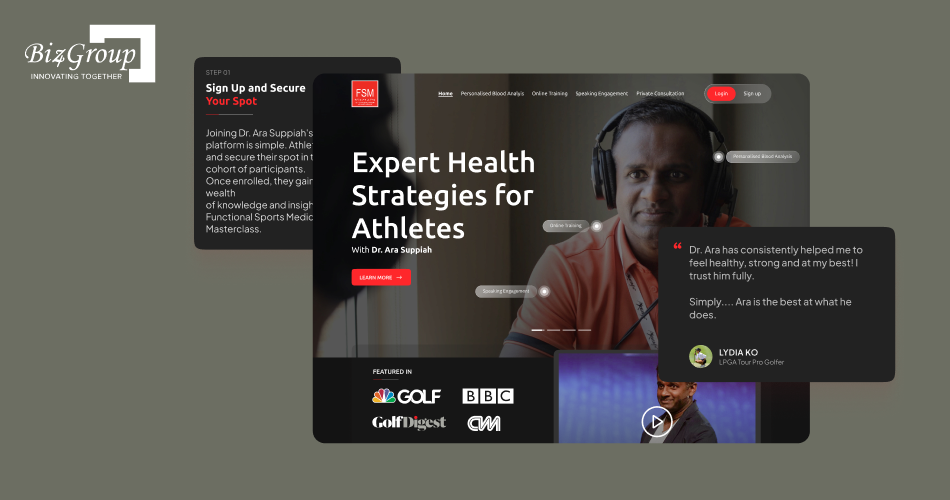
We built Dr. Ara, an AI-powered athletic health platform that reads blood test reports and turns them into real recommendations around hydration, recovery, and performance, not generic tips pulled from a template. Building it taught us something most founders do not expect to hear. The chat interface is the easy 20%. The architecture, the compliance posture, and the escalation logic behind it make up the other 80%, and that 80% is what this guide is actually about.
Ready to see what goes into building one of these properly? Let's get into it.
What Is an AI Health Assistant App, and What Can It Actually Do for You?
An AI health assistant app is software that uses artificial intelligence, usually some mix of large language models, machine learning, and retrieval systems, to interact with patients or healthcare staff and help them make sense of health information in real time.
That is the textbook answer. Here is the one that actually matters for your product decisions.
An AI health assistant app is not one thing. It is a category stretching from a simple medication reminder bot all the way to a system that flags early cardiac risk from wearable data. Where your app falls on that spectrum changes your tech stack, your compliance burden, your timeline, and your cost by a wide margin. This is true whether you are planning AI health assistant mobile app development for a patient-facing product or a browser-based tool for clinical staff.
Take Dr. Ara as an example. On the surface, it looks like a simple upload-and-chat tool. Underneath, it is parsing structured lab data, cross-referencing it against the user's history, and generating recommendations a user will actually act on. That is interpretation, not display. The moment your app crosses that line, it stops being a filing cabinet and starts being a system that makes judgment calls. Judgment calls in healthcare carry weight, regulatory and otherwise.
A good AI virtual health assistant app does a few things well, regardless of where it sits on that spectrum:
- It understands what the user is asking, even when they phrase it the way a worried patient would, not the way a textbook would
- It pulls in relevant context, past symptoms, medication history, wearable data, instead of answering in a vacuum
- It knows its own limits and hands off to a human the moment things get uncertain or risky
- It keeps a clean record of what happened, because in healthcare, if it is not logged, it did not happen
So, before you get attached to a feature list, ask yourself this. Is your app going to replace a sticky note reminder, or is it going to replace part of a nurse's judgment call? Those are two very different engineering problems wearing the same marketing label and figuring out which one you are building is the real starting point of AI health assistant app development.
AI Health Assistant App vs. a Regular Health App: What's the Real Difference?
A regular health app stores information and shows it back to you. A step counter. A medication list you fill in yourself. A calendar for appointments.
An AI health assistant app interprets. It takes your symptoms, your history, your wearable readings, and generates something new: a recommendation, a risk flag, a next step.
That distinction sounds small. It is not. The moment your app starts interpreting health data instead of just displaying it, you have entered a different risk category entirely.
|
What You're Comparing |
Regular Health App |
AI Health Assistant App |
|---|---|---|
|
Core function |
Stores and displays data |
Interprets data and generates a response |
|
Example |
Step counter, medication list |
Symptom checker that recommends next steps |
|
Decision-making |
None, user decides |
AI suggests, flags, or prioritizes |
|
Data handling |
Mostly static storage |
Active analysis of context and history |
|
Compliance exposure |
Lower, data at rest |
Higher, AI output can influence care decisions |
|
Failure mode |
Missing or outdated data |
Wrong recommendation, missed escalation |
We have had founders come to us wanting to "just add AI" to an existing AI healthcare app and assume it is a quick feature addition. It rarely is, because interpretation brings compliance obligations that simple data storage does not. This is also the exact point where teams realize that custom AI health assistant app development is a different project than bolting a chatbot onto an MVP.
Here is a quick gut check. If you removed the AI tomorrow, would your app still function, just less conveniently? Or would it stop making sense entirely? If it is the second one, you are building an AI health assistant app, not a health app with AI sprinkled on top, and your development approach needs to reflect that from day one.
Consumer-Facing or Clinician-Facing? Why This Decision Shapes Everything Else
Before you write a line of code, answer one question honestly. Who is actually going to use this app day to day?
- A consumer-facing assistant talks to patients. It handles symptom intake, medication reminders, wellness coaching, and appointment booking. The tone is warm, the interactions are relatively forgiving, and the compliance risk, while real, is moderate.
- A clinician-facing assistant talks to doctors, nurses, and care teams. It summarizes patient records, assists with documentation, and supports triage decisions. The tolerance for error here is almost zero, because a clinician is relying on your output to make real clinical decisions, not just a suggestion they can shrug off. Many of these tools now fall under what's increasingly called an AI assistant for physicians, a category with its own design and compliance demands.
What surprises most founders is that these two paths rarely merge cleanly. The architecture, the compliance posture, and the escalation logic a clinician tool needs are fundamentally stricter than what a wellness assistant requires. Trying to build one system that serves both audiences from day one usually means you do neither job particularly well.
Decide who you are building for first. Everything else, your features, your stack, your compliance checklist, follows from that answer.
Not Sure Where to Start with Your AI Health Assistant App?
Every build has different compliance exposure, architecture needs, and cost depending on what you're actually trying to solve. Let's map yours out before you write a single line of code.
Book a Free ConsultationWhat Kind of AI Health Assistant App Are You Actually Trying to Build?
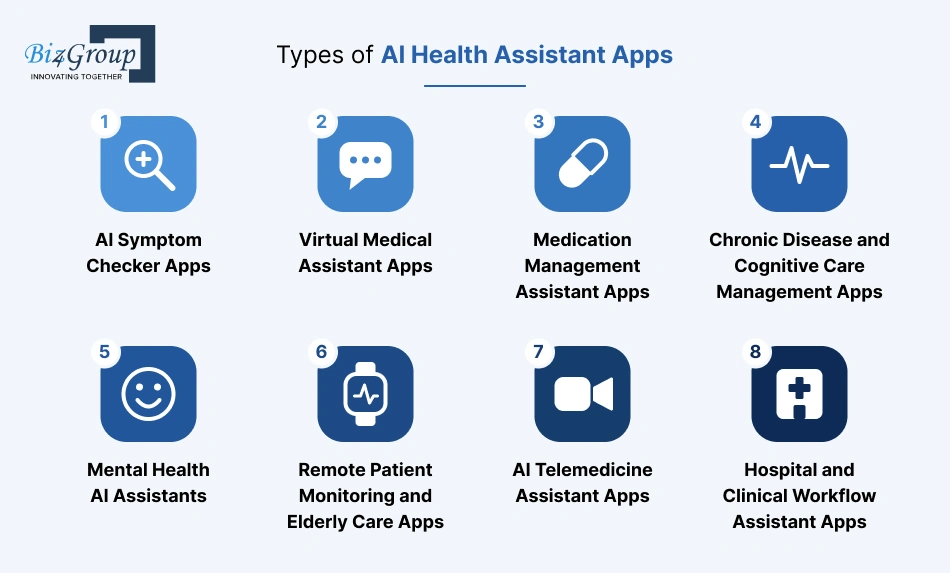
"AI health assistant" gets used as a catchall term, but the apps hiding behind it do very different jobs. Even Big Tech has started drawing these lines publicly. OpenAI launched ChatGPT Health, Microsoft rolled out Copilot Health, and Amazon shipped One Medical Health AI, all in 2026, and all targeting different slices of this category, according to a 2026 review in the Journal of Medical Internet Research.
Picking your type early saves you months of rework later, whether you are planning an AI health assistant web app development project for clinical staff or an AI health assistant mobile app development project for patients on the go. Here are the types worth knowing before you start scoping.
1. AI Symptom Checker Apps
These apps ask a patient a series of follow-up questions about what they are feeling, then narrow down possible causes and urgency. An AI symptom checker app does not diagnose. It triages, the same way a nurse on a phone line would before deciding if you need an ER visit or a Tuesday appointment.
- Follow-up question flow based on symptom severity
- Risk scoring to flag urgent cases
- Integration with medical history for context
- Clear handoff point to professional care
2. Virtual Medical Assistant Apps
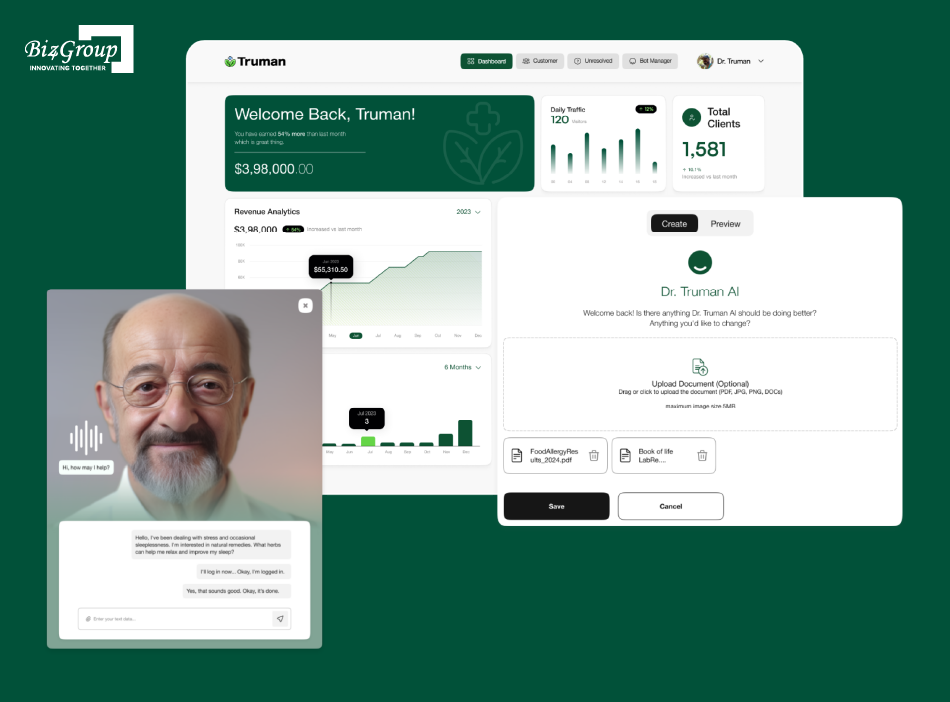
This is the conversational front door most people picture when they hear AI virtual health assistant app development. We learned how deep that front door actually goes while building Truman, an AI avatar that holds a real conversation with a patient, recommends personalized next steps based on their health history, and keeps that history updated as the relationship continues instead of treating every visit like a stranger walked in. That is the bar a genuine AI virtual healthcare assistant needs to clear, memory and continuity, not just a chat window that resets every session.
- Natural language Q&A for health questions
- Appointment booking and rescheduling
- Prescription and dosage clarification
- Persistent memory across sessions
3. Medication Management Assistant Apps
Missed doses are rarely intentional. A well-built medication reminder app tracks what a patient is supposed to take, reminds them on schedule, and flags dangerous drug interactions before they happen. For anyone managing multiple prescriptions, this app type alone can meaningfully cut hospital readmissions.
- Smart dose reminders tied to real schedules
- Refill alerts before medication runs out
- Drug interaction warnings
- Adherence tracking over time
4. Chronic Disease and Cognitive Care Management Apps
Diabetes, hypertension, dementia, and similar long-term conditions need daily attention, not occasional check-ins. A solid chronic disease management system with AI tracks trends over weeks and months, not just single readings, and alerts a care team the moment something drifts outside a safe range.
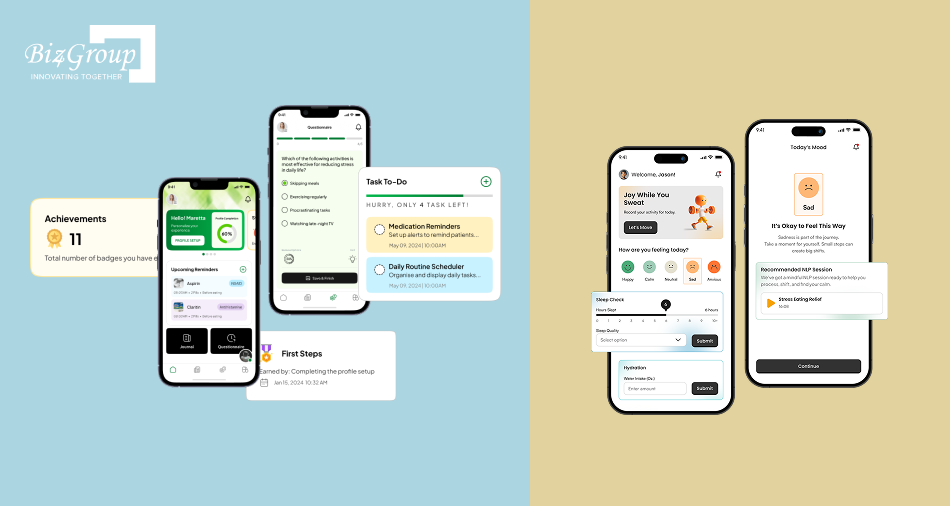
We saw this play out differently in two of our own builds. SweatJoy applies this logic to everyday wellness, tracking mood, sleep, hydration, and activity together, then using NLP-guided coaching and meal planning to turn that data into a daily routine users actually follow. CogniHelp, built for dementia patients, takes the same continuous-care principle in a different direction, sending daily medication and quiz reminders and letting patients voice-journal their day instead of typing, since typing is often the harder task for this group. Both are proof that AI personal health assistant app development does not have to mean one rigid template. It should flex around who the patient actually is.
- Continuous tracking of relevant biomarkers or wellness signals
- Trend analysis instead of single-point readings
- Automatic alerts to care providers on abnormal patterns
- Lifestyle and medication adjustment suggestions
5. Mental Health AI Assistants
Demand here has grown fast, and for good reason. A responsible mental health AI assistant offers mood tracking, guided CBT-style exercises, and crisis resources between therapy sessions, not instead of them. Done well, it extends a therapist's reach rather than replacing one.
- Daily mood and symptom check-ins
- Guided CBT-based exercises
- Crisis detection with escalation pathways
- Clear boundaries around what the app will not attempt to treat
6. Remote Patient Monitoring and Elderly Care Apps
These connect to wearables and sensors to watch vitals, detect falls, and notify caregivers the moment something looks wrong. An AI remote patient monitoring app built well is often the difference between a patient living independently and needing full-time care, and an AI elderly care monitoring app extends that same principle specifically to aging-in-place seniors who need a caregiver looped in without feeling surveilled.
- Continuous vital sign monitoring via wearables
- Fall detection and emergency alerts
- Caregiver notification systems
- Medication and routine compliance tracking
7. AI Telemedicine Assistant Apps
Before a virtual visit even starts, an AI telemedicine app gathers symptoms, pulls relevant history, and hands the doctor a clean summary instead of a blank slate. That prep work is what makes a 10-minute video call actually useful for both sides.
- Pre-visit symptom and history collection
- Automated visit summaries for physicians
- Secure video and chat integration
- Post-visit follow-up and care plan delivery
8. Hospital and Clinical Workflow Assistant Apps
Not every assistant talks to patients. Some exist purely to take administrative weight off clinical staff. AI healthcare workflow automation covers things like triage routing, documentation, and insurance verification, so doctors spend less time on paperwork and more time on patients.
- Automated patient triage and routing
- Clinical documentation support
- Insurance verification workflows
- Discharge planning assistance
Each of these types pulls from a different part of the AI healthcare app ideas landscape, and most successful products stay narrow on purpose. Whether your goal is building an AI health assistant app from scratch or expanding an existing product into a new category, trying to be all eight at once is usually how a six-month MVP turns into an eighteen-month one.
Is Your AI Health Assistant App Even Legal? Compliance and Security, Explained
Most founders think HIPAA compliance means encrypting a database and signing a cloud contract. That used to be close enough. It is not anymore.
2026 has brought the biggest HIPAA Security Rule overhaul in two decades, a growing stack of state AI laws, and an FDA guidance update that quietly redrew the line between a wellness app and a regulated medical device. If your AI health assistant app development plan still treats compliance as a launch-week checklist, you are already behind. Real AI compliance planning starts on day one, not after your MVP is built.
Here is what actually applies to you right now.
1. HIPAA in 2026: Why "Compliant Cloud" Doesn't Mean a Compliant App
Hosting on AWS or Azure does not make your app HIPAA compliant. It means the infrastructure is capable of supporting compliance if you configure it correctly, which most teams do not realize until an audit asks them to prove it.
The Office for Civil Rights is finalizing a Security Rule overhaul targeted for May 2026 that eliminates the old "addressable" category entirely. Encryption at rest, encryption in transit, and multi-factor authentication move from optional-with-justification to flatly required. If your AI health assistant web app development project moves PHI to the cloud without end-to-end encryption, that is now a straightforward violation, not a judgment call.
The same update adds a 24-hour access termination rule. The moment a staff member's role changes, their access to every connected AI tool needs to be revocable within a day, which means centralized identity management is no longer a nice-to-have for anyone serious about building an AI health assistant app at production scale.
2. Shadow AI: The BAA Gap Nobody's Talking About
Here is the scenario that catches more founders off guard than anything else in this section. A clinician on your platform pastes patient notes into a consumer AI tool, maybe to draft a summary faster, with no Business Associate Agreement in place covering that tool. That single action can make your entire HIPAA program "deficient" under current OCR enforcement posture, regardless of how carefully you built everything else.
This pattern has a name now: Shadow AI. It is any AI tool touching PHI without a properly scoped BAA, and regulators are treating it as a priority audit target in 2026.
A few things worth knowing before you sign any vendor agreement:
- A generic, one-size-fits-all BAA from 2024 is probably not good enough anymore. It needs a non-training clause that explicitly blocks your PHI from being used to improve the vendor's global model
- If your AI vendor uses a third-party cloud underneath their product, that subcontractor needs its own downstream BAA, and you are responsible for verifying that chain
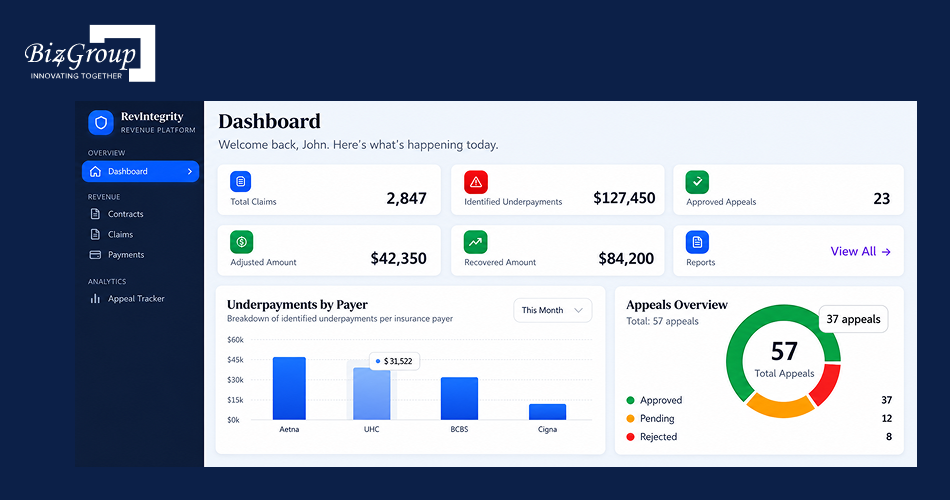
- Your BAA should give you the right to pull audit logs on demand, because if a patient requests their data, you need to show exactly which AI systems touched it. We built exactly this kind of traceability into RevIntegrity, our healthcare revenue platform, which includes an append-only audit trail with six-year retention as a core part of its architecture
- Every AI tool in use across your organization needs to sit on a documented technology asset inventory. If it is not on the list, your HIPAA program is considered incomplete, even if that specific tool never caused a breach
If you are early in vetting vendors or evaluating a HIPAA-compliant AI healthcare app development company, this is the exact list to run them against before anything gets signed.
3. State AI Laws Are Stacking Up. Is Your App Ready?
HIPAA is now the floor, not the ceiling. States have started layering their own AI-specific healthcare laws on top of it, and if you are building for a national audience, you need to satisfy all of them at once, not just the strictest one.
Texas, Colorado, and California have each passed healthcare-relevant AI legislation with real teeth:
- Texas's TRAIGA focuses on transparency and accountability, and its requirements extend to AI vendors selling into state health systems
- Colorado's AI Act requires impact assessments for AI systems that materially affect consumer decisions, healthcare included
- California's AB 489 requires disclosure when AI is involved in a clinical interaction, meaning your app may need to tell the patient outright that they are talking to AI, not a clinician
This is why informed AI consent is becoming a real design requirement, not a legal afterthought. If your onboarding flow does not clearly disclose AI involvement, you may be compliant with HIPAA and still be in violation of state law. Solid AI governance in healthcare now means tracking state-level requirements alongside federal ones, because the two are no longer the same conversation.
When Does Your AI Health Assistant Become a Medical Device?
This is the question that catches founders off guard the most, because the line moved recently and most teams do not know it.
On January 6, 2026, the FDA issued revised Clinical Decision Support guidance that sharpened exactly when software crosses into Software as a Medical Device, or SaMD, territory. Under Section 3060 of the 21st Century Cures Act, your app can avoid FDA regulation only if it meets all four exemption criteria, generally meaning it displays information without independently analyzing it, and a clinician can review the underlying basis for any recommendation before acting on it.
The moment your app independently analyzes patient data and produces a prediction, classification, or specific recommendation that a clinician does not fully verify before acting, you are very likely looking at SaMD, which means 510(k) clearance, De Novo classification, or full premarket approval depending on risk level.
A rough way to think about where you sit:
|
What Your App Does |
Likely Classification |
|---|---|
|
Displays patient data without analysis |
Not a medical device |
|
Wellness coaching, habit tracking, general reminders |
Not a medical device |
|
Symptom triage where a clinician reviews before acting |
Often CDS-exempt |
|
Independent risk scoring or diagnostic suggestions |
Likely SaMD, Class II |
|
Autonomous treatment recommendations in critical care |
Likely SaMD, Class II or III |
If you are building anything past basic wellness tracking, get an FDA Pre-Sub conversation on the calendar early. Finding out you needed clearance after your app is live is one of the most expensive mistakes a team building a custom AI health assistant app development project can make.
What Features Actually Make an AI Health Assistant App Worth Using?
A feature list alone does not make an app good. What makes an AI health assistant app worth using is whether each feature actually changes a user's behavior or outcome, not whether it exists on a spec sheet.
Here is the real breakdown, split into what you cannot launch without and what separates a forgettable app from one patients keep opening.
The Non-Negotiables Every AI Health Assistant App Needs
These are not optional. Skip any of these in your AI health assistant app development scope and you will be retrofitting them later at a much higher cost.
|
Feature |
What It Actually Does |
Why It Matters |
|---|---|---|
|
Understands natural language symptom descriptions, not just keyword matching |
Patients describe symptoms the way they feel them, not the way a form expects |
|
|
Symptom triage logic |
Scores urgency and routes accordingly |
Separates a "see a doctor today" case from a "monitor and check back" case |
|
Medication reminders |
Tracks dosage schedules and sends timed alerts |
Directly reduces missed doses and treatment drop-off |
|
Secure health record access |
Stores and retrieves patient history with encryption |
Required for any meaningful personalization, and required under HIPAA |
|
Human escalation path |
Hands off to a clinician the moment confidence drops or risk rises |
The single most important safety feature in the entire app |
|
Consent and disclosure flow |
Clearly tells the user they are interacting with AI |
Increasingly a legal requirement under state AI laws, not just good practice |
|
Audit logging |
Records what the AI said, when, and why |
Needed for compliance review and for debugging bad outputs after the fact |
The Advanced Features That Turn Users into Long-Term Patients
Once the baseline works reliably, these are the features that build the kind of trust that keeps someone using your app six months in in, instead of deleting it after week two.
|
Feature |
What It Actually Does |
Why It Matters |
|---|---|---|
|
Wearable and biometric integration |
Pulls real-time data from devices like Apple Health, Fitbit, or glucose monitors |
Turns the app from reactive to continuously aware |
|
Predictive risk scoring |
Flags patterns before symptoms become obvious |
This is where real preventive value lives, not just reminders |
|
Contextual memory across sessions |
Remembers past conversations and history without the user repeating themselves |
The difference between a tool that feels smart and one that feels like a form |
|
Explains lab results or imaging reports in plain language |
Reduces the anxiety gap between getting results and seeing a doctor |
|
|
Multilingual support |
Handles conversations in the user's preferred language |
Expands who can actually use the app, not just who speaks English fluently |
|
Telemedicine handoff |
Pre-fills a doctor with a structured summary before a video visit |
Makes a 10-minute consultation genuinely useful instead of rushed |
|
Lets users speak symptoms instead of typing |
Matters most for elderly users and anyone managing a condition that limits typing |
If you are weighing which of these to build first versus later, that decision usually comes down to how you plan to integrate AI into an app you already have versus starting from a clean slate. A custom AI health assistant app development approach gives you the flexibility to sequence features around what your specific users need first, instead of shipping every feature at once and hoping something sticks.
One honest note before you lock your feature list. Every feature in that second table adds real compliance surface area. Predictive risk scoring, for instance, pushes you closer to the FDA's SaMD line we covered earlier. Decide which advanced features you actually need before you decide which ones would be nice to have.
Not Sure Which Features Your App Actually Needs First?
Every feature on that list adds real cost and real compliance surface area. We can help you sequence yours the right way, starting with what matters most.
Contact UsWhat's Really Happening Under the Hood? AI Health Assistant App Architecture Explained
Everything a patient sees in your app, the chat window, the reminders, the clean dashboard, sits on top of a stack of decisions most users will never notice. Get those decisions wrong, and you will feel it in your infrastructure bill, your compliance exposure, and how often your app says something it shouldn't.
Here is what actually sits underneath a production-grade AI health assistant app.
Hosted APIs or Self-Hosted Models? Making the Call
This is usually the first infrastructure decision founders face, and most teams overthink it early when the answer is often simpler than they expect.
|
Approach |
Best For |
Trade-Off |
|---|---|---|
|
Hosted LLM APIs (OpenAI, Anthropic, Azure OpenAI) |
MVPs, early-stage products, teams without ML infrastructure |
Less control over data residency and model behavior |
|
Self-hosted models |
High-volume products, strict data sovereignty needs |
Real infrastructure cost and ongoing ML engineering overhead |
|
Hybrid |
Products scaling past MVP with specific compliance zones |
More orchestration complexity to manage |
Start with hosted APIs unless you have a specific reason not to. A specific reason looks like regulatory requirements that mandate your data never leaves your own infrastructure, not a general feeling that self-hosting sounds more serious. Most teams that jump straight to self-hosted models end up paying for infrastructure they are not yet using at scale.
RAG or Fine-Tuning? The Decision That Decides Your App's Reliability
This is the single most consequential architecture decision in the entire build, and it is also the one most founders get wrong by picking a side too early.
Retrieval-Augmented Generation, or RAG, keeps the base model untouched and retrieves relevant information from your own medical knowledge base at the moment a user asks a question. Fine-tuning actually modifies the model's weights using your own data, teaching it a specific reasoning style or output format permanently.
Industry data backs a clear starting point. According to Menlo Ventures' 2024 State of Generative AI in the Enterprise report, 51% of production enterprise AI deployments now run on RAG, while only 9% rely primarily on fine-tuning.
There is a reason RAG wins by default in healthcare specifically, and it is not just cost. A 2026 scoping review in Bioengineering found that hybrid fine-tuning plus RAG systems consistently outperformed either approach alone across clinical summarization, question answering, and decision support tasks. RAG gives you traceability, you can point to the exact document a claim came from, which matters enormously when a regulator or a clinician asks "why did the AI say that."
|
Choose This |
When |
|---|---|
|
RAG |
You need current, traceable medical information and fast time to production |
|
Fine-tuning |
Every response must follow a precise clinical format or coding structure |
|
Both together |
You need domain-specific clinical reasoning and up-to-date retrieval, which is most serious healthcare products |
A rough rule that holds up in practice: RAG for your knowledge, fine-tuning for your voice. If you are only building one, build RAG first. You can add fine-tuning later once you know exactly what behavior you are trying to lock in.
From Input to Audit Trail: How the Layers Actually Connect
A production AI health assistant app is not one model answering questions. It is a chain of systems working together, and understanding that chain is what separates a founder who can brief a dev team properly from one who gets surprised by scope creep three months in.
- Input layer: Captures what the user says or types, through chat, voice, or connected wearable data
- Understanding layer: Natural language processing extracts intent, symptoms, and urgency from that raw input
- Retrieval layer: Pulls relevant medical knowledge and the patient's own history to ground the response in actual context, not just the model's training data
- Generation layer: The LLM produces an actual response, recommendation, or next step based on everything retrieved
- Escalation layer: Checks confidence and risk level, and routes to a human the moment either crosses a threshold
- Audit layer: Logs the full interaction, what was asked, what was retrieved, what was said, for compliance and for debugging later
Each layer is a separate point of failure, and each one needs to be designed on purpose rather than assumed to work because the model is good. A strong model sitting on top of a weak retrieval layer will still hallucinate. A great retrieval layer with no escalation logic will still miss the one case that actually needed a human.
This is also where the compliance requirements from earlier in this guide stop being abstract. The audit layer is not a nice-to-have bolted on at the end. It is the same traceability infrastructure your BAAs will require you to produce on demand.
How Do You Actually Build an AI Health Assistant App? (Step-by-Step)
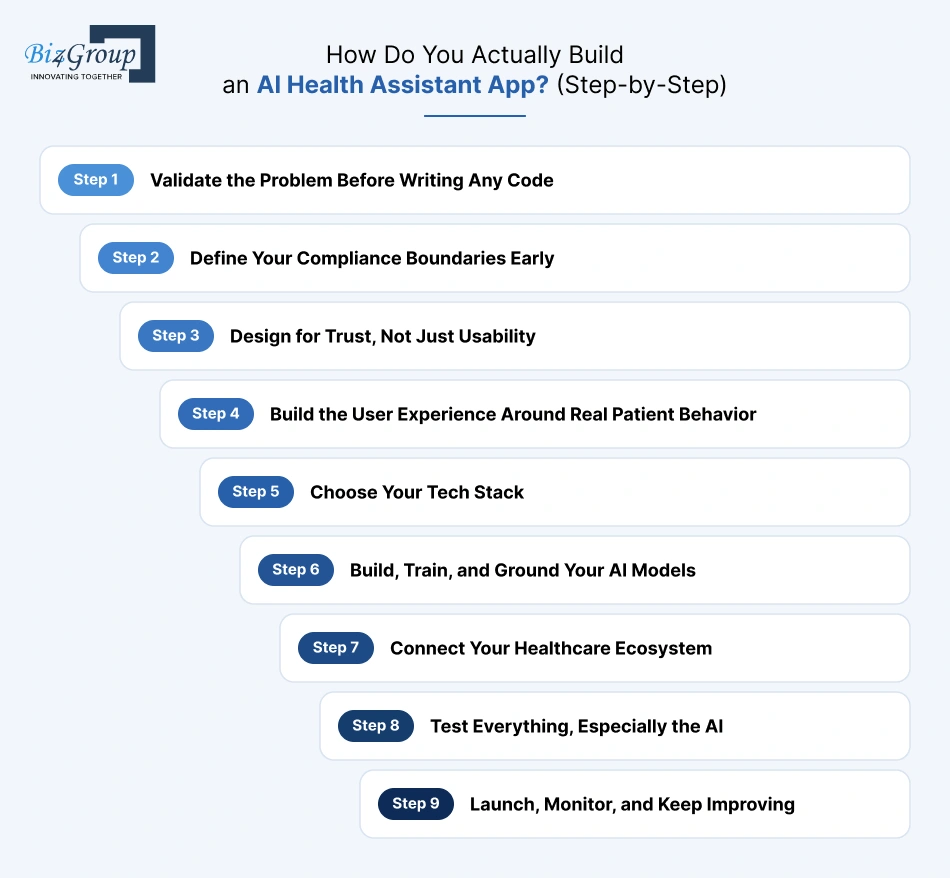
Most development guides give you a generic list that could describe building any app. Healthcare does not work that way. Skip the wrong step here, and you are not just late, you are potentially non-compliant. Here is the actual sequence behind real AI health assistant app development, in the order that prevents expensive rework later.
Step 1: Validate the Problem Before Writing Any Code
Before any code gets written, you need brutal honesty about who actually needs this and why. A huge share of failed healthcare AI projects skip this step entirely and pay for it in month six, not month one.
- Interview real clinicians and patients, not just your assumptions about them
- Study where existing tools fall short for your specific use case
- Write a scope document that explicitly excludes features you are not ready to support
- Define what success actually looks like in measurable terms, not just "patients like it"
Step 2: Define Your Compliance Boundaries Early
This is where you decide if you are building a wellness tool or something that edges toward clinical decision support, since that single decision changes your entire FDA exposure from the compliance section earlier in this guide.
- Map where PHI enters, moves through, and exits your system
- Decide early whether any planned feature could trigger SaMD classification
- Identify which state AI laws apply based on where your users are located
- Loop in compliance expertise now, not after the build is finished
Step 3: Design for Trust, Not Just Usability
Healthcare users are often anxious, in pain, or managing something chronic. Good AI assistant app design for this audience looks different from designing a productivity app, because confusion here has higher stakes than a lost click.
- Prototype core flows before writing production code
- Keep symptom intake screens short and linear, not branching and overwhelming
- Design the AI disclosure and consent flow as a first-class screen, not a footnote
- Test with real users across different ages and tech comfort levels
Step 4: Build the User Experience Around Real Patient Behavior
Strong UI/UX design in this category reduces cognitive load at every screen, especially during symptom intake, when a user is least able to tolerate friction. This step is where your Step 3 prototypes actually become production screens.
- Minimize the number of taps between a user's question and a useful answer
- Build accessibility in from the start, not as a later patch
- Make the human escalation option visible at every stage, not buried in settings
- Keep clinician-facing screens dense with information but still scannable in seconds
Step 5: Choose Your Tech Stack
This is where architecture decisions from earlier become real engineering choices. Here is what a production-grade stack actually looks like in 2026.
|
Layer |
Common Choices |
What It Handles |
|---|---|---|
|
Frontend |
React Native, Flutter, Next.js |
Patient app, clinician dashboard, chat interface |
|
Backend |
API logic, authentication, session management |
|
|
LLM layer |
OpenAI, Claude, Azure OpenAI, Llama |
Core conversational and reasoning engine |
|
Orchestration |
LangChain, LlamaIndex |
Connects retrieval, memory, and escalation logic |
|
Vector database |
Pinecone, Weaviate, pgvector |
Powers the retrieval layer for RAG |
|
Cloud infrastructure |
AWS, Azure, Google Cloud, all HIPAA-eligible |
Hosting, storage, and PHI handling |
|
Interoperability |
FHIR APIs, HL7, Apple HealthKit |
EHR and wearable data exchange |
|
Monitoring |
Datadog, Langfuse, OpenTelemetry |
Tracks AI reliability and system health in production |
If you are building this as an agentic AI health assistant platform rather than a simple chat interface, your orchestration layer needs to handle multi-step reasoning and tool use, not just single-turn responses. That is a meaningfully heavier build than a standard chatbot, and it should be scoped as one from the start.
Step 6: Build, Train, and Ground Your AI Models
This is where the RAG and fine-tuning decisions from the architecture section turn into actual pipelines. Your retrieval system needs real medical knowledge behind it, not a placeholder dataset you plan to fix later.
- Connect your RAG pipeline to verified, current medical sources
- Test hallucination rates against realistic, difficult prompts, not easy ones
- Set confidence thresholds that trigger escalation automatically
- Validate outputs with actual clinical reviewers before anything goes live
Step 7: Connect Your Healthcare Ecosystem
An AI health assistant app rarely works well in isolation. The real value shows up once it talks to the systems patients and clinicians already use every day.
- Integrate EHR and EMR systems through FHIR or HL7 standards
- Connect wearable and biometric data sources relevant to your use case
- Build secure, authenticated handoffs to telemedicine or scheduling platforms
- Test every integration for failure handling, not just the happy path
Step 8: Test Everything, Especially the AI
Healthcare apps need testing layers most consumer apps skip entirely. A chatbot that answers correctly 95% of the time still fails the 5% that matters most if there is no safety net underneath it.
- Run functional, security, and compliance testing as separate tracks
- Stress-test escalation logic specifically, not just whether the chat responds
- Validate encryption, access control, and audit logging before launch
- Treat this phase as part of AI health assistant mobile app development, not an afterthought squeezed in before a deadline
Step 9: Launch, Monitor, and Keep Improving
A functioning demo and a production-ready app are not the same thing. Many teams underestimate this phase and treat MVP development as the finish line instead of the starting point for real validation.
- Start with a controlled rollout to a limited user group before full launch
- Monitor hallucination rates and retrieval accuracy continuously, not just uptime
- Track clinician override rates to catch AI reliability issues early
- Plan for continuous model evaluation as medical guidelines and your own data evolve
Nine steps, in order, are the real shape of this build. Skip ahead on any of them, and you are not saving time, you are just moving the cost to a later, more expensive point in the project.
So, What Does an AI Health Assistant App Actually Cost?
Here is the number most founders actually want before reading another paragraph. AI health assistant app development typically costs between $25,000 and $150,000, depending on how deep the AI goes, how many systems you integrate, and how strict your compliance scope is.
That range is wide on purpose. A medication reminder app with basic chat support sits near the bottom. A platform with EHR integration, predictive risk scoring, and full HIPAA-grade infrastructure sits near the top. The honest answer to what your AI health assistant web app development or AI health assistant mobile app development project will cost is always "it depends on exactly what we just discussed in the last four sections," not a single flat number pulled out of thin air.
Cost by Feature: Where the Budget Actually Goes
This is the breakdown that matters more than any single total figure, because it shows you exactly what you are paying for and where you have room to phase things in later.
|
Feature |
Estimated Cost |
Why It Costs What It Does |
|---|---|---|
|
Conversational AI intake and chat |
$5,000 - $12,000 |
Natural language processing plus conversation state management |
|
Symptom triage and risk scoring |
$6,000 - $16,000 |
Requires clinical logic validation, not just a decision tree |
|
Medication reminders and adherence tracking |
$3,000 - $8,000 |
Relatively straightforward, scales with notification complexity |
|
Secure health record storage |
$5,000 - $10,000 |
Encryption, access control, and compliance architecture built in |
|
EHR and FHIR integration |
$8,000 - $22,000 |
Every healthcare system interfaces differently, and none are simple |
|
Wearable and biometric data integration |
$6,000 - $14,000 |
Depends heavily on how many device ecosystems you support |
|
RAG pipeline and vector database setup |
$7,000 - $18,000 |
Core to AI reliability, not an optional add-on for serious products |
|
Human escalation and clinician handoff logic |
$4,000 - $10,000 |
Small in scope, large in importance, and easy to underbuild |
|
Compliance infrastructure and audit logging |
$6,000 - $16,000 |
HIPAA Security Rule changes in 2026 make this heavier than it used to be |
|
Multilingual and voice support |
$3,000 - $9,000 |
Cost rises with the number of languages and accents supported |
A lean MVP picking four or five of these lands near the $25,000 floor. A fuller custom AI health assistant app development build covering most of this table settles closer to the $150,000 ceiling. Very few serious products need every row at launch, which is exactly why phasing matters.
What Actually Drives Your Cost Up or Down
A few factors do more to move your final number than any single feature on that table.
- AI depth matters more than feature count. A simple reminder app with a sophisticated RAG pipeline can cost more than a feature-heavy app running on basic prompt engineering
- Compliance scope is not optional overhead, it is core architecture. Building HIPAA requirements into your AI health assistant app from day one costs less than retrofitting them after a security review flags gaps
- Integration count compounds quickly. Each EHR system, each wearable platform, each telemedicine tool adds its own authentication, error handling, and testing burden
- Platform choice affects timeline and budget together. Native iOS and Android builds cost more than a single cross-platform codebase, but perform better at scale
- Team location and structure change the math significantly. An in-house team, a freelance network, and a dedicated development partner all price this very differently
- Clinical validation adds real cost but is not something you can skip if your app touches triage or risk scoring in any serious way
The Hidden Costs Most Teams Forget to Budget For
These rarely show up in an initial quote, and they are exactly what blows past-budget projects off course six months in.
- Ongoing LLM API usage and inference costs, which scale with conversation volume, not just user count
- Vector database storage and retrieval costs, which grow as your medical knowledge base expands
- Business Associate Agreement negotiation and vendor compliance review, especially under the stricter 2026 BAA standards covered earlier in this guide
- Continuous AI model monitoring and evaluation, not a one-time testing phase but an ongoing operational cost
- Annual penetration testing and security audits, which most teams forget until a client or investor asks for proof
- AI Model retraining or retrieval base updates as medical guidelines change over time
- App store maintenance, OS compatibility updates, and the routine cost of simply staying functional
How to Actually Control Your Development Cost
None of this means you are locked into the top of the range. A few decisions genuinely bring the number down without compromising quality on your path to building an AI health assistant app that actually works.
- Start with a tightly scoped MVP instead of building every feature from the full vision at once
- Use hosted LLM APIs instead of self-hosted models until you have real usage data justifying the switch
- Choose RAG over fine-tuning first, since it reaches production faster and costs less to maintain early on
- Phase compliance-heavy features like EHR integration into a second release once your core product is validated
- Reuse proven architecture patterns instead of custom-building infrastructure that already has reliable off-the-shelf solutions
- Work with a team that has already solved healthcare-specific problems before, so you are not paying to relearn lessons someone else already learned
Build In-House or Partner with a Development Team?
This decision affects your cost structure as much as any feature choice, so it deserves its own direct comparison.
|
Factor |
Build In-House |
Partner With a Development Company |
|---|---|---|
|
Upfront cost |
Lower if you already have ML and compliance talent on staff |
Higher hourly rate, but no hiring or training overhead |
|
Speed to launch |
Slower, especially if you need to hire specialized roles |
Faster, since the team already has healthcare AI experience |
|
Compliance expertise |
You carry the full learning curve yourself |
Comes pre-built from prior healthcare projects |
|
Long-term control |
Full ownership and flexibility over architecture |
Still full ownership, but shared execution responsibility |
|
Best fit |
Teams with existing healthcare AI talent and infrastructure |
Startups and teams who need to move fast without hiring a full team first |
Most founders underestimate how much the hiring and ramp-up time costs when they try to create an AI health assistant app entirely in-house for their first healthcare product. If you are leaning toward a partner model, it is worth understanding how to build an AI app the right way before you start interviewing vendors, so you know what good actually looks like going in.
Want an Exact Cost Estimate Instead of a Range?
Ranges are useful for planning. A real number comes from your actual scope. Let's break down what your AI health assistant app would really cost to build.
Get Your QuotesWhere Do AI Health Assistant Apps Usually Go Wrong, and How Do You Fix It?
Most AI health assistant apps that fail do not fail because the model was weak. They fail because of decisions made months before anyone saw a single AI response. According to IDC, 88% of AI prototypes never make it to production, and Gartner attributes 85% of AI model failures to poor data quality, not poor algorithms.
Here are the patterns we see most often in AI health assistant app development, and what actually fixes each one.
|
The Problem |
Why It Happens |
How to Fix It |
|---|---|---|
|
Poor fit with clinical workflow |
The app was built around what AI could do, not around a validated clinical problem, so clinicians route around it instead of using it |
Interview clinicians and patients before writing a single feature, and study AI healthcare case studies to see what actually gets adopted versus what looks good in a pitch deck |
|
Alert fatigue and ignored escalations |
Overly sensitive triage logic produces too many false positives, so staff eventually stop trusting the alerts entirely |
Tune escalation thresholds against real data, and treat a quiet, accurate system as better than a noisy, aggressive one |
|
Weak onboarding and low retention |
Users are asked for extensive health history in the first session with no clear payoff, so they abandon before seeing any value |
Collect only what you need for the first useful interaction, and expand data collection gradually as trust builds |
|
Data quality problems undermining AI reliability |
Teams assume clinical data arrives clean and labeled like a research dataset, when real-world EHR data is messy, inconsistent, and often reflects billing codes rather than real-time clinical reality |
Budget real time and resources for data normalization before training or connecting any retrieval pipeline |
|
Compliance treated as a launch checklist |
HIPAA and state AI law requirements get bolted on right before launch instead of built into architecture from day one |
Fold compliance planning into Step 2 of your development process, and work through a real list of questions to ask before AI adoption in healthcare before you commit to a build |
|
Scaling infrastructure before validating the workflow |
Teams invest heavily in infrastructure and model sophistication before confirming the core workflow solves a real problem |
Validate with a small, controlled user group first, then scale infrastructure once the workflow itself is proven |
|
Weak integration with the broader healthcare ecosystem |
The app works well in isolation but creates friction because it does not talk to EHR systems, scheduling tools, or existing clinician workflows |
Treat interoperability as a core requirement from the start, often through dedicated AI integration services rather than a bolted-on afterthought |
|
No real AI monitoring after launch |
Teams track uptime and crash reports but never monitor hallucination rates, retrieval accuracy, or escalation effectiveness |
Build AI healthcare analytics into your launch plan from day one, not just standard application performance monitoring |
The pattern across almost every row here is the same. The failure usually traces back to a decision made early, not a bug found late. Whether you are planning a custom AI health assistant app development build, fixing the early decision is what keeps most of these problems from showing up in the first place.
Why Build Your AI Health Assistant App with Biz4Group?
Everything in this guide, the compliance detail, the architecture trade-offs, the honest cost breakdown, comes from work we have actually done, not research we did for this blog post.
Biz4Group has been building software since 2003. Today that means a 300-plus person team, more than 1,000 delivered projects, and an 85% client retention rate, the kind of number that only holds up when clients come back because the first project actually worked. We were ranked among the top healthcare AI firms on Clutch in 2025, recognition based on verified client reviews, not self-reported claims.
What that looks like in healthcare specifically:
- We built Dr. Ara, an athletic health platform that reads real blood test data and turns it into recommendations a user acts on, not generic wellness tips
- We built Truman, an AI avatar that holds genuine ongoing conversations and remembers patient history across sessions
- We built an AI chatbot for veteran support services that gives homeless and at-risk veterans real-time access to healthcare, housing, and crisis support through voice and text, a product where getting escalation logic wrong has real human consequences
- We built RevIntegrity, with append-only audit trails and six-year retention as core architecture, the exact traceability infrastructure this guide's compliance section describes as a 2026 requirement, not an afterthought
We are not a generalist agency that added "AI" to a services page. We are an AI healthcare app development company that treats HIPAA, FDA SaMD classification, and escalation logic as first-class engineering problems from the first discovery call, not a checklist handled by legal after the build is done.
If you are ready to talk through your specific scope, hire AI developers who have already solved the compliance and architecture problems this guide walks through, instead of learning them on your project.
Ready to Work with a Team That's Already Solved This?
Compliance, architecture, cost, we've navigated all of it on real healthcare products. Let's see what that looks like for yours.
Schedule a CallWrapping Up!
Building an AI health assistant app is no longer just about picking a good model and wiring up a chat interface. AI health assistant app development is about getting the architecture, the compliance posture, and the escalation logic right from the very first decision, because every section in this guide traces back to that one truth.
Get the early choices right, RAG versus fine-tuning, hosted versus self-hosted, wellness tool versus something that edges toward SaMD, and the rest of building an AI health assistant app gets easier. Get them wrong, and you are paying for that mistake in month six, not month one.
If you are ready to build something real instead of just reading about it, Biz4Group has already solved the problems this guide walks through, HIPAA in 2026, FDA classification, RAG pipelines, honest cost planning, across real custom AI health assistant app development projects we have shipped.
Book an appointment with our team and let's talk through what your AI health assistant app actually needs, not a generic pitch.
FAQ
1. How much does AI health assistant app development cost?
AI health assistant app development typically costs between $25,000 and $150,000, depending on AI depth, integrations, and compliance scope. A lean MVP with basic chat and reminders sits near the lower end. A platform with EHR integration, predictive risk scoring, and full HIPAA-grade infrastructure sits closer to the top.
2. Does my AI health assistant app need to be HIPAA compliant?
Yes, if your app collects, stores, or transmits protected health information in any form. This applies the moment PHI enters your system, not just when you launch publicly. With the HIPAA Security Rule overhaul expected in May 2026, encryption and access controls that used to be optional are becoming mandatory requirements, not recommendations.
3. How long does it take to build an AI health assistant app?
A basic wellness-focused MVP can launch in two to four months. A production-grade AI health assistant app with EHR integration, contextual memory, and clinician escalation workflows typically takes six to twelve months, since compliance validation and clinical testing add real time that a standard consumer app does not require.
4. Should I use RAG or fine-tuning for my AI health assistant app?
Start with RAG, retrieval-augmented generation, for most AI health assistant apps. It reaches production faster, costs less to maintain, and gives you traceability back to the source of every answer, which matters enormously in healthcare. Fine-tuning becomes worth the investment once you need a very specific output format or reasoning style that RAG alone cannot deliver consistently.
5. Can an AI health assistant app replace a doctor?
No, and any app positioning itself that way is taking on serious regulatory risk. A well-built AI virtual health assistant app supports triage, reminders, and information access, then hands off to a clinician the moment a situation requires real medical judgment. The goal is reducing workload and improving access, not replacing diagnosis or treatment decisions.
6. What is the difference between a wellness app and a regulated medical device?
The line comes down to whether your app independently analyzes data and produces a specific recommendation a clinician does not fully verify before acting on it. Wellness coaching and habit tracking generally stay outside FDA oversight. Independent risk scoring or diagnostic suggestions usually cross into Software as a Medical Device territory, which brings a separate approval process entirely.
7. How do I choose the right AI health assistant app development company?
Look for a team that treats compliance as part of the architecture from day one, not a checklist handled after the build is finished. Ask specifically how they handle PHI isolation, escalation logic, and hallucination mitigation. A strong AI health assistant app development company will ask you hard questions about your workflow and risk tolerance before quoting a number, not the other way around. Biz4Group takes this approach with every healthcare AI project, which is exactly why this guide exists in the first place.