 Location :
Orlando, FL, USA
Location :
Orlando, FL, USA +1 (407) 714-1616
 info@biz4group.com

- AI printing management software development helps automate scheduling, reduce errors, and improve visibility across your printing operations.
- Core and advanced features like AI-based scheduling, predictive maintenance, and real-time monitoring drive efficiency and cost savings.
- To develop AI printing management software, follow a structured approach including data strategy, MVP planning, AI model development, and system integration.
- The cost to build AI printing management system typically ranges from $30,000 to $250,000+, depending on features, AI complexity, and scalability.
- Choosing the right partner for custom AI printing software development, like Biz4Group, ensures faster deployment, fewer risks, and a system built for real-world operations.
Are delays, reprints, and constant scheduling issues quietly cutting into your profits?
You are not alone. The industry is moving fast. According to a report, the digital printing market size was valued at USD 49.62 billion in 2025. At the same time, another report stated that over 60% of print businesses are investing in automation and AI to stay competitive.
Source:
So, let’s ask the real question. If your workflows still rely on manual scheduling and reactive decisions, how long can that keep up?
Many businesses reach a point where they start asking: “We are facing delays and errors in printing workflows, can AI automation fix this problem?”
This is where AI printing management software development becomes critical. It is not just about automation. It is about building systems that continuously improve how your operations run.
Businesses that develop AI printing management software or build AI printing management system are shifting from reactive workflows to intelligent control.
If you are exploring how this transformation is unfolding, understanding AI in printing industry will give you a clearer view of what modern print operations look like.
In the next section, we will break down what this actually means and why more companies are investing in it now.
What Is AI Printing Management Software Development and Why Are Businesses Investing in It?
AI printing management software development refers to building software that uses data and machine learning to automate, optimize, and control printing operations in real time.
Instead of relying on manual inputs or fixed rules, these systems analyze live data from print jobs, machines, and workflows. They automatically handle scheduling, resource allocation, and issue detection without constant human intervention.
When you develop AI printing management software or build AI printing management system, you are creating a system that adapts to your operations and improves performance over time.
Many businesses reach this point when they start asking: “We want to build a custom AI printing management system for our operations, what features should we include?”
That question usually comes after dealing with delays, inefficiencies, or lack of control in day-to-day operations.
Why Businesses Are Investing in AI Print Management Software Development
- Automates job scheduling and reduces dependency on manual planning
- Provides real-time visibility into print jobs, machine status, and workflows
- Reduces operational costs by optimizing resource usage
- Minimizes errors, reprints, and production inconsistencies
- Predicts machine failures and reduces unplanned downtime
- Improves overall production speed and throughput
For teams scaling their operations, AI print management software development is becoming a key part of broader initiatives like enterprise AI integration, where systems work together instead of in silos.
How Does an AI Printing Management System Actually Work Behind the Scenes?
When you build an AI printing management system, you are not just adding automation. You are connecting multiple layers that work together in real time. The system continuously collects data, processes it, makes decisions, and improves outcomes without manual intervention. This is the foundation of printing process management software development with AI and modern intelligent workflows.
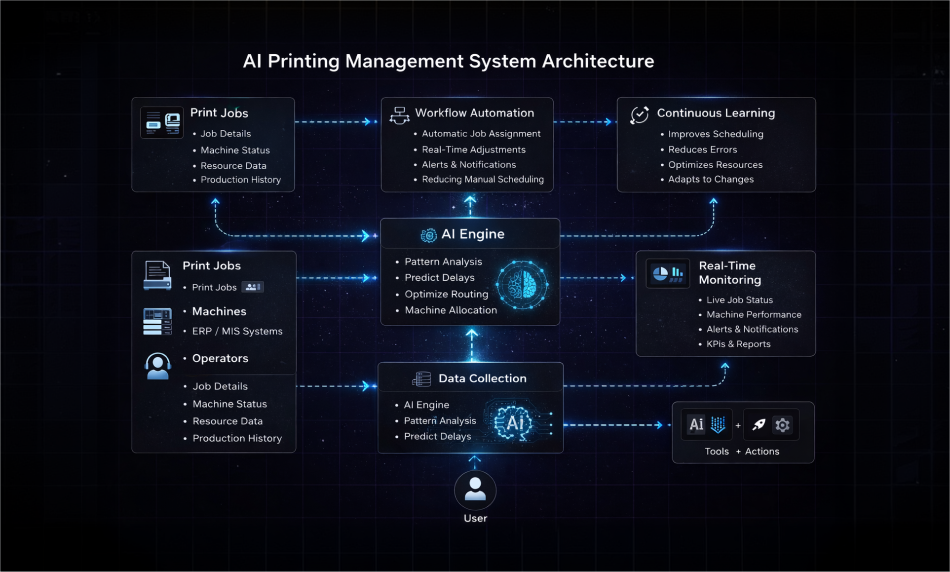
1. Data Collection from Print Jobs, Machines, and Systems
Everything starts with data. When you develop AI printing management software, the system gathers inputs from print jobs, machines, ERP/MIS systems, and operator actions to create a real-time operational view.
- Job details like size, priority, deadlines
- Machine status such as speed, errors, availability
- Resource data including ink, paper, and usage
- Historical production data for pattern analysis
2. AI Engine for Decision-Making and Optimization
This layer powers the intelligence behind AI printing management software development. It analyzes incoming data, detects patterns, and makes decisions to improve efficiency and reduce delays.
- Predicts delays and bottlenecks
- Optimizes job sequencing and routing
- Recommends best machine allocation
- Continuously improves using past data
If you are planning to integrate AI models, this is where they operate.
3. Workflow Automation and Execution Layer
This is where decisions turn into action. In AI printing operations management software development, automation ensures tasks are executed instantly without manual coordination.
- Automatically assigns jobs to available machines
- Adjusts schedules based on real-time conditions
- Triggers alerts for delays or issues
- Reduces dependency on manual scheduling
4. Real-Time Monitoring and Control Dashboard
Visibility is critical when you create AI printing management software. This layer gives you full control over operations with live tracking and insights.
- Live tracking of job progress and machine status
- Alerts and notifications for issues
- Performance metrics and KPIs
- Reporting for better decision-making
This is essential in creating AI printing workflow software with real-time monitoring, where decisions rely on live data.
5. Continuous Learning and Improvement
A key advantage of AI print management software development is that the system keeps learning and improving with every cycle.
- Improves scheduling accuracy over time
- Reduces recurring errors
- Optimizes resource allocation continuously
- Adapts to changing workloads
For businesses scaling operations, this approach aligns with how to integrate AI into your printing workflow effectively.
This is how you develop an AI printing software that does more than manage workflows. It builds a system that continuously improves performance.
Where Does It Deliver the Most Value? Real Use Cases of AI Printing Operations Management Software Development
When you develop AI printing management software, each use case targets a specific operational problem. The value comes from how the system makes decisions and improves outcomes in real time.
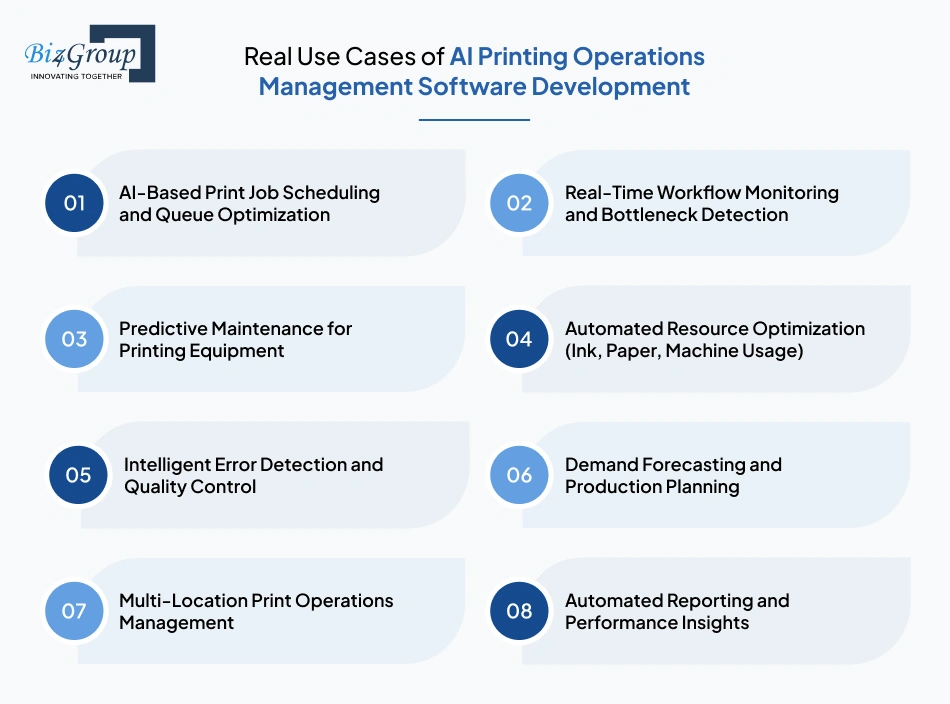
1. AI-Based Print Job Scheduling and Queue Optimization
This solves one of the biggest bottlenecks in printing operations, manual job scheduling. Instead of relying on static rules or human judgment, the system continuously evaluates incoming jobs, deadlines, machine availability, and processing time. It then dynamically assigns and reorders jobs to maximize throughput and avoid delays.
Example: A print service provider handling bulk and urgent orders uses AI printing operations management software development to automatically prioritize high-value jobs. When a rush order comes in, the system reshuffles the queue, assigns it to the fastest available printer, and adjusts other jobs without disrupting the workflow.
2. Real-Time Workflow Monitoring and Bottleneck Detection
This use case focuses on visibility and control. The system tracks every stage of the printing process, from job intake to final output. When delays occur, it identifies exactly where the slowdown is happening and why, allowing immediate corrective action.
Example: A production manager notices delivery timelines slipping but cannot identify the issue. After implementing creating AI printing workflow software with real-time monitoring, the system highlights that the finishing stage is overloaded. The team redistributes tasks, and delays are reduced significantly.
3. Predictive Maintenance for Printing Equipment
Unplanned downtime is expensive and disruptive. This use case analyzes machine performance data over time to detect patterns that indicate potential failures. Instead of reacting after a breakdown, the system schedules maintenance proactively.
Example: A printing facility frequently experiences unexpected printer failures during peak hours. After adopting developing AI printing management software with predictive maintenance features, the system identifies early warning signs like temperature spikes and reduced output speed, allowing maintenance to be scheduled before failure occurs.
4. Automated Resource Optimization (Ink, Paper, Machine Usage)
This use case addresses cost inefficiencies. The system analyzes how resources are being used across jobs and identifies areas where waste can be reduced. It then recommends or automatically applies optimized configurations.
Example: A packaging company notices rising material costs but cannot pinpoint the cause. After they build AI printing management system, the software identifies inefficient layout patterns and excessive ink usage in certain jobs, helping reduce waste and lower operational costs.
5. Intelligent Error Detection and Quality Control
Printing errors often lead to rework, delays, and material loss. This use case uses pattern recognition and real-time monitoring to detect inconsistencies early in the production process, before they scale.
Example: During a large batch print, the system detects slight misalignment in the initial outputs. With AI print management software development, the process is paused immediately, preventing the entire batch from being wasted and saving both time and cost.
6. Demand Forecasting and Production Planning
This use case helps businesses prepare for future demand instead of reacting to it. The system analyzes historical data, seasonal trends, and order patterns to predict upcoming workloads and adjust production planning accordingly.
Example: A print-on-demand company sees unpredictable spikes during promotional events. Using AI printing management platform development, the system forecasts increased demand based on past campaigns and prepares resources in advance, ensuring smooth operations during peak periods.
7. Multi-Location Print Operations Management
Managing multiple locations without centralized control creates inefficiencies. This use case connects all facilities into a unified system, allowing better coordination, load balancing, and performance tracking.
Example: A company operating across multiple cities struggles with uneven workload distribution. When they develop an AI printing software, the system automatically routes jobs to locations with available capacity, reducing delays and improving turnaround time.
8. Automated Reporting and Performance Insights
This use case focuses on decision-making. The system collects operational data and converts it into actionable insights, helping businesses identify inefficiencies and improve performance over time.
Example: A business reviews system-generated reports and discovers that certain machines are consistently underutilized. With printing process management software development with AI, they redistribute workloads and increase overall production efficiency without adding new resources.
If you want to explore how these capabilities translate into real implementations, AI use cases in the printing can give you a broader perspective.
What Core Features Should You Include When You Develop AI Printing Management Software?
Once you understand the use cases, the next step is translating them into actual features. When you develop AI printing management software, these are not optional add-ons. These are the core capabilities that make your system functional, scalable, and reliable in real-world operations.
1. AI-Based Print Job Scheduling and Optimization
Scheduling is where most inefficiencies begin. This feature uses AI to automatically prioritize, assign, and adjust print jobs based on deadlines, job complexity, and machine availability. It removes the need for manual coordination and reduces delays. When you create AI printing management software, this feature ensures that urgent jobs are handled on time while maintaining overall workflow balance. It also adapts dynamically when new jobs enter the queue or machines become unavailable.
2. Real-Time Workflow Monitoring and Visibility
Without visibility, decision-making becomes reactive. This feature provides a centralized view of all ongoing jobs, machine status, and workflow stages in real time. It allows operators and managers to track progress and identify issues instantly. In AI print management software development, real-time monitoring is critical for maintaining control. It ensures that delays, bottlenecks, or errors are detected early before they impact delivery timelines.
3. Intelligent Resource Optimization
Printing operations consume significant resources like ink, paper, and machine time. This feature analyzes usage patterns and optimizes how resources are allocated across jobs to minimize waste and reduce costs. When you build an AI printing management system, resource optimization directly impacts profitability. It ensures that every job uses the most efficient configuration without compromising output quality.
4. Predictive Maintenance and Machine Health Monitoring
Machine downtime can disrupt entire production schedules. This feature tracks equipment performance and identifies patterns that indicate potential failures. It helps schedule maintenance before breakdowns occur. In AI printing operations management software development, predictive maintenance improves reliability and reduces unexpected interruptions. It also extends the lifespan of printing equipment.
5. Automated Error Detection and Quality Control
Errors in printing can lead to rework, wasted materials, and missed deadlines. This feature uses AI to detect inconsistencies such as color variations, alignment issues, or print defects during production. When you develop AI printing management software, this capability ensures quality control at every stage. It prevents small issues from turning into large-scale production problems.
6. Smart Analytics and Reporting Dashboard
Data is only useful when it leads to better decisions. This feature collects operational data and presents it through dashboards and reports that highlight performance trends, inefficiencies, and improvement areas. In printing management software development with AI, analytics help you understand what is working and what needs attention. It enables continuous optimization of your workflows.
7. Integration with ERP, MIS, and Existing Systems
Printing operations rarely run in isolation. This feature allows your system to connect with ERP, MIS, and other business tools to ensure seamless data flow across departments. When you invest in custom AI printing software development, integration ensures that your printing workflows align with broader business operations such as order management, inventory, and billing. This is also where strong AI integration services become important to connect all systems without disruption.
8. Role-Based Access and Workflow Control
Different users need different levels of access and control. This feature allows you to define roles, permissions, and workflows to ensure secure and efficient system usage. In development of AI printing software, role-based access improves accountability and prevents unauthorized changes that could impact operations.
These features form the backbone of any system when you develop AI printing management software. Without them, the system may function, but it will not deliver the efficiency, control, and scalability your business needs.
Next, we move beyond the basics and look at advanced capabilities that can give you a competitive edge.
Want to Go Beyond Basics? Advanced Features in AI-Powered Print Management Platform Development
Core features help you run operations. Advanced features help you scale, predict, and stay ahead. When you move toward AI-powered print management platform development, these capabilities bring deeper intelligence into your system and reduce the need for constant manual oversight.
|
Advanced Feature |
What It Does |
How It Helps in Real Operations |
|---|---|---|
|
This feature continuously tracks machine performance such as temperature, speed, and error patterns. It identifies early signs of wear or failure and triggers maintenance before breakdowns happen. It plays a key role in developing AI printing management software with predictive maintenance features. |
A production unit avoids sudden printer failures during peak hours because the system schedules maintenance in advance based on usage trends, not guesswork. |
|
|
The system analyzes past orders, seasonal trends, and customer behavior to predict future demand. It helps you prepare resources, workforce, and machine capacity ahead of time instead of reacting late. |
A print-on-demand business anticipates a surge during festive seasons and prepares capacity in advance, avoiding missed deadlines and last-minute pressure. |
|
|
Intelligent Job Prioritization Engine |
This feature evaluates job urgency, deadlines, and business value in real time. It dynamically reshuffles job queues to ensure the most critical tasks are always handled first without manual intervention. |
A high-priority client order is automatically moved ahead in the queue and assigned to the fastest available machine, improving delivery timelines and client satisfaction. |
|
IoT-Enabled Smart Printer Integration |
Printers and devices are connected to the system through IoT, allowing real-time data exchange. This enables remote monitoring, control, and faster decision-making based on live machine data. |
A company monitors all printers across locations from a single dashboard and adjusts workloads instantly based on machine availability and performance. |
|
Self-Optimizing Workflows |
The system continuously learns from completed jobs, errors, and delays. Over time, it improves scheduling, routing, and execution without needing manual updates or reconfiguration. |
A printing business notices that its workflows become faster and more efficient over time as the system learns which processes work best under different conditions. |
|
AI-Based Anomaly Detection |
This feature identifies unusual patterns in machine behavior, job processing, or output quality. It helps catch hidden issues that may not be visible through manual monitoring. |
The system detects an unusual slowdown in a printer and flags it early, allowing the team to investigate before it impacts production. |
|
Dynamic Cost Optimization Engine |
The system evaluates different ways to execute a job and selects the most cost-efficient option based on resource usage, machine availability, and time constraints. |
A business reduces ink and energy costs by automatically routing jobs to machines that deliver the best efficiency for specific tasks. |
|
AI-Powered Print Simulation |
Before executing a job, the system simulates the process to identify potential issues such as layout errors, resource waste, or time delays. This reduces trial-and-error in actual production. |
A complex packaging job is tested virtually, helping the team avoid costly mistakes and reprints during live production. |
|
This feature allows users to interact with the system through voice commands or chat-based inputs. It simplifies access to information and reduces dependency on manual navigation. |
A manager quickly checks job status or machine performance using voice commands instead of navigating multiple dashboards. |
|
|
The system provides suggestions based on past performance and real-time data. It highlights opportunities to improve efficiency, reduce delays, and optimize processes. |
The system recommends a better job sequence that reduces turnaround time, helping the team improve output without additional effort. |
These advanced features turn your system into more than just software. They make it adaptive, predictive, and capable of improving on its own. They also reflect how modern systems are evolving, as highlighted in top trends in AI product, where automation is moving toward intelligence and self-optimization.
How to Develop AI Printing Management Software Step-by-Step Without Costly Mistakes
Building a successful system is not about coding first. It is about structuring the problem, data, and workflows correctly. When you develop AI printing management software, the order of execution directly impacts performance, scalability, and ROI.
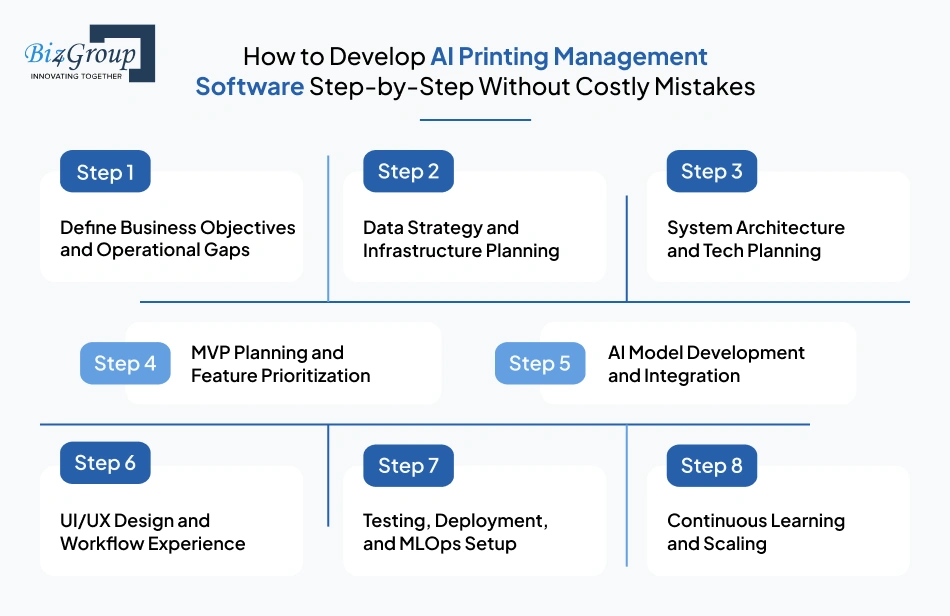
Step 1: Define Business Objectives and Operational Gaps
Start by identifying where your current system is failing. Focus on measurable problems like delays, downtime, or resource waste. This step ensures your custom AI printing software development is aligned with real business impact, not assumptions.
- Identify workflow inefficiencies and bottlenecks
- Define measurable KPIs such as turnaround time and cost reduction
- Map current processes and failure points
- Prioritize problems that need immediate attention
Step 2: Data Strategy and Infrastructure Planning
AI systems depend on data, not just features. Before building anything, you need to define what data you need and how it will flow. This is a critical step in AI printing management software development that many teams overlook.
- Identify data sources like machines, jobs, ERP systems
- Define real-time and batch data pipelines
- Ensure data quality and consistency
- Plan storage and processing architecture
Step 3: System Architecture and Tech Planning
Before development begins, you need a clear system design. This includes how different components interact, scale, and communicate. When you build an AI printing management system, architecture determines long-term flexibility.
- Define system components and data flow
- Choose cloud infrastructure and backend architecture
- Plan integrations with existing systems
- Ensure scalability and security design
Step 4: MVP Planning and Feature Prioritization
Do not try to build everything at once. Focus on solving the most critical problems first through a controlled release. This approach reduces risk in development of AI printing software.
- Identify must-have features for initial release
- Prioritize based on business impact
- Validate assumptions with early users
- Plan phased feature rollout
A structured approach like MVP development helps you launch faster and iterate based on real feedback.
Step 5: AI Model Development and Integration
This is where intelligence is introduced. Models are trained, tested, and integrated into workflows for scheduling, prediction, and optimization. In printing process management software development with AI, this step is iterative, not one-time.
- Build models for scheduling and optimization
- Train predictive models for maintenance and demand
- Continuously test and refine models
- Integrate models into live workflows
If you are planning to integrate AI models, this step becomes central to system performance.
Step 6: UI/UX Design and Workflow Experience
Once the system logic is defined, the interface must make it usable for real teams. Poor usability can limit adoption even if the system is powerful. This step ensures your AI printing management platform development is practical for daily use.
- Design intuitive dashboards and controls
- Simplify workflows for operators and managers
- Ensure clarity in data visualization
- Optimize for accessibility and usability
A strong UI/UX design ensures your system is easy to adopt and operate.
Step 7: Testing, Deployment, and MLOps Setup
Testing is not just about bugs. You need to validate system performance, model accuracy, and real-world behavior before scaling. In AI printing operations management software development, deployment includes continuous monitoring and updates.
- Perform functional and performance testing
- Validate AI predictions and outputs
- Deploy in controlled phases
- Set up monitoring for models and system health
Step 8: Continuous Learning and Scaling
AI systems improve over time. Post-deployment, the system should continuously learn from new data and adapt to changing conditions. When you develop an AI printing software, this step ensures long-term value.
- Monitor system performance and outcomes
- Retrain models with new data
- Add advanced capabilities gradually
- Scale infrastructure with business growth
For long-term automation, combining this with AI automation services helps expand intelligence across your operations.
A well-structured development process reduces risk and ensures your system delivers real value from day one.
Now that you know how to build it, the next question is just as important. What technologies should you use to make it scalable and future-ready?
What Tech Stack Is Required for AI Printing Management Platform Development?
Choosing the right tech stack is not just a technical decision. It directly affects performance, scalability, integration, and long-term maintenance. When you approach AI printing management platform development, your stack should support real-time processing, AI model execution, and seamless system integration.
Here is a practical breakdown of the technologies typically used.
|
Layer |
Technologies |
Why It Matters in AI Printing Management Software Development |
|---|---|---|
|
Frontend (User Interface) |
React.js, Angular, Vue.js |
These frameworks help build responsive dashboards for monitoring jobs, machines, and workflows. A strong frontend ensures your team can easily interact with the system and make quick decisions. |
|
Backend (Application Logic) |
Backend handles business logic, APIs, and system coordination. In developing AI printing management software, this layer ensures smooth communication between AI models, databases, and user interfaces. |
|
|
AI/ML Frameworks |
TensorFlow, PyTorch, Scikit-learn |
These frameworks are used to build models for scheduling, prediction, and optimization. They are central to AI print management software development and determine how intelligent your system becomes. |
|
Data Processing & Pipelines |
Apache Kafka, Apache Spark, Airflow |
These tools manage real-time and batch data processing. They ensure your system can handle large volumes of print job data efficiently without delays. |
|
Database & Storage |
PostgreSQL, MongoDB, Redis |
Databases store job data, machine logs, and analytics. Choosing the right database ensures fast access, scalability, and reliable data management. |
|
Cloud Infrastructure |
AWS, Microsoft Azure, Google Cloud |
Cloud platforms provide scalability, security, and flexibility. They are essential when you build AI printing management system that needs to handle growing workloads and multiple locations. |
|
IoT Integration |
MQTT, OPC-UA, REST APIs |
These technologies connect printers and devices to your system. They enable real-time data collection and remote monitoring, which is critical for automation. |
|
DevOps & MLOps |
Docker, Kubernetes, CI/CD pipelines |
These tools help manage deployment, scaling, and continuous updates. In AI printing operations management software development, they ensure your system runs reliably in production. |
|
Security & Compliance |
OAuth 2.0, JWT, SSL/TLS |
Security is essential when handling operational and business data. These tools protect your system from unauthorized access and ensure compliance. |
|
Analytics & Visualization |
Power BI, Tableau, custom dashboards |
These tools help convert raw data into actionable insights. They support decision-making and performance tracking across operations. |
Selecting the right stack is only part of the equation. You also need the right expertise to implement and integrate everything effectively. This is where working with an experienced AI development company can make a significant difference in how smoothly your system comes together.
Now that you understand the technology side, the next question most decision-makers ask is straightforward. How much does it actually cost to build AI printing management software?
Also Read: Next JS Development Company
How Much Does It Cost to Build AI Printing Management System in the USA?
If you are planning to build an AI printing management system, one of the first questions is cost. In most cases, the cost of AI printing management software development ranges between $30,000 to $250,000+. This varies based on features, AI complexity, integrations, and scalability requirements.
A basic system with limited automation will cost significantly less than a fully advanced platform with predictive intelligence, real-time monitoring, and multi-location support.
Feature-Wise Cost Breakdown in AI Printing Management Software Development
Understanding where your budget goes helps you plan better and avoid overspending during custom AI printing software development.
|
Feature / Module |
Estimated Cost Range |
What Impacts the Cost |
|---|---|---|
|
AI Job Scheduling & Optimization |
$5,000 – $25,000 |
Complexity of scheduling logic, real-time adjustments, AI model accuracy |
|
Real-Time Monitoring Dashboard |
$5,000 – $20,000 |
UI complexity, data refresh rate, visualization depth |
|
Predictive Maintenance System |
$10,000 – $40,000 |
Data availability, model training, machine integration |
|
Resource Optimization Engine |
$5,000 – $20,000 |
Level of automation and data analysis required |
|
Error Detection & Quality Control |
$8,000 – $30,000 |
AI model sophistication and detection accuracy |
|
Analytics & Reporting |
$5,000 – $15,000 |
Custom dashboards, reporting depth |
|
ERP/MIS Integration |
$10,000 – $35,000 |
Number of systems, API complexity |
|
Multi-Location Management |
$10,000 – $30,000 |
Scalability, centralized control logic |
|
AI Model Development |
$15,000 – $60,000 |
Model complexity, training data, iteration cycles |
|
Cloud & Infrastructure Setup |
$5,000 – $25,000 |
Cloud provider, scalability, security |
What Factors Affect the Cost of AI Printing Management Software Development?
Several variables influence how much you will spend when you develop AI printing management software.
- Feature complexity
More advanced features like predictive analytics and automation increase development time and cost - Level of AI integration
Basic automation costs less than systems with advanced learning and optimization - Data availability and quality
Poor or unstructured data increases the effort required for model training - Integration requirements
Connecting with ERP, MIS, IoT devices, and legacy systems adds complexity - Scalability needs
Systems designed for multi-location or enterprise use require stronger infrastructure - Development team location and expertise
Costs vary depending on whether you hire in-house teams or external partners
Hidden Costs in AI Print Management Software Development
Many businesses underestimate these costs during planning.
- Data preparation and cleaning
Preparing usable data for AI models often takes significant time and effort - Model training and re-training
AI systems require continuous updates to maintain accuracy - Infrastructure scaling
As your operations grow, cloud and storage costs increase - Maintenance and updates
Ongoing support, bug fixes, and feature enhancements add to long-term costs - User training and adoption
Teams need time and resources to adapt to new systems
How to Optimize Cost When You Build AI Printing Management System
You can control costs without compromising quality if you plan strategically.
- Start with an MVP and scale gradually
- Focus on high-impact features first
- Use cloud infrastructure for flexibility and cost control
- Reuse existing systems and integrations where possible
- Work with experienced teams to avoid rework
If you are evaluating budgets in detail, understanding the cost to integrate AI in printing business can give you a clearer breakdown of investment areas.
Cost should not be seen as an expense alone. It is an investment in efficiency, scalability, and long-term profitability.
Now that you understand the financial side, the next step is equally important. What challenges should you expect and how can you overcome them effectively?
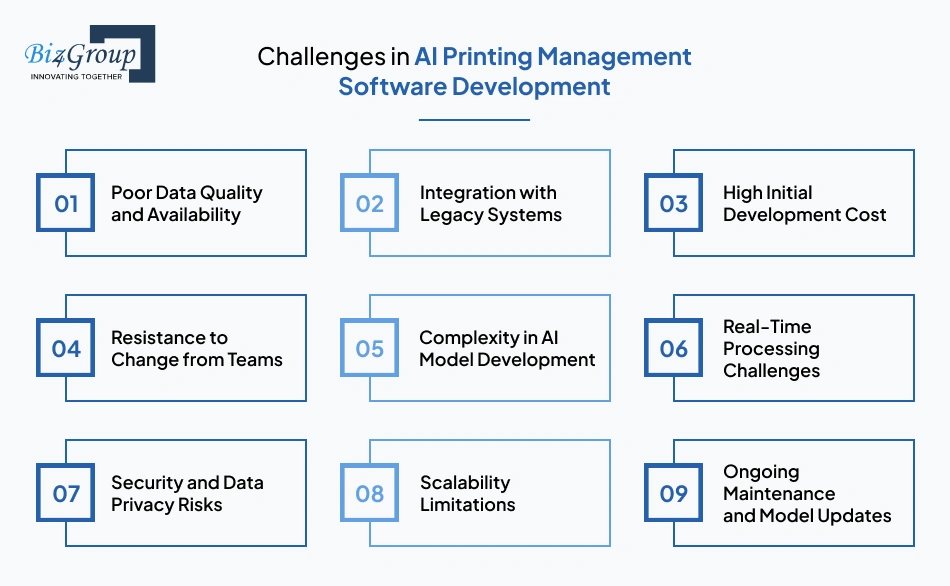
What Are the Biggest Challenges in AI Printing Management Software Development and How Can You Solve Them?
When you develop AI printing management software, challenges are not just technical. They are operational, data-driven, and sometimes cultural. The key is not avoiding them but planning for them early in your AI printing management software development journey.
|
Challenge |
Why It Happens |
How to Solve It |
|---|---|---|
|
Poor Data Quality and Availability |
AI systems rely heavily on clean and structured data. Many printing businesses have fragmented or inconsistent data across systems. |
Start with a data audit. Standardize data collection across machines and workflows. Build pipelines that ensure clean, consistent data before model training. |
|
Integration with Legacy Systems |
Older ERP, MIS, or machine systems are not designed for modern AI integration, making connectivity difficult. |
Use APIs and middleware to bridge systems. Plan integrations early during building AI printing management system to avoid rework later. |
|
High Initial Development Cost |
Advanced features like predictive maintenance and real-time optimization require significant upfront investment. |
Begin with an MVP and scale gradually. Focus on high-impact features first to generate ROI early. |
|
Resistance to Change from Teams |
Operators and managers may resist shifting from manual processes to automated systems. |
Invest in training and user-friendly design. Gradual rollout and clear benefits help improve adoption. |
|
Complexity in AI Model Development |
Building accurate models requires expertise, data, and continuous iteration. Many teams underestimate this effort. |
Work with experienced teams or partners offering enterprise AI solutions to ensure proper model development and deployment. |
|
Real-Time Processing Challenges |
Handling large volumes of data in real time can impact system performance if not designed properly. |
Use scalable cloud infrastructure and efficient data pipelines. Optimize system architecture for real-time processing. |
|
Security and Data Privacy Risks |
Printing systems handle sensitive business and customer data, making security critical. |
Implement strong encryption, access control, and compliance standards from the beginning. |
|
Scalability Limitations |
Systems built without scalability in mind struggle as business volume grows. |
Design with modular architecture and cloud-based infrastructure to scale seamlessly. |
|
Ongoing Maintenance and Model Updates |
AI systems require continuous updates to stay accurate and effective. |
Set up monitoring and retraining pipelines to keep models updated with new data. |
These challenges are common, but they are manageable with the right approach and expertise. Working with the right team, whether you hire AI developers or partner with experts, can significantly reduce risks and speed up implementation.
With challenges addressed, the final piece is choosing the right partner to bring your vision to life. Let’s look at why Biz4Group is the right development company that makes all the difference.
Looking for Experts? Why Biz4Group Is a Leading Company for AI Printing Management Software Development in the USA
Choosing the right partner is not just about development. It is about understanding workflows, handling complexity, and building systems that actually work in real environments.
When businesses look for companies that develop AI printing management software in USA, they are usually asking: “Can this team handle real-world complexity, not just build software?”
This is where experience with similar platforms matters.
1. Custom Artwork Printing Platform - Udder Color
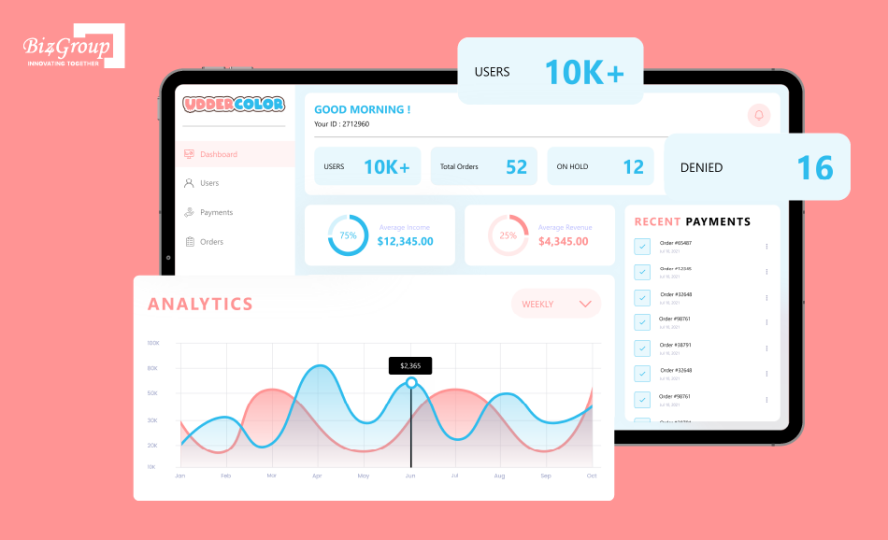
Udder Color involved building a high-scale, custom printing platform that could handle large volumes of user-generated artwork and convert it into printable outputs. The goal was to replace an outdated system with a modern, scalable solution capable of handling thousands of orders efficiently. What makes this relevant to AI printing management software development is how it handled workflow automation, approvals, and order management at scale.
Key Highlights:
- High-quality artwork upload with automated and manual verification
- Multi-step approval workflow before production
- Order management and real-time tracking
- Role-based access for reviewers and operators
- Payment integration with discounts and membership handling
- Activity logs for tracking workflow actions
This is a strong example of how structured workflows and automation layers are built, which is exactly what you need when you build an AI printing management system for handling complex job flows.
2. Custom Print eCommerce Platform - Post Heritage

Post Heritage focused on building a fully customized eCommerce platform for printing business cards, stationery, and marketing materials. The challenge was to create a system where users could design, customize, and order print products without manual intervention. This directly connects with printing management software development with AI, especially in areas like customization, workflow handling, and order automation.
Key Highlights:
- Full product customization (size, design, graphics)
- Pre-built templates for faster order creation
- Save and reuse designs for repeat orders
- Secure payment integration (Stripe)
- Shipping integration (USPS, UPS) for bulk delivery
- End-to-end order processing workflow
This project demonstrates how user input, customization, and production workflows can be streamlined, which is essential when you create AI printing management software for modern printing businesses.
If you are thinking: “I am running a print service company and want to develop AI printing management software, which companies can build this”
Then the answer depends on whether the company has already solved similar workflow challenges. With proven experience in building scalable platforms and intelligent systems, Biz4Group brings both technical depth and domain understanding. You can explore how similar systems are built through their AI printing software solutions and broader AI product capabilities.
The difference between a working system and a scalable one comes down to execution. And that is where the right development partner makes all the difference.
Wrapping Up!
If your operations still rely on manual processes, delays, and limited visibility, scaling will only get harder. This is where AI printing management software development becomes a practical step forward. It helps you move from reactive workflows to systems that optimize, predict, and improve continuously.
Many businesses reach this stage and ask: “we are running a printing business and want to develop AI printing management software to automate our workflows, which companies can help us”
The answer depends on choosing the right approach and the right partner.
With strong experience in custom AI printing software development and building scalable platforms, Biz4Group focuses on delivering solutions that work in real production environments, not just on paper.
If you are planning to build an AI printing management system, the next move is simple. Start building something that actually runs your operations, not just tracks them.
FAQ
1. How can AI printing management software help automate my printing workflows?
When you develop AI printing management software, it automates job scheduling, resource allocation, and workflow tracking. Instead of manual coordination, the system prioritizes jobs, detects delays, and optimizes execution in real time. This reduces errors, improves turnaround time, and gives you full operational visibility.
2. What features should we include when we build AI printing management system?
When you build AI printing management system, focus on core features like AI-based job scheduling, real-time monitoring, predictive maintenance, resource optimization, and analytics dashboards. These features ensure efficiency, cost control, and scalability without adding unnecessary complexity.
3. How to create AI printing software for job scheduling and optimization?
To create AI printing management software for scheduling, you need data from past jobs, machine performance, and deadlines. AI models analyze this data to automatically prioritize and assign jobs. Over time, the system improves accuracy and reduces delays through continuous learning.
4. What is the cost of AI printing management software development in the USA?
The cost of AI printing management software development typically ranges from $30,000 to $250,000+, depending on features, AI complexity, and integrations. Basic systems cost less, while advanced platforms with predictive analytics and multi-location support require higher investment.
5. Which companies develop AI printing management software in USA?
Many businesses search for companies that develop AI printing management software in USA when they want custom solutions. The right partner should have experience in AI, workflow automation, and scalable system development, along with proven projects in similar domains.
6. Can AI help reduce printing errors and operational costs?
Yes. With AI print management software development, the system detects errors early, optimizes resource usage, and reduces reprints. It also improves machine utilization and minimizes waste, which directly lowers operational costs over time.
7. How long does it take to develop AI printing management software?
The timeline for development of AI printing software depends on scope and complexity. An MVP can take 2 to 4 weeks, while a full-scale system with advanced features may take 6 to 8 weeks. A phased approach helps you launch faster and scale gradually.
