Location :
Orlando, FL, USA
Location :
Orlando, FL, USA +1 (407) 714-1616
 info@biz4group.com

















Imagine a digital system that doesn’t wait for instructions but instead, understands your business goals, learns from real-time feedback, and takes independent actions to get the job done.
Read More
 AI Summary Powered by Biz4AI
What happens when your RCM team spends its day chasing payer responses, correcting claim issues, and moving information between systems instead of resolving the work that actually drives revenue?
The answer is operational drag more manual effort, slower follow-ups, and valuable staff time tied up in repetitive workflows.
Prior authorization alone creates substantial friction: physicians complete an average of 39 requests per physician, per week, and 94% say the process delays necessary patient care. Similar bottlenecks can extend across eligibility, claims, denials, and payer follow-up.
So, how can healthcare organizations solve these bottlenecks?
Well, build AI agents for healthcare revenue cycle management to give these workflows an intelligent execution layer that can interpret context, retrieve relevant information, perform defined actions, and escalate exceptions when human judgment is required.
For that to work in production, the AI agent must be engineered around the realities of healthcare RCM which include:
That is exactly where AI agent development for healthcare revenue cycle management becomes an engineering discipline rather than a simple automation exercise.
With that on table if you’re thinking along this line, “I manage revenue cycle operations for a healthcare organization, and my team spends too much time handling repetitive eligibility, claims, and denial workflows. I want to build AI agents to reduce this workload, but I am not sure where to start.”
Then this guide will walk you through the workflows, integrations, security controls, development process, costs, risks, and partner considerations involved in building RCM AI agents for production starting with where you should begin.
Start with revenue cycle workflows that are high-volume, rule-driven, data-accessible, and action-oriented. These are the processes where an AI agent can retrieve the required context, apply workflow logic, execute defined tasks, and route exceptions without creating another layer of manual work.
63% of healthcare organizations have already integrated AI or automation into the revenue cycle, making workflow prioritization the practical next step
Now, let’s take a deeper look at which healthcare revenue cycle workflows are best suited for AI agents:
Prior authorization should be high on the automation list because it involves repeated data collection, payer-specific requirements, documentation checks, submission tracking, and time-sensitive follow-up.
Under CMS-0057-F, impacted payers must decide standard prior authorization requests within 7 calendar days and expedited requests within 72 hours, effective January 1, 2026. That makes timely status tracking and exception handling important automation targets.
An agent can support:
Also Read: How to Develop AI Prior Authorization System for Mid-Size Clinics
Eligibility verification is well suited to create AI agents for healthcare revenue cycle management because much of the workflow depends on structured coverage data and defined verification steps.
Prioritize tasks such as:
Claims preparation is a practical target for healthcare revenue cycle AI development when the agent can validate claim information against coding requirements, payer rules, and predefined billing logic.
Focus the agent on:
Also Read: Medical Coding Standards: How AI Optimizes Claims & RCM
Claim-status follow-up is another strong candidate because the workflow can be triggered, checked, updated, and escalated according to defined operational rules.
An agent can handle:
Denial management becomes a strong candidate when the AI agent can access claim history, EOB/ERA data, payer rules, and supporting documentation needed to determine the next workflow action.
Automation can cover:
For workers’ compensation workflows, applicable logic can also account for DWC Fee Schedules, State WC Statutes, and WC Carrier Rules.
Also Read: Develop AI Denial Management Software for Healthcare
At this point, you may be wondering whether an AI product already exists that can handle denial-management workflows and generate evidence-backed appeals.
Then the answer is Yes. Bill Matters, developed by Biz4Group LLC, addresses this use case with an AI denial agent that investigates denied claims, identifies the underlying issue, gathers relevant evidence, and generates an evidence-backed AI appeal for authorized human review before submission.
Therefore, these workflows are practical starting points for AI RCM agent development services because they combine repeatable tasks, measurable outcomes, and defined points for human intervention.
Let Bill Matters investigate denials, build evidence-backed appeals, and move recoveries forward
See Bill Matters in Action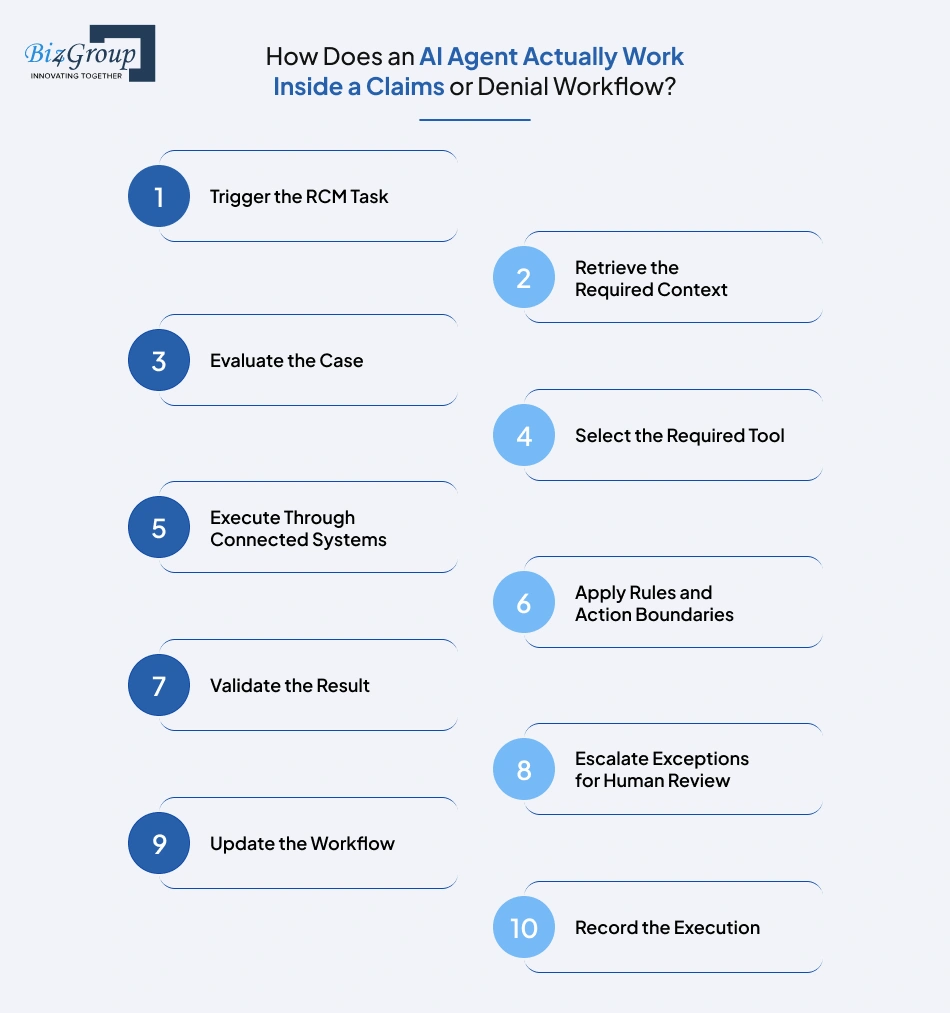
An RCM AI agent moves a claim or denial through a defined sequence:
trigger → context retrieval → reasoning → tool selection → system action → validation → escalation → workflow update.
Let’s take a look at how AI agents work to automate eligibility verification, prior authorization, claims, and denial management.
A well-designed RCM agent follows a controlled path from task intake to action and validation to human review shaping each step. That workflow is the practical foundation organizations need to build AI Agents for healthcare revenue cycle management that can operate reliably within real revenue cycle operations.
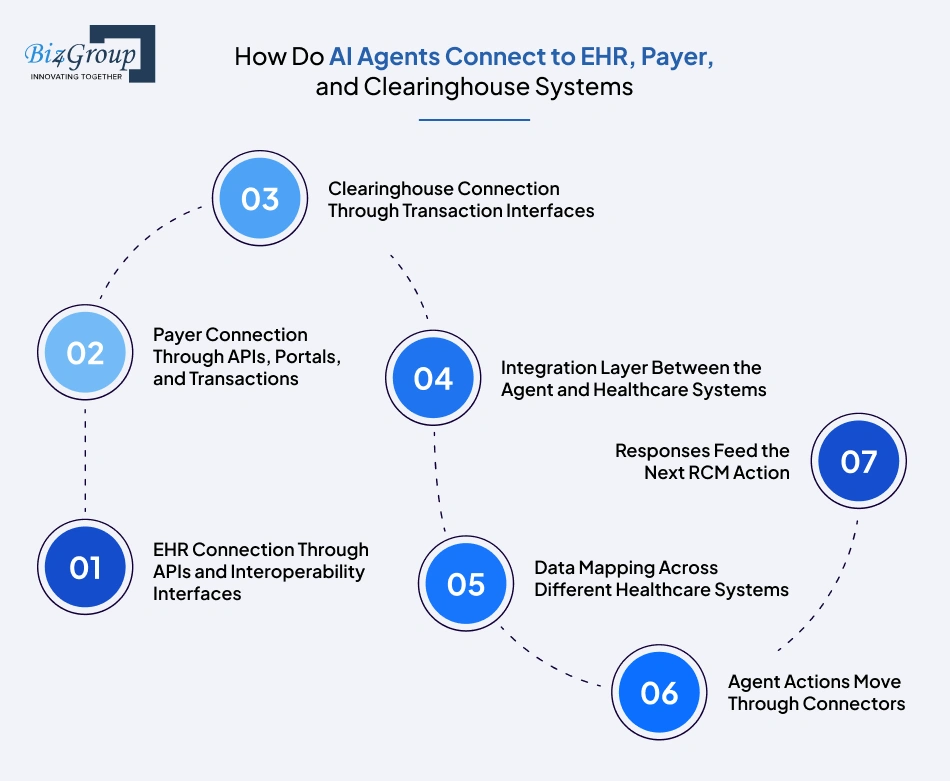
AI agents connect to EHR, payer, and clearinghouse systems through tool-specific connectors and integration services that translate agent requests into supported healthcare transactions and return structured results.
If you're someone wondering, “I run an RCM operation and our teams work across multiple EHR, payer, and clearinghouse systems. I want to develop AI agents that can work across these systems, but I am concerned about integration complexity and data security.”
Well, the connection model is straightforward: the agent requests an action, a connector translates it, the target system processes it, and the response returns to the workflow.
The AI agent sends a defined request through an EHR connector to retrieve or update permitted workflow data. Depending on the EHR, connectivity can use FHIR APIs, vendor APIs, HL7 interfaces, or other supported integration methods.
Also Read: How to Integrate Healthcare Platforms with AI EHRs
Payer connectivity depends on what the payer supports. An AI agent connector can submit requests or retrieve information through payer API connectivity, supported portal workflows, or standardized electronic transactions, then return the response to the RCM workflow.
Clearinghouses act as transaction gateways between provider workflows and participating payers. AI agent can initiate supported eligibility, claim, claim-status, and acknowledgment transactions, receive the returned data, and use it to determine the next workflow step.
The agent should not contain separate logic for every EHR or payer. A connector or middleware layer handles API calls, message transformation, field mapping, transaction routing, and response normalization, giving the agent a consistent interface.
The same RCM field can appear differently across systems. The integration layer maps identifiers, claim fields, status values, payer responses, and document references into a common structure so the agent can interpret results consistently across connected environments.
When the agent needs information or wants to perform an action, it calls the relevant connector with structured parameters. The connector sends the request to the target system, receives the response, and returns usable data to the agent.
The agent evaluates the returned status, transaction result, or retrieved record against the active workflow. A successful response can trigger the next step, while an incomplete or unexpected response can send the case into an exception workflow.
This connection model is central to how to build an AI agent for healthcare RCM workflows because the agent’s usefulness depends on how reliably it can exchange actionable information across the systems that run the revenue cycle.
A practical RCM AI agent technology stack combines an LLM, agent orchestration framework, Python backend, RCM data and retrieval layer, FHIR/HL7 interoperability, and X12 transactions. It also requires integration services, document AI, workflow execution, and an operational application layer.
The table below tells you what technologies are needed to develop AI agents for healthcare revenue cycle management and the role each layer performs in the agent workflow:
|
Architecture Layer |
Technology Used |
Purpose |
|---|---|---|
|
LLM Layer |
Enterprise LLM API / Azure OpenAI / equivalent enterprise model |
Handles reasoning, classification, extraction, and content generation |
|
Agent Orchestration |
LangGraph |
Controls agent state, tool calls, branching, and workflow execution |
|
Backend & Agent Services |
Python + FastAPI |
Runs agent services, APIs, business logic, and tools |
|
Data & Retrieval |
PostgreSQL + pgvector |
Stores RCM data and retrieves relevant records, policies, and documents |
|
Healthcare Interoperability |
HL7 FHIR + HL7 v2 |
Exchanges healthcare data with compatible EHR and clinical systems |
|
Healthcare Transactions |
X12 270/271, 276/277, 837, 835 |
Handles eligibility, claim-status, claim, and remittance transactions |
|
Prior Authorization Connectivity |
FHIR Prior Authorization APIs + applicable X12 workflows |
Handles prior-authorization requests, documentation, and responses |
|
Integration Layer |
REST APIs + API Gateway + healthcare integration middleware |
Connects the agent to EHRs, payer systems, clearinghouses, and RCM applications |
|
Document Intelligence |
Enterprise OCR + Document AI |
Extracts information from EOBs, denial letters, and supporting documents |
|
Durable Workflow Execution |
Temporal |
Runs long RCM workflows, retries failed tasks, and manages waiting periods |
|
Application Layer |
NextJS + ReactJS + NodeJS |
Provides work queues, review screens, approvals, and dashboards |
|
Observability |
OpenTelemetry + centralized logs and metrics |
Tracks agent actions, errors, latency, and workflow performance |
|
Container & Runtime Layer |
Docker + Kubernetes or managed container platform |
Runs and scales application services in production |
For AI agent development for healthcare RCM, the exact implementation can vary by workflow and existing healthcare infrastructure. A denial-management agent may need deeper document retrieval and payer-rule processing, while an eligibility agent may rely more heavily on real-time transaction connectivity.
Python development is well suited to the agent and backend layer, while NextJS development, ReactJS development, and NodeJS development support the operational application around the agent. The important part is that these technologies work together as one RCM system rather than as isolated components.
Build these controls directly into the AI agent’s data layer, tool layer, workflow engine, and human-review layer so access is restricted, actions are controlled, approvals are enforced, and every significant activity is traceable.
If you're thinking along the line, “We are considering AI agents for revenue cycle management, but our healthcare organization has strict HIPAA and compliance requirements. How can we build agents that can access sensitive financial and patient information while maintaining proper security and audit controls?”
The implementation starts with scoped data access, controlled agent permissions, protected data flows, approval gates, and traceable activity across every workflow stage.
Take a deeper look at what we are saying:
Start by identifying where ePHI enters the workflow and exactly which records the AI agent needs for each task. The risk analysis should drive these access decisions rather than a one-size-fits-all configuration.
Build permissions around the AI agent’s task and role, so it receives only the information required to perform that function. HIPAA’s minimum-necessary standard calls for reasonable steps to limit PHI access to the intended purpose. Make sure that you:
For healthcare RCM AI agent development, protect PHI throughout its full processing path rather than only inside the database. That includes retrieval, model input, tool payloads, temporary context, responses, and application logs.
Use predefined tools with tightly scoped operations instead of allowing the model unrestricted access to backend systems. The AI model development can select a function; application logic should determine whether that function is permitted to run.
This is essential when organizations develop AI agents for healthcare revenue cycle management, because the model should never become the final authority over system permissions.
Build human review directly into the execution path for actions that require authorization, judgment, or exception handling. The workflow should pause until the designated reviewer approves the action.
Build auditability into the application and integration layers so each material action can be reconstructed. HIPAA’s security rule requires mechanisms to record and examine activity in systems containing or using ePHI.
Also Read: HIPAA-Compliant AI Healthcare Software Development
Before production, test the controls against realistic failure conditions rather than only successful workflows. AI agent development for revenue cycle management should verify that it fails safely when data, tools, permissions, or workflow conditions do not match expectations.
The result is a controlled operating model in which AI agents for healthcare RCM can work with sensitive revenue-cycle data while permissions, workflow actions, human approvals, and auditability remain enforced by the system around the agent.
Build RCM AI agents with governed access, human approvals, and traceable execution from day one
Discuss Your RCM AI Build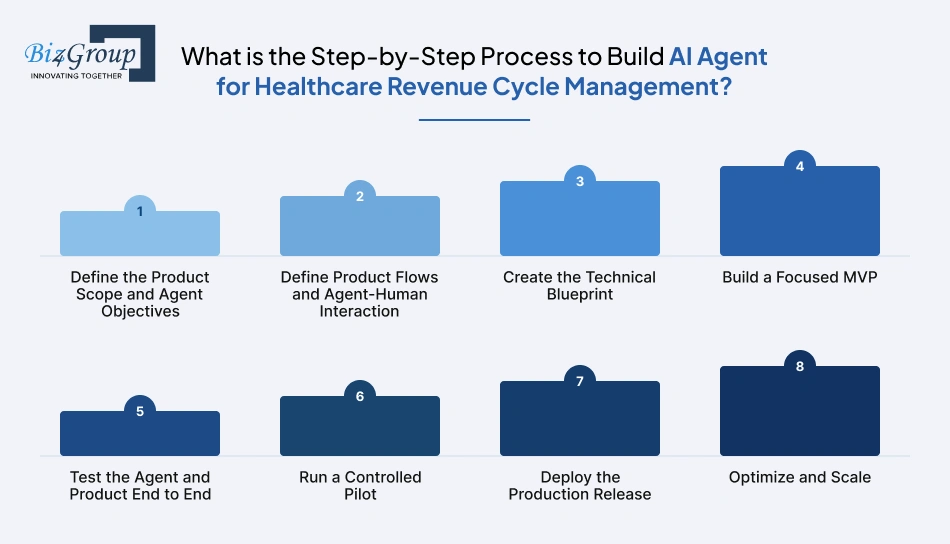
A practical build process moves from scope and agent behavior to product design, architecture, MVP development, testing, pilot deployment, production release, and controlled scale.
If you have also stumbled upon this, “We process a large volume of healthcare claims every month, and our staff spends hours checking claim status, correcting errors, and following up with payers. How can we build AI agents that automate these workflows without losing human oversight?”
The answer is a staged build where each phase produces a testable result before the next level of complexity is introduced.
Start with one RCM problem, one primary user group, and one measurable outcome. Define what the AI agent for healthcare is responsible for and where the first release stops.
To create an AI agent for healthcare RCM, this scope becomes the reference point for every later product and engineering decision.
Map how users, the agent, and the product interact before development starts. This covers the actions the agent initiates, the information users review, and the points where users take control.
A UI/UX design company can help translate these workflows into practical user journeys and interfaces before development begins.
Also Read: Top UI/UX Design Companies in USA
Convert the approved product flow into an engineering design. Define service boundaries, data contracts, agent tools, integration interfaces, and the sequence in which system components communicate.
At this stage, the team should know exactly what it is building before writing the full implementation.
Also Read: Adopt an API-First architecture for business agility
Build one complete vertical slice of the product rather than a collection of disconnected features. The MVP should take a real RCM task from input to agent action to usable outcome.
MVP development services can accelerate this stage, but the MVP should use maintainable code and real interfaces rather than throwaway prototype logic.
Also Read: Top MVP Development Companies in USA
Test the agent as an operating system, not just as a model. Evaluate whether it reaches the correct outcome when inputs, tools, integrations, and workflow states behave as expected and when they do not. You should test it for:
Use the MVP with a limited claim population, workflow, or user group before broad production rollout. The pilot should expose operational gaps and confirm whether the agent performs acceptably in live conditions.
This is where teams considering custom AI agents for healthcare revenue cycle management can validate the business case before expanding scope.
Promote the validated build through controlled release stages with versioning, rollback procedures, and clear ownership for incidents. Production deployment should expand only after the pilot meets the agreed acceptance thresholds.
Treat production performance as the input for the next development cycle. Improve the agent where evidence shows a measurable gap, then expand into additional workflows or integrations.
This is how teams build AI agents for healthcare revenue cycle management as production products: scope tightly, validate the agent, build the MVP, test real operating conditions, pilot carefully, and scale from evidence.
Developing an AI agent for healthcare RCM typically costs $30,000–$160,000+, depending on workflow complexity, integrations, agent capabilities, data requirements, and overall product scope.
|
Development Level |
Estimated Cost |
Scope |
|---|---|---|
|
MVP Level AI Agent for Healthcare RCM |
$30,000–$50,000 |
Single RCM workflow, core agent, limited tools, 1–2 system integrations, basic dashboard, essential testing |
|
Mid-Level AI Agent for Healthcare RCM |
$50,000–$90,000 |
Multiple workflow variations, broader EHR/payer/clearinghouse connectivity, document processing, retrieval, advanced orchestration, review dashboards |
|
Advanced AI Agent for Healthcare RCM |
$90,000–$160,000+ |
Multi-workflow or multi-agent system, extensive integrations, complex orchestration, advanced retrieval and document intelligence, enterprise deployment and monitoring |
Healthcare organizations should invest now because RCM inefficiencies are already measurable, agentic AI is moving into production, and the cost of maintaining manual processes continues to accumulate.
Let's a deeper look at those possibilities:
The investment case starts with the organization's current cost-to-collect, unresolved revenue, staffing requirements, and recovery performance. That gives finance teams a baseline against which an AI initiative can be evaluated.
McKinsey estimates that agentic AI applied across the revenue cycle could reduce cost-to-collect by 30% to 60%.
For organizations evaluating AI agent development for revenue cycle management, the financial baseline should include:
The investment becomes more compelling when the agent contributes to both lower collection costs and higher recovered revenue. Organizations looking to reduce revenue leakage in healthcare using AI can therefore measure value in recovered dollars alongside operating savings.
A practical ROI calculation is:
Revenue recovered + cost avoided + capacity gained − implementation and operating cost = net financial impact
This connects the AI investment to measurable RCM performance and provides a basis for evaluating payback.
Waiting carries its own economic cost. Organizations continue paying for manual processing, unresolved accounts, existing cost-to-collect, and revenue leakage while delaying the operational learning needed to deploy agentic AI effectively.
Deloitte reports that 98% of surveyed healthcare executives expect at least 10% cost savings from agentic AI, while 37% expect savings above 20%.
Its 2026 research also found that 61% were already building or implementing agentic AI initiatives or had secured budgets, while 85% planned to increase investment over the next 2–3 years.
The relevant question is therefore not only what implementation costs, but what measurable value is forfeited while the organization waits.
The global AI in revenue cycle management market is estimated at $28.1 billion in 2026 and projected to reach $70.1 billion by 2030.
Considering custom AI agents for healthcare revenue cycle management, this growth signals a market attracting sustained investment and increasing operational adoption.
For organizations considering building AI revenue cycle management agents from scratch, the case for investing now is straightforward: capture measurable value sooner, build operational experience earlier, and stop carrying the full cost of today's inefficiencies into the next planning cycle.
Turn repetitive RCM work into measurable automation and build an AI strategy around financial impact
Calculate Your AI OpportunityCommon failure points in RCM AI-agent development include poor scope definition, incomplete data, inconsistent agent outputs, fragile integrations, excessive autonomy, weak testing, and premature scaling.
Each can affect revenue, operating cost, or user adoption. We have listed them below for you so that you don't learn the lesson the hard way like we did:
|
Development Challenge |
Business Impact |
How to Avoid It |
|---|---|---|
|
Automating an unsuitable workflow |
Low adoption, weak ROI, and wasted development effort |
Select a high-volume workflow with clear inputs, outputs, rules, and measurable outcomes |
|
Poor or incomplete RCM data |
Incorrect classifications, missed actions, and unreliable results |
Profile source data early and validate claim, payer, remittance, and document data |
|
Insufficiently grounded or inconsistent agent output |
Incorrect next actions, rework, and loss of staff confidence |
Use grounded retrieval, deterministic rules, structured outputs, and evaluation thresholds |
|
Brittle EHR, payer, or clearinghouse integrations |
Failed transactions, workflow delays, and manual intervention |
Add connector validation, retries, error handling, and integration testing before rollout |
|
Giving the agent excessive autonomy |
Incorrect submissions, financial exposure, and operational risk |
Restrict actions by workflow state and require approval for high-impact actions |
|
Testing only successful scenarios |
Production failures when cases contain missing, conflicting, or unexpected data |
Test edge cases, tool failures, payer exceptions, malformed inputs, and escalation paths |
|
Scaling before the first workflow is stable |
Higher maintenance costs and inconsistent performance across use cases |
Validate one workflow against defined KPIs before expanding into broader healthcare revenue cycle automation |
For teams looking to build AI agents for healthcare revenue cycle management, the practical objective is to identify high-impact failure points early, build controls around them, and expand only after the workflow demonstrates reliable performance in real operating conditions.
A successful RCM AI agent is built around a measurable business problem, a defined level of autonomy, reliable system integration, and a development process that proves the product before it scales. That is what turns AI from an interesting capability into something your revenue cycle operation can actually depend on.
For organizations evaluating how to build AI agents for healthcare revenue cycle management, the objective should be clear: build where the economics are measurable, keep execution controlled, and expand only when the results justify the next step. This means that you should build AI agents for healthcare revenue cycle management around real operational priorities not around AI for its own sake.
Biz4Group helps businesses design and develop production-ready AI solutions aligned with their workflows, product goals, and implementation requirements.
Book an Appointment with Biz4Group to discuss your RCM AI agent.
RCM AI agents typically require EHR interfaces, payer connectivity, clearinghouse transactions, claims systems, document repositories, and RCM databases. Depending on the workflow, common standards include FHIR, HL7, and X12 transactions such as 270/271, 276/277, 837, and 835.
These controls should be built into the agent architecture through scoped data access, role-based permissions, controlled tool execution, human approval gates, protected data handling, and traceable activity logs. Agent actions should remain within defined workflow and authorization boundaries.
Organizations should test AI agents using normal cases, edge cases, incomplete data, integration failures, incorrect tool calls, and exception scenarios. Before wider deployment, teams should measure accuracy, escalation rates, processing time, integration reliability, and relevant RCM performance metrics against established baselines.
Developing an AI agent for healthcare RCM typically costs $30,000–$160,000+. An MVP generally ranges from $30,000–$50,000, a mid-level implementation from $50,000–$90,000, and an advanced implementation from $90,000–$160,000+, depending on scope, integrations, and complexity.
The timeline depends on workflow complexity, integration requirements, data readiness, product scope, testing, and deployment requirements. A focused MVP can take 2-4 weeks, while a production-grade multi-workflow or multi-agent implementation can take 4-10 weeks.
The strongest candidates are high-volume, repeatable, data-accessible workflows with defined actions and measurable outcomes. Common starting points include eligibility verification, prior authorization, claims validation, denial management, claim-status follow-up, and payer-related administrative tasks.
The choice depends on workflow complexity. A single agent with multiple tools can handle closely related tasks, while specialized agents are useful when workflows require different tools, data sources, rules, or decision boundaries. A central orchestration layer can coordinate either model.

Our website require some cookies to function properly. Read our privacy policy to know more.