Location :
Orlando, FL, USA
Location :
Orlando, FL, USA +1 (407) 714-1616
 info@biz4group.com


















Imagine a digital system that doesn’t wait for instructions but instead, understands your business goals, learns from real-time feedback, and takes independent actions to get the job done.
Read More

Every delayed personalized print campaign creates pressure somewhere inside the shop floor. One team is fixing spreadsheet mismatches. Another is updating customer versions manually. Prepress operators are checking whether the right offer, image, or QR code reached the right recipient before the files move to production. When campaign volumes increase, that workload grows faster than most print teams can realistically handle.
That pressure is already influencing how print businesses invest in automation. Variable data printing has reached a 33% adoption rate among printing houses because faster personalization is becoming part of everyday client expectations. At the same time, nearly 60% of consumers now prefer customizable printing options, which means print buyers expect campaigns tailored to specific audiences instead of one fixed design for everyone.
Not only this, the global variable data printing market is also projected to reach USD 35.87 billion by 2031. For many production teams, the conversation has shifted toward AI variable data printing software development for print shops after repeated delays, rising manual effort, and scaling issues start affecting turnaround times.
The biggest operational gaps usually appear in areas like:
Many print businesses are now asking how to handle large-scale customized printing jobs and need AI automation for variable data printing because traditional workflows struggle to keep pace with growing personalization demands.
This blog breaks down what matters before investing in variable data printing software development for print shops integrating AI, including workflows, features, integrations, development approach, and scalability considerations for modern print operations.
AI variable data printing software is a print automation system designed to create personalized print materials by combining customer data with dynamic design elements during production. Instead of producing one fixed version of a document, the software allows text, images, offers, barcodes, QR codes, and layouts to change automatically for every recipient or customer group. With reliable AI automation services, the software can also help decide which content variation should be used based on customer data, campaign rules, or behavioral patterns.
For print businesses handling large personalization volumes, AI variable data printing software development for print shops focuses on reducing manual setup work while improving production speed, accuracy, and campaign scalability.
What the software typically does includes:
Traditional variable data printing software helped print shops personalize names, addresses, and basic customer information across print campaigns. That worked well for standard direct mail and segmented print jobs. The challenge started when personalization requirements became more dynamic and campaign timelines became tighter.
Print businesses now deal with larger datasets, multiple audience variations, conditional content rules, and faster delivery expectations. This is where AI-powered VDP workflows introduce more automation into production handling, content selection, and print preparation.
|
Area |
Traditional VDP Software |
AI Variable Data Printing Software |
|---|---|---|
|
Personalization Logic |
Uses fixed rules and manual setup |
Uses AI-driven logic for dynamic personalization |
|
Content Selection |
Teams manually assign templates and offers |
Software can automatically select suitable content variations |
|
Campaign Scalability |
Slows down as personalization complexity increases |
Handles larger personalization volumes with less manual effort |
|
Data Handling |
Relies heavily on spreadsheets and static datasets |
Processes data from CRM, MIS, APIs, and live customer sources |
|
Template Management |
Requires manual management of multiple template versions |
Reduces repetitive template handling through automation |
|
Preflight Checking |
Manual quality checks before print approval |
AI-assisted validation helps detect data and formatting issues |
|
Production Speed |
More operator involvement during setup and execution |
Faster processing with reduced production intervention |
|
Personalization Depth |
Supports basic variable fields |
Supports behavior-based and segment-driven personalization |
|
Workflow Automation |
Limited workflow flexibility |
Automates multiple stages from data mapping to print output |
|
Business Adaptability |
Difficult to adjust for evolving campaign requirements |
Supports scalable and flexible print personalization strategies |
For print shops managing growing personalization demands, the shift is not only about adding AI capabilities into print workflows. It is about reducing production bottlenecks, simplifying campaign execution, and creating a workflow that can support higher-volume customized printing without increasing operational complexity.
Automate print personalization before campaign complexity starts slowing production workflows
See Automation in ActionPersonalized print campaigns are becoming harder to manage with workflows that still depend on manual file preparation, repetitive template handling, and time-consuming quality checks. This growing workload is one of the key reasons many businesses now look to build AI print personalization software for print shops that can support higher-volume customization with less operational strain.
The biggest challenges usually begin in the following areas:
Many print teams still rely on spreadsheets, manual data imports, and repetitive file preparation before campaigns move into production. Even small data mismatches can create printing errors that lead to rework, wasted materials, and delayed deliveries.
Large campaigns often require different offers, images, messages, and layouts for multiple customer segments, and employees end up spending an average of 2.5 hours per day searching for information. Handling hundreds of template versions manually increases production complexity and makes campaign management harder for prepress teams.
As personalization rules become more detailed, quality checking takes longer. Teams must verify customer names, QR codes, promotional offers, and variable fields before printing starts. Missing one error can impact thousands of printed pieces and in order to avoid that 51% of employees spend at least 2 hours daily on repetitive operational tasks.
Many print businesses use disconnected systems for CRM data, MIS workflows, web-to-print storefronts, and production management. This creates delays during data transfer and increases dependency on manual coordination between teams, as much as commercial printers end up losing 10-20% of annual revenue due to workflow inefficiencies.
Clients expect personalized campaigns to move from approval to production within shorter timelines. Print shops handling multiple high-volume jobs often struggle to maintain speed while keeping personalization accurate.
These operational challenges are pushing print businesses toward more automated workflows. Now let us look at how the AI variable data printing software development for print shops helps address these production and scalability issues more efficiently.
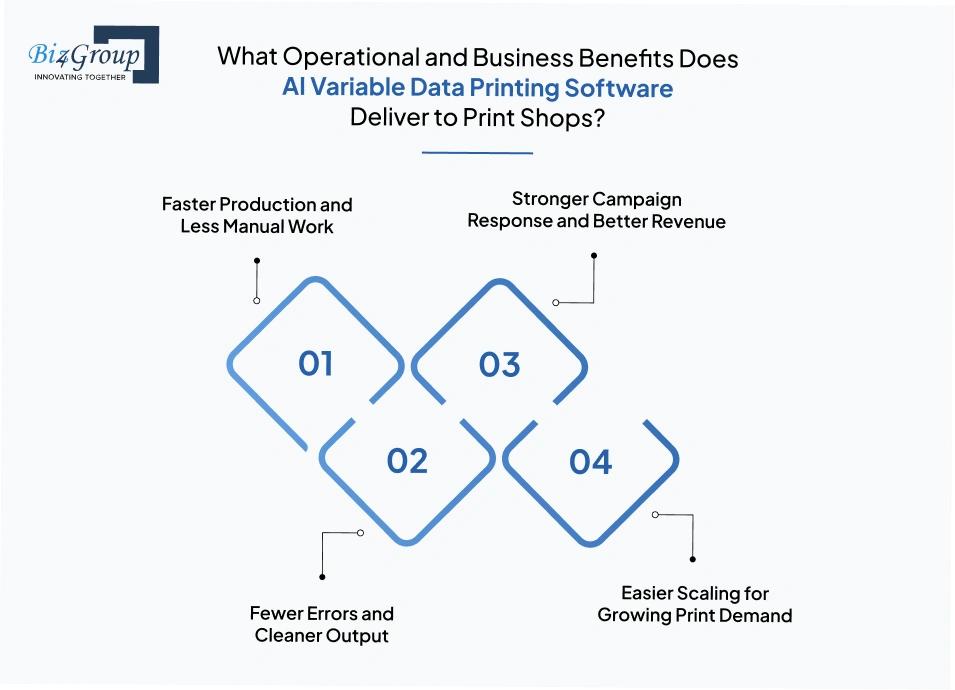
When you look at the development of AI variable data printing software for printing business operations, the real value shows up after it goes live on the floor. Jobs move faster, teams spend less time fixing errors, and personalized campaigns become easier to handle at volume. Here is where the impact becomes visible.
AI-driven workflows cut down the repetitive steps that slow print teams down. Data gets mapped more quickly. Variable content gets prepared with less back-and-forth. Campaigns that once needed constant operator attention start moving with far less friction.
That shift matters because speed is not just a convenience. It changes how many jobs a shop can take on.
Manual personalization leaves too much room for missed fields, wrong versions, and data mismatches. AI variable data printing software reduces that risk by checking more of the workflow before files reach the press.
This is one of the clearest operational gains for print shops that handle high-volume campaigns.
The business side improves too. When messages, offers, and visuals match the audience better, printed campaigns perform better. That gives print shops a stronger case when they sell personalized direct mail and premium variable print services.
That kind of lift turns personalization from a production task into a revenue driver.
Once the workflow is automated, the shop can handle more variation without adding the same amount of manual labor. That makes growth easier to absorb.
These improvements are exactly why print businesses invest in AI variable data printing software development for print shops. The payoff is faster output, fewer errors, stronger campaign results, and a more scalable operation.
Reduce production pressure while scaling campaign volumes with smarter workflow automation
Plan Smarter Print OperationsPersonalized print campaigns move through multiple production stages before reaching the press. That is why print businesses evaluating variable data printing software development using AI for print shops often want clarity on two areas first: how the workflow operates and what system structure supports it behind the scenes.
This workflow is designed to automate how personalized print jobs move from raw customer data into large-scale print production.
The workflow begins by collecting customer information from CRM platforms, spreadsheets, Print MIS systems, marketing databases, web-to-print storefronts, or e-commerce platforms. This information may include names, addresses, demographics, campaign categories, purchase behavior, and personalization preferences. The software gathers this information before campaign processing begins.
Once the data is collected, the system prepares it for production use. Incomplete entries, duplicate records, formatting problems, and missing fields are identified before personalization starts. This step helps maintain cleaner production workflows during large campaign processing.
The system then organizes recipients into different customer groups based on campaign conditions, customer behavior, geographic regions, or promotional targeting requirements. This allows campaigns to handle multiple personalization variations within the same production workflow.
After segmentation, personalized content is assigned to each recipient group. The workflow inserts dynamic text, promotional offers, images, QR codes, barcodes, serial numbers, and location-based messaging into predefined print layouts. At this stage, personalized campaign versions are generated automatically across large datasets.
Before files move into production, the workflow performs automated checks for missing fields, incorrect formatting, image quality problems, and variable content mismatches. Potential production issues are identified before printing begins.
Validated files move through approval workflows and production queues. Campaign assets are routed between prepress teams, approval stages, and production systems without heavy manual coordination. This keeps large personalization workflows moving more efficiently across departments.
Once approvals are completed, the workflow generates print-ready output in formats such as PDF/VT or PPML. These files are then transferred into production environments for final printing. This is the final stage before personalized campaigns move into physical print execution.
While the workflow explains what happens during production processing, the architecture explains what system layers support those operations.
This layer connects external business systems with the personalization environment. It manages incoming campaign data from CRM platforms, MIS systems, marketing databases, web-to-print storefronts, and customer data sources. It serves as the central connection point for production data movement.
This layer stores, organizes, and manages campaign datasets, customer records, personalization fields, and production-related information required during campaign execution. It maintains structured access to variable print data across workflows.
This layer manages personalization rules, campaign logic, audience conditions, and AI-assisted content decision processes used during print personalization. It controls how personalization behavior is applied across different campaign versions.
This layer stores reusable print templates, layout structures, dynamic design assets, and variable field configurations used across personalized campaigns. It supports consistent handling of high-volume template variations.
This layer coordinates production movement between personalization stages, approvals, validation checkpoints, and output workflows. It manages workflow sequencing, production routing, and job coordination across departments. It helps maintain operational continuity during large-scale campaign execution.
This layer manages production-level verification controls, validation settings, approval management, and output consistency monitoring before files move into print production. It supports production accuracy across personalized print jobs.
This layer manages print-ready file generation and production delivery into RIP systems, production servers, digital front-end systems, and digital printing environments. It acts as the final execution environment before physical printing begins.
This combination of workflow automation and layered system architecture allows print businesses to manage large-scale personalization with greater speed and operational control. It also shows why AI variable data printing software development for print shops focuses heavily on automation across both production handling and data-driven personalization workflows.
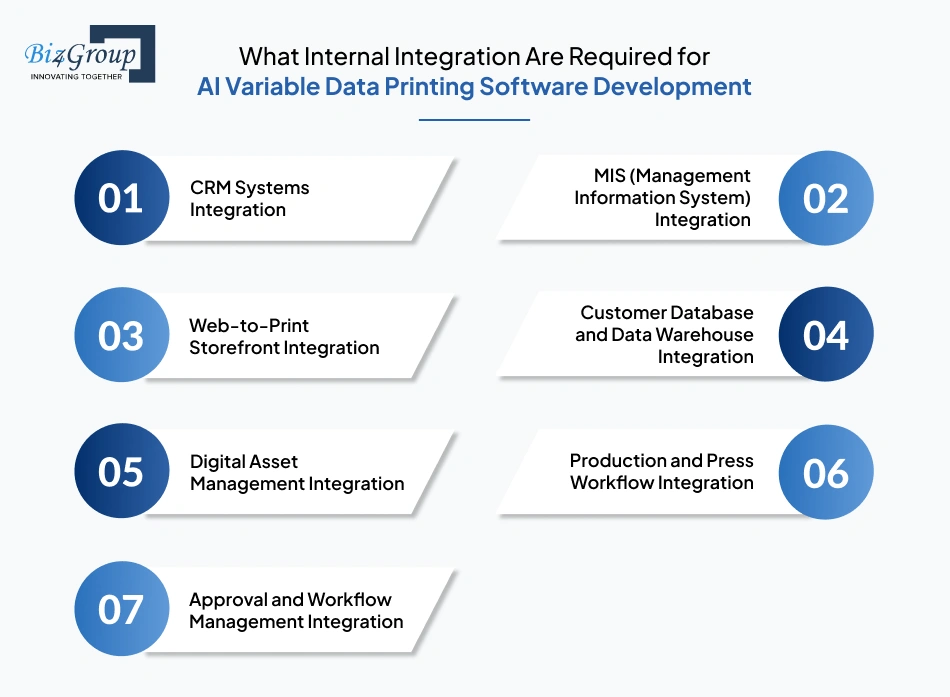
Managing large-scale print personalization often involves multiple systems working together across production, customer management, approvals, and print operations. That is why print businesses planning to develop AI variable data printing software for personalized print campaigns also need to understand which internal integrations are necessary to keep workflows connected, organized, and production-ready.
Also Read: Artificial Intelligence in CRM
Also Read: AI Prepress Automation Software Development for Printing Companies
These integrations help personalized print workflows operate as one connected production environment instead of multiple disconnected systems.
Connect storefronts, CRM workflows, and production tools without operational disconnects
Map My IntegrationsManaging personalized print campaigns becomes difficult when production teams handle multiple template versions, approvals, customer segments, and campaign variations manually. That is why understanding the right software features matters early. Take a look at the key features required for AI-based print customization software development:
|
Essential Feature |
Purpose |
|---|---|
|
Smart Campaign Dashboard |
Gives production teams centralized visibility into campaign activity, job progress, approvals, and print status |
|
Dynamic Content Rules |
Controls how personalized content variations are assigned across customer segments |
|
Multi-Template Campaign Support |
Helps manage multiple campaign versions within the same production workflow |
|
Real-Time Campaign Preview |
Allows teams to review personalized output before production begins |
|
Automated Proof Approval Workflow |
Reduces delays during campaign review and approval handling |
|
Variable Barcode and QR Generation |
Supports personalized tracking, authentication, and customer engagement workflows |
|
Personalized Offer Management |
Helps assign targeted offers and promotional messaging across campaigns |
|
Bulk Campaign Processing |
Supports large-volume personalization without slowing production operations |
|
Print-Ready File Generation |
Converts personalized campaign assets into production-compatible output formats |
|
User Role and Access Control |
Helps manage operational access across production, sales, and approval teams |
|
Production Queue Management |
Organizes campaign movement across prepress and print scheduling workflows |
|
Version History Tracking |
Maintains records of template edits, campaign updates, and approval changes |
|
Multi-Channel Asset Support |
Handles text, graphics, promotional visuals, and personalized media assets together |
|
Reporting and Campaign Analytics |
Tracks campaign activity, production performance, and personalization outcomes |
|
API Connectivity Support |
Helps connect the software with external business and production platforms |
|
Multi-Location Workflow Support |
Helps larger print businesses manage personalization workflows across multiple facilities |
Also Read: A Complete Guide to OpenAI API Integration for AI Applications
A well-structured feature set directly affects how smoothly personalized print campaigns move across production environments. This is where AI variable data printing software development for print shops becomes more operationally valuable, helping teams handle personalization scale and production coordination with greater efficiency.
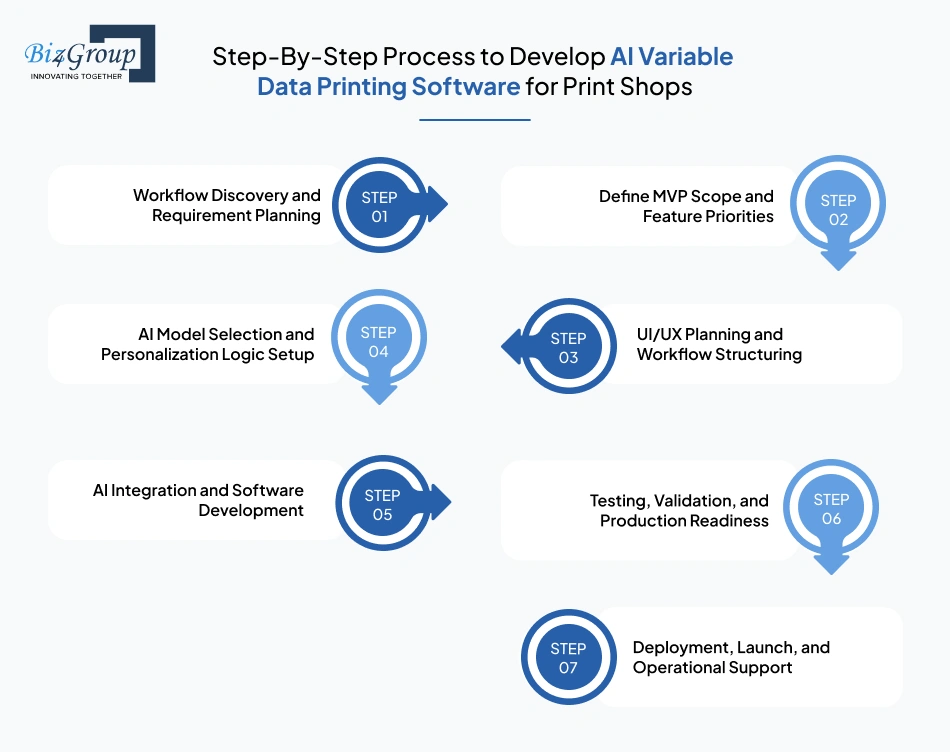
Moving from manual personalization toward automated print production requires a structured execution process. Understanding the development stages of AI variable data printing software for printing shops early help businesses plan software around actual production requirements before implementation begins.
The process starts by identifying how your current print workflow operates, where personalization delays happen, and which production bottlenecks affect campaign handling. This stage defines project goals, operational requirements, integration needs, and personalization expectations.
Key focus areas usually include:
Once requirements are clear, the next step is deciding which features should be included in the initial release. Many print businesses begin with focused workflows before expanding into larger automation capabilities through structured MVP development services.
This stage helps prioritize:
Also Read: Top MVP Development Companies in USA
The software interface is then planned around production usability. This stage focuses on how operators, prepress teams, sales staff, and administrators will interact with the platform during campaign execution. Many print businesses work with a specialized UI/UX design company to simplify workflow handling across departments.
This stage typically covers:
Also Read: Top UI/UX Design Companies in USA
Once workflows are finalized, the personalization engine and automation logic are prepared. This stage focuses on AI model selection based on campaign requirements, audience segmentation needs, and personalization complexity.
Key activities include:
After personalization planning, the platform moves into core development. The engineering team starts integrating workflow automation, campaign management, template handling, and production coordination systems. This stage includes integrating AI models into personalization workflows and production decision handling.
Development tasks generally include:
Before launch, the software undergoes validation to ensure personalization workflows operate correctly across large production volumes. Many businesses work with experienced software testing companies to identify workflow gaps, production risks, and output inconsistencies before deployment.
This stage focuses on:
After testing is completed, the software is deployed into the production environment. Teams are trained on campaign handling, workflow management, and personalization operations before live execution begins. Ongoing support is then used to improve workflows as production requirements grow.
This final stage usually includes:
A structured process keeps personalization workflows aligned with real production needs instead of disconnected software planning. That is why businesses investing in building an AI variable data printing software for printing shop operations usually focus heavily on workflow clarity, scalability planning, and production coordination from the very beginning.
The technology stack determines how efficiently personalization workflows, campaign handling, approvals, integrations, and print production operate together across the system. The technologies below support different operational areas required for large-scale personalized print automation and production management.
|
Technology Area |
Recommended Stack |
Purpose in VDP Workflow |
|---|---|---|
|
Frontend Development |
React.js, Angular |
Manages dashboards, campaign workflows, approvals, and user interaction |
|
Backend Development |
Handles personalization logic, workflow coordination, and production processing |
|
|
Database Management |
PostgreSQL, MongoDB |
Stores customer data, campaign records, templates, and production information |
|
AI and Personalization Engine |
TensorFlow, PyTorch, OpenAI APIs |
Supports personalization logic, audience segmentation, and content automation |
|
API Integration Layer |
REST APIs, GraphQL |
Connects CRM systems, MIS platforms, storefronts, and production environments |
|
Workflow Automation |
Apache Airflow, Camunda |
Manages campaign routing, approvals, and automated production workflows |
|
File Processing Engine |
PDF/VT Libraries, PPML Tools |
Generates print-ready personalized output files |
|
Cloud Infrastructure |
AWS, Microsoft Azure, Google Cloud |
Supports scalable storage, workflow processing, and production coordination |
|
Digital Asset Management |
Cloudinary, Bynder |
Organizes templates, images, graphics, and campaign assets |
|
Authentication and Security |
OAuth 2.0, JWT |
Controls user access, workflow permissions, and production security |
|
Analytics and Reporting |
Power BI, Tableau |
Tracks campaign performance, workflow activity, and production insights |
|
Print Production Connectivity |
EFI Fiery APIs, RIP Integrations |
Connects personalization workflows with digital press environments |
|
Real-Time Notifications |
Firebase, WebSocket Services |
Supports approval alerts, workflow updates, and production notifications |
|
Containerization and Deployment |
Docker, Kubernetes |
Supports scalable deployment and workflow management across environments |
|
Testing and Monitoring |
Selenium, New Relic |
Monitors workflow performance and production stability |
This technology stack gives print businesses a stronger foundation when planning to create an AI variable data printing software for printing business operations.
Align production systems with scalable automation architecture built for long-term operational growth
Build My Tech Roadmap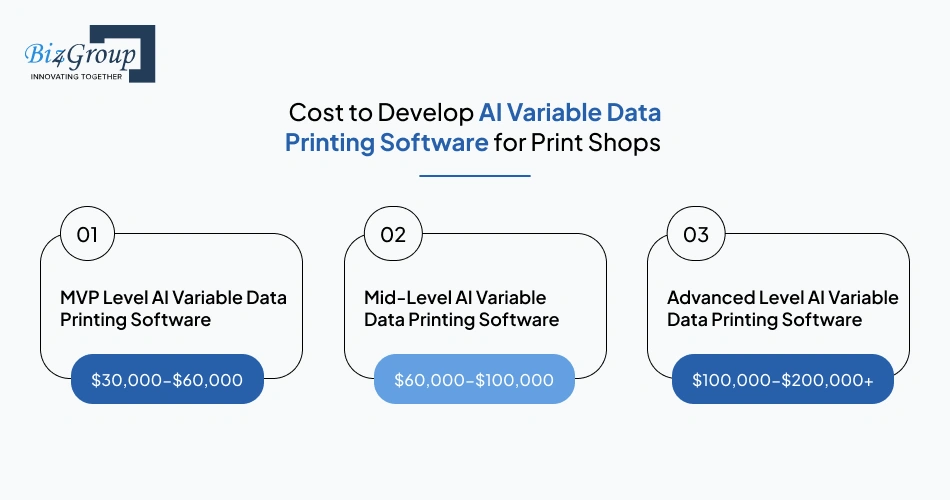
Cost planning becomes easier when print businesses understand how personalization complexity and production requirements affect development scope. For most businesses investing in AI variable data printing software development for print shops, the overall cost usually falls between $30,000-$200,000+ depending on feature depth and production scalability requirements.
|
Development Level |
Estimated Cost Range |
Scope |
|---|---|---|
|
MVP Level AI Variable Data Printing Software |
$30,000-$60,000 |
Covers basic personalization workflows, template handling, campaign management, and limited automation features |
|
Mid-Level AI Variable Data Printing Software |
$60,000-$100,000 |
Includes workflow automation, CRM integrations, approval systems, reporting, and advanced personalization logic |
|
Advanced Level AI Variable Data Printing Software |
$100,000-$200,000+ |
Supports enterprise-scale workflows, AI-driven personalization, multi-location production handling, analytics, and complex integrations |
Estimated Impact: $10,000-$40,000
Campaigns with dynamic offers, audience segmentation, automated content switching, and high-volume personalization require more advanced workflow logic. Costs increase further when multiple campaign conditions and production rules must operate together inside the platform.
Estimated Impact: $5,000-$20,000
Production dashboards, approval workflows, campaign visibility, and operator interfaces directly affect UI/UX design cost. More departments, workflow stages, and production roles usually increase interface planning and frontend development requirements.
Estimated Impact: $15,000-$50,000
The AI integrations cost depends on personalization logic depth, automation requirements, recommendation workflows, and campaign decision handling. Advanced automation workflows generally require larger development and workflow coordination efforts during implementation.
Estimated Impact: $8,000-$35,000
Connecting CRM systems, MIS platforms, RIP environments, storefronts, and production servers increases both integration complexity and testing requirements. Integration costs usually grow with the number of production systems involved.
Estimated Impact: $7,000-$25,000
Generating production-ready files in formats such as PDF/VT or PPML requires specialized print workflow handling. Costs increase when the system must support large campaign volumes and multiple print production environments.
Estimated Impact: $5,000-$18,000
Campaign processing, customer data storage, workflow automation, and production coordination require scalable cloud infrastructure. Long-term operational costs also depend on usage volume, storage requirements, and production activity levels.
|
Hidden Cost |
Estimated Cost Impact |
|---|---|
|
Data cleanup and migration |
$3,000-$12,000 |
|
Production workflow adjustments |
$5,000-$15,000 |
|
Press environment compatibility testing |
$4,000-$10,000 |
|
Additional approval workflow changes |
$2,000-$8,000 |
|
User onboarding and staff training |
$3,000-$9,000 |
|
Ongoing workflow optimization |
$5,000-$20,000 annually |
|
Cloud usage expansion |
$2,000-$12,000 annually |
|
Security and compliance updates |
$4,000-$15,000 |
Businesses planning to create an AI variable data printing software for printing business operations usually see more predictable development outcomes when cost planning aligns closely with real production requirements and long-term workflow goals.
Also Read: How Much Does AI Software Development Cost?
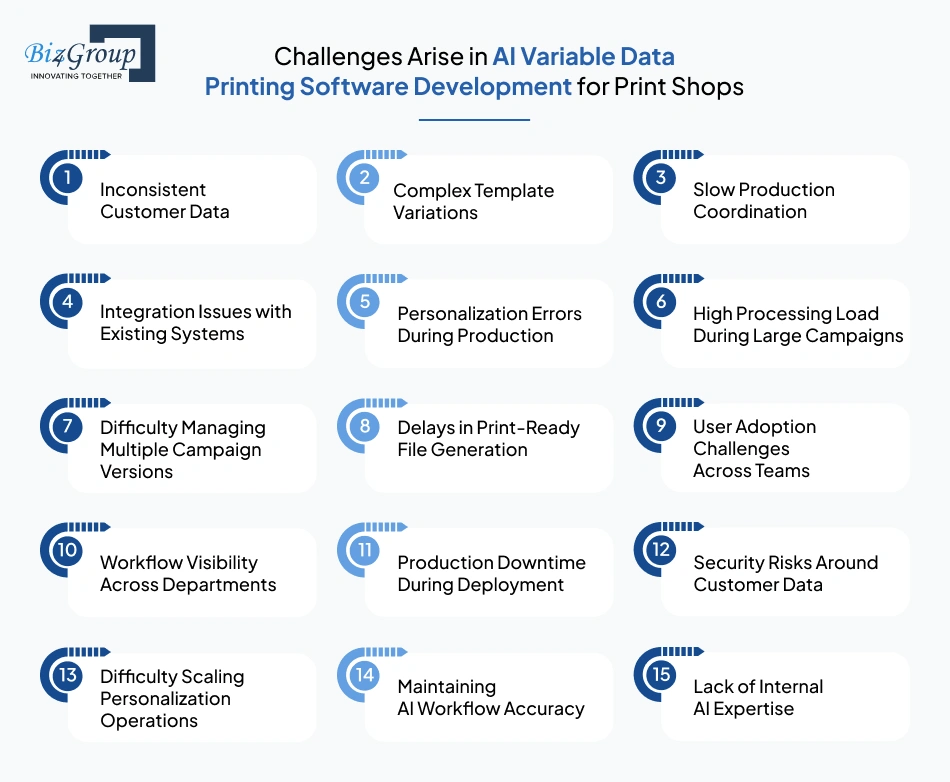
Managing large personalization workflows often brings operational and technical challenges that many print businesses do not fully anticipate during early planning stages. Understanding these issues early helps teams prepare stronger AI solutions for mass personalized print marketing campaigns without creating production delays, workflow instability, or scalability problems later.
|
Development Challenge |
How to Solve It |
|---|---|
|
Inconsistent Customer Data |
Standardize data formatting rules early and implement automated validation before personalization workflows begin |
|
Complex Template Variations |
Use centralized template management and structured personalization rules to reduce manual handling complexity |
|
Slow Production Coordination |
Automate approval routing, campaign movement, and workflow sequencing across departments |
|
Integration Issues with Existing Systems |
Connect CRM, MIS, storefronts, and production systems through stable API-based integrations |
|
Personalization Errors During Production |
Add automated preflight validation and workflow-level quality checks before print execution |
|
High Processing Load During Large Campaigns |
Use scalable cloud infrastructure and distributed workflow processing for high-volume personalization |
|
Difficulty Managing Multiple Campaign Versions |
Organize campaigns through centralized dashboards and version-controlled workflow management |
|
Delays in Print-Ready File Generation |
Optimize output workflows and use dedicated file processing engines for PDF/VT and PPML generation |
|
User Adoption Challenges Across Teams |
Keep workflows simple and provide production-focused onboarding for operators and prepress teams |
|
Workflow Visibility Across Departments |
Use centralized workflow monitoring and role-based dashboards for operational transparency |
|
Production Downtime During Deployment |
Roll out workflows in phases and validate production stability before full-scale deployment |
|
Security Risks Around Customer Data |
Apply role-based access controls, encrypted storage, and permission-level workflow security |
|
Difficulty Scaling Personalization Operations |
Design workflows around modular automation and scalable production architecture from the beginning |
|
Maintaining AI Workflow Accuracy |
Continuously monitor personalization logic and work with experienced AI product development service providers for workflow refinement |
|
Lack of Internal AI Expertise |
Many print businesses hire AI developers with workflow automation and production integration experience to reduce implementation risks |
Also Read: Cost to Hire an AI Software Developer in 2026
These challenges usually appear when personalization workflows grow faster than existing production systems can manage. Addressing them early helps AI variable data printing software development for print shops stay operationally stable, scalable, and easier to manage during long-term production growth.
Businesses planning to upgrade print business with AI-driven variable data printing solutions are usually looking for systems that improve personalization handling without creating additional production complexity.
Many teams begin asking, “we need vendors who can provide AI-based variable data printing solutions for scalable print marketing.” This is where working with an experienced team like Biz4Group LLC becomes operationally important.
As a US-based custom AI software development company, we focus on building systems aligned with real production workflows instead of disconnected automation layers. Our approach to AI variable data printing software development for print shops centers on how personalization workflows operate during campaign execution, approval handling, template coordination, and print production management.
What makes this approach practical is our ability to align workflow automation with actual print operations. Our experience with AI printing software solutions reflects how personalization handling, workflow coordination, and production management operate together inside real business environments.
To understand how this translates into execution, let us look at projects delivered by our team:
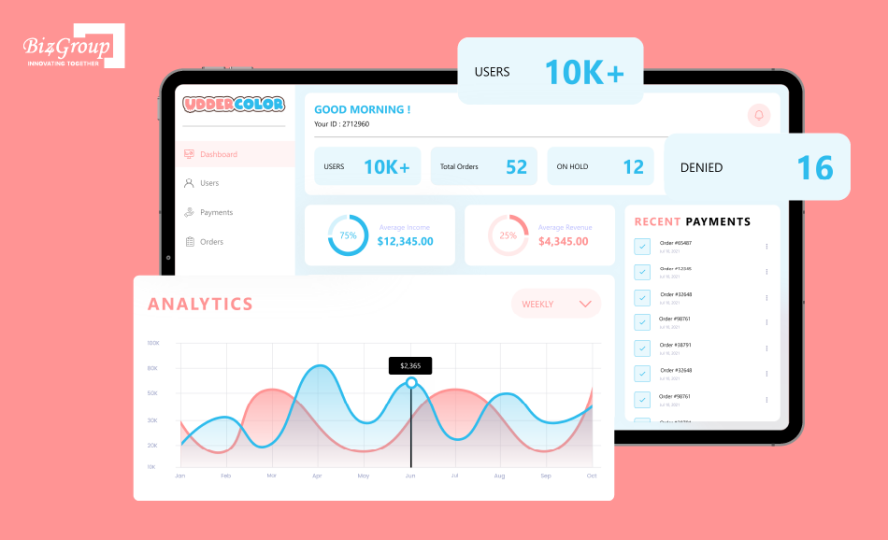
A high-volume custom AI artwork printing platform designed for a leading U.S. printing business, where users can upload designs, select sizes and quantities, and place personalized print orders through a centralized workflow system.
The platform manages artwork uploads, approval handling, order coordination, payment workflows, and production routing within one operational environment. This structure helps maintain organized personalization workflows while supporting scalable print order management.
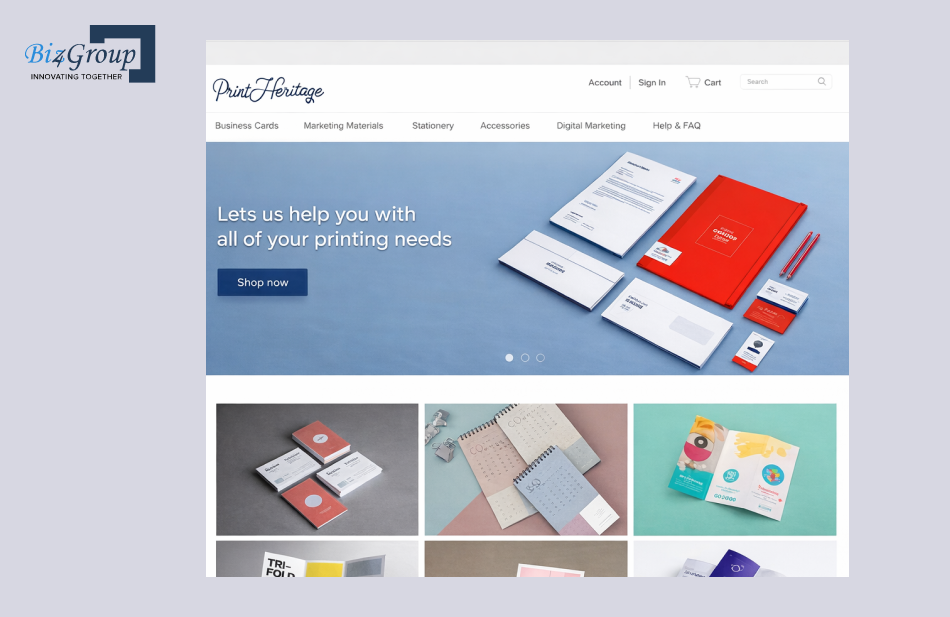
A digital eCommerce platform designed for customized business cards, stationery, and branded print products. Users can personalize layouts, graphics, quantities, and product specifications before placing bulk print orders.
The system supports reusable templates, order management, shipping coordination, and production workflow handling. This helps maintain smoother personalization workflows and more controlled campaign execution across customized print operations.
Still not convinced, here what we offer beyond development:
We offer AI consulting services focused on implementing automation workflows that align with existing production environments instead of disrupting operational processes. This helps businesses scale personalization workflows with better coordination across departments.
Our enterprise AI solutions are structured around how campaign handling, personalization, and production workflows operate inside real print environments instead of isolated software modules.
Our AI portfolio includes workflow automation platforms, personalization systems, production-focused platforms, and generative AI development projects across multiple industries. This broader experience helps us design scalable systems around operational execution and workflow stability.
Working with the right partner is about execution, not just software delivery. With our experience in personalization systems and production-focused implementation, we position ourselves as a reliable team for AI variable data printing software development for print shops. This helps businesses looking to reduce manual effort in personalized printing campaigns using automation software move toward more scalable and operationally stable product in high-volume print environments.
Work with a team that understands production workflows, automation logic, and scalable execution
Talk To Our AI ExpertsPrint businesses are under growing pressure to deliver faster customization without slowing production or increasing operational complexity. This is why AI variable data printing software development for print shops is becoming an important investment for companies looking to improve production speed, campaign handling, and overall execution efficiency.
The real value comes from creating a system that keeps data handling, approvals, print preparation, and production movement more organized across daily operations. That is where working with an experienced AI development company becomes important for long-term execution and scalability.
Businesses evaluating US based companies that develop variable data printing software often look for partners that understand both technology and real production environments. Biz4Group LLC focuses on aligning automation systems with practical operational requirements instead of disconnected software implementation.
So, schedule a consultation call with our team to discuss the right strategy for your print business.
AI helps print businesses segment audiences more accurately based on customer behavior, demographics, purchase history, and campaign conditions. This improves how offers, visuals, and messaging are assigned across print campaigns without increasing manual production effort.
Yes. Enterprise-grade systems can manage campaign approvals, production queues, templates, and print workflows across multiple production facilities from one centralized environment. This helps larger print businesses maintain better operational visibility and coordination.
The overall development cost usually ranges between $30,000-$200,000+ depending on workflow complexity, AI functionality, integrations, production scalability, and enterprise-level customization requirements.
The timeline generally ranges from 3-12+ weeks based on feature scope, workflow complexity, approval systems, AI automation depth, and integration requirements with existing print production environments.
Yes. Most modern platforms are designed to connect with existing MIS systems, CRM software, storefronts, and production tools through APIs and workflow integrations. This helps businesses avoid replacing their entire operational setup.
Commercial print shops, direct mail providers, packaging businesses, promotional print companies, and high-volume print operations benefit the most because they manage larger campaign volumes, multiple customization requirements, and tighter production timelines regularly.

with Biz4Group today!
Our website require some cookies to function properly. Read our privacy policy to know more.