 Location :
Orlando, FL, USA
Location :
Orlando, FL, USA +1 (407) 714-1616
 info@biz4group.com

- Top AI healthcare automation companies in USA help providers reduce repetitive work, lower costs, and improve daily operational efficiency.
- Leading companies automate scheduling, billing, claims, documentation, and patient communication across high-volume healthcare workflows.
- Strong AI healthcare automation vendors USA bring healthcare expertise, secure integrations, and clear execution plans tied to measurable business outcomes.
- Healthcare leaders should evaluate vendors based on experience, automation depth, support quality, and system compatibility.
- The right AI automation partners for healthcare can improve growth capacity, staff productivity, and long-term patient service performance.
- Biz4Group LLC stands out through healthcare-focused automation delivery, real implementations, and scalable workflow transformation capabilities.
Why are many printing businesses still working hard but seeing margins shrink every quarter? In many cases, the issue is not demand. It is the daily workflow behind the jobs. Manual scheduling, delayed approvals, disconnected costing sheets, and limited shop-floor visibility often turn profitable orders into avoidable expense.
For operations managers and production heads, the pressure is practical. They need to know which jobs are delayed, which machines are free, what material is available, and whether a job is still profitable. CTOs and MIS administrators need an AI printing MIS software that connects these moving parts without adding more complexity, and that is exactly where AI printing MIS automation software development creates direct value.
A custom platform can centralize order intake, job costing, scheduling, live tracking, inventory usage, invoicing, and management reporting in one place. It can also use AI to predict delays, balance workloads, and improve daily decisions. These are not vague claims market direction supports this shift. Take a look:
- The print production workflow software market is valued at $1.43 billion in 2026 and is projected to reach $3.51 billion by 2035 with North America holding the leading share at 41%.
- 80% of PSPs have already automated at least part of their workflow processes, and
- S. commercial printing industry expected to reach USD 165.4 million by 2033.
With that being said, if you own or manage a printing business and daily operations feel harder to control, you may now be asking questions like these:
- we are running a printing business and want to develop AI printing MIS automation software to reduce costs and improve workflow efficiency
- we are unable to scale our printing operations efficiently, can AI MIS systems improve productivity
- we are looking to build a printing MIS system with AI automation for job scheduling, tracking, and production management
- we are comparing companies to develop AI printing MIS automation software, which vendors are best in USA
- we want to create a custom AI-powered printing MIS platform for our print shop operations, which companies can help
Well, these are the similar questions many growing print businesses ask before making their next move. The sections ahead break down how modern systems are being built and where AI in printing industry operations deliver measurable gains.
What is AI Powered Printing MIS Automation Software and How It Differs from Traditional Printing MIS Systems?
AI powered printing MIS automation software is a business system built to manage daily operations with more speed, control, and accuracy. In printing, it connects sales orders, production planning, inventory, billing, and reporting inside one platform. Instead of relying on manual updates and disconnected files, businesses use one smarter operating system built around real production needs.
What It Does in Daily Print Operations
A modern AI printing management software can help your team handle core workflows such as:
- Create faster and more accurate job estimates
- Turn approved quotes into production jobs automatically
- Schedule print jobs based on machine load and deadlines
- Track job progress in real time
- Monitor paper, ink, and material usage
- Generate invoices with fewer billing errors
- Alert teams about delays or missed milestones
- Show dashboards for profit, output, and efficiency
- Improve planning through built-in AI workflow automation tools
Knowing what the system does is useful, but most business leaders also want to know how it changes everyday operations compared to older MIS platforms.
|
Aspect |
AI Powered Printing MIS Automation Software |
Traditional Printing MIS Systems |
|---|---|---|
|
Quote Turnaround Time |
Generates estimates quickly using live material costs, machine rates, labor inputs, and job history. |
Quotes are usually prepared manually and often take longer during busy periods. |
|
Job Costing Accuracy |
Uses current production data to improve pricing accuracy and protect margins. |
Costing often depends on old rate cards or manual assumptions. |
|
Job Ticket Creation |
Converts approved quotes into digital job tickets with production details automatically. |
Job tickets are commonly created manually after order approval. |
|
Production Scheduling |
Schedules jobs based on press availability, deadlines, run time, and priority levels. |
Schedules are planned manually and need frequent rework when jobs change. |
|
Press Utilization |
Balances workloads across machines to improve available production time. |
Some presses may be overloaded while others remain underused. |
|
Real-Time Job Tracking |
Shows live status from prepress to printing, finishing, and dispatch. |
Status updates are often shared through calls, emails, or manual entries. |
|
Paper and Ink Control |
Tracks usage trends and predicts replenishment needs before shortages happen. |
Inventory checks often happen after stock issues or excess ordering. |
|
Reprints and Waste Control |
Flags recurring errors, missed specs, and process issues that increase waste. |
Waste is usually reviewed after jobs are completed. |
|
Billing and Invoicing |
Creates invoices from approved job data with fewer pricing and quantity errors. |
Billing often needs manual reconciliation between production and accounts. |
|
Customer Updates |
Sends automated progress updates, proofs, and delivery notifications. |
Customer communication depends on staff follow-up. |
|
Multi-Site Operations |
Centralizes orders, reporting, and workflows across multiple print locations. |
Each location may operate with separate processes and limited visibility. |
|
Management Reporting |
Provides live dashboards for profit per job, output, delays, and machine efficiency. |
Reports are often created later and may not reflect current conditions. |
This shift is not only about new software. It is about gaining clearer control, faster execution, and stronger margins across your print business. The next section looks at how these systems are structured behind the scenes and what makes them work reliably.
Still Running Print Operations Blind?
See how a smarter MIS platform can align your daily workflows faster
Get MIS Strategy ReviewSystem Architecture of AI-Powered Printing MIS Automation Software
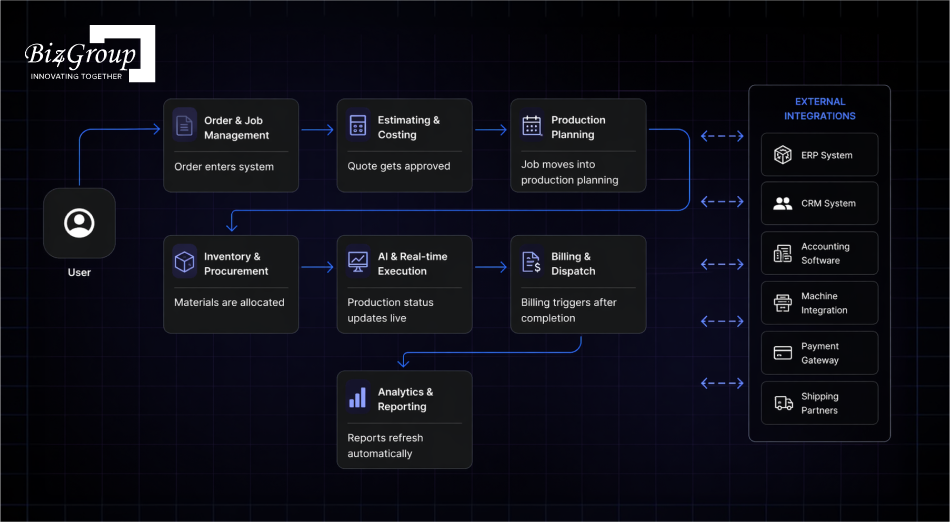
When print operations start slowing down, the real issue is often system flow rather than production effort. Orders, costing, scheduling, inventory, and billing need to work as one connected process. That is why many businesses investing in AI printing MIS automation software development first review architecture before features.
1. User Access Layer
- Controls how internal teams, managers, customers, and vendors enter the system
- Applies role-based permissions for secure access
- Routes each user to the right dashboard and actions
- Keeps approvals and daily tasks organized by responsibility
2. Order and Job Management Layer
- Captures incoming orders from sales teams, portals, emails, or internal staff
- Converts requests into structured production jobs
- Maintains job records from intake to dispatch
- Tracks ownership, deadlines, revisions, and progress stages
3. Estimating and Costing Engine
- Calculates pricing using production rules and business margins
- Standardizes quote creation across teams
- Reduces manual pricing inconsistency
- Protects revenue through better costing control
4. Production Planning Layer
- Assigns jobs to presses, finishing units, and teams
- Balances workload across available capacity
- Reorders schedules when urgent work enters the queue
- Supports smoother plant-level execution
5. Inventory and Procurement Layer
- Tracks stock movement across raw materials and consumables
- Prevents shortages that delay jobs
- Triggers purchasing workflows when stock falls
- Improves buying control and usage discipline
6. AI and Automation Layer
- Detects delays, bottlenecks, and unusual cost patterns
- Suggests smarter scheduling decisions
- Automates repetitive approvals and alerts
- Strengthens daily control through AI integrated printing workflow processes
Also Read: How Much Does It Cost to Integrate AI in Printing Business
7. Integration Layer
- Connects ERP, accounting, CRM, shipping, and machine systems
- Removes duplicate data entry between departments
- Keeps business records synchronized
- Supports end-to-end operational continuity
8. Analytics and Reporting Layer
- Converts daily activity into usable management insights
- Tracks profit, output, delays, waste, and efficiency
- Helps leaders act faster with current data
- Supports planning with trend visibility
The right architecture gives your print business control, speed, and cleaner execution across departments. Many smart printing MIS software solutions succeed because the system foundation is planned correctly before rollout begins.
Where Does Printing MIS Software Automation with AI Create Real Impact: High Value Use Cases
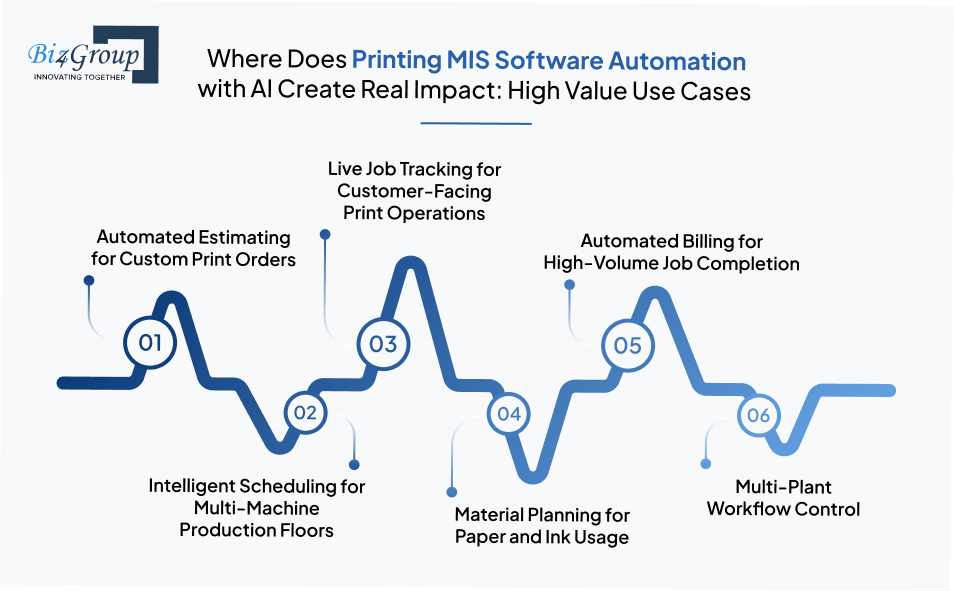
Many print leaders ask, we are facing high operational costs in printing due to manual processes, can AI MIS automation solve this problem The practical way to judge that is by looking at real world AI use cases in printing industry operations where daily workload, delays, and revenue control matter most.
1. Automated Estimating for Custom Print Orders
Commercial printers often receive jobs with different sizes, paper types, finishes, quantities, and delivery timelines. AI-powered MIS systems can process these variables and prepare faster estimates using stored costing logic, historical jobs, and current material rates.
This is widely used by brochure printers, packaging firms, and short-run digital print providers handling frequent quote requests.
2. Intelligent Scheduling for Multi-Machine Production Floors
A print facility may run offset presses, digital machines, finishing units, and packing stations at the same time. AI scheduling assistant can assign jobs based on due dates, machine availability, run time, and current queue load. It is highly useful for plants where rush orders regularly disrupt manual schedules.
3. Live Job Tracking for Customer-Facing Print Operations
Many print businesses lose time answering status calls and internal follow-ups. MIS automation can track each job from artwork approval to printing, finishing, packing, and dispatch. This works well for B2B print vendors, franchise print networks, and publishing operations managing high daily order counts.
4. Material Planning for Paper and Ink Usage
Paper waste, over-ordering, and urgent stock purchases reduce margins. AI systems can study order trends, repeat demand, and material consumption to guide purchasing cycles. This is commonly used in packaging printing, label production, and newspaper printing where material movement is constant.
5. Automated Billing for High-Volume Job Completion
When multiple jobs finish every day, billing delays become common. MIS platforms can connect completed production records with approved quotes and dispatch data to prepare accurate invoices. This is valuable for trade printers and enterprise print houses managing recurring client accounts.
6. Multi-Plant Workflow Control
Large printing groups often split jobs across different locations based on capacity or geography. A connected MIS can route work, track progress, and standardize reporting across all sites. Many AI driven software projects focus here when growth creates coordination challenges.
These examples show why interest in AI printing MIS automation software development usually comes from operational pain, not trends. Print businesses invest when faster execution, tighter control, and scalable workflows become business priorities.
How AI Reduces Costs in Printing MIS Operations?
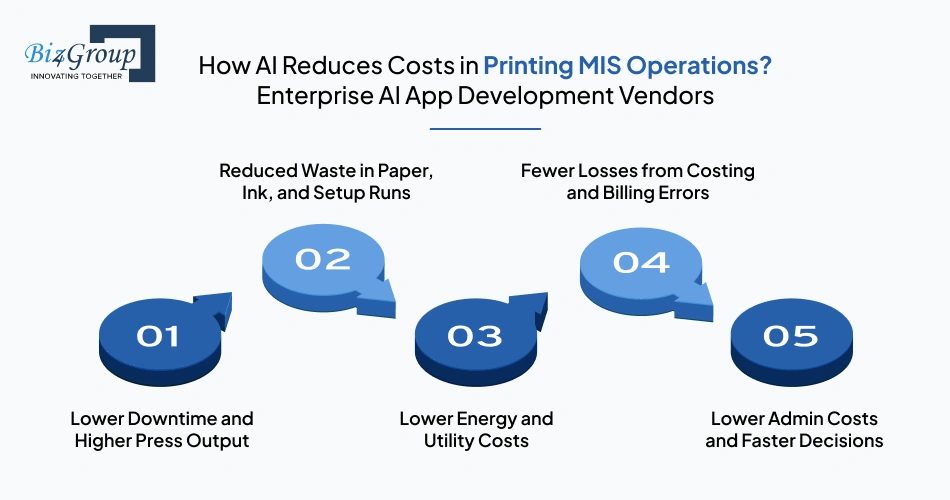
Print businesses rarely lose profit through one major problem. Costs usually rise through idle press hours, paper waste, rushed rescheduling, underquoted jobs, delayed invoices, and extra admin effort. That is why many companies reviewing AI printing MIS automation software development focus on cost leaks first, because they compound every day.
1. Lower Downtime and Higher Press Output
When a press stops unexpectedly, production schedules shift fast. Jobs get delayed, teams wait, and overtime often follows. AI systems monitor machine patterns and flag service risks early, helping teams act before stoppages affect the day. Industry reports show AI-enabled systems are reducing downtime by 20%+.
That usually lowers costs through:
- Fewer emergency repairs
- Less overtime recovery work
- Better use of scheduled shifts
- More billable machine hours
2. Reduced Waste in Paper, Ink, and Setup Runs
Material waste can quietly damage margins, especially in high-volume print shops. AI can identify repeat setup issues, incorrect job sequencing, and unusual usage trends using trained AI models linked to production data. Even a 1% reduction in waste can create meaningful financial gains.
Common savings areas include:
- Lower paper spoilage
- Reduced ink overuse
- Fewer reprints
- Better makeready control
3. Lower Energy and Utility Costs
Presses, cutters, dryers, and finishing lines consume significant power during long shifts. AI scheduling can group jobs better, reduce idle runtime, and keep equipment operating more efficiently across the day. Industry findings show a 5% decrease in energy use can generate measurable gains.
This often comes from:
- Shorter idle machine runtime
- Better shift load planning
- Smarter production sequencing
- Reduced unnecessary equipment use
4. Fewer Losses from Costing and Billing Errors
Many printers lose margin before production even starts. A job may be underquoted, labor may be missed, or finishing charges may not be billed later. AI checks pricing logic, production data, and invoice values before revenue slips away.
That often improves:
- Quote accuracy
- Margin consistency
- Invoice completeness
- Faster payment cycles
5. Lower Admin Costs and Faster Decisions
Manual follow-ups between sales, production, dispatch, and finance take time every day. AI can automate alerts, reports, approval routing, and planning updates through connected AI automation services and wider enterprise AI solutions.
Broader market data shows 87% of organizations said AI helped reduce annual costs, while 25% reported cost reductions above 10%.
That usually reduces spend through:
- Less manual coordination time
- Faster management decisions
- Fewer reporting delays
- Leaner back-office workload
Most printers do not invest just to add software. They invest to stop recurring losses hidden inside daily operations. That is why more businesses now plan to develop AI printing MIS automation software for reducing operational costs with clear ROI expectations.
Ready to Cut 20%+ Downtime?
Find where hidden print costs are draining margin every production day
Find Cost Saving GapsWhat Key Features Are Required to Develop AI Printing MIS Automation Software?
Strong MIS software is defined by the features it gives your team every day. Print businesses usually ask which capabilities actually matter before they commit budgets to create printing production automation system using AI. The right answer is a balanced mix of core operational controls and advanced intelligence.
|
Feature |
What Each Feature Does in the Software |
|---|---|
|
Customer Order Hub |
Stores incoming requests, repeat orders, artwork changes, approvals, and promised delivery dates in one place. |
|
Smart Price Calculator |
Prepares selling prices using material inputs, labor effort, production time, finishing needs, and target margins. |
|
Digital Work Instructions |
Generates clear production sheets with size, quantity, colors, finishing notes, and job requirements. |
|
Capacity Planner |
Distributes work across presses and finishing resources based on available time and due commitments. |
|
Live Status Monitor |
Displays current progress, pending stages, delays, and completed work for every active order. |
|
Stock Control Center |
Monitors paper, ink, packaging items, and consumables with balance levels and replenishment alerts. |
|
Revenue Capture Module |
Prepares bills using approved pricing, completed quantities, extra charges, and tax rules. |
|
Performance Dashboard |
Shows earnings, turnaround time, waste levels, machine load, and delivery reliability. |
|
Service Risk Alerts |
Uses machine signals and predictive analysis to identify maintenance needs before stoppages occur. |
|
Margin Protection Engine |
Detects pricing gaps, missed charges, and low-profit jobs through continuous review. |
|
Demand Forecasting Tool |
Uses past order patterns and seasonal demand to estimate future production load. |
|
Decision Recommendation Engine |
Suggests better resource allocation, buying timing, and planning actions using AI model development methods. |
These features determine whether software simply stores data or actively improves operations. Businesses planning AI printing MIS automation software development usually gain the best results when core MIS controls and advanced AI capabilities are designed together from the start.
How to Develop AI Print MIS Automation Software Step-by-Step for Printing Companies?
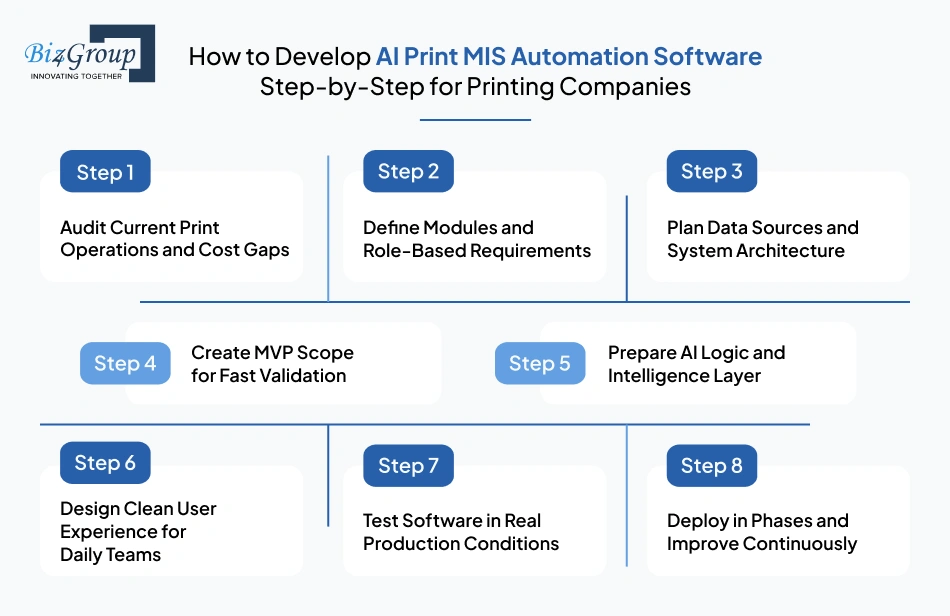
A successful MIS platform starts with solving real print-floor problems, not writing code too early. Most printing companies need a roadmap that matches operations, data, and growth goals. That is why printing management information system development integrating AI should begin with structured execution.
Many leaders researching how to develop AI printing MIS automation software for reducing operational costs are usually trying to remove delays, waste, and manual dependency. The steps below show a realistic path used in production-focused software projects.
Step 1: Audit Current Print Operations and Cost Gaps
Start by reviewing where money and time are being lost today. This usually includes slow estimating, scheduling delays, reprints, stock issues, or billing leakage.
- Review order-to-delivery workflow stages
- Identify recurring delays and manual handoffs
- Measure waste, downtime, and invoice errors
- Define business targets for the new system
Step 2: Define Modules and Role-Based Requirements
List the departments that will use the platform and what each team needs daily. This prevents overbuilding features that nobody uses.
- Define needs for sales, production, dispatch, finance, and admins
- Set approval flows and access levels
- Map required dashboards by role
- Prioritize must-have functions first
Step 3: Plan Data Sources and System Architecture
AI needs reliable data. This step prepares how information will move from orders, machines, inventory, and finance into one usable system.
- Identify data sources across current tools
- Design central database structure
- Plan ERP, AI CRM, and machine integrations
- Set security and backup requirements
Step 4: Create MVP Scope for Fast Validation
The first release should solve urgent business problems quickly. Many companies use MVP development services to launch a focused version before full expansion.
- Include core quoting, job control, scheduling, and billing
- Keep phase one practical and measurable
- Launch to a pilot team or single facility
- Gather real user feedback early
Also Read: Top MVP Development Companies in USA
Step 5: Prepare AI Logic and Intelligence Layer
This is where automation becomes smarter. Use historical and live data to select AI models that match print operations, then integrate AI models into daily workflows.
- Add delay prediction for active jobs
- Add smart scheduling recommendations
- Add pricing anomaly detection
- Add demand forecasting for materials
Step 6: Design Clean User Experience for Daily Teams
Even strong software fails when teams struggle to use it. A capable UI/UX design company can make workflows faster and clearer.
- Design simple screens for plant teams
- Create dashboards for managers
- Reduce clicks for routine tasks
- Keep mobile access for approvals and updates
Also Read: Top UI/UX Design Companies in USA
Step 7: Test Software in Real Production Conditions
Testing should reflect how print businesses actually operate. Many firms involve experienced software testing companies before launching.
- Test quotes, scheduling, billing, and permissions
- Validate AI recommendations using sample data
- Test speed during high job volume
- Check integrations and data accuracy
Also Read: Top AI Software Development Companies in USA
Step 8: Deploy in Phases and Improve Continuously
Go live in controlled stages instead of one risky rollout. Improve the system as teams start using it daily.
- Launch by plant, team, or module
- Monitor usage and adoption issues
- Retrain AI models with new data
- Add advanced features after stability
The right process reduces risk, controls budget and improves adoption across departments. Strong AI printing MIS automation software development is rarely about speed alone. It succeeds when each step is aligned with real printing operations.
Also Read: Top AI Printing Software Development Companies in USA
Need A Clear Build Roadmap?
Get a practical rollout plan built around your print workflows
Plan My MIS BuildWhat is The Best Technology Stack to Develop Custom AI Printing MIS Automation Platform?
Many printing companies reach a point where software requirements become clear, but technology decisions still feel uncertain. Questions like I am looking to build AI-powered MIS software for my printing company, what technology should I use usually come next, because the right stack affects speed, scale, integrations, and long-term cost.
The best stack should support live production data, secure user access, reporting, machine connectivity, and future AI upgrades. Businesses planning to develop custom printing MIS automation platform solutions usually prefer proven tools with strong support ecosystems and long-term reliability.
|
Architecture Layer |
Recommended Tools |
Purpose |
|---|---|---|
|
Frontend Web Dashboard |
Creates fast dashboards for sales, production, finance, and management users. |
|
|
Mobile Access |
React Native, Flutter |
Supports approvals, alerts, tracking, and field access on mobile devices. |
|
Backend Application Layer |
Node.js, NestJS, Python FastAPI, .NET Core |
Runs business logic, user roles, workflows, and secure transactions. |
|
Database (Primary) |
PostgreSQL, MySQL |
Stores orders, customers, pricing, inventory, billing, and operational records. |
|
Real-Time Data Layer |
Redis, Socket.IO, Kafka |
Handles live job updates, alerts, queue events, and status refreshes. |
|
AI / ML Layer |
Python, TensorFlow, PyTorch, Scikit-learn |
Powers forecasting, anomaly detection, scheduling logic, and recommendations. |
|
Reporting & BI |
Power BI, Metabase, Tableau |
Converts operational data into dashboards, KPIs, and management insights. |
|
Cloud Infrastructure |
AWS, Microsoft Azure, Google Cloud |
Hosts applications securely with scalability, backups, and monitoring. |
|
File & Artwork Storage |
AWS S3, Azure Blob Storage |
Stores proofs, artwork files, production documents, and backups. |
|
Integration Layer |
REST APIs, GraphQL, Webhooks |
Connects ERP, CRM, machines, shipping, and accounting through reliable API development. |
|
Security Layer |
OAuth 2.0, JWT, Azure AD, Okta |
Protects logins, permissions, access control, and user identity. |
|
DevOps & Deployment |
Docker, Kubernetes, GitHub Actions, GitLab CI/CD |
Supports updates, testing, scaling, and release automation. |
The best stack is rarely the trendiest one. It should match your plant operations, integration needs, and growth plans. Strong AI printing MIS automation software development usually succeeds when practical architecture choices support stable full stack development from day one.
Also Read: Why to Choose the Full Stack Development for Modern Business
How Much Does AI Printing MIS Automation Software Development Cost in 2026?
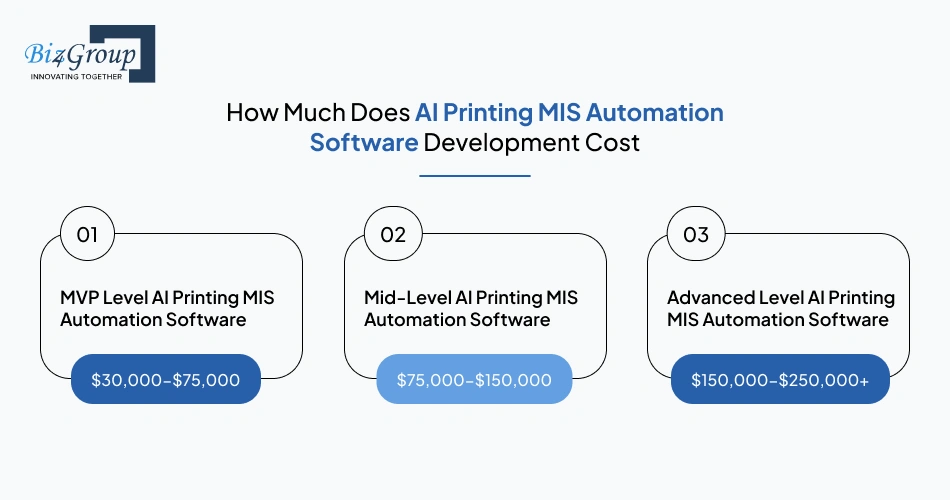
Budget planning usually starts once printing companies understand the operational value of automation. Businesses planning to develop AI printing MIS automation software should expect pricing to depend on scope, integrations, AI depth, user roles, and rollout complexity.
In 2026, most projects fall between $30,000-$250,000+. Smaller systems focused on one facility cost less, while multi-location platforms with advanced AI and integrations sit at the higher end.
Cost Breakdown by Development Level
|
Development Level |
Estimated Cost Range |
Scope |
|---|---|---|
|
MVP Level AI Printing MIS Automation Software |
$30,000-$75,000 |
Core quoting, job control, scheduling, billing, basic dashboards, limited users |
|
Mid-Level AI Printing MIS Automation Software |
$75,000-$150,000 |
Full MIS modules, inventory, role access, reporting, ERP/accounting integrations, early AI features |
|
Advanced Level AI Printing MIS Automation Software |
$150,000-$250,000+ |
Multi-plant operations, custom workflows, forecasting, machine integrations, advanced AI process automation, enterprise security |
Cost Drivers in AI Printing MIS Automation Software Development
1. Feature Depth
More modules increase time, testing, and configuration effort. Quoting, inventory, production planning, billing, reporting, and approvals each add scope. Custom logic for print operations increases workload further.
Estimated Impact: $15,000 to +$70,000
2. AI Capability Level
Basic alerts cost less than advanced forecasting, anomaly detection, smart scheduling, or recommendation engines. Deeper models and training data raise AI integration costs noticeably.
Estimated Impact: $20,000 to +$80,000
3. Third-Party Integrations
ERP, CRM, accounting, shipping, and machine connectivity require secure syncing and data mapping. Complex legacy systems often need specialized AI integration services and longer implementation time.
Estimated Impact: $10,000 to +$60,000
4. UI and User Roles
Multiple dashboards for sales, plant managers, finance, customers, and admins increase UI/UX design cost and access control effort. More roles usually mean more screens and workflows.
Estimated Impact: $8,000 to +$35,000
5. Deployment Scale
One facility costs less than multi-site rollouts with centralized reporting, local permissions, and phased launches across plants or franchises.
Estimated Impact: $15,000 to +$75,000
Hidden Costs AI Printing MIS Automation Software
|
Hidden Costs |
Estimated Cost Impact |
|---|---|
|
Legacy data cleanup and migration |
$5,000-$25,000 |
|
Change requests during development |
$5,000-$40,000 |
|
Additional integrations after launch |
$8,000-$35,000 |
|
Staff training and onboarding |
$3,000-$15,000 |
|
Cloud hosting and monitoring setup |
$2,000-$12,000 annually |
|
Ongoing model tuning and updates |
$5,000-$30,000 annually |
Strategies to Optimize the Development Cost AI Printing MIS Automation Software
1. Start With MVP Software Development
Launch core modules first, then expand in phases after user feedback. This often lowers initial spend by 20%-40%.
2. Use Existing Systems Where Practical
Retain stable accounting or ERP tools instead of replacing everything at once. This can reduce costs by 10%-25%.
3. Prioritize High-ROI AI Features First
Start with quoting, scheduling, or billing intelligence before advanced automation. This can improve budget efficiency by 15%-30%.
4. Phased Multi-Site Rollout
Deploy one plant first, refine processes, then expand. This can lower rollout risk and rework costs by 10%-20%.
5. Use Standard Integrations First
Adopt common APIs before custom connectors where possible. This often saves 10%-25%.
The right budget is not the lowest number. It is the amount aligned to measurable operational returns. Strong AI printing MIS automation software development investments usually win when scope is phased, costs are controlled, and ROI targets are clear.
Also Read: Cost to Hire an AI Software Developer in 2026
What Should Your Budget Be?
Get realistic pricing based on scope users AI and integrations
Estimate My Project CostCommon Challenges in Printing MIS AI Implementation and How to Solve Them
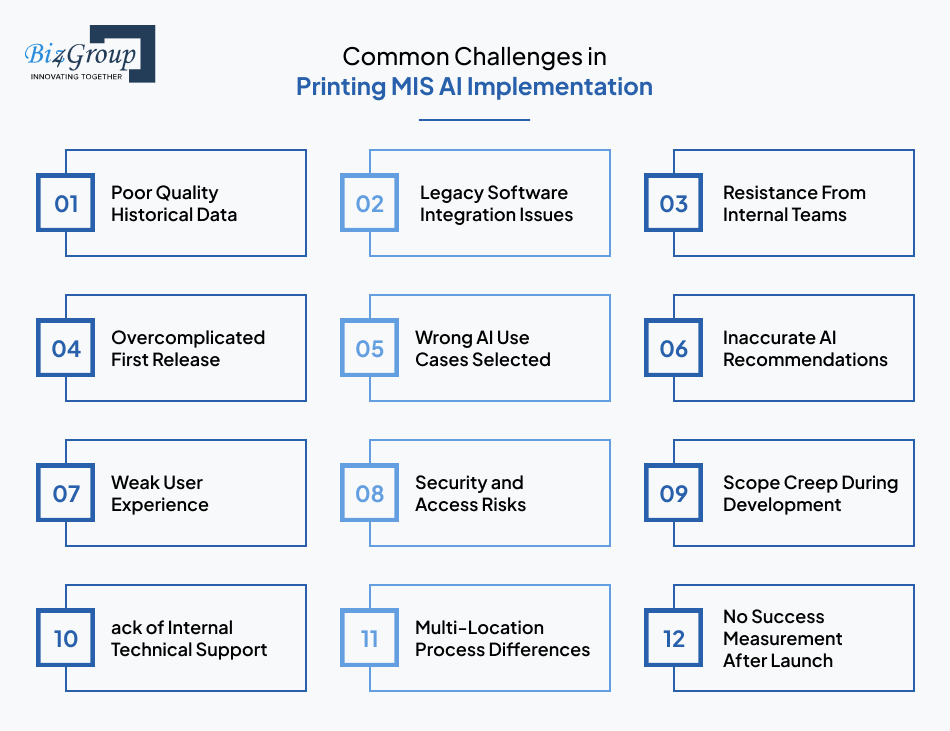
Many printing companies see the value of automation but run into execution issues during rollout. That is why successful AI printing MIS automation software development depends as much on planning and adoption as it does on technology itself.
|
Challenges |
Solution |
|---|---|
|
Poor Quality Historical Data |
Clean old job records, pricing files, customer data, and inventory entries before migration. Use validated data sets for better AI accuracy. |
|
Legacy Software Integration Issues |
Connect older ERP, accounting, or machine systems through APIs, middleware, or phased replacement plans. A skilled custom software development company can simplify this stage. |
|
Resistance From Internal Teams |
Train users early, involve department leads, and show how daily work becomes easier. Adoption improves when teams see practical value. |
|
Overcomplicated First Release |
Start with core modules such as quoting, scheduling, tracking, and billing. Add advanced features after stable usage. |
|
Wrong AI Use Cases Selected |
Focus first on high-value areas like pricing accuracy, delay prediction, maintenance alerts, or stock planning. Strong AI consulting services help set priorities. |
|
Inaccurate AI Recommendations |
Use real production data, review outputs regularly, and retrain models over time for better reliability. |
|
Weak User Experience |
Keep screens simple, role-based, and task-focused so plant teams and office staff can use the system easily. |
|
Security and Access Risks |
Apply role permissions, secure logins, audit trails, backups, and controlled data sharing across teams. |
|
Scope Creep During Development |
Lock phase-one priorities, approve changes through review cycles, and separate future requests into later releases. |
|
Lack of Internal Technical Support |
Assign internal owners and hire AI developers or external specialists for post-launch support and upgrades. |
|
Multi-Location Process Differences |
Standardize key workflows first, then allow location-level flexibility where needed. |
|
No Success Measurement After Launch |
Track KPIs such as turnaround time, waste, downtime, billing speed, and profit per job from day one. |
Most implementation problems are manageable when addressed early. The strongest projects combine clear priorities, realistic rollout plans, and expert guidance. That is how businesses build smart printing MIS software solutions that teams actually use and trust.
Also Read: How to Hire an AI App Developer in USA for Your Business?
KPIs to Track After Launching AI Printing MIS Software
Once the system goes live, results should be measured through numbers, not assumptions. Companies investing in AI printing MIS automation software development usually gain faster value when they track clear operational KPIs tied to output, cost control, speed, and service quality. The most useful metrics to monitor after launch include:
- Quote turnaround time to measure how quickly estimates are prepared and approved.
- Order-to-production start time to track how fast jobs move into execution.
- On-time delivery rate to monitor customer commitment performance.
- Average production cycle time to measure total job completion speed.
- Press utilization rate to track how effectively machines are being used.
- Machine downtime hours to monitor lost production capacity.
- Reprint percentage to identify quality issues and recurring job errors.
- Paper waste percentage to measure material efficiency across runs.
- Ink and consumable usage per job to control variable production costs.
- Inventory stockout frequency to track shortages affecting schedules.
- Invoice generation time to measure billing speed after completion.
- Billing accuracy rate to monitor missed charges or pricing mistakes.
- Gross profit per job to understand which work is truly profitable.
- Rush order frequency to reveal planning gaps and late-stage pressure.
- Customer complaint rate to monitor service quality after delivery.
- Repeat order percentage to measure retention and satisfaction.
- User adoption rate to track how actively teams use the MIS platform.
- ROI timeline to track how quickly the software investment pays back.
- Dashboard response time and data freshness to support daily decisions, especially where enterprise AI integrations depend on live information.
- AI recommendation acceptance rate to measure trust in automated scheduling or costing suggestions.
The right KPIs turn software into a measurable business asset. Strong results usually come when teams review these numbers regularly and keep improving processes after launch while developing smart printing MIS software maturity over time.
Tracking Results or Just Guessing?
Measure profit speed waste and output with the right KPI plan
Get KPI Growth PlanWhy Businesses Choose Biz4Group LLC for AI Printing MIS Automation Software Development
When business leaders ask, I am planning to develop a custom AI printing MIS workflow management system, which company can build it for my business, the real decision is usually about execution capability. Rather it is, can the partner understand print workflows, operational complexity, integrations, and long-term scalability? That is where Biz4Group LLC becomes relevant as a strategic technology partner.
As an AI development company, we work with businesses that need more than basic software delivery. Printing MIS platforms require order logic, production controls, inventory visibility, approvals, billing flow, and intelligent automation in one connected system. This is where domain-led planning matters. Here’s the proof of our expertise
Portfolio Spotlight
1. Udder Color: High-Volume Custom Artwork Printing Platform
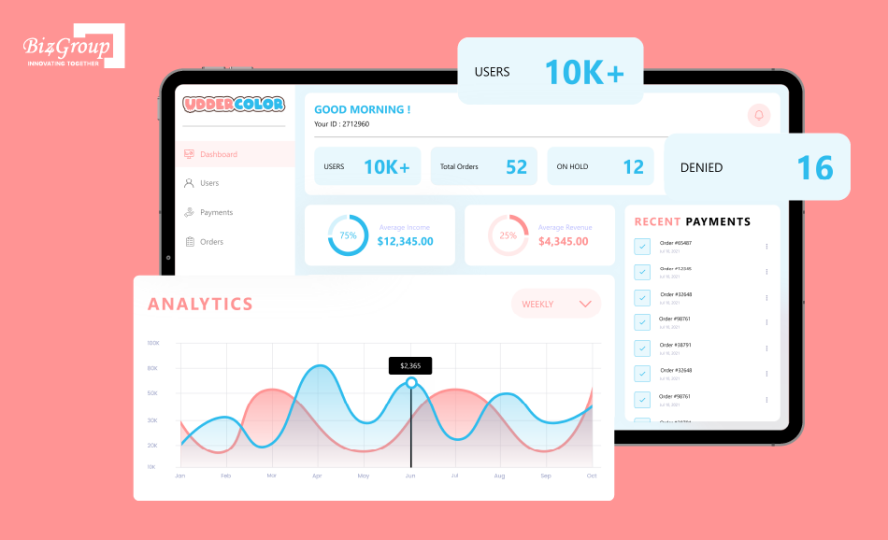
Udder Color is a digital printing solution created for a major U.S. print company to streamline large daily order volumes through a modern online platform. Customers can submit orders for custom heat transfer prints, choose required sizes and quantities, upload artwork files, and receive completed orders within a 1 to 2 day turnaround window.
2.Post Heritage: Custom Print eCommerce Platform
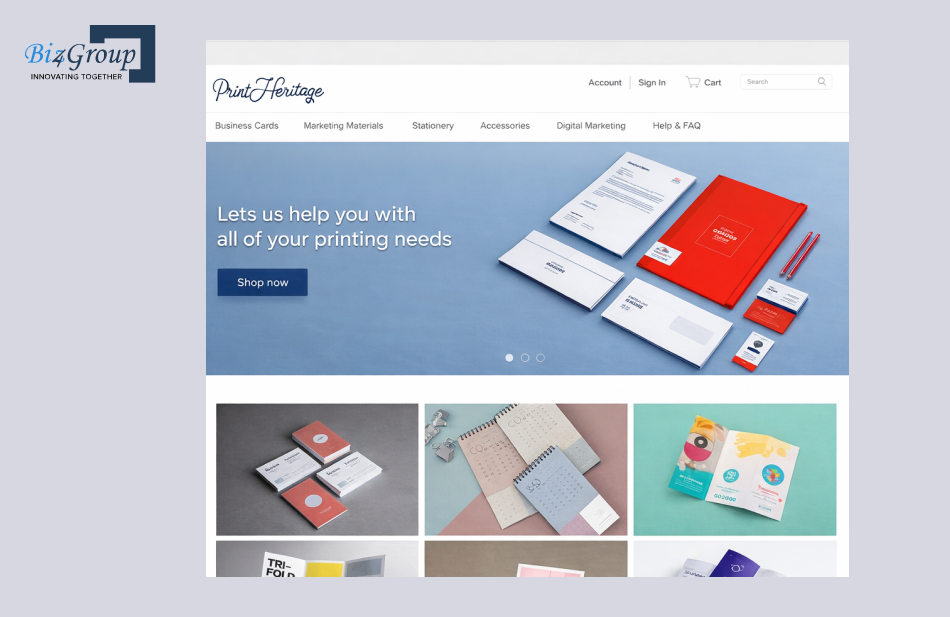
Post Heritage is a digital ecommerce platform designed for online ordering of personalized business cards, stationery, branded accessories, and marketing print materials. Users can configure products by choosing size, shape, layout, graphics, and quantity before purchase. The system also supports reusable templates for repeat orders and manages bulk purchases through connected payment and shipping services.
Why This Matters in MIS Automation Projects
Printing businesses often need a partner who can align software with real operational demands, such as:
- Multi-step approvals before production
- Order flow from request to fulfillment
- Customer customization and repeat ordering
- Connected billing, shipping, and reporting
- Scalable architecture for future growth
- Intelligent features through printing software AI solutions
The right partner should help reduce implementation risk, prioritize ROI, and shape software around how your business actually runs. That is why many companies evaluating AI printing MIS automation software development look for proven execution experience not just coding resources, which is exactly what we bring to the table.
Final Thoughts
Printing businesses rarely struggle because demand is missing. More often, profit gets squeezed through delays, waste, manual coordination, and limited visibility. That is why many leaders are now evaluating printing MIS software automation with AI as a practical way to run leaner and respond faster. With the right direction and experienced AI product development services, operational pressure can turn into measurable control.
The bigger question is not whether change is coming. It is whether your current systems are ready for the pace of customer expectations, tighter margins, and daily production complexity. Businesses that act early often gain stronger control over growth and decision-making.
When you are ready schedule a strategy call and discuss what fits your print operation, Biz4Group LLC can help you assess the right path for AI printing MIS automation software development.
FAQ’s
1. What is the overall cost range for AI printing MIS automation software development in 2026?
Most custom projects range between $30,000 and $250,000+. Cost depends on user roles, AI depth, integrations, reporting needs, and whether you need one facility rollout or multi-location control.
2. How many weeks does AI printing MIS automation software development usually take?
A focused MVP can take 3 to 6 weeks. Mid-level platforms often take 6 to 10 weeks. Advanced enterprise systems with AI modules and integrations may require 10 to 15+ weeks depending on scope.
3. Can printing MIS software automation with AI work with my existing ERP, accounting, or shipping tools?
Yes. Most modern platforms can connect with ERP, CRM, accounting, courier, and payment systems through APIs or middleware. This helps avoid replacing stable systems while improving workflow control.
4. How much historical data is needed before AI can improve print scheduling and costing?
6 to 12 months of even clean order, pricing, machine, and delivery data can create useful starting models. More historical data usually improves forecasting accuracy and recommendations over time.
5. Is custom AI printing MIS software better for packaging, labels, or commercial printing businesses?
Custom platforms are often stronger when your workflows involve special approvals, multiple production stages, custom pricing logic, or different plant locations. Standard tools may struggle with highly specific print operations.
6. What ROI should printing companies expect after launching an AI-powered MIS platform?
ROI usually comes from lower waste, fewer billing misses, faster quote turnaround, better machine utilization, and reduced manual admin work. Many businesses target measurable returns within 6 to 18 months after go-live.
