Location :
Orlando, FL, USA
Location :
Orlando, FL, USA +1 (407) 714-1616
 info@biz4group.com


















Imagine a digital system that doesn’t wait for instructions but instead, understands your business goals, learns from real-time feedback, and takes independent actions to get the job done.
Read More

What slows down your print business today, production capacity or the way orders move before printing even begins?
Most delays don’t come from machines. They start earlier, when orders arrive through emails, calls, and scattered files. Teams spend hours checking specifications, fixing designs, and chasing approvals. That friction builds across every job.
If this feels familiar, you’re not alone:
This is more than an efficiency issue. Around 67.9% of print businesses already struggle to hire skilled labor, which makes manual handling harder to sustain. At the same time, up to 30% of print jobs require rework due to file and proofing errors, directly affecting margins.
Now consider a different approach. A customer uploads a file, and the system instantly checks resolution, margins, and print readiness. Proofs are generated automatically. Approvals happen without long email threads. Well, an AI powered software is capable of doing it, and this is exactly where AI web-to-print software development for commercial printing businesses becomes relevant.
For businesses asking, “we are a printing company aiming to improve efficiency through automated web-to-print ordering and design approval.” The shift starts by building systems that reduce manual effort and creating an online print ordering system for customers with automated design validation.
If you run a commercial printing business and want to build an AI web-to-print software to automate orders and proofing workflows, the next sections will guide you through it step by step.
AI web-to-print software is a digital platform that allows your customers to place print orders online while your internal system manages how those orders are captured, structured, and prepared for production. It brings customer inputs, design files, and order specifications into one organized environment instead of relying on scattered communication.
The goal here is not just to move orders online. It is to ensure that every order comes in with the right format, complete details, and clear instructions so your team does not spend time correcting or clarifying basic inputs. This shift reflects how AI in the printing industry is helping businesses bring more control and consistency into everyday operations.
When teams start exploring AI web-to-print software development for commercial printing businesses, they are essentially looking to build a system that standardizes how orders enter and move through their business without constant manual handling.
At a functional level, this software is designed to:
You have seen what this system is and how it brings structure to incoming orders. The next step is to understand how it actually differs from what most print businesses already use. That difference will help you see where your current workflow slows down and where online print ordering portal development integrating AI starts to make sense.
At a surface level, both systems allow customers to place print orders online. The real difference shows up in how those orders are handled once they enter your system.
|
Area |
Traditional Web-to-Print |
AI-Powered Web-to-Print |
|---|---|---|
|
Order Handling |
Orders are captured but require manual review |
Orders are structured and prepared automatically |
|
File Validation |
Manual checking of files and specifications |
Automated validation during upload |
|
Proofing Process |
Back-and-forth email or manual proof creation |
System-generated proofs with minimal intervention |
|
Specification Accuracy |
Depends on customer input and manual correction |
Inputs are standardized and guided by the system |
|
Workflow Movement |
Relies on team coordination across stages |
Moves through predefined system-driven steps |
|
Error Handling |
Issues are identified later in the process |
Issues are flagged at the point of submission |
This difference is not about adding complexity. It is about how much manual effort is required after an order is placed and how consistently each job moves forward. As print businesses start evaluating AI web-to-print software solutions, the focus naturally shifts toward building systems that reduce dependency on manual checks and repeated coordination.
Let’s structure your print operations into a system that actually runs without constant follow-ups
Fix My WorkflowYou already understand what the system is and how it differs from traditional setups. The real question now is simple what is pushing print businesses to rethink their current way of handling orders and move to AI web-to-print software development for commercial printing businesses?
The answer sits in everyday operational pressure that keeps building over time.
Most print businesses do not lack machines. They lose time before jobs even reach production. Orders wait for approvals, files move back and forth, and teams spend hours coordinating instead of producing.
In fact, 34% of print businesses report approval delays as a direct reason for underutilized production capacity. This means machines sit idle not because of low demand, but because workflows slow everything down.
These delays create a gap between available capacity and actual output.
Even with consistent order flow, many businesses are not operating at full potential. The issue is not demand; it is how efficiently orders move through the system.
Over 55% of print businesses operate below their target production utilization. This points to a deeper problem where operations cannot keep up with incoming work due to manual handling.
This creates a ceiling on growth even when opportunities are available.
Repeat B2B clients such as restaurants, real estate agents, and nonprofits are no longer comfortable with slow ordering cycles. They want a faster and more predictable way to place orders.
When ordering depends on manual interaction, it slows down both the customer and your internal team.
Customer service and design teams often carry the burden of repetitive tasks. From checking files to managing revisions, a large part of their time goes into handling routine work instead of high-value tasks.
Shops that introduce structured ordering systems see 30–60% of orders move without manual intervention. At the same time, AI can now generate layouts, adjust bleed, and prepare print-ready files instantly.
This shift is not about replacing teams, it is about removing unnecessary workload.
What’s driving commercial printing web-to-print platform development using AI is not a trend or new technology push. It is the growing gap between how orders are handled today and how efficiently they need to move. As these gaps widen, relying on manual coordination becomes harder to sustain across daily operations.
You might already be thinking: we are struggling with manual print order processing and want to implement an AI-powered web-to-print platform.
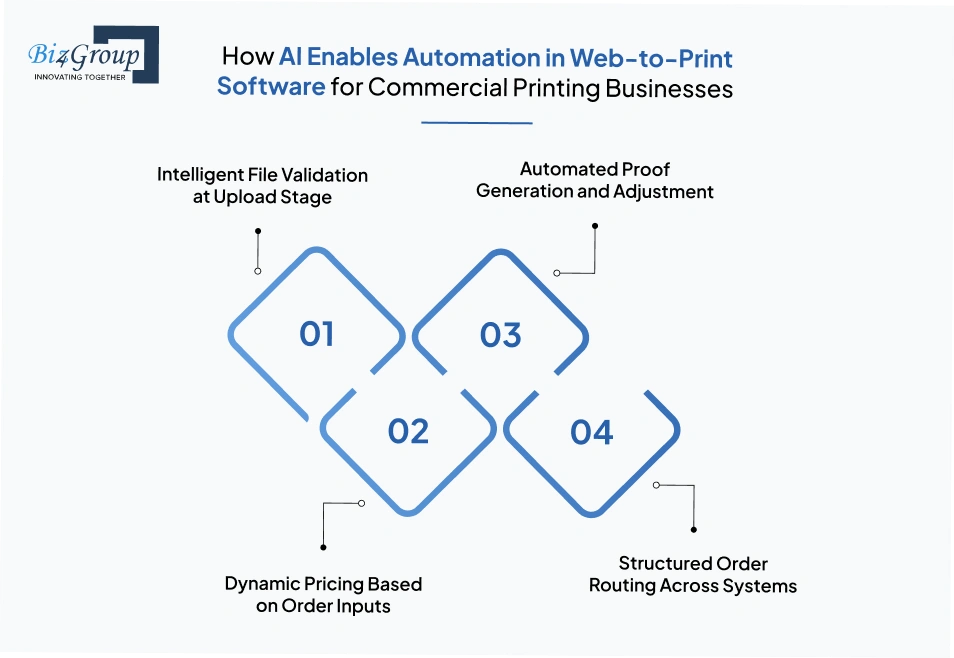
That direction starts by understanding how AI actually works within the system. This is not about replacing your process. It is about embedding checks and decisions directly into it so work moves forward without repeated intervention.
As teams move toward AI web-to-print software development for printing businesses, these internal capabilities become the foundation of automation. Have a look:
The first point of interaction is when a customer uploads a design file. Instead of waiting for someone to review it later, the system evaluates the file instantly based on print requirements.
This approach reflects how AI prepress automation is becoming a standard across modern print environments. In fact, 67% of commercial printing facilities with revenue above $2M already use automated prepress systems to handle such validations. AI:
These checks ensure that only print-ready files move forward in the system.
Once the file and specifications are in place, pricing does not rely on manual estimation. AI in print estimation calculates it based on predefined logic tied to print variables. This reduces dependency on manual quoting while maintaining consistency across orders as AI:
This capability ensures that pricing is generated as part of the order itself.
After order details are captured, the system prepares a digital proof based on the uploaded file and specifications. This removes the need for manual proof creation in most cases. This is where AI web-to-print design software development for print shops plays a critical role by embedding layout adjustments directly into the system.
This allows proofing to happen as a system-driven step instead of a manual task.
Once the order is validated and prepared, it needs to move to the right stage without manual coordination. This is where system-level routing comes in. With the help of AI printing MIS automation, orders are directed based on predefined logic instead of relying on team handoffs as it assigns
This ensures that orders move forward in a controlled and consistent way.
When these capabilities work together, a significant portion of orders begin to move without manual intervention. Many print businesses already report up to 60% of orders being auto-processed, while freeing nearly 40% of CSR time for more complex work.
Together, these mechanisms define how automation is actually built into the system. As you continue developing web-to-print design software for printing businesses, the next step is to understand how these capabilities come together in a complete order flow.
We design systems where validation proofing and routing happen without your team chasing every step
Show Me AI Automation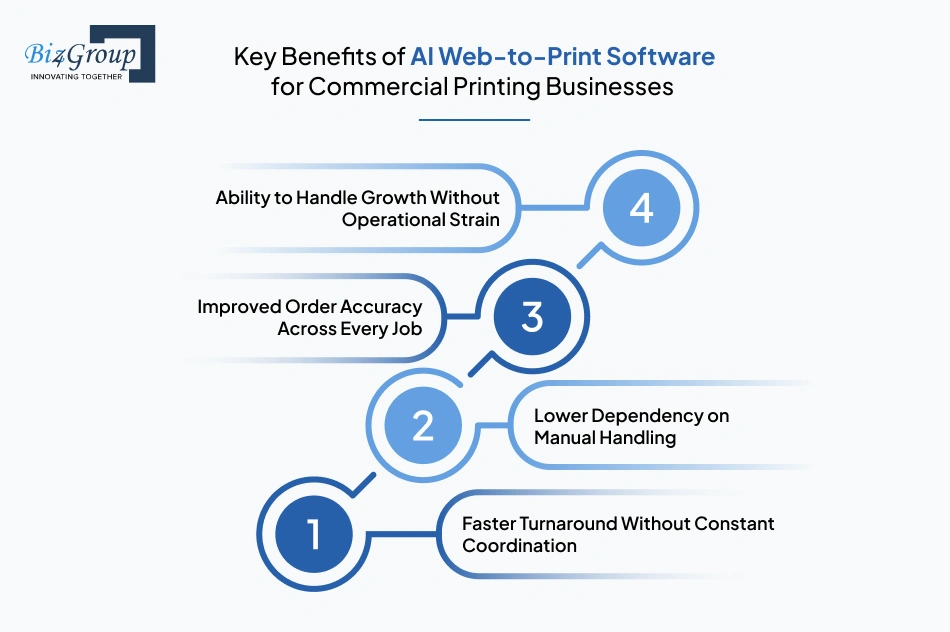
Before getting into specific outcomes, think about your current workflow for a moment. Where does time slip away? Where do teams get pulled into repetitive tasks? These patterns point directly to what improves when AI web-to-print software becomes part of your operations.
Order timelines become easier to control when delays around approvals, corrections, and clarifications reduce. Jobs move forward without waiting on repeated back-and-forth communication. Instead of chasing confirmations or fixing inputs late in the process, orders progress in a more predictable way. This directly improves delivery consistency across both small and high-volume jobs.
A significant portion of daily work in print businesses comes from routine coordination. Teams spend time reviewing files, managing revisions, and handling order details that repeat across jobs. With structured systems in place, that dependency reduces. Work that once required constant human attention shifts into the system, allowing teams to focus on areas that need judgment rather than repetition.
This is where integrating AI into printing workflows starts reflecting in how teams allocate their time across operations.
Errors in print orders often originate from incomplete inputs or missed checks. These issues usually appear later, when correcting them becomes more expensive and time-consuming. When orders enter the system in a more structured way, accuracy improves at the source. Specifications are clearer, files are more consistent, and fewer corrections are needed as jobs move forward.
As order volume increases, manual processes tend to break down. More orders usually mean more coordination, more follow-ups, and more pressure on teams. With a structured system in place, higher volumes do not create the same level of disruption. Orders continue to move through defined steps without requiring proportional increases in effort.
These improvements reshape how your business handles daily operations. The focus shifts from managing individual tasks to maintaining a system that keeps working consistently.
That is the direction most teams aim for when they start building an AI web-to-print software, where the goal is not just digitization but smoother execution at scale.
Once you understand what the system includes and what improves, the next step is simple how does an order actually move through it? What happens from the moment a customer uploads a file to the point it reaches production?
This flow becomes easier to visualize when you look at it as a sequence rather than isolated actions. As teams move toward AI web-to-printing software development, this structured order movement becomes the foundation of daily operations.
This step-by-step flow defines how orders move without relying on scattered communication or repeated manual intervention. Each stage connects directly to the next, creating a predictable path from order placement to production readiness.
AI web-to-print software does not operate as a standalone system. It connects with the tools already used across your business so that order data, customer details, and production inputs remain aligned across systems.
As you evaluate AI web-to-print software development for commercial printing businesses, this connectivity becomes essential to ensure that information flows without manual transfer between departments.
Your ERP system manages core business data such as inventory, procurement, and financial records. The web-to-print system connects directly with it to ensure that order-related information aligns with business operations.
Customer interactions and history are often managed through CRM platforms. Integration ensures that order activity becomes part of the overall customer record.
Also Read: Artificial Intelligence in CRM
Print-specific operations are usually handled through MIS systems. The connection between web-to-print and AI printing management ensures that production teams receive structured job information without manual transfer.
Payment systems are integrated to handle transactions during order placement. This ensures that financial processing is part of the same flow as order submission.
These integrations define how the system connects across your business environment. As you move toward create AI web-to-print software, aligning these systems ensures that data flows consistently without manual dependency.
We connect your ERP CRM and MIS so your data flows without manual syncing chaos
Unify My SystemsWhat actually sits inside the system matters more than anything else. When teams move toward custom web to print software development integrating AI, the core features define how the system is structured from the ground up.
|
Feature |
What It Does in the Software |
|---|---|
|
Online Product Catalog |
Displays available print products with predefined options such as size, material, and formats |
|
Template-Based Design Editor |
Allows users to customize designs using predefined templates within the portal |
|
File Upload Management |
Accepts customer-uploaded files and organizes them with order details |
|
AI-Based File Validation |
Checks uploaded files for print readiness such as resolution, dimensions, and format |
|
Automated Proof Generation |
Creates digital proofs based on uploaded files and selected specifications |
|
Dynamic Pricing Engine |
Calculates pricing automatically based on selected product options and order inputs |
|
Order Management Dashboard |
Maintains a centralized view of all orders and their current status |
|
Customer Account Management |
Stores customer profiles, order history, and saved preferences |
|
Approval Management System |
Handles proof approvals and revision requests within the platform |
|
Production Queue Integration |
Sends approved orders to production systems with complete job details |
|
Payment Gateway Integration |
Processes payments during order placement and links them with order records |
|
Reporting and Analytics Module |
Tracks order data, customer activity, and system usage for internal review |
These features define what the system includes at a functional level. As you move toward AI web-to-print software development for commercial printing businesses, this structure becomes the base on which the entire platform operates.
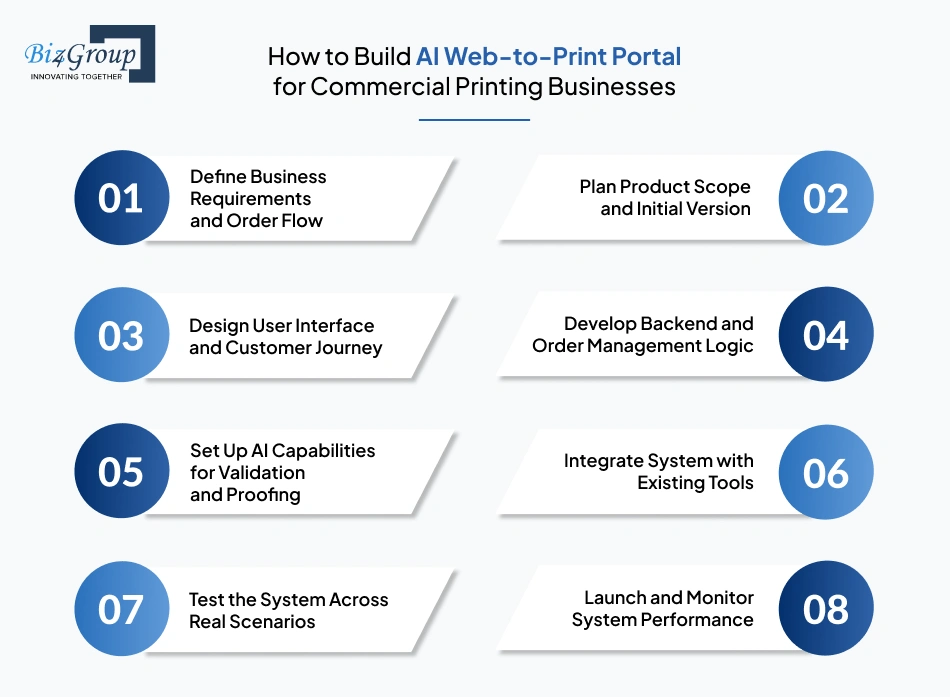
Moving from idea to execution requires more than assembling features. The system needs to be planned in a way that aligns with how your print business operates daily, from order intake to production readiness. Many teams asking, “we are planning to launch an online printing service and want a web-to-print software for customer self-service ordering.”
Well, the direction calls for a structured approach where each step builds toward a system that can handle real operational demands without adding complexity.
Start by identifying how orders should enter and move through your system. This step focuses on aligning the platform with your existing operations rather than forcing a new process.
Instead of building everything at once, the focus should be on defining a practical starting MVP version of the platform. This helps in validating how the system performs in real conditions.
Also Read: Top MVP Development Companies in USA
The AI web-to-print portal should be easy to use for customers who may not have technical knowledge. Every interaction should feel clear and predictable.
Also Read: Top UI/UX Design Companies in USA
This step focuses on how the system handles data behind the interface. Orders, files, and specifications need to be captured and managed in a structured way.
AI components need to be planned based on what tasks the system should handle automatically. This is where decisions around AI model selection become important.
The platform should connect with your existing business systems to avoid duplication of work and data.
Before launch, the system needs to be tested in conditions that reflect actual usage. This ensures that all components work together as expected.
Once the system is live, the focus shifts to observing how it performs in real conditions and making adjustments where needed.
Each of these steps contributes to building a system that aligns with how your business operates. AI web-to-print software development for commercial printing businesses becomes more effective when the process focuses on structure, clarity, and real operational needs rather than just feature implementation.
Many teams reach this point with a clear direction which is to build a self-service print ordering portal with customization and workflow automation. Let’s break down the technology stack for businesses looking to digitize print shop and need a web-to-print system with AI-based order and file validation.
|
Architectural Layer |
Recommended Tools |
Purpose (What It Enables) |
|---|---|---|
|
Frontend (Customer Interface) |
Handles user interaction for product selection, file upload, and order placement through responsive web development |
|
|
Backend Application Layer |
Node.js, Django |
Manages business logic, order processing, and system workflows through structured server-side handling |
|
API Layer |
REST APIs, GraphQL |
Connects frontend, backend, and third-party systems through structured API development |
|
Database Layer |
PostgreSQL, MongoDB |
Stores order data, customer details, and product configurations in a structured and scalable format |
|
File Storage & Management |
AWS S3, Google Cloud Storage |
Stores uploaded design files and manages access, retrieval, and version control |
|
AI Processing Layer |
Python, TensorFlow, OpenAI API |
Handles file validation, proof generation, and intelligent checks using trained AI models |
|
AI Model Management |
MLflow, Hugging Face |
Supports versioning, monitoring, and lifecycle management of AI models used in the system |
|
Pricing Engine Layer |
Custom Logic (Node.js/Python) |
Calculates order pricing dynamically based on product configuration and order inputs |
|
Integration Layer |
MuleSoft, Apache Kafka |
Connects the system with ERP, CRM, MIS, and other external tools for seamless data flow |
|
Authentication & Security |
OAuth 2.0, JWT |
Manages secure login, user authentication, and access control across the platform |
|
Payment Gateway Integration |
Stripe, PayPal |
Processes customer payments and links transaction data with order records |
|
DevOps & Deployment |
Docker, Kubernetes, AWS/GCP |
Manages application deployment, scaling, and infrastructure reliability |
|
Monitoring & Logging |
Prometheus, ELK Stack |
Tracks system performance, logs activity, and identifies issues in real time |
This stack defines how different parts of the system work together to support ordering, validation, and processing. AI web-to-print software development for commercial printing businesses becomes more structured when each layer is clearly defined and aligned with operational needs.
Get a system built on the right architecture not random tools stitched together
Build It Right with US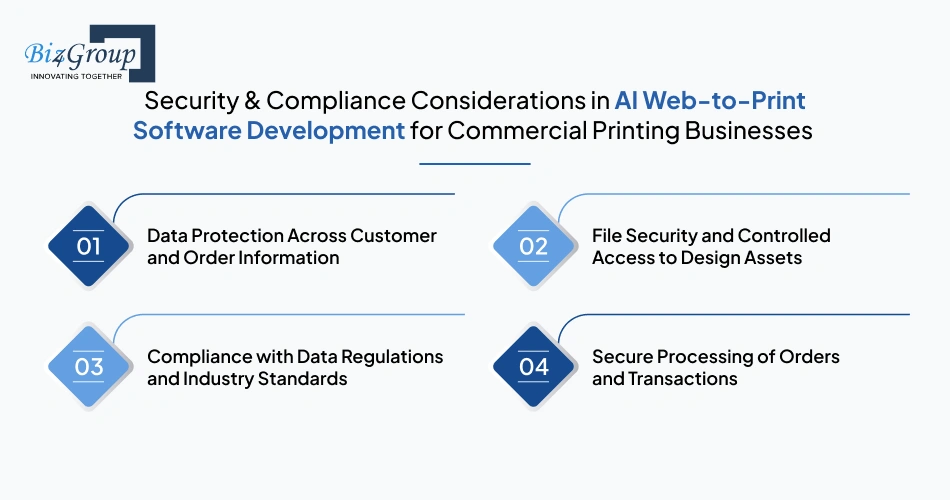
Many businesses adopt an AI web-to-print solution for automated file checking and order processing with a clear goal to reduce manual work and improve accuracy. Alongside that shift, protecting customer data and design files becomes a critical part of how the system is structured.
Customer details, order history, and uploaded files move through multiple stages inside the system. Without proper safeguards, this data can be exposed or misused. Strong data handling practices focus on controlled access and secure storage.
Only authorized users should be able to view or manage sensitive information. Encryption plays a key role in protecting data both during transfer and while stored. Many businesses also rely on an experienced AI development company to align system architecture with secure data practices from the start.
Uploaded design files often contain proprietary content such as brand assets, marketing materials, or confidential layouts. Any unauthorized access or accidental sharing can lead to serious business risks.
Secure file handling involves restricting access based on user roles and maintaining clear control over file usage. Version tracking is also important so that changes remain traceable. Access logs help monitor who interacts with files and when, reducing the risk of misuse.
Print businesses handling customer data across regions must align with regulations such as GDPR and similar data protection laws. These requirements focus on how data is collected, stored, and used.
Compliance involves obtaining clear user consent, maintaining transparency in data usage, and allowing users to manage or delete their information when required. Systems also need to maintain audit trails to demonstrate compliance during reviews or audits.
Order data and payment details pass through multiple systems. Any gap in handling these interactions can create vulnerabilities. Secure processing requires encrypted communication between systems and validation of all incoming data.
Payment handling must follow established security standards, ensuring that transaction details remain protected throughout the process.
Security and compliance shape how reliable your web-to-print software becomes over time. As businesses move toward web-to-print software development for SaaS and print marketplace businesses, maintaining control over data, files, and transactions becomes essential for long-term trust and operational stability.
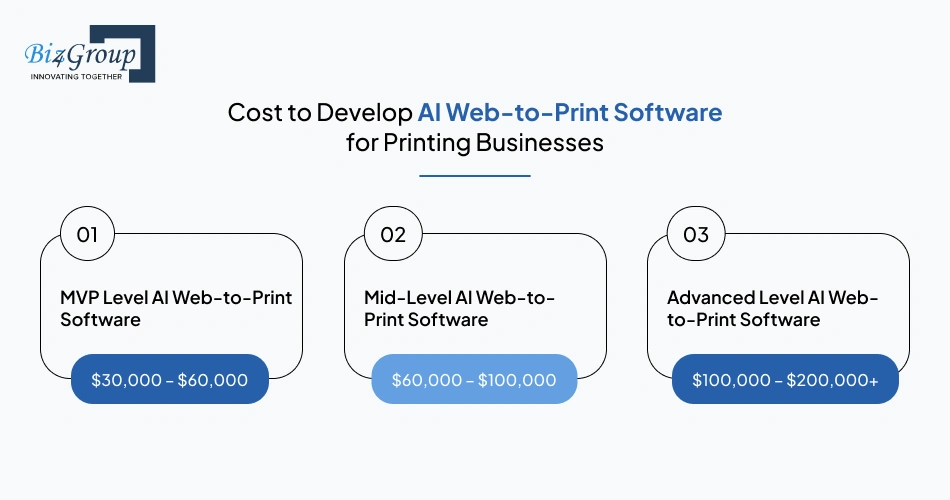
The cost to develop web-to-print design portal with AI automation features depends on how much of your ordering, validation, and approval process you want the system to handle. Projects typically fall within a range of $30,000 to $200,000+, based on scope, integrations, and level of automation.
|
Development Level |
Estimated Cost Range |
Scope |
|---|---|---|
|
MVP Level AI Web-to-Print Software |
$30,000 – $60,000 |
Basic ordering portal with file upload, simple validation, limited automation, and core workflow setup |
|
Mid-Level AI Web-to-Print Software |
$60,000 – $100,000 |
Expanded system with automated proofing, dynamic pricing, integrations, and improved user flows |
|
Advanced Level AI Web-to-Print Software |
$100,000 – $200,000+ |
Full-scale platform with AI validation, complex workflows, multi-system integrations, and enterprise-level setup |
The level of automation defined for the system influences development effort. Basic validation requires limited setup, while advanced AI automation services involving model tuning and deeper workflow alignment increase cost.
A limited scope keeps development controlled. Expanding the system with dashboards, reporting, and customization layers increases overall investment.
Simple ordering interfaces require less design effort. More interactive customization tools and detailed flows increase both UI/UX design cost and development workload.
Connecting ERP, CRM, MIS, and payment systems adds layers of complexity. Enterprise AI integration across multiple systems requires additional effort in development and testing.
Cloud setup, hosting configuration, and scaling readiness contribute to initial costs. Higher traffic expectations require stronger infrastructure planning.
|
Hidden Costs |
Estimated Cost Impact |
|---|---|
|
AI model updates and maintenance |
$5,000 – $20,000 annually |
|
Third-party APIs and subscriptions |
$2,000 – $10,000 annually |
|
Cloud scaling and storage growth |
$3,000 – $15,000 annually |
|
Security updates and compliance adjustments |
$4,000 – $12,000 annually |
Teams looking to develop a web-to-print software for printing business to reduce manual work and errors often control cost better with phased execution. AI web-to-print design software development becomes easier to manage when scope and automation are aligned with real operational priorities.
We help you scope smart, so you invest where it matters not everywhere
Estimate My Development CostFor businesses evaluating AI web-to-print software development for commercial printing businesses, the real decision often comes down to financial return. The shift is not only operational. It directly impacts how costs are controlled, how revenue grows, and how efficiently orders convert into output.
These outcomes define how financial return builds over time. Development of AI web-to-print software becomes easier to justify when cost control, revenue expansion, and operational efficiency align with how the business runs daily.
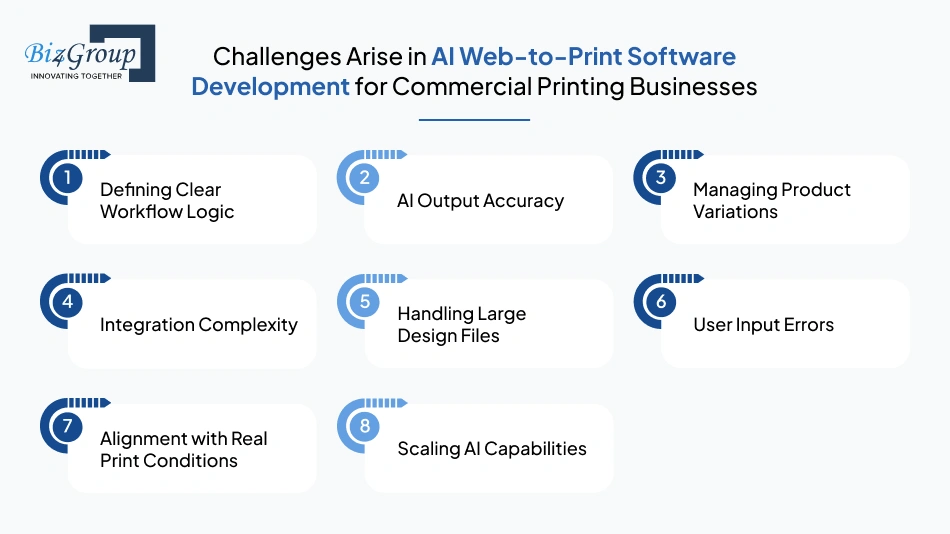
If you’re running a print business and want to build a web-to-print software with AI features for order automation and proofing, it brings up a set of practical challenges once development starts. These are not theoretical issues, they show up during execution and need to be handled early.
|
Challenge |
How to Solve Them |
|---|---|
|
Defining Clear Workflow Logic |
Document the complete order flow before development. Fix how orders are captured, validated, approved, and passed to production. Keep rules consistent, so the system does not rely on manual interpretation. |
|
AI Output Accuracy |
Train models using actual print files and real production scenarios. Continuously refine outputs based on feedback. AI model development should align with print specifications instead of generic datasets. |
|
Managing Product Variations |
Standardize product configurations such as size, material, and format. Create predefined rules for each category, so the system handles variations without confusion or manual adjustments. |
|
Integration Complexity |
Define data flow between ERP, CRM, and MIS systems early. Use structured APIs and test integrations in stages. A reliable software development company helps ensure consistency across systems. |
|
Handling Large Design Files |
Use optimized storage and processing methods. Break file handling into steps such as upload, validation, and processing to prevent system slowdowns during high-volume usage. |
|
User Input Errors |
Structure input fields clearly and guide users with fixed formats. Limit incorrect submissions by enforcing required fields and validation rules at the input stage. |
|
Alignment with Real Print Conditions |
Test the system using actual production scenarios instead of ideal cases. Include edge cases and real order variations to ensure system behavior matches day-to-day operations. |
|
Scaling AI Capabilities |
Plan AI layers that can expand over time. Teams often hire AI developers to improve model accuracy and adapt to increasing order complexity and volume. |
These challenges are part of the implementation process and need structured handling from the beginning. AI web-to-print software development for commercial printing businesses becomes more reliable when these areas are addressed with clear planning and controlled execution.
The search for right development partner often starts with a simple thought which is to find a company in USA that can develop a web-to-print system with automation and AI features. The challenge is not just technical execution. It is about working with a team that understands how print workflows actually operate. That is where Biz4Group LLC comes into the picture.
We operate as a custom software development company in USA with a strong focus on building systems that align with real business operations instead of generic platforms.
What makes the difference here is our ability to connect technology with actual use cases. From order intake to production alignment, our work around AI web-to-print software development for commercial printing businesses focuses on how systems behave in real conditions, not just how they are designed on paper.
Our experience with AI printing software solutions is not limited to concept-level implementations. It reflects in projects where structured ordering, automation layers, and system integrations come together to support real workflows. Here’s the proof:
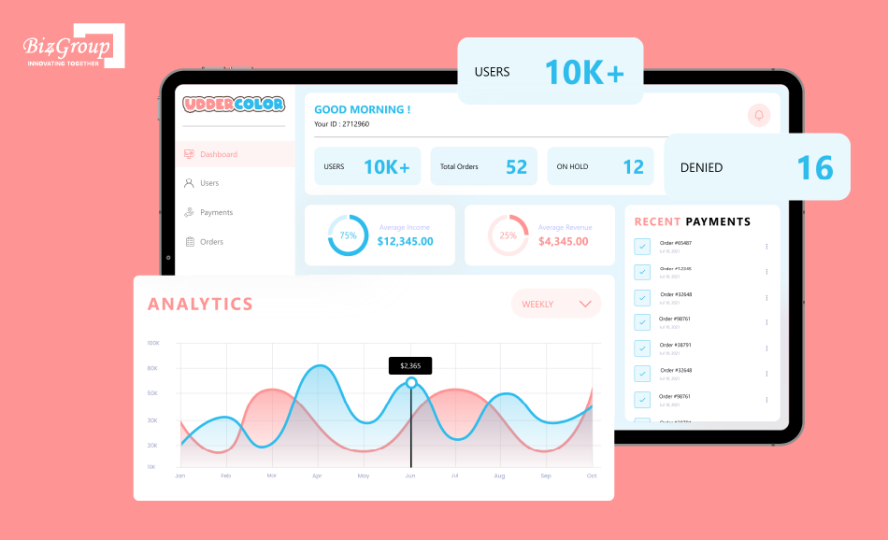
The Udder Color is a high-volume custom artwork printing solution where customers can upload designs, configure print specifications, and place orders for heat transfer prints directly through an online interface.
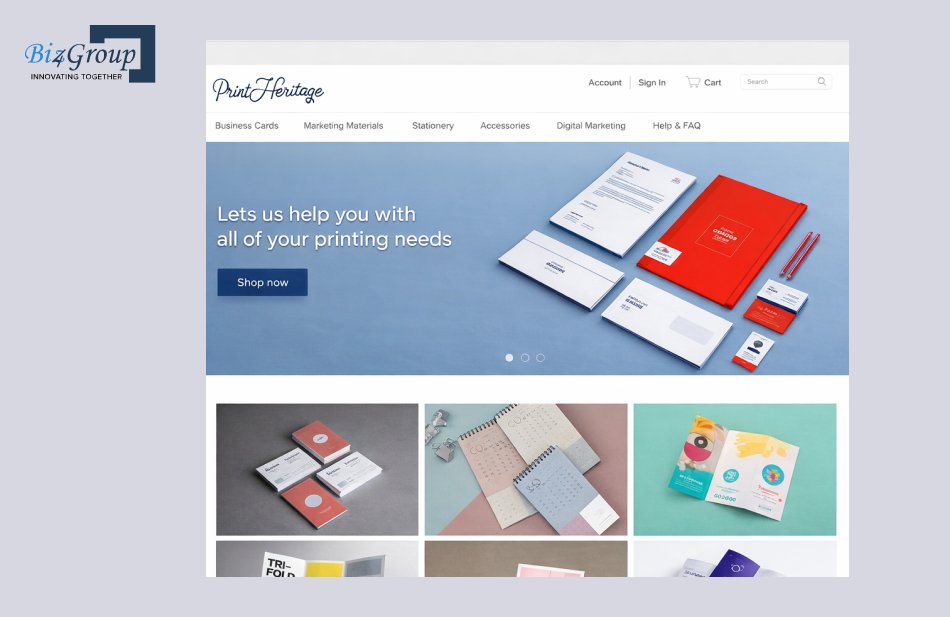
The Post Heritage is a structured eCommerce platform where users can design and order customized business materials such as cards, stationery, and marketing assets. This custom ecommerce store for business cards and accessories was designed to give users control over product configuration while keeping ordering and customization aligned with print-ready requirements.
Working with the right partner often defines how smoothly the system evolves after launch. If you need a development partner to build a scalable web-to-print software for your printing company, the focus should stay on execution clarity, system alignment, long-term scalability, and this is exactly what Biz4Group LLC brings for you.
Work with people who build systems around how your business actually runs
Start My ProjectAs printing businesses plan ahead, the focus is shifting beyond automation to AI systems that can make decisions, generate designs, and adapt to customer behavior in real time. Many teams aiming to build AI web-to-print software are already exploring what comes next and how these changes will reshape daily operations.
Design creation is expected to move closer to automation where systems can generate layouts based on simple inputs such as text, brand guidelines, or previous orders. Instead of starting from scratch, designs will be created dynamically based on context. This shift will allow print platforms to handle design variations without relying entirely on manual input, especially in high-volume or repeat order environments.
Also Read: Building Effective Generative AI Solutions
Order patterns will no longer remain reactive. AI web-to-print systems will begin to anticipate demand based on historical data, predictive analysis, customer behavior, and seasonal trends. This direction will influence how print businesses plan production cycles, manage workload, and prepare for incoming orders before they are even placed.
Customer interaction will move toward more personalized experiences where systems adjust product options, designs, and ordering preferences based on individual behavior. In AI web to print storefront software development, this level of personalization will allow platforms to present tailored ordering experiences without manual customization for each customer.
AI web-to-print systems will evolve to handle more decision-making internally. Instead of waiting for manual inputs, they will determine how orders should move, how files should be adjusted, and how workflows should adapt based on predefined logic. This will reduce dependency on manual coordination and allow systems to operate with greater autonomy.
These trends point toward a shift where systems do more than manage orders. They start shaping how print businesses operate at a deeper level. AI web-to-print software development for commercial printing businesses will continue evolving around these capabilities as platforms become more adaptive and responsive.
AI web-to-print software development for commercial printing businesses comes down to one clear shift moving from manual coordination to structured order handling. The focus is no longer just on taking orders online. It is about how consistently those orders move through your system without delays, corrections, or repeated effort.
As you evaluate next steps, the decision is less about tools and more about execution. Working with the right team offering AI product development services helps align your system with real operational needs instead of building something that looks complete but struggles in daily use.
For teams exploring companies that develop web-to-print software in USA, the goal should stay clear, find a partner who can support end-to-end development of an AI-powered web-to-print software for order and proofing automation while keeping your workflows practical and scalable.
That is where Biz4Group LLC aligns with what most print businesses are trying to achieve. If you are ready to move forward with clarity and a structured approach, let’s talk.
Timelines depend on scope, integrations, and automation depth. A focused MVP can take around 3–5 weeks, while a more structured platform with AI validation and proofing workflows typically requires 5–14+ weeks for full implementation.
The cost of AI web-to-print software development for commercial printing businesses usually ranges between $30,000 to $200,000+ depending on system complexity, level of AI automation, and integrations with production and business systems.
Yes, AI models can be trained to manage variations in layouts, formats, and specifications. The system can adapt to different product types as long as the rules and datasets are properly defined during development.
AI systems can recognize past order patterns and stored configurations, allowing repeat customers to place orders without redefining specifications. This reduces dependency on manual input while keeping order consistency intact.
Customization can extend to product configuration, pricing rules, design templates, and workflow logic. The system can be tailored to match how your print business handles different order types and customer requirements.
The focus should be on domain understanding, not just technical capability. Look for teams with experience in print workflows, AI-driven validation, and system integrations rather than generic software development expertise.

with Biz4Group today!
Our website require some cookies to function properly. Read our privacy policy to know more.