Location :
Orlando, FL, USA
Location :
Orlando, FL, USA +1 (407) 714-1616
 info@biz4group.com


















Imagine a digital system that doesn’t wait for instructions but instead, understands your business goals, learns from real-time feedback, and takes independent actions to get the job done.
Read More

What happens when legal workflows expand faster than the systems designed to manage them? Law firms today handle complex approvals, compliance documentation, contract reviews, and internal requests that move across multiple teams every day. Managing these operations through disconnected tools creates coordination gaps that affect case visibility and operational control.
The growth of workflow automation platforms reflects how organizations are restructuring operational processes. Here’s what you should know:
The workflow management software market is projected to reach $19.6 billion in 2026 and grow to $49.4 billion by 2030, signaling a strong shift toward structured workflow automation across industries.
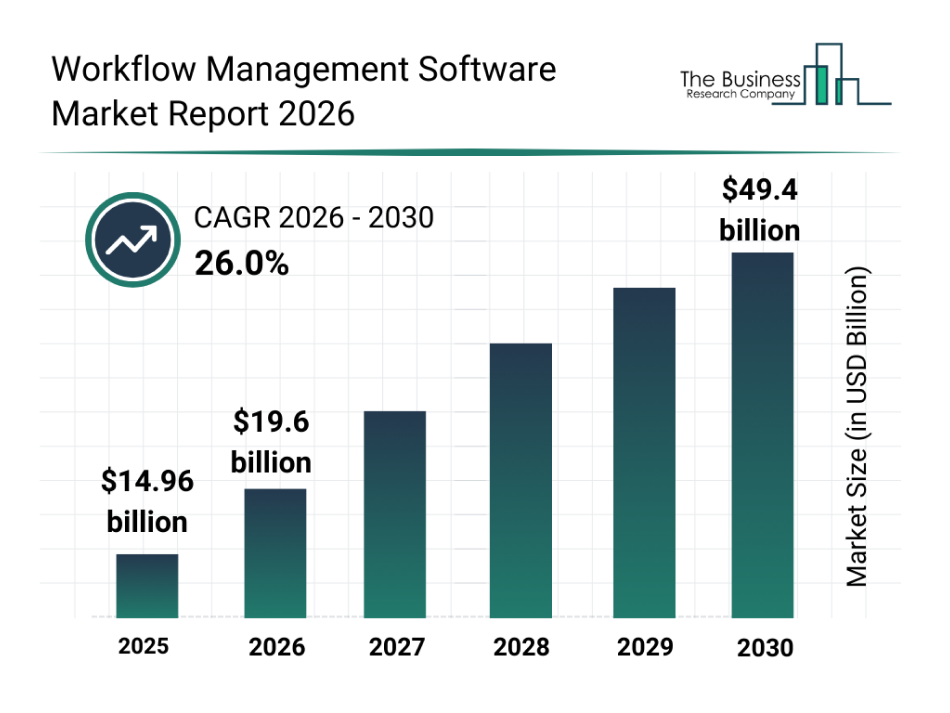
Legal teams are paying close attention to this shift because their work depends heavily on structured coordination across documents, approvals, and internal reviews.
Many firms now collaborate with a custom software development company that understands legal operations and case workflows. With guidance from AI consulting services, organizations can design platforms that match real operational needs and build custom AI legal workflow software for law firms handling complex legal processes. These evolving operational needs continue to drive interest in AI legal custom workflow management software development across modern legal departments.
Let's dive into the blog for more insights.
AI legal custom workflow management software is a system that organizes how legal tasks move across a firm. It connects case intake, document review, approvals, and compliance checks into structured workflows. Instead of managing work through emails or spreadsheets, the platform routes tasks automatically and tracks every step of a case. Many law firms use these systems as part of AI legal case management platforms where workflow automation keeps legal processes organized while teams manage large volumes of cases and documents.
Legal teams are facing growing operational pressure as case volumes increase, and compliance expectations expand. Firms now create AI legal workflow solutions for case management to improve coordination, maintain oversight, and support structured legal operations. A peak into industry insights tells us that 79% of law firms now use AI tools, with many automating up to 74% of routine billable tasks such as legal research, document review, and discovery.
Legal operations continue expanding across contracts, litigation, compliance, and internal advisory work. Structured workflow platforms help firms maintain control over these processes while supporting long term AI legal custom workflow management software development initiatives across modern legal departments.
Discover how structured workflow systems organize case tasks, approvals, and legal operations across teams.
Talk To Our SpecialistsLegal workflow platforms operate through a structured process that manages requests, case data, document movement, and task assignments. The system quietly coordinates these activities so legal teams follow consistent procedures while handling multiple cases across departments.
The workflow begins when a legal request enters the platform through forms, portals, or internal systems. The platform records request details, creates a case entry, and places the request into the correct legal workflow pipeline.
Workflow rules determine how tasks move between legal professionals. When a case enters a review stage, the system routes the task to the responsible attorney or legal team based on predefined workflow conditions.
Legal documents uploaded to the platform become part of the case file. The system organizes files within the case record and ensures reviewers access the latest document version during the workflow review stage.
Each legal case progresses through defined workflow stages. The system monitors task completion and updates the case status automatically so legal teams always know the current stage of a matter.
Legal workflows include strict deadlines for document preparation and case reviews. The platform tracks these timelines and alerts responsible team members when important legal tasks require immediate attention.
Every action within the system generates a record. The platform logs document uploads, task assignments, and approval actions, so legal teams maintain clear visibility into how each case progresses.
Legal workflow platforms coordinate requests, documents, approvals, and case activities through structured automation. These operational mechanisms form the technical foundation supporting AI legal custom workflow management software development used by modern legal departments.
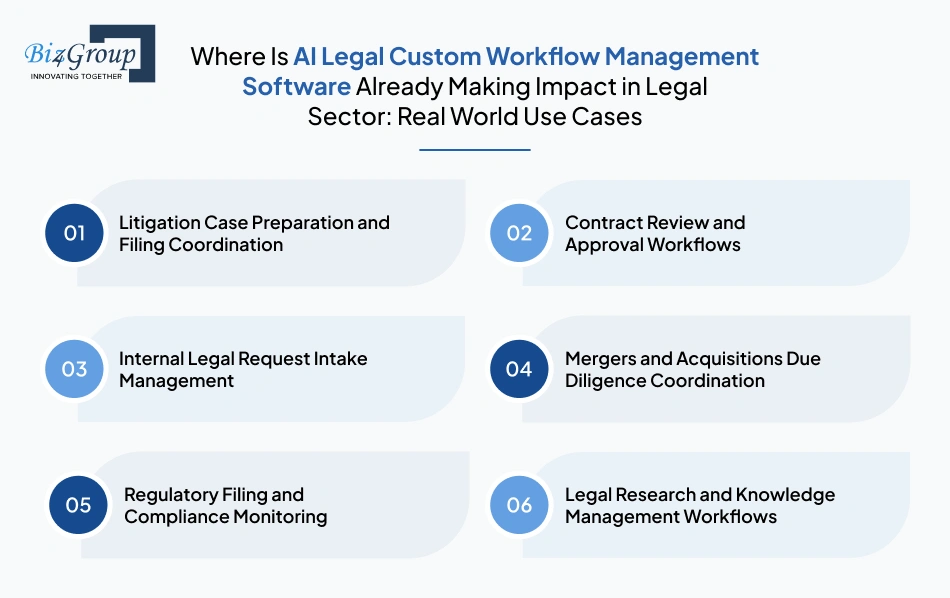
Legal teams increasingly rely on automation for structured operational processes such as litigation coordination, compliance management, and contract review. Organizations that create AI based legal process management software apply these systems to manage real legal workflows across departments.
Litigation teams coordinate evidence collection, court filings, and internal document reviews through automated workflows. Structured systems ensure every document moves through the correct preparation stage before submission.
Corporate legal departments process continuous streams of vendor contracts and partnership agreements. AI legal custom workflows management software coordinate review stages, so documents move through structured approval pipelines.
Legal teams receive requests from procurement, finance, and compliance departments. AI legal custom workflows management software organize these requests and assigns them to appropriate legal staff.
Legal teams reviewing acquisitions must examine ownership records, contracts, and financial disclosures. Custom legal workflow management platforms organize these large document sets and distribute review responsibilities.
Corporate legal departments manage ongoing regulatory filings and documentation reviews. Automated workflow systems help compliance teams coordinate internal approvals before regulatory submission.
Large law firms maintain internal knowledge bases containing case precedents and research material. AI custom workflow management systems organize research preparation tasks, so attorneys access relevant materials during case preparation.
Real operational workflows across litigation, compliance, contract review, and legal request management already rely on automation systems. These implementations continue expanding as firms refine their platforms through AI legal custom workflow management software development initiatives.
Also Read: 10 AI Automation Use Cases for Enterprises to Scale Faster
Modern legal teams manage case approvals, document reviews, and client communication across many systems. Organizations that develop AI legal workflow management software for operational efficiency must include practical automation features that simplify legal coordination and daily operational workflows.
Legal operations benefit when case activities remain connected with client records. Integrating workflow platforms with a CRM system allows teams to track legal requests, client history, and ongoing cases within one operational environment.
Legal teams receive requests from clients, departments, and external partners. Intake systems capture these requests automatically and categorize them. When connected through AI chatbot integration with CRM systems, new requests can directly appear inside the legal workflow platform.
Legal professionals spend significant time reviewing contracts and supporting documents. A system supported by well-tuned LLM’s can analyze legal text, identify document types, and route files to the correct reviewers within the workflow.
A clearer picture of how AI assisted document review works in practice becomes clear when you look at platforms built to analyze and interpret large document collections.

PDF Consultant AI is an AI-powered document intelligence platform designed to help professionals analyze and interact with large PDF files more efficiently. The system allows users to upload documents and retrieve insights without manually reviewing every page. Core capabilities include:
These capabilities reflect how AI assisted document review helps legal teams interpret complex files and route relevant information within structured workflow systems.
Workflow platforms automatically distribute tasks to attorneys or legal staff based on role, expertise, or workload. This structured task routing supports consistent legal operations when teams implement custom AI legal operations software development.
Legal operations often involve multi step approvals. A visual workflow builder allows teams to design processes for contract approvals, case reviews, and compliance checks without depending on technical teams for updates.
A built-in legal AI assistant helps attorneys retrieve documents, summarize case records, and access previous case insights quickly. This feature reduces manual searching and improves response time during legal reviews.
Legal workflows often involve communication with clients or internal departments. AI chatbot integration helps automate routine responses while allowing legal teams to track conversations related to case activities.
Legal managers require visibility into how cases progress across teams. Reporting dashboards provide insights into task completion time, workflow bottlenecks, and workload distribution across legal staff.
Every action within the workflow system must remain traceable. Detailed logs track document edits, approvals, and workflow transitions. These records support legal audits and regulatory documentation requirements.
Workflow systems should coordinate case intake, document routing, and compliance reviews automatically. These processes support AI integration within broader legal operations and strengthen AI business process automation across legal departments.
Strong workflow features help legal teams coordinate tasks, manage documents, and maintain compliance without increasing administrative work. A well-structured feature set strengthens AI legal custom workflow management software development and supports scalable automation across modern legal organizations.
Let's design workflow features that match how your attorneys manage cases, documents, and approvals.
Book A ConsultationLegal departments manage increasing volumes of documents, approvals, and regulatory reviews. Teams that plan to develop scalable AI legal workflow systems for legal departments often rely on advanced intelligence capabilities that improve decision support, automate complex processes, and maintain operational visibility.
|
Advanced AI Capability |
How It Supports Legal Workflow Systems |
|---|---|
|
Predictive Case Prioritization |
AI systems analyze historical case data and workload patterns to highlight urgent matters. Using predictive analysis, the system can identify deadlines or legal risks earlier, so teams can build AI driven legal case management workflows that respond faster to operational demands. |
|
Context Aware Legal Document Understanding |
Advanced AI engines interpret legal documents, contracts, and supporting evidence by understanding context within legal text. This capability helps automation systems classify files accurately and route them to the correct legal workflow stage. |
|
Autonomous Legal Task Coordination |
Intelligent systems powered by a legal AI agent can monitor workflow stages, trigger approvals, and recommend the next actions. This reduces manual coordination between attorneys and improves operational continuity during complex case processes. |
|
Adaptive Workflow Optimization |
AI models observe how legal teams handle tasks over time. These insights allow systems to adjust task routing and workflow sequences, so legal departments operate more efficiently as workloads change. |
|
Cross System Legal Intelligence Integration |
Legal workflows often interact with research databases, billing platforms, and document repositories. Structured AI integration allows information from multiple sources to support workflow decisions without requiring manual data transfers. |
|
Autonomous Legal Operations Agents |
Advanced workflow systems increasingly rely on autonomous agents that handle document routing, deadline monitoring, and internal legal coordination. This approach is becoming common in agentic AI development for legal services where automation operates alongside legal professionals. |
|
Operational Intelligence for Legal Leadership |
Large legal departments rely on enterprise AI solutions that analyze workflow performance, case timelines, and workload distribution. These insights help legal leaders monitor operational efficiency and identify areas where legal processes require improvement. |
Advanced intelligence capabilities allow legal departments to automate complex operational coordination without losing visibility into case activities. These technologies play a growing role in AI legal custom workflow management software development, enabling scalable workflow automation across modern legal organizations.
Also Read: Cost to Develop Legal AI Agent
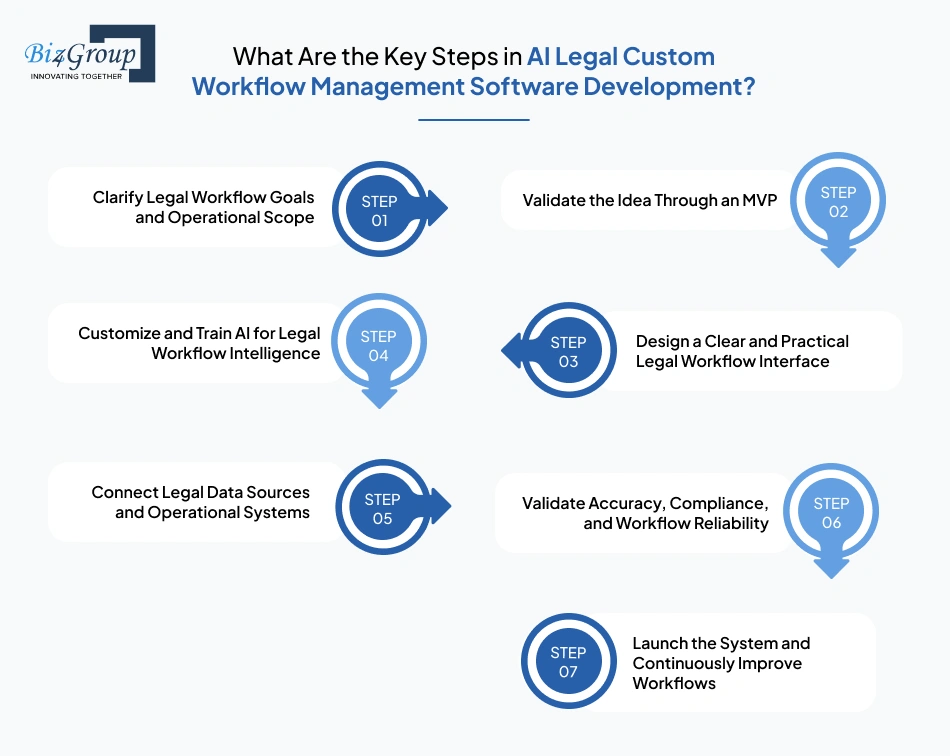
Legal workflow automation requires more than simply adding AI into an existing system. Law firms must carefully structure how cases move, how tasks get assigned, and how approvals happen. The following steps help teams approach AI legal custom workflow management software development in a structured and practical way.
Also Read: MVP vs Full Scale Legal Tech Platform Development Guide
Also Read: Top UI/UX design companies in USA
Also Read: Guide to OpenAI API Integration for AI Applications
A structured development approach helps legal organizations implement workflow automation with fewer disruptions. When each stage is handled carefully, firms gain a system that improves case visibility, reduces administrative workload, and supports long-term operational efficiency.
Also Read: Top MVP Development Companies
Legal workflow systems rely on several technology layers working together. Teams that plan architecture early often deliver stable platforms faster. This approach helps organizations create AI-powered legal workflow automation tools while maintaining reliability, usability, and long-term scalability.
|
Architecture Layer |
Recommended Technology |
Purpose |
|---|---|---|
|
User Interface Layer |
React.js, Angular, Vue.js |
Provides dashboards where attorneys manage cases, review tasks, and track legal workflows. Modern frameworks support responsive web development, so legal teams can access workflow systems easily from secure browsers. |
|
Mobile Access Layer |
Flutter, React Native, Swift |
Enables lawyers to review documents, approve requests, and monitor cases remotely. Many firms support a secure mobile app, so legal professionals stay connected with workflow updates outside the office. |
|
Application Logic Layer |
Handles business rules such as task routing, case intake, document approvals, and role permissions. This layer manages the operational logic required to develop AI workflow tools for law firms. |
|
|
Workflow Automation Engine |
Camunda, Temporal, Apache Airflow |
Executes automated legal processes such as document review routing, approval workflows, and compliance steps. The engine ensures each legal process follows the correct sequence. |
|
AI Processing Layer |
OpenAI, Azure OpenAI, Hugging Face, TensorFlow |
Supports document classification, legal text analysis, and workflow recommendations. AI helps automate document sorting and case categorization across legal departments. |
|
Document Management Layer |
AWS S3, SharePoint, Alfresco |
Stores legal documents, contracts, and evidence files while maintaining version history and controlled access for legal teams. |
|
Search and Indexing Layer |
Elasticsearch, OpenSearch |
Enables fast document retrieval and case search across large legal repositories where thousands of documents may exist. |
|
Data Storage Layer |
PostgreSQL, MongoDB |
Stores structured case data, workflow activity logs, and legal metadata needed for reporting and audit purposes. |
|
Integration Layer |
REST APIs, GraphQL, Message Queues |
Connects the workflow system with billing platforms, CRM tools, legal research databases, and document systems so case data flows automatically between tools. |
|
Notification and Communication Layer |
Firebase Cloud Messaging, Twilio, SendGrid |
Sends alerts for deadlines, document approvals, and workflow status updates, so attorneys and legal managers stay informed about case progress. |
|
Security and Compliance Layer |
OAuth 2.0, JWT, Role Based Access Control |
Protects confidential legal data through authentication, access permissions, and encrypted communications across the platform. |
|
Monitoring and DevOps Layer |
Docker, Kubernetes, Prometheus, Grafana |
Ensures the system remains stable and scalable by monitoring performance, managing deployments, and maintaining infrastructure reliability. |
A balanced architecture helps legal teams avoid system complexity later in the product lifecycle. Many organizations rely on experienced full stack development teams to align frontend usability, backend workflows, and AI capabilities into one reliable legal automation platform.
The right architecture foundation supports long term performance, scalability, and compliance requirements. When legal workflows, AI processing, and system integrations work together effectively, organizations can move forward with AI legal custom workflow management software development that supports modern legal operations.
Also Read: Why to Choose the Full Stack Development for Modern Business
Build a stable legal workflow platform powered by the right architecture, integrations, and automation.
Schedule A Strategy Call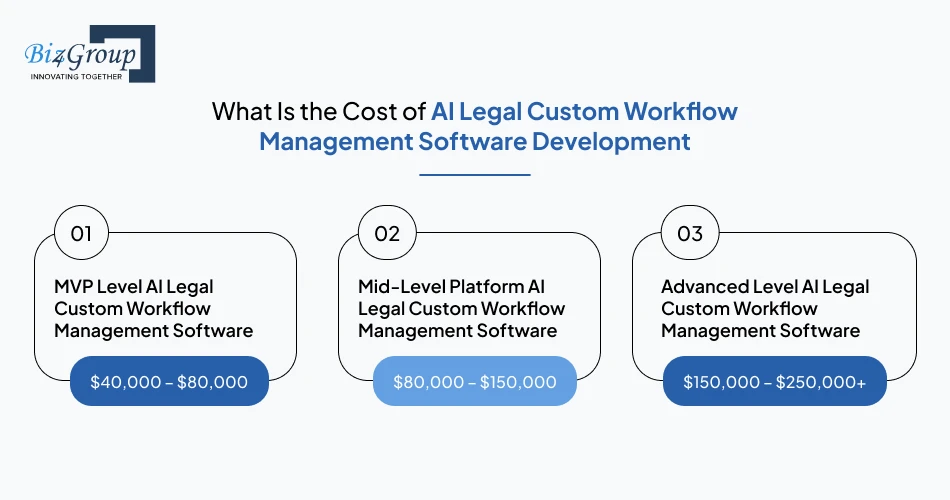
Investment levels vary depending on workflow complexity, integrations, and AI capabilities. Most organizations planning AI legal workflow management software development for enterprises typically spend between $40,000 and $250,000+ depending on the automation scope and platform scale.
|
Development Level |
Estimated Cost Range |
Scope |
|---|---|---|
|
MVP Level AI Legal Custom Workflow Management Software |
$40,000 – $80,000 |
Basic workflow automation with limited case routing, document tracking, and simple dashboards used to validate operational requirements. |
|
Mid-Level Platform AI Legal Custom Workflow Management Software |
$80,000 – $150,000 |
Expanded workflow automation, document management, integrations with legal tools, and improved reporting for operational visibility. |
|
Advanced Level AI Legal Custom Workflow Management Software |
$150,000 – $250,000+ |
Complex legal workflows, AI document classification, analytics dashboards, advanced integrations, and enterprise security controls across multiple departments. |
Legal workflows often include intake reviews, approval layers, and compliance documentation. Each process requires logic and validation rules. These operational details increase development effort when teams build AI powered legal workflow systems for large legal departments.
Automation becomes more intelligent when systems analyze documents and case data. Implementing these capabilities increases the AI integration cost because models must be trained and connected with workflow engines.
A stable system needs secure databases, workflow engines, document storage, and integration layers. Teams that build AI software for legal environments must design reliable infrastructure that supports high case volumes.
Legal teams often rely on document management platforms, billing systems, and compliance tools. Integrating these systems adds development effort and affects the overall AI software development cost.
Launching a smaller platform that automates only critical workflows allows legal teams to validate requirements early. An MVP development reduces initial investment while providing real intake data that guides later improvements. Once the system proves operational value, organizations can expand automation features gradually.
Case intake workflows, document approvals, and compliance tracking often consume the most time. Prioritizing these areas delivers faster operational benefits without expanding the development scope unnecessarily.
A modular system structure allows developers to add new workflows, integrations, or AI features later. This approach prevents major platform rebuilds and keeps future expansion costs more predictable.
Mapping external systems before development begins reduces rework later. Early integration planning helps maintain consistent data flows between legal platforms and workflow automation systems.
Legal organizations that plan automation scope carefully often control investment more effectively. A structured approach to AI legal custom workflow management software development ensures the system delivers operational value while supporting long term legal process automation.
Also Read: Cost to Hire an AI Software Developer
Legal organizations manage highly sensitive client information. Any workflow automation platform must handle documents, case data, and communication carefully. Firms planning legal workflow automation software development using AI must ensure strong governance, privacy protection, and system level security from the earliest design stage.
Let’s take a look at how these security and governance principles are applied in real legal workflow platforms delivered by Biz4Group LLC.
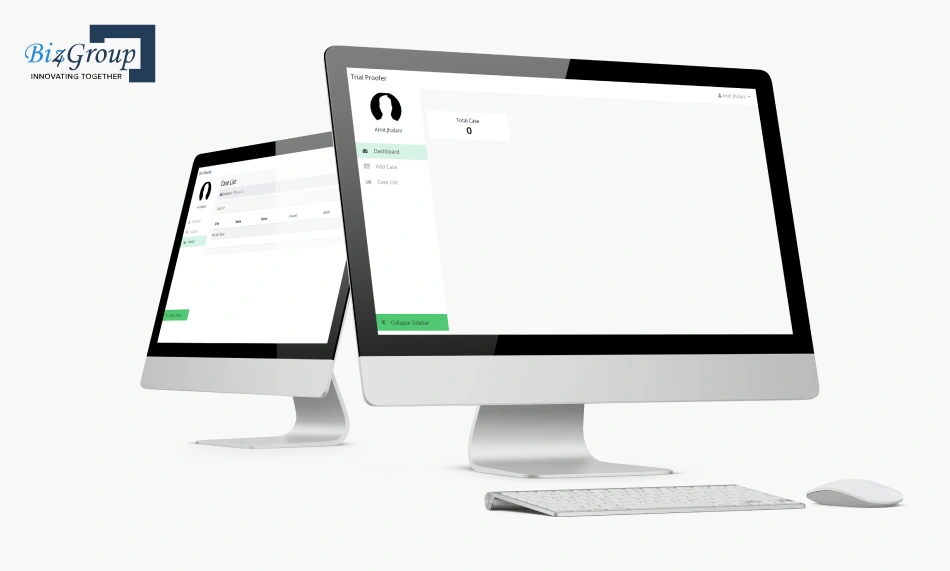
TrialProofer is a litigation preparation platform that organizes case evidence, witness notes, and legal arguments inside structured digital case files. The system supports attorneys preparing trial material while keeping sensitive case information controlled within secure environments. Its architecture incorporates safeguards that protect confidential legal data and maintain audit visibility across case workflows through features such as:
These safeguards reflect how compliance-focused workflow platforms protect confidential legal information while supporting secure case preparation processes.
Careful governance protects both client confidentiality and operational integrity. Legal organizations that prioritize security from the beginning establish stronger foundations for AI legal custom workflow management software development that supports safe and compliant legal workflow automation.
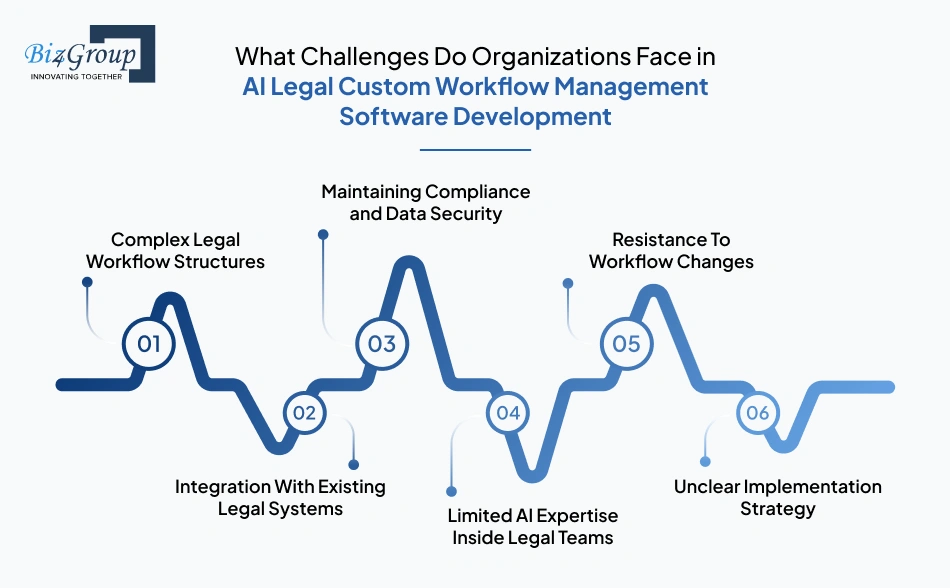
Legal automation initiatives often reveal operational gaps that remain hidden in manual processes. Organizations planning to make AI legal workflow software with compliance features must prepare for workflow complexity, system integration hurdles, and adoption challenges during implementation.
|
Challenge |
Practical Solution |
|---|---|
|
Complex Legal Workflow Structures |
Legal processes often involve approvals, document reviews, and compliance checkpoints. Mapping these steps clearly before development prevents confusion later. Teams planning AI legal custom workflow management software development should document real operational flows with legal stakeholders before writing system logic. |
|
Integration With Existing Legal Systems |
Law firms rely on document storage tools, billing platforms, and research databases. Connecting these systems requires careful enterprise AI integration, so information moves correctly across platforms without creating duplicate records or workflow conflicts. |
|
Maintaining Compliance and Data Security |
Legal data includes confidential documents and client information. Organizations must build secure AI legal custom workflow management platforms with strong access controls, encrypted data storage, and traceable workflow records to maintain regulatory and internal compliance requirements. |
|
Limited AI Expertise Inside Legal Teams |
Many legal departments lack internal experience with automation technologies. You can hire AI developers who understand both legal workflows and AI systems, so the platform aligns with real operational needs rather than generic automation tools. |
|
Resistance To Workflow Changes |
Lawyers and legal staff are accustomed to familiar processes. Early stakeholder involvement and proper training reduce hesitation and encourage smoother adoption of automated legal workflows across teams. |
|
Unclear Implementation Strategy |
Organizations sometimes begin automation without a structured roadmap. Working with experienced AI development company helps legal leaders define workflow priorities, plan implementation phases, and align automation goals with operational requirements. |
Challenges are common when automation enters complex legal environments. Organizations that address workflow structure, integrations, and security early create stronger foundations for AI legal custom workflow management software development while maintaining operational reliability and long-term scalability.
Let's solve integration, compliance, and workflow challenges before they slow your legal operations.
Contact Our TeamEnterprise legal automation requires more than a collection of software features. It requires platforms designed around real legal operations and structured workflows. At Biz4Group LLC, we work closely with organizations to design systems that align with how legal teams manage documents, approvals, and case coordination.
As a legal software development company, we approach platform development by studying how legal departments operate daily. Our team focuses on designing practical systems that support structured case workflows, document management, and operational visibility across legal teams. This experience allows us to deliver reliable AI legal workflow software development services tailored to enterprise legal environments.
Legal departments depend on consistent process coordination across multiple teams. Our platforms focus on improving legal workflow automation, so case requests, document reviews, and compliance approvals move through clearly defined steps without creating operational confusion.
Our experience across legal tech projects also helps us understand how legal systems connect with existing enterprise platforms. Thus through thoughtful architecture and process driven design, we help enterprises move forward with AI legal custom workflow management software development that reflects real operational requirements.
Legal teams manage continuous case intake, document reviews, compliance approvals, and internal legal requests. Each activity must move through the right people at the right time. When these processes rely on scattered emails or disconnected tools, tracking case progress and maintaining clear operational visibility becomes difficult.
Many firms therefore focus on AI legal custom workflow management software development to structure how legal work moves across departments. A well-designed workflow platform routes tasks automatically, organizes documents, and records approvals so legal teams can monitor every stage of a case. If you are evaluating how to develop AI legal custom workflow management software, working with an experienced AI product development company helps translate legal processes into a reliable system architecture that reflects how your team actually works.
At Biz4Group LLC, we collaborate with organizations that want to automate legal workflows and improve coordination across legal operations. If you are planning a workflow automation initiative, schedule a consultation with our team and book an appointment to discuss your requirements.
AI legal custom workflow management software development helps structure how legal tasks move across teams. The system routes case requests, assigns document reviews, tracks approvals, and maintains workflow records, so legal teams manage ongoing matters with clear operational visibility.
The process typically begins with mapping legal workflows such as case intake, document review, and approval stages. Development teams then design workflow logic, implement AI document processing, integrate legal systems, and deploy the platform with compliance and security controls.
Key capabilities include automated case routing, document workflow management, approval tracking, compliance audit trails, workflow dashboards, and integrations with document repositories, CRM platforms, and internal legal systems used by the organization.
Development costs usually range from $40,000 to $250,000+ depending on workflow complexity, AI capabilities, integrations with legal systems, and enterprise security requirements. MVP systems typically cost $40,000–$80,000, while advanced enterprise platforms require larger investment.
Common challenges include mapping complex legal processes, integrating legacy legal systems, maintaining compliance with regulatory requirements, and designing workflows that match how attorneys and legal operations teams handle real case activities.
Enterprises usually start by standardizing legal workflows across departments. The platform then connects case intake, document management, approvals, and compliance tracking into a centralized workflow system that coordinates tasks between attorneys, legal staff, and internal departments.

with Biz4Group today!
Our website require some cookies to function properly. Read our privacy policy to know more.