 Location :
Orlando, FL, USA
Location :
Orlando, FL, USA +1 (407) 714-1616
 info@biz4group.com

- Develop an avatar-based conversational AI companion web app to streamline onboarding, support, and guided interaction across enterprise workflows.
- Conversational AI avatar systems improve engagement, reduce operational load, and support consistent interaction across SaaS platforms and digital products.
- Businesses can build AI avatar assistants with capabilities like contextual memory, real-time responses, and structured conversation handling.
- The cost to build avatar-based conversational AI companion web app typically ranges from $20,000 to $150,000+, depending on features, integrations, and system scale.
- Organizations planning to build scalable avatar-based AI companion web app can control costs through MVP-first approach, phased development, and focused integrations.
- Biz4Group LLC delivers AI avatar companion web app solutions that align with business workflows and support reliable performance across real enterprise environments.
What if your web application could handle conversations, guide decisions, and stay available without depending on human intervention?
That shift is already taking shape across industries. Many organizations are beginning to focus on avatar-based conversational AI companion web app development because the move toward automation and human-like interaction is already in motion.
A recent report shows that the global AI avatar market is set to reach $5.93 billion by 2032, and North America continues to lead adoption with a strong market share. Not only this, the 3D and Metaverse avatar segment is growing fastest at a CAGR of 37.4%.
Business leaders clearly understand what this means:
- Teams want clear communication across digital touchpoints
- Operations need relief from repetitive tasks.
- Decision-makers expect structured workflows and better control over interactions
Building an AI avatar assistant brings these needs together into one connected experience. The development of AI avatar-based web apps makes interactions more natural and easier to follow. A conversational layer helps simplify communication, especially when clarity matters. When teams build AI-driven avatars for engagement, they introduce a consistent interface that explains processes in a way that feels direct and easy to understand.
This guide will walk you through how teams move from idea to launch when they make avatar based conversational AI companion web app. Then what are we waiting for? Let’s dive in for more insights.
What is an Avatar-Based Conversational AI Companion Web App?
An avatar-based conversational AI companion web app is a system where customer support teams interact with an AI through a visual avatar. The avatar represents the system and delivers responses through speech and expressions instead of only text.
The system accepts user input in text or voice form, processes it using a conversational engine, and returns a response through both language and visual output. This creates a direct interaction layer between the user and the system.
The companion aspect defines how the system handles interaction over time. It retains context across multiple exchanges and generates responses based on the ongoing conversation instead of treating each input as an isolated request.
Core Components of an Avatar-Based Conversational AI Web App
The system is built on three primary components. Each component performs a specific function and contributes to the overall interaction.
- Conversational AI Engine
- A conversational AI engine is responsible for processing input and generating responses. It receives raw user input from the interface and converts it into structured data.
- The system identifies intent, extracts relevant information, and determines how the response should be formed.
- It keeps track of previous interactions and uses that information to generate responses that remain consistent within the AI conversation app. Without this layer, the system cannot maintain continuity or accuracy.
- Avatar Rendering and Animation System
- This layer controls how the response is presented visually. It takes the generated output and converts it into speech and animation.
- The system synchronizes voice output with lip movement and aligns expressions with the tone of the response.
- It also handles avatar behavior on screen. This includes facial expressions, head movement, and basic gestures. The purpose of this layer is to ensure that the response is not only heard but also visually communicated.
- Interaction Interface (Text/Voice Layer)
- Interaction interface manages communication between the user and the system. It captures input through text fields or voice input and sends it to the backend for processing.
- It also delivers the output back to the user. This may include spoken responses through speech recognition models, on-screen text, or both.
- The interface ensures that the interaction remains responsive and continuous.
Each of these components operates independently but remains connected during execution as it depends on all three working together to maintain a consistent interaction flow. Now let us understand the working of avatar-based conversation AI companion we app.
How Does an Avatar-Based Conversational AI Companion Web App Work?
The system follows a structured sequence of operations that enables real-time interaction. Each stage handles a specific responsibility, starting from input capture to final output delivery, and all processing happens in a continuous loop where each step passes structured data to the next layer.
Step 1: Input Capture
- The interaction begins when input is received through text or voice channels. The interface captures this input and performs initial handling, such as formatting and routing.
- For voice input, the system converts speech into text before forwarding it. This ensures that all inputs reach the processing layer in a consistent format. The goal of this step is to standardize incoming data before deeper analysis begins.
Step 2: Input Processing and Interpretation
- The conversational AI engine takes the formatted input and analyzes it to understand intent and context. It identifies what the request represents and how it connects to previous interactions.
- This step involves breaking down the input into structured elements such as intent, entities, and context signals. The system also checks conversation history to ensure that the response aligns with the ongoing interaction instead of treating the input independently.
Step 3: Response Generation
- Once the intent is established, the system generates a response. This response is created in natural language and is shaped by both the current input and prior context.
- The system ensures that the output remains consistent in tone and structure across the conversation. It also applies response rules or constraints to maintain control over how outputs are generated.
Step 4: Speech Conversion and Avatar Synchronization
- The generated response is converted into speech using text-to-speech This audio output is then aligned with the avatar’s visual behavior.
- The system maps phonemes from the speech to lip movements and adjusts facial expressions based on the response type. This synchronization ensures that the avatar’s visual output matches the spoken response without delay or mismatch.
Step 5: Output Delivery
- The final response is delivered through the avatar interface. The output may include spoken audio, visual expressions, and on-screen text depending on how the system is configured.
- This step completes one interaction cycle. The system remains active and ready to process the next input while maintaining the existing conversation context.
What Makes It Different from Standard Web Interfaces?
|
Aspect |
Traditional Web Applications |
Avatar-Based Conversational AI Companion Web Apps |
|---|---|---|
|
Interaction Model |
Navigation-based using menus, buttons, and forms |
Conversation-based using text or voice input |
|
Input Type |
Structured inputs such as fields and selections |
Natural language input through text or voice |
|
Response Format |
Static content such as pages or text updates |
Speech, avatar expressions, and optional text |
|
Flow Control |
Fixed workflows with predefined steps |
Dynamic flow based on input and context |
|
Context Handling |
Limited to session or page-level state |
Maintains conversation context across interactions |
|
Guidance Method |
Instructions through UI elements or help sections |
Guidance delivered directly within conversation |
|
System Layers |
Frontend UI and backend logic |
AI engine, avatar system, and real-time interaction layer |
When organizations build avatar based conversational AI web application systems, the interaction model shifts from navigation-driven workflows to input-driven response handling. This reduces dependence on structured UI flows and allows communication to be handled through a conversational layer.
Why Businesses Should Consider Investing in Avatar-Based AI Companion Web App Development
Customer-facing operations often rely on support teams, onboarding workflows, and engagement layers that require continuous human involvement. This increases response costs and slows down interaction cycles. Enterprises now look for systems that can handle these interactions consistently while reducing manual effort and improving measurable output across support, conversion, and onboarding processes.
The following reasons explain why enterprises and SaaS companies should invest in making AI avatar powered conversational web app:
1. Reduction in Customer Support Costs
Support teams often handle a large volume of repetitive queries that do not require human judgment. Managing this volume through human agents increases operational costs and response delays. An avatar-based system can handle these interactions at scale, reducing dependency on large support teams as it:
- Handles high-frequency queries without human involvement
- Reduces ticket volume handled by support agents
- Lowers cost per interaction over time
- Minimizes need for scaling support teams during peak demand
This directly reduces the cost required to maintain support operations while keeping response time consistent.
2. Increase in Engagement and Session Duration
Standard interfaces often fail to keep attention during interaction. Drop-offs happen when guidance is unclear or requires multiple steps. A conversational interface supported by AI avatar in web apps keeps interaction active for longer durations as it:
- Encourages continuous interaction without navigation breaks
- Keeps sessions active through guided responses
- Reduces early exit rates during interaction flows
- Improves completion rates for key actions
In environments where interaction design is tightly aligned with an enterprise AI solution, sustained engagement becomes easier to maintain across different user journeys.
3. Improvement in Conversion Rates
Conversion often depends on how quickly and clearly information is delivered. Delays or confusion during interaction directly affect outcomes such as sign-ups or purchases. An interactive conversational layer helps move users through decision points without friction as it:
- Reduces hesitation during decision-making stages
- Provides immediate responses to queries that block conversion
- Guides users toward completion without requiring manual navigation
- Supports real-time clarification during critical steps
This allows organizations to convert interactions into measurable outcomes without increasing acquisition effort.
4. Reduction in Onboarding Friction
Onboarding processes often involve multiple steps, instructions, and user confusion. This leads to drop-offs before completion and increases dependency on support teams. A conversational system simplifies onboarding by guiding each step in real time and
- Breaks down complex steps into guided interactions
- Reduces confusion during initial product usage
- Minimizes need for external support during onboarding
- Accelerates time required to complete setup
When onboarding flows are supported through structured AI integration services, the process becomes more consistent across different user segments.
5. Automation of Repetitive Human Tasks
A large portion of operational workload comes from tasks that follow predefined patterns. These tasks consume time but do not require decision-making from human teams. Avatar based conversational AI companion for web apps automates these interactions to improve efficiency across operations and
- Handles repetitive queries using AI automation tools
- Reduces workload on support and operations teams
- Frees up human resources for complex tasks
- Maintains consistency in responses across interactions
This level of automation is often supported by focused AI model development that ensures responses remain accurate and controlled at scale.
These outcomes directly impact cost, revenue, and operational efficiency. Enterprise and SaaS companies investing in avatar-based conversational AI companion web app development can scale interaction handling without increasing dependency on human resources.
Still Spending Too Much on Repetitive Interactions?
Turn every conversation into measurable savings, higher conversions, and stronger long-term digital returns
Contact Us Now!Industry-Wise Use Cases of Avatar-Based Conversational AI Companion Web Apps
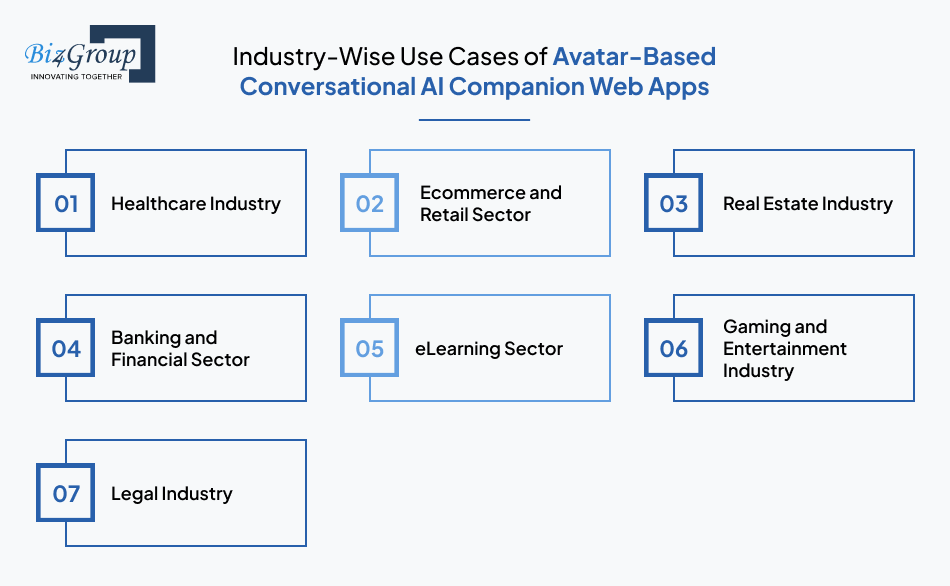
The value of avatar-based conversational AI varies across industries based on how users interact, the complexity of information, and the need for guided experiences. Instead of functioning as a generic assistant, the AI avatar adapts to specific workflows, making interactions more contextual and effective.
The following industry scenarios highlight how avatar based conversational AI companion web apps are applied in real business environments:
1. Healthcare Industry
Healthcare platforms often handle patient queries before consultations. An AI avatar guide users through symptom inputs and appointment preparation in a structured flow. It replaces static forms with conversational interaction, making responses easier to follow.
AI avatar for clinical management, supports clarity during early-stage interactions without overwhelming users.
- Guides patients through pre-consultation questions
- Provides structured responses based on inputs
- Reduces dependency on manual coordination
This approach helps teams manage higher patient volumes while maintaining consistent interaction quality and improving follow-up adherence.
Also Read: Healthcare Software Product Development
2. Ecommerce and Retail Sector
Online shoppers often hesitate during product selection. A conversational AI avatar in ecommerce platforms can guide users through choices by asking relevant questions and narrowing options based on preferences. This creates a more directed buying journey compared to browsing filters alone.
The conversational layer helps users move forward with decisions instead of abandoning sessions midway.
- Assists in selecting products based on user intent
- Answers pre-purchase queries in real time
- Supports post-purchase clarification when needed
Such guided interactions help businesses increase completed purchases and improve order value without expanding support teams.
Also Read: How To Start An eCommerce Business Using AI?
3. Real Estate Industry
Real estate platforms rely on early-stage interactions to qualify potential buyers. An AI avatar walks users through property preferences, explain listing details, and schedule viewings within a single interaction flow.
In platforms using an AI avatar for real estate business, this interaction replaces the need for immediate agent involvement during initial discovery.
- Filters listings based on buyer inputs
- Explains pricing, amenities, and location details
- Assists in booking property visits
This structured engagement helps teams identify serious buyers faster and improves the transition from inquiry to site visit.
Also Read: How to Build a Voice Enabled Real Estate AI assistant for Property Search and Client Engagement?
4. Banking and Financial Sector
Users often require guidance while navigating financial products and onboarding steps. An AI avatar assists by explaining account setup, product options, and transaction-related queries in a conversational format.
This reduces confusion during digital interactions in a web banking application and supports users through multi-step processes.
- Guides users through account creation steps
- Explains product features in simple language
- Handles common account-related queries
Such assistance helps institutions complete onboarding journeys faster while lowering the need for continuous human intervention.
Also Read: AI Banking App Development Cost Guide
5. eLearning Sector
Learners often need real-time guidance while going through course material. An AI avatar on eLearning web platforms act as a tutor that explains concepts, answers questions, and provides contextual support during lessons.
This interaction keeps learners involved and reduces dependency on static learning formats.
- Explains concepts based on learner queries
- Supports doubt resolution during sessions
- Guides users through course progression
Platforms benefit from higher course completion and better retention as learners receive continuous support throughout their journey.
Also Read: AI eLearning Website Development
6. Gaming and Entertainment Industry
Interactive experiences depend on how users engage with digital characters. Conversational AI avatar on gaming platforms as a companion that responds to player actions and guides interactions within the environment.
- Responds to player inputs in real time
- Supports story progression through interaction
- Adapts responses based on user behavior
Such interaction depth keeps users active for longer durations and strengthens retention across gaming sessions.
Also Read: top iGaming software development companies in USA
7. Legal Industry
Legal platforms often require structured intake before assigning cases. Avatar based conversational AI companion on web application guides through initial queries, collect relevant details, and explain procedural steps in a conversational format. Conversational AI avatar for legal software simplifies early-stage interactions without overwhelming users.
- Collects case-related information step by step
- Explains next steps in simple language
- Filters relevant cases for further review
This structured intake process helps firms handle more inquiries while ensuring only qualified cases move forward.
Also Read: Your Guide to Develop AI Legal Compliance Software
Avatar-based conversational AI companion web app development enables businesses to align interactions with specific goals, making each use case more structured, efficient, and outcome-driven across varied operational environments.
Can Your Industry Use This Better?
Map the right avatar workflow to your business model and unlock stronger user engagement paths
Talk to UsTypes of Avatar-Based Conversational AI Companion Web Apps
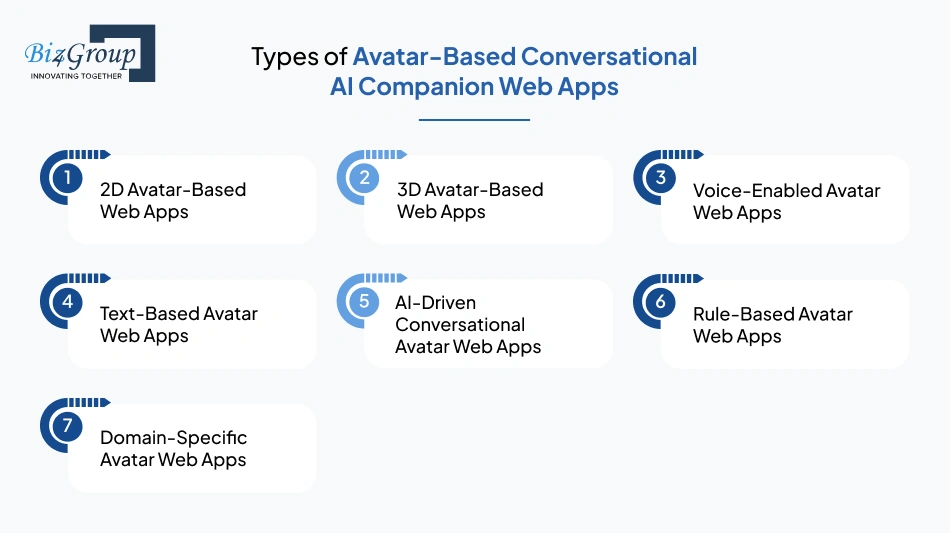
Not every application needs the same level of interaction or visual depth. Some experiences stay simple, while others demand more realism and flexibility. As teams plan how to develop conversational AI avatar web platform solutions, understanding these variations helps define scope early and avoid unnecessary complexity during execution.
1. 2D Avatar-Based Web Apps
- Uses flat, animated characters with basic expressions and limited motion
- Loads faster on web browsers and work well on low-bandwidth environments
- Suitable for simple conversational flows where visual realism is not critical
- Easier to design, customize, and maintain compared to advanced avatar formats
2. 3D Avatar-Based Web Apps
- Uses three-dimensional characters with realistic movements and depth
- Supports detailed facial expressions and smoother interaction flows
- Requires stronger frontend rendering capabilities for consistent performance
- Suitable for applications where visual interaction plays a central role
3. Voice-Enabled Avatar Web Apps
- Allows users to interact using speech instead of typing
- Combines speech recognition with natural voice responses
- Creates a hands-free interaction experience across devices
- Require synchronization between spoken output and avatar movement
4. Text-Based Avatar Web Apps
- Focuses on typed interaction with visual avatar support
- Provides structured and controlled conversational responses
- Works reliably across different browsers without heavy processing needs
- Suitable for environments where voice interaction is not preferred
5. AI-Driven Conversational Avatar Web Apps
- Uses advanced language models to handle dynamic conversations
- Adapts responses based on context and user input patterns
- Supports ongoing interaction instead of one-time responses
- Requires continuous tuning to maintain response accuracy
6. Rule-Based Avatar Web Apps
- Follows predefined scripts and structured conversation paths
- Delivers predictable responses based on specific user inputs
- Easier to control and manage for defined workflows
- Limited flexibility in handling unexpected queries
7. Domain-Specific Avatar Web Apps
- Designed for a specific industry or business function
- Uses focused knowledge to handle targeted interactions
- Provides more relevant and structured responses within a defined scope
- Easier to optimize accuracy within a controlled environment.
The variations highlight how design choices shape the overall scope and complexity of avatar-based conversational AI companion web app development. Selecting the right type depends on interaction depth, platform requirements, and the level of conversational flexibility needed for the intended application.
Now let us walk through the core features required to build a web app with conversational AI campanion.
Core Features to Consider While Developing an Avatar-Based Conversational AI Companion Web App
The effectiveness of an AI avatar-based conversational interface depends on how well it supports real user interactions across different touchpoints. These features shape how conversations flow, how responses are delivered, and how consistently the system behaves during ongoing user engagement.
|
Core Feature |
Purpose in the App |
|---|---|
|
Natural Language Understanding Engine |
Interprets user input, identifies intent, and extracts key entities required to generate accurate responses |
|
Dialogue Management System |
Controls conversation flow, manages context switching, and determines the next response based on interaction history |
|
Context Memory Handling |
Stores and retrieves previous user inputs to maintain continuity across multi-turn conversations |
|
Response Generation Layer (LLM Integration) |
Produces context-aware replies based on user intent, conversation history, and defined response boundaries |
|
Speech-to-Text Processing |
Converts spoken user input into structured text for further processing by the AI system |
|
Text-to-Speech Output Engine |
Converts generated responses into voice output aligned with tone and clarity requirements |
|
Avatar Rendering Engine |
Displays the visual avatar, including facial structure, movement, and on-screen presence |
|
Lip-Sync and Facial Expression Mapping |
Aligns spoken responses with mouth movement and facial expressions for natural interaction delivery |
|
Real-Time Interaction Processing |
Manages low-latency communication between input processing, response generation, and avatar output |
|
Conversation State Management |
Tracks user session state including active topics, user intent progression, and interaction stage |
|
Content Moderation and Response Filtering |
Prevents inappropriate, irrelevant, or unsafe responses from being delivered to users |
|
API and Backend Integration Layer |
Connects the system with external services such as databases, CRMs, or business logic systems required for task execution |
A focused approach to Avatar-based conversational AI companion web application development ensures every element supports clarity, responsiveness, and continuity, creating an experience that feels reliable instead of inconsistent or disconnected.
How to Develop Avatar Based Conversational AI Companion Web App: A Step-By-Step Process
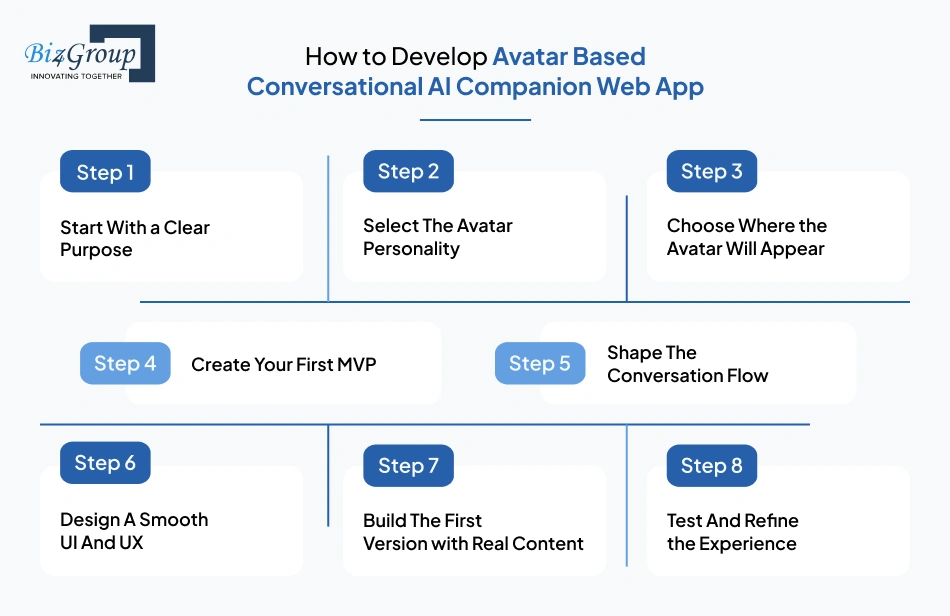
Every decision you make should connect back to how users will actually experience your product. While planning how to develop avatar based conversational AI companion web app, keep the focus on real interactions so each step helps you build something useful and easy to adopt.
The following steps help you move forward with clarity while keeping the experience practical, usable, and engaging for real users.
Step 1. Start With a Clear Purpose
- Define The Core Problem: Start by identifying what real problem your app will solve for users. It could be guidance, support, or companionship. Avoid vague goals and focus on a specific need that users face regularly in their daily routines.
- Understand Your Target Audience: Think about who will use this app and why they would Their expectations will shape tone, interaction style, and feature decisions across the product experience.
- Set Clear Success Metrics: Decide how you will measure success. It can be user retention, engagement time, or task completion rate. These metrics help you stay focused while building.
- Align With Business Intent: If you plan to create avatar AI companion web app for businesses, ensure the product supports both user value and business outcomes without creating unnecessary complexity.
Step 2. Select The Avatar Personality
- Define Voice and Behavior: The AI avatar should feel consistent in every interaction. Decide whether it should sound friendly, calm, professional, or slightly playful based on your audience expectations and product purpose.
- Design Emotional Responses: Plan how the avatar reacts to different user inputs. It should acknowledge emotions where needed and respond in a way that feels natural and supportive, not mechanical or repetitive.
- Keep Language Simple: Avoid complex or robotic phrasing. Simple and clear responses make conversation easier to follow and help users stay engaged without confusion.
- Reflect Brand Identity: The conversational AI companion should match your brand tone and values. Consistency across interactions builds trust and makes the experience feel more intentional and reliable.
Step 3. Choose Where the Avatar Will Appear
- Identify Key Interaction Moments: Place the avatar where users need help or guidance the most. This could be onboarding screens, dashboards, or decision points where users may feel stuck or uncertain.
- Avoid Overuse Across Screens: Showing the avatar everywhere can feel overwhelming. Limit its presence to meaningful moments where it adds value instead of becoming a distraction.
- Optimize For Devices: Ensure the avatar works well across desktop and mobile environments. The placement and size should adapt without affecting usability or readability.
- Use Contextual Triggers: Let the avatar appear based on user actions. This keeps the experience relevant and prevents unnecessary interruptions during normal navigation.
Step 4. Create Your First MVP
- Focus On Essential Features Only: Start with basic conversational ability and a few meaningful use cases. Avoid adding advanced features at this stage, as they can delay validation and increase complexity.
- Keep Development Scope Controlled: A lean approach helps you move faster and test ideas early. Many teams rely on MVP development services to define scope and avoid overbuilding in the initial phase.
- Validate With Real Users Early: Launch a simple version and observe how users interact with it. Real feedback is more useful than internal assumptions during early development.
- Iterate Based on Usage Patterns: Improve only what users actually engage This helps you build a product that grows based on real needs instead of guesswork.
Also Read: Top MVP Development Companies in USA
Step 5. Shape The Conversation Flow
- Map Real User Journeys: Think through how users interact step by step. Each conversation should feel purposeful and easy to follow without unnecessary steps or confusion.
- Design Clear Response Paths: Ensure responses are direct and relevant. Avoid long or complicated replies that may overwhelm users during interaction.
- Train The System Carefully: You will need to train AI models based on expected queries and real use cases. This helps improve accuracy and keeps responses aligned with user intent.
- Refine Over Time: Use ongoing feedback to fine tune LLM’s and improve how the system understands and responds to user inputs in different scenarios.
Also Read: Top Open Source LLMs for Business Growth
Step 6. Design A Smooth UI And UX
- Keep The Interface Simple: A clean layout helps users focus on conversations without distractions. Avoid clutter and keep the design easy to navigate.
- Improve Conversation Readability: Use proper spacing, font size, and structure so users can follow interactions comfortably without confusion or strain.
- Ensure Fast and Responsive Experience: Delays in responses can break engagement. Optimize performance to keep interactions smooth and consistent.
- Work With the Right Design Expertise: Collaborating with a UI/UX design company help ensure the experience feels natural, intuitive, and aligned with user expectations across different touchpoints.
Also Read: Top UI/UX Design Companies in USA
Step 7. Build The First Version with Real Content
- Use Practical Conversation Scenarios: Add real use cases instead of placeholder content. This helps users understand the value of the product from the first interaction.
- Connect Systems Properly: Use API connections to link backend systems and ensure smooth data flow between components without breaking the experience.
- Integrate AI Thoughtfully: Make sure you integrate AI models in a way that supports consistent and reliable responses during user interactions.
- Focus On Usability First: The goal is to build AI avatar assistant web app that works smoothly in real situations without unnecessary complexity or over-engineering.
Step 8. Test And Refine the Experience
- Observe Real User Behavior: Watch how users interact with the app in real scenarios. This helps you identify areas where the experience may feel unclear or incomplete.
- Fix Interaction Gaps Quickly: Address confusion points and improve flows where users struggle. Small improvements can significantly enhance usability.
- Improve Response Accuracy: Continuously refine how the avatar responds based on user inputs and feedback collected over time.
- Plan Continuous Iteration: Treat the product as evolving. Regular updates and refinements ensure the experience stays relevant and aligned with user expectations.
Also Read: Software Testing Companies in USA
A meaningful experience is shaped through continuous improvement, not just initial development. When you move forward with avatar-based conversational AI companion web app development, focus on making each interaction feel natural, helpful, and easy to engage with for every user who uses your platform.
A structured development approach becomes more meaningful when you see how it performs in a real system.
Real World Implementation: AI Wizard- Avatar-based AI Companion
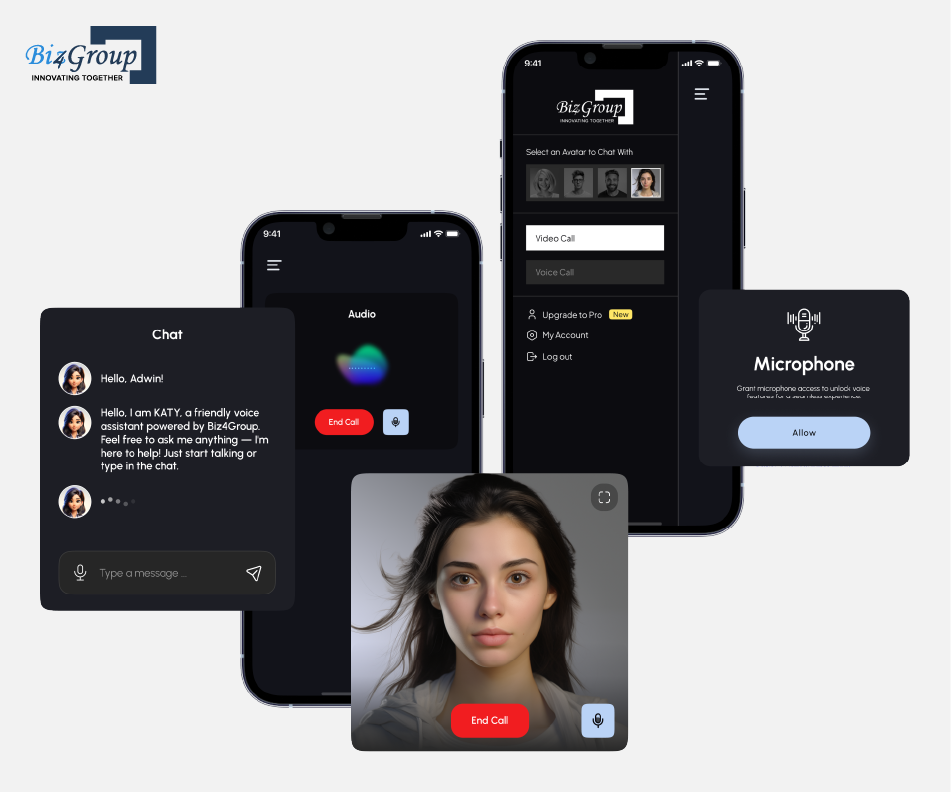
AI Wizard is a conversational AI avatar platform where interaction is not limited to answering queries, but guiding users through structured information flows. The system focuses on handling real-time conversations while maintaining context across interactions. It
- Handles multi-step conversations where each response builds on previous inputs instead of restarting interaction
- Guides users through structured flows such as onboarding, discovery, or information navigation without manual intervention
- Maintains response consistency across sessions to avoid fragmented or repetitive communication
- Reduces dependency on traditional UI navigation by shifting interaction toward conversation-driven progression
This reflects how avatar-based conversational systems move from feature-level implementation to becoming a functional interaction layer within real digital environments.
Need the Right Team Behind the Build?
Move from concept to launch with a partner who structures every interaction layer correctly
Schedule A Strategy CallWhat is the Cost to Build Avatar-Based Conversational AI Companion Web App?
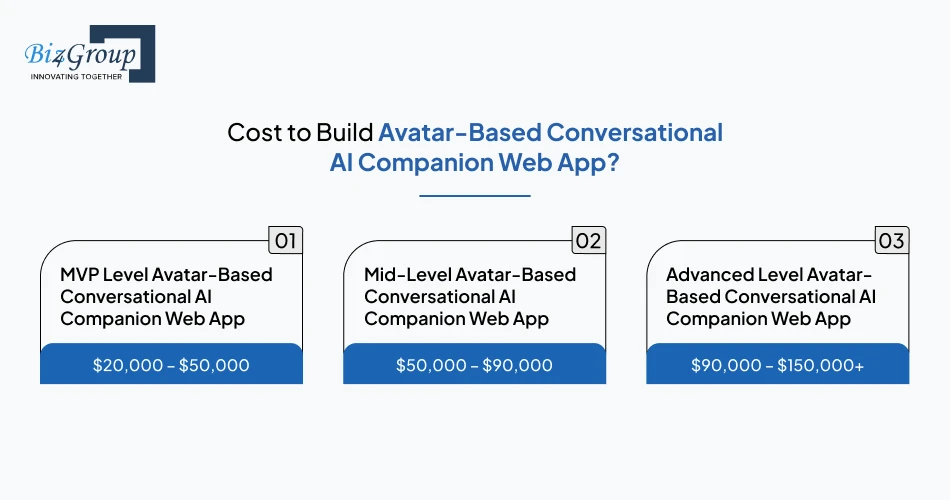
Costs can vary widely depending on what you expect your product to do from day one. The final number to build scalable avatar-based AI companion web app depends on how advanced your avatar behavior is, how natural conversations feel, and how many features you include in the first release
In most cases, the overall cost to develop intelligent avatar AI web application typically falls between $20,000 to $150,000+.
|
Development Level |
Estimated Cost Range |
Scope |
|---|---|---|
|
MVP Level Avatar-Based Conversational AI Companion Web App |
$20,000 – $50,000 |
Basic avatar, simple conversations, limited flows, early validation features |
|
Mid-Level Avatar-Based Conversational AI Companion Web App |
$50,000 – $90,000 |
Improved conversation quality, better UI, integrations, structured use cases |
|
Advanced Level Avatar-Based Conversational AI Companion Web App |
$90,000 – $150,000+ |
Real-time interactions, smart avatar behavior, deep integrations, scalable architecture |
Key Cost Drivers in Avatar-Based Conversational AI Companion Web App
- Avatar Design and Interaction Depth: The more expressive and responsive your avatar becomes, the higher is the AI avatar development cost. Basic avatars may stay within $5,000, while advanced visual behavior and animation layers can push costs closer to $25,000 depending on complexity.
- Conversation Intelligence and Training: Costs increase as you improve how well the system understands users. Initial setup may cost around $10,000, while ongoing refinement tied to AI integration costs can extend another $15,000 based on conversation depth and accuracy needs.
- Backend And Infrastructure Setup: A simple backend may cost around $5,000, but scalable systems that handle real-time conversations and user sessions can reach $20,000. This depends on how many users you expect and how stable the system needs to be.
- UI And User Experience Quality: A basic interface may stay within $5,000, but polished and interactive experiences often require $15,000 or more. Better design directly improves engagement and retention.
- Third-Party Integrations and APIs: Adding external services like voice, analytics, or CRM systems can start at $3,000 and grow up to $20,000 depending on how many systems you connect and how deeply they are integrated.
Strategies To Optimize the Development Cost of Avatar-Based Conversational AI Companion Web App
- Start with a focused MVP instead of building full-scale features initially. This can reduce early investment by 30% to 40% while helping you validate real user needs before scaling further.
- Limit advanced avatar features in the first version and improve them gradually. This approach can lower upfront costs by 20% to 35% without affecting the core user experience.
- Use existing AI frameworks instead of building everything from scratch. This can help reduce development effort by 25% to 45% depending on the complexity of your use cases.
- Prioritize high impact features that users will actually use. Avoiding unnecessary functionality can reduce total development costs by 15% to 30%.
- Plan integrations carefully and only include essential systems in early stages. This helps control costs by 20% to 30% while keeping the product stable and manageable.
A clear understanding of cost helps you make better product decisions from the beginning. As you move forward with avatar-based conversational AI companion web app development, focus on building something useful first, then scale thoughtfully based on how users interact with your platform.
Trying to Balance Cost with Scale?
Plan smarter architecture decisions early and avoid budget leaks during later expansion stages
Discuss with UsBusiness Models for Avatar-Based Conversational AI Companion Web Apps
Getting the product right is only half the job. What matters next is how it turns into a consistent income stream over time. As you shape your approach to avatar-based conversational AI companion web app development, the focus should stay on how users derive value daily.
1. Subscription Based Companion Access
- Revenue is generated by charging a fixed recurring fee for continued access to the avatar. Users are billed monthly or yearly, and access is restricted once payment stops.
- In practice, you define pricing tiers such as $9, $19, or $49 per month. Each tier allows a fixed number of conversations or unlocks deeper interaction limits. As the user base grows, revenue scales predictably because payments repeat every billing cycle.
- For example, 1,000 users paying $20 per month generates $20,000 monthly revenue. This model depends on retaining users, since cancellations directly reduce income.
2. Business Facing Deployment Model
- In this approach, companies pay to use your avatar system within their own operations. The payment is usually structured as a contract based on usage, number of users, or overall access.
- For example, a company may pay $10,000 annually to use the avatar for customer onboarding, or $2 per employee per month for internal usage. Larger companies may sign contracts worth $25,000 to $100,000 depending on scale.
- Income is generated through contracts, not individual transactions. This model brings fewer customers but significantly higher revenue per deal.
3. Premium Interaction Packs
- Here, Enterprises, startups and SaaS companies do not commit to subscriptions. They pay only when they need a specific type of interaction that delivers a clear outcome, making it a transaction-based model instead of ongoing billing.
- For example, a guided session for decision-making may cost $5, while a structured planning session may cost $10. Users purchase access when needed, and revenue is generated per transaction.
- If 5,000 users each purchase a $5 interaction, that results in $25,000 revenue. This model depends on volume and repeat purchases instead of long-term subscriptions.
4. API Based Monetization
- Revenue is generated by charging other platforms for using your system through API requests. Every interaction sent from another app is counted and billed.
- For example, you may charge $0.01 per request. If a partner platform generates 1 million requests per month, that results in $10,000 monthly revenue.
- As more platforms integrate your system, usage increases, and revenue scales automatically without acquiring individual users directly.
Revenue clarity comes from understanding who pays, how often they pay, and what triggers payment. Avatar based conversational AI web app development should focus on models where usage directly connects to revenue generation, not just engagement.
Technology Stack Considerations for Development of Scalable AI Avatar Companion Web Application
Every layer you choose shapes how your product performs once users start interacting with it daily. While planning web app development, it helps to think in layers, so nothing breaks under growth. A strong scalable AI avatar companion web application architecture ensures your system handles conversations, users, and data without slowing down or failing.
|
Architecture Layer |
Recommended Technology |
Purpose |
|---|---|---|
|
Frontend Interface |
Handles user interaction and visual interface to create AI avatar based virtual assistant web app with smooth and responsive experience |
|
|
UI Component Library |
Tailwind CSS, Material UI |
Speeds up design consistency and ensures clean layouts for user interaction screens |
|
Backend Framework |
Manages server logic, handles requests, and controls how different parts of the system communicate |
|
|
AI Model Layer |
OpenAI API, Anthropic, custom LLMs |
Powers conversation logic and generates responses based on user inputs |
|
AI Orchestration Layer |
LangChain, LlamaIndex |
Controls how prompts are structured and how responses are generated across workflows |
|
Database |
PostgreSQL, MongoDB |
Stores user data, conversation history, and application data securely |
|
Real-Time Communication |
WebSockets, Firebase |
Enables live interaction between user and avatar without delays |
|
Avatar Rendering |
Ready Player Me, Unity WebGL |
Handles avatar visuals, animations, and interactive presence on screen |
|
API Layer |
REST APIs, GraphQL |
Connects frontend, backend, and AI services for smooth data flow |
|
Cloud Infrastructure |
AWS, Google Cloud |
Supports hosting, scaling, and performance across different user loads |
|
Monitoring And Logging |
Datadog, New Relic |
Tracks performance, errors, and system health to maintain stability |
A reliable setup is not about adding more tools, it is about connecting the right layers in a way that supports growth. To develop a conversational AI avatar companion web platform, keep the focus on stability, flexibility, and thoughtful full stack development so your system scales without breaking under real usage.
Also Read: Why to Choose the Full Stack Development for Modern Business
Best Practices for Building Scalable Avatar-Based AI Companion Web Applications
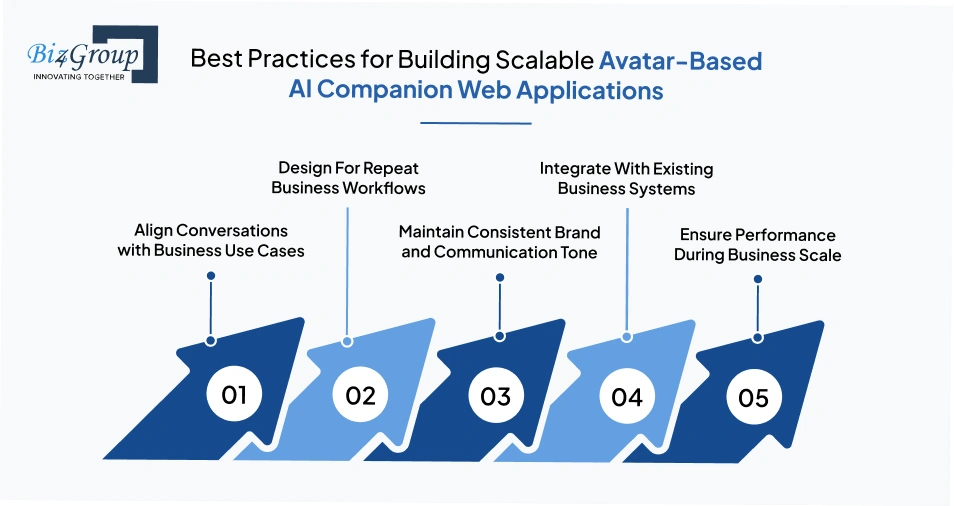
Every decision at this stage impacts how well your product fits into real business workflows. While planning human-like AI avatar web app development, the focus should stay on operational value, team adoption, and measurable outcomes across enterprise and SaaS environments.
1. Align Conversations with Business Use Cases
Conversations should solve specific operational needs, not general interaction. Think in terms of onboarding flows, customer support handling, or guided product navigation. When you develop avatar-based AI companion web app, each interaction should map to a business objective such as reducing support load or improving onboarding completion rates.
2. Design For Repeat Business Workflows
The system should support tasks that teams perform regularly. This includes handling recurring queries, guiding users through processes, or assisting internal teams. For SaaS platforms and support teams, repeated usage comes from operational dependency, not casual engagement.
3. Maintain Consistent Brand and Communication Tone
The avatar should reflect how the business communicates with its customers or internal teams. Inconsistent tone can affect trust and brand perception. Define a clear communication style that aligns with business identity and apply it across all interaction flows.
4. Integrate With Existing Business Systems
The platform should connect with tools already used by teams such as AI CRM, support systems, or internal dashboards. This ensures that the AI avatar becomes part of existing workflows instead of creating an isolated experience that teams struggle to adopt.
5. Ensure Performance During Business Scale
Enterprise and SaaS environments require systems that work reliably under high interaction volume. Delays or failures can directly impact operations. Plan for stable performance so teams can depend on the system during peak usage without disruption.
A scalable product in this space succeeds when it fits naturally into business operations. As you move forward to develop conversational AI avatar companion web platform, focus on solving repeatable business problems so teams rely on it as part of their daily workflow.
Common Pitfalls and How to Avoid Them in Conversational AI Avatar Web App Development
Even strong ideas fail when execution misses real-world expectations. During avatar-based conversational AI companion web app development, small missteps in planning or interaction design can slow adoption across teams.
The following table helps you identify what usually goes wrong and how to fix it early.
|
Pitfall |
Solution |
|---|---|
|
Avatar feels impressive in demo but fails in real workflows |
Define exact business tasks before you make avatar-based AI chatbot web app, so the system handles real use cases instead of just scripted interactions |
|
Conversation breaks when queries go beyond expected inputs |
Expand training data based on real scenarios and continuously refine responses to handle unpredictable business queries |
|
System fails to integrate smoothly with existing tools |
Plan integrations early with CRM and support systems so teams do not face workflow disruption after deployment |
|
High response time during peak usage |
Set up infrastructure that supports concurrent interactions and prevents delays during high demand periods in business app development using AI |
|
Inconsistent responses across similar queries |
Standardize response logic and regularly review outputs to maintain reliability in business communication |
|
Overbuilding features before validation |
Limit initial scope and validate with real usage before adding complexity that increases development time and cost |
|
Low adoption across teams after launch |
Align the product with actual team workflows instead of introducing a system that requires behavioral change |
|
Difficulty in maintaining and updating the system |
Work with experienced AI development company that can support long-term updates and system improvements |
Most challenges surface only when the system starts handling real interactions at scale. Addressing these gaps early keeps the product stable and usable in daily operations. Focus on execution quality so your ability to create AI avatar for real time conversational web apps translates into consistent performance, not rework.
Avoiding Rework Starts With Better Decisions
Fix architecture, response flow, and avatar sync risks before they become expensive setbacks
Talk to our ExpertsWhy You Should Choose Biz4Group LLC for Avatar-Based Conversational AI Companion Web App Development?
When you move from idea to execution, the partner you choose directly affects how your product performs in real business environments. If you are evaluating which company can build avatar-based companion AI web apps for enterprises, the focus should be on experience that goes beyond basic development.
At Biz4Group LLC, we bring hands-on experience in designing and delivering AI avatar solutions that are used across SaaS platforms, customer support systems, and digital products. As an AI avatar development company, we focus on turning complex interaction requirements into structured, usable systems that teams can rely on daily.
Our experience with custom AI avatar web app development solutions like AI Wizard has given us experience to handle real-time interaction, maintain response quality, and support growing user demand without disruption.
We do not approach projects as isolated builds. Our AI avatar web app development services are shaped around real workflows such as onboarding, guided navigation, and support automation. This ensures the avatar does not remain a feature but becomes part of how businesses operate.
Therefore, this combination of reliability and imagination allows us to build technology that reduces workload and brings comfort across your enterprise operations. So, if you are ready to build something exceptional, we’re here to guide you with that precision and insight.
Conclusion
By now, you have a clear picture of what it takes to move from an idea to a working AI avatar assistant web app that actually fits into business operations. This is where working with an experienced AI product development company becomes important, because execution quality decides whether the product performs reliably or creates friction later.
Early decisions around interaction flow, system behavior, and integration directly affect long-term usability. With the right direction through AI consulting services, you avoid unnecessary rework and ensure the product aligns with how teams already operate instead of forcing change.
At Biz4Group LLC, the focus stays on building systems that are practical, stable, and ready for real usage. When you approach avatar-based conversational AI companion web app development with this clarity, the outcome is not just a product, but something teams can depend on daily. If you are planning the next step, you can always talk to us.
FAQ’s
1. How to develop AI avatar web app for interactive user experiences that actually fit business workflows?
The focus should stay on real operational use cases instead of generic interaction. Start by identifying where the avatar will assist, such as onboarding, support handling, or guided navigation. Then design conversation flows around those tasks so the system becomes part of daily business processes instead of an isolated feature.
2. How to build AI avatar web app for customer engagement without increasing support complexity?
The key is to reduce workload, not add to it. Design the avatar to handle repetitive queries, guide users through structured steps, and resolve common issues. This improves engagement while keeping support teams focused on complex tasks instead of routine interactions.
3. What is the typical cost range for avatar-based conversational AI companion web app development?
Most projects fall between $20,000 to $150,000+, depending on scope, interaction depth, and system complexity. A basic version stays on the lower end, while systems with real-time interaction, integrations, and scalable architecture move toward the higher range.
4. How long does it take to develop a conversational AI avatar companion web platform for enterprise use?
A basic MVP can take 8 to 12 weeks, while a more structured and scalable system may take 3 to 6 months. Timelines depend on how detailed the interaction flows are and how deeply the system integrates with existing business tools.
5. Who can build avatar based conversational AI web application that integrates with existing business systems?
You need a team that understands both development and business workflows. The right partner will design the system to connect with CRM tools, support platforms, or internal dashboards, so it works within existing operations instead of requiring process changes.
6. How to create AI avatar for real-time conversational web apps that performs reliably under scale?
Focus on architecture early. Real-time performance depends on how well the backend handles multiple interactions at once. Plan for stable infrastructure, consistent response handling, and efficient data flow, so the system performs reliably as usage grows.
